1
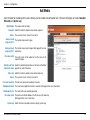
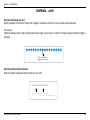
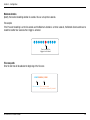
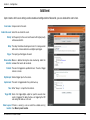
Table of Contents
Table of Contents
Product Overview....................................................4
Package Contents............................................................... 4
System Requirements........................................................ 4
Introduction........................................................................ 5
Features.............................................................................. 6
Hardware Overview............................................................ 8
Connections................................................................. 8
LEDs............................................................................ 9
Hardware Installation........................................................ 10
Network Deployment........................................................ 11
Software Installation.............................................. 12
Configuration....................................................... 15
Setup Wizard Configuration.............................................. 15
Adjusting the lens............................................................. 23
Attaching the Enclosure.................................................... 24
Web-based Configuration Utility....................................... 25
Live Video......................................................................... 26
Camera....................................................................... 26
Snapshot.................................................................... 27
Client Setup................................................................ 28
Setup................................................................................ 29
Wizard........................................................................ 29
Internet Connection Setup Wizard.......................... 29
Motion Detection Setup Wizard.............................. 34
Network Setup........................................................... 37
D-Link DCS-6110 User Manual
Dynamic DNS............................................................. 43
Image Setup............................................................... 44
Audio and Video......................................................... 45
Motion Detection........................................................ 46
Time and Date............................................................ 49
Event Setup................................................................ 50
Add Server............................................................. 52
Add Media.............................................................. 53
Add Event............................................................... 56
Add Recording....................................................... 57
Access List................................................................. 59
DI and DO.................................................................. 60
Maintenance..................................................................... 60
Device Management................................................... 60
Backup and Restore................................................... 61
Firmware Update........................................................ 62
Status............................................................................... 63
Device Info................................................................. 63
Logs........................................................................... 64
Help.................................................................................. 65
D-ViewCam Installation........................................... 66
Add a Camera................................................................... 69
Frequently Asked Questions..................................... 74
Networking Basics................................................. 77
Table of Contents
Check your IP address...................................................... 77
Statically Assign an IP address......................................... 78
Reset and Restore............................................................ 79
External I/O Port............................................................... 80
Technical Specifications.......................................... 81
D-Link DCS-6110 User Manual
Section 1 - Product Overview
Product
PackageOverview
Contents
• D-Link DCS-6110 Fixed Dome Network Camera
• Screws
• CAT5 Ethernet Cable
• I/O Connector
• Power Adapter
• Alignment Paper
• Dome Enclosure
• Manual and Software on CD
• Ring Enclosure
• Quick Install Guide
• Screw Driver
Note: Using a power supply with a different voltage than the one included with
your product will cause damage and void the warranty for this product.
If any of the above items are missing, please contact your reseller.
System Requirements
•Windows® XP or Windows Vista™
•At least 256MB of memory (512MB recommended)
•An available Ethernet connection
•Internet Explorer 6.x or higher Internet Web Browser
•VGA card resolution: 800x600 or above
•CPU: 1.7GHz or above processor (2.8GHz plus processor with 512MB memory and a 32MB video card is required for
multiple camera viewing and recording in IP surveillance program)
D-Link DCS-6110 User Manual
Section 1 - Product Overview
Introduction
DCS-6110 fixed dome network camera is cost-effective and an ideal security solution providing high quality real-time videos in
MPEG-4 and JPEG compression for small to medium-sized businesses, office and homes. The DCS-6110 features 3G mobile
video support, enabling you to view a live video feed from your camera on a compatible 3G mobile phone or PDA anywhere in
your 3G coverage area. The 3G mobile video support allows you to monitor a remote location without using a computer or an
internet connection. In addition supports dual stream output for simultaneous live monitoring and high resolution recording.
D-ViewCam software is also included to manage up to 32 cameras simultaneously from your computer, send automated e-mail
alerts, and record video to your hard drive when motion is detected. The DCS-6110 is a deluxe-size dome network camera, giving
you a more professional look to your business or location making it an excellent choice for home and business surveillance.
Note: Use of video equipment for recording the image of a person without their knowledge and consent is prohibited in certain states
or jurisdictions. Nothing herein represents a warranty or representation that the D-Link product provided herein is suitable for the
end-user’s intended use under the applicable laws of his or her state. D-Link disclaims any liability whatsoever for any end-user use
of the D-Link product, which fails to comply with applicable state, local, or federal laws.
D-Link DCS-6110 User Manual
Section 1 - Product Overview
Features
•Powerful Surveillance - DCS-6110 targets entry level market. The VGA Progressive CMOS technology delivers
exceptional picture quality. Use D-Link’s SoC (system-on-chip) products to provide high quality real-time video
compression in MPEG-4 and Motion JPEG formats. DCS-6110 supports simultaneous dual-streaming for live
monitoring and recording. With the free-bundled 32-channel recording software, the DCS-6110 is an ideal solution
for high quality viewing and reliable recording.
•Sharp Image Monitoring From Different Angles - The DCS-6110 is recommended for indoor ceiling mounting,
and thus prevents possible damage that maybe caused by a burglar. This network camera has a built-in three axis
mechanism for wall mount installation. The DCS-6110 provides high quality real-time videos in MPEG-4 and JPEG
compression with VGA/QVGA/QQVGA resolution. It is suitable for narrow space surveillance, like an elevator.
•View Live Video from a 3G Mobile Phone - The live camera feed of the camera can be pulled from the 3G cellular
network by using a compatible cell phone or PDA with a 3G video player. Anywhere within the 3GPP service area, users
are offered a flexible and convenient way to remotely monitor a home or office in real time.
• Wired PoE Access - For effective surveillance in and around a building, this camera comes with a built-in 802.3af
compliant Power Over Ethernet (PoE) module, which eases the installation process and also gives you the freedom
to place the camera where it’s needed. In addition, the 10/100BASE-TX Ethernet port is also provided for convenient
connection to an Ethernet network or to a broadband Internet via a gateway router.
• Smart & Easy To Use - The software allows you to view up to 32 cameras on a single computer screen at one central
location. Users can set up automated e-mail alerts to be instantly informed of unusual activities. Fixed dome cameras
usually uses fixed focus lens, but the DCS-6110 also has a vari-focal lens. Vari-focal lens provides easier installation
process because the board lens of dome camera is not like CS/C mount lens, it is not changeable. Drop ceiling bracket
is another alternative option for an installation method. In addition, this network camera supports the Universal Plugn-Play feature, which allows computers running on Windows 2000/XP/Vista to automatically recognize the camera
and adds it to the network. Sign up with one of the free Dynamic DNS services available on the web, to assign a name
and domain to the camera (e.g.mycamera.dlinkddns.com). This allows users to remotely access the camera without
having to remember the IP address.
D-Link DCS-6110 User Manual
Section 1 - Product Overview
• Supports a Variety of Protocols - The DCS-6110 supports a wide variety of protocols such as RTSP, FTP, SMTP, NTP
and HTTP. In addition, supports UPnP and DDNS. DDNS allows your camera to be accessed using a static host name
rather than an IP address. UPnP allows Windows XP users to install the camera with a single mouse click.
• Web Configuration - Using a Web browser, administrators can configure and manage the network camera directly from
its own Web page via the Intranet or the Internet. Up to 20 user names and passwords are permitted, with privilege
settings controlled by the administrator.
• Connection to External Devices - Supporting auxiliary Input/Output connectors, you can connect the Network Camera
to a variety of external devices such as IR-sensors, switches and alarm relays. Combined with programmable alarming
equipment, you can develop a variety of security applications that are triggered on alarm-based events. The Network
Camera provides an industry standard in/out external connector for connectivity.
Note: Use of audio or video equipment for recording the image or voice of a person without their knowledge and consent is prohibited in
certain states or jurisdictions. Nothing herein represents a warranty or representation that the D-Link product provided herein is suitable
for the end-user’s intended use under the applicable laws of his or her state. D-Link disclaims any liability whatsoever for any end-user use
of the D-Link product, which fails to comply with applicable state, local, or federal laws.
D-Link DCS-6110 User Manual
Section 1 - Product Overview
Hardware Overview
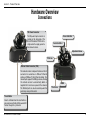
Connections
DC Power Connector
The DC power input connector is
located on the side panel of the
DCS-6110 labeled 12VDC with a
single socket to supply power to
the network camera.
Focus Controller
Zoom Controller
Adjustment Screw
Tilt Screw
Ethernet Cable Connector (PoE)
The network camera’s side panel features an RJ-45
connector for connections to 10Base-T Ethernet
cabling or 100Base-TX Fast Ethernet cabling. This
network port supports the NWay protocol, allowing
this network camera to automatically detect or
negotiate the transmission speed of the network.
The Ethernet port can also be used to power the
camera by using a PoE switch.
DI/DO
Pan Screw
Reset Button
Reset is initiated when the reset button is
pressed once and held until the power LED
flashes through its cycle twice.
D-Link DCS-6110 User Manual
Section 1 - Product Overview
Hardware Overview
LEDs
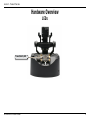
Power/Activity LED
D-Link DCS-6110 User Manual
Section 1 - Product Overview
Hardware Installation
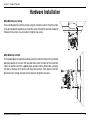
When Mounting to a Ceiling
Find a suitable place to install the camera using the installment stencil. Place the camera
at the desired operating location and insert the screws through the two holes located at
the base of the camera. Use screwdriver to tighten and secure.
When Mounting to a Wall
Find a suitable place to install the camera by using the installment stencil to find a desired
operating location on the wall. Drill two pilot holes where the holes of the installment
stencil are located. Insert the supplied plastic anchors into the drilled holes, and align
the holes at the base of the camera with the plastic anchors. Once aligned, insert the
provided screws through the holes with screwdriver to tighten and secure.
D-Link DCS-6110 User Manual
10
Section 1 - Product Overview
Network Deployment
General Connection (without PoE)
Connect the network camera to a hub via Ethernet cable.
Connect the supplied power cable from the camera to a power outlet.
Connection with a PoE Hub/Switch
If using a PoE hub/switch, connect the network camera to the hub/switch via Ethernet
cable, which will provide transmission for both power and data over a single cable.
D-Link DCS-6110 User Manual
11
Section 2 - Installation
Software Installation
Turn on the computer and insert the D-Link DCS-6110 Autorun CD into the CD-ROM drive. The following step-by-step instructions
displayed are shown when using Windows Vista operating system. The steps and screens are similar when using other Windows
operating systems.
Click on Installation Wizard
to begin software installation.
The Installation Setup Wizard window will pop up. Click Next to
continue.
Click Next
D-Link DCS-6110 User Manual
12
Section 2 - Installation
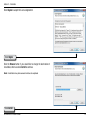
Click I Agree to accept the License Agreement.
Click I Agree
Click the Browse button if you would like to change the destination of
installation, otherwise click Install to continue.
Note: Installation may take several minutes to complete.
Click Install
D-Link DCS-6110 User Manual
13
Section 2 - Installation
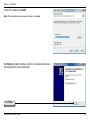
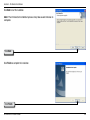
To start the installation click Install.
Note: The installation may take several minutes to complete.
Click Finish to complete installation and the D-Link Installation Wizard window will pop up for camera configuration.
Click Finish
D-Link DCS-6110 User Manual
14
Section 3 - Configuration
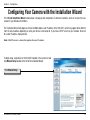
Configuring Your Camera with the Installation Wizard
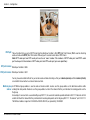
If the D-Link Installation Wizard window does not pop up after completion of software installation, click on the icon that was
created in your Windows Start Menu.
The Installation Wizard will appear and show the MAC address and IP address of the DCS-6110, which may appear to be different
from the actual address depending on what your device is connected to. If you have a DHCP server on your network, there will
be a valid IP address displayed here.
Note: A DHCP server is a device that supplies the same IP address.
To begin setup, single-click on the DCS-6110 located in the camera list and
click Manual Setup located on the left of the Installation Wizard.
Click Manual Setup
D-Link DCS-6110 User Manual
15
Section 3 - Configuration
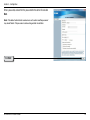
Enter a password, and confirm the password for the admin ID and click
Next.
Note: The default administrator username is set to admin and the password
may be left blank. The password can be changed after installation.
Click Next
D-Link DCS-6110 User Manual
16
Section 3 - Configuration
PPPoE Setup
The Network Type screen displays will pop up to ask if you want to setup a
PPPoE for the device. Click No for quick setup and skip to the next page .
Note: By using PPPoE, users can virtually dial from one machine to another over an Ethernet
network, establish a point to point connection between them and then securely transport
data packets over the connection.
The PPPoE Setting screen displays. Enter the username and password provided
by your ISP to connect to the Internet by PPPoE.
Click Next and skip to the setup screen as seen in page 19.
Click Next
D-Link DCS-6110 User Manual
17
Section 3 - Configuration
Check the Get IP by DHCP Server automatically box to obtain a new IP
address every time the camera starts up. Click Next to continue.
Click Next
Select UPnP Port Forwarding if your router supports this function. If not, choose
Manual to manually enter your port numbers. Click Next to continue.
Click Next
D-Link DCS-6110 User Manual
18
Section 3 - Configuration
Click Next to continue.
Click Next
A window will pop up asking you if you want to access the DCS-6110 via
mobile phone. Clicking Yes will set the video resolution to 176x144.
D-Link DCS-6110 User Manual
19
Section 3 - Configuration
Click Apply to apply the settings listed in the window to the device.
Application may take a few minutes to process.
Click Apply
A window will pop up to confirm application was successful. Click OK
to continue.
A new window will pop up displaying the lists to access your device,
click Add to my favorite to save the address then click Exit to complete
installation.
Click Exit
D-Link DCS-6110 User Manual
20
Section 3 - Configuration
Double-click DCS-6110 in the Installation Wizard window to launch the
camera’s web configuration.
Note: Please see the user manual for more information.
Enter admin as the default username and leave the password blank. Click
OK to continue.
D-Link DCS-6110 User Manual
21
Section 3 - Configuration
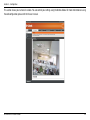
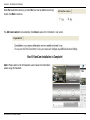
This section shows your camera’s live video. You can control your settings using the buttons below. For more information on using
the web configuration, please refer to the user manual.
D-Link DCS-6110 User Manual
22
Section 3 - Configuration
Adjusting the Lens
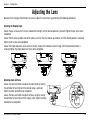
Based on the live image retrieved from the camera, adjust the camera lens by performing the following procedures:
Adjusting the Viewing Angle
Loosen the pan screw and turn the lens module left and right until the desired position is achieved; tighten the pan screw when
completed.
Loosen the tilt screws on both sides of the camera, and turn the lens module up and down until the desired position is achieved;
tighten the tilt screws once completed.
Loosen the image adjustment screw and turn the lens to adjust the network camera’s image until the desired orientation is
achieved, tighten the image adjustment screw once completed.
Loosen
Tighten
Loosen
Loosen
Tighten
Tighten
Adjusting Zoom and Focus
Loosen the zoom controller and adjust the zoom factor by moving
the controller left and right until the desired range is achieved;
tighten the zoom controller once completed.
Loosen the focus controller and adjust the focus range by moving
the controller left and right until the image is clear; tighten the focus
controller once completed.
D-Link DCS-6110 User Manual
Tighten
Loosen
23
Section 3 - Configuration
Attaching the Enclosure
Once the lens is properly adjusted, rearrange the light shield so that it will not obstruct the lens during surveillance.
Place the dome enclosure over the network camera so that the LED sticker on the dome
enclosure is properly aligned with the camera’s LED. Insert the supplied screws into the
two holes located at the base of the dome enclosure, tighten until secure.
Place the ring enclosure over the dome enclosure. Once placed, gently turn the ring
enclosure clockwise until it locks and is securely attached to the dome enclosure.
Note: When attaching the ring enclosure, be sure to first align the line on the ring enclosure with the
triangle on the dome enclosure. When attachment is successful, the line on the ring enclosure will be
aligned with the line on the dome enclosure.
D-Link DCS-6110 User Manual
24
Section 3 - Configuration
Web-based Configuration Utility
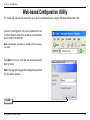
This section will show you how to configure your new D-Link Network Camera using the Web-based Configuration Utility.
To access the configuration utility, open a web-browser such
as Internet Explorer and enter the IP address of your Network
Camera (http://192.168.0.120)
Note: In the example, this address is 192.168.0.120. Your address
may differ.
Type Admin in the user name field and leave the password
blank by default.
Note: You may refer to page 51 to change the password
for your admin account.
Click OK
D-Link DCS-6110 User Manual
25
Section 3 - Configuration
Live Video
Camera
This section shows your camera’s live video. You can control your settings using the buttons below.
Zoom: “-” zooms out, and “+” zooms in
MP4 Starst and stops MP4 recording
Recording:
Pause: To pause live video
Stop: Stops streaming
D-Link DCS-6110 User Manual
26
Section 3 - Configuration
Snapshot
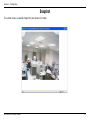
This section shows a snapshot image from your camera’s live video.
D-Link DCS-6110 User Manual
27
Section 3 - Configuration
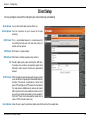
Client Setup
You may configure and select the setting for your media streaming and recording
Stream Options: You can select which video stream profile to use.
Protocol Options: There are 4 protocols for you to choose for the video
streaming.
UDP Protocol: This is recommended because it is an ideal protocol for
transmitting real-time audio and video data, which can
tolerate some lost packets.
UDP Unicast: Will stream to a single computer.
UDP Multicast Will stream to multiple computers using multicast.
TCP: Provides higher quality video streaming than UDP does.
It provides error correction and guarantees packet to be
delivered to client. However, transmission speed will be
reduced.
HTTP Protocol: Offers the highest image and video quality. However, packet
losses will diminish image quality when bandwidth becomes
restricted. If the network is protected by a firewall and it
opens HTTP port (80) only, HTTP protocol must be selected.
this mode, audio is disabled and only video can be viewed.
UDP connections will not be available to remote users if all
four ports have not been forwarded (as shown on page 32).
Only the HTTP port must be forwarded for remote users to
make an HTTP connection (video only).
In
Record Options: Allows the user to specify a destination folder and prefix filename for the recorded video.
D-Link DCS-6110 User Manual
28
Section 3 - Configuration
Setup
Wizard
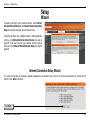
To quickly configure your network camera, click Internet
Connection Setup Wizard or click Manual Internet Connection
Setup to manually configure your network camera.
To quickly configure your network camera’s motion detection
settings, click Motion Detection Setup Wizard and skip to
page 29. If you want to enter your settings without running
the wizard, click Manual Motion Detection Setup and skip to
page 39.
Internet Connection Setup Wizard
This wizard will guide you through a step-by-step process to configure your new D-Link Camera and connect the camera to the
internet. Click Next to continue.
Click Next
D-Link DCS-6110 User Manual
29
Section 3 - Configuration
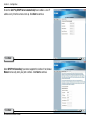
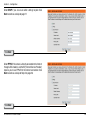
Select DHCP if you are unsure which settings to pick. Click
Next to continue and skip to page 27.
Click Next
Select PPPoE if the camera is directly connected to the Internet
through a DSL modem, and the ISP (Internet Service Provider)
requires you to use PPPoE for the Internet connection. Click
Next to continue and skip to Step 2 on page 26.
Click Next
D-Link DCS-6110 User Manual
30
Section 3 - Configuration
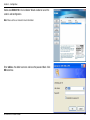
Select Static IP if your Internet Service Provider has provided
you with connection settings, or you wish to set a static address
within your home network. Click Next to continue.
Click Next
If you have selected PPPoE, enter your username and password.
Click Next to continue.
Click Next
D-Link DCS-6110 User Manual
31
Section 3 - Configuration
If you have a Dynamic DNS account and would like the camera
to update your IP address automatically, enable DDNS and enter
your host information. Click Next to continue.
Click Next
Enter a name for your camera and click Next to continue.
Click Next
Configure the correct time to ensure that all events will be
triggered, captured and scheduled at the right time. Click Next
to continue.
Click Next
D-Link DCS-6110 User Manual
32
Section 3 - Configuration
If you have selected DHCP, you will see a summary of your
camera’s settings. Please note down all this information as
you will need it for accessing your camera within the network.
Click Apply to save your settings.
Click Apply
If you have selected PPPoE, you will see a summary of your
camera’s settings. Please note down all this information as
you will need it for accessing your camera within the network.
Click Apply to save your settings.
Click Apply
If you selected Static IP, you will see a summary of your
camera’s settings. Please note down all this information as
you will need it for accessing your camera within the network.
Click Apply to save your settings.
Click Apply
D-Link DCS-6110 User Manual
33
Section 3 - Configuration
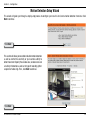
Motion Detection Setup Wizard
This wizard will guide you through a step-by-step process to configure your new D-Link Camera motion detection functions. Click
Next to continue.
Click Next
This section will allow you to enable or disable motion detection
as well as control the sensitivity or your camera’s ability to
detect movement. Specify the window area, window name and
sensitivity of detection as well as the type of recording (either
snapshot of video clip). Then, click Next to continue.
Click Next
D-Link DCS-6110 User Manual
34
Section 3 - Configuration
This section will allows you to specify the time and date your
camera records motion.
Note: Recording camera footage will take up space
on your hard drive. Its recommended that you have
sufficient disk space for Always function.
Click Next
This step allows you to specify how you will receive the events
notification of your camera, either via using email or FTP. You
will need to enter all the relevant information for your email
account or FTP settings. Then, click Next to continue.
Click Next
D-Link DCS-6110 User Manual
35
Section 3 - Configuration
You have completed the Motion Detection Wizard. Click Apply
to save your settings.
Click Apply
D-Link DCS-6110 User Manual
36
Section 3 - Configuration
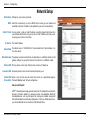
Network Setup
LAN Settings: Settings for your local area network.
DHCP: Select this connection if you have a DHCP server running on your network and
would like a dynamic IP address to be updated to your camera automatically.
Static IP Client: You may obtain a static or fixed IP address and other network information from
your network administrator for your camera. A static IP address will ease you for
accessing your camera in the future.
IP Address: The fixed IP address.
Subnet Mask: The default value is “255.255.255.0.” Used to determine if the destination is in
the same subnet.
Default Gateway: The gateway used to forward frames to destinations in a different subnet. Invalid
gateway settings may cause the failure of transmissions to a different subnet.
Primary DNS: Primary domain name server that translates names to IP addresses.
Secondary DNS: Secondary domain name server to backup the primary one.
Enable UPnP Allows a user to find, view and control this camera via a presentation page or
Presentation: “Network Neighborhood” without configuration.
How does UPnP work?
UPnPTM networking technology provides automatic IP configuration and dynamic
discovery of devices added to a network. Services and capabilities offered by
networked devices, such as printing and file sharing, are available among each
other without bothersome network configuration. In the case of Network Cameras,
you will see Network Camera shortcuts at My Network Places.
D-Link DCS-6110 User Manual
37
Section 3 - Configuration
Enabling UPnP port forwarding allows the Network Camera to open secondary HTTP port on the router, not HTTP port, meaning
that you have to add the secondary HTTP port number behind the Network Camera’s public address in order to access the Network
Camera from the Internet. For example, when the HTTP port is set to 80 and the secondary HTTP port is set to 8080, refer to the
list below for the Network Camera’s IP address.
From the Internet
In a local area network
http://203.67.124.123:8080
http://192.168.4.160 or
http://192.168.4.160:8080
If the PPPoE settings are incorrectly configured or the Internet access is not working, restore the Network Camera to factory default.
After the Network Camera is reset to factory default, it is accessible in a local area network.
Enable UPnP Port
Forwarding: Enables the camera to add the port forwarding entry into the router automatically when this option is enabled.
PPPoE Settings: Enable this setting if your ISP (DSL service) is using PPPoE. You may already have both Username and Password given by your ISP,
or you may check with your ISP. The Connect Status will be determined automatically by the system.
HTTP: You may configure two HTTP ports for your camera. HTTP ports allow you to connect to the camera via a standard web browser.
These ports can be set to a number other than the default TCP ports 80 and 8080. A corresponding port must be opened on the
router. For example, if the port is changed to 1010, users must type in the web browser “http://192.168.0.100:1010” instead of
“http://192.168.0.100”.
Authentication: Authentication: Choose either Basic where the password is not encrypted, or Digest where the password is encrypted during the
transmission to the web server.
Basic authentication: When selected, the password is sent in plain text format; there can be potential risks of being intercepted.
Digest authentication: When selected, user credentials are encrypted in MD5 algorithm and thus provide better protection against
unauthorized accesses.
HTTP Port: The default value is 80.
D-Link DCS-6110 User Manual
38
Section 3 - Configuration
Secondary HTTP The default value is 8080.
Port: After you have enabled the Authentication, you will need to configure and use the access name to access your video file. For example,
http://camera ip/video.mjpg (video.mjpg is the Access name, you can modify it here)
Access name for The default name is video.mjpg.
stream1:
Access name for The default name is video2.mjpg.
stream2:
Access name for stream 1 / Access name for stream 2 : The access name is used to differentiate the streaming source. When using
Mozilla Firefox or Netscape to access the Network Camera, and the video mode is set to JPEG, users will receive continuous JPEG
pictures. This technology, known as "server push", allows the Network Camera to feed live pictures to Mozilla Firefox and Netscape.
Use http://<ip address>:<http port>/<access name for stream1 or stream2> to make connection.
For example, when the access name for stream 1 is set to video.mjpg:
1 : Launch Mozilla Firefox or Netscape.
2 : Type the URL command in the address field. Press Enter.
3 : The JPEG images will be displayed in your web browser.
FTP Port: Default port is 21. If you want to change the port number, you will need to specify the port when connecting to the FTP server. For example
FTP://68.5.1.81:60 (if you use port 60 for your FTP server)
RTSP Streaming: This setting enables you to connect to a camera by using streaming mobile device(s), such as a mobile phone or PDA.
Authentication: Choose either Basic where the password is not encrypted, or Digest where the password is encrypted during the transmission to the web
server. After you have enabled the Authentication, you will need to configure and use the access name to access your video file. RTSP://
camera ip/live.sdp (live.sdp is the default access name, you can modify it here)
Access name for The default name is live.sdp.
stream1:
Access name for The default name is live2.sdp.
stream2:
D-Link DCS-6110 User Manual
39
Section 3 - Configuration
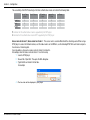
The accessibility of the RTSP streaming for the three authentication modes are listed in the following table.
Quick Time
player
Real Player
VLC media
player
mpegable
Player
pvPlayer
Disable
O
O
O
O
O
Basic
O
O
X
X
X
Digest
O
X
X
X
X
O indicates that the authentication mode is supported by the RTSP player.
X indicates that the authentication mode is NOT supported by the RTSP player.
Access name for stream 1 / Access name for stream 2 : The access name is used to differentiate the streaming source. When using a
RTSP player to access the Network Camera, and the video mode is set to MPEG-4, use the following RTSP URL command to request a
transmission of streaming data.
rtsp://<ip address>:<rtsp port>/<access name for stream1 or stream2>
For example, when the access name for stream 1 is set to live.sdp:
1 : Launch a RTSP player.
2 : Choose File > Open URL. This opens the URL dialog box.
3 : Type the URL command in the text box.
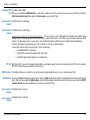
For example:
4 : The live video will be displayed in your player.
D-Link DCS-6110 User Manual
40
Section 3 - Configuration
RTSP port: The port number that you use for RSTP streaming, the default port number is 554. RTP (Real Time Protocol) Port is used to streaming
audio and video while RTCP (Real Time Control Protocol) port is used to monitor QoS of RTP stream.
Note: RTP video port and RTP audio port must be an “even” number. The numbers of RTCP video port and RTCP audio
port must equal to the numbers of RTP video port and RTP audio port, plus one repetitively
RTP port for video: Default port number is 5556.
RTCP port for video: Default port number is 5557.
You may choose to enable multicast for your camera audio and video streaming so that your cameras (sources) and the receivers (clients)
can establish the connection to send and receive contents.
Multicast group An IP Multicast group address is used to send and receive content. Sources use this group address as the destination address while
address: sending their data packets. Receivers use this group address to inform the network that they are interested in receiving packets sent to
that group.
For example, if some content is associated with group 239.1.1.1, the source will send data packets destined to 239.1.1.1. Receivers for that
content will inform the network that they are interested in receiving data packets sent to the group 239.1.1.1. The receiver “joins” 239.1.1.1.
The Multicast address ranges from 224.0.0.0 to 239.255.255.255, or, equivalently, 224.0.0.0/4
D-Link DCS-6110 User Manual
41
Section 3 - Configuration
Multicast video port: Default port number is 5560, or please choose between 1024 and 65534.
Multicast RTCP
video port: Default port number is 5561, or please choose between 1024 and 65534.
Multicast RTCP
audio port: Default port number is 5563, or please choose between 1024 and 65534.
Multicast TTL
{1~255]: Set a Time to Live(TTL) value for multicast packet, please choose between 1 and 255.
Unicast video transmission delivers a stream through point-to-point transmission; multicast, on the other hand, sends a stream to the
multicast group address and allows multiple clients to acquire the stream by requesting a copy from the Multicast
group address.
The five ports can be changed between 1025 and 65535. The multicast RTP port must be an even number and the multicast RTCP port
is multicast RTP port number plus one, and thus always be odd. When the multicast RTP port changes, the multicast RTCP port will
change accordingly.
D-Link DCS-6110 User Manual
42
Section 3 - Configuration
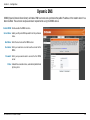
Dynamic DNS
DDNS (Dynamic Domain Name Server) will hold a DNS host name and synchronize the public IP address of the modem when it has
been modified. The username and password are required when using the DDNS service.
Enable DDNS: Click to enable the DDNS function.
Server Name: Select your Dynamic DNS provider from the pull down
menu.
Host Name: Enter the host name of the DDNS server.
Username: Enter your username or e-mail used to connect to the
DDNS
Password: Enter your password used to connect to the DDNS
server.
Status: Indicate the connection status, automatically determined
by the system.
D-Link DCS-6110 User Manual
43
Section 3 - Configuration
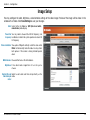
Image Setup
You may configure the color, brightness, and orientation settings of the video image. Preview of the image will be shown in the
window of Live Video. Click Save Settings to save your changes.
Color: Select either for Color or B/W (black and white,
monochrome) video display.
Power line You may need to choose 50 or 60 Hz frequency; and
frequency: nonetheless maintain the system operation at a basic 50
Hz frequency.
Video orientation: Two options. Flip will vertically rotate the video while
Mirror will horizontally rotate the video. You may check
both options if the camera is being installed upside
down.
White balance: Choose either Auto or Fix white balance.
Brightness: It has eleven levels ranged from -5 to +5 for you to
choose.
Overlay title and Select to add a date and time stamp directly on the
time stamp on video.
video:
D-Link DCS-6110 User Manual
44
Section 3 - Configuration
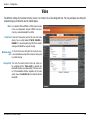
Video
Two different settings for two video streams (stream 1 and stream 2) can be configured here. You may configure one setting for
computer display and the other one for mobile display.
Mode: It can be either JPEG or MPEG4. In JPEG mode, the video
frames are independent. However, MPEG4 consumes
much less network bandwidth than JPEG.
Frame Size: Frame Size: Three options exist for the sizes of the video
display. You can select between 176x144, 352x240, or
640x480. It is recommended using 176x144 for mobile
viewing and 640x480 for computer viewing.
Maximum frame 1 is the minimum value while 30 is the maximum value.
rate: is recommended choosing 30 for computer viewing and
for mobile viewing.
It
5
Video quality: This limits the maximal refresh frame rate, which can
be combined with the “Fixed quality” to optimize the
bandwidth utilization and video quality. If the User wants
to fix the bandwidth utilization regardless of the video
quality, choose “Constant bit rate” and select the desired
bandwidth.
D-Link DCS-6110 User Manual
45
Section 3 - Configuration
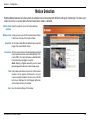
Motion Detection
Enabling Motion Detection will allow up to three windows that can be created with different settings for monitoring. This allows your
camera to serve as a security device that will record when motion is detected.
Enable motion Check this option to turn on the motion detection.
detection:
Window name: Create your own name for the monitored area/ window.
It will show at the top of the motion window.
Sensitivity: Set the measurable difference between two sequential
images that would indicate motion.
Percentage: Set the amount of motion in the window being monitored
that is required to initiate a motion detected alert. If this
is set to 100%, this means that motion is detected within
the whole window to trigger a snapshot.
Note: Setting a higher sensitivity and a lower
percentage will make any motion more easily.
New: Click to add a new window. A maximum of three motion
windows can be opened simultaneously. Use your
mouse to drag the window frame to re-size or the title
bar to move. Clicking on the ‘x’ at the upper right corner
of the window will close the window.
Save: Save the related settings of that window.
D-Link DCS-6110 User Manual
46
Section 3 - Configuration
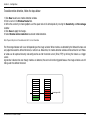
To enable motion detection, follow the steps below:
1. Click New to add a new motion detection window.
2. Enter a name in the Window Name field.
3. Define the sensitivity to moving objects and the space ratio of all alerted pixels by moving the Sensitivity and Percentage
slide bar.
4. Click Save to apply the changes.
5. Select Enable motion detection to activate motion detection.
Note: Drag and drop to resize the window and click X to close the window.
The Percentage Indicator will rise or fall depending on the image variation. When motions are detected by the Network Camera and
are judged to exceed the defined threshold, a red bar rises. Meanwhile, the motion detection window will be outlined in red. Photos
or videos can be captured instantly and configured to send to the remote server (Email, FTP) by utilizing this feature as a trigger
source.
A green bar indicates that even though motions are detected, the event will not be triggered because the image variations are still
falling under the defined threshold.
Percentage = 30%
D-Link DCS-6110 User Manual
47
Section 3 - Configuration
How does motion detection work?
A
C
B
D
There are two parameters for setting the motion detection: Sensitivity and Percentage. In the illustration above, frame A and frame
B are two sequential images. Pixel differences between the two frames are detected and highlighted in gray (frame C), and will
be compared with the sensitivity setting. Sensitivity is a value that expresses the sensitivity to moving objects. Higher sensitivity
settings are expected to sense a slight movement while smaller sensitivity settings tend to neglect it. When the sensitivity is set to
70%, the Network Camera defines the pixels in the purple areas as “alerted pixels” (frame D). Percentage is a value that expresses
the proportion of “alerted pixels” to all pixels in the motion detection window. In this case, 50% of pixels are identified as “alerted
pixels”. When the percentage is set to 30%, the motions are judged to exceed the defined threshold; therefore, the motion window
will be outlined in red.
For applications that require higher security management, it is suggested to set higher sensitivity settings and smaller percentage
values.
D-Link DCS-6110 User Manual
48
Section 3 - Configuration
Time and Date
From this section, you may automatically or manually configure, update and maintain the internal system clock for your camera.
Current Server Will be determined by the system.
Time:
Time Zone: Select your time zone from the drop-down menu.
Enable Daylight Select this to enable the daylight saving time (DST).
Saving: During DST, the system clock moves one hour ahead.
Note: To utilize this feature, ensure to set the time zone of your
network camera. Then starting and ending time of the DST is
displayed upon selecting the option.
Daylight Saving
Dates: You may configure the daylight saving date and time.
Automatic Time Enable this feature to obtain time configuration
Configuration: automatically from NTP server.
NTP Server: Network Time Protocol (NTP) synchronizes the DCS6110 with an Internet time server. Choose the one that
is closest to your location.
Update Interval: The time interval for updating the time information from
NTP server.
Set the date and
time manually: This option allows you to set the time and date manually.
Copy Your
Computer’s Time This will synchronize the time information from your PC.
Settings:
D-Link DCS-6110 User Manual
49
Section 3 - Configuration
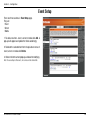
Event Setup
There are three sections in Event Setup page.
They are:
• Event
• Server
• Media
1. To add a new item - event, server or media click Add. A
pop-up will appear and update the fields accodringly.
2. To delete the selected item from the pull-down menu of
event, server or media click Delete.
3. Click on the item name to pop up a window for modifying.
Note: You can add up to three events, five servers and five media fields.
D-Link DCS-6110 User Manual
50
Section 3 - Configuration
Application
A typical application is that when a motion is detected, the DCS-6110 Network Camera sends buffered images to a FTP server or via
e-mail as notifications. For example, as seen in the illustration below, an event can be triggered by many sources, such as motion
detection or external digital input devices. When an event is triggered, you can specify what kind of action will be performed. You
can configure the Network Camera to send snapshots or videos to your email address or FTP site.
Action
Event Condition
ex.
Motion detection,
Periodically, Digital input,
System reboot
Media
(what to send)
ex.
Snapshot, Video Clips
Server
(where to send)
ex.
Email, FTP
To start plotting an event, it is suggested to configure server and media columns first so that the Network Camera will know what
action shall be performed when a trigger is activated.
D-Link DCS-6110 User Manual
51
Section 3 - Configuration
Add Server
Up to 5 servers, where will store the media with its own settings can be created and configured here.
Server Name: Unique name of your server.
Email: Select this to enable and apply your email account
setting for your camera.
FTP: Select this to access a granted folder on the external
FTP server.
HTTP: Select this to use a web server to store the media.
Network Storage: Only one network storage is supported.
D-Link DCS-6110 User Manual
52
Section 3 - Configuration
Add Media
Up to 5 media for recording with its own settings can be created and configured here. There are three types of media, Snapshot,
Video Clip and System Log.
Media Name: The unique name for media.
Snapshot: Select this feature to enable camera to take snapshot.
Source: The source of stream, stream1 or stream2.
Send pre-event The number of pre-event images.
image(s) [0~7]:
Send post-event The number of post-event images. Refer page 48 for more
image(s) [0~7]: information.
File name prefix: The prefix name will be added on the file name of the
snapshot images.
Add date and time Check it to add timing information as file name suffix. Refer
suffix to file name: page 48 for more information.
Video clip: Select this feature to enable camera to take video clip.
Source: The source of stream, stream1 or stream2.
Pre-event recording: The interval of pre-event recording in seconds.
Maximum duration: The maximal recording file duration in seconds. Refer page 48 for more information.
Maximum file size: The maximal file size would be generated.
File name prefix: The prefix name will be added on the file name of the video clip.
Refer page 48 for more information.
System log: Select this feature to enable camera to display system log.
D-Link DCS-6110 User Manual
53
Section 3 - Configuration
Add Media...contd
Send post-event image (s) [0~7)
Specify to capture the number of images after a trigger is activated. A maximum of seven images can be generated.
For example:
If both the Send pre-event images and Send post-event images are set to seven, a total of 15 images are generated after a trigger is
activated.
1 pic.
2 pic.
3 pic.
4 pic.
5 pic.
6 pic.
7 pic.
8 pic.
9 pic.
10 pic.
11 pic. 10 pic.
12 pic. 13 pic.
14 pic.
15 pic.
The moment the
trigger is activated.
Add date and time suffix to file name
Select this option to add date and time to the file name suffix.
SNAPSHOTS20080104_100341
File name prefix Date and time suffix
The format is: YYYYMMDD_HHMMSS
D-Link DCS-6110 User Manual
54
Section 3 - Configuration
Maximum duration
Specify the maximal recording duration in seconds. You can set up to ten seconds.
For example:
If the Pre-event recording is set to five seconds and the Maximum duration is set to ten seconds, the Network Camera continues to
record for another four seconds after a trigger is activated.
1 sec.
2 sec.
3 sec.
4 sec.
5 sec.
6 sec.
7 sec.
8 sec.
9 sec.
10 sec.
The moment the
trigger is activated.
File name prefix
Enter the text that will be added at the beginning of the file name.
VIDEOS20080104_100341
File name prefix Date and time suffix
The format is: YYYYMMDD_HHMMSS
D-Link DCS-6110 User Manual
55
Section 3 - Configuration
Add Event
Up to 3 events with its own settings can be created and configured here. Meanwhile, you can schedule the events here.
Event name: Unique name for the event.
Enable this event: Select this to activate this event.
Priority: Set the priority for this event and the event with higher priority
will be executed first.
Delay: The delay time before checking next event. It is being used for
both events of motion detection and digital input trigger.
Trigger: The input type that triggers the event.
Video motion Motion is detected during live video monitoring. Select the
detection: windows that need to be monitored.
Periodic: The event is triggered in specified intervals. The unit of trigger
interval is minute.
Digital input: External trigger input to the camera.
System boot: The event is triggered when the system boot up.
Time: Either “Always” or input the time interval.
Trigger D/O: Check it to trigger digital output for specific seconds when
event is triggered. The default actions are triggering the D/O
and storing the media on a CF card.
Move to preset If there is a server(s), user can select the available server(s)
location: from Move to preset location.
D-Link DCS-6110 User Manual
56
Section 3 - Configuration
Add Recording
Here you can configure and schedule the recording settings.
Recording entry The unique name of the entry.
name:
Enable this Select this to enable the recording function.
recording:
Priority: Set the priority for this entry and the entry with higher
priority will be executed first.
Source: The source of stream.
Recording schedule: Scheduling the recording entry.
Recording settings: Configuring the setting for the recording.
Destination: Select the folder where will store the recording file.
Total cycling Please input a HDD memory volume between 1MB
recording size: and 200GB for recording space. The recording data
will replace the oldest one when total recording size
exceeds this value. For example, if each recording
file is 6MB, and the total cycling recording size
is
600MB, then camera will recording 100 files to the
specified location (folder). And then the camera will delete the oldest file and create new file for cycling recording.
Please notice that if the HDD empty space is not enough, the recording will stop. Before you setup this option please make sure you HDD
have enough space and it is better not to save other files in the same folder as recording files.
Size of each file for File size for each recording file. You may input the value in the range of 200-6000.
recording:
File Name Prefix: The prefix name will be added on the file name of the recording file(s).
D-Link DCS-6110 User Manual
57
Section 3 - Configuration
Access List
Here you can configure the access permissions for each user.
Allow list: The list of IP addresses that have the access right to
the camera.
Start IP address: The starting IP Address of the devices (such as a
computer) that have permission to access the video of
the camera. Click Add to save the changes made.
Note: A total of ten lists can be configured for both columns.
End IP address: The ending IP Address of the devices (such as a
computer) that have permission to access the video
of the camera.
Delete allow list: Remove the customized setting from the Allow List.
Deny list: The list of IP addresses that have no access right to
the camera.
Delete deny list: Remove the customized setting from the Delete List.
For example:
When the range of allowed list is set from 1.1.1.0 to
192.255.255.255 and the range of denied list is set from 1.1.1.0
to 170.255.255.255, Only users’ IP located between 171.0.0.0
and 192.25.25.25 can access the Network Camera.
D-Link DCS-6110 User Manual
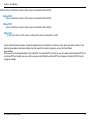
Alowed
List
Denied
List
58
Section 3 - Configuration
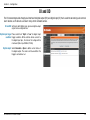
DI and DO
The I/O connector provides the physical interface for digital output (DO) and digital input (DI) that is used for connecting such external
alarm devices as IR-Sensors and alarm relays to the network camera.
DI and DO: Setting for both Digital input signal and digital output
signal can be configured here.
Digital input trigger Please select from “High” or “Low” for digital input
condition: trigger condition. When external device connect to
the digital input pins, the state of the voltage will be
monitored. (Max. Input 500mA, 12Vdc)
Digital output: Select Grounded or Open to define normal status of
the digital output. The camera will show whether the
trigger is activated or not.
D-Link DCS-6110 User Manual
59
Section 3 - Configuration
Maintenance
Device Management
You can modify both camera’s name and administrator’s password of your camera, as well as add more user accounts for accessing
the camera.
Admin password Modify a password for the administrator’s account.
setup:
Add user account: Add new user account.
Username: The username for the new account.
Password: The password for the new account.
Privilege: The access right for the new user.
Manage user: Managing the accounts for the existing users.
Authentication: The access right for the existing users.
Camera Name: Create a unique name for your camera and you can
access the camera using this name in your web-browser.
For example: http://DCS-6110 (By default).
D-Link DCS-6110 User Manual
60
Section 3 - Configuration
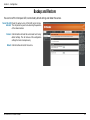
Backup and Restore
You can turn off the front panel LED, restore factory default settings and reboot the camera.
Turn off the LED Check this option to turn off the LED next to the lens.
indicator: This will prevent anyone from observing the operation
of the network camera.
Restore: Click the button will reset the camera back to its factory
default settings. This will remove all the configuration
settings that were made previously.
Reboot: Click the button will restart the camera.
D-Link DCS-6110 User Manual
61
Section 3 - Configuration
Firmware Update
Your current firmware version and date will be displayed on your screen. You may go to the D-Link Support page to check for the
latest firmware version available.
To upgrade the firmware on your DCS-6110, please download and save the latest firmware version from the D-Link Support page to
your local hard drive. Locate the file on your local hard drive by clicking the Browse button. Then, open the file and click the “Upload”
button to start the firmware upgrade.
Current firmware It will be automatically determined and displayed by the
version: system.
Current firmware It will be automatically determined and displayed by the
date: system.
File Path: Locate the file (upgraded firmware) on your hard drive
using the browse feature.
Upload: Start uploading and upgrading the new firmware to your
camera.
D-Link DCS-6110 User Manual
62
Section 3 - Configuration
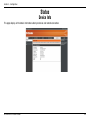
Status
Device Info
This page displays all the details information about your device and network connection.
D-Link DCS-6110 User Manual
63
Section 3 - Configuration
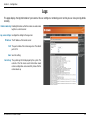
Logs
This page displays the log information of your camera. You can configure a remote log server so that you can view your log details
remotely.
Enable remote log: Enabling this feature so that the camera can send camera
log files to a remote server.
Log server settings: Configure the setting for the log server.
IP Address: The IP address of the remote server.
Port: The port number of the remote log server. The default
port is 514.
Save: Save the setting.
Current Log: The system log file that displayed by the system. The
content of the file reveals useful information about
camera configuration and connectivity status after the
camera boots up.
D-Link DCS-6110 User Manual
64
Section 3 - Configuration
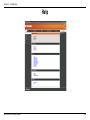
Help
D-Link DCS-6110 User Manual
65
Section 4 - D-ViewCam Installation
D-ViewCam Installation
D-ViewCam software is included for the administrator to manage up to 32 D-Link network cameras remotely. The administrator can use
the software to configure the advances settings for the camera. D-ViewCam is a complete management tool and includes all configurative settings.
Insert the CD-ROM into the CD-ROM drive. A menu screen will appear as shown below.
Click D-ViewCam
D-ViewCam provides English, Traditional Chinese and Simplified Chinese language
versions. Select a language version and click OK to continue.
Click OK
D-Link DCS-6110 User Manual
66
Section 4 - D-ViewCam Installation
Click Next to continue.
Click Next
Click Browse if you would like to choose a specific folder for the installation,
otherwise click Next to continue.
Click Next
D-Link DCS-6110 User Manual
67
Section 4 - D-ViewCam Installation
Click Next to start the installation.
Note: The D-ViewCam installation process may take several minutes to
complete.
Click Next
Click Finish to complete the installation.
Click Finish
D-Link DCS-6110 User Manual
68
Section 4 - D-ViewCam Installation
Add a Camera
This section will show you how to start and add a camera to the D-ViewCam system.
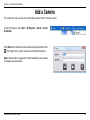
To start D-ViewCam, select Start > All Programs > D-Link > D-Link
D-ViewCam.
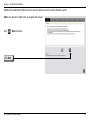
Enter admin as the default username and leave the password blank. Click
/ OK to log into the system and access the Add Camera Wizard.
Note: Please refer to page 48 in the D-ViewCam user manual
to change your password.
D-Link DCS-6110 User Manual
69
Section 4 - D-ViewCam Installation
Welcome to the Add Camera Wizard. Use this wizard to add your cameras to the D-ViewCam system.
Note: Use the left or right arrow to navigate the wizard.
Click
/ Next to continue.
Click Next
D-Link DCS-6110 User Manual
70
Section 4 - D-ViewCam Installation
Choose which method to add your camera(s). You can choose Auto Discovery
to automatically search for your camera(s), or choose Add Manually to add your
camera(s) via the camera’s IP address. Click Next to continue.
If you choose Auto Discovery, the system will search all cameras that are located
on the same LAN with same subnet. The system will place all the cameras at the
default map called My Map. Click Next to continue.
If you choose Add Manually, you will need to enter the IP address of the camera(s).
Click Next to continue.
D-Link DCS-6110 User Manual
71
Section 4 - D-ViewCam Installation
D-ViewCam shows the detected network camera(s) information. You can choose and schedule the recording for each camera.
• 24/7 Continuous Recording: Continuously records surveillance 24 hours a day, 7 days a week.
• 24/7 Motion Detection Recording: Continuously monitors, but only records surveillance when motion is detected.
• Office Hours Only: Continuously monitors during office hours (8:00AM to 6:00PM), and only records when motion is
detected.
• Non-Office Hours Only: Continuously monitors during non-office hours (6:00PM to 8:00AM), and only records when motion is
detected.
Note: Excluding 24/7 Continuous Recording, all other schedule recording modes can only record when motion is detected. Please refer
to the user manual for more information.on.
Click Next to continue.
D-Link DCS-6110 User Manual
72
Section 4 - D-ViewCam Installation
Select Yes to add other camera(s), or select No if you have no additional camera(s)
to add. Click Next to continue.
The Add Camera wizard is now complete. Click Close to access the D-ViewCam’s main screen.
Your D-ViewCam Installation is Complete!
Note: Please refer to the D-ViewCam user manual for information
about using D-ViewCam.
D-Link DCS-6110 User Manual
73
Section 5 - Frequently Asked Questions
Frequently Asked Questions
This chapter provides solutions to problems that may occur during the installation and operation of the DCS-6110. Read the following
descriptions if you are having any problems.
Note: The examples below are illustrated in Windows XP. If you have a different operating system, the screenshots on
your computer will look similar to the following examples.
Fixed Dome Network Camera Features
1. What is a Fixed Dome Network Camera?
The Fixed Dome Network Camera is a stand-alone system connecting directly to an Ethernet or Fast Ethernet network. The Fixed
Dome Network Camera differs from a conventional PC Camera because it has an integrated system with built-in CPU and web-based
solutions, providing a low cost solution that can transmit high quality video images for monitoring. The Fixed Dome Network Camera
can be remotely managed, accessed and controlled from any PC/Notebook over an Intranet or Internet using a web browser.
2. What is the maximum number of users that can access DCS-6110 simultaneously?
The maximum number of users that can log onto the Fixed Dome Network Camera at the same time is 10. Please keep in mind the
overall performance of the transmission speed will be reduced if many users have logged on to the camera simultaneously.
There is no limited user when multicast-enabled router is used. This helps to reduce the network transmission load.
Note that to utilize this feature; the Network Camera must be configured to enable multicast streaming at the same time. For more
information, see RTSP Streaming on page 41.
3. What algorithm is used to compress the digital image?
The Fixed Dome Network Camera utilizes MPEG-4 simple profile or MJPEG Mode image compression technology providing high
quality images. MJPEG is a standard for image compression and it can be applied to various web browsers and application software
without installing any extra software
4. Can I capture still images from the Fixed Dome Network Camera?
Yes you can capture still images using the snapshot function.
D-Link DCS-6110 User Manual
74
Section 5 - Frequently Asked Questions
Fixed Dome Network Camera Installation
1. Can the Network Camera be used outdoors?
The Fixed Dome Network Camera is not weatherproof. It needs to be equipped with a weatherproof case for outdoor use but it is not
recommended.
2. When physically connecting the Fixed Dome Network Camera to a network, what network cabling is
required?
The Fixed Dome Network Camera uses Category 5 UTP cable allowing 10 Base-T and 100 Base-T networking solutions.
3. Can the Fixed Dome Network Camera be setup as a PC-cam on a computer?
No, the Fixed Dome Network Camera is used only on an Ethernet or Fast Ethernet network. The D-Link DSB-C110, DSB-C310, can
be used as a PC Camera (Webcam).
4. Can the Fixed Dome Network Camera be connected to the network if it consists only of private IP
addresses?
The Fixed Dome Network Camera can be connected to a LAN with private IP addresses.
5. Can the Fixed Dome Network Camera be installed and work if a firewall exists on the network?
If a firewall exists on the network, port 80 is open for ordinary data communication. The DCS-6110 uses port 5002 for streaming
audio and port 5003 for streaming video. These ports (or the ports you have specified in the Setup Tab in the Configuration screen)
need to be opened on the firewall.
6. Why am I unable to access the Fixed Dome Network Camera from a web browser?
If a router or firewall is used on the network, the correct ports for the DCS-6110 may not be configured on the router or firewall.
To correct the problem, you need to determine if the DCS-6110 is behind a router or firewall and if the router or firewall is properly
configured for the ports the DCS-6110 is using. Refer to Page 28 for help in opening the correct ports on a router or firewall for use
with the DCS-6110. Other possible problems might be due to the network cable. Try replacing your network cable. Test the network
D-Link DCS-6110 User Manual
75
Section 5 - Frequently Asked Questions
interface of the product by connecting a local computer to the unit, utilizing a Ethernet crossover cable. If the problem is not solved,
the Fixed Dome Network Camera might be faulty.
7. Why does the Fixed Dome Network Camera work locally but not externally?
• This might be caused by network firewall protection. The setting of the firewall may need to be changed in order for the Fixed Dome
Network Camera to be accessible outside of your local LAN. Check with the Network Administrator for your network.
• Make sure that your Fixed Dome Network Camera isn’t conflicting with any Web server you may have running on your network.
• The default router setting might be a possible reason. Check that the configuration of the router settings allows the Fixed Dome
Network Camera to be accessed outside of your local LAN.
8. I connected the Fixed Dome Network Camera directly to a computer with a cross-over Ethernet cable and
received a Windows error upon running the installation Wizard?
• This Windows error will occur if the Fixed Dome Network Camera is connected to a computer that is not properly configured with
a valid IP address. Turn off DHCP from the Network Settings in Windows and configure the computer with a valid IP address
or connect the camera to a router with DHCP enabled.
• This error can also occur if the Installation Wizard icon is clicked on more than once from the setup wizard.
9. Noisy images occur. How can I solve the problem?
The video images might be noisy if the Fixed Dome Network Camera is used in a very low light environment. To solve this issue you
need more lighting.
10. The images appear to be of poor quality, how can I improve the image quality?
• Make sure that your computer’s display properties are set above 256 colors. Using 16 or 256 colors on your computer will produce
dithering artifacts in the image, making the image appear to be of poor quality.
• The configuration on the Fixed Dome Network Camera image display is incorrect. Through the Setup>Image Setup section of the
Web management you need to adjust the image related parameters such as brightness, white balance and power line frequency for
fluorescent light.
D-Link DCS-6110 User Manual
76
Appendix B - Networking Basics
Networking Basics
Check your IP address
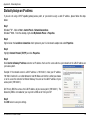
After you install your new D-Link adapter, by default, the TCP/IP settings should be set to obtain an IP address from a DHCP server
(i.e. wireless router) automatically. To verify your IP address, please follow the steps below.
Click on Start > Run. In the run box type cmd and click OK.
At the prompt, type ipconfig and press Enter.
This will display the IP address, subnet mask, and the
default gateway of your adapter.
If the address is 0.0.0.0, check your adapter installation,
security settings, and the settings on your access point.
Some firewall software programs may block a DHCP
request on newly installed adapters.
If you are connecting to a wireless network at a hotspot
(e.g. hotel, coffee shop, airport), please contact an employee or administrator to verify their wireless network settings.
D-Link DCS-6110 User Manual
77
Appendix B - Networking Basics
Statically Assign an IP address
If you are not using a DHCP capable gateway/access point, or you need to assign a static IP address, please follow the steps
below:
Step 1
Windows® XP - Click on Start > Control Panel > Network Connections.
Windows® 2000 - From the desktop, right-click My Network Places > Properties.
Step 2
Right-click on the Local Area Connection which represents your D-Link network adapter and select Properties.
Step 3
Highlight Internet Protocol (TCP/IP) and click Properties.
Step 4
Click Use the following IP address and enter an IP address that is on the same subnet as your network or the LAN IP address on
your access point.
Example: If the network camera’s LAN IP address is 192.168.0.1, make your IP address
192.168.0.X where X is a number between 2 and 99. Make sure that the number you choose
is not in use on the network. Set Default Gateway the same as the LAN IP address of your
access point (192.168.0.1).
Set Primary DNS the same as the LAN IP address of your access point (192.168.0.1). The
Secondary DNS is not needed or you may enter a DNS server from your ISP.
Step 5
Click OK twice to save your settings.
D-Link DCS-6110 User Manual
78
Appendix B - Reset and Restore
Reset and Restore
There is a button hidden in the pinhole beside the Ethernet socket. It is used to reset the system or restore the factory default settings.
Sometimes resetting the DCS-6110 will return the system back to a normal state. If the system still has problems after reset, restore
the factory settings and install again:
RESET:
1.
Lightly insert a paper clip (or a similar sized tool) into the reset
hole on the back of the camera, press lightly and then release
the button.
2.
The LED on the front of the camera will begin blinking red and
green.
Reset button
3.
When the LED stops the blinking the reset has completed.
RESTORE: 1.
Insert the paperclip or other tool and press on the button
continuously.
2.
Wait for the LED on the front of the camera to blink red and
green and hold the button for 30 seconds.
3.
Withdraw the tool after the second cycle of the LED blinking
and a factory restore has been completed.
D-Link DCS-6110 User Manual
Restoring the factory defaults will result in the
loss of any previous settings and will require
running the Installation Wizard to return the
DCS-6110 to a normal state.
79
Appendix B - External I/O Port
External I/O Port
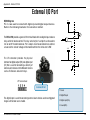
DI/DO Diagram
Pin 1~4 are used to connect with digital input and digital output devices.
Refer to the following illustration for connection method.
12V
PIN 1
Power+12V
The DCS-6110 provides a general I/O terminal block with one digital input and one
relay switch for device control. The relay switch of pin 1 and pin 2 can be used to
turn on or off the external device. Pin 3 and pin 4 can be connected to an external
sensor and the state of voltage will be monitored from the initial state ‘LOW’.
PIN 2
Digital output
+12V
The I/O connector provides the physical
interface for digital output (DO) and digital input
(DI) that is used for connecting a diversity of
external alarm devices to the Network Camera
such as IR-Sensors and alarm relays.
PIN 3
Digital input
PIN 4
Ground
I/O Terminal Block:
External I/O Port
1 Power
The digital input is used for connecting external alarm devices and once triggered
images will be taken and e-mailed.
2 Digital Output
3 Digital input(DI+)
4 Ground(DI-)
D-Link DCS-6110 User Manual
80
Appendix C - Technical Specifications
Technical Specifications
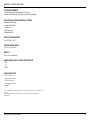
NETWORK PROTOCOL SUPPORT
+ TCP/IP, RTSP, RTP, RTCP, HTTP, SMTP, FTP, NTP, DNS, DHCP, UPnP, DDNS,
PPPoE, ICMP, Samba client, IP Filtering, 3GPP
BUILT-IN NETWORK INTERFACES
PHYSICAL & ENVIRONMENTAL
DIAGNOSTIC LED
2 color LED
3-AXIS ANGLE
X : 350˚, Y : 45˚, Z : 350˚
+ 10/100BASE-TX Ethernet port
VIDEO ALGORITHM SUPPORT
+ JPEG for still image
+ MPEG4/MJPEG dual format compression
VIDEO RESOLUTION
+ Up to 30fps at 176 x 144
+ Up to 30fps at 320 x 240
+ Up to 30fps at 640 x 480
VIDEO FEATURES
POWER INPUT
100-240VAC, 50/60Hz
POWER CONSUMPTION
Max 3.6 W
DIMENSIONS
194 (W) X 180 (D) X 107 (H) (mm)
WEIGHT
630 gm
+ Adjustable image size and quality
+ Time stamp and text overlays
+ 3 configurable motion detection windows
+ Flip & mirror
SECURITY
VIDEO BIT RATE
SURVEILLANCE SOFTWARE FUNCTIONS
20K to 4M
CAMERA SPECIFICATIONS
+ VGA Progressive CMOS Sensor
+ 1.5 Lux @ F1.4
+ Electronic rolling shutter
+ 3.7-12mm vari-focal lens, F1.4-F2.8
+ Administrator and user group protected
+ Password authentication
+ Remote management/control of up to 32 cameras
+ Viewing of up to 32 cameras on one screen
+ Supports all management functions provided in web interface
+ Scheduled motion triggered, or manual recording options
REMOTE MANAGEMENT
+ Configuration accessible via web browser
+ Take snapshots/video clips and save to local hard drive or NAS via web browser
LAN
+ IEEE 802.3 compliance
+ IEEE 802.3u compliance
+ Support Full-Duplex operations
+ 802.3x Flow Control support for Full-Duplex mode
SURVEILLANCE
(Motion detection weekly schedule)
+ Upload snapshots/video clips via email
+ Upload snapshots/video clips via FTP
+ Supported IEEE 802.3af standard (PoE)
D-Link DCS-6110 User Manual
81
Appendix C - Technical Specifications
SYSTEM REQUIREMENTS
+ Operating System: Microsoft Windows 2000, XP, Vista
+ Browser: Internet Explorer, Firefox, Netscape, Mozilla, Opera browser
SUPPORTED PDA, MOBILE PHONES & SOFTWARE
Handsets with 3GPP player
+ Packet Video Player 3.0
+ QuickTime 6.5
+ Real Player 10.5
+ Windows 2000, XP
OPERATION TEMPERATURE
0º to 40º C (32º to 104º F)
STORAGE TEMPERATURE
-20º to 70º C (-4º to 158º F)
HUMIDITY
20% to 80% non-condensing
EMISSION (EMI), SAFETY & OTHER CERTIFICATIONS
+ FCC
+ CE
+ C-Tick
PACKAGE INCLUDES
+ DCS-6110 camera
+ External power adapter
+ Cat5 Ethernet cable
+ Quick Installation Guide
+ Master CD
The mobile device must have 3G support and subscribe to 3G service from the phone service
provider.
The playback device must be equipped with 3G video playback such as RealPlayerTM or
PacketVideoTM.
1
D-Link DCS-6110 User Manual
82