1
10-30.7-84
E - i - 3/14
Control Valves - SMARTLINK® MRV
50120624-001/
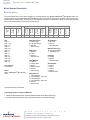
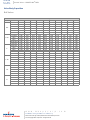
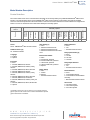
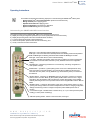
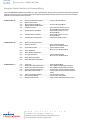
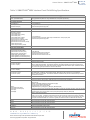
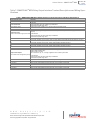
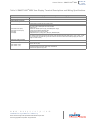
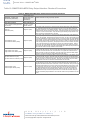
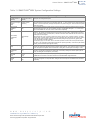
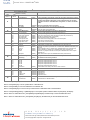
Table 14: SMARTLINK® MRV User Commands - Command Set ‘C’
Table 14: SMARTLINK® MRV User Commands - Command Set ‘C’
SMARTLINK® Commands
Number: Name
Description of command purpose and usage
Command Set ‘C’
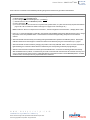
C-0: Test Valve
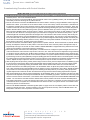
Command C-0 is a diagnostic command that is used to test a valve actuator through its full travel. When the command is executed, the selected valve moves to its full open position, pauses for several seconds, and returns to a fully closed position. (To
display or change the selected valve, perform Command A-3.) During command execution, the even numbered lights should
flash on the Control Interface. If either open or close positions are not properly reached, all the numbered lights will flash momentarily indicating the test has failed. The system must first be in Shutdown Mode before this command will be executed. (To place
the system in Shutdown Mode, disconnect one of the valves temporarily until a Shutdown alarm is indicated or initiate a system
shutdown from the User Display.) If all of the numbered lights momentarily flash after command entry, the command was not executed.
C-1: Reserved for Trained
Personnel
(Enable Calibration)
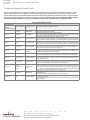
Command C-1 permits the selected valve actuator to be re-calibrated. In effect, this command enables the user to execute Command C-2, Calibrate Valve. (Refer to the Actuator Replacement section on page 10-30.7-68 for the complete procedure.) The
system must first be in Shutdown Mode before this command will be executed. If all of the numbered lights momentarily flash
after Control Interface Command entry, the command was not executed.
C-2: Reserved for Trained
Personnel
(Calibrate Valve)
Command C-2 calibrates the valve actuator and replaces the factory-set valve calibration data. This command should be performed by factory-trained personnel only. When the command is executed, the selected valve finds the factory-set hard-stop,
establishes a new "home" or 0.0 degree position, and then verifies full travel movement in 0.1 degree steps. (To display or
change the selected valve prior to executing Command C-2, execute Command A-3.) When the command is executed from the
Control Interface, the even numbered lights should flash. (No lights will flash on the Control Interface if this command is executed
from the User Display.) The command takes approximately 3 minutes to complete. If the calibration procedure fails, all the numbered lights will flash momentarily indicating the test has failed. Command C-1 must be successfully performed before this command can be executed. If all of the numbered lights momentarily flash after the command is entered or at the end of the
calibration procedure, the command was not successfully executed.
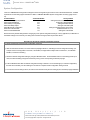
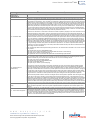
C-3: Reset Factory Default
Settings
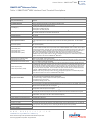
Command C-3 is a configuration command that is used to reset all system configuration and valve position data with the exception of the backup position profile. To execute Command C-3, the valve system must first be in Position Setup Mode (See Command A-2) and the Modulate Valve Command (MVC) must be off. With the unit in Position Setup Mode and Command C-3
selected, push the Enter button. Light #3 and the command set 'c' light should momentarily turn off indicating the reset is complete.
Command C-4 is a configuration command that is used to enter a new 4-digit electronic passcode to prevent tampering. To execute Command C-4, the electronic "lock" must be enabled and the unit must be in the "unlocked" state. (A locked unit is indicated
by a flashing alarm light.) If all the numbered lights momentarily flash after command entry, the command was not executed due
to one of the following reasons:
- The "lock" function is disabled, or
- The unit is currently locked. (See Command C-5 to enable the lock function or Command A-7 to unlock the unit.)
C-4: Enter New Lock Combination
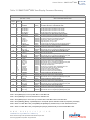
After the command is entered, the INC/DEC command is used to select a passcode digit as indicated by the numbered lights.
After the first digit is selected, the Enter button should be pushed and the numbered light and command set light 'c' momentarily
turn off. Repeat the previous digit entry process 3 more times for a total of 4 digits. After the 4th digit is entered, the number #4
light will turn on and the command set 'c' light will begin to flash, indicating that a new 4-digit passcode has been saved and the
command is complete.
If the 4-digit passcode is forgotten, call MAXON for assistance. The factory default 4-digit passcode is 0-0-0-0.
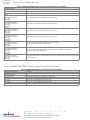
Command C-5 is a configuration command that is used to enable or disable the electronic "lock" function. The factory default is
configuration #0, Lock Disable. Configuration #1 is Lock Enable.
C-5: Select Lock Enable / Disable To execute Command C-5, the unit must be in the unlocked state. (The alarm light will be flashing rapidly if the unit is locked. See
Command A-7 to unlock the device.) After command entry, the current configuration is shown by one of the numbered lights.
Select either configuration #0 or #1 using the INC/DEC switch and push the Enter button after the desired configuration is
selected and indicated by the numbered lights.
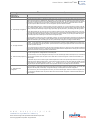
C-6: Save Profile as Backup
Command C-6 is a configuration command that is used to save the currently stored valve position profiles. This command is
used in conjunction with C-7, Restore Backup Profile, to help ensure that proven valve position profiles can be restored without
re-commissioning if a factory default reset is accidentally performed or incorrect position adjustments are made during the commissioning process.
To execute Command C-6, the valve system must first be in Position Setup Mode (See Command A-2). With Command C-6
selected and the unit in Position Setup Mode, push the Enter button. Light #6 and the command set 'c' light should momentarily
turn off, indicating the command has been executed.
C-7: Restore Backup Profile
Command C-7 is a configuration command that is used to restore a backup valve position profile as the current operating profile.
This command is used in conjunction with C-6, Save Profile as Backup, to help ensure that proven valve position profiles can be
restored without re-commissioning if a factory default reset is accidentally performed or incorrect position adjustments are made
during the commissioning process.
To execute Command C-7, the valve system must first be in Position Setup Mode (See Command A-2) and the Modulate Valve
command input must be in the OFF state. With the unit in Position Setup Mode and Command C-7 selected, push the Enter button. Light #7 and the command set 'c' light should momentarily turn off, indicating the command has been executed.
w w w . m a x o n c o r p . c o m
combustion systems for industry
Maxon reserves the right to alter specifications and data without prior notice.
© 2014 Copyright Maxon Corporation. All rights reserved.