1
Base Unit manual
5/22/02
4:42 PM
Page 3
Getting familiar with the PowerCore System
Safety Precautions
Please review all instructions before installing the PowerCore System
1
G U I D E
5 6
7
8 9
•
•
•
•
•
•
9
5
2
3 4 4 4 4
•
•
•
U S E R S
•
•
•
6
10
1
2
3
4
5
6
7
8
9
10
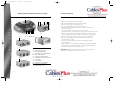
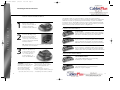
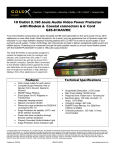
PowerCore™ DC Jack
Ground LED Indicator
Only for use indoors in a dry environment.
All household wiring must be properly grounded.
Do not rest any object on the power cord.
Do not spill any liquid on the PowerCore System.
Do not insert any foreign objects into the power outlets on the
PowerCore System.
Do not insert any foreign objects into the PowerCore,
Telecommunication, or Surge Protection slots on the PowerCore System.
Do not operate any electronic equipment during an electrical storm.
We recommend that you turn off ALL of your electronic equipment.
Do not use the Surge Protector if the power cord is damaged.
Do not use any adapter to connect the PowerCore System to a
two-prong power outlet.
Do not insert the PowerCore System power plug into another
surge protector.
Close supervision is necessary when used by or around small children.
To disconnect, turn the power switch off, grip the power plug and
pull from wall socket. Do not pull on cord.
CAUTION: DO NOT remove the cap from the PowerCore System or
device unless installing a new PowerCore device.
Surge Protection LED Indicator
Power LED Indicator
Coax Protection Module*
Fax/Modem Protection Module*
AC Outlets
Power Switch
Surge Protection Module*
LAN Protection Module
* Preinstalled at the factory.
4
5