1
Base Unit manual
5/22/02
4:43 PM
Page 5
Protecting Your Equipment
Using the Coax Module
Using the LAN Module
G U I D E
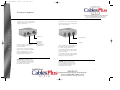
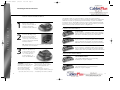
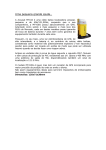
If you plan to use a device that requires
a Coaxial cable, please configure the
cables as shown below:
If you plan to use a device that requires
a RJ45 patch cable, please configure the
cables as shown below:
U S E R S
Outside Line
Insert the F-type coax cable leading
from the outside into the Coax
Protection Module.
Insert a F-type coax cable (sold separately) into the Coax Protection Module
and the secondary device (i.e. DSS
System, Cable-Ready Television, CableReady VCR, Cable Modem etc…)
CAUTION: When installing a Cable
Protection Module, please make sure
you are installing the module correctly
by ensuring that the brass strip is on
the right side of the module.
8
DSS System
Cable-Ready
Television
Cable-ready VCR
Cable Modem
Secondary Device
Computer
Insert the RJ45 patch cable leading from
the outside into the secondary device
(i.e. Switch, Router, Firewall, etc…)
Insert a RJ45 patch cable (sold separately)
into the secondary device and the LAN
Protection Module.
Insert a RJ45 patch cable (sold separately)
into the LAN Protection Module and the
Ethernet port on your computer.
CAUTION: When installing a Cable
Protection Module, please make sure
you are installing the module correctly
by ensuring that the brass strip is on
the right side of the module.
9