1
TROUBLESHOOTING
If you have problems with your phone, please check below
for helpful hints:
BLANK OR
FAINT
SCREEN
l
l
Check line cord and adapter.
CALLER ID
DOES NOT
WORK
l
l
l
Be sure your caller ID service is active.
Do not answer the phone before two rings.
If the problem continues, contact the telephone
company.
l
l
Be sure the ringer is not off.
There may be too many devices connected to the
phone line. Remove all other phones and see if this
phone will ring. If so, add devices back one by one
to find the problem unit.
l
l
Verify that the line cord is connected.
Verify that the line cord connection is correct and
tightly secured.
l
Check power adapter.
PHONE
WILL NOT
RING
NO DIAL
TONE
NO CHARACTERS
ON DISPLAY
Check Contrast setting.
26
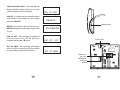
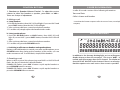
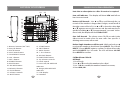
LOCATION
OF CONTROLS
SAFETY INSTRUCTIONS
To reduce the risk of fire, electrical shock, and injury, please follow
these basic safety precautions before you use this equipment.
1. Carefully read the instructions in this manual.
2. Follow all warnings and instructions marked on the unit.
3. When cleaning, unplug the telephone jack from the wall outlet
and unplug the power adapter. Use a damp cloth. Do not use
liquid or aerosol cleaners.
4. Do not use this equipment near water e.g.: near a kitchen sink,
bathtub, washbowl, laundry tub, swimming pool or in a wet
basement.
5. Install in a protected location. Ensure all lines and cords are away
from foot traffic. Do not place objects on the line cord that may
cause damage or abrasion.
6. Avoid spilling any liquid on the unit. This may cause internal
shorting, fire or shock. Otherwise, the phone is not covered
under your warranty.
7. Do not overload wall outlets and extension cords as this can
result in the risk of fire or electrical shock.
8. Never push objects of any kind into this telephone as they can
touch dangerous voltage points or short out parts that could
result in a risk of fire or electrical shock.
9. Take the phone to a qualified technician when it requires repair
work or service. To reduce the risk of electrical shock, do not
disassemble the telephone. Opening or removing covers can
expose you to dangerous voltages or other risks. Incorrect reassembly can cause electrical shock during subsequent use.
10. Avoid using the telephone during an electrical storm. There can
be a slight risk of electrical shock from lightning.
11. Do not use the telephone to report a gas leak, if in the vicinity of
the leak.
12.Unplug this telephone from the wall outlet and refer servicing to
qualified service personnel under the following conditions:
l If liquid is spilled into the unit.
l If the unit is exposed to rain or water.
l If the unit does not operate normally by following the
operating instructions.
l If the unit is dropped or the casing is damaged.
l If the unit exhibits a distinct change in performance.
3