1
E
English Edition
INSTRUCTIONS
Thank you for purchasing a Canon product.
The EOS-3 is the world’s first high-performance AF single-lens reflex
camera with Eye-Control area AF. The camera’s many features can suit
diverse picture-taking requirements from fully automatic operations to
highly specialized applications. It also retains the simple electronic dial
operation found on other top-tier EOS cameras.
Before using the camera, read this Instructions booklet and familiarize
yourself with the camera.
● Precautions
• Before using the camera for important events such as a weddings,
be sure to take test shots to make sure the camera operates
properly.
• EOS cameras have a lens mount fitted with electrical contacts for
dedicated operation (autofocusing, exposure control, etc.) with
Canon EF lenses. Using a non-EF lens with an EOS camera may
not result in proper camera or lens operation.
Also, the warranty does not cover any malfunction or damage
occurring with the use of non-Canon lenses.
● Symbols used in this Instructions booklet:
: Warning for preventing camera malfunction.
: Supplementary notes for basic camera operation.
: Helpful tip for operating your camera and taking pictures.
• Page numbers in parentheses indicate where you can find more
information.
• Also read “Handling Precautions” on page 6 to prevent faulty
pictures and camera mishaps.
• Retain this Instructions manual for future reference.
3
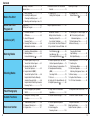
Contents
4
Handling Precautions ...........................6
Nomenclature .......................................9
Conventions Used in this Instructions
Booklet .........................................13
Attaching the Strap.............................14
Before You Start
1. Basic Operation ...........................16
2. Installing the Battery and
Checking the Battery Level ..........21
3. Mounting and Detaching a Lens ..23
4. Loading Film ................................24
Setting the Film Speed ................26
5. Unloading Film .............................28
Midroll Rewind (
)...................28
Quick Start With
Program AE
Program AE........................................30
Shifting the Program ..........................31
Dioptric Adjustment Lenses ...............32
Autofocus (AF)
1. AF Mode Selection ......................34
AF Modes ....................................35
2. Area AF Ellipse and
Focusing Points ...........................37
3. Focusing Point Selection .............38
● Automatic Selection .................38
● Manual Selection .....................38
● Eye-Control Selection ..............38
About Eye-Control AF ..................41
Eye-Control Calibration................42
4. Eye-Control One-Shot AF Mode ..47
5. Eye-Control AI-Servo AF Mode ...48
6. Focusing an Off-Center Subject ..49
● AF Sensitivity and the Lens’
Maximum Aperture...................50
7. When Autofocus Fails ..................51
8. Manual Focusing .........................52
Metering Modes
1. Selecting a Metering Mode ..........54
2. Metering Modes ...........................55
Evaluative Metering ( ) .............55
Partial Metering ( )....................55
Spot Metering ( ).......................55
Centerweighted Metering ( ).....56
Focusing Point-Linked
Spot Metering ..............................56
Multi-Spot Metering......................57
Shooting Modes
1. Shutter Speed-Priority AE (Tv):
You Set the Shutter Speed ..........62
2. Aperture-Priority AE (Av):
You Set the Aperture ...................65
3. Depth-of-field AE (DEP):
You Set the Depth of Field...........68
Depth-of-field AE with a ManuallySelected Focusing Point ..............68
Depth-of-field AE with Eye-Selected
Focusing Points ...........................70
4. Manual Exposure (M): You Set the
Shutter Speed and Aperture ........73
5. Setting Exposure Compensation...75
6. Autoexposure Bracketing
(AEB) ...........................................77
Canceling AEB.............................78
7. AE Lock .......................................79
8. Setting the Film Speed Manually...81
9. Multiple Exposures ( )...............82
10. buLb Exposures ...........................84
11. Switching the
Film Advance Mode .....................85
12. Self-timer Operation.....................87
Attaching the Eyepiece Cover .....88
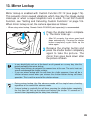
13. Mirror Lockup ...............................89
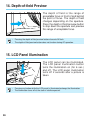
14. Depth-of-field Preview .................90
15. LCD Panel Illumination ................90
Flash Photography
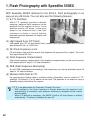
1. Flash Photography with Speedlite
550EX ..........................................92
2. Using Other EOS-Dedicated
Speedlites ..................................100
3. Using Non-Canon Flash Units ...101
Custom Functions
1. Setting and Canceling Custom
Functions ...................................104
2. Custom Function Settings..........106
3. Index of Custom Functions ........124
Reference Section
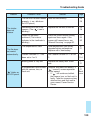
1. Troubleshooting Guide ..............128
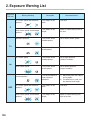
2. Exposure Warning List...............130
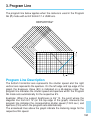
3. Program Line .............................131
4. Shutter Speed and Aperture
Readouts ...................................132
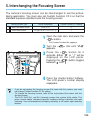
5. Interchanging the
Focusing Screen ........................133
6. Major Accessories .....................135
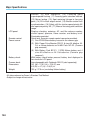
Major Specifications .........................140
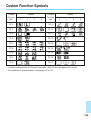
Custom Function Symbols ...............145
5
Handling Precautions
Camera Care and Storage
( 1 ) The camera is a precision instrument. Do not drop it or subject it to
physical shock.
( 2 ) This camera is not waterproof and cannot be used underwater. If the
camera gets really wet, promptly consult your nearest Canon Service
Center. Wipe off any water droplets with a dry cloth. If the camera
has been exposed to salty air, wipe with a well-wrung damp cloth.
( 3 ) Do not leave the camera in places prone to excessive heat such as
in a car on a sunny day. Excessive heat can cause the camera to
malfunction.
( 4 ) The camera contains precision electronic circuitry. Never attempt to
disassemble the camera.
( 5 ) Use only a blower brush to blow away dust on the lens, viewfinder
eyepiece, focusing screen, film compartment, and mirror. Do not use
an organic solvent-containing cleaner to clean the camera body or
lens. For stubborn dirt, consult your nearest Canon Service Center.
( 6 ) The shutter curtains are extremely thin. Use only a blower to clean.
Be careful not to blow air too forcefully on the shutter curtains. The
shutter curtains can be easily deformed or damaged. Also, when
loading and unloading film, be careful not to touch the shutter
curtains.
( 7 ) Do not touch the electrical contacts with your fingers. Otherwise
corrosion may develop on the contacts, resulting in improper camera
operation.
( 8 ) If the camera is not to be used for an extended period, remove the
battery. Store the camera in a well-ventilated, cool, dry place. During
the storage period, release the shutter a few times once in a while.
( 9 ) Avoid storing the camera in a laboratory, cabinet, etc., where
corrosive chemicals are present.
(10) If the camera has not been used for an extended period or if the
camera is to be used for an important event, check the operation of
all the camera controls or take it to your nearest Canon Service
Center.
6
Handling Precautions
(11) After detaching the lens from the camera, put on the lens caps or put
down the lens with the rear end up to avoid scratching the lens
surface and electrical contacts.
(12) Even when the Main switch is set to < >, a small amount of power
is still supplied to the camera’s LCD panel. However, this does not
affect the number of film rolls which can be taken with the battery.
LCD Panel
In time, the camera’s LCD (liquid-crystal display) panel indications may
become light and difficult to read. If this happens, have it replaced (at
cost) by a Canon Service Center.
At low temperatures, the display response of the LCD panel may become
slower. And at 60˚C or higher temperatures, the display may blacken. In
either case, the display will return to normal at room temperature.
Blinking “
” on the LCD panel
If the battery power falls to a very low level or a camera misoperation or
malfunction occurs, “ ” will blink on the LCD panel. In such a case,
follow the procedure below:
( 1 ) Press the battery check button to check the battery power. If the
battery power is low, replace the battery.
( 2 ) If the battery power is normal, remove the battery and reload it.
( 3 ) Release the shutter once.
If the “ ” then turns off, the camera is back to normal. However, if this
procedure is repeated and “ ” still continues to blink, the camera has a
malfunction. Take it to your nearest Canon Service Center.
7
Handling Precautions
About the Battery
The camera operates only after the battery is properly installed (see page
21). Check the battery power in the following cases:
(1) After replacing the battery.
(2) After not using the camera for an extended period.
(3) The shutter does not work.
(4) The camera is being used in a low-temperature environment.
(5) Before using the camera for an important event.
• Before installing the battery, wipe the battery contacts to remove any
fingerprints and smudges. This is to prevent faulty connections and
corrosion.
• Never disassemble or recharge the battery. Also, never store a battery
in high-temperature places or short circuit the battery contacts or toss
a battery into a fire.
• Although lithium batteries work well even in low temperatures, battery
performance may suffer slightly in freezing temperatures. In such a
case, keep a spare battery warm in a pocket, etc., and use and warm
the batteries alternately.
Low Battery Power
Even when
is not displayed or when it blinks on the LCD panel, a
correctly-exposed picture can still be taken as long as the shutter can be
released. However, when the battery power runs out, there may not be
enough power to advance and rewind the film automatically. “ ” will
then blink on the LCD panel. After the battery is replaced with a new one,
film advance will resume automatically or film rewind will continue when
the midroll film <
> is pressed.
8
Nomenclature
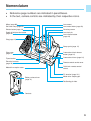
•
•
Reference page numbers are indicated in parentheses.
In the text, camera controls are indicated by their respective icons.
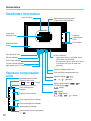
Mirror (page 89)
Lens mount
Self-timer lamp (page 87)
Lens mount index (page 23)
Shutter button (page 16)
Focusing screen
Depth-of-field preview button
(page 90)
Lens lock pin
Lens release button
(page 23)
Grip (page 21)
Strap eyelet (page 14)
Grip screw
(page 21)
Camera back lock release
button (page 24)
Camera back lever (page 24)
Tripod socket
Electrical contacts
(page 23)
Remote control socket cover
Motor drive coupler cover
Quick-lock remote control
socket
PC terminal (page 101)
Battery release lever
(page 21)
Motor drive coupling pin
Positioning pin hole
Contacts
9
Nomenclature
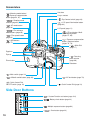
Hot shoe
< > Metering mode button /
< >Exposure compensation
button (page 54, 97)
X-sync contact
<
<
> Shooting mode
selector (page 30)
> Eye-Control switch (page 40)
<
> LCD panel illumination button
(page 90)
<
> AF mode button
(page 34)
LCD panel (page 11)
<
> Film advance
mode buttons (page 85)
<
> FE lock button / Multispot metering button
(pages 57, 95)
<
> Film speed button
(page 81)
< > Exposure compensation
button / Aperture button
(pages 73, 76)
< > AEB buttons
(page 77)
<
> Main Dial
(page 17)
Eyepiece
Eyecup
< > Focusing
point selector
(page 38)
Film window
Side door
<
<
> Main switch (page 16)
> Midroll rewind button (page 28)
<
< > Quick Control Dial
ON/OFF switch (page 19)
<
> AE lock button (page 79)
> Quick Control Dial (page 19)
Side Door Buttons
<
<
<
<
10
> Custom Function set button (page 104)
> Battery check button (page 22)
> Multiple exposure button (page 82)
> Clear button (page 20)
Nomenclature
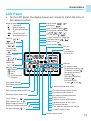
LCD Panel
•
On the LCD panel, the display boxes are colored to match the color of
the camera controls.
Shooting mode
P
: Program AE
: Manual exposure
: Shutter speed-priority
: AE
: Depth-of-field AE
: Aperture-priority AE
Aperture (
~
(
) ,
AEB amount
(
~
)
Focusing point
selection mode
(
)
Custom Function
setting
( / / / )
Calibration
channel No.
(
~
)
)
Shutter speed (
~
)
bulb display (
)
Depth-of-field AE point (
)
Focusing point selection mode
(
,
,
,
)
ISO film speed ( ~
)
Custom Function No. (
~ )
Calibration display (
,
)
Battery check (
)
FE lock display (
)
ISO icon
AF mode
One-Shot AF
AI Servo AF
AEB icon
Film advance mode
Single-frame shooting ( )
Continuous shooting ( )
Low-speed continuous
shooting (
)
High-speed continuous
shooting (
)
Self-timer setting
(10 sec.
, 2 sec.
)
Metering mode
Evaluative
Partial
Spot
Centerweighted
averaging
Film-loaded indicator
Film rewind completed
indicator
Flash exposure compensation icon
Remaining frame counter icon
Frame counter ( ~
)
Bulb exposure time ( ~
)
Multiple exposure setting ( ~ )
Remaining multiple exposures ( ~ )
Self-timer indicator ( ~ )
Exposure compensation scale
Film advance and rewind indicator
Film advance failure warning
Film advance completed indicator
Battery check icon
Exposure compensation indicator
Bulb elapsed time (30-sec. units)
AEB amount indicator
Flash exposure compensation amount
Custom Function setting
Multiple exposure icon
11
Nomenclature
Viewfinder Information
Area AF ellipse
Spot metering focusing points
(Lights at the required point)
Center spot
metering circle
Exposure
compensation
scale
Film Counter
New Lasermatte
screen
Eye-Control AF icon
AE lock indicator
Flash-ready indicator
FE lock warning indicator
High-speed sync (FP flash) indicator
In-focus indicator
Lights when focus is achieved, blinks
(8 Hz) when not achieved.
During manual focus, lights when focus
is achieved and stays off when not
achieved.
Exposure compensation icon
Exposure compensation
scale
Standard exposure index
Exposure level scale
: 1 stop
: 1/3 stop
Overexposure indicator
Flash overexposure
indicator
Exposure level indicator
Flash exposure level indicator
Flash underexposure indicator
Underexposure indicator
Frame counter (count up or down)
( ~
)
12
Flash exposure compensation icon
Aperture display (
,
,
,
~
Shutter speed display (
FE lock display(
)
display
,
)
display
display
display
,
,
,
~
, display
)
Conventions Used in this Instructions Booklet
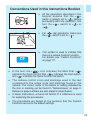
CF
•
All the operations described in this
booklet assume that the < >
switch is already set to < >. Before
proceeding with any operation, first
turn the < > switch to < > or
< >.
•
For < > dial operations, make sure
the < > switch is set to < >.
•
This symbol is used to indicate that
there is a related Custom Function.
For details, see “Custom Functions”
on page 111
•
In the text, the <
> icon indicates the Main Dial, < >
indicates the Quick Control Dial, < > indicates the main switch,
and < > indicates the Quick Control Dial switch.
•
The camera control icons and markings used in the text
correspond to the actual icons and markings found on the
camera. The correct name of the button or setting indicated by
the icon or marking can be found in “Nomenclature” on page 9.
Reference page numbers are also stated in parentheses.
•
In these Instructions, a Canon EF 50mm f/1.4 USM lens is used
for explaining the procedures.
•
The procedures are based on the pretense that the Custom
Functions are set to the default settings.
13
•
The ( 6 ) icon indicates that the respective function or setting
remains effective for 6 seconds after you take off your finger from
the shutter button.
•
The ( 16 ) icon indicates that the respective function or setting
remains effective for 16 seconds after you take off your finger
from the shutter button.
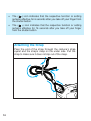
Attaching the Strap
Pass the end of the strap through the camera’s strap
eyelet and the strap’s clasp on the under side. Pull the
strap to make sure it does not slip out of the clasp.
14
Before You Start
This chapter explains a few preliminary steps and basic operations which
you should know before you start taking pictures. If you are a new EOS
user, read this chapter first.
If you are familiar with the basic operations of EOS cameras and want to
start using the camera right away, see “Quick Start with Program AE” on
page 29.
15
1. Basic Operation
Main Switch
The camera operates only after the <
switch has three settings:
> switch is turned on. This main
<
>: Lock position. The camera does
not operate. Set to this position
when not using the camera.
<
>: To turn on the camera, set to
this position. The “A” stands for
“Advance.”
<
>: This is the same as < >
except that it also enables the
beeper to sound in the following
cases:
• Focus is achieved in One-Shot AF
mode.
• Focus is achieved with manual focus.
• During Eye-Control calibration.
(Short beeps for successful
registration and intermittent beeping
for failed registration.)
When the camera is not to be used, set the Command Dial to < >. This will prevent
accidental battery drainage if the shutter button is held down inadvertently.
Shutter Button
You can press the shutter button halfway or all the way.
Hold the camera steadily and press the shutter button slowly without any
jerking movement. The difference between halfway and complete
pressing of the shutter button is explained below. Beginners should
practice pressing the shutter button halfway and completely before
loading any film.
16
Basic Operation
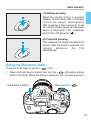
(1) Halfway pressing
When the shutter button is pressed
halfway, autofocusing (AF) is activated
to focus the subject. Autoexposure
(AE) metering is also turned on to set
the correct shutter speed and aperture
which is displayed in the viewfinder
and on the LCD panel for ( 6 ).
(2) Complete pressing
This releases the shutter and takes the
picture. After the frame is exposed, the
camera
advances
the
film
automatically.
Using the Electronic Dials
There are three ways to use the <
> dial:
1. Press and hold down a button and turn the <
> dial while looking
at the LCD panel. When the button is released, you can take a picture.
1Hold down a button...
2then turn the <
>.
17
Basic Operation
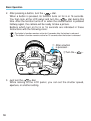
2. After pressing a button, turn the <
> dial.
When a button is pressed, its function turns on for 6 or 16 seconds.
You then look at the LCD panel and turn the <
> dial during this
time. After the function turns off or when the shutter button is pressed
halfway again, the camera will be ready to take a picture.
Buttons which turn on for 6 or 16 seconds are indicated in these
Instructions with the following icons:
( 6 ): The button’s function remains active for 6 seconds after the button is released.
( 16 ): The button’s function remains active for 16 seconds after the button is released.
1 After a button
is pressed...
2Turn the <
>.
3. Just turn the <
> dial.
While looking at the LCD panel, you can set the shutter speed,
aperture, or another setting.
18
Basic Operation
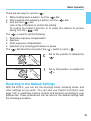
There are two ways to use the <
>:
1. While holding down a button, turn the < > dial.
2. After pressing and releasing a button, turn the < > dial.
3. Just turn the < > dial.
Look at the LCD panel to confirm the setting.
To restore the button’s function or to ready the camera for picture
taking, turn the <
> dial.
The <
1.
2.
3.
4.
> is used to set the following:
Real-time exposure compensation
Aperture
Flash exposure compensation
Selection of a focusing point above or below
The <
> dial functions only when the <
> switch is set to <
>.
: Set to this position to disable the
< >.
: Set to this position to enable the
< >.
Reverting to the Default Settings
With the EOS-3, you can set the shooting mode, metering mode, and
other settings as you wish. You can also use Custom Functions (see
page 103) to customize camera controls and functions according to your
preferences. These preferences can be reset to the default settings with
the following procedure.
19
Basic Operation
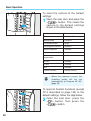
To reset the camera to the default
settings:
the side door and press the
1 Open
<
> button. This resets the
camera to the default settings
shown in the table below.
Shooting mode
P
AF mode
One-Shot AF
Metering mode
Evaluative
Film advance mode
Single
Focusing point selection
Automatic
Multiple exposures
Canceled
Exposure compensation
0
Flash exposure
compensation
0
AE lock
Canceled
FE lock
Canceled
AEB
Canceled
Custom Functions
Settings retained
• When the camera is reset, the
shooting mode will be set
automatically to Program AE <P>
(page 29).
1
To reset all Custom Functions (except
CF-0 described on page 105) to the
default settings, follow the step below:
the side door, press the
2 Open
<
> button, then press the
<
2
20
> button.
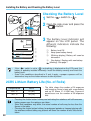
2. Installing the Battery and Checking the Battery Level
The battery is housed in the camera grip. Remove the grip to install one
2CR5 lithium battery.
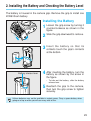
Installing the Battery
the grip screw by turning it
1 Loosen
counterclockwise as shown in the
figure.
2 Slide the grip downward to remove.
2
1
the battery so that its
3 Insert
contacts touch the grip’s contacts
at the bottom.
Battery release lever
inserting the battery, turn the
4 After
battery as shown by the arrow in
the figure.
• To take out the battery, slide the battery
release lever.
the grip to the camera,
5 Reattach
then turn the grip screw to tighten
securely.
Lithium batteries may not be available in certain areas. Carry a spare battery when
going on a trip or when you will use many rolls of film.
21
Installing the Battery and Checking the Battery Level
Checking the Battery Level
1 Set the < > switch to < >.
the side cover and press the
2 Open
<
> button.
battery level indicator will
3 The
appear on the LCD panel. The
1
2
3
4
different indicators indicate the
following:
1:
2:
3:
Battery level OK.
Keep spare battery handy.
(Blinking display) Battery will soon be
exhausted.
4: (No display): Replace with new battery.
(blinking): See page 7.
• If the < > switch is set to < > and nothing is displayed on the LCD panel, the
battery is probably installed incorrectly. Install the battery correctly and check the
battery level.
• Even if the conditions described in 3 and 4 apply, a proper exposure will be
obtained as long as the shutter releases to take a picture.
2CR5 Lithium Battery Life (No. of Rolls)
Temperature
+20 °C
–20 °C
Rolls
75 (50)
18 (12)
• The table shows the number of 24-exposure
rolls based on Canon’s tests with a new battery
and an EF 50mm f/1.4 USM lens. Figures in
parentheses are the number of 36-exposure
rolls.
• Pressing the shutter button halfway and activating the autofocus will still consume
battery power even if no pictures are taken.
• Since field conditions may differ, the actual number of rolls may be less than the
figures in the table.
• Pressing the shutter button halfway for prolonged periods or frequent playing with
the autofocus without taking any pictures will lower the number of rolls that can be
taken.
22
3. Mounting and Detaching a Lens
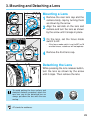
Mounting a Lens
the rear lens cap and the
1 Remove
camera body cap by turning them
as shown by the arrow.
the red dots on the lens and
2 Align
camera and turn the lens as shown
by the arrow until it snaps in place.
Red dots
the lens, set the focus mode
3 On
switch to AF.
• If the focus mode switch is set to MF) or M
on older lenses, autofocus will not operate.
4 Remove the front lens cap.
Detaching the Lens
While pressing the lens release button,
turn the lens as shown by the arrow
until it stops. Then remove the lens.
AF
To avoid getting the lens surface and
electrical contacts scratched, attach the
rear lens cap to the detached lens or
always put down the lens with the rear
end up.
AF stands for autofocus.
23
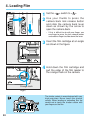
4. Loading Film
1
2
1 Set the < > switch to < >.
your thumb to press the
2 Use
camera back lock release button
and slide the camera back lever
down as shown by the arrow to
open the camera back.
• If this is difficult to do with one finger, use
one finger to press the lock release button
and another finger to slide down the lever.
the film cartridge at an angle
3 Insert
as shown in the figure.
down the film cartridge and
4 Hold
pull the edge of the film leader to
the orange mark on the camera.
Orange mark
Right
The shutter curtain is manufactured with very
high precision. Never touch the shutter
curtain. When loading or unloading film, be
careful not to touch the shutter curtain with
your fingers or the film.
24
Loading Film
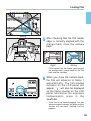
Wrong
checking that the film leader
5 After
edge is correctly aligned with the
orange mark, close the camera
back.
Right
Wrong
• If the edge of the film leader goes beyond
the orange mark, rewind some of the film
back into the cartridge.
you close the camera back,
6 When
the film will advance to frame 1
automatically. The film-loaded
indicator on the LCD panel will
appear. “ ” will also be displayed
on the frame counter on the LCD
panel and below the exposure
compensation scale in the
viewfinder.
• If the film is not loaded properly, the film
advance/rewind indicator will blink and the
shutter will not work. Reload the film
properly.
25
Loading Film
Custom Function CF-8 can set the frame counter to count down the remaining
number of exposures. If this function is set, ◆ will be displayed on the upper left of
the frame counter on the LCD panel. See page 112.
CF
When using the camera in high temperatures, do not remove the film packaging until
you are ready to load the film.
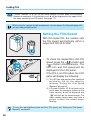
Setting the Film Speed
36 400
E
With DX-coded film, the camera sets
the film speed automatically within a
range from ISO 25 to 5000.
X
P
EXP
400
36
•
To check the loaded film’s ISO film
speed, press the <
> button and
< > button simultaneously. The
ISO icon and film speed will be
displayed on the LCD panel.
•
If the film is not DX-coded, the LCD
panel will display the following:
(1) The ISO icon and previous film speed will
be blinking. Set the film speed by
following “Setting the Film Speed
Manually” on page 81.
(2) If Custom Function CF-8 has been set to
count down the remaining frames on the
frame counter, ◆ will be displayed and
“
” will blink on the frame counter. The
frame counter counts down each time a
picture is taken (the number keeps
blinking).
To set a film speed different from the film’s ISO speed, see “Setting the Film Speed
Manually” on page 81.
26
Loading Film
CF
Custom Function CF-3 can prevent the ISO film speed from being set
automatically. See page 108.
Since an infrared sensor is used to detect
the film’s transport, it will fog (expose)
infrared film below the picture area.
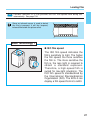
Basic Terminology 1
● ISO film speed
36 400
E
X
P
EXP
400
36
The ISO film speed indicates the
film’s sensitivity to light. The higher
the film speed, the more sensitive
the film is. The more sensitive the
film is, the less light is required to
obtain a standard exposure.
Therefore, a high-speed film is
suited for low-light situations. The
ISO film speed is standardized by
the International Standardization
Organization (ISO). The EOS-3 can
display a film speed from 6 to 6400.
27
5. Unloading Film
After the film’s last frame is exposed, the camera rewinds the film
automatically.
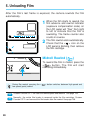
the film starts to rewind, the
1 When
film advance and rewind indicator
(exposure compensation scale) on
the LCD panel will “flow” from right
to left to indicate that the film is
rewinding. The frame counter also
counts in reverse.
film rewind ends automatically.
2 The
Check that the < > icon on the
LCD panel is blinking, then remove
the film cartridge.
Midroll Rewind (
)
To rewind the film in midroll, press the
<
> button. The film will start
rewinding immediately.
During film rewind, pressing the <
low-speed (quiet) rewind.
28
> button switches between high-speed and
CF
Custom Function CF-1 can alter the rewind speed and method. See page 106.
CF
Normally, the entire film leader is rewound inside the film cartridge. Custom
Function CF-2 can leave out the film leader after film rewind. See page 108.
Quick Start With Program AE
For quick and easy picture-taking, use the Program AE mode. This mode
sets both the shutter speed and aperture automatically to suit the
subject’s brightness. Anyone can easily take pictures in this mode. By
using the focusing points in the wide area AF ellipse in the viewfinder, it is
easy to compose and capture a variety of subjects.
First set the < > switch to < >. If
necessary, also set the < > switch to
< >.
The Program AE mode is set automatically as the camera’s initial shooting mode.
See page 19.
AE is an abbreviation for Auto Exposure.
29
Quick Start With Program AE
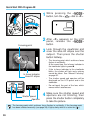
pressing
1 While
button, turn the <
the <
>
> dial to <P>.
<P> appears on the LCD
2 After
panel, release the <
>
Focusing point
button.
through the viewfinder and
3 Look
cover the area AF ellipse over the
subject. Then press the shutter
button halfway.
In-focus indicator
Area AF ellipse
Shutter speed
Aperture
• The focusing point which achieves focus
flashes in red briefly.
At the same time, the in-focus indicator in
the viewfinder lights in green ●.
• If the in-focus indicator in the viewfinder
blinks, the shutter will lock and a picture
cannot be taken. See “Manual Focusing”
on page 52.
• The shutter speed and aperture will be
displayed on the LCD panel and in the
viewfinder.
• Do not touch the part of the lens which
moves while it autofocuses.
sure the shutter speed and
4 Make
aperture are not blinking, then
press the shutter button completely
to take the picture.
The focusing point which achieves focus flashes in red briefly. If the focusing point
has been selected manually (see page 38), it lights dimly while it is active for ( 6 ).
30
Quick Start With Program AE
[Exposure Warnings]
If the shutter speed or aperture blinks, it means a standard exposure cannot be obtained.
Although the picture can be taken, it may come out too light or too dark. For details, see
“Exposure Warning List” on page 130.
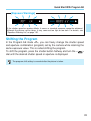
Shifting the Program
In the Program AE mode <P>, you can freely change the shutter speed
and aperture combination (program) set by the camera while retaining the
same exposure value. This is called shifting the program.
To shift the program, press the shutter button halfway and turn the <
dial until the desired shutter speed or aperture is displayed.
>
The program shift setting is canceled after the picture is taken.
31
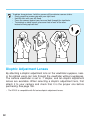
To obtain sharp pictures, hold the camera still to minimize camera shake.
• Firmly grasp the camera grip with your right hand.
• Hold the lens with your left hand.
• Press the camera against your face and look through the viewfinder.
• To maintain a stable stance, place one foot in front of the other
instead of lining up both feet.
Dioptric Adjustment Lenses
By attaching a dioptric adjustment lens on the viewfinder eyepiece, nearor far-sighted users can look through the viewfinder without eyeglasses.
The camera viewfinder is set to -1 diopter, and ten dioptric adjustment
lenses are available. When selecting a dioptric adjustment lens, first
attach it to your camera and check that it is the proper one before
purchasing. See page 138.
• The EOS-3 is compatible with Ed-series dioptric adjustment lenses.
32
Autofocus (AF)
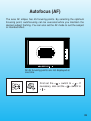
The area AF ellipse has 45 focusing points. By selecting the optimum
focusing point, autofocusing can be executed while you maintain the
desired subject framing. You can also set the AF mode to suit the subject
or intended effect.
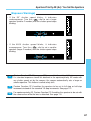
All 45 focusing points are not displayed at
one time.
First set the < > switch to < >. If
necessary, also set the < > switch to
< >.
33
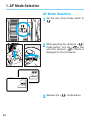
1. AF Mode Selection
AF Mode Selection
1 Set .the lens focus mode switch to
pressing the camera’s <
>
2 While
mode button, turn the <
> dial
until the desired <
> mode is
displayed on the LCD panel.
3 Release the <
34
> mode button.
AF Mode Selection
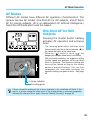
AF Modes
Different AF modes have different AF operation characteristics. The
camera has two AF modes: One-Shot AF for still subjects, and AI Servo
AF for moving subjects. (AI is an abbreviation for Artificial Intelligence.)
Select the AF mode which suits the subject.
One-Shot AF for Still
Subjects
Pressing the shutter button halfway
activates AF operation and achieves
focus.
• The focusing point which achieves focus
flashes briefly and the in-focus indicator (●) in
the viewfinder lights at the same time.
• When the < > switch is set to < >, the
beeper also sounds when focus is achieved.
• With evaluative metering, the exposure setting
(shutter speed and aperture) will be set when
focus is achieved. The exposure setting and
focus will be locked as long as the shutter
button is pressed halfway. You can then
recompose the shot while retaining the
exposure setting and point of focus. See page
49.
In-focus indicator
Focusing point
If focus cannot be achieved, the in-focus indicator in the viewfinder will blink. If this
occurs, a picture cannot be taken even if the shutter button is pressed completely.
Reframe the shot and focus again. Also see “Manual Focusing” on page 52.
35
AF Mode Selection
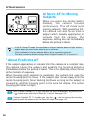
AI Servo AF for Moving
Subjects
While you press the shutter button
halfway, the camera focuses
continuously. This AF mode suits
moving subjects. With predictive AF,
the camera can also focus track a
subject which steadily approaches or
retreats from the camera. The
exposure setting are set immediately
before the picture is taken.
• In the AI Servo AF mode, the viewfinder’s in-focus indicator does not light and the
beeper does not sound even when focus is achieved.
• If the viewfinder’s in-focus indicator blinks, focus cannot be achieved.
• The focus cannot be locked (except when Custom Function CF-4 is set to 2.)
* About Predictive AF
If the subject approaches or retreats from the camera at a constant rate,
the camera tracks the subject and predicts the focusing distance
immediately before the picture is taken. This is for obtaining correct focus
at the moment of exposure.
When focusing point selection is automatic, the camera first uses the
center focusing point to focus. If the subject later moves away from the
center focusing point, focus tracking continues as long as the subject is
covered by another focusing point in the area AF ellipse. The active
focusing point does not light.
36
CF
With Custom Function CF-4, you can lock the focus momentarily by pressing the
< > button even while the AI Servo AF is active. See page 108.
CF
Custom Function CF-11 enables you turn the < > dial to change the focusing
point to track the subject in the AI Servo AF mode. See page 116.
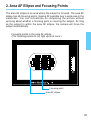
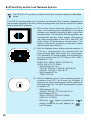
2. Area AF Ellipse and Focusing Points
The area AF ellipse is an area where the subject is focused. The area AF
ellipse has 45 focusing points, making AF possible over a wide area in the
viewfinder. You can concentrate on composing the picture without
worrying about whether a focusing point is covering the subject. As long
as the subject is within the area AF ellipse, the camera will focus the
subject automatically.
Focusing points in the area AF ellipse
(The focusing points do not light up all at once.)
Focusing point
Area AF ellipse
37
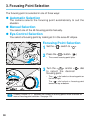
3. Focusing Point Selection
The focusing point is selected in one of three ways:
● Automatic Selection
The camera selects the focusing point automatically to suit the
situation.
● Manual Selection
You select one of the 45 focusing points manually.
● Eye-Control Selection
You select a focusing point by looking at it in the area AF ellipse.
Focusing Point Selection
1 Set the <
2 Press the <
> switch to <
>.
> button. ( 6 )
• The current focusing point lights.
the <
3 Turn
to select
> and/or <
the desired
focusing point.
> dial
• The <
> dial selects a focusing point on
the left or right.
The < > dial selects a focusing point
toward the top or bottom.
CF
38
Custom Function CF-17 expands the number of focusing points made available for
manual focusing point selection. See page 120.
Focusing Point Selection
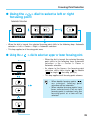
● Using the < > dial to select a left or right
focusing point
Automatic Selection
• When the dial is turned, the selected focusing point shifts in the following loop: Automatic
selection ↔ Left ↔ Center ↔ Right ↔ Automatic selection.
• This loop applies to all focusing point rows.
● Using the <
> dial to select an upper or lower focusing point.
• When the dial is turned, the selected focusing
point shifts in the following loop: Automatic
selection ↔ Up ↔ Center ↔ Down ↔
Automatic selection.
• As shown in the figures, the focusing point
selection shifts from single ( ) to double
(
) to single ( ) focusing point(s).
• This loop applies to all focusing point columns.
• When double focusing points (
)
a r e sel ect ed, f ocusi ng poi nt
selection will be automatic.
• When double focusing points have
been selected and a left or right
focusing point is selected, only one
focusing point at a time will be
selected.
39
Focusing Point Selection
When the <
> button is pressed while the < > is pressed, the <
be turned to select a focusing point toward the top or bottom.
> dial can
focusing point selection takes
4 The
effect after 6 seconds or when the
shutter button is pressed halfway.
CF
The focusing point selection method can be altered with the Custom Function
CF-11. See page 116.
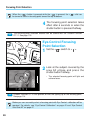
Eye-Control Focusing
Point Selection
1 Set the <
> switch to <
>.
at the subject covered by the
2 Look
area AF ellipse and press the
shutter button halfway.
• The selected focusing point will light and
achieve focus.
CF
Custom Function CF-10 can prevent or limit the lighting up of the focusing point.
See page 114.
Before you can accurately select a focusing point with Eye Control, calibration will be
required. For details, see “Eye-Control Calibration” on page 42 and “Eye-Control
One-Shot AF” on page 47.
40
Focusing Point Selection
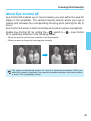
About Eye-Control AF
Eye-Control AF enables you to focus at where you look within the area AF
ellipse in the viewfinder. The camera instantly detects where your eye is
looking and activates the corresponding focusing point (among the 45) to
focus.
Eye-Control AF works in both horizontal and vertical camera orientations.
Enable Eye-Control AF by setting the < > switch to <
AF is especially effective in the following cases:
>. Eye-Control
• When you want to achieve focus instantly at the desired point.
• When you want to change the focusing point instantly.
The camera automatically detects its vertical or horizontal orientation. When you
switch the camera's orientation, the camera's orientation detection mechanism makes
a sound. This is completely normal.
41
Focusing Point Selection
Eye-Control Calibration
Before using Eye-Control AF, you must calibrate the camera to recognize
your eye movements. The camera will then be able to detect where you
are looking in the viewfinder.
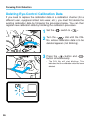
Calibration Procedure
You calibrate the camera by looking at a blinking focusing point in the
viewfinder and then pressing the shutter button. You do this for four
focusing points while holding the camera horizontally and again while
holding the camera vertically. Therefore, you have to follow the calibration
procedure eight times.
There are three calibration channels (CAL 1, 2, 3) which can store
different calibration data.
For example, you can store calibration data in channel 1 for your naked
eye and channel 2 for when you wear eyeglasses or contact lenses.
Channel 3 can be used to store calibration data for another user.
• Keep your eye on the viewfinder eyepiece until you complete the calibration procedure.
• In the same calibration channel, do the calibration procedure for both the horizontal and
vertical camera orientations.
If the calibration procedure is done only for the horizontal camera orientation, EyeControl AF during vertical picture-taking may be inaccurate. You should complete
the calibration procedure for both horizontal and vertical camera orientations in a
calibration channel.
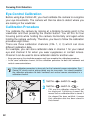
1 Set the <
2 Set the <
> switch to <
> switch to <
>.
>.
• CAL and the calibration channel No. will
be displayed. A blinking channel No.
means that no calibration data is stored. If
the channel No. does not blink, it means
that calibration data has been stored in
that channel.
42
Focusing Point Selection
the <
> dial to select a
3 Turn
blinking channel No.
• If there is no blinking channel No., see
“Deleting Eye-Control Calibration Data” on
page 46.
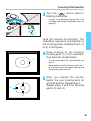
Hold the camera horizontally. The
calibration sequence corresponds to
the focusing points numbered from (1)
to (4) in the figures.
looking at the blinking
4 Keep
focusing point (1) in the viewfinder,
then press the shutter button.
(1)
(3)
• The focusing point will stop blinking and
stay lit.
• Keep looking at the lit focusing point for 1
to 2 seconds until the beeper sounds and
the focusing point turns off.
you release the shutter
5 After
button, the next focusing point (2)
will start blinking. Repeat step 4.
Repeat steps 4 and 5 for focusing
points (3) and (4).
(2)
(4)
43
Focusing Point Selection
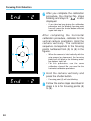
you complete the calibration
6 After
procedure, the channel No. stops
blinking and stays lit. “
displayed.
” is also
• If you take too long during the calibration
procedure and the blinking focusing point
turns off, press the shutter button and start
again from step 4.
After completing the horizontal
calibration procedure, calibrate for the
vertical camera orientation. Hold the
camera vertically. The calibration
sequence corresponds to the focusing
points numbered from (5) to (8) in the
figures.
(5)
(7)
(8)
(6)
• When the camera is held vertically with the
grip upward or downward, the focusing
points will still blink in the following order:
top, bottom, right, left.
• For this procedure, use the same
calibration channel No. you used for the
horizontal calibration procedure.
the camera vertically and
7 Hold
press the shutter button.
• Focusing point (5) will start blinking.
the same steps described in
8 Follow
steps 4 to 6 for focusing points (5)
to (8).
44
Focusing Point Selection
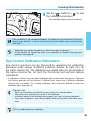
the < > switch to <
9 Set
the calibration procedure.
> to end
• The viewfinder display returns to normal.
If the calibration is not completed properly, the beeper will sound and the LCD panel
display items will blink. In such a case, press the shutter button again and start again
from step 4.
• Calibration may not be possible if you wear mirror-type sunglasses.
• If Eye-Control AF cannot be used, use automatic or manual focusing point
selection. See page 38.
Eye-Control Calibration Refinement
Eye-Control precision can be improved by repeating the calibration
procedure under various conditions (outdoors, indoors, at night, etc.) for
the same channel No. The additional eye-related data can accumulate in
the same channel No. for both the horizontal and vertical camera
orientations.
• A calibration channel must not store calibration data for more than one person. Otherwise
Eye-Control precision will be affected. A different user should use a different calibration
channel that is available. Or, existing calibration data should be deleted to store new
calibration data. See page 46.
Calibration Tips
• Relax your shoulders and hold the camera steady in a natural posture.
• Align your line of sight with the center of the viewfinder.
• Instead of looking at the blinking focusing point itself, look at the point beyond it.
• If you wear eyeglasses, wear them properly without having them slide down your
nose.
CAL is an abbreviation for calibration.
45
Focusing Point Selection
Deleting Eye-Control Calibration Data
If you need to replace the calibration data in a calibration channel (for a
different user, eyeglass/contact lens wear, etc.), you must first delete the
existing calibration data by following the procedure below. You can then
register new calibration data by following the calibration procedure.
1 Set the <
> switch to <
>.
the <
> dial until the CAL
2 Turn
No. whose calibration data is to be
deleted appears (not blinking).
the < > button and <
3 Press
button simultaneously.
>
• The CAL No. will start blinking. This
indicates that the calibration data has been
deleted.
46
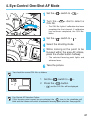
4. Eye-Control One-Shot AF Mode
1 Set the <
> switch to <
the <
2 Turn
CAL No.
>.
> dial to select a
• The CAL No. lights if calibration has been
completed for that channel. If calibration
has not been completed, the CAL No.
blinks.
3 Set the < > switch to < >.
4 Select the shooting mode.
looking at the point to be
5 While
focused within the area AF ellipse,
press the shutter button halfway.
• The selected focusing point lights and
achieves focus.
6 Take the picture.
You check the current CAL No. as follows:
1
Set the <
2
Press the <
•
> switch to <
>.
> button.
and the CAL No. will be displayed.
Eye-Control AF Selection Failure
If the focusing point cannot be eye-selected, the < > icon in the viewfinder will
blink and the camera will switch to automatic focusing point selection. See page 38.
47
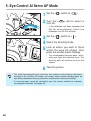
5. Eye-Control AI Servo AF Mode
1 Set the <
> switch to <
the <
2 Turn
CAL No.
•
>.
> dial to select a
If the calibration has been completed, the
CAL No. will be displayed. If there is no
calibration, the CAL No. will blink.
3 Set the < > switch to < >.
4 Select the shooting mode.
at where you want to focus
5 Look
within the area AF ellipse, then
press the shutter button halfway.
• The corresponding focusing point, selected by eye, lights and achieves focus. This
focusing point will continue to focus the
subject.
6 Take the picture.
• The initial focusing point you select by eye remains active during continuous
focusing in the AI-Servo AF mode. You cannot select another focusing point by
eye during continuous focusing (while the shutter button is pressed halfway).
• If a focusing point cannot be selected by eye, the camera switches to automatic
focusing point selection. See page 38.
48
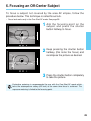
6. Focusing an Off-Center Subject
To focus a subject not covered by the area AF ellipse, follow the
procedure below. This technique is called focus lock.
• Focus lock works only in the One-Shot AF mode. See page 35.
the focusing point on the
1 Aim
subject and press the shutter
button halfway to focus.
pressing the shutter button
2 Keep
halfway (this locks the focus) and
recompose the picture as desired.
the shutter button completely
3 Press
to take the picture.
Evaluative metering is recommended for use with the One-Shot AF mode which
locks the autoexposure setting (AE lock) at the same time focus is achieved. The
exposure metering is linked to the focusing point.
49
● AF Sensitivity and the Lens’ Maximum Aperture
The EOS-3’s AF sensitivity in relation to the lens’ maximum aperture is described
below.
The EOS-3’s focusing points are all sensitive to horizontal lines. However, depending on
the maximum aperture of the lens, certain focusing points can also be sensitive to vertical
lines to enhance AF precision.
(1) With lenses whose maximum aperture is f/2.8 or
larger, the focusing points highlighted in the figure
become cross sensors sensitive to both vertical and
horizontal lines. The remaining 38 focusing points are
horizontal-line sensitive. Cross sensors (also used as
the center focusing point in the EOS-1 and EOS-1N)
attain higher AF performance and precision. The
sensor’s vertical-line sensitivity is three times higher
than horizontal-line sensitivity.
(2) With the following lenses whose maximum aperture is
f/2.8 to f/4, high-precision AF is possible with the
center focusing point which works as a cross sensor.
The remaining 44 focusing points are horizontal-line
sensitive (except with EF 70-200mm f/2.8L USM +
Extender EF 1.4x).
28-80/2.8-4L, 300/4L, 300/4L IS, 500/4L IS,
600/4L, 600/4L IS, 70-200/4L
• With Extender EF 1.4x:
200/2.8L, 200/2.8L II, 300/2.8L, 300/2.8L IS,
400/2.8L, 400/2.8L II, 400/2.8L IS
• With Extender EF 2x:
135/2L, 200/1.8L
(3) With the following lenses, if the maximum aperture is
anywhere from f/6.7 to f/8 when an Extender is
attached, the center focusing point will be sensitive to
horizontal lines only. The other focusing points cannot
be used for AF.
• With Extender EF 1.4x:
400/5.6L, 500/4.5L, 100-400/4.5-5.6L IS
• With Extender EF 2x:
300/4L, 300/4L IS, 500/4L IS, 600/4L,
600/4L IS, 70-200/4L
• When the <
> button is pressed, the
display shown on the right appears on
the LCD panel
50
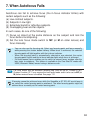
7. When Autofocus Fails
Autofocus can fail to achieve focus (the in-focus indicator blinks) with
certain subjects such as the following:
(a)
(b)
(c)
(d)
Low-contrast subjects.
Subjects in low light.
Extremely backlit or reflective subjects.
Overlapping near and far objects.
In such cases, do one of the following:
(1) Focus an object at the same distance as the subject and lock the
focus before recomposing.
(2) Set the lens focus mode switch to MF (or M on older lenses) and
focus manually.
• You can also use the focusing aid. Select any focusing point and focus manually
while pressing the shutter button halfway. When focus is achieved, the selected
focusing point will light together with the in-focus indicator.
• When the focusing point is automatically selected or eye-selected, the center
focusing point flashes and the in-focus indicator lights when focus is achieved.
• Full-time manual focus enables you to switch to manual focus anytime after the
lens starts to autofocus. This feature is available in the One-Shot AF mode with
USM (Ultrasonic Motor) lenses having a distance scale.
CF
For USM lenses with an electronic focusing ring (such as the EF 200mm f/1.8L),
Custom Function CF-7 may require the lens focus mode switch to be set to MF (or
M) before manual focus is enabled. See page 112.
If focusing cannot be achieved even while the Speedlite or ST-E2's AF-assist lamp is
on, select the center focusing point to autofocus. The other focusing points might not
achieve focus as readily as the center focusing point.
51
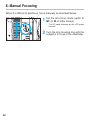
8. Manual Focusing
When it is difficult to autofocus, focus manually as described below.
the lens focus mode switch to
1 Set
MF (or M on older lenses).
• The AF mode indicator on the LCD panel
turns off.
the lens focusing ring until the
2 Turn
subject is in focus in the viewfinder.
52
Metering Modes
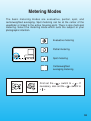
The basic metering modes are evaluative, partial, spot, and
centerweighted averaging. Spot metering can be at the center of the
viewfinder or linked to the active focusing point. There is also multi-spot
metering. Select the metering mode which suits the subject or your
photographic intention.
Evaluative metering
Partial metering
Spot metering
Centerweighted
averaging metering
First set the < > switch to < >. If
necessary, also set the < > switch to
< >.
53
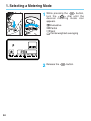
1. Selecting a Metering Mode
pressing the <
1 While
turn the <
> dial
> button,
until the
desired metering mode icon
appears.
Evaluative
Partial
Spot
Centerweighted averaging
2 Release the <
54
> button.
2. Metering Modes
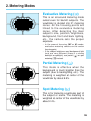
Evaluative Metering (
)
This is an all-around metering mode
suited even for backlit subjects. The
viewfinder is divided into 21 metering
zones. All the focusing points are
linked to the evaluative metering
zones. After detecting the main
subject’s size, position, brightness,
background, front and back lighting,
etc., the camera sets the proper
exposure.
• In the manual focusing (MF or M) mode,
evaluative metering centers on the center
focusing point.
• If the subject brightness and background light
level are very different (there is a strong
backlight or spotlight), use partial ( ) or spot
metering ( ) instead.
Partial Metering (
)
This mode is effective when the
background is much brighter than the
subject (due to backlighting, etc.). The
metering is weighted at center of the
viewfinder by about 8.5%.
Spot Metering (
)
This is for metering a particular part of
the subject or scene. The metering is
weighted at center of the viewfinder by
about 2.4%.
55
Metering Modes
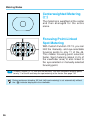
Centerweighted Metering
( )
The metering is weighted at the center
and then averaged for the entire
scene.
Focusing Point-Linked
Spot Metering
With Custom Function CF-13, you can
limit the manually- and eye-selectable
focusing points to only 11 of the 45.
This makes focusing point selection
faster. Spot metering (about 2.4% of
the viewfinder area) is also linked to
the eye-selected or manually-selected
focusing point.
CF
Custom Function CF-13 can limit the manually- and eye-selectable focusing points
to only 11 of the 45 and keep the spot metering at the center. See page 118.
During continuous shooting, AE lock (with spot metering) is set automatically without
the < > indicator displayed in the viewfinder.
56
Metering Modes
Multi-Spot Metering
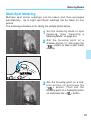
Multiple spot meter readings can be taken and then averaged
automatically. Up to eight spot meter readings can be taken for one
picture.
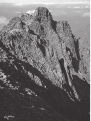
The following procedure is for taking the sample photo below.
the metering mode to spot
1 Set
metering. (See “Selecting a
Metering Mode” on page 54.)
the focusing point on a
2 Aim
shadow portion (1) and press the
<
> button to take a spot meter
reading.
(1)
(2)
(3)
the focusing point on a mid3 Aim
tone portion (2) and press the
<
> button. Then aim the
focusing point on a highlight portion
(3) and press the <
> button.
57
Metering Modes
Each time a spot meter reading is taken, the spot meter readings taken so
far are averaged and the result (shutter speed and aperture) is displayed
below the viewfinder. See the figure on the next page for “Multi-Spot
Metering Display.” On the exposure compensation scale on the right of
the viewfinder, the exposure level indicator moves around in real-time to
indicate the spot meter reading’s current exposure level. Each spot meter
reading is also indicated on the scale with a fixed (non-moving) metering
mark.
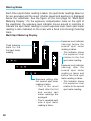
Multi-Spot Metering Display
Exposure level indicator
(moving) before the
second spot meter
reading is taken.
• This indicator shows
the exposure level
relative to the first
spot meter reading.
Fixed metering
mark for the
first spot meter
reading
Exposure setting after
the second spot meter
reading is taken.
• This is the result
(fixed) after the first
and second spot
meter readings are
averaged.
• This is repeated each
time a spot meter
reading is taken.
58
Exposure level indicator
(moving) after the
second spot meter
reading is taken and
before the third spot
meter reading is taken.
• This indicator shows
the exposure level
relative to the second
spot meter reading.
Metering Modes
● The exposure settings obtained with multi-spot meter readings are
canceled in the following cases:
1. After a spot meter reading is taken, 16 seconds elapse.
2. You press the <
>, <
>, or <
> button.
3. After taking the picture, you release the shutter button.
Up to eight spot meter readings can be taken for one picture. If you press the <
>
button to try and take a ninth spot meter reading, no spot meter reading will register.
Multi-spot metering can be fixed at the center or linked to the active focusing point.
59
Shooting Modes
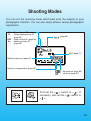
You can set the shooting mode which best suits the subject or your
photographic intention. You can also easily achieve various photographic
expressions.
M
Tv
: Manual (page 73)
: Shutter speed-priority AE
(page 62)
DEP : Depth-of-field AE (page 68)
Av : Aperture-priority AE
(page 65)
(page 84)
AEB (page 77)
Multiple exposures (page 82)
Exposure compensation (page 75)
: film advance (page 85)
: self-timer (page 87)
First set the < > switch to < >. If
necessary, also set the < > switch to
< >.
61
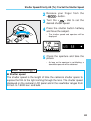
1. Shutter Speed-Priority AE (Tv):
You Set the Shutter Speed
In this mode, you set the desired shutter speed and the camera sets the
aperture automatically to suit the subject brightness.
A fast shutter speed can freeze motion, and a slow shutter speed can
achieve a blurred effect.
Tv is an abbreviation for Time value.
With a fast shutter speed
With a slow shutter speed
pressing
1 While
button, turn the <
the <
>
> dial until Tv
appears on the LCD panel.
62
Shutter Speed-Priority AE (Tv): You Set the Shutter Speed
your finger
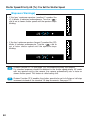
2 Release
<
> button.
from the
the <
> dial to set the
3 Turn
desired shutter speed.
the shutter button halfway
4 Press
and focus the subject.
• The shutter speed and aperture will be
displayed.
the aperture and take the
5 Check
picture.
• As long as the aperture is not blinking, a
standard exposure will be obtained.
Basic Terminology 2
● Shutter speed
The shutter speed is the length of time the camera’s shutter opens to
expose the film to the light coming through the lens. The shutter speed
displayed on the camera’s LCD panel and in the viewfinder ranges from
30 sec. to 1/8000 sec. and bulb.
63
Shutter Speed-Priority AE (Tv): You Set the Shutter Speed
[Exposure Warnings]
• If the lens’ maximum aperture (smallest F-number like
f/1.4) blinks, it indicates underexposure. Turn the <
>
dial to set a slower shutter speed until the aperture stops
blinking.
• If the lens’ minimum aperture (largest F-number like f/22)
blinks, it indicates overexposure. Turn the <
> dial to
set a faster shutter speed until the aperture stops
blinking.
CF
CF
64
Custom Function CF-16 (see page 120) can enable the safety shift feature:
If a standard exposure cannot be obtained in the shutter speed-priority AE mode
with any aperture set by the camera, the camera automatically sets a faster or
slower shutter speed. This feature is called safety shift.
Custom Function CF-6 enables the shutter speed to be set in full-stop or half-stop
increments instead of the standard 1/3-stop increments. See page 112.
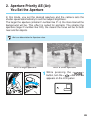
2. Aperture-Priority AE (Av):
You Set the Aperture
In this mode, you set the desired aperture and the camera sets the
shutter speed automatically to suit the subject brightness.
The larger the aperture (smaller F-number like f/1.4) the more blurred the
background will be. This effect is suited for portraits. The smaller the
aperture (larger F-number like f/22), the clearer the focus will be for both
near and far objects.
Av is an abbreviation for Aperture value.
With a large aperture
With a small aperture
pressing
1 While
button, turn the <
the <
>
> dial until Av
appears on the LCD panel.
65
Aperture-Priority AE (Av): You Set the Aperture
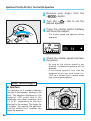
your finger
2 Release
<
> button.
from the
the <
> dial to set the
3 Turn
desired aperture.
the shutter button halfway
4 Press
and focus the subject.
• The shutter speed and aperture will be
displayed.
the shutter speed and take
5 Check
the picture.
• As long as the shutter speed is not
blinking, a standard exposure will be
obtained.
• If the shutter speed is less than the
reciprocal of the lens focal length (i.e.
1/200 for a 200mm lens), camera shake
may cause a blurred picture.
Basic Terminology 3
● Aperture
The aperture (or F-number) indicates
the size of the aperture opening in the
lens. The aperture displayed on the
camera’s LCD panel and in the
viewfinder can range anywhere from
1.0 to 91, depending on the lens
attached to the camera. The larger the
F-number, the smaller the aperture.
And the smaller the F-number, the
larger the aperture.
66
Aperture-Priority AE (Av): You Set the Aperture
[Exposure Warnings]
• If the 30” shutter speed blinks, it indicates
underexposure. Turn the <
> dial to set a larger
aperture (smaller F-number) until the shutter speed stops
blinking.
• If the 8000 shutter speed blinks, it indicates
overexposure. Turn the <
> dial to set a smaller
aperture (larger F-number) until the shutter speed stops
blinking.
CF
Custom Function CF-16 (see page 120) can enable the safety shift feature:
If a standard exposure cannot be obtained in the aperture-priority AE mode with
any shutter speed set by the camera, the camera automatically sets a larger or
smaller aperture. This feature is called safety shift.
CF
Custom Function CF-6 enables the aperture to be set in full-stop or half-stop
increments instead of the standard 1/3-stop increments. See page 112.
CF
For aperture-priority AE, Custom Function CF-5 enables the aperture to be set with
the camera even while the lens is detached. See page 110.
67
3. Depth-of-field AE (DEP):
You Set the Depth of Field
This mode is for obtaining sharp focus between a specified point in the
foreground and one in the background. It is effective for large-group
photos and landscapes. The optimum point of focus and aperture to attain
the depth of field are set automatically along with the shutter speed. You
can use this mode with a manually-selected or eye-selected focusing
point.
• To use this mode, the lens focus mode switch must be set to AF.
Depth-of-field AE with a
Manually-Selected
Focusing Point
pressing the <
>
1 While
button, turn the <
> dial until
DEP appears on the LCD panel.
2 Release the <
3 Set the < > to <
> button.
>.
4 Select the focusing point.
68
Depth-of-field AE (DEP): You Set the Depth of Field
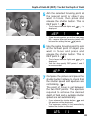
the selected focusing point at
5 Aim
the nearest point or object you
want in focus, then press and
release the shutter button. This is
DEP point 1. ( 6 )
• The in-focus indicator lights and
displayed.
is
• If two focusing points are active (see page
39), camera-selected focusing points will
be used for setting the two
points.
the same focusing point to aim
6 Use
at the farthest point or object you
want in focus and press and
release the shutter button. This is
DEP point 2. ( 6 )
• The in-focus indicator lights and
is
displayed.
• You can also specify DEP points 1 and 2
in reverse order.
the picture and press the
7 Compose
shutter button halfway to check that
the shutter speed and aperture are
not blinking. ( 6 )
The point of focus is set between
the two DEP points. The aperture
required to achieve the desired
depth of field and a suitable shutter
speed are set automatically.
• If you release the shutter button,
and
the aperture will be displayed.
• The exposure setting is set immediately
before the shutter is released.
69
Depth-of-field AE (DEP): You Set the Depth of Field
the shutter button completely
8 Press
to take the picture.
Depth-of-field AE with a Camera-Selected Focusing Point
• The camera selects the center focusing point for depth-of-field AE. Follow the
same procedure as for “Depth-of-field AE with a Manually-Selected Focusing
Point” while using the center focusing point to set the DEP points.
• Be sure to complete each step within 6 seconds (before the viewfinder display
turns off) after removing your finger from the shutter button. Otherwise, the DEP
settings will be canceled and you will have to start over.
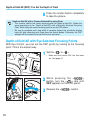
Depth-of-field AE with Eye-Selected Focusing Points
With Eye Control, you can set the DEP points by looking at the focusing
point. This is the easiest way.
1 Set the <
> to <
>.
• Make sure the correct CAL No. has been
set. See page 42.
pressing the <
>
2 While
button, turn the <
> dial until
DEP appears on the LCD panel.
3 Release the <
70
> button.
Depth-of-field AE (DEP): You Set the Depth of Field
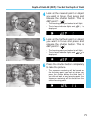
at the nearest point or object
4 Look
you want in focus, then press and
release the shutter button. This is
dEP point 1. ( 6 )
• The focusing point you looked at will light.
• The in-focus indicator lights and
is
displayed.
at the farthest point or object
5 Look
you want in focus and press and
release the shutter button. This is
dEP point 2. ( 6 )
• The focusing point you looked at will light.
• The in-focus indicator lights and
is
displayed.
the shutter button completely
6 Press
to take the picture.
• The exposure metering will be based on
the focusing point you look at when you
press the shutter button the third time. If
you did not look at any focusing point, the
exposure metering will be based on the
center focusing point.
71
Depth-of-field AE (DEP): You Set the Depth of Field
[Exposure Warnings]
• If the aperture blinks, the desired depth of field cannot be obtained. (However, you can
still take the picture and obtain a proper exposure.) Use a wide-angle lens or move away
from the subject and repeat steps 4 to 6.
• If the 30” shutter speed and the lens’
maximum aperture (smallest CFnumber) blink, the scene is too dark
and the picture cannot be taken in the
depth-of-field AE mode.
• If the 8000 shutter speed and the lens’
minimum aperture (largest f-number)
blink, the scene is too bright. Use a
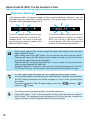
neutral density (ND) filter to reduce the
amount of light entering the camera.
• When using a zoom lens, do not change the zoom focal length while using the
depth-of-field AE mode.
• After setting one or two dEP points, do not change the active focusing point.
Doing so will cancel the dEP point(s) that has been set and you will have to start
over with the newly selected focusing point.
• Depth-of-field AE cannot be used with flash. If flash is used, the result will be the
same as using Program AE with flash.
• If depth-of-field AE is used with a lens having a focusing limiting switch (like the
EF 300mm f/2.8 lens), set the switch to the maximum focusing distance range.
• If a slow shutter speed has been set, use a tripod to prevent camera shake.
• If six seconds elapse and the display turns off before you complete the procedure,
the DEP settings entered so far will be canceled. In such a case, you must start
over again.
• To cancel the depth-of-field AE mode midway, press the <
> button, <
>
button, or < > button.
• To further increase the depth of field, use a wide-angle lens.
• Setting dEP points 1 and 2 at the same point on the subject will make the depth of
field shallow. The foreground and background will then be blurred, making the
subject stand out. Using a telephoto lens enhances this effect.
72
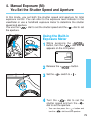
4. Manual Exposure (M):
You Set the Shutter Speed and Aperture
In this mode, you set both the shutter speed and aperture for total
exposure control. You can refer to the exposure level indicator in the
viewfinder or use a handheld exposure meter to determine the shutter
speed and aperture.
You use the <
> dial to set the shutter speed and the < > dial to set
the aperture.
Using the Built-in
Exposure Meter
pressing
1 While
button, turn the <
the <
>
> dial until M
appears on the LCD panel.
2 Release the <
3 Set the <
> button.
> switch to <
>
the <
> dial to set the
4 Turn
shutter speed and turn the < >
dial to set the aperture.
• You can also press the < > button and
turn the <
> dial to set the aperture.
73
Manual Exposure (M): You Set the Shutter Speed and Aperture
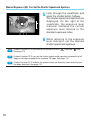
through the viewfinder and
5 Look
press the shutter button halfway.
The shutter speed and aperture are
displayed. On the right of the
viewfinder, the exposure level
indicator indicates the current
exposure level relative to the
standard exposure index.
referring to the exposure
6 While
level indicator, set the desired
shutter speed and aperture.
74
CF
Custom Function CF-5 can reverse the functions of the <
See page 110.
> dial and <
> dial.
CF
Custom Function CF-6 can set the shutter speed and/or aperture increments to full
stops or half stops instead of the standard 1/3 stops. See page 112.
CF
Custom Function CF-5 enables the aperture to be set manually even when the lens
has been detached. See page 110.
5. Setting Exposure Compensation
Exposure compensation is used to alter the camera’s standard exposure
setting. While looking through the viewfinder, you can use either the < >
dial or < > button to set the exposure compensation amount. Any
exposure compensation amount that you set can later be changed or
canceled with the < > dial or < > button. The exposure compensation
amount can be set up to ±3 stops in 1/3-stop increments.
Exposure Compensation
with the < > Dial
the < > switch to < >.
1 Set
Focus the subject and check the
2 exposure level.
the < > dial to set the
3 Turn
desired exposure compensation
amount.
Overexposure.
• Turn the < > dial while pressing the
shutter button halfway or within ( 6 ) after
releasing the shutter button.
• The exposure compensation amount is
indicated by the exposure level indicator ■
in the viewfinder (where the
icon also
lights) and the exposure compensation
indicator on the LCD panel.
• On the viewfinder’s exposure level scale,
any position above the standard exposure
index indicates overexposure and any
position below it indicates underexposure.
On the LCD panel, any position on the +
side indicates overexposure and any
position on the – side indicates
underexposure.
• To cancel exposure compensation, set the
amount to the standard exposure index
(zero).
Underexposure.
4 Take the picture.
75
Setting Exposure Compensation
CF
Custom Function CF-6 enables the exposure compensation amount to be set in
half-stop increments. See page 112.
• The exposure compensation amount’s 1/3-stop or half-stop (enabled with Custom
Function CF-6) increments are indicated in the viewfinder and on the LCD panel
as shown below.
• The exposure compensation amount remains effective even after the < > switch
is set to < >.
–1 1/2 exposure compensation
–1 1/3 exposure compensation
Exposure Compensation with the <
> Button
Exposure compensation can also be set with the <
dial.
> button and <
>
Press the < > button and turn the
<
> dial within ( 6 ) to set the
desired exposure compensation
amount.
• This is useful when you want to
apply
the
same
exposure
compensation to the entire roll of
film.
• To prevent the < > dial from
turning inadvertently and changing
the exposure compensation amount,
set the < > switch to < >.
76
6. Autoexposure Bracketing (AEB)
With autoexposure bracketing, the camera automatically changes the
exposure level within the set range for three successive frames. The
bracketing amount centers on the standard exposure (or exposure
compensation setting), and the exposure can be varied up to ±3 stops in
1/3-stop increments. The three bracketed shots are exposed in the
following sequence: standard exposure, underexposure, and
overexposure. The film advances in the current film advance mode (see
“Switching the Film Advance Mode” on page 85).
standard exposure (0)
Underexposure (–1/3 stop)
Overexposure (+1/3 stop)
1 Press
<
and hold down the
> button and <
>
button simultaneously.
• The
panel.
AEB icon appears on the LCD
the <
> dial to set the
2 Turn
desired bracketing amount.
• The bracketing amount is indicated
numerically and shown on the exposure
compensation scale on the LCD panel.
77
Autoexposure Bracketing (AEB)
the pictures. The current film
3 Take
advance mode will be used.
Bracketing amount set to ±1 stop.
• On the viewfinder’s exposure level scale,
the exposure level indicator will mark the
respective bracketing amount as each
bracketed shot is taken.
• In the continuous shooting mode, holding
down the shutter button will take all three
bracketed shots continuously. The
shooting will then stop automatically.
• When AEB is used with the self-timer, the
three bracketed shots will be taken in
succession after the 2- or 10-second selftimer delay.
To indicate that AEB is in progress, the
AEB icon on the LCD panel and
indicator in the viewfinder will blink until all the bracketed shots are taken.
Canceling AEB
Follow steps 1 and 2 to set the AEB to
0.
• AEB will also be canceled by changing lenses,
rewinding the film, replacing the film, setting a
bulb exposure, having a flash-ready Speedlite,
pressing the <
> button, and setting the
< > switch to < >.
CF
Custom Function CF-6 enables the AEB amount to be set in half-stop increments.
See page 112.
Custom Function CF-9 can change the bracketing sequence to underexposure,
standard exposure, and overexposure. See page 114.
Custom Function CF-9 can prevent AEB from being canceled by changing lenses,
rewinding the film, replacing the film, and setting the < > switch to < >. See
page 114.
• No viewfinder information will be displayed during continuous shooting of the
bracketed shots.
• After the AEB amount is set, exposure compensation can also be set to obtain
underexposed or overexposed bracketing. See “Setting Exposure Compensation”
on page 75.
• AEB cannot be used together with bulb exposures or flash.
• If mirror lockup is set with Custom Function CF-12 and AEB is used, single-frame
shooting will take effect even if the film advance mode is set to continuous
shooting.
78
7. AE Lock
Normally, the camera’s autoexposure meter reading changes in real-time
when you change the camera angle. AE lock prevents the meter reading
from changing even when you recompose the shot. This feature is useful
for backlit and spotlighted subjects.
at the point where you want
1 Focus
to lock the meter reading.
• The exposure setting (shutter speed and
aperture) will be displayed on the LCD
panel and in the viewfinder.
2 Press the <
> button. ( 6 )
• < > lights in the viewfinder to indicate
that the exposure setting is locked.
• Each time you press the < > button, it
locks the current exposure setting.
• AE lock cancels 6 seconds after you press
the < > button or if you press the <
>
button, < > button, or <
> button.
79
AE Lock
at the desired point,
3 Focus
recompose the shot, and take the
picture.
• When the shot is recomposed, the
exposure level indicator will show the new
exposure level in real-time relative to the
locked exposure level.
AE lock indicator
AE lock exposure level
Real-time exposure level
CF
Custom Function CF-4-1 enables AE lock with the shutter button (instead of the
< > button) pressed halfway and focusing with the < > button. See page 108.
Partial or spot metering is recommended for AE lock over a specific point. See page
54.
If One-Shot AF and evaluative metering are set, pressing the shutter button halfway
to focus will automatically set AE lock at the same time.
80
8. Setting the Film Speed Manually
If the film is not DX-coded or if you want to set a different ISO film speed,
load the film and set the ISO film speed manually.
• The ISO film speed can be set manually from 6 to 6400.
and hold down the <
>
1 Press
button
and
<
>
button
simultaneously.
• The <
> icon and the currently-set film
speed will be displayed.
the <
> dial until the
2 Turn
desired film speed is displayed on
the LCD panel.
the two buttons. The film
3 Release
speed will then be set.
The manually-set film speed will be canceled the next time DX-coded film loaded.
81
9. Multiple Exposures < >
By not advancing the film, a single frame can be exposed multiple times.
Up to nine multiple exposures can be set for one frame. Multiple
exposures can be taken in any shooting mode.
the side door and press the
1 Open
< > button.
• The
icon appears on the LCD panel
and the frame counter displays “1.” This
number indicates the number of multiple
exposures.
the <
> dial to set the
2 Turn
desired number of multiple
exposures.
82
Multiple Exposures <
>
setting takes effect after ( 6 )
3 The
or when you press the shutter
button halfway.
the shooting mode and press
4 Set
the shutter button completely for
each multiple exposure.
Set for 3 multiple exposures.
all the multiple exposures are
5 After
taken, the film advances to the next
frame automatically and the
multiple exposure setting is
canceled.
If any of the film’s first or last frames is used for multiple exposures, the exposures
may not align exactly due to film advance characteristics.
• While multiple exposures are being taken, the multiple exposure icon
blinks
on the LCD panel.
• To cancel the multiple exposure setting before taking multiple exposures, set the
number of multiple exposures to 1.
• To cancel the multiple exposure setting after you start taking multiple exposures,
follow steps 1 and 2 and set the number of multiple exposures blank.
When taking multiple exposures, you should underexpose each multiple exposure
by the amounts shown below. To underexpose, see “Setting Exposure
Compensation” on page 75.
Exposure Compensation Guide for Multiple Exposures
No. of Multiple Exposures
Underexposure Amount of Each Exposure
2
3
4
–1.0 stop
–1.5 stop
–2.0 stops
• These exposure compensation amounts are only general guidelines. The
optimum amount depends on the scene. Experiment to find the optimum
compensation amount.
83
10. buLb Exposures
When bulb is set, the film is exposed during the time you keep pressing
the shutter button completely. Bulb is useful when a long exposure is
necessary for capturing night scenes, fireworks, and the night sky.
pressing the <
>
1 While
button, turn the <
> dial until
is displayed.
> button.
2 Release the <
3 Set the < > switch to < >.
the <
> (or < >) dial to
4 Turn
set the desired aperture.
and hold down the shutter
5 Press
button completely for the duration
of the exposure.
• When the bulb exposure starts, the frame counter on the LCD panel counts the
elapsed exposure time from 1 to 30 seconds. After every 30 seconds, one
segment (
) on the exposure compensation scale appears and the frame
counter resets to 1. Therefore, if three segments are displayed and the frame
counter reads “30,” it means 120 seconds have elapsed.
• Bulb exposures consume almost no battery power.
• To connect a remote controller (Remote Switch 60T3, etc.) to the camera, use
Remote Switch Adapter RA-N3.
Connecting Remote Switch RS-80N3 (shutter release lock provided) or Timer
Remote Controller TC-80N3 (both sold separately) to the camera’s remote control
terminal relieves your finger from pressing the shutter button during bulb exposures.
84
11. Switching the Film Advance Mode
The film advance mode can be set to single-frame shooting or continuous
shooting.
Single-frame Shooting (
)
After a picture is taken, the film advances by one frame automatically.
Continuous Shooting (
)
The film advances at a rate of 4.3 frames per second while you hold down
the shutter button completely.
• The rate of 4.3 frames per second applies when the shutter speed is 1/250 sec. or
faster.
• With One-Shot AF and evaluative metering set, if you stop continuous shooting by
returning the shutter button to the halfway position, you can maintain the AE lock
for the next time you start shooting.
1 Press
<
and hold down the
> button and < > button
simultaneously.
• The current film advance mode is
displayed.
the <
> dial to set the
2 Turn
desired film advance mode.
3 Release the two buttons.
85
Switching the Film Advance Mode
When
,
,
, or
Blinks
If the battery power drops in cold temperatures or the film advance
operation is slow, it means that the camera is trying to provide film
advance power rather than speed. This feature is called automatic film
advance transmission. If this is activated, one of the film advance icons
( ,
,
,
) will blink on the LCD panel. This feature is canceled
when you press the <
> button and < > button simultaneously or
when you replace the film or battery. If this feature is activated, check the
battery power (see page 22) and follow the respective countermeasures.
• If film advance or rewind stops midway,
will blink on the LCD panel. When the battery is
replaced with a new one, film advance will resume. To resume film rewind, press the midroll
rewind button.
• In cold temperatures, warm the battery in your pocket, etc., to enable use.
Continuous Shooting Rates
Configuration
Power Source
EOS 3
2CR5 lithium battery
EOS 3 + BP-E1
Size-AA alkaline batteries × 4
EOS 3 + PB-E2
Nickel Hydride Pack NP-E2
Size-AA alkaline batteries × 8
EOS-3 + Power
Drive Booster E1
Size-AA alkaline batteries × 8
Film
Advance
Mode
(approx. frames/sec.)
One-Shot AF /
Manual Focus
AI Servo AF
4.3
3.3
7
7
3
3
6
5
3
3
6
5
3
3
No viewfinder information is displayed during continuous shooting.
86
12. Self-timer Operation
The self-timer can be set to either a 2-second or 10-second delay. When
using the self-timer, you should mount the camera on a tripod.
pressing the <
>
1 While
button and < > button, turn the
<
> dial and set the desired
self-timer delay time.
: 10-second delay
: 2-second delay
The 2-second delay is effective for close-ups or photo duplicating work to prevent
camera shake (camera movement while the shutter button is pressed).
through the viewfinder and
2 Look
press the shutter button halfway.
Make sure the in-focus indicator
and exposure setting are
displayed.
the
shutter
button
3 Press
completely. The self-timer lamp will
start blinking to indicate that the
self-timer has started. The lamp
blinks faster during the two
seconds before the picture is
taken.
• To cancel the self-timer after it starts, set
the < > switch to < >.
Do not stand in front of the camera when you press the shutter button to start the
self-timer. Doing so will throw off the focus.
87
Self-timer Operation
Attaching the Eyepiece Cover
If you take a picture without looking through the viewfinder, stray light may
enter the eyepiece and affect the exposure. To prevent this, detach the
eyecup and attach the eyepiece cover (provided on the strap) on the
eyepiece before taking the picture.
1 Remove the eyecup.
on the eyepiece cover over the
2 Slip
eyepiece.
88
13. Mirror Lockup
Mirror lockup is enabled with Custom Function CF-12 (see page 116).
This prevents mirror-caused vibrations which may blur the image during
close-ups or when a super telephoto lens is used. To set this Custom
Function, see “Setting and Canceling Custom Functions” on page 104.
When mirror lockup is set, the camera operates as follows:
• When using mirror lockup, Remote Switch RS-80N3 (sold separately) is recommended.
the shutter button complete1 Press
ly. The mirror locks up.
• After 30 seconds, the mirror goes back
down automatically. Pressing the shutter
button completely again locks up the
mirror again.
the shutter button and
2 Release
press the shutter button completely
again to take the picture. The
mirror then goes back down after
the picture is taken.
• In very bright light such as at the beach or ski ground on a sunny day, take the
picture promptly after mirror lockup.
• During mirror lockup, do not point the camera lens at the sun. The sun’s heat can
scorch and damage the shutter curtains.
• If you use mirror lockup with the self-timer for a bulb exposure, there will be a
shutter release sound when you release the shutter button during self-timer
operation. This is not the sound of the shutter release.
• During mirror lockup, the film advance mode will be single-frame shooting
regardless of the current film advance mode.
• If mirror lockup is used with the self-timer, pressing the shutter button completely
the first time will lock up the mirror and release the shutter 10 seconds or 2
seconds later (depending on the delay time selected).
89
14. Depth-of-field Preview
The depth of field is the range of
acceptable focus in front of and behind
the point of focus. The depth of field
changes depending on the aperture.
Press the depth-of-field preview button
to stop down the aperture and preview
this range of acceptable focus.
• Pressing the depth-of-field preview button also sets AE lock.
• The depth-of-field preview button does not function during AF operation.
15. LCD Panel Illumination
The LCD panel can be illuminated.
The LCD panel illumination button
turns the illumination on (for 6 sec.)
and off. The LCD panel illumination
turns off 2 seconds after a picture is
taken.
• Pressing any button while the LCD panel is illuminated prolongs the illumination.
• The illumination turns off at the start of a bulb exposure.
90
Flash Photography
An EOS-dedicated EX-series or EZ-series Speedlite makes flash
photography with the EOS-3 as easy as any AE mode. With an EX-series
Speedlite, E-TTL autoflash photography as well as wireless E-TTL multiflash photography is possible.
Speedlite 550EX will be used to describe the flash photography features
provided with the EOS-3. For details on Speedlite 550EX, see the
Instructions that come with it.
First set the < > switch to < >. If
necessary, also set the < > switch to
< >.
91
1. Flash Photography with Speedlite 550EX
With Speedlite 550EX attached to the EOS-3, flash photography is as
easy as any AE mode. You can also use the following features:
(1) E-TTL Autoflash
With E-TTL autoflash (preflash evaluative
metering), optimum flash exposure can be
obtained for the subject in focus. In the
aperture-priority AE mode, a slow sync
speed is set automatically in low-light
situations to obtain a natural-looking,
balanced exposure between the subject and
background.
(2) High-Speed Sync (FP Flash)
High-speed sync (FP or focal-plane flash) enables flash synchronization with all shutter
speeds from 30 sec. to 1/8000 sec.
(3) FE (Flash Exposure) Lock
FE lock obtains and locks the correct flash exposure for any part of the subject. This is the
flash equivalent of AE lock.
(4) Flash Exposure Compensation
Like normal exposure compensation, flash exposure compensation can be used to set the
flash output up to ±3 stops in 1/3-stop increments.
(5) FEB (Flash Exposure Bracketing)
As with AEB (autoexposure bracketing), flash exposures can also be bracketed up to ±3
stops in 1/3-stop increments.
(6) Wireless Multi-flash E-TTL
For sophisticated lighting effects, multiple wireless Speedlites can be used for E-TTL
autoflash. All features (1) to (5) above can be used. The operation is as simple as using a
Speedlite directly attached to the camera.
E-TTL is an abbreviation for Evaluative-Through-The-Lens.
• With autofocus, the flash exposure is always based on the aperture (set
automatically or manually) and autoflash metering is weighted at the current
focusing point.
• When it is difficult to autofocus, the 550EX’s built-in AF-assist beam is emitted
automatically. The beam is linked to the area AF.
92
Flash Photography with Speedlite 550EX
Full Auto Flash
Full Auto E-TTL autoflash used with the Program AE mode is described
here. For details on Speedlite 550EX operations, see the Instructions that
came with it.
the camera’s shooting mode to
1 Set
P.
that the 550EX’s pilot lamp
2 Check
is lit.
3 Focus the subject.
sure the flash-ready indicator
4 Makeis lit,
check the shutter speed
and aperture, then take the picture.
E-TTL Autoflash in Other Shooting Modes
Even in the Tv, Av, and M modes, E-TTL autoflash can be used as easily
as without flash.
(1) When you press the shutter button, the shutter speed and aperture
are set by the camera as usual.
Mode
Tv (Shutter speed-priority AE)
Av (Aperture-priority AE)
M (Manual)
Shutter Speed Setting
Flash Aperture Setting
Manual (30 sec. - 1/200 sec.)
Auto
Auto (30 sec. - 1/200 sec.)
Manual
Manual (30 sec. - 1/200 sec.)
Manual
(2) When you press the shutter button completely, preflash evaluative
metering based on the aperture setting is used for the flash exposure.
(3) The background exposure is set by the shutter speed and aperture
combination.
93
Flash Photography with Speedlite 550EX
High-Speed Sync (FP Flash)
When the Speedlite’s high-speed sync lamp ( ) is on, high-speed sync
(FP or focal-plane flash) is enabled automatically. The Speedlite can then
synchronize at all shutter speeds, even those faster than 1/200 sec.
When high-speed sync is enabled,
is displayed in the viewfinder to
indicate high-speed sync.
High-speed sync is effective in the following cases:
(1) When you want to use fill-in flash for a portrait and maintain
background blur with a large aperture.
(2) When you want to produce a catchlight in the subject’s eyes.
(3) When you want to use fill-in flash to eliminate shadows
With conventional flash.
94
With FP flash.
Flash Photography with Speedlite 550EX
FE Lock
FE (flash exposure) lock obtains and locks the correct flash exposure
reading for the desired portion of the scene.
that the Speedlite’s pilot
1 Check
lamp is lit.
• The flash mode can be either normal or
high-speed sync. FE lock works with either
mode.
the subject with AF or
2 Focus
manual focus.
the spot metering circle over
3 Aim
the part where you want to lock the
flash exposure, then press the
<
> button. (16 sec.)
• The Speedlite fires a preflash and
calculates the required flash output which
is then stored in memory.
• In the viewfinder, the focusing point linked
to the FE lock flashes in red.
Spot metering circle
95
Flash Photography with Speedlite 550EX
• Below the viewfinder, the display shown in
1 appears for 0.5 sec. followed by the
display shown in 2.
1
2
the shot and take the
4 Compose
picture.
• If the subject is too far away resulting in underexposure, the
icon will blink. Get
closer to the subject and follow steps 3 and 4.
• When shooting more than one exposure of the same subject, FEL must be set
again for each shot.
CF
96
Custom Function CF-13 enables FE lock with the manually-selected or eyeselected focusing point. See page 118.
Flash Photography with Speedlite 550EX
Flash Exposure Compensation
When an EOS-dedicated Speedlite is used, you can set flash exposure
compensation with the camera up to ±3 stops in 1/3-stop increments.
pressing the < > button,
1 While
turn the < > dial to set the desired
flash exposure compensation
amount.
• On the LCD panel, the plus side of the
scale indicates overexposure and the
minus side indicates underexposure. The
sample LCD panel on the left shows a
flash exposure compensation amount of
+2/3 stop.
the < > button and the
2 Release
normal display returns.
• Press the shutter button halfway to display
the flash exposure compensation amount
on the viewfinder’s exposure level scale.
• Press the < > button to display the flash
exposure compensation amount on the
LCD panel.
• To cancel flash exposure compensation,
set the flash exposure compensation
amount to < >.
CF
Custom Function CF-6 enables the flash exposure compensation amount to be set
in half-stop increments. See page 112.
• The flash exposure compensation amount is retained even when the < > switch
is set to < >.
• The flash exposure compensation amount can also be set with certain Canon
Speedlites. If flash exposure compensation is set with both the camera and the
Speedlite, the flash exposure compensation amount set with the Speedlite will
override the one set with the camera.
97
Flash Photography with Speedlite 550EX
FEB (Flash Exposure Bracketing)
Three successive flash shots can be bracketed automatically according to
the bracketing amount set with Canon Speedlite 550EX. Without
changing the background exposure, you can bracket the flash exposure
for the subject up to ±3 stops in 1/3-stop increments.
Correct exposure.
Underexposure (–1 stop).
Overexposure (+1 stop).
• Flash exposure bracketing is set with the 550EX. For details, see the 550EX’s Instructions.
• The flash exposure bracketing amount set with the 550EX can be displayed in the camera’s
viewfinder.
• Before taking FEB pictures, be sure the Speedlite 550EX is ready. Single-frame shooting is
recommended.
CF
The flash exposure bracketing amount can also be set in half-stop increments. See
page 112.
Modeling Flash
By using modeling flash, you can see the shadows and other flash lighting
effects produced by the flash or multiple flash units.
the Speedlite and camera
1 Check
settings.
the camera’s depth-of-field
2 Press
preview button.
• The Canon Speedlite 550EX fires at 70 Hz
for 1 second.
98
Flash Photography with Speedlite 550EX
Wireless Multi-Flash System
The Canon Speedlite 550EX has the following three features:
(1) E-TTL autoflash
(2) Slave unit
(3) Wireless master control of other slave-triggered 550EX units
By using the above features, you can set up a wireless E-TTL autoflash
system with up to three Speedlites. You can also set the flash output ratio
between the Speedlites to create the desired flash lighting effect.
• For details, see the 550EX and ST-E2's Instructions.
Wireless multi-flash system
Canon
Speedlite
Transmitter
ST-E2
Canon Speedlite
550EX
Canon Speedlite
550EX
99
2. Using Other EOS-Dedicated Speedlites
With an EOS-dedicated Speedlite other than the EX series, TTL autoflash
can be used as easily as normal AE modes. The flash exposure is
controlled by off-the-film flash metering linked to the focusing point.
(1) When you press the shutter button halfway, the shutter speed and
aperture are set automatically by the camera.
Shutter Speed Setting
Flash Aperture Setting
P (Program AE)
Mode
Auto (1/60 sec. - 1/200 sec.)
Auto
Tv (Shutter speed-priority AE)
Manual (30 sec. - 1/200 sec.)
Auto
Auto (30 sec. - 1/200 sec.)
Manual
Manual (30 sec. - 1/200 sec.)
Manual
Av (Aperture-priority AE)
M (Manual)
(2) When you press the shutter button completely, TTL autoflash metering
based on the aperture setting is used for the flash exposure.
(3) The background exposure is set by the shutter speed and aperture
combination.
•
•
•
•
CF
100
Flash exposure compensation can be set with the camera.
If the multi-flash system is wired with flash cords, TTL autoflash takes effect.
Cover the main subject with the area AF ellipse.
Automatic Reduction of Flash Output
If an EOS-dedicated Speedlite is used for a subject backlit by a top light, the flash
output is reduced automatically to avoid having an unnatural-looking exposure.
This is called automatic reduction of flash output.
Custom Function CF-14 can prevent the automatic reduction of flash output. See
page 118.
3. Using Non-Canon Flash Units
Sync Speed
The EOS-3 can synchronize with compact, non-Canon flash units at
1/200 sec. or slower shutter speeds. With large studio flash, the sync
speed is 1/125 sec. or slower. Be sure to test the flash to see if it
synchronizes properly with the camera.
PC Terminal
The camera’s PC terminal is provided for flash units using a sync cord.
The PC terminal is threaded to prevent inadvertent disconnection. Only Xsync is used for synchronization at 1/200 sec. or slower.
A flash unit attached to the camera’s hot shoe and a flash unit connected to the PC
terminal can be used at the same time.
• Canon EOS-dedicated Speedlites are recommended for use with this camera.
• If the camera is used with a flash unit or flash accessory dedicated to another
camera brand, the camera may not operate properly and camera malfunction may
result.
• There are studio flash units whose
sync cord polarity is opposite from
the camera’s PC terminal. Such
flash units do not work with the
camera. Consult the manufacturer of
the flash unit or purchase a
commercially-available polarity
conversion cord. The camera’s PC
terminal polarity is shown in the
figure on the right.
X
+v(plus)
–} (minus)
C i X
101
Basic Terminology 4
● Depth of Field
This is the range in front of and behind the plane of optimum focus
where acceptable focus can be achieved. The smaller the aperture (the
larger the F-number), the greater the depth of field will be. And the
larger the aperture (the smaller the F-number), the shallower the depth
of field will be.
The depth of field is affected as described below:
(1) A smaller aperture (a larger F-number) increases the depth of field.
(2) A lens with a shorter focal length increases the depth of field.
... A wide-angle lens obtains a greater depth of field than a telephoto
lens.
(3) A longer distance between the camera and subject increases the
depth of field.
(4) The depth of field behind the plane of optimum focus is twice as
long as the depth of field in front of the plane of optimum focus.
Range of acceptable focus
Point of optimum focus
1
Taken with an f/22 aperture.
102
2
Taken with an f/2 aperture.
Custom Functions
You can customize camera functions with the camera’s Custom
Functions.
In the previous text, the CF symbol was used to point out a relevant
Custom Function. In this chapter, all the Custom Functions are described
in detail.
First set the < > switch to < >. If
necessary, also set the < > switch to
< >.
103
1. Setting and Canceling Custom Functions
Setting a Custom Function
the side door and press the
1 Open
<
> button.
• The Custom Function No. appears on the
LCD panel.
the <
> dial until the
2 Turn
desired Custom Function No.
appears.
press the <
> button to
3 Then
change the Custom Function’s
setting. Each time you press the
<
> button, the Custom Function
setting changes.
• To change Custom Function
’s
setting, press the <
> button for at least
2 seconds. See page 133.
Custom Function
No.
Setting
Altered Custom
Function indicator ■.
104
4
Press the shutter button halfway.
The LCD panel returns to the
normal display and the new
Custom Function setting takes
effect.
• While you use the camera, you can check
the Custom Function setting by pressing
the <
> button.
Setting and Canceling Custom Functions
Altered Custom Function Indicator
↑
↑
↑
↑
(CF-1) (CF-5) (CF-10 ) (CF-14)
In this example, the scale shows that
Custom Functions CF-1, CF-5, CF-10,
and CF-14 have been altered.
The Custom Functions which you have
altered are indicated on the exposure
compensation scale.
The scale’s increments from left to right are
used to mark the 17 Custom Functions. The
left-most increment (–3) is for Custom
Function CF-1. The next increment to the
right denotes the next Custom Function in
numerical order up to CF-17.
Canceling a Custom
Function
the Custom Function No.
1 Select
whose setting is to be canceled,
then press the <
> button until
the setting returns to
on the LCD
panel.
the shutter button halfway.
2 Press
The LCD panel returns to the
normal display.
Canceling All Custom
Functions
1
To reset all Custom Functions (except
CF-0) to 0, open the side door and
press the CF button. Then press the
<
> button.
2
105
2. Custom Function Settings
Custom Function CF-0 makes the camera’s built-in exposure meter
compatible with the focusing screen. Be sure to set this Custom Function
to suit the focusing screen installed in the camera.
Custom Functions CF-1 to CF-17 can be set to suit your preferences.
Custom Function
No.
Setting
0
Match the focusing screen
Custom Function
Film rewind mode
106
CF-0
No. Setting
1
Description
0
High-speed automatic film rewind.
1
No automatic film rewind.
→ Pressing midroll rewind <
>
button executes high-speed rewind.
2
Silent automatic film rewind.
3
No automatic film rewind.
→ Pressing midroll rewind <
button executes silent rewind.
CF-1
>
Focusing Screen
Setting for focusing screen Ec-N or Ec-R ( N : New Lasermatte Screen).
Page
133
Setting for focusing screens Ec-A, Ec-B, Ec-C, Ec-CII, Ec-D, Ec-H, Ec-I,
Ec-L ( L : Lasermatte Screen)
Remarks
Page
28
Settings 1 and 3 are ideal when film rewind noise would be disturbing.
107
Custom Function
Film leader position
after film rewind
ISO film speed
setting method
AF activation
method
108
No. Setting
CF-2
Description
0
Rewinds the film leader into the cartridge.
1
Leaves the film leader outside the
cartridge.
0
Sets the film speed automatically with
DX-coded film.
1
Enables the film speed to be set
manually.
0
Enables AF and AE operation by pressing
the shutter button halfway.
• AE lock with the < > button.
1
Enables AE and AF operations with the
< > button.
• Shutter button pressed halfway
enables AE lock.
2
Shutter button pressed halfway enables
AF and AE operation.
• AF lock (no AE lock) with the < >
button.
3
Enables AF and AE operation (no AE
lock) with the < > button.
• Pressing the shutter button completely
releases the shutter (pressing it
halfway executes AE operation only).
CF-3
CF-4
Custom Function Settings
Remarks
Page
28
This is convenient if you develop the film yourself.
• If 1 is set, the shutter speed will always be 1/8000 sec. if you release
the shutter with the camera back open.
26
This is effective if you want to set the film speed yourself.
You can be relieved from setting the film speed each time you load film.
27
81
This is effective when you want to focus and meter at different portions of
the scene.
80
This is effective when you want to stop AI Servo AF operation
momentarily.
If an obstruction comes between the camera and subject, it will not throw
off the AF. The exposure is set at the moment of exposure.
36
When you use AI Servo AF, you can toggle between AI Servo AF and focus
lock just by pressing the < > button. This is useful for subjects which keep
moving and stopping repeatedly. The exposure is also set at the moment
when the picture is taken. Thus, the focusing and exposure are always set
correctly and all you do is wait for the right moment to capture the shot.
109
Custom Function
Shutter speed and
aperture setting
method in the
Manual mode
110
No. Setting
CF-5
Description
0
Enables the <
> dial to set the shutter
speed and the < > dial (or the < >
button and <
> dial) to set the
aperture.
1
Enables the <
> dial to set the
aperture and the < > dial (or the < >
button and <
> dial) to set the shutter
speed.
• This reverses the functions of the
<
> and < > dials.
2
The shutter speed and aperture are set in
the same way as setting 0. In the
aperture-priority AE and manual exposure
modes, the aperture can be set with the
camera manually even with the lens
detached.
3
The shutter speed and aperture are set in
the same way as setting 1. In the
aperture-priority AE and manual exposure
modes, the aperture can be set with the
camera manually even with the lens
detached.
Custom Function Settings
Remarks
Page
This makes it easier to change the aperture during studio sessions with
studio flash units. Also, when AEB is used in the manual exposure mode,
the shutter speed can be fixed while only the aperture is shifted for AEB.
74
If you are using a super telephoto lens with more than one EOS-3 body,
you can still set the aperture with the camera(s) not attached to the lens.
This function is mainly for pro photographer assistants.
67
74
Same as setting 2.
• To use this Custom Function together with Custom Function CF-11,
see page 123.
67
74
111
Custom Function
Exposure setting
increments
Electronic manual
focusing.
Frame counter
display
112
No. Setting
0
Enables all settings to be set in 1/3-stop
increments.
1
Enables the shutter speed and aperture
to be set in full-stop increments, and
exposure compensation and flash
exposure compensation in 1/3-stop
increments.
2
Enables all exposure settings to be set in
half-stop increments.
0
The lenses listed on the right enable
electronic manual focusing after AF
operation.
1
Disables electronic manual focusing after
AF operation.
2
Disables electronic manual focusing at all
times.
0
The frame counter counts up.
1
The frame counter counts down
(indicates the remaining number of
frames).
CF-6
CF-7
CF-8
Description
Custom Function Settings
Remarks
Page
This is suited for slide films which have a narrow exposure latitude.
The shutter speed and aperture can be set in the familiar full-stop
increments.
Suited for negative films which have a wide exposure latitude.
EF 50mm f/1.0L USM,
EF 200mm f/1.8L USM,
EF 400mm f/2.8L USM,
EF 500mm f/4.5L USM,
EF 1200mm f/5.6L USM,
64
67
74
64, 67
74, 78
97, 98
EF 85mm f/1.2L USM,
EF 300mm f/2.8L USM,
EF 400mm f/2.8L II USM,
EF 600mm f/4L USM,
EF 28-80mm f/2.8-4L USM.
This prevents the focus from being thrown off by inadvertent turning of the
focusing ring after One-Shot AF.
52
When this Custom Function is set to 0 or 1 and Custom Function CF-4 is
set to 1 or 3 (see page 122), the focusing ring can be used to focus
before AF operation. However, this is disabled with this setting.
* When this Custom Function is set to 1 or 2, you must first set the lens
focus switch to MF (or M) to focus manually.
52
25
You can see how many frames are left in the roll.
26
113
Custom Function
AEB sequence and
cancellation
Focusing point
flashing mode
114
No. Setting
Description
0
standard exposure, underexposure,
overexposure, then automatic
cancellation.
1
standard exposure, underexposure,
overexposure, and no automatic
cancellation.
2
Underexposure, standard exposure,
overexposure, then automatic
cancellation.
3
Underexposure, standard exposure,
overexposure, and no automatic
cancellation.
0
Standard mode
• Flashes when focus is achieved, lights
dimly while you press the shutter
button halfway after focus is achieved.
1
No flashing at all.
2
No flashing after focus is achieved.
3
Flashes brightly.
CF-9
CF-10
Custom Function Settings
Remarks
AEB is not canceled even when the lens is interchanged or when the film
is replaced. Therefore you can keep taking AEB shots (with the standard
exposure first).
Page
78
78
You can keep taking AEB shots in this sequence.
78
This applies during manual focusing point selection and Eye-Control AF.
During automatic focusing point selection, the focusing point does not
light dimly after focus is achieved.
If the flashing of the focusing point is annoying, you can disable it.
42
This disables the focusing point from lighting dimly after focus is
achieved.
42
This makes the focusing point easier to see even in bright light.
42
115
Custom Function
Focusing point
selection method
Mirror lockup
116
No. Setting
0
Enables the focusing point to be selected
by pressing the < > button and turning
the <
> dial and/or < > dial.
• Turn the <
> dial to select a
focusing point on the right or left, and
turn the < > dial to select a focusing
point on the top or bottom.
1
Enables the focusing point to be selected
by pressing the < > button and turning
the <
> dial and/or < > dial.
2
Enables the < > dial alone to select a
left or right focusing point.
• Setting 1 operations can also be
executed.
3
Enables the focusing point to be selected
by pressing the <
> button and turning
the <
> dial and/or < > dial.
0
No mirror lockup (normal position).
1
Sets mirror lockup.
CF-11
CF-12
Description
Custom Function Settings
Remarks
Page
38
The functions of the < > button and < > button are reversed. This
makes the exposure compensation method and aperture setting method
(during manual exposure) the same as with the EOS-1.
42
This setting is identical to the EOS-1N’s Custom Function CF-11 set to 2
for the left or right focusing point selection method. With this setting, you
can select the focusing point while pressing the shutter button halfway (or
within ( 6 ) after releasing the shutter button) or during continuous
shooting in the AI Servo AF mode. The focusing point selection stops at
the extreme left or right focusing point.
• During autofocusing, pressing the < > button switches the focusing
point selection mode from manual to automatic. This is convenient
when you want to switch quickly to automatic focusing point selection.
36
42
This reverses the functions between the < > button and <
The button next to the AE lock button then functions as an <
42
> button.
> button.
Effective for close-up shots and with super telephoto lenses. Mirror lockup
eliminates camera vibration caused by the mirror’s reflex action. A tripod
is required.
89
117
Custom Function
Focusing point and
spot metering
linkage
Automatic reduction
of fill-in flash output
Shutter curtain
synchronization
118
No. Setting
0
No linkage.
• Spot metering is always at the center.
1
Links spot metering to the focusing point.
• Spot metering is linked to one of 11
focusing points selected either
manually or by Eye Control.
2
No linkage.
• Spot metering is always at the center.
• You can select only one of 11 focusing
points.
0
Enable.
1
Disable.
0
First-curtain synchronization.
• The flash fires immediately after the
shutter opens.
1
Second-curtain synchronization.
• At slow sync speeds, the flash fires
immediately before the shutter closes.
CF-13
CF-14
CF-15
Description
Custom Function Settings
Remarks
Page
The selectable focusing points are limited to 11. This makes focusing
point selection faster and links spot metering to the focusing point you
select. This setting is effective for spotlighted subjects on-stage, etc.,
when you want to maintain the framing of the subject.
56
96
Compared to setting 0, this setting makes focusing point selection faster.
(When automatic focusing point selection is used with settings 1 and 2, all
45 focusing points will be subject to automatic selection.)
56
Natural-looking fill-in flash effects are obtained automatically.
Preventing automatic reduction of flash output is effective for backlit
subjects in front of a sunset, etc., to prevent underexposure of the
subject.
100
By using a slow sync speed, you can create a light trail following a moving
subject.
This setting is convenient if your EX-series Speedlite does not have a
second-curtain synchronization feature. If your EX-series Speedlite is set
for second-curtain synchronization, it will override the C.Fn-15’s setting.
119
Custom Function
Safety shift
No. Setting
120
0
Disabled.
1
Enabled.
• Safety shift works in the shutter speedpriority AE and aperture-priority AE
modes.
• If a standard exposure cannot be
obtained with the shutter speed or
aperture you have set, then the camera
automatically shifts the shutter speed
or aperture so that a standard
exposure can be obtained.
0
Standard
1
Expanded selection range
2
Automatically-selected range
CF-16
Manual focusing
CF-17
point selection range
Description
Custom Function Settings
Remarks
Page
Even if the exposure settings you have set are not suitable, the camera
will automatically alter the settings to obtain a standard exposure. This
feature is convenient when the scene’s brightness changes suddenly.
64
67
This setting is suited for subjects whose focusing distance changes
irregularly.
The focusing point selection range expands by one point all around the
manually-selected focusing point. This setting is effective when the
manually-selected focusing point is unable to focus track a subject
moving irregularly.
As shown in the table below, the camera sets the focusing point selection
range automatically to suit the lens focal length, AF mode, and subject
movement during predictive AF. This feature is useful when the subject
movement is unpredictable.
AF Mode
Lens Focal Length
Shorter than 300mm
300mm or Longer
One-Shot AF
The focusing point selection range
does not expand automatically.
The focusing point selection range
expands by 1 point.
For a slowmoving subject.
For a slowmoving subject.
AI Servo AF
For a fastmoving subject.
For a fastmoving subject.
121
Custom Function Settings
Using Custom Functions CF-4 and CF-7 Together
If Custom Functions CF-4 and CF-7 are used together, the availability of
electronic manual focusing will be as follows:
Custom Function
No.
Setting
CF-7
CF-4
0, 2
1, 3
0
×/O
O/O
1
×/×
O/×
2
×/×
×/×
Before focus/After focus
O: Electronic manual focusing enabled.
×: Electronic manual focusing disabled.
122
Custom Function Settings
Using Custom Functions CF-5 and CF-11 Together
If Custom Functions CF-5 and CF-11 are used together in the manual
exposure mode, the shutter speed and aperture setting method will be as
follows:
Custom Function
No.
Setting
CF-5
0, 2
1, 3
0
Shutter speed: Set with <
> dial.
Aperture:
(1) Set with < > dial,
(2) Or with < > button and
<
> dial.
Aperture: Set with <
> dial.
Shutter speed:
(1) Set with < > dial,
(2) Or with < > button and
<
> dial.
1
Shutter speed: Set with <
> dial.
Aperture:
(1) Set with < > dial,
(2) Or with < > button and
<
> dial.
Aperture: Set with <
> dial.
Shutter speed:
(1) Set with < > dial,
(2) Or with < > button and
<
> dial.
2
Shutter speed: Set with <
> dial.
Aperture:
(1) Set with < > button and
<
> dial.
Aperture: Set with <
> dial.
Shutter speed:
(1) Set with < > button and
<
> dial.
3
Shutter speed: Set with <
> dial.
Aperture:
(1) Set with < > dial,
(2) Or with < > button and
<
> dial.
Aperture: Set with <
> dial.
Shutter speed:
(1) Set with < > dial,
(2) Or with < > button and
<
> dial.
CF-11
123
3. Index of Custom Functions
Film Transport Custom Functions
124
No.
Setting
1 No auto film rewind.
CF-1
1, 3
2 High-speed film rewind.
CF-1
0, 1
3 Quiet film rewind.
CF-1
2, 3
4 Leave out film leader after rewind.
CF-2
1
5 Set film speed manually.
CF-3
1
6 Display remaining frame No.
CF-8
1
AF Custom Functions
No.
Setting
1 No AF operation with halfway pressing of shutter button.
CF-4
1, 3
2 Autofocus with a button other than the shutter button.
CF-4
1, 3
3 Separate metering and autofocusing operations.
CF-4
1, 3
4 Enable AF lock in AI Servo AF mode.
CF-4
2, 3
5 Enable AE and AI Servo AF with the < > button and
allow the shutter button to only release the shutter.
CF-4
3
6 After focus is achieved in the One-Shot AF mode, enable
electronic manual focusing.
CF-7
0
7 After focus is achieved in the One-Shot AF mode,
disable electronic manual focusing.
CF-7
1, 2
8 Disable focusing point flashing.
CF-10
1
9 Enable focusing point flashing only when focus is
achieved.
CF-10
2
0 Make focusing point flashing brighter.
CF-10
3
q Enable instant switching from manual to automatic
focusing point selection.
CF-11
2
w Enable a left or right focusing point to be selected with
the < > dial alone.
CF-11
2
Index of Custom Functions
Picture-Taking Custom Functions
No.
Setting
1 Enable the <
> dial to set the aperture in manual
exposure mode.
CF-5
1, 3
2 Enable the aperture to be set with the camera even with
the lens detached.
CF-5
2, 3
3 Set the shutter speed and aperture increments to full
stops.
CF-6
1
4 Set the exposure compensation (including flash
exposure compensation) increments to half stops.
CF-6
2
5 Prevent AEB from canceling when the lens is
interchanged or when film is replaced.
CF-9
1, 3
6 Set the AEB sequence to underexposure, standard
exposure, and overexposure.
CF-9
2, 3
7 Link spot metering to the focusing point.
CF-13
1
8 Enable faster focusing point selection.
CF-13
1, 2
9 In the shutter speed-priority AE mode, enable a standard
exposure automatically even when the lighting conditions
change suddenly.
CF-16
1
0 In the aperture-priority AE mode, enable a standard
exposure automatically even when the lighting conditions
change suddenly.
CF-16
1
q Set second-curtain flash synchronization.
CF-15
1
w Enable flash exposure lock with the <
> button.
CF-11
3
e Enable flash exposure bracketing with studio flash.
CF-5
1, 3
r Set a correct flash exposure for a subject backlit by a
sunset. (Disable automatic reduction of flash output.)
CF-14
1
t Set mirror lockup.
CF-12
1
125
Reference Section
This section helps you understand your camera and enjoy photography
better. It gives reference information and introduces system accessories.
127
1. Troubleshooting Guide
If there is a problem, first refer to this Troubleshooting Guide. If the
problem still persists, take the camera to your nearest Canon Service
Center. Canon Service Centers are listed on the back of this booklet.
Problem
Nothing is
displayed on
the LCD panel.
The film does
not load.
A Custom
Function
cannot be set.
Probable Cause
128
Page
No battery has been
installed.
Set the <
The battery is exhausted.
Replace the battery with a new
one.
21
22
The battery has been
installed incorrectly.
Load the battery correctly.
21
<
Set the <
16
> is not on.
> switch to
> switch to
.
.
16
Film has not been loaded
properly. (
blinks on the
LCD panel.)
Load the film correctly.
The <
> switch is not on.
Set the <
> switch to
.
16
The <
set to
> switch has been
.
Set the <
> switch to
.
19
Set the <
> switch to
.
16
<
AF does not
work.
Solution
> switch is not on.
24
25
The lens focus mode has
been set to MF (or M).
Set the lens focus mode to AF (or
A).
23
Custom Function CF-4 has
been set to 1 or 3.
Set Custom Function CF-4 to 0.
104
Troubleshooting Guide
Problem
The shutter
does not
release.
The film does
not rewind
automatically.
“ ” blinks on
the LCD panel.
Probable Cause
Solution
Page
The film has not been loaded
properly. (<
> blinks on
the LCD panel.)
Load the film correctly.
24
25
Rewound film is still in the
camera. (The < > icon is
blinking.)
Replace the film with a new roll.
24
28
Focus has not been
achieved. (The in-focus
indicator in the viewfinder is
blinking.)
Press the shutter button halfway
again and focus again. If the
camera still cannot focus, see
“Manual Focusing “ on page 52.
17
30
52
The temperature is cold.
Cold temperatures can quickly
degrade battery performance.
Replace with a new battery.
8
21
Custom Function CF-1 has
been set to 1 or 3.
Set Custom Function CF-1 to 0 or
2.
28
104
Battery power is very low.
Replace the battery with a new
one.
7
21
A misoperation has occurred
with the camera, lens, or
flash unit.
Remove and reload the battery. If
7
“ ” turns off, camera operation
21
will be normal.
Back
• If “ ” still continues to blink,
cover
the camera, lens, or flash unit is
faulty. Take the camera and any
attached lens and flash unit to
your nearest Canon Service
Center.
129
2. Exposure Warning List
Mode and
Dial Icon
Blinking Warning
Description
Countermeasures
30” shutter speed and maximum
aperture
The subject is too
dark.
Use flash.
8000 shutter speed and minimum
aperture
The subject is too
bright.
Attach a neutral density filter to
the lens.
Maximum aperture
The picture will be
underexposed.
Set a slower shutter speed.
Minimum aperture
The picture will be
overexposed.
Set a faster shutter speed.
30” shutter speed
The picture will be
underexposed.
Set a larger aperture
(smaller f-number).
8000 shutter speed
The picture will be
overexposed.
Set a smaller aperture
(larger f-number).
Current aperture
The desired depth of
field cannot be
obtained.
1) Move away from the subject
and try again.
2) If a zoom lens is used, use
the shortest focal length.
30” shutter speed and maximum
aperture
The subject is too
dark.
Use flash.
8000 shutter speed and minimum
aperture
The subject is too
bright.
Attach a neutral density (ND)
filter to the lens.
P
Tv
Av
DEP
130
3. Program Line
The program line below applies when the camera is used in the Program
AE (P) mode with an EF 50mm f/1.4 USM lens.
00
64
00
32
16
00
80
0
40
0
20
0
10
0
50
25
12
IS
O
6
Intelligent Program AE Line
With EF 50mm f/1.4 USM
6
5
7
8
9
10
11
12
13
14
15
16
17
18
19
20
21
22
23
32
4
16
Aperture
22
3
2
11
1
8
0
5.6
-1
4
3.5
-2
2.8
-3
2
-4
1.4
-5
30
15
8
4
2
1
2
4
8
15
30
60
125
250
500
1.0
1000 2000 4000 8000
SHUTTER SPEED
320
Program Line Description
The bottom horizontal axis represents the shutter speed and the right
vertical axis represents the aperture. On the left edge and top edge of the
graph, the Exposure Value (EV) is indicated on a 45-degree scale. The
program line indicates the shutter speed and aperture which the Program
AE mode sets automatically for the respective EV.
Example: When the subject brightness is EV 12, the point where the
diagonal line from EV 12 (on the top edge of the graph) intersects the
program line indicates the corresponding shutter speed (1/320 sec.) and
aperture (f/3.5) which the program sets automatically.
The arrowhead lines above the graph indicate the metering range for the
respective film speed.
131
4. Shutter Speed and Aperture Readouts
● Shutter speed readout
The shutter speed is normally displayed in 1/3-stop increments. Numbers from “4” to
“8000” denote the denominator of the shutter speed fraction. For example, “125” is 1/125
sec. Also, 0”3 is 0.3 sec., and 15” is 15 sec.
● Aperture readout
The aperture is normally displayed in 1/3-stop increments. The larger the number, the
smaller the aperture opening. The range of aperture numbers (f-numbers) displayed
depends on the lens used.
CF
Custom Function CF-6 enables the shutter speed and aperture to be set in full-stop
or half-stop increments. See page 112.
1/3-stop Increments
Shutter speed
132
Aperture
Half-stop Increments
Shutter speed
Aperture
Full-stop Increments
Shutter speed
Aperture
5. Interchanging the Focusing Screen
The camera’s focusing screen can be interchanged to suit the picturetaking application. You must also set Custom Function CF-0 so that the
standard exposure standard suits the focusing screen.
Focusing Screen Type
Screen Designation
Custom Function CF-0 Setting
N : New Laser-matte Screen
Ec-N, Ec-R
0
Ec type (A, B, C, CII, D, H, I, L)
1
L : Laser-matte Screen
the side door and press the
1 Open
<
> button.
• The Custom Function No. appears.
the <
> dial until “
”
2 Turn
appears.
the <
> button for 2
3 Press
seconds. Either “ ” or “ ” will be
displayed on the LCD panel.
Pressing the <
> button toggles
between
and .
the shutter button halfway.
4 Press
The LCD panel’s normal display
reappears.
• If you do not replace the focusing screen that came with the camera, you need
not change Custom Function CF-0’s setting.
• To change the focusing screen, refer to the Instructions that comes with the
focusing screen.
• The Ec-A, Ec-B, Ec-I, and Ec-L focusing screens has a prism at the center. This
prism cannot obtain standard exposure readings during evaluative and spot
metering. Use centerweighted averaging metering or off-center spot metering
instead.
133
Interchanging the Focusing Screen
Ec-series Interchangeable Focusing Screens
Ec-A: Standard microprism
Compatible with all EF
lenses. Lenses with a
maximum aperture
smaller than f/5.6 will
cause the focusing
screen’s microprism to
darken.
Ec-D: Laser-matte with grid
Compatible with all EF
lenses. Ideal for
architectural photography and photo
duplication work.
Ec-B: New split screen
Compatible with all EF
lenses. Lenses with a
maximum aperture
smaller than f/5.6 will
cause the focusing
screen’s split portion
to darken.
Ec-H: Laser-matte with scale
Compatible with all EF
lenses. The scales at
the center and periphery help you compose
shots for close-ups
and photomicrography.
Ec-CIII: Laser-matte
Ec-I: Laser-matte with cross hair reticle
Use the cross hair at
the center to focus.
Suited for photomicrography and astrophotography.
EOS-1 V’s standard
focusing screen. The
CIII logo is imprinted on
the lug to distinguish it
from the Ec-N.
Ec-CII: Laser-matte
EOS-1N’s standard
screen.
Ec-R New Laser-matte
EOS-1N RS’s standard screen.
134
Ec-L: Cross split screen
Compatible with all EF
lenses. Focus with the
vertical and horizontal
splits. Lenses with a
maximum aperture
smaller than f/5.6 will
cause the focusing
screen’s split portion
to darken.
6. Major Accessories
● Camera Case EH-11L and EH-11LL
Dedicated case which can accommodate the
camera attached with a lens.
● Power Drive Booster PB-E2
Together with the Ni-MH Pack NP-E2, Power
Drive Booster PB-E2 enables a top continuous
shooting speed of about 7 frames per second.
The vertical grip has its own shutter button,
Main Dial, AE lock button, FE lock button, and
focusing point selector. It makes vertical shots
as easy as horizontal shots. With Battery
Magazine BM-E2, this Booster becomes
compatible with the EOS-1N and EOS-1.
● Power Drive Booster E1
Although this was developed for the EOS-1N
and EOS-1, it can also be used with the EOS3. The maximum continuous shooting speed is
about 6 frames per second. It has a verticalgrip shutter button and AE lock button.
● Battery Pack BP-E1
The grip portion houses a 2CR5 lithium battery
while the battery magazine holds four widelyavailable size-AA alkaline batteries. You can
switch between these two power sources to
suit the shooting condition. The continuous
shooting speed is the same as a plain EOS-3.
135
Major Accessories
● Ni-MH Pack NP-E2
Powerful battery pack dedicated to Power
Drive Booster PB-E2. The rated voltage is 12
V. It can be recharged over 500 times. When
fully charged, it has enough power for 70 rolls
of 36-exposure film at 20˚C.
* Power Drive Booster PB-E2 installed with
this Pack cannot be used with the EOS-1N
and EOS-1.
● Ni-MH Charger NC-E2
This dedicated charger quickly recharges the
Ni-MH Pack NP-E2, taking about 100 minutes
for one Pack. It also prevent excess
recharging. Two Packs can be attached at one
time. The discharge feature (taking about 8.5
hours) cancels the NP-E2 memory effect. It
runs on 100 - 240 VAC.
● Battery Magazine BM-E2
Dedicated to and provided with Power Drive
Booster PB-E2. It holds eight size-AA alkaline,
Ni-Cd, or lithium batteries.
136
Major Accessories
● EX-series Speedlites
These EOS-dedicated Speedlites are available
as large-output, autozoom models or compact
flash units. All EX-series Speedlites feature ETTL autoflash, high-speed sync (FP flash), and
FE lock.
● Speedlite Transmitter ST-E2
This is the controller for a wireless, multi-flash
E-TTL autoflash system. It can control up to
two Speedlite 550EX groups set as slaves. The
wireless transmitter range is about 12 to 15
meters indoors and 8 to 10 meters outdoors.
● Off-Camera Shoe Cord 2
This cord enables the 550EX to be connected
off-camera up to 60 cm away. All of the
Speedlite’s controls and features can be used
as usual. The Cord can be used with all EXseries, EZ-series, and E-series Canon
Speedlites.
137
Major Accessories
● Date Back DB-E2
This is an interchangeable, EOS-3-dedicated
camera back equipped with a Quick Control
Dial and date imprinting feature. The date up to
the year 2019 can be imprinted on the
photograph. The following imprinting modes
(displayed on LCD) are provided: Year, month,
day; Day, hour, minute; Blank; Month, day,
year; and Day, month, year.
● Ed-Series Dioptric Adjustment
Lenses
The EOS-3’s viewfinder is set to -1 diopter. If
necessary, one of ten Ed-series dioptric
adjustment lenses (–4 to +3 diopters) with
eyecup can be attached. Eye Control can also
be used while a dioptric adjustment lens is
attached.
● Timer Remote Controller TC-80N3
This is a remote switch with an 80-cm cord and
self-timer, interval timer, long-exposure timer,
and other features. The time setting can be set
anywhere from 1 sec. to 99 hours, 59 min., 59
sec. Its connection plug for the EOS-3 has a
quick-lock feature.
● Remote Switch RS-80N3
Remote switch with an 80-cm cord to prevent
camera shake for super telephoto shots,
macrophotography, and bulb exposures. The
remote switch can give the same effect as
pressing the shutter button halfway or
completely. It also has a shutter release lock.
Its quick-lock plug connects to the EOS-3’s
remote control socket.
138
Major Accessories
● Extension Cord ET-1000N3
Ten-meter extension cord for connecting the
Timer Remote Controller TC-80N3 or Remote
Switch RS-80N3 to the EOS-3. For remote
picture-taking situations.
● Wireless Controller LC-4
Wireless controller effective up to 100 meters.
It comes with a transmitter and receiver. The
receiver’s camera connection plug connects to
the EOS-3’s three-pin remote control socket
with quick-lock feature. It has the same
wireless controller features as the LC-3.
● Remote Switch Adapter RA-N3
This plug adapter enables old Remote
Switches (60T3, etc.) having a threaded, 3-pin
plug to be connected to the EOS-3’s new
remote control socket.
• The EOS-3’s three-pin remote control socket is new with a quick-lock feature. It is
compatible with the new Remote Switch RS-80N3, Timer Remote Controller TC80N3, and Wireless Controller LC-4 receiver. When a plug is connected, it locks
automatically.
• The EOS-3’s three-pin remote control socket is not directly compatible with oldmodel accessories such as Remote Switch 60T3. Remote Switch Adapter RA-N3
will be required to connect such accessories.
139
Major Specifications
■ Type
Type:
Picture size:
Compatible lenses:
Lens mount:
35mm AF/AE single-lens reflex with focal-plane shutter and
built-in motor drive.
24 mm × 36 mm
Canon EF lenses
Canon EF mount
■ Viewfinder
Type:
Picture coverage:
Magnification:
Standard diopter:
Focusing screen:
Mirror:
Viewfinder information:
Depth-of-field Preview:
140
Eye-level pentaprism
97 percent vertically and horizontally
0.72x (–1 diopter with 50mm lens at infinity)
–1 diopter. (19.5mm eye relief)
Interchangeable (9 types), Standard focusing screen: Ec-N.
Quick-return half mirror (Transmission:reflection ratio of
37:63). No vignetting with EF 1200mm f/5.6 lens or a shorter
lens.
(1) On the screen: Area AF ellipse, center spot metering
circle
(2) Below the screen: Shutter speed, aperture,
(blinks at
2 Hz during AE lock and AEB),
(lights when Eye
Control is enabled or blinks when Eye Control fails),
(lights during flash-ready and blinks during unsuitable FE
lock),
(lights during high sync speed),
(exposure
compensation and flash exposure compensation), ● (infocus indicator (Light when focus is achieved and blinks
at 8 Hz if AF fails)
(3) Right of screen: Exposure level scale (±3 stops in ±1/3stop increments), exposure level indicator (1 AE mode
and exposure compensation amount, 2 AE lock and
real-time metering indicator, 3 Manual exposure level, 4
AEB amount, 5 Background exposure with flash), flash
exposure level (1 Flash exposure compensation amount,
1 Reverse highlight with FE lock, 1 FEB amount), Multispot metering, frame counter.
Enabled with depth-of-field preview button
Major Specifications
■ Exposure Control
Metering modes:
Exposure Control Methods:
Metering range:
ISO film speed range:
Exposure compensation:
AE Lock:
TTL max. aperture metering with a 21-zone silicon photocell.
(1) Evaluative metering (linkable to any focusing point)
(2) Partial metering (approx. 8.5% of viewfinder at center)
(3) Center spot metering (approx. 2.4% of viewfinder at
center)
(4) Spot metering (linked to focusing point at approx. 2.4% of
viewfinder)
* During continuous shooting with metering modes (3) and
(4), the first shot is metered in real time and the meter
reading is locked (AE lock) for subsequent shots in the
same burst.
(5) Multi-spot metering (Max. 8 multi-spot metering entries)
(6) Centerweighted averaging metering
1 Program AE (shiftable), 2 Shutter speed-priority AE (in 1/3
stops, safety shift enabled with Custom Function), 3
Aperture-priority AE (in 1/3 stops, safety shift enabled with
Custom Function), 4 Depth-of-field AE, 5 E-TTL program
flash AE (high-speed sync, FE lock, and wireless control
enabled with 550EX), 6 A-TTL program flash AE, 7 TTL
program flash AE, 8 Manual, 9 Bulb
EV 0-20 (at 20˚C with 50mm f/1.4 lens, ISO 100)
ISO 6-6400 (Set automatically with DX-coded film at ISO 255000.)
(1) Autoexposure bracketing (AEB): ±3 stops in 1/3-stop
increments. standard exposure, underexposure, and
overexposure sequence. Repeated bracketing enabled
according to current film advance mode. With self-timer,
all three bracketed shots are taken in the continuous
shooting mode regardless the film advance mode.
(2) Manual exposure compensation: ±3 stops in 1/3-stop
increments set with the Quick Control Dial or exposure
compensation button and Main Dial.
(3) AEB and manual exposure compensation can be set
together.
(1) Auto AE lock: Operates in One-Shot AF mode with
evaluative metering when focus is achieved.
(2) Manual AE lock: AE lock button activates AE lock in all
metering modes.
141
Major Specifications
Multiple exposures:
Max. 9 multiple exposures. Cancels automatically after all
multiple exposures are taken. (Cancelable and resettable at
any time.)
■ AF
Type:
Focusing points:
AF working range:
Focusing modes:
In-focus indicator:
Focusing point selection:
AF focusing point indicator:
AF-assist beam:
TTL-AREA-SIR with a CMOS sensor
Area AF with 45 focusing points (Custom Function can limit
this to 11)
EV 0-18 (at ISO 100)
(1) One-Shot AF: Autofocus stops when focus is achieved.
AF lock enabled. Shutter releases only when focus is
achieved.
(2) Predictive AF with AI Servo AF: Tracks subject
movement up to the start of exposure. Predictive AF
enabled. The shutter can be released at anytime
regardless of focus (predictive AF control takes effect
during continuous shooting), no in-focus indicator (blinks
at 8 Hz only if AF fails).
(3) Manual focusing: Enabled with the focusing ring when the
lens focus mode is set to MF (or M).
(4) Manual focusing: Enabled with the electronic focusing
ring during continuous shooting (except during film
exposure).
Lights in viewfinder (●) and beeps. (Beeper can be disabled.).
(1) Automatic selection: Focusing point camera-selected.
(2) Manual selection: Focusing point manually-selected.
(3) Eye-Control selection: Focusing point eye-selected.
Superimposed focusing point in viewfinder
Emitted automatically by the attached EOS Speedlite when
necessary.
■ Shutter
Type:
Shutter speeds:
Shutter release:
Self-timer:
142
Vertical-travel, focal-plane shutter with all speeds
electronically-controlled.
30 to 1/8000 sec. in 1/3-stops, X-sync at 1/200 sec.
Soft-touch electromagnetic release
Electronically-controlled with 10-sec. or 2-sec. delay. Lamp
blinks (2 Hz, then 8 Hz for the remaining two sec.). Self-timer
countdown on LCD panel. Self-timer cancelable by turning the
main switch to L.
Major Specifications
■ Film Transport
Film loading:
Film advance system:
Shooting capacity:
Film rewind system:
Film rewind time:
Rewind noise:
Automatic loading with a sprocketless system. After film is
loaded and the back is closed, the film advances to frame 1
automatically, taking about 1 sec.
Automatic film advance with built-in motor.
(1) EOS 3: Single
and continuous
shooting.
(2) With Power Drive Booster PB-E2: Single
, low
continuous
, and high continuous
.
No. of 24-ex. rolls / No. of 36-ex. rolls
At 20°C: Approx. 75 /Approx. 50 At –20°C: Approx. 18
/Approx. 12
While using an EF 50mm f/1.4 USM lens, 1/1000 sec. shutter
speed, Eye-Control, and continuous shooting mode, the
following operations for each frame were executed: The lens
was focused from infinity to the minimum distance and back,
the shutter button was pressed halfway for 6 seconds, the
picture was taken, and the settings were retained for 2
seconds. This operation cycle was repeated in continuous
shooting mode and high-speed film rewind was used at the
end of each roll.
At the end of the roll, automatic film rewind with a built-in
motor. Midroll rewind possible.
Approx. 4.5 sec. for 24-ex. film and approx. 6.5 sec. for 36-ex.
film
59 dB (High-speed rewind), 49 dB (Silent rewind)
■ Camera
Specifications
Flash contacts:
External Flash Unit
Compatibility:
Custom Functions:
(1) Hot shoe: X-sync direct contacts
(2) Below camera back latch: JIS B-type socket (threaded)
* Flash units connected to (1) and (2) can be used and
fired simultaneously.
E-TTL autoflash, A-TTL autoflash, TTL autoflash
Eighteen user-settable Custom Functions: (0) Focusing
screen characteristics, (1) Auto film rewind mode, (2) Film
leader position after rewind, (3) Film speed setting method, (4)
AF activation method, (5) Manual Tv/Av setting method, (6)
Increments for shutter speed, aperture, exposure
compensation, flash exposure compensation, and AEB, (7)
Manual focusing with electronic focusing ring, (8) Frame
143
Major Specifications
LCD panel:
Remote control:
Power source:
Battery check:
Camera back:
Dimensions:
Weight:
counter, (9) AEB sequence, (10) Focusing point
superimposed flashing, (11) Focusing point selection method,
(12) Mirror lockup, (13) Spot metering linkage to focusing
point, (14) Fill-in flash output control, (15) Shutter-curtain flash
synchronization, (16) Safety shift for shutter speed priority-AE
and aperture-priority AE, (17) Manual focusing point selection
range.
Displays shooting, metering, AF, and film advance modes;
shutter speed, aperture, frame counter, and battery level.
Illumination provided.
Quick-lock, three-pin remote control connector provided.
(1) One 2CR5 lithium battery housed in the camera grip.
(2) With Power Drive Booster PB-E2, 8 size-AA alkaline, NiCd, or lithium batteries or Ni-MH Pack NP-E2. (Camera
grip removed.)
(3) With Battery Pack BP-E1, 1 2CR5 lithium battery and 4
size-AA alkaline or Ni-Cd batteries (Camera grip
removed.)
With battery check button pressed, battery level displayed in
four levels on LCD panel.
Interchangeable with Dateback DB-E2 (sold separately)
161 (W) × 119.2 (H) × 70.8 (D) mm
6.3 (W) × 4.7 (H) × 2.8 (D) in.
780 g / 27.5 oz. (excluding lithium battery)
• All data are based on Canon’s Standard Test Method.
• Subject to change without notice.
144
Custom Function Symbols
Custom
Function
No.
Sticker
0
1
2
3
Custom
Function
No.
CF-0
CF-9
CF-1
CF-10
CF-2
CF-11
CF-3
CF-12
CF-4
CF-13
CF-5
CF-14
CF-6
CF-15
CF-7
CF-16
CF-8
CF-17
Sticker
0
1
2
3
• A sticker is provided for the Custom Functions. Affix it to the side door on the inside.
• For details on CustomFunctions, see pages 106 to 121 .
145
This device complies with Part 15 of the FCC Rules. Operation is
subject to the following two conditions: (1) This device may not cause
harmful interference, and (2) this device must accept any interference
received, including interference that may cause undesired operation.
Do not make any changes or modifications to the equipment unless
otherwise specified in the instructions. If such changes or
modifications should be made, you could be required to stop
operation of the equipment.
This equipment has been tested and found to comply with the limits
for a class B digital device, pursuant to part 15 of the FCC Rules.
These limits are designed to provide reasonable protection against
harmful interference in a residential installation. This equipment
generates, uses and can radiate radio frequency energy and, if not
installed and used in accordance with the instructions, may cause
harmful interference to radio communications.
However, there is no guarantee that interference will not occur in a
particular installation. If this equipment does cause harmful
interference to radio or television reception, which can be determined
by turning the equipment off and on, the user is encouraged to try to
correct the interference by one or more of the following measures:
• Reorient or relocate the receiving antenna.
• Increase the separation between the equipment and receiver.
• Consult the dealer or an experienced radio/TV technician for help.
This digital apparatus does not exceed the Class B limits for radio
noise emissions from digital apparatus as set out in the interferencecausing equipment standard entitled “Digital Apparatus”, ICES-003 of
the Industry Canada.
The CE Mark is a Directive conformity mark of the
European Community (EC)
146