1
Crestron SWAMP(I)-24X8
Sonnex Multiroom Audio System
2.
Press q or ▲ to display Domain Name and press ENTER. The domain
name is displayed.
3.
Press ENTER to return to the previous screen.
NOTE: The domain name can be changed with Crestron Toolbox.
Control Setup
Select this option to configure and view the SWAMP-24X8 control system settings.
Enter/Exit the “Control Setup”
Menu
Lock Front Panel
To enter the “Control Setup” menu, perform the following procedure:
1.
Enter the “Installer Mode” menu as described in “Enter the “Installer
Mode” Menu” on page 26.
2.
Press q or ▲ to display Control Setup and press ENTER.
3.
To exit the “Control Setup” menu and return to the “Installer Mode” menu,
press MENU.
The front panel controls of the SWAMP-24X8 can be locked to prevent unauthorized
access. To lock or unlock the front panel, perform the following procedure:
1.
Enter the “Control Setup” menu as described above.
2.
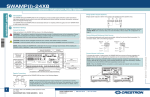
Press q or ▲ to display Front Panel Lock and press ENTER. The “Front
Panel Lock” screen is displayed.
“Front Panel Lock” Screen
▲
3.
Set the Cresnet ID
Front Panel Lock
Off
Press q or ▲ to display the desired setting and press ENTER. The display
returns to the previous screen.
If the SWAMP-24X8 is to communicate with a control system over Cresnet, the Net
ID must be set. To set the Net ID using the front panel, perform the following
procedure:
1.
Enter the “Control Setup” menu as described above.
2.
Press q or ▲ to display Cresnet ID and press ENTER. The “Cresnet ID”
screen is displayed.
“Cresnet ID” Screen
▲
q
3.
Set the IP ID
Press q or ▲ to display the desired setting and press ENTER. The display
returns to the previous screen.
If the SWAMP-24X8 is to communicate with a control system over TCP/IP, the IP
ID must be set. To set the IP ID using the front panel, perform the following
procedure:
1.
Operations Guide – DOC. 7049D
Cresnet ID
A1
Enter the “Control Setup” menu as described on page 39.
Sonnex Multiroom Audio System: SWAMP(I)-24X8 • 39