1
Appendix B: Customization
T.37 Advanced Usage
Introduction
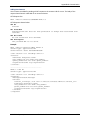
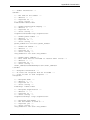
Below you will find examples of T.37 (email to fax) implementation using Multi-Tech Systems FaxFinder
x30 family unit (which includes the FF130, FF230, FF430 and FF830 models). The lines that mention RFC
(Request For Comment) numbers can be looked up online at the IETF website (www.ietf.org) for further
details.
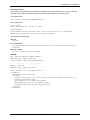
Sample addresses:
[email protected]
[email protected]
FAX=111-222-3333/[email protected]
FAX=111-222-3333/[email protected]
FAX=1234/[email protected]
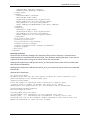
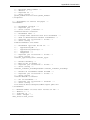
The minimal specification [See: RFC 2304] of a fax in e-mail address is:
fax-email = ["/"] fax-address ["/"] "@" mta-I-fax
fax-address = fax-mbox [ t33s ]
fax-mbox = "FAX=" global-phone
global-phone = "+" 1*( DIGIT / written-sep )
written-sep = ( "-" / "." )
t33s = "/" t33-sep "=" sub-addr
t33-sep = "T33S"
sub-addr = 1*( DIGIT )
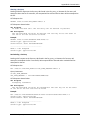
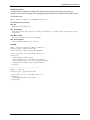
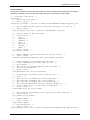
FaxFinder additions:
cover-page-enabled = "/" cover-page-enabled-sep "=" value
cover-page-enabled-sep = "COVER-PAGE-ENABLED"
value = “false” / “true”
The fax priority specifies the order of scheduling ( 0 is highest and 5 is lowest):
fax-priority = "/" fax-priority-sep "=" priority
fax-priority-sep = "FAX-PRIORITY"
priority = 0 – 5
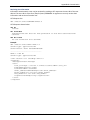
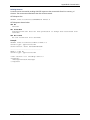
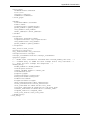
Inline comments specifies whether the message body is treated as cover page comments or not. By
default, the first inline text body part will be used as the cover page comments. This can be changed by
setting /INLINE-COMMENTS=false.
inline-comments = "/" inline-comments-sep "=" value
inline-comments-sep = "INLINE-COMMENTS"
value = "false" / "true"
Multi-Tech Systems, Inc.
FaxFinder Admin User Guide
113