1
Getting Started
GCA70-251
Positioning Your Station
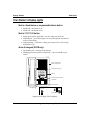
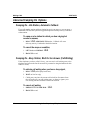
If you are using an Impact 8201N SCS model, your telephone has an adjustable
pedestal to allow you to select the most comfortable viewing angle. When you
receive the telephone, the pedestal is in its lowest position—flush against the
pedestal.
·
To adjust the pedestal (8201N
only),
Telephone
First Notch
Second Notch
1. GRASP the rear of the pedestal base
firmly with one hand AND LIFT theSupporting Arm
rear portion of the telephone upward
with your other hand.
Third Notch
(For Highest Position)
PED01
2. LIFT the telephone upward with
one hand AND R A ISE the
telephone supporting arms upward
with your other hand. (Notice there
are three sets of notches under the
telephone corresponding to the three
positions available.)
Pedestal Base
Adjusting The Pedestal
3. When the telephone is at the desired height, SELECT the closest
pair of notches AND INSERT the supporting arms in the notches.
PRESS DOWN slightly on the telephone UNTIL you feel the
supporting arms snap into place.
Setting a Personal Ringing Tone and Volume
You can choose one of eight different ring tones for your telephone. Often, when
several telephones are located close together, each user chooses a different personal
ring tone.
·
To select one of the ring tones, proceed as follows:
1. PRESS INTERCOM.
**4.
DIAL number ( 1
2. DIAL
3.
to
8 ) to select ring tone.
4. The next time your telephone rings, you will hear the new ring
tone.
NOTE: On the 8101N, a three-position switch on the bottom of the telephone
controls the ringer volume. There is no handset volume control.
2
Single Line Proprietary Telephone Station User’s Guide