1
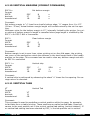
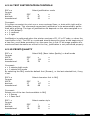
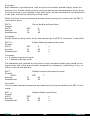
ESC <
Format:
ASCII:
decimal:
hexadecimal:
One line unidirectional printing
ESC
27
1B
<
60
3C
Comment:
The current line is forced to be printed with print head moving from left to right. This
command ceases after a CR (carriage return) is received.
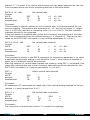
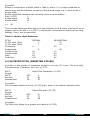
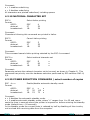
ESC U n
Format:
ASCII:
decimal:
hexadecimal:
Unidirectional printing enable/disable
ESC
27
1B
U
85
55
n
n
n
Comment:
n = 1 enables unidirectional printing
n = 0 disables unidirectional printing
MP 2000 normally prints text with bidirectional print head movement. This command
forces unidirectional print and allows for a more accurate text positioning.
Unidirectional printing can be useful when the ASCII extended graphic character set is
used (from 176 dec to 223 dec.), which requires the finest vertical alignment tuning.
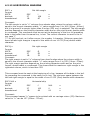
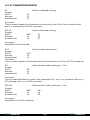
4.2.4 Page Control
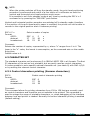
FF
Format:
ASCII:
decimal:
hexadecimal:
Form Feed
FF
12
0C
Comment:
This comment forces all data in the input buffer to be printed and paper advanced by a
length equal to the set page length.
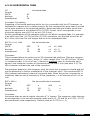
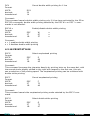
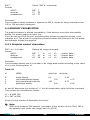
ESC C n
Format:
ASCII:
decimal:
hexadecimal:
Page length in lines
ESC
27
1B
C
67
43
n
n
n
Comment:
Page length is set to “n” lines. The range for “n” is from 1 to 127 (01 hex....7Fhex)
Physical page length is determined by the actual line spacing; maximum physical
length is 12” and if a line spacing of 1/6” is chosen, the maximum value for “n” will be
72. The beginning of the page is assumed to be the current page position. Any bottom
margin setting established by an ESC N n command is cleared whenever page length
setting is changed. Default page length is set to 66 lines.
DCA Intertel
21
DCA Intertel