1
4. Activating Your Beacon
Overview
Personal Locator Beacons are designed to be manually activated. They
are only to be activated when all other means of self-rescue have been
exhausted. When properly registered as required, the activation of the
beacon tells Search and Rescue who you are, where you are, and that
you are facing a life threatening situation.
situation
How To Activate Your Beacon
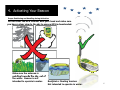
To activate your beacon in a distress situation, follow these steps:
1. Unclip the antenna latch from the case and move
antenna
a
a into
o the upright
up g position
pos o
2. Depress the ON/OFF button for 1 full second. (button is
embossed only, red color is for enhanced graphics presentation)
When Activated (First Minute):
To let you know the beacon has been activated, you will see the strobe
li ht flash
light
fl h once every second
d while
hil the
th RED light
li ht will
ill flash
fl h once every 3
seconds.
After the First Minute:
While transmitting your distress signal, the RED light and Strobe light
each will flash once every 3 seconds, alerting you that your beacon is
active.
When the Red light is replaced by the GREEN light, this indicates that
yyour beacon has successfullyy downloaded yyour GPS coordinates and is
transmitting them along with your 406 MHz Distress Signal.
8