1
adjust the level to the desired maximum. Different input
sources on the same amplifier can have different volume
limit settings.
This ability is desirable in situations when one microphone
is to be used for emergency announcements and another
is for general paging. The PM3180 can be set to completely mute background music during emergency announcements, but only partial muting on normal pages.
In this application we will set limits only in the bar area. For
the background music and the CD player, the limits will be
set at half the maximum. For the jukebox and TV, the level
is set by ear to what the owner considers to be appropriate.
Once the amplifier/input/MIC combination has been
selected, it’s only a matter of using the volume control
buttons to adjust the AUX input mute level. The microphone is live while making this adjustment so the volume
difference between the AUX input and microphone level
signals can be evaluated. The microphone volume during
this setup mode is the same as the PRESETS level and
can not be adjusted.
Two of the zones in this installation, the Waiting and Dining
Rooms, are not to be adjusted by the user after the
initial setup. To protect the system from tampering, the
INHIBIT feature can be used. The volume, bass, and treble
controls for each amplifier channel in the PM3180 can be
individually inhibited from operating. Either the volume or
bass and treble, or both can be inhibited from operating.
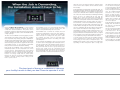
Bogen’s ProMatrix Model PM3180 is a three-channel
amplifier designed specifically to address the needs of
complicated sound installations. This product solves
multi-input, multi-zone application problems by providing
immense flexibility for audio control and distribution in
a single package.
The ProMatrix can be set to automatically switch input
sources and apply preset levels for volume, bass, and
treble as each prioritized input becomes active.
The ProMatrix uses a common set of inputs, but each
channel has independent control over input priorities,
volume, and EQ levels. For example, this ensures that
when someone in a facility’s bar area puts a dollar
in a jukebox, the music comes on loud and heavy
while the background music in the dining room stays
calm and quiet.
The heart of the ProMatrix is an analog signal processor
and microprocessor which control audio level, equalization, compression, input routing, and power amplification.
Through easy-to-understand setup menus, the ProMatrix
can be instructed to handle audio signals in ways that
would normally require banks of equipment and complicated wiring schemes. It even includes a detachable
front panel for the ultimate installation flexibility.
For the installer, the PM3180 is about as easy to install
as a home stereo. Simply plug in the audio input sources,
wire the speaker load to the amplifiers and the system is
up and running. The unit comes from the factory set so
that you’ll hear audio as soon as you press the power
button. Then simply enter the password-protected
programming mode and customize the system operation.
The programming mode gives you access to numerous
features that makes complicated installations a breeze.
Even though the ProMatrix solves complicated audio
installation problems, it is not complicated to use. It was
created with the understanding that non-technical
people will be the ones using the system long after the
installation is complete. Operation is simple and intuitive
because of its large, cleanly laid out control panel.
However, the best part of having a ProMatrix PM3180
amplifier to manage a facility’s audio is that you don’t
have to operate it at all.
In this application we set the muting levels in the bar and
waiting area. The volume of the different input sources
are each set to be approximately 10 dB lower than the
microphone level.
In this application we select AMP 1 and select ON for the
volume inhibit. Selecting ON means that the inhibit feature is on, indicating that the associated control buttons
don’t operate. We select the same setting for AMP 3.
The last step in this installation is to program the PM3180
to replace the default input display names with the name
of the input source. The LABELS menu is used to customize the name of the 6 input sources. Names must be
no more than 10 characters (A to Z, 0 to 9, -, /, or “space”).
The PM3180 is capable of muting an AUX input source to a
predetermined level while a page is in progress. Once the
page has finished the AUX input will fade back to its original
level. Setting the level to which the AUX input is suppressed
is accomplished by using the AUX MUTE menu function.
In this application we set the microphone input name to
PAGE, the CD player to CD CHANGER, the background music
service to BGM, the TV AUDIO and jukebox to JUKEBOX. You
scroll through a list of available characters to select one so
only a few buttons are used to edit the name.
To set this feature you must select the amplifier and input
source combination to be adjusted. Also, for AUX mute
level setting, you must select a microphone input. The
PM3180 has the ability to mute an input source differently
depending on which microphone input is being used.
The best part of having a ProMatrix to manage
your facility’s audio is that you don’t have to operate it at all.
2
7