1
3.0
Installation Instructions for Specific Power Supplies, continued
3.2
Alpha XM Series, continued
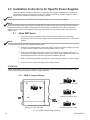
3.2.3 XM USM Output Voltage Calibration
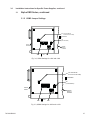
You must calibrate the scaled output voltage of the USM cards. To calibrate the
output voltage, use a DC voltmeter and adjust the potentiometer located next to the
white 15-pin connector of the USM cards. Refer to the Alpha USM Installation manual
for more information.
Determine if the power supply has a 60V or 90V nominal output.
NOTE:
This alignment procedure requires that the output neutral of the power supply is connected to the chassis of
the power supply. If you are performing the alignment on a bench, verify this connection is made. For installed
power supply sites, this connection is automatic inside the SPI box.
To make a universal adjustment:
•
•
•
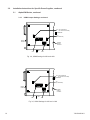
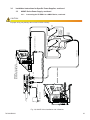
Connect a DC voltmeter, Common or Minus side to the battery, (black) test point
on the inverter module front panel (or chassis); plus side to pin 4 of the USM
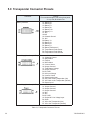
connector. For reference, Pin 1 of the transponder connecter is the black wire.
For 60V power supplies, using the USM card, adjust the voltage at pin 4 to
15.0VDC.
For 90V power supplies, USM card, adjust the voltage at pin 4 to 22.5VDC.
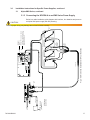
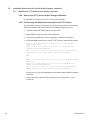
3.2.4 Provisioning the Network for the XM Series
The transponder must be recognized by the CMTS as a valid device, be able to
obtain an IP address and communicate with the SNMP management server.
1. Load the transponder’s MAC address into the CMTS.
2. Setup SNMP using two AM propriety MIBs files.
3. Compile the two MIBs onto a network manager or MIB browser software.
4. Set the AM MIBS points for the XM as follows:
Oid: 1.3.6.1.4.1.2183.2.3.3.1.2 set to (3) (power supply
selection)
Oid: 1.3.6.1.4.1.2183.2.3.6.5 set to (2) (output voltage
scaling)
Oid: 1.3.6.1.4.1.2183.2.3.6.6 set to (1)for 110V powered
supply and (2) for 220V (input voltage measurement)
See Section 4.0, Proprietary Management Information Bases (MIBs) for detailed
information.
5. Install and configure the DOCSIS configuration file. See Section 2.1.8 for a
sample file.
745-838-B0-001
21