1
See Model Size
For Length
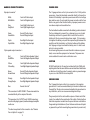
WIRING DIAGRAM
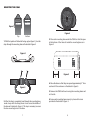
Figure 6
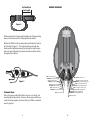
7. Remove any slack in the strap by feeding it out of the mounting
base on the loose end of the strap opposite the buckle.
8. Place the CS8A5 on the mounting bases and fasten the buckles
as illustrated in figure 7. The strap should loop through the
buckle and be tightened securely by holding the strap in place
with one hand and pulling the loose end away from the buckle,
but against the cabinet.
REMOTE
POWER
F/R GAIN
INPUT
SUB GAIN
PHASE
OUTPUT
B-
B+
White - front left pos. input
White/Black - front left neg. input
Figure 7
Blue - remote turn on
Grey - front right pos. input
Grey/Black - front right neg. input
Orange - rear right pos. speaker ouput
Orange/Purple - rear right neg. speaker ouput
Brown - rear left pos. speaker ouput
Brown/Green - rear left neg. speaker ouput
Green - rear left pos. input
Green/Black - rear left neg. input
Purple - rear right pos. input
Purple/Black - rear right neg. input
Technical Note:
Due to the jarring and shifting that can occur in a vehicle, the
mounting straps may stretch or loosen. We recommend that you
check the straps regularly to assure that your CS8A5 is mounted
securely in place.
9
Yellow - front right pos. speaker ouput
Yellow/Grey - front right neg. speaker ouput
Red - front left pos. speaker ouput
Red/White - front left neg. speaker ouput
Black - battery ground
Red - battery positive
10