1
Excalibur Multirate DAP Installation and Operation
Loop 2 and Loop 2 Error Tests
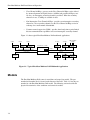
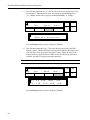
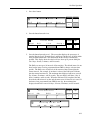
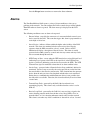
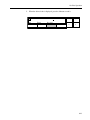
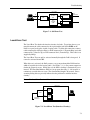
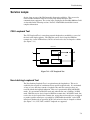
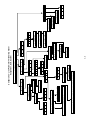
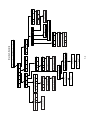
The Loop 2 Test places the far-end DAP into a V.54 Digital Loop. (See Figure 7-9.)
You can run this test on the entire aggregate bandwidth (Aggregate Digital Loop Test),
through an individual port (Port Digital Loop Test), or through a channel's lowest
numbered port (Channel Digital Loop Test). This test allows you to isolate the far-end
DTE from the rest of the network. If you want the DAP to generate a test pattern through
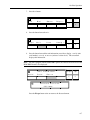
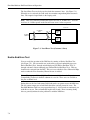
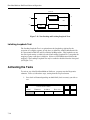
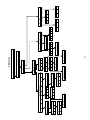
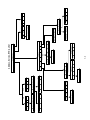
the looped path, you can select a Loop 2 Error Test. (See Figure 7-10.) The DAP lets
you program how long (1 - 999 seconds or continuous) you wish the Loop 2 Error Test to
run. The recommended length is 60 seconds. These tests should not be activated from
the RCP. The Loop 2 and Loop 2 Error Test are not available when the service is set for
Clear Channel 64 Kbps or when the Clear Secondary Channel feature is enabled.
Notes: The Aggregate Loop 2 and Aggregate Loop 2 Error Tests are not available when
the Diagnostic Compatibility parameter in the RCP submenu is set to On. These tests are
available at the port or channel level.
The far-end DAP will be placed in a Digital Loop or a V.54 Digital Loop depending on
its Remote Digital Loop Parameter setting in the DAP Configuration submenu for
Aggregate level tests only.
LOCAL DAP
REMOTE DAP
TX
DATA
RX
DATA
LINES
TRANSMITTER
RECEIVER
RECEIVER
TRANSMITTER
MARKING
GEN
RX
DATA
TX
DATA
Figure 7-9. Loop 2 Test
LOCAL DAP
TX
DATA
RX
DATA
TEST
PATTERN
GEN
MARKING
GEN
TEST
PATTERN
COMP
REMOTE DAP
TX
DATA
LINES
TRANSMITTER
RECEIVER
RECEIVER
TRANSMITTER
RX
DATA
Figure 7-10. Loop 2 Error Test
7-8
MARKING
GEN