1
InfraStruXure 20kW System
Installation, Operation,
and Maintenance
Contents
Safety ......................................................................1
Overview . . . . . . . . . . . . . . . . . . . . . . . . . . . . . . . . . . . . . . . . . 1
Safety symbols used in this guide . . . . . . . . . . . . . . . . . . . . . 1
InfraStruXure-certified . . . . . . . . . . . . . . . . . . . . . . . . . . . . 1
Warnings . . . . . . . . . . . . . . . . . . . . . . . . . . . . . . . . . . . . . . . . . 2
Receiving/moving . . . . . . . . . . . . . . . . . . . . . . . . . . . . . . . 2
Installation/maintenance . . . . . . . . . . . . . . . . . . . . . . . . . . 2
Maintenance performed
while the system is receiving input power . . . . . . . . . . . . . . . 2
Adding power cables and circuit breakers . . . . . . . . . . . . . . . 3
Total power off procedure . . . . . . . . . . . . . . . . . . . . . . . . . 3
DANGER—Risk of Electric Shock! . . . . . . . . . . . . . . . . . . . . . 3
Batteries—CAUTION . . . . . . . . . . . . . . . . . . . . . . . . . . . . . 3
Emergency Power Off (EPO) . . . . . . . . . . . . . . . . . . . . . . . . 3
EMI . . . . . . . . . . . . . . . . . . . . . . . . . . . . . . . . . . . . . . . . . 4
Handling and transport . . . . . . . . . . . . . . . . . . . . . . . . . . . 4
Overview .................................................................5
InfraStruXure 20kW System Components. . . . . . . . . . . . . . . . . . 5
Front view . . . . . . . . . . . . . . . . . . . . . . . . . . . . . . . . . . . . 5
Front view (interior) . . . . . . . . . . . . . . . . . . . . . . . . . . . . . . 6
Front view (lower interior) . . . . . . . . . . . . . . . . . . . . . . . . . 7
Rear view . . . . . . . . . . . . . . . . . . . . . . . . . . . . . . . . . . . . . 8
Main input connection options . . . . . . . . . . . . . . . . . . . . . . 9
Site Planning..........................................................11
InfraStruXure 20kW System . . . . . . . . . . . . . . . . . . . . . . . . . . . 11
Weight/dimensions . . . . . . . . . . . . . . . . . . . . . . . . . . . . . 11
Clearances . . . . . . . . . . . . . . . . . . . . . . . . . . . . . . . . . . . 11
Heat output . . . . . . . . . . . . . . . . . . . . . . . . . . . . . . . . . . 12
Electrical requirements . . . . . . . . . . . . . . . . . . . . . . . . . . . 12
InfraStruXure 20kW System—Installation, Operation, and Maintenance
i
Installation ............................................................ 13
Overview. . . . . . . . . . . . . . . . . . . . . . . . . . . . . . . . . . . . . . . . . 13
Before you begin . . . . . . . . . . . . . . . . . . . . . . . . . . . . . . 13
Tools required for installation procedures . . . . . . . . . . . . . . 13
Install the InfraStruXure 20kW System . . . . . . . . . . . . . . . . . . . 14
Level the InfraStruXure 20kW System . . . . . . . . . . . . . . . . . 14
Ensure that all power is off . . . . . . . . . . . . . . . . . . . . . . . . 15
Connect utility conductors
to the InfraStruXure 20kW System . . . . . . . . . . . . . . . . . . . 16
Connect an Emergency Power Off switch . . . . . . . . . . . . . . 19
Install Additional InfraStruXure Components . . . . . . . . . . . . . . 20
Install Shielding Troughs, Shielding Partitions,
and Cable Ladders . . . . . . . . . . . . . . . . . . . . . . . . . . . . . 20
Install InfraStruXure Rack-mount Devices . . . . . . . . . . . . . . 20
Route and Attach Overhead Wiring . . . . . . . . . . . . . . . . . . . . . 21
Route and attach power cables to equipment racks . . . . . . . 21
System Start-up...................................................... 25
Safety . . . . . . . . . . . . . . . . . . . . . . . . . . . . . . . . . . . . . . . . . . . 25
Start-Up Procedure. . . . . . . . . . . . . . . . . . . . . . . . . . . . . . . . . . 26
Start the InfraStruXure 20kW System using
the display interface . . . . . . . . . . . . . . . . . . . . . . . . . . . . 28
Apply power to load equipment . . . . . . . . . . . . . . . . . . . . 29
Quick Configuration .............................................. 31
Network Management Card . . . . . . . . . . . . . . . . . . . . . . . . . . . 31
Overview . . . . . . . . . . . . . . . . . . . . . . . . . . . . . . . . . . . . 31
TCP/IP configuration methods . . . . . . . . . . . . . . . . . . . . . . 31
InfraStruXure 20kW System Display Interface . . . . . . . . . . . . . . 32
Configuring network settings using the display interface . . . 32
APC Management Card Wizard . . . . . . . . . . . . . . . . . . . . . . . . 33
BOOTP & DHCP Configuration . . . . . . . . . . . . . . . . . . . . . . . . . 34
BOOTP . . . . . . . . . . . . . . . . . . . . . . . . . . . . . . . . . . . . . 34
DHCP . . . . . . . . . . . . . . . . . . . . . . . . . . . . . . . . . . . . . . 35
ii
InfraStruXure 20kW System—Installation, Operation, and Maintenance
Control Console. . . . . . . . . . . . . . . . . . . . . . . . . . . . . . . . . . . . 36
Local access to the control console . . . . . . . . . . . . . . . . . . . 36
Remote access to the control console . . . . . . . . . . . . . . . . . 36
Configuring settings on the control console . . . . . . . . . . . . . 37
How to Access a Configured InfraStruXure 20kW System . . . . . 38
Overview . . . . . . . . . . . . . . . . . . . . . . . . . . . . . . . . . . . . 38
Operation ..............................................................39
Display Interface . . . . . . . . . . . . . . . . . . . . . . . . . . . . . . . . . . . 39
Navigating screens . . . . . . . . . . . . . . . . . . . . . . . . . . . . . 40
Top-Level Status screen . . . . . . . . . . . . . . . . . . . . . . . . . . 41
Top-Level Menu screen . . . . . . . . . . . . . . . . . . . . . . . . . . . 41
Control screen . . . . . . . . . . . . . . . . . . . . . . . . . . . . . . . . 42
Status screens . . . . . . . . . . . . . . . . . . . . . . . . . . . . . . . . . 42
Setup screen . . . . . . . . . . . . . . . . . . . . . . . . . . . . . . . . . . 43
Accessories screen . . . . . . . . . . . . . . . . . . . . . . . . . . . . . . 44
Logging screens . . . . . . . . . . . . . . . . . . . . . . . . . . . . . . . 45
Display screens . . . . . . . . . . . . . . . . . . . . . . . . . . . . . . . . 45
Diags screens . . . . . . . . . . . . . . . . . . . . . . . . . . . . . . . . . 46
Help screens . . . . . . . . . . . . . . . . . . . . . . . . . . . . . . . . . . 46
Procedures . . . . . . . . . . . . . . . . . . . . . . . . . . . . . . . . . . . . . . . 47
How to transfer the InfraStruXure 20kW System
UPS into maintenance bypass operation . . . . . . . . . . . . . . . 47
How to return from maintenance bypass operation . . . . . . . 50
How to ensure total power off
. . . . . . . . . . . . . . . . . . . . . 53
Troubleshooting.....................................................55
Overview . . . . . . . . . . . . . . . . . . . . . . . . . . . . . . . . . . . . . . . . 55
Alarm Messages on the Display Interface . . . . . . . . . . . . . . . . . 56
General status . . . . . . . . . . . . . . . . . . . . . . . . . . . . . . . . . 56
General fault . . . . . . . . . . . . . . . . . . . . . . . . . . . . . . . . . 58
Module failure . . . . . . . . . . . . . . . . . . . . . . . . . . . . . . . . 60
Threshold alarm . . . . . . . . . . . . . . . . . . . . . . . . . . . . . . . 60
Bypass . . . . . . . . . . . . . . . . . . . . . . . . . . . . . . . . . . . . . . 62
InfraStruXure 20kW System—Installation, Operation, and Maintenance
iii
Maintenance ......................................................... 63
Parts Replacement . . . . . . . . . . . . . . . . . . . . . . . . . . . . . . . . . . 63
How to obtain replacement parts . . . . . . . . . . . . . . . . . . . 63
How to return parts to APC . . . . . . . . . . . . . . . . . . . . . . . 64
Replacement parts
. . . . . . . . . . . . . . . . . . . . . . . . . . . . . 64
How to remove a power module . . . . . . . . . . . . . . . . . . . . 65
How to install a power module . . . . . . . . . . . . . . . . . . . . . 66
How to remove an intelligence module . . . . . . . . . . . . . . . 66
How to install an intelligence module . . . . . . . . . . . . . . . . . 67
How to remove a card . . . . . . . . . . . . . . . . . . . . . . . . . . . 67
How to install a card . . . . . . . . . . . . . . . . . . . . . . . . . . . . 67
Battery replacement . . . . . . . . . . . . . . . . . . . . . . . . . . . . 68
How to remove a battery unit . . . . . . . . . . . . . . . . . . . . . . 68
How to install a new battery unit . . . . . . . . . . . . . . . . . . . 68
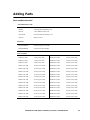
Adding Parts . . . . . . . . . . . . . . . . . . . . . . . . . . . . . . . . . . . . . . 69
Parts available from APC . . . . . . . . . . . . . . . . . . . . . . . . . 69
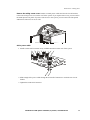
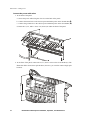
How to add circuit breakers and power cables . . . . . . . . . . . 70
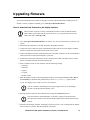
Upgrading Firmware . . . . . . . . . . . . . . . . . . . . . . . . . . . . . . . . 73
How to download new firmware to the display interface
. . . 73
Specifications ........................................................ 75
Product Information .............................................. 81
Warranty. . . . . . . . . . . . . . . . . . . . . . . . . . . . . . . . . . . . . . . . . 81
Life-Support Policy . . . . . . . . . . . . . . . . . . . . . . . . . . . . . . . . . . 82
How to Obtain Service. . . . . . . . . . . . . . . . . . . . . . . . . . . . . . . 83
iv
InfraStruXure 20kW System—Installation, Operation, and Maintenance
Safety
Overview
Safety symbols used in this guide
Indicates a hazard, which, if not avoided, could result in injury or death.
Electrical
Hazard
Indicates a hazard, which, if not avoided, could result in damage to product or other
property.
Warning
Indicates important information.
Note
Indicates a heavy load that should not be lifted without assistance.
Heavy
Indicates that more information is available on the same subject in a different section
of this manual.
Indicates that more information is available on the same subject in a different manual.
See also
Indicates a standby state. When in standby, the unit is not operating, but it may still
contain hazardous voltage. It is not safe to service until the equipment is
disconnected from all sources of electrical power.
SAVE THESE INSTRUCTIONS. This manual contains important instructions that must be followed
during installation, operation, and maintenance of the InfraStruXure 20kW System.
InfraStruXure-certified
This product is certified for use in APC InfraStruXure systems. If you have InfraStruXure Manager as
part of your system, the Quick Configuration instructions in this document do not apply. See instead
the InfraStruXure Manager’s documentation for more information.
InfraStruXure 20kW System—Installation, Operation, and Maintenance
1
Warnings
Receiving/moving
Do not tilt the InfraStruXure 20kW System greater than 45° from its vertical axis. Never lay the
InfraStruXure 20kW System on its side.
Installation/maintenance
Only a certified electrician can:
• Connect the InfraStruXure 20kW System to utility
• Connect a switch to the EPO interface on the InfraStruXure 20kW System
• Install a customer-specified, hard-wired power cable
Only a certified electrician or an APC Field Service Engineer can perform maintenance of the
InfraStruXure 20kW System.
When connecting the InfraStruXure 20kW System to utility, a 90A circuit breaker must be installed
to protect the InfraStruXure 20kW System against over-current. The circuit breaker must have a
shunt trip.
Maintenance performed while the system is receiving input power
APC does not recommend maintenance while the system is receiving input power. However, due to
the critical nature of data center loads, maintenance while the system is receiving input power may
occur. If you must perform maintenance while the system is receiving input power, observe the
following precautions to reduce the risk of electric shock:
1. Never work alone.
2. Perform the maintenance only if you are a certified electrician who is trained in the hazards of
live electrical maintenance.
3. Know the procedure for disconnecting electricity to the system and the data center in case of an
emergency.
4. Wear appropriate personal protective equipment.
5. Use double-insulated tools.
6. Always follow local and site regulations when working on the system.
2
InfraStruXure 20kW System—Installation, Operation, and Maintenance
Safety: Warnings
Adding power cables and circuit breakers
The APC InfraStruXure Build-Out Tool allows you to attach three 20A, single-pole breakers to one
three-phase power cable if you are powering 120V (L-N) loads. However, if you are powering 208V
(L-L) loads, you must attach a three-phase power cable to one three-pole, 20A breaker.
Any customer-specified, hard-wired 3-phase power cable that is installed by an electrical contractor
must be installed with a 3-pole breaker.
Total power off procedure
1. Set the System Enable switch to Standby.
2. Set the DC Disconnect breaker to Off.
3. Set the Q1, Q2, and Q3 switches to Off.
4. Set the DC Disconnect breaker of each XR Battery Enclosure to Off.
5. Set the utility circuit breaker to Off.
6. Disconnect the batteries by pulling them out approximately one inch (25.4 mm) from their
normal position.
DANGER—Risk of Electric Shock!
Hazardous, live parts inside the InfraStruXure 20kW System are energized from the battery supply
even when the AC power is disconnected. Test any electrical parts before touching them.
Batteries—CAUTION
Before replacing batteries, remove conductive jewelry such as chains, wrist watches, and rings. High
short-circuit current through conductive materials could cause severe burns.
Do not dispose of batteries in a fire. The batteries may explode.
Do not open or mutilate batteries. Released electrolyte is toxic and harmful to the skin and eyes.
Emergency Power Off (EPO)
Hazardous voltage from the branch circuit must be isolated from the 24VAC, 24VDC, and contact
closure. 24VAC and 24VDC are considered Class 2 circuits as defined in Article 725 of the National
Electrical Code (NFPA 70) and Section 16 of the Canadian Electrical Code (C22.1).
A Class 2 circuit is a source having limited voltage and energy capacity as follows:
a. If an Inherently Limited Power Source, voltage and energy are limited to less than 30VAC,
less than 30VDC, and 8A.
InfraStruXure 20kW System—Installation, Operation, and Maintenance
3
Safety: Warnings
b. If not an Inherently Limited Power Source, voltage and energy are limited to less than
30VAC, less than 60VDC, 250VA, and the current is limited to 1000/Vmax. The fuse is
limited to 5A if less than 20VAC or 20VDC, or 100/Vmaximum if less than 30VAC or
60VDC.
If you choose to use a 24VAC, 24VDC, or contact closure connection to the EPO, use one of the
following UL-listed wire types:
• CL2 Class 2 cable for general purpose use
• CL2P Plenum cable for use in ducts, plenums, and other space used for environmental air
• CL2R Riser cable for use in a vertical run shaft from floor to floor
• CL2X Limited Use cable for use in dwellings and for use in a raceway
• For installation in Canada, the cable should be CSA Certified, type ELC (extra-low-voltage
control cable).
If you do not use a CL2 cable, route the EPO wiring in conduit that does not contain any branch
circuit wiring.
EMI
This equipment has been tested and found to comply with the limits for a Class A digital device,
pursuant to Part 15 of the FCC Rules. These limits are designed to provide reasonable protection
against harmful interference when the equipment is operated in a commercial environment. This
equipment generates, uses, and can radiate radio frequency energy and, if not installed and used in
accordance with this user manual, may cause harmful interference to radio communications.
Operation of this equipment in a residential area is likely to cause harmful interference. The user will
bear sole responsibility for correcting such interference.
This Class A digital apparatus complies with Canadian ICES-003.
Cet appareil numérique de la classe A est conforme à la norme NMB-003 du Canada.
Handling and transport
When moving the InfraStruXure 20kW System to another location, always remove the power
modules and battery units to avoid damage during transport. Remove the power modules anytime the
system is moved—even a very short distance.
US Federal regulations require that batteries be disconnected during shipment.
4
InfraStruXure 20kW System—Installation, Operation, and Maintenance
Overview
InfraStruXure 20kW System Components
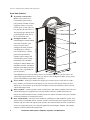
Front view
Power cables—The cables
provide power to
equipment racks; they exit
the system through
knockouts on the roof of
the enclosure. The power
cables consist of five wires:
three phases, one neutral,
and one ground. The
number of power cables
installed depends on your
system’s configuration.
Each power cable has a
NEMA L21-20 outlet,
which accepts a variety of
APC InfraStruXure
accessories, including Rack
PDUs and the Automatic
Transfer Switch.
Main input gland plate—
This gland plate is used for
wiring access to the main
input terminals. When an
electrician connects utility
power to the system, this
gland plate guides the
conductors to the main
input terminals.
Wiring access cover—This cover is used for wiring access to the distribution circuit breaker
panel. Remove this plate when you add power cables or breakers to the system.
Display interface—The display interface is attached to the name plate on the front door of the
enclosure. It has an LCD, five-button interface, basic status lights, and a beeper.
Leveling feet—The feet adjust for leveling the enclosure. All enclosures must be level before
installation of the system begins.
InfraStruXure 20kW System—Installation, Operation, and Maintenance
5
Overview: InfraStruXure 20kW System Components
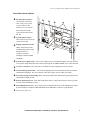
Front view (interior)
42-position circuit breaker
panel—Each system has a
circuit breaker panel with 39
pole positions available for load
equipment. Thirty-seven poles
provide power at 120 volts L-N;
two poles provide 208 volts L-L.
The amperage provided by each
position depends on the size of
the circuit breaker used.
Intelligence module —The
main intelligence module (MIM)
is the main controller of the
system. It reports status,
configures the UPS, performs
UPS diagnostics, manages
power and batteries, controls
general UPS performance,
regulates output voltage, and
accommodates power module
load-sharing. The redundant
intelligence module (RIM) is the
redundant controller. The RIM is
identical to the MIM (same part
number), and is responsible for
system operation
if the MIM fails or is removed. When you have two intelligence modules, you can remove one
without affecting the load. However, when you only have one intelligence module, always put the
system in maintenance bypass before removing it.
Power module— Each power module can support up to 10kVA of power. Each time you add a
power module, you increase the total capacity of your UPS. The total capacity cannot go above
20kVA (N+1). You can have up to three power modules in each system and they can be removed
without affecting the load.
Battery module—A battery module consists of four battery units. Battery modules can be removed
without affecting power supplied to the load. The number of battery modules determines the
runtime of a particular load. A battery module provides six minutes of runtime to one power module
at full load (assuming a 0.8 load power factor).
Static switch module—The static switch module is a parallel power path within the system. If the
system suffers a catastrophic failure, the static switch is activated; input power bypasses the power
modules; and power flows through the static switch to the connected load. The static switch has its
own power supply and operates on a fail-safe signal from the intelligence modules. This module
cannot be removed without affecting the load.
6
InfraStruXure 20kW System—Installation, Operation, and Maintenance
Overview: InfraStruXure 20kW System Components
Front view (lower interior)
DC disconnect breaker—
This breaker controls the
flow of DC power on the
system’s DC bus. The
breaker is an over-current
device that protects the
system from a fault on the
DC bus.
System enable switch—
This switch acts as the on/off
switch for the UPS.
Display/computer interface
card—This card provides
communication between the
display interface, a
computer, and each
intelligence module (MIM
and RIM).
System power supply cards—These cards supply power to the MIM and RIM. The cards are their
own separate input and output buses and each can support the MIM and RIM if one of the cards fail.
Accessory card slots—The card slots are available for APC management card accessories.
Network Management Card—The Network Management Card communicates directly with the
InfraStruXure Manager. The card connects to the hub, using a network cable (provided).
External switch gear monitoring card—This card monitors the maintenance bypass panel in the
InfraStruXure 20kW System.
Battery monitoring card—This card monitors the battery voltage and current in order to provide
accurate runtime and battery status.
XR communications card—This card provides communication between the InfraStruXure 20kW
System intelligence modules (MIM and RIM) and an XR Battery Enclosure (if applicable).
Reserved for future use.
InfraStruXure 20kW System—Installation, Operation, and Maintenance
7
Overview: InfraStruXure 20kW System Components
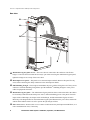
Rear view
Maintenance bypass panel access—The access door is connected to the enclosure with friction
hinges. To increase friction so that the door stays open when accessing the maintenance bypass panel,
tighten the hinge screws on top of the access door.
Main input access panel—This panel covers the main input terminals. Remove this panel for easy
access when connecting the utility conductors to the main input terminals.
PDU Shielding Trough—The trough accommodates the power cables exiting the roof of the system’s
enclosure. The PDU Shielding Trough lines up with NetShelter® Shielding Troughs to route power
cables to equipment enclosures.
Maintenance bypass panel—The maintenance bypass panel has three switches that allow the UPS to
be electrically isolated from the main power source, while maintaining power to the panel. The main
input switch is labeled Q1, the output switch is labeled Q2, and the maintenance bypass switch is
labeled Q3. The diagram label on the maintenance bypass panel illustrates the power flow, and the H2
and H3 LEDs indicate when it is safe to operate the Q2 and Q3 switches.
Floor access cover—Remove this cover to connect to the bottom entry main input terminal block, or to
route communication wires, if necessary.
8
InfraStruXure 20kW System—Installation, Operation, and Maintenance
Overview: InfraStruXure 20kW System Components
Main input connection options
Main input terminal block—The main input conductors (4W + G) land directly on this
terminal block. Access the terminal block through the main input gland plate.
Bottom entry main input terminal block—If you ordered this option, your main input
conductors (4W + G) land on this terminal block, which is wired to the main input terminal
block in the top of the system. Access the bottom terminal block through the floor access cover.
InfraStruXure 20kW System—Installation, Operation, and Maintenance
9
Site Planning
InfraStruXure 20kW System
Weight/dimensions
Ensure that the floor and subfloor can support the
total weight of the InfraStruXure 20kW System when
concentrated on the leveling feet. If you are placing
the system on a raised floor, consult the flooring
manufacturer for loading requirements before
installing the system.
Maximum weight: 1803 lb (818 kg)
With trough:
88.79 in
(2255 mm)
Without trough:
81.5 in
(2070 mm)
23.5 in
(597 mm)
34.5 in
(876.3 mm)
Clearances
Use this figure to determine the space requirements for installing the InfraStruXure 20kW System.
Consult your local codes and the NEC for additional requirements.
>12 in (304 mm)
Ceiling Clearance
Minimum Rear
Clearance
Minimum Front
Clearance
208 V: 36 in (914 mm)
208 V: 36 in (914 mm)
InfraStruXure 20kW System—Installation, Operation, and Maintenance
11
Site Planning: InfraStruXure 20kW System
Heat output
Consider the heat dissipation ratings of equipment to determine cooling requirements. Additional
equipment may be required.
Load
Batteries fully charged
Batteries charging
100%
6,345BTU/hr
9,346BTU/hr
75%
4,759BTU/hr
7,946BTU/hr
50%
3,172BTU/hr
6,360BTU/hr
Note 1: Batteries fully charged is a continuous rating; battery charge time is 3 hours,
maximum.
Note 2: Charging losses are based on 3000W, 90% charger electronic efficiency, and
80% battery charging efficiency.
The heat output is higher while batteries are charging. Under normal operating
conditions, battery recharging periods are infrequent.
Note
Electrical requirements
Upstream circuit breaker
(provided by customer)*
90A
Conductors to main input breaker
(provided by customer)*
208V, 4W + G
Recommended wire sizes
4AWG THHN
1-inch conduit
Torque for main input terminals
24.3–26in-lb
* Consult the NEC and local codes for sizing requirements.
12
InfraStruXure 20kW System—Installation, Operation, and Maintenance
Installation
Overview
Do not begin installing your InfraStruXure 20kW System without an APC Field
Service Engineer present.
Warning
Before you begin
Unpack the InfraStruXure 20kW System according to the unpacking instructions included in the
envelope on the outside of the system’s packaging. Search all boxes and packaging to make sure that
they are empty before discarding them.
The shipping materials are recyclable. Please save them for later use, or dispose of
them appropriately.
To determine the correct placement of your InfraStruXure 20kW System, see your Configure-ToOrder (CTO) report. Move the system to its final site.
Tools required for installation procedures
Tool
Provided?
13/14-mm open-ended wrench Yes
Level
No
Step ladder
No
Phillips screwdriver
No
Standard screwdriver
No
Torx-bit screwdriver
No
InfraStruXure 20kW System: Installation, Operation, and Maintenance
13
Install the InfraStruXure 20kW System
Do not install any batteries or power modules into the InfraStruXure 20kW
System until instructed to do so.
Warning
Level the InfraStruXure 20kW System
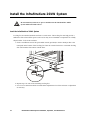
Leveling feet are attached under the enclosure at each corner. The leveling feet can help provide a
stable base if the selected floor space is uneven, but they are not intended to compensate for a badly
sloped surface. To level the enclosure:
1. Fit the 14-millimeter end of the open-ended wrench (provided) to the hex head just above the
round pad on the bottom of the leveling foot. Turn the wrench clockwise to extend the leveling
foot until it makes firm contact with the floor.
2. Repeat step 1 for each of the remaining leveling feet.
3. Use a level to determine which feet need further adjustment to level the enclosure. Adjust them
as necessary.
14
InfraStruXure 20kW System: Installation, Operation, and Maintenance
Installation: Install the InfraStruXure 20kW System
Ensure that all power is off
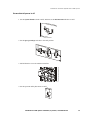
1. Set the System Enable switch to OFF, and then set the DC Disconnect breaker to OFF.
2. Set the Q1, Q2, and Q3 switches to the OFF position.
3. Pull all batteries out to the red disconnect line.
4. Set the upstream utility disconnect to OFF.
InfraStruXure 20kW System: Installation, Operation, and Maintenance
15
Installation: Install the InfraStruXure 20kW System
Connect utility conductors to the InfraStruXure 20kW System
The following procedures require a licensed electrician:
• Connection of utility conductors to the main input terminals
Electrical
Hazard
• Installation of an upstream circuit breaker
Attach conduit to the system for the utility input conductors.
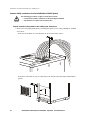
1. Remove the main input gland plate by loosening the captive screws, using a Phillips or standard
screwdriver:
– In the roof of the PDU (if you ordered the top access main input option).
– In the floor of the PDU (if you are connecting to the bottom entry main input terminal block
option).
16
InfraStruXure 20kW System: Installation, Operation, and Maintenance
Installation: Install the InfraStruXure 20kW System
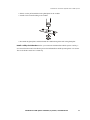
2. Knock out the perforated hole in the gland plate for the conduit.
3. Install a lock-nut and bushing to the conduit.
4. Re-attach the gland plate, and then thread the conduit through the hole in the gland plate.
Install a utility circuit breaker. Before you connect the InfraStruXure 20kW System to utility, a
90A circuit breaker must be installed to protect the InfraStruXure 20kW System against over-current.
The circuit breaker must have a shunt trip.
InfraStruXure 20kW System: Installation, Operation, and Maintenance
17
Installation: Install the InfraStruXure 20kW System
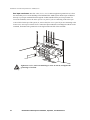
Run input conductors. Run four wires (L1, L2, L3, N) and an equipment ground wire (G) from
the main utility service of the building to the InfraStruXure 20kW System. Route input conductors
directly to your input terminal block through the conduit installed in the previous procedure. To
access the terminals, remove the main input access panel if you are connecting to the main input
terminal block at the top of the system; or, remove the floor access panel if you are connecting to the
bottom entry main input terminal block. Connect the input conductors according to the labels on the
terminals, and connect the ground wire to the lug located to the left of the terminals.
Tighten the L1, L2, and L3 terminal lugs to 24.6–26.1 in-lb, and tighten the
ground lug to 124 in-lb.
Warning
18
InfraStruXure 20kW System: Installation, Operation, and Maintenance
Installation: Install the InfraStruXure 20kW System
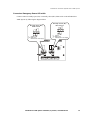
Connect an Emergency Power Off switch
Connect either a normally open (NO) or normally closed (NC) EPO switch to the InfraStruXure
20kW System by following the diagram below.
Normally Closed (NC)
EPO Control
Normally Open (NO)
EPO Control
8
4
3
2
7
6
5
1
8
Ground
7/6 Relay Coil 2
5
Internal Power +24V Supply
4
Ground
3/2 Relay Coil 1
1
Internal Power +24V Supply
J6
4
3
2
1
14 13 12 11 10 9
8
7
6
5
8
7
6
5
4
3
2
1
InfraStruXure 20kW System: Installation, Operation, and Maintenance
19
Install Additional InfraStruXure Components
Install Shielding Troughs, Shielding Partitions, and Cable Ladders
After your enclosures and the InfraStruXure 20kW System are installed in their final location, install
the Shielding Troughs, Shielding Partitions, and Cable Ladders to route overhead wiring for your
system.
See the installation and grounding instructions in the manual included with your
Shielding Troughs, Shielding Partitions, and Cable Ladders.
See also
Install InfraStruXure rack-mount devices
Install the Rack Automatic Transfer Switches (ATS). Install a Rack ATS in the top of each
enclosure for overhead wiring, or in the bottom of each enclosure for wiring under the floor.
See the installation instructions included with your Rack ATS.
See also
The Rack ATS is an optional component, and is not included with all InfraStruXure systems.
Install the Rack Power Distribution Units (PDU). Install Rack PDUs in the channel directly
behind the vertical mounting rails in the rear of the NetShelter VX enclosures. For overhead wiring,
make sure that the power cord is pointing toward the roof of the enclosure. For under the floor wiring,
make sure that the power cord is pointing toward the floor.
See the installation instructions included with your Rack PDU.
See also
Install the InfraStruXure Manager and Hub (or Switch). Install the InfraStruXure Manager in
the enclosure closest to the InfraStruXure 20kW System. The CAT-5 data cables included with your
configuration vary in length, based on the distance components will be installed from the
InfraStruXure 20kW System.
See the installation instructions included with your InfraStruXure Manager.
See also
Install the APC Environmental Monitoring Unit. Install the Environmental Monitoring Unit
according to the installation instructions included with the device. The Environmental Monitoring
Unit is an optional component and is not included with all InfraStruXure systems.
20
InfraStruXure 20kW System: Installation, Operation, and Maintenance
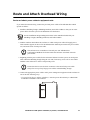
Route and Attach Overhead Wiring
Route and attach power cables to equipment racks
If you ordered overhead wiring, connect the prewired power cables of the InfraStruXure 20kW
System as follows:
1. Install the Shielding Troughs, Shielding Partitions, and Cable Ladders so that you can route
power cables from the system to the NetShelter VX Enclosures.
See the installation and grounding instructions in the manual included with your
Shielding Troughs, Shielding Partitions, and Cable Ladders.
See also
2. Find the numbers that indicate the enclosure to which each power cable will supply power.
These numbers appear on the roof of the InfraStruXure 20kW System where the power cables
exit, and on the ends of each power cable.
Note
The enclosures are not numbered. Consult your APC InfraStruXure
Configuration Buildout Tool to determine the enclosure associated with each
power cable.
3. Beginning with the power cables for the enclosures farthest from the system, run each power
cable within the Shielding Trough along the row and, if necessary, across one or more Cable
Ladders to the enclosure to which it will provide power.
Ensure that the L21-20 twist-lock connector at the end of each power cable
always lies on top of any longer power cables in the Shielding Trough.
Note
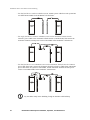
4. Connect the appropriate power cable to APC power management equipment in the enclosure in
one of the four following ways:
– For single-feed devices without redundancy: Attach a power cable directly to a Rack PDU
installed in a NetShelter VX Enclosure.
InfraStruXure 20kW System: Installation, Operation, and Maintenance
21
Installation: Route and Attach Overhead Wiring
– For dual-feed devices within a redundant system: Attach a power cable from each system into
two different Rack PDUs in the NetShelter VX Enclosure.
– For single-feed devices within a redundant system with an Automatic Transfer Switch:
Connect a power cable to the Automatic Transfer Switch (A and B feeds), and connect the
Automatic Transfer Switch power cord to a Rack PDU in the NetShelter VX Enclosure.
– For dual-feed devices in a redundant system with an Automatic Transfer Switch: Connect a
power cable from each system to the Automatic Transfer Switch’s A and B feeds, and another
power cable from one system to a Rack PDU, and the Automatic Transfer Switch’s power
cord to a second Rack PDU in the NetShelter VX Enclosure.
Lay the cables neatly in the Shielding Trough to minimize cable build-up.
Note
22
InfraStruXure 20kW System: Installation, Operation, and Maintenance
Installation: Route and Attach Overhead Wiring
5. From each NetShelter VX Enclosure, run the power cable of the appropriate APC power
management device out the roof of the enclosure, through the notch in the rear wall of the
Shielding Trough, to the connector of the appropriate power cable from the system. Plug the
two connectors together, and twist them clockwise to lock.
Note
The APC InfraStruXure Build-Out Tool allows you to attach three 20A, single-pole
breakers to one three-phase power cable if you are powering 120V (L-N) loads.
However, if you are powering 208V (L-L) loads, you must attach a three-phase power
cable to one three-pole, 20A breaker.
InfraStruXure 20kW System: Installation, Operation, and Maintenance
23
System Start-Up
Safety
Only APC Field Service Engineers or qualified, APC-trained personnel may
perform a system start-up.
Warning
s
Do not install any batteries or power modules into the InfraStruXure 20kW
System until instructed to do so.
Warning
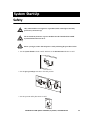
Before you begin, ensure that all power is off by following the procedure below:
Electrical
Hazard
1. Set the System Enable switch to OFF, and then set the DC Disconnect breaker to OFF.
2. Set the Q1, Q2, and Q3 switches to the OFF position.
3. Set the upstream utility disconnect to OFF.
InfraStruXure 20kW System: Installation, Operation, and Maintenance
25
Start-Up Procedure
1. Set the upstream utility breaker to ON.
2. Ensure A-B-C clockwise phase rotation at the top of the input terminal block, using a phase
rotation meter.
3. Set the Q1 switch to ON.
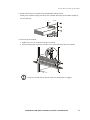
4. Install at least one battery module (four battery units) in the InfraStruXure 20kW System.
Install battery modules, starting in the lowest available shelf. Position the battery unit between
the grooves, and slide it completely into the enclosure.
Electrical
Hazard
26
The DC bus in the InfraStruXure 20kW System is energized when battery
modules are installed, even when the system’s DC Disconnect breaker is OFF.
InfraStruXure 20kW System: Installation, Operation, and Maintenance
System Start-Up: Start-Up Procedure
5. Install at least one power module in the InfraStruXure 20kW System.
Install power modules starting from the lowest available shelf. Push each module completely
into the enclosure.
6. Secure the power module:
a. Tighten the screws on each side of the power module.
b. Turn the locking latch clockwise until the arrow on the knob faces the power module.
The power module will not operate unless the locking latch is engaged.
Note
InfraStruXure 20kW System: Installation, Operation, and Maintenance
27
System Start-Up: Start-Up Procedure
7. Set the DC Disconnect breaker to ON, and then set the System Enable switch to ON.
When the System Enable switch is in the ON position, the Startup screen appears on the display
interface, and then
PowerView RM
Rev: 000 English
Please wait...
the top-level status screen appears on the display interface. This changeover may take up to 40
seconds.
||||||||||||
Chrg %
|||
Load %
208Vin 000Vout 60Hz
Runtime: 1hr 2min
Start the InfraStruXure 20kW System using the display interface
1. Read the messages on the display interface:
Note any alarms and verify that they are
appropriate for start-up conditions.
2. Command the UPS to apply power to the load:
a. Press the ESC key to open the top-level
menu.
b. Select Control, and press the ENTER key.
c. Select Turn UPS Output On from the
Control menu, and press the ENTER key.
Top-Level Status Screen
||||||||||||
Chrg %
|||
Load %
208Vin 000Vout 60Hz
Runtime: 1hr 2min
Top-Level Menu
Control
Status
Setup
Accessories
Logging
Display
Diags
Help
Control Menu
UPS Into Bypass
Do Self Test
Simulate Power Fail
Graceful Reboot
Graceful Turn Off
Start Runtime Cal
Turn UPS Output On
28
InfraStruXure 20kW System: Installation, Operation, and Maintenance
System Start-Up: Start-Up Procedure
d. On the next screen: select Yes, UPS Load
ON, and press the ENTER key.
Confirmation Screen
Confirm:
Turn UPS ON
No, Abort
Yes, Turn UPS ON
The interface will display the following screen:
UPS HAS BEEN
COMMANDED TO TURN
LOAD POWER ON...
The UPS Output LED illuminates and the interface displays the following screen:
UPS LOAD IS ON
Press any key...
Apply power to load equipment
1. Set the Q2 switch to ON.
2. Close (turn ON) the Panel Power circuit breaker, and then close the individual distribution
panel circuit breakers.
InfraStruXure 20kW System: Installation, Operation, and Maintenance
29
Quick Configuration
Network Management Card
Warning
Disregard the procedures in this section if you have APC InfraStruXure Manager
as part of your system. See the documentation included with your InfraStruXure
Manager for more information.
Overview
You must configure the following TCP/IP settings before the system can operate on a network:
• The IP address of the system
• The subnet mask
• The default gateway
Note
See also
If a default gateway is unavailable, use the IP address of a computer that is usually
running and is located on the same subnet as the system. The system uses the
default gateway to test the network when traffic is very light.
See “Watchdog Features” in the “Introduction” of the Network Management
Card’s User’s Guide (.\doc\usrguide.pdf) on the CD for more information about
the watchdog role of the default gateway.
TCP/IP configuration methods
Use one of the following methods to define the TCP/IP settings needed by the system:
• The InfraStruXure 20kW System display interface (See “InfraStruXure 20kW System Display
Interface” on page 32).
• APC Management Card Wizard (See “APC Management Card Wizard” on page 33).
• DHCP or BOOTP server (See “BOOTP & DHCP Configuration” on page 34).
• Local computer (See “Local access to the control console” on page 36).
• Networked computer (See “Remote access to the control console” on page 36).
InfraStruXure 20kW System: Installation, Operation, and Maintenance
31
InfraStruXure 20kW System Display
Interface
Configuring network settings using the display interface
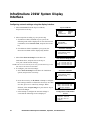
1. Select Accessories from the Top-Level Menu,
and press the ENTER key.
2. Select an option according to your system setup:
a. If a Measure-UPS is installed in your system, the
following menu will be displayed. To enter the Network
Card Menu, select Network Card, and press the ENTER
key.
b. If no Measure-UPS is installed in your system, the
Network Card Menu will be displayed by default.
3. Select View Network Setup from the Network
Card Menu above, and press the ENTER key to
view your current network settings.
NOTE: This screen is read-only. Press a key (not the HELP key) to exit
and return to the Network Card Menu.
4. To configure your network settings:
a. Select Network Setup from the Network Card Menu
options, and press the ENTER key.
b. Press the ENTER key on IP, Mask, or Gway to configure
their settings with the UP and DOWN arrow keys one value
at a time; press ESC to cancel any changes. When
finished, select Accept Changes or press the ESC key to
cancel all changes.
c. If the attempt to configure the network settings is
successful the following screen is displayed.
Top-Level Menu
Control
Status
Setup
Accessories
Logging
Display
Diags
Help
Accessories
MeasureUPS
Network Card
Network Card Menu
Network Card
View Network Setup
Network Setup
View Network Setup Screen
Network Setup
IP: 000.000.000.000
Mask: 000.000.000.000
Gway: 000.000.000.000
Network Card Menu
Network Card
View Network Setup
Network Setup
IP: 000.000.000.000
Mask: 000.000.000.000
Gway: 000.000.000.000
Accept Changes
Configuration Confirmation
Screen
Configuration
complete. Network
Card may have to
reboot.
32
InfraStruXure 20kW System: Installation, Operation, and Maintenance
APC Management Card Wizard
You can use the APC Management Card Wizard at a Windows 95, Windows 98, Windows NT 4.0, or
Windows 2000 computer to configure a system.
To configure multiple systems, or to configure a system from a configuration file,
see the Management Card Addendum (.\doc\addendum.pdf).
See also
1. Follow the on-screen instructions to install the Wizard from the Network Management Card
CD.
2. Launch the Wizard, when prompted, or, if prompted to restart the computer, access the Wizard
from the Start menu after the computer has restarted.
3. Wait for the Wizard to discover the unconfigured system, then follow the on-screen instructions.
If you leave the Start a Web browser when finished option enabled, you can use apc
for both the User Name and Password to access the system through your browser.
Note
InfraStruXure 20kW System: Installation, Operation, and Maintenance
33
BOOTP & DHCP Configuration
The Boot Mode setting, a TCP/IP option in the system’s Network menu, identifies how the TCP/IP
settings will be defined. The possible settings are Manual, DHCP only, BOOTP only, and DHCP &
BOOTP (the default setting).
Note
The DHCP & BOOTP setting assumes that a properly configured DHCP or
BOOTP server is available to provide TCP/IP settings to APC InfraStruXure
20kW Systems.
If these servers are unavailable, see “APC Management Card Wizard” on
page 33, “Control Console” on page 36, or “Remote access to the control
console” on page 36 to configure the needed TCP/IP settings.
With Boot Mode set to DHCP & BOOTP, the system attempts to discover a properly configured
server. It first searches for a BOOTP server, then searches for a DHCP server, and repeats this pattern
until it discovers a BOOTP or DHCP server.
For more information about using a server to configure a Management Card’s
TCP/IP settings, see “BOOTP” on this page or “DHCP” on page 35.
BOOTP
You can use an RFC951-compliant BOOTP server to configure the TCP/IP settings the Management
Card needs.
1. Enter the system’s MAC and IP addresses, the subnet mask, and default gateway settings, and an
optional Bootup File Name in the BOOTPTAB file of the BOOTP server.
See the InfraStruXure 20kW System Quality Assurance slip for the MAC address.
2. When the system reboots, the BOOTP server provides it with the TCP/IP settings.
3. If you specified a bootup file name, the system will attempt to transfer that file from a TFTP or
FTP server residing on the BOOTP server. The system will assume all settings specified in the
bootup file.
• If you did not specify a Bootup File Name, the system can be configured remotely by using
Telnet or by using the Web interface: User Name and Password are both apc, by default.
Note
You must use the APC Management Card Wizard or the APC initialization
(*.ini) text-to-binary configuration (*.cfg) conversion utility, i2c300, to
create the bootup file.
To create a bootup file, see the BOOTP section in the Management Card
Addendum (.\doc\addendum.pdf).
34
InfraStruXure 20kW System: Installation, Operation, and Maintenance
Quick Configuration: BOOTP & DHCP Configuration
DHCP
You can use a RFC2131/RFC2132-compliant DHCP server to configure the TCP/IP settings the
Management Card needs.
For more detail about how a DHCP server is used to configure the network settings for
a system, see “DHCP Configuration” in the InfraStruXure 20kW System User’s Guide
(.\doc\usrguide.pdf).
See also
1. A Management Card sends out a DHCP request that uses the following to identify itself:
– A Vendor Class Identifier (APC by default)
– A Client Identifier (by default, the Management Card’s MAC address value)
– A User Class Identifier (by default, the identification of the Management Card’s application
firmware)
2. A properly configured DHCP server responds with a DHCP offer that includes all of the
settings that the Management Card needs for network communication. The DHCP offer also
includes the Vendor Specific Information option (DHCP option 43). By default, the system will
ignore DHCP offers that do encapsulate the APC cookie in the Vendor Specific Information
option using the following hexidecimal format:
Option 43 = 01 04 31 41 50 43
where
– the first byte (01) is the code
– the second byte (04) is the length
– the remaining bytes (31 41 50 43) are the APC cookie
Refer to your DHCP server documentation for information about adding code
to the Vendor Specific Information option.
See also
To disable the APC cookie requirement, see “Control Console” on page 36 or
“Remote access to the control console” on page 36 to change the control
console’s DHCP Cookie Is setting, an Advanced option in the TCP/IP menu.
InfraStruXure 20kW System: Installation, Operation, and Maintenance
35
Control Console
Local access to the control console
You can use a local computer, to connect to the system through the serial port to access the control
console.
1. Select a serial port at the local computer and disable any service that uses that port.
2. Disconnect the display interface.
3. Connect the smart-signaling cable (940-0024) that came with the system to the selected serial
port at the local computer and to the serial port at the system’s Display/Computer Interface
Card.
4. Run a terminal program (such as HyperTerminal) and configure the selected port for 2400 bps,
8 data bits, no parity, 1 stop bit, and no flow control, and save the changes.
5. Press ENTER to display the User Name prompt.
6. Use apc for the user name and password.
7. See “Configuring settings on the control console” on page 37 to finish the configuration.
Remote access to the control console
From any computer on the same subnet as the system, you can use ARP and Ping, to assign an IP
address to a system, and then use Telnet to access that system’s control console and configure the
needed TCP/IP settings.
After a system has its IP address configured, you can use Telnet, without first
using ARP and Ping, to access that system.
Note
1. Use ARP to define an IP address for the system, and use the system’s MAC address in the ARP
command. For example, to define an IP address of 159.215.15.141 for a system that has a MAC
address of 00 c0 b7 63 9f 67, use one of the following commands:
– Windows command format:
arp -s 159.215.15.141 00-c0-b7-63-9f-67
– LINUX command format:
arp -s 159.215.15.141 00:c0:b7:63:9f:67
The InfraStruXure 20kW System quality assurance test slip lists the MAC
address.
36
InfraStruXure 20kW System: Installation, Operation, and Maintenance
Quick Configuration: Control Console
2. Use Ping with a size of 113 bytes to assign the IP address defined by the ARP command. For the
IP address defined in step 1, use one of the following Ping commands:
– Windows command format:
ping 159.215.15.141 -l 113
– LINUX command format:
ping 159.215.15.141 -s 113
3. Use Telnet to access the system at its newly assigned IP address. For example:
telnet 159.215.15.141
4. Use apc for both the user name and password.
5. See “Configuring settings on the control console” on page 37 to finish the configuration.
Configuring settings on the control console
After you log on at the control console, as described in either “Control Console” on page 36 or
“Remote access to the control console” on page 36:
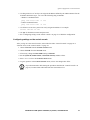
1. Choose Network from the Control Console menu.
2. Choose TCP/IP from the Network menu.
3. If necessary, change the Boot Mode setting to Manual.
4. Set the System IP, Subnet Mask, and Default Gateway address values.
5. Press CTRL-C to exit to the Control Console menu.
6. Log out (option 4 in the Control Console menu) to have the changes take effect.
If you disconnected a cable during the procedure described in “Control Console” on
page 36, reconnect that cable and restart the associated service.
Note
InfraStruXure 20kW System: Installation, Operation, and Maintenance
37
How to Access a Configured InfraStruXure
20kW System
Overview
Once the Management Card is running on your network, you can use several different interfaces to
access the Management Card.
See also
For more information about how to use the interfaces identified here, see the
InfraStruXure 20kW System User’s Guide (.\doc\usrguide.pdf) and the Management
Card Addendum (.\doc\addendum.pdf).
Web interface. You can use Internet Explorer 5.0 (and higher) or Netscape® 4.0.8 (and higher)
browsers to configure Management Card options, or to view the Event log.
1. Address the Management Card by its IP address or DNS name (if configured).
2. Enter the user name and password (apc by default).
Telnet. You can use Telnet to access a Management Card’s control console from any computer on
the same subnet.
1. At a command prompt, type telnet <address> and press ENTER at a command prompt,
where <address> is the system’s IP address or DNS name (if configured).
2. Enter the user name and password (apc by default).
SNMP. After you add the PowerNet MIB to a standard SNMP MIB browser, you can use that browser
for SNMP access to a system. The default read community name is public; the default read/write
community name is private.
FTP. You can use FTP (enabled by default) to download new firmware to a system, or to access a copy
of a system’s event or data logs.
1. At a command prompt, type ftp address and press ENTER, where address is the system’s IP
address.
2. Enter the User Name and Password (apc by default).
APC Management Card Wizard. You can use the APC Management Card Wizard to configure
multiple systems over the network.
Analog modem (AP9618). The AP9618 InfraStruXure 20kW System EM/MDM has an internal
analog modem you can use for dial-in access to the system’s control console.
38
InfraStruXure 20kW System: Installation, Operation, and Maintenance
Operation
Display Interface
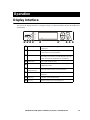
You can use the display interface to configure settings, set alarm thresholds, and provide audible and
visual alarms.
UPS
Output
ESC
On
Battery
?
Bypass
Fault
UPS Output LED
Green: the system is providing power to the load
equipment.
On Battery LED
Yellow: power is flowing through the static bypass
switch and to the load equipment.
Bypass LED
Yellow: power to the load is being supplied directly by
the utility power source. The UPS has been removed
from the circuit for maintenance or replacement.
Fault LED
Red: a fault condition exists.
LCD
Displays alarms, status data, instructional help, and
configuration items.
UP and DOWN
navigation keys
ENTER key
Opens menu items and makes changes to system
parameters.
HELP key
Launches context-sensitive help.
ESC key
Returns to the previous screen displayed.
Selects menu items and accesses information.
InfraStruXure 20kW System: Installation, Operation, and Maintenance
39
Operation: Display Interface
Navigating screens
From any screen, you can press the ESC key until you reach the
Top-Level Status screen, which provides basic system status
information.
Chrg 100%
Load 000%
120Vin 120Vout 60Hz
Runtime: 1hr 30min
Press the ENTER key from the Top Level Status screen to open
Top-Level Status
the Top-Level Menu screen. To view another screen, press the
ENTER key when the selector arrow (,) is next to the name of the screen you want to view.
,
Control
Status
Setup
Accessories
Logging
Display
Diags
Help
Top-Level Menu
The continue arrow (-) indicates that there are sub-menu screens. Press the UP and DOWN keys to
navigate to those screens.
Capacity: 10.0kVA
Fault Tolerance: n+2
Total UPS Modules: 03
Bad UPS Modules: 00
Bat Voltage: 218.0V
Bat Capacity 100.0%
Runtime: 01hr 30min
16 Batts, 00Bad
Press the UP or DOWN key to change options under an item on the display, and press the ENTER key to
move the Input arrow (.) to select and enter information.
Low Batt Dur:
2min
20sec
Shutdwn Dly:
Return Dly:
0sec
Return Bat Cap:
0%
Low Batt Dur:
10min
Shutdwn Dly:
20sec
Return Dly:
0sec
0%
Return Bat Cap:
.
40
InfraStruXure 20kW System: Installation, Operation, and Maintenance
Operation: Display Interface
Top-Level Status screen
After the display interface has established communication with
the InfraStruXure 20kW System, the Top-Level Status screen,
by default, displays the following:
Chrg 100%
Load 050%
208Vin 208Vout 60Hz
Runtime: 0hr 30min
Charge Percentage
The percentage of battery capacity that is available.
Load Percentage
The percentage of system capacity that is being used to
supply conditioned power to the connected load.
Input Voltage/ Output
Voltage/ Input Frequency
The input voltage from the main power source, the output
voltage supplied to the load equipment, and the frequency of
the input power.
Run Time
The runtime that can be expected from the batteries. The
intelligence module calculates the runtime based on both the
amount of power required by the load equipment and the
capacity of the battery modules in the system.
Note
After the display interface has been inactive for a period of time (specified by the
password time-out setting under the Display menu), the interface reverts to the TopLevel Status screen.
Top-Level Menu screen
From the Top-Level Menu screen you can command,
configure, and monitor the InfraStruXure 20kW System.
Control
Status
Setup
Accessories
Logging
Display
Diags
Help
For information on specific screens accessed through the top-level menu screen,
see pages 42–46.
InfraStruXure 20kW System: Installation, Operation, and Maintenance
41
Operation: Display Interface
Control screen
From the Control screen, you can select the following items:
UPS into Bypass
Place into or return from maintenance bypass operation.
Do Self Test
Initiate a system of self-tests and diagnostics.
Simulate Power Fail
Simulate a power failure.
Graceful Reboot
Turn off and start load equipment in an orderly manner.
Graceful Turn Off
Shut down load equipment in an orderly manner.
Start Runtime Cal
Begin runtime calibration of the UPS.
Turn UPS Output On/Off
Apply power to or shut down the system.
Status screens
The Status screens display information regarding load, battery and power modules, voltage, and
current.
Status screen 1
Vin
Vout
Iout
The input voltage (V), output voltage (V), and output
current (A) for each phase (1–3).
Status screen 2
%load assuming no
redundancy
Percentage of the load in relation to the total capacity of all
power modules.
Status screen 3
%load allowing for
n+x redundancy
Percentage of the load, allowing for the redundancy in
your system.
Status screen 4
Frequencies
The input and output frequency in hertz (Hz).
Status screen 5
42
Bat Voltage
Actual voltage of the batteries (volts).
Bat Capacity
Percentage of battery capacity available.
Runtime
The available runtime for battery operation in hours and
minutes.
#Batts
The number of installed battery modules.
#Bad
The number of failed battery modules.
InfraStruXure 20kW System: Installation, Operation, and Maintenance
Operation: Display Interface
Status screen 6
Capacity: kVA
The system load capacity.
Fault Tolerance
The configured redundancy for your UPS
(n+0, n+1, n+2...).
Total Pwr Modules
The number of power modules installed.
Bad Pwr Modules
The number of failed power modules in the system.
Status screen 7
Alarm
Thresholds
Settings configured for the thresholds that trigger alarms.
Fault Tolerance n+0
The alarm threshold for reduced redundancy.
Runtime hr min
The alarm threshold for reduced runtime.
Load: kVA
Alarm indication of the load exceeding the configured
redundancy.
Status screen 8
Self Tst
Status of the last self-test.
Lst Xfr
Information on the last transfer to battery operation.
Status
General UPS status.
IM
Status of the main intelligence module.
RIM
Status of the redundant intelligence module.
Setup screen
From the Setup screen, you can select the following items:
Shutdown
Configure the following system shutdown conditions:
Low Batt Dur: Low battery duration is the amount of time from low
battery signal to shutdown of the load.
Shutdwn Dly: Shutdown delay is the amount of time between the UPS
receiving a shutdown command (usually sent by a server) to shutdown
of UPS power to the load equipment. This delay allows load equipment
time to finish shutdown processes.
Return Dly: Return delay is the amount of time required for the UPS
to turn on after a power outage has ended.
Return Bat Cap: Return battery capacity is the minimum percentage
of full battery capacity required for the UPS to turn on.
Defaults
Return all UPS settings to their default values.
InfraStruXure 20kW System: Installation, Operation, and Maintenance
43
Operation: Display Interface
Output Freq
Set the desired output frequency.
Alarms
Redundancy: The state of redundancy that will trigger an alarm.
Choices are:
• N+0—an alarm will occur only when there is more load than all
functioning power modules can support
• N+1—an alarm will occur when there are no spare power
modules in good condition
• N+2— an alarm will occur when there is only one functioning
power module
Load: When the load is greater than this threshold, an alarm will
sound.
Runtime: When the UPS is unable to power the load within the
parameters of the specified threshold, an alarm will sound. This alarm
is the result of an increase in load or a decrease in battery capacity.
Bypass
Set the conditions that will automatically transfer the UPS into bypass
operation.
Copy
Copy the UPS settings.
Other
Self Test: Set the UPS to perform a self-test automatically at periodic
intervals.
UPS ID: Provide a unique name for the UPS.
VoutReporting: Set the reporting to the number of the tap to which the
most significant load is wired on the output transformer.
Output: Set the UPS output voltage.
BatFrAmpHour: Set the Amp-hour rating of external battery
enclosures that are not APC Symmetra XR Battery Enclosures.
Accessories screen
The Accessories screen is used only if the display interface is connected to the computer interface
port on the Display/Computer Interface card on the InfraStruXure 20kW System. From the
Accessories screen, you can view the status of APC accessories connected to the UPS.
44
InfraStruXure 20kW System: Installation, Operation, and Maintenance
Operation: Display Interface
Logging screens
The Logging screen allows you to customize the InfraStruXure 20kW System log. The following
items are accessible from this screen:
View Log
Point to an entry in the log and press the ENTER key to view a
description of the event. The display logs the most recent 64
events.
View Statistics
View statistics of the events logged.
Configure Logging
Set the type of events that are recorded in the log. To log a type of
event, choose On.
List Event Groups
View the list of event types.
• Power Events
• UPS Control Events
• User Activities
• UPS Fault Events
• MeasureUPS Events
For each group, press the ENTER key to display each event listed
under the group.
Clear Log
Clear all events currently stored in the log.
Display screens
The Display screen allows you to customize the InfraStruXure 20kW System display interface. The
following items are accessible from this screen:
Date/Time
Set the correct date (day:month:year) and time (hour:minute).
Password
Protect the system against unauthorized configuration changes.
Information
View the model number, serial number, date of manufacture, and
revision number of the display interface.
Beeper
Configure the audible alarm settings:
At UPS
At Disp
Vol
Click
Contrast
Set the contrast on the LCD.
InfraStruXure 20kW System: Installation, Operation, and Maintenance
45
Operation: Display Interface
Config
Personalize the Top-Level Status screen. Choose each line you
want displayed from a list of options. Scroll up or down the list to
find the data you want displayed. To change a line, move the
selection arrow to that line and press the ENTER key. Then press the
ENTER key again to save your changes. Press the ESC key to discard
your changes.
Diags screens
The Diagnostics screen provides information for use in troubleshooting. The following items are
accessible from this screen:
Fault & Diagnostics
Lists any failures found.
Frame Status
If any status except ON or OK is displayed, a power module or
battery must be replaced. If you do not have a redundant module
installed, you must place the UPS in bypass operation before you
remove an intelligence module.
Aux. Device Status
Lists external device status.
Comm Bus Status
If any status except ON or OK is displayed, a power module
must be replaced. The Faults and Diagnostics screen will
describe the location of the failed module.
Help screens
To access the display interface context-sensitive Help screens, press the? key.
46
InfraStruXure 20kW System: Installation, Operation, and Maintenance
Procedures
How to transfer the InfraStruXure 20kW System UPS into maintenance
bypass operation
Before servicing the InfraStruXure 20kW System UPS, transfer the UPS into maintenance bypass
operation. When the UPS is operating in maintenance bypass, input power flows directly to the
InfraStruXure 20kW System distribution circuit breaker panel and out to the load equipment.
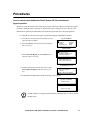
1. Command the UPS into static bypass operation through the UPS display interface:
a. Press the ESC key at the top-level status screen to
open the top-level menu.
b. Select Control on the top-level menu, and press
the ENTER key.
Top-Level Menu
Control
Status
Setup
Accessories
Logging
Display
Diags
Help
Control Menu
c. Select UPS Into Bypass on the Control menu
and, press the ENTER key.
UPS Into Bypass
Do Self Test
Simulate Power Fail
Graceful Reboot
Graceful Turn Off
Start Runtime Cal
Turn UPS Output On
Confirmation Screen
d. Confirm the selection on the next screen: select
YES, UPS into Bypass, and press the ENTER
key.
Confirm:
UPS into Bypass
Cancel
YES, UPS into Bypass
The BYPASS LED illuminates and the following screens appear:
Bypass attempted
Please wait...
UPS IS BYPASSED
Press any key...
The H3 LED above the Q3 switch illuminates, indicating that it is safe to operate
the Q3 switch.
Note
InfraStruXure 20kW System: Installation, Operation, and Maintenance
47
Operation: Procedures
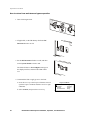
2. Turn ON the Q3 switch.
The H2 LED above the Q2 switch illuminates, indicating that it is safe to operate
the Q2 switch.
Note
3. Turn OFF the Q2 switch.
4. Set the System Enable switch to OFF, and
then set the DC Disconnect breaker to OFF.
48
InfraStruXure 20kW System: Installation, Operation, and Maintenance
Operation: Procedures
5. If applicable, set the XR Battery Enclosure
DC Disconnect breaker to OFF.
6. Turn OFF the Q1 switch.
The UPS is now in maintenance bypass operation.
InfraStruXure 20kW System: Installation, Operation, and Maintenance
49
Operation: Procedures
How to return from maintenance bypass operation
1. Turn ON the Q1 switch.
2. If applicable, set the XR Battery Enclosure DC
Disconnect breaker to ON.
3. Set the DC Disconnect breaker to ON, and then
set the System Enable switch to ON.
The UPS will show a Forced Bypass message on
the display interface, and the Fault LED will be
red.
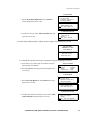
4. Command the UPS to apply power to the load:
a. Press the ESC key at the Top-Level Status screen to
open the Top-Level Menu and have access to eight
submenus.
b. Select Control, and press the ENTER key.
50
Top-Level Menu
Control
Status
Setup
Accessories
InfraStruXure 20kW System: Installation, Operation, and Maintenance
Logging
Display
Diags
Help
Operation: Procedures
Control Menu
c. Select Turn UPS Output On from the Control
menu, and press the ENTER key.
UPS Into Bypass
Do Self Test
Simulate Power Fail
Graceful Reboot
Graceful Turn Off
Start Runtime Cal
Turn UPS Output On
Confirmation Screen
d. On the next screen: select YES, Turn UPS ON, and
press the ENTER key.
Confirm:
Turn UPS ON
Cancel
YES, Turn UPS ON
The UPS Output LED illuminates and the interface displays the following two screens:
UPS HAS BEEN
COMMANDED TO TURN
LOAD POWER ON
UPS LOAD IS ON
Press any key...
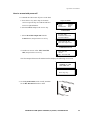
5. Command the UPS into static bypass operation through the UPS display interface:
a. Press the ESC key at the Top-Level Status screen to
open the Top-Level Menu.
b. Select Control on the top-level menu, and press the
ENTER key.
Top-Level Menu
Control
Status
Setup
Accessories
Logging
Display
Diags
Help
Control Menu
c. Select UPS Into Bypass on the Control menu, and
press the ENTER key.
UPS Into Bypass
Do Self Test
Simulate Power Fail
Graceful Reboot
Graceful Turn Off
Start Runtime Cal
Turn UPS Output On
Confirmation Screen
d. Confirm the selection on the next screen: select YES,
UPS into Bypass, and press the ENTER key.
Confirm:
UPS into Bypass
Cancel
Yes, UPS into Bypass
InfraStruXure 20kW System: Installation, Operation, and Maintenance
51
Operation: Procedures
The H2 LED above the Q2 switch illuminates, indicating that it is safe to
operate the Q2 switch.
Note
6. Turn ON the Q2 switch.
The H3 LED above the Q3 switch illuminates, indicating that it is safe to operate
the Q3 switch.
Note
7. Turn OFF the Q3 switch.
The UPS automatically comes out of static
bypass operation.
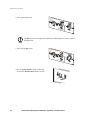
52
InfraStruXure 20kW System: Installation, Operation, and Maintenance
Operation: Procedures
How to ensure total power off
1. Command the UPS to turn off power to the load:
a. Press the ESC key at the Top-Level Status
screen to open the Top-Level Menu and have
access to eight submenus.
b. Select Control, and press the ENTER key.
Top-Level Menu
Control
Status
Setup
Accessories
Logging
Display
Diags
Help
Control Menu
c. Select Turn UPS Output Off from the
Control menu, and press the ENTER key.
UPS Into Bypass
Do Self Test
Simulate Power Fail
Graceful Reboot
Graceful Turn Off
Start Runtime Cal
Turn UPS Output Off
Confirmation Screen
d. On the next screen: select YES, Turn UPS
OFF, and press the ENTER key.
Confirm:
Turn UPS OFF
Cancel
YES, Turn UPS OFF
The UPS Output LED turns off and the interface displays the following two screens:
UPS HAS BEEN
COMMANDED TO TURN
LOAD POWER OFF...
UPS LOAD IS OFF
Press any key...
2. Set the System Enable switch to OFF, and then
set the DC Disconnect breaker to OFF.
InfraStruXure 20kW System: Installation, Operation, and Maintenance
53
Operation: Procedures
3. If applicable, set the XR Battery Enclosure DC
Disconnect breaker to OFF.
4. Pull out all battery units in the UPS and XR
Battery Enclosures to the red battery disconnect
line.
5. Set the Q1, Q2, and Q3 switches to OFF.
6. Set the upstream input utility circuit breaker to
the OFF or Locked Out position.
54
InfraStruXure 20kW System: Installation, Operation, and Maintenance
Troubleshooting
Overview
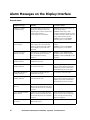
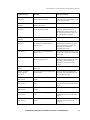
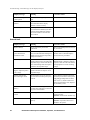
This section lists all of the alarm and status messages that are displayed on the InfraStruXure 20kW
System display interface. A suggested corrective action is listed with each message to help you
troubleshoot problems. Contact APC Technical Support for assistance with complex problems.
See “APC Customer Support” on the back cover of this manual for contact
information.
Note
Note
More than one message may occur at the same time. Be sure to review all of the
messages for a better understanding of the system condition.
If the display interface reports a problem with a component, verify that the component
is correctly installed in the InfraStruXure 20kW System.
If the system works in bypass, ensure the presence of AC mains supply input.
Note
If a problem persists, note UPS model #, serial #, and date purchased before calling
APC Customer Support. See “How to Obtain Service” on page 83.
InfraStruXure 20kW System: Installation, Operation, and Maintenance
55
Alarm Messages on the Display Interface
General status
56
Display message
Meaning
Corrective action
Input Freq outside
configured range
The input frequency to the UPS is
outside the configured range. The
output frequency will not synchronize
with the input frequency.
Normal bypass is not available.
Option 1: Improve the frequency of
the incoming voltage.
Option 2: Widen range of the
acceptable incoming frequency using
the display interface. Select Start-UP,
Setup, Output, and Freq Select.
Option 3: Proceed with startup.
Normal bypass is not available.
AC adequate for UPS but
not for bypass
The UPS will function online with the
input voltage, but in the event that
bypass is required, the input voltage
is not adequate to power the load
equipment.
Option 1: Improve the incoming
voltage.
Option 2: Proceed with startup.
Normal bypass is not available.
Low/No AC input,
startup on battery
Input voltage is not adequate to start
the UPS. If start-up proceeds, the
UPS will function in battery
operation.
Option 1: Cancel start-up until
acceptable input voltage is present.
Option 2: Continue start-up and run
on battery.
Main Intelligence
Module inserted
An Intelligence Module has been
installed into the UPS.
No corrective action necessary.
Main Intelligence
Module removed
An Intelligence Module has been
removed from the UPS.
If no intelligence modules have been
removed, check that the intelligence
modules are properly inserted, and
that the fastening screws are tight.
Redundant Intelligence
Module inserted
An Intelligence Module has been
installed into the UPS.
No corrective action necessary.
Redundant Intelligence
Module removed
An Intelligence Module has been
removed from the UPS.
If no intelligence modules have been
removed, check that the intelligence
modules are properly inserted, and
that the fastening screws are tight.
# Batteries changed since
last ON
At least one battery module has been
added or removed from the UPS since
the last time the Power ON command
was used.
No corrective action necessary.
# Pwr modules changed
since last ON
At least one power module has been
added or removed from the UPS since
the last time the Power ON command
was used.
Check that all power modules are
properly inserted, the two fastening
screws are tight, and the locking
latches are engaged.
Battery Module Quantity
increased
At least on battery module has been
added to the system.
No corrective action necessary.
InfraStruXure 20kW System: Installation, Operation, and Maintenance
Troubleshooting: Alarm Messages on the Display Interface
Display message
Meaning
Corrective action
Battery Module Quantity
decreased
At least one Battery Module has been
removed from the system.
If no Battery Modules have been
removed, ensure that all Battery Units
are properly inserted.
Power Module Quantity
increased
At least one Power Module has been
added to the system
No corrective action necessary.
Power Module Quantity
decreased
At least one Power Module has been
removed from the system.
If no Power Modules have been
removed, check that all Power
Modules are properly inserted, the
two fastening screws are tight, and
the locking latch is engaged.
Battery Cabinet Quantity
increased
At least one external battery cabinet
has been connected to the UPS.
No corrective action necessary.
Battery Cabinet Quantity
decreased
At least one external Battery
Enclosure has been disconnected
from the UPS.
Ensure that all Battery Enclosure
communication cables are properly
connected and that the LEDs are
illuminated on the battery
communication cards.
Low-Battery
The UPS is online and the battery
charge is low.
No corrective action necessary. Note:
If the input voltage fails, runtime will
be limited.
Battery Discharged
The UPS is in battery operation and
the battery charge is low.
No corrective action necessary. Note:
Runtime is limited in duration. Shut
down the system and the load
equipment or restore incoming
voltage.
Automatic Self Test
Started
The UPS has started pre-programmed
battery test.
No corrective action necessary.
Number of System
Power Supplies
Decreased
One of the system power supplies has
been removed.
If no system power supplies have
been removed, check that they have
been properly inserted.
External switch gear
Q001 closed
The external switch gear Q001 is
closed.
No corrective action necessary.
External switch gear
Q001 opened
The external switch gear Q001 is
open.
No corrective action necessary. The
UPS is disconnected from the input
power.
External switch gear
Q002 closed
The external switch gear Q002 is
closed.
No corrective action necessary.
External switch gear
Q002 opened
The external switch gear Q002 is
open.
No corrective action necessary. The
load is disconnected from the UPS
output.
External switch gear
Q003 closed
The external switch gear Q003 is
closed.
No corrective action necessary. The
UPS is in maintenance bypass
operation.
InfraStruXure 20kW System: Installation, Operation, and Maintenance
57
Troubleshooting: Alarm Messages on the Display Interface
Display message
Meaning
Corrective action
External switch gear
Q003 opened
The external switch gear Q003 is
open.
No corrective action necessary.
Graceful Shutdown
Started
A graceful shutdown or reboot has
been initiated from the display
interface or other accessory.
No corrective action necessary.
Redundancy OK
A loss of power module redundancy
occurred and the redundancy has been
restored. Either additional modules
have been installed or the load has
been reduced.
No corrective action necessary.
Display message
Meaning
Corrective action
Replace Batt(s)
One or more battery units need
replacement
Refer to Module Replacement section
for procedures.
The Redundant Intelligence Module Has
Assumed Control
The Main Intelligence Module has
failed, and the Redundant Intelligence
Module is functioning as the primary
intelligence module.
Replace the Main Intelligence
Module. Refer to Module Replacement Section for procedures.
On Battery
The UPS has transferred to battery
operation as the input is not within the
acceptable range. At this time the batteries will discharge until the input is
restored to an acceptable range.
No corrective action necessary.
Note: Runtime is limited in duration.
Prepare to shut down the UPS and the
load equipment or restore incoming
voltage.
Load Shutdown From
Bypass. Input Freq/Volts
out of range
The UPS has transferred to battery
operation because the input is out of
acceptable range.
Correct the input voltage problem.
Internal Temperature
Exceeded Upper Limit
The temperature of one or more battery units has exceeded system specifications.
Ensure that the ambient temperature
meets the specifications of the system.
If the ambient temperature is below
104o F (40o C), initiate a self test to
detect any bad battery units. Replace
any bad battery units.
Shutdown Due To Low
Battery
The UPS was in battery operation and
shut down the load when no more battery power was available.
No corrective action necessary.
No Batteries Are Connected
No battery power is available.
Option 1: Check that batteries are
inserted properly.
Option 2: Check for DC breaker trip.
UPS Is Overloaded
The load exceeded the system power
capacity.
Option 1: Decrease the load.
Option 2: If possible, add a Power
Module to the system.
General fault
58
InfraStruXure 20kW System: Installation, Operation, and Maintenance
Troubleshooting: Alarm Messages on the Display Interface
Display message
Meaning
Corrective action
Internal Communications Failed
One of the buses used for the communication between the Intelligence
Modules failed.
Contact APC Customer Support. See
Customer Support section.
No Working Power Modules Found
No working Power Modules were
found.
Option 1: Check that all power modules are properly inserted, the two fastening screws are tight, and the
locking latches are engaged.
Option 2: Check for other alarm messages.
XR Frame Fault
One of the Battery Frames has failed.
Contact APC Customer Support. See
Customer Support section.
System Not Synchronized to AC Line
System cannot synchronize to AC line
and bypass mode may not be available
if required.
Option 1: Decrease the sensitivity to
input frequency (select Startup, Setup,
Output Freq, and select value).
Option 2: Correct the input voltage to
provide acceptable voltage on frequency.
Battery Voltage Is Too
High
The battery voltage is too high and the
charger has been deactivated.
Contact APC Customer Support. See
Customer Support section.
Site Wiring Fault
Wrong phase rotation on the input
side.
An electrician should check that the
UPS has been wired properly.
Isolation Transformer
Over-temperature
The Isolation Transformer temperature is too high.
Contact APC Customer Support. See
Customer Support section.
External DC Disconnect
Switch Tripped
The external DC disconnect switch
tripped. Battery power is not available
or the runtime is lower than expected.
Activate the external DC disconnect
switch.
Sys Power Sply Fail
A system power supply has failed.
One of the power supplies has to be
changed.
Contact APC Customer Support. See
Customer Support section.
Battery Monitor Card
Failed
The battery monitor card has failed.
Refer to Module Replacement section
for further details.
Battery Monitor Card
Removed
The battery monitor card has been
removed.
If the battery monitor card has not
been removed, check that it has been
properly inserted.
Switch Gear Communication Card Fail
The switch gear communications card
has failed.
Refer to Module Replacement section
for further details.
Switch Gear Communication Card Removed
The switch gear communications card
has been removed.
Refer to Module Replacement section
for further details.
Internal DC Disconnect
Switch Tripped
The internal DC disconnect switch
tripped and battery power is not available.
Activate the internal DC disconnect
switch.
Static Bypass Switch
Module Fault
A Static Bypass Switch module has
failed.
Contact APC Customer Support. See
Customer Support section.
InfraStruXure 20kW System: Installation, Operation, and Maintenance
59
Troubleshooting: Alarm Messages on the Display Interface
Display message
Meaning
Corrective action
System ID Card
Removed
The system ID card has been
removed.
Refer to Module Replacement section
for further details.
System ID Card Failed
The system ID card has failed.
Refer to Module Replacement section
for further details.
System Start Up Configuration Failed
System configuration download
failed. Unable to determine system
voltage and/or frame size.
Check for other alarms and contact
APC customer support if problem persists.
Display message
Meaning
Corrective action
Battery Module Fault
A battery module has failed and
requires replacement.
Refer to Module Replacement Section for procedures.
Power Module Fault
A power module has failed and
requires replacement.
Refer to Module Replacement Section for procedures.
Intelligence Module
Fault
The Main Intelligence Module has
failed and requires replacement.
Replace the Main Intelligence Module. Refer to Module Replacement
Section for procedures.
Redundant Intelligence
Module Fault
The Redundant Intelligence Module
has failed and requires replacement.
Replace the Redundant Intelligence
Module. Refer to Module Replacement Section for procedures.
Display message
Meaning
Corrective action
Redundancy Has Been
Lost
The UPS no longer detects redundant
power modules. One or more power
module(s) have failed, or the load has
increased.
Option 1: If possible, install
additional Power Modules.
Option 2: Replace failed modules.
Refer to Module Replacement Section
for procedures.
Option 3: Reduce the load.
Runtime Is Below Alarm
Limit
Actual Power Module redundancy has
fallen below user-specified
redundancy alarm threshold. At least
one power module has failed or the
load increased.
Option 1: If possible, install
additional Power Modules.
Option 2: Replace failed modules.
Refer to Module Replacement Section
for procedures.
Option 3: Reduce the load.
Option 4: Use display interface to
change alarm limit.
Module failure
Threshold alarm
60
InfraStruXure 20kW System: Installation, Operation, and Maintenance
Troubleshooting: Alarm Messages on the Display Interface
Display message
Meaning
Corrective action
Runtime Is Below Alarm
Threshold
The predicted runtime is lower than
the user-specified minimum runtime
alarm threshold. Either the battery
capacity has decreased, or the load
has increased.
Option 1: Allow the battery modules
to recharge.
Option 2: If possible, increase the
number of battery modules.
Option 3: Reduce the load.
Option 4: Raise alarm threshold.
Load Power Is Above
Alarm Limit
The load has exceeded the userspecified load alarm threshold.
Option 1: Use the display interface to
raise the alarm threshold.
Option 2: Reduce the load.
Load Is No Longer
Above Alarm Threshold
The load exceeded the alarm
threshold and the situation has been
corrected either because the load
decreased or the threshold was
increased.
No corrective action necessary
Min Runtime Restored
The system runtime dropped below
the configured minimum and has been
restored. Additional battery modules
were installed, the existing battery
modules were recharged, the load was
reduced, or the threshold was raised.
No corrective action necessary
InfraStruXure 20kW System: Installation, Operation, and Maintenance
61
Troubleshooting: Alarm Messages on the Display Interface
Bypass
62
Display message
Meaning
Corrective action
Bypass Not Available
Input Freq/Volt Out Of
Range
The frequency or voltage is out of
acceptable range for bypass. This
message occurs when the UPS is
online, and indicates that the bypass
mode may not be available if
required.
Option 1: Decrease the sensitivity to
input frequency. (Select Startup,
Setup, OutputFreq, and select a
value).
Option 2: Correct the input voltage to
provide acceptable voltage or
frequency.
UPS In Bypass Due To
Fault
The UPS has transferred to bypass
mode because a fault has occurred.
Contact APC Customer Support
(see rear cover).
UPS In Bypass Due To
Overload
The load exceeded the system power
capacity. The UPS has switched to
bypass mode.
Option 1: Decrease the load.
Option 2: If possible, add a power
module to the system.
UPS In Maintenance
Bypass
The system is in maintenance bypass:
Q002 is open and Q003 is closed.
No corrective action necessary.
UPS In Forced Bypass
State
The system has been forced into
maintenance bypass operation: Q003
is closed and/or manual bypass switch
is activated.
No corrective action necessary.
Static Bypass Switch
Module Removed
The static bypass switch has been
removed.
If a static bypass switch has not been
removed, check that it has been properly inserted.
InfraStruXure 20kW System: Installation, Operation, and Maintenance
Maintenance
Parts Replacement
You can replace power modules, battery units, communication cards, and intelligence modules on the
InfraStruXure 20kW System without affecting power to the load equipment.
Follow these guidelines whenever you replace parts in the system:
• Replace a failed module only when the load conditions and settings of the system support
redundancy.
• Replace battery units only when the system is not in the on-battery operating mode.
• Remove batteries and power modules before you move or ship the system to avoid damage in
transit. Remove these modules even if you are moving the system a very short distance.
• You will need two people to remove and install power modules and battery units.
• Replace a faulty battery unit if it fails less than six months from the time of installation. Replace
the entire battery module (four battery units) if a battery unit fails after operating for six months
or more.
• The InfraStruXure 20kW System display interface will list an alarm condition when a module
fails.
How to obtain replacement parts
To obtain a replacement part, contact APC Customer Support at a number on the back cover of this
manual and follow the procedure below so that the APC Customer Support representative can assist
you promptly:
1. In the event of a module failure, the display interface may show additional “fault list” screens.
Press any key to scroll through these fault lists, record the information, and provide it to the
representative.
2. If possible, call APC Customer Support from a telephone that is within reach of the
InfraStruXure 20kW System display interface so that you can gather and report additional
information to the representative.
3. Be prepared to provide a detailed description of the problem. A representative will help you
solve the problem over the telephone, if possible, or will assign a return material authorization
(RMA) number to you. If a module is returned to APC, this RMA number must be clearly
printed on the outside of the package.
4. If the InfraStruXure 20kW System is within the warranty period, repairs will be performed free
of charge. If it is not within the warranty period, there will be a charge for repair. Review APC’s
warranty policy on page 81.
5. If the InfraStruXure 20kW System is covered by an APC service contract, have the contract
available to provide information to the representative.
InfraStruXure 20kW System: Installation, Operation, and Maintenance
63
Maintenance: Parts Replacement
How to return parts to APC
Call APC Customer Support to obtain an RMA number.
See “APC Customer Support” on the back cover of this manual for phone numbers.
To return a failed module to APC, pack the module in the original shipping materials, and return it by
insured, prepaid carrier. The APC Customer Support representative will provide the destination
address. If you no longer have the original shipping materials, ask the representative about obtaining
a new set. Pack the module properly to avoid damage in transit. Never use styrofoam beads or other
loose packaging materials when shipping a module. The module may settle in transit and become
damaged. Enclose a letter in the package with your name, RMA number, address, a copy of the sales
receipt, description of the problem, a phone number, and a check as payment (if necessary).
Damages sustained in transit are not covered under warranty.
Note
Replacement parts
Replacement Parts and Numbers
64
10kW Power Module
SYPM10KF
Battery Module
SYBT4
Battery Monitoring Card
SYCBTMON
Battery Unit
SYBTU1
Display and Computer Interface Card
SYCDCI
Intelligence Module
SYMIM4
Network Management Card
AP9618
Switch Gear Monitoring Card
SYCSGMON
InfraStruXure 20kW System Static Switch Module
SYSSW40KF
System ID Card
SYCSYSID
System Power Supply Card
SYCSPS
XR Communication Card
SYCXRCOM
InfraStruXure 20kW System: Installation, Operation, and Maintenance
Maintenance: Parts Replacement
How to remove a power module
1. To deactivate the power module, turn the knob counter-clockwise until the arrow points to the
unlock symbol.
2. Turn the spring-activated finger screws (one on either side at the front of the module) until they
pop out.
3. With one person on each side of the enclosure, pull the power module outward until it is fully
extended in the locked position.
4. With the power module resting in the enclosure, release the lock by depressing the button on
each side of the power module.
5. With one person positioned on each side, pull the power module away from the enclosure.
InfraStruXure 20kW System: Installation, Operation, and Maintenance
65
Maintenance: Parts Replacement
How to install a power module
1. With one person positioned on each side, push the power module all the way into the system
enclosure. (The power module is self-guiding.)
2. Turn the spring-activated finger screws clockwise to secure the power module.
3. Turn the knob clockwise until the arrow points toward the power module to activate it.
4. Verify that the InfraStruXure 20kW System display interface shows a message reporting that it
has registered the installation.
How to remove an intelligence module
You can remove an intelligence module without affecting the load equipment
only if a functioning redundant intelligence module is installed in the system.
Note
1. Loosen the two Phillips screws on either side at the top of the intelligence module. Loosening
the left-hand top screw deactivates the intelligence module.
2. Carefully remove the intelligence module from the enclosure by pulling outward on the handle.
66
InfraStruXure 20kW System: Installation, Operation, and Maintenance
Maintenance: Parts Replacement
How to install an intelligence module
1. Carefully position the intelligence module between the grooves in the empty slot in the
InfraStruXure 20kW System enclosure, and slide the module inward.
2. Tighten the two Phillips screws to secure the intelligence module to the enclosure. Once the tab
on the top left is flush with the enclosure, the intelligence module will activate.
3. Verify that the InfraStruXure 20kW System display interface shows a message reporting that an
intelligence module was installed.
How to remove a card
1. Loosen the two Phillips screws at each side of the card.
2. Carefully pull the card outward, handling it by the endplate. Do not touch the exposed printed
circuit board.
3. Install a new card, or cover an exposed card slot with a cover plate that was previously
removed.
How to install a card
Inserting the card upside down can damage the card. The sides of the printed
circuit board must align with the card guides in the sides of the slot.
Caution
1. Slide the card all the way into the card slot, handling it by the endplate. Do not touch the
exposed printed circuit board.
2. Tighten the two Phillips screws at each side of the card.
3. Verify that the UPS display interface shows a message reporting that it has registered the
installation.
InfraStruXure 20kW System: Installation, Operation, and Maintenance
67
Maintenance: Parts Replacement
Battery replacement
If a battery unit fails less than six months from the time of installation, replace the faulty battery unit.
If a battery unit fails after operating for six months or more, replace the entire battery module (four
battery units).
You can replace battery units without interrupting power to the connected load equipment if the
InfraStruXure 20kW System is not in on-battery operation. When working with batteries, follow
these safety instructions:
Risk of Electrical Shock and Energy Hazard!
Warning
Before replacing batteries, remove conductive jewelry such as chains, wrist
watches, and rings. High short-circuit current through conductive materials
could cause severe burns.
Do not dispose of batteries in a fire. The batteries may explode.
Do not open or mutilate batteries. Released electrolyte is toxic and harmful to the
skin and eyes.
How to remove a battery unit
1. With one hand, gently lift the battery handle, and then pull it outward until the battery is fully
extended in the locked position.The battery unit will stop at a safety lock.
2. To release it from the lock mechanism, gently push the battery upward again and pull outward,
supporting the battery unit with your other hand.
How to install a new battery unit
1. Position the battery to slide in by aligning it between the two guide rails in the empty slot in the
enclosure, and then push it all the way into the InfraStruXure 20kW System enclosure.
2. Check that the InfraStruXure 20kW System display interface shows a message reporting that
the number of batteries has increased.
68
InfraStruXure 20kW System: Installation, Operation, and Maintenance
Adding Parts
Parts available from APC
APC SmartSlot Cards
AP9607
2-Port Interface Expander Card
AP9615
5-Port 10Base-T Hub Card
AP9612TH
Environmental Monitoring Card
AP9610
Relay I/O Card
Breakers
PD1P20ABBSD
20-amp, single-pole breaker
PD3P20ABBSD
20-amp, three-pole breaker
Power Cables
PDW5L21-20R
5-foot power cable
PDW35L21-20R
35-foot power cable
PDW7L21-20R
7-foot power cable
PDW37L21-20R
37-foot power cable
PDW9L21-20R
9-foot power cable
PDW39L21-20R
39-foot power cable
PDW11L21-20R
11-foot power cable
PDW41L21-20R
41-foot power cable
PDW13L21-20R
13-foot power cable
PDW43L21-20R
43-foot power cable
PDW15L21-20R
15-foot power cable
PDW45L21-20R
45-foot power cable
PDW17L21-20R
17-foot power cable
PDW47L21-20R
47-foot power cable
PDW19L21-20R
19-foot power cable
PDW49L21-20R
49-foot power cable
PDW21L21-20R
21-foot power cable
PDW51L21-20R
51-foot power cable
PDW23L21-20R
23-foot power cable
PDW53L21-20R
53-foot power cable
PDW25L21-20R
25-foot power cable
PDW55L21-20R
55-foot power cable
PDW27L21-20R
27-foot power cable
PDW57L21-20R
57-foot power cable
PDW29L21-20R
29-foot power cable
PDW59L21-20R
59-foot power cable
PDW31L21-20R
31-foot power cable
PDW61L21-20R
61-foot power cable
PDW33L21-20R
33-foot power cable
PDW63L21-20R
63-foot power cable
InfraStruXure 20kW System: Installation, Operation, and Maintenance
69
Maintenance: Adding Parts
How to add circuit breakers and power cables
Electrical
Hazard
Only licensed electricians or APC Field Service Engineers can add circuit
breakers and power cables to the system. Read the information in “Warnings”
on page 2 before beginning any work on the system.
Any 3-phase power cable that is installed by an electrical contractor must be installed
with a 3-pole breaker.
Caution
Add a circuit breaker.
1. Remove the panel cover to access the circuit breaker panel.To remove, loosen the captive
screws at each corner of the cover and pull it off of the system.
2. At the circuit breaker panel, snap and bolt the new breaker into a position on the panel.
3. Remove the corresponding plastic blanking plate on the panel cover, and re-attach the cover to
the system.
70
InfraStruXure 20kW System: Installation, Operation, and Maintenance
Maintenance: Adding Parts
Remove the wiring access cover. In order to attach power cables and wire the circuit breakers,
remove the wiring access cover in the roof of the system. If you require more room, you can remove
the main input access panel. If you have side access to the system, you can remove the side panels
and interior side access covers as well.
Add a power cable.
1. Install a strain-relief connector in any available knockout on the roof of the system.
2. Slide enough of the power cable through the strain-relief connector to reach the new circuit
breaker.
3. Tighten the strain-relief connector.
InfraStruXure 20kW System: Installation, Operation, and Maintenance
71
Maintenance: Adding Parts
Connect the power cable wires.
1. At the back of the panel:
a. Secure the power cable using the wire ties on the back of the panel.
b. Connect the neutral wire to the closest open termination point on the Neutral Bar (Q).
c. Connect the ground wire to the closest open termination point on the Ground Bar (J).
d. Route the L1, L2, and L3 wires over (shown) or under the back of the panel.
J
Q
2. At the front of the panel, connect the L1, L2, and L3 wires to the circuit breaker(s). The
illustration below shows three-pole breakers; however, you can also connect single-pole
breakers.
72
InfraStruXure 20kW System: Installation, Operation, and Maintenance
Upgrading Firmware
You can download firmware updates or language versions to the InfraStruXure 20kW System. To
find the versions or updates available, go to: www.apc.com/tools/download.
How to download new firmware to the display interface
Note
This procedure requires two APC communication cables: 940-0110 and 940-0024C.
These cables are provided with the system; however, you can purchase both of these
cables from APC (www.apc.com).
1. Go to www.apc.com/tools/download to see if there is a more recent firmware version for your
system.
2. Disconnect the cable that is currently attached to the display interface.
3. Connect the 9-pin connector on the communication cable (940-0110) to the display/computer
interface card on the control panel on the front of the system.
4. Connect the display interface communication port to the RJ45 connector on the communication
cable (940-0110). Ensure that the display is powered.
5. Connect the serial cable (940-0024C) to the communication cable (940-0110) and to a serial
port on a computer that has the latest firmware file.
6. Start a terminal session on the computer with the following settings:
– 19200 bps
– 8 data bits
– no parity
– 1 stop bit
– no flow control
7. Place the display interface into programming mode by pressing and holding the ESC, HELP,
and ENTER keys simultaneously. Hold the keys until “Programming…” appears on the
screen. The display is now ready to receive new firmware.
You can cancel the download process by pressing the ESC key on the display
interface repeatedly until the display resets.
Note
8. Send the firmware file from the terminal session using the XMODEM protocol.
Note
Once the firmware download begins, it cannot be stopped. If the download is
interrupted, the firmware must be downloaded again before normal operation may
resume.
9. When the download is complete, the display will reset itself. It is safe to disconnect the display
and reconnect it as before. Normal operation will resume.
InfraStruXure 20kW System: Installation, Operation, and Maintenance
73
Specifications
InfraStruXure 20kW System
Performance
Efficiency
AC–AC at nominal mains
91.5%
Minimum from 75% to full load when
configured as 20kVA n+0
DC–AC at nominal battery voltage
94%
Minimum from 75% to full load when
configured as 20kVA n+0
Electrical
Output
Output Power
20kVA / 20kW
Load power factor
0.5 to 1.0
Output Current—normal or battery operation
Full load
55.5A
Overload 1
83.3A
Crest factor
2.7
150% for 30 seconds
Output Current—static bypass
Overload 1
69.4A
125% continuous
Overload 2
555.1A
1000% for 500ms
Output Voltage—normal or battery operation
Nominal
208V
Minimum
205.9V
-1%
Maximum
210.1V
+1%
Dynamic load response
+/- 5%
For load step 0% to 100% or 100% to 0%.
Recovery back to steady state: < 60ms.
Total harmonic distortion (THD)
< 2%
100% resistive load
< 6%
Computer load as defined by EN50091-3/
IEC 62040-3
Output Frequency
Normal operation
Synchronized to bypass input
Frequency is synchronized to mains over the range of 57
to 63Hz. Optional +/- 0.1Hz and +/-10Hz setting from
front panel.
Battery operation
60Hz
Slew rate
1 Hz/s
InfraStruXure 20kW System: Installation, Operation, and Maintenance
75
Specifications: InfraStruXure 20kW System
Input
Input Current
Normal
61.3A
Current that flows at nominal mains with batteries fully
charged
Maximum
70.9A
Current that flows at nominal mains with charging batteries
Limit
89.4A
The maximum continuous input current limit that can be
drawn at low mains with charging batteries
Overload
115.0A
For 30 seconds. Based on 150% overload on output
Walk-in duration
15s
On re-transfer from mains to battery, RMS current will
linearly ramp in for 10 seconds.
Power factor
0.99
At full load
Total harmonic distortion (THD)
< 6%
At full load
Input Voltage—normal operation
Nominal
208V
Minimum
166V
At less than full load, the UPS will operate from mains
power to lower voltages.
Maximum
240V
Above 240V, the UPS will operate from battery power.
Input Voltage—static bypass
Minimum
183V
Maximum
233V
Input Frequency
AC mains input
40–70Hz
Outside of this range, the UPS will operate from battery
power.
Batteries
Battery type
Maintenance-free, sealed, lead-acid battery with suspended electrolyte—
leakproof
Battery voltage
Nominal battery voltage
± 192Vdc
Float voltage
± 219Vdc
No boost charge voltage
End of discharge voltage
± 160Vdc
May be higher at less than full load.
Temperature compensation
–320mV per
°C
For temperatures greater than or
equal to 20°C.
0mV per °C
For temperatures less than 20°C.
Battery charging
2kW
N system—2 power modules (May drop to lower values at
low AC Mains.)
Maximum charging power
3kW
N+1 system—3 power modules (May drop to lower values
at low AC Mains.)
76
InfraStruXure 20kW System: Installation, Operation, and Maintenance
Specifications: InfraStruXure 20kW System
Runtime
8 minutes
Two battery shelves: @ 0.7 PF load
(SMPS load according to EN50091-3/IEC62040-3)
4.5 minutes
Two battery shelves: @ 1.0 PF load
21 minutes
Four battery shelves: @ 0.7 PF load
(SMPS load according to EN50091-3/IEC62040-3)
13 minutes
Four Battery shelves: @ 1.0 PF load
Re-charge time
3hours
To 90% capacity after full discharge
DC ripple current
< 0.05C
In normal operation at fully charged batteries.
External battery/extended runtime
options
Up to four Symmetra XR Battery Enclosures can be added. (Also
compatible with Silcon battery cubicles.)
External Battery Input
Full load DC input current
55.4A
At +/- 192V
Maximum DC input current
66.5A
At end of discharge +/- 160V
Load
Batteries fully charged
Batteries charging
100%
6,345 BTU/hr
9,346 BTU/hr
75%
4,759 BTU/hr
7,946 BTU/hr
50%
3,172 BTU/hr
6,360 BTU/hr
Environmental
On-line thermal dissipation
Note 1: Batteries fully charged is a continuous rating; “batteries charging” is
for 3 hours, maximum.
Note 2: Charging losses are based on 3000W and 90% charger electronic
efficiency and 80% battery charging efficiency.
Operating temperature range
0 to 40° C
Cooling
Front to rear airflow; 12 inches (minimum) required behind system for
exhaust airflow
Audible noise @ 1m from surface
< 58dBA @ < 70% load of system size when configured with 1 to 2 power
modules (< 100% load with 3 power modules); 25 °C
< 64 dBA @ > 70% load of system size when configured with 1 to 2 power
modules; 25° C
Operating relative humidity
0–95%
Operating elevation
0–10 000ft (3000m)
Storage temperature
–15 to 45°C (with batteries: at 25° C, battery self discharge is approximately
6–8 months; at 45° C, battery self discharge is approximately 1–2 months)
–30 to 70° C (without batteries)
Storage relative humidity
0–95%
Storage elevation
0–50 000ft (15000m)
InfraStruXure 20kW System: Installation, Operation, and Maintenance
77
Specifications: InfraStruXure 20kW System
Physical
Dimensions
Height
81.5in (2068mm)
Width
23.5in (597mm)
Depth
35.6in (905mm)
Weight
Fully loaded enclosure
1803lb (818kg)
Enclosure without power or battery
modules
665 lb (301kg)
Approximate shipping
715 lb (324kg)
One power module
58 lb (26 kg)
One battery unit
52 lb (23.5kg)
Static switch module
70 lb (32kg)
Color
Black
Compliance
Safety
UL listed, per UL1778
CSA Certified, per standard CSA 107.1
Emissions
FCC Verified Class A, per standard FCC 47 CFR Part 15
Electrostatic discharge
IEC 61000-4-2 level 3, performance criteria B
Electrical fast transient compatibility
IEC 61000-4-4 level 2, performance criteria A
Surge transient
IEC 1000-4-5 test voltages double those required for class 3
Continuous electromagnetic
susceptibility
IEC 61000-4-3 level 2, performance criteria A
78
InfraStruXure 20kW System: Installation, Operation, and Maintenance
Specifications: InfraStruXure 20kW System
Communication and Management
Interface port
DB-9 RS-232, RJ-45 10 Base-T Ethernet for web/SNMP,
internal modem for out-of-band management
Card slots
2
Management software included
PowerChute Symmetra Bundle
Control panel
Multi-function LCD status and control console
Audible alarm
Alarm when on battery; distinctive low battery alarm; configurable
delays
Emergency Power Off (EPO)
Yes—primary wiring (dry contact closure or applied 24Vdc)
Optional Management Devices
AP9607: 2-Port Interface Expander
AP9615: 5-Port 10Base-T Hub SmartSlot Card
AP9612TH: Environmental Monitoring SmartSlot Card
AP9610: Relay I/O SmartSlot Card
AP9618: APC Network Management Card
Installation and Wiring
Connection type
Input configuration:
Allowable output connections:
3P + N + G
3P + N + G or 3P + G
System Mains Input Protection:
UPS Withstand rating
30,000 symmetrical amps RMS
Protection type and rating
Condition: The UPS plus the following options:
(External to the UPS)
Input Isolation Transformer
Protection Type
Notes
Present
90A 3 pole breaker
(30k AIC)
1,2,4
Not Present
90A Class J Current
limiting fuse
3,4
Note 1: If available fault current is less than 30kA, a lower AIC rated
breaker may be used.
Note 2: Isolation transformer contains 90A Class J fuse on primary
Note 3: Current limiting fuse is required to limit fault current through
static switch
Note 4: Each power module contains 2 pieces of 30A fuse in parallel on
its input
InfraStruXure 20kW System: Installation, Operation, and Maintenance
79
Specifications: InfraStruXure 20kW System
System DC Input Protection
Condition: The UPS plus the following options:
Symmetra XR
Battery
Enclosure
DP Battery
Cubicle
Present
Protection Type
Notes
Present
External MCCB
required
Note: 1,2
Not present
Present
External MCCB
required
Note: 1,2
Present
Not present
No external protection
required
Note: 2,3
Not present
Not present
Not applicable
Note: 1,2
Note 1: External MCCB supplied by APC contains two 100A DC
breakers for battery isolation.
Note 2: Each Symmetra battery pack contains a 60A fuse.
Note 3: Symmetra XR frames contain a 125A DC fuse and 250A
disconnect switch for isolation and protection.
Wiring
Phase
Conductor
Size
Terminal lug diameter
Notes
1.2
Mains Input
4 AWG
THHN
Saddle clamp
DC Input
1/0 AWG
8mm
Notes: 1: Recommended wire gauge is based on section 310-15 and
table 310-16 of the National Electric Code (NEC); 75°C (167°F),
copper wire.
Note 2: Neutral conductor to be sized equal to phase current (#4 AWG
recommended).
Note 3: Recommended ground conductor size is 4 AWG. The ground
lug diameter is 0.250in (8mm).
EPO type
Normally open dry Contact closure or applied 24Vdc
EPO wiring
CL2 or other extra-low voltage wiring in accordance with local
electrical codes.
Wraparound bypass
configuration / rating
Q1
3-pole 100A switch
Q2
4-pole 100A switch
Q3
4-pole 100A switch
Distribution
Square D QOB Panel 42 poles 3-phase
Input via back-fed 80A breaker mounted in panel
Capable of feeding 13, 3-pole circuits
Configurable overhead power cables
80
InfraStruXure 20kW System: Installation, Operation, and Maintenance
Product Information
Warranty
InfraStruXure standard warranty
The InfraStruXureTM system ships with a 2-year standard warranty. If you purchase all components in
the InfraStruXure system, APC offers an additional free* 1-year warranty. Under this warranty, APC
will ship all parts to your site at no cost to be available to you the next business day after APC is
notified of the requirement. If you choose to upgrade the system to include an on-site contract, APC
offers modular service packages to match your needs.
*All warranties are null and void unless installation and startup are performed by authorized APC
Global Services service centers.
InfraStruXure 20kW System: Installation, Operation, and Maintenance
81
Life-Support Policy
APC three-phase systems
American Power Conversion Corporation (APC) and its affiliates and subsidiaries worldwide do not
recommend the use of any of their products in life-support applications where failure or malfunction
of the APC product can be reasonably expected to cause failure of the life-support device or to
significantly affect its safety or effectiveness. APC does not permit the use of any of its products in
direct patient care. APC will not knowingly sell its products for use in such applications unless the
life-support system or direct patient care device is part of a whole facility/building into which the
UPS is integrated, and unless APC receives, in writing, assurances satisfactory to APC that:
a. The UPS system will be configured in a manner that will provide N+1 power redundancy to
the critical load,
b. The end-user customer assumes all risks and signs the APC System Configuration and Use
Form, and
c. The customer and operators of the APC UPS system agree to indemnify and hold APC and
its affiliates and subsidiaries harmless for any and all claims arising out of the systems use in
such applications.
Examples of life-support devices include, but are not limited to, neonatal oxygen analyzers, nerve
stimulators (whether used for anaesthesia, pain relief, or other purposes), auto-transfusion devices,
blood pumps, defibrillators, arrhythmia detectors and alarms, pacemakers, hemodialysis systems,
peritoneal dialysis systems, neonatal ventilator incubators, ventilators for both adults and infants,
anaesthesia ventilators, infusion pumps, and any other device designated as “critical” by the
U.S.F.D.A.
Hospital-grade wiring devices and leakage current may be ordered as options on many APC UPS
systems. APC does not claim that units with this modification are certified or listed as hospital-grade
by APC or any other organization. Therefore, these units do not meet the requirements for use in
direct patient care.
82
InfraStruXure 20kW System: Installation, Operation, and Maintenance
How to Obtain Service
Note
If you ordered on-site service, see your entitlement certificate and terms and conditions
of the service before following the procedure described below. An on-site service
contract entitles you to an on-site visit by an APC technician to assess the issue,
determine the problem, and replace parts, if needed. (Response time varies per contract.)
Obtaining service
To obtain support for problems with your InfraStruXure 20kW System:
0
1. Note the serial number and date of purchase.
2. Contact Customer Support at a phone number on the back cover of this document. A technician
will try to help you solve the problem by phone.
3. If you must return the product, the technician will give you a return material authorization
(RMA) number. If the warranty expired, you will be charged for repair or replacement.
4. Pack the unit carefully. The warranty does not cover damage sustained in transit. Enclose a
letter with your name, address, RMA number and daytime phone number; a copy of the sales
receipt; and a check as payment, if applicable.
5. Mark the RMA number clearly on the outside of the shipping carton.
6. Ship by insured, prepaid carrier to the address provided by the Customer Support technician.
InfraStruXure 20kW System: Installation, Operation, and Maintenance
83
APC Worldwide Customer Support
Customer support for this or any other APC product is available at no charge in any of the following ways:
• Visit the APC Web site to find answers to frequently asked questions (FAQs), to access
documents in the APC Knowledge Base, and to submit customer support requests.
– www.apc.com (Corporate Headquarters)
Connect to localized APC Web sites for specific countries, each of which provides customer
support information.
– www.apc.com/support/
Global support with FAQs, knowledge base, and e-support.
• Contact an APC Customer Support center by telephone or e-mail.
– Regional centers:
Direct InfraStruXure Customer Support
(1)(877)537-0607 (toll free)
fif
APC headquarters U.S., Canada
(1)(800)800-4272 (toll free)
Latin America
(1)(401)789-5735 (USA)
Europe, Middle East, Africa
(353)(91)702055 (Ireland)
Japan
(0) 35434-2021
Australia, New Zealand, South Pacífic
(61) (2) 9955 9366 (Australia)
– Local, country-specific centers: go to www.apc.com/support/contact for contact information.
Contact the APC representative or other distributor from whom you purchased your APC product for
information on how to obtain local customer support.
Entire contents copyright © 2003 American Power Conversion. All rights reserved. Reproduction
in whole or in part without permission is prohibited. APC, the APC logo, InfraStruXure,
NetShelter, and PowerChute are trademarks of American Power Conversion Corporation and may
be registered in some jurisdictions. All other trademarks, product names, and corporate names are
the property of their respective owners and are used for informational purposes only.
990-1493
*990-1493*
10/2003