1
Projector Driver Application Note
Viewsonic PJ1060
Revision A
This document describes the Smart Panel Projector Driver for the Viewsonic PJ1060 projector. For
more information on configuring and using the Panel see the Smart Panel Configuration and Installation
Guide.
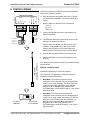
Please read the SPECIAL CONTROL NOTE below before attempting to control the Viewsonic. This
driver is known to work only when the projector is configured for serial communication at 9600 8N1.
I. PROJECTOR CONTROL
A. Volume and Power Control
Volume control for the Viewsonic is absolute.
Absolute volume control for this model is also possible with use of SP Controls’ optional Audio Follow
Video Pre-Amplifier.
B. Input Selection Mapping
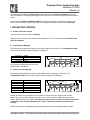
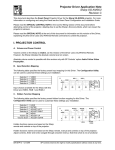
The following table specifies the factory preset input mapping for this Driver. The Configuration Utility
can be used to customize these settings your installation.
Selection 1:
Selection 2:
Selection 3:
Selection 4:
VIDEO
VIDEO
RGB 1
RGB 2
RGB 1
RGB 2
VIDEO 2
Projector
VIDEO 1
Volume
ON
Ready
OFF
Warm-up
Input choices available with this Driver are
VIDEO, RGB 1 and RGB 2.
C. Hidden Function Mapping
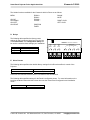
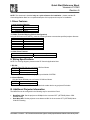
The following table specifies the factory preset hidden function mapping for this Driver. The
Configuration Utility can be used to customize these settings your installation.
Selection 1:
Selection 2:
Selection 3:
Selection 4:
Off:
Volume Up:
Volume Down:
BLANK
MUTE
ADJ LEFT
ADJ RIGHT
MENU
ADJ UP
ADJ DOWN
ADJ LEFT
ADJ UP
ADJ RIGHT
MUTE
Projector
Volume
ON
BLANK
Ready
OFF
Warm-up
MENU
ADJ DOWN
Hidden functions names are based on the Viewsonic remote control and projector-top controls.
Menu both summons and dismisses on screen menus. Adjust controls navigate through onscreen
menus. Blank and Mute are toggles. Note that on-screen menus can not be summoned if no source
is detected on the currently selected input! (This is a Viewsonic behavior not under Panel
control).
Hidden functions are accessed by pressing the indicated key while the holding the On key down.
DR-VWS03 - 12/18/03
SP Controls reserves the right to modify specifications without notice at any time.