1
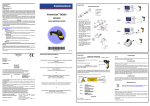
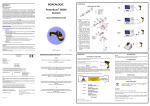
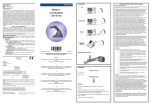
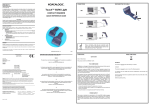
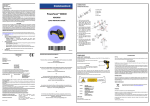
RESTORE DEFAULT DEFAULT VALUES RESTORE DEFAULT USB-KBD DEFAULT SETTINGS USA keyboard, FIFO enabled, inter-character and inter-code delays disabled, USB keyboard speed normal. DATA FORMAT: code identifier disabled, no field adjustment, code length not transmitted, no header, terminator = ENTER, character replacement disabled. Ì$+$*oÎ KEYBOARD NATIONALITY USING POWERSCAN™ D8330/D8330 AR READERS USB-KBD and Wedge users should select one of the following wedge keyboard nationality codes according to the keyboard. PowerScan™ D8330 readers automatically scan barcodes at a distance. Simply aim and pull the trigger. Code scanning is performed along the scan line emitted from the reading window. This line must cross the entire code. The best reading angles are indicated in the figure below.: Belge To change the defaults refer to the PowerScan™ D8330/M8330 Reference Manual, or to the Datalogic Aladdin™ Configuration program, both downloadable from the website. Ì$+FJ7$-8Î RS-232 Standard DEFAULT SETTINGS 9600 baud, no parity, 8 data bits, 1 stop bit, no handshaking, delay disabled, rx timeout 5 sec., ack/nack disabled, FIFO enabled, inter-character delay disabled, serial trigger lock disabled. DATA FORMAT: code identifier disabled, no field adjustment, code length not transmitted, no header, terminator = CR-LF, character replacement disabled. Deutsch INTERFACE SELECTION USB INTERFACE SELECTION USA keyboard, caps lock off, caps lock auto-recognition enabled, num lock unchanged, inter-character and inter-code delays disabled, control character emulation = ctrl+shift+key. DATA FORMAT: code identifier disabled, no field adjustment, code length not transmitted, no header, terminator = ENTER, character replacement disable. PEN DEFAULT SETTINGS Ì$+UA03$-:Î AIMING SYSTEM USB-KBD-ALT-MODE Español Ì$+UA04$-@Î Ì$+FJ6$-3Î USB-COM* interpret operating mode, conversion to code 39 disabled, output level normal, idle level normal, minimum output pulse 600 μs, overflow medium, inter-block delay disabled. Ì$+UA02$-4Î PowerScan™ D8330 and PowerScan™ D8330 AR provide an aiming system. If enabled, a partial trigger press produces a red spot, which should be aimed over the code center to get the best reading performance, see figure (1) above. By completely pressing the trigger the scan line appears to start code scanning (2) . Français Ì$+FJ2$-ÊÎ USB-IBM-Hand Held CODE SELECTION Ì$+UA01$-.Î Enabled codes EAN 8/EAN 13 / UPC A/UPC E without ADD ON check digit transmitted, no conversions Interleaved 2/5 check digit control and transmission, variable length code; 4-99 characters English Ì$+FJ4$-)Î USB-KBD WEDGE DEFAULT SETTINGS Ì$+FJ3$-$Î Select one of the interface codes according to your application. Italiano Ì$+FJ1$-ÅÎ USB-IBM Table top Ì$+UA00$-(Î Disable Aiming System (Default) USB KBD-APPLE Ì$+UA05$-FÎ Standard Code 39 no check digit control, variable length code; 1-99 characters Disabled codes EAN 128, ISBT128, Code 93, Codabar, pharmaceutical codes, MSI, Code 11, Code 16K, Code 49, GS1 DataBar™ Codes Ì$+Bj0$-"Î Svenskt Ì$+FJ5$-.Î * When configuring USB-COM, the relevant files and drivers must be installed from the USB Device Installation software, which can be downloaded from the web site http:// www.scanning.datalogic.com. Code 128 variable length code; 1-99 characters After setting up the reader, you can enable or disable the aiming system by reading the codes below: Enable Aiming System Ì$+Bj1$-'Î USA (Default) Ì$+FJ0$-|Î PEN EMULATION INTERFACE SELECTION PEN Ì$+CP6$-BÎ The following Keyboard Nationality selections are only valid for IBM AT compatible PCs: DATA FORMAT TERMINATORS Japanese Electrical Features @ 4V @5V @30V Sleep mode PowerScan™ D8330 AR 4 to 30 VDC 0.076 mm (3 mils) 0.25 mm (10 mils) 420 mA 310 mA 62 mA 4 mA 500 mA 370 mA 70 mA 4 mA Scan Rat Reading Indicators For your convenience, some common Terminators are given below. For other Header/ Terminator selections, Data Format and Advanced Data Format parameters, see the PowerScan™ D8330/M8330 Reference Manual. RS-232 Standard Ì$+CP0$-$Î Russian (Latin) PowerScan™ D8330 Power Supply Max. Consumption: Ì$+FJ8$-=Î RS-232 INTERFACE SELECTION TECHNICAL FEATURES PowerScan™ D8330/ D8330 AR Ì$+FJ9$-BÎ Nixdorf Mode A Ì$+CM2EC0$->Î Russian (Cyrillic) Ì$+FJA$-jÎ Fujitsu Ì$+CM1$-ÈÎ 35 ± 5 scans/sec ICL Mode Good Read Spot (green), Beeper Ì$+EA1183$-0Î Hungarian Ì$+CM0$-ÃÎ Good Read LED (green) Enter Ì$+FJB$-oÎ Optical Features Reading Field (Typical performance at 20ºC / 68ºF on high quality barcodes) Max. Resolution PCS (Datalogic Test Chart) 97.8 cm (38.5 in) @ 40 mils 12.5 m (41.0 ft) @ 100 mils reflective 0.076 mm (3 mils) 0.178 (7,5 mils) 15% 25% WEDGE INTERFACE SELECTION Wedge IBM AT or PS/2 PCs 1.3 mW Scan Angle 42° 13.5° ± 0.7 Laser Safety Class Class 2 EN 60825-1/CDRH Environmental Features Working Temperature -30 °C to + 50 °C / -22° to +122 °F Storage Temperature -30 °C to + 70 °C / -22° to +158 °F Humidity 90% non condensing Drop Resistance IEC 68-2-32 Test ED 2 m Protection Class IP65 Mechanical Features Weight (without cable) Cable Length about 295 g (10.4 oz) 2 m (6 ft 6 in) Ì$+EA1184$-8Î Slovenian, Croatian, Serbian (Latin) Ì$+FJC$-tÎ None Ì$+EA10$-dÎ Romanian Ì$+FJD$-yÎ PC Notebook 0.9 mW Tab Ì$+CP500$-aÎ Laser Features Power (max) CR-LF Ì$+EA120D0A$-ÃÎ Ì$+CP505$-ÈÎ OPERATING TEST Read the TEST code below. Czech Republic PC Notebook - ALT mode Ì$+FJE$-~Î Ì$+CP508$-2Î Code 128 IBM AT - ALT mode Ì$+CP507$-+Î t Interface for IBM XT and IBM Terminals 3151, 347X and 348X can be selected from the PowerScan D8330/M8300 Reference Manual available online at http://www.scanning.datalogic.com. e s t