1
User Instructions
Cyrus integrated 6 vs2 & integrated 8 vs2
OPERATION WITH THE AVRS7.2 REMOTE CONTROL
The integrated 6vs2/8vs2 is supplied with the Cyrus AVRS7.2 remote control
which will control Cyrus CD players, DVD players, tuners and surround sound
decoders in addition to the integrated 6vs2/8vs2.
AVRS7.2 System select keys
System select keys
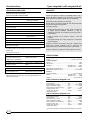
Commands may be sent to different Cyrus system components by selecting
the appropriate system select key on the handset. These keys are marked
CD, TU/DAB, AV, AV-S and SETUP. The CD, TU/DAB, AV, AV-S keys will
flash when any command is transmitted to show which type of product is
under control. Commands to a Surround Decoder from the SETUP system
will flash the AV-S indicator.
Pressing CD will send commands to a Cyrus CD player. This key will
also switch on an amplifier and select the CD input.
Pressing TU/DAB will send commands to DAB radios or FM Tuners.
This key will also switch on a DAB radio or FM Tuner and select the TU
input of an amplifier. To change between DAB or FM operation, hold
down the TU/DAB key for 3 seconds until the light changes colour. The
key will light green when set for DAB commands or red when set for FM
tuner commands. NOTE:- The FM band of a DAB radio is not selected
in this way, the BAND key is used for this purpose.
Pressing AV will send commands to a DVD player. This key will also
switch on a DVD player and select the AV input of an amplifier.
The amplifier will respond to the volume, balance, mute and input keys when
any of the above systems are selected.
NOTE - The AV-S and SETUP keys are not used to control a stereo system.
OFF
CD
b
AMPLIFIER
d
h
i
1$
1%
1^
1*
1(
2)
2@
2$
2%
TU/DAB
AV
AV-S
DVD
IN
ZOOM
NIGHT
ANGLE
DSP
OK
ADJ-
ADJ+
a
c
e
f
g
1)
1!
1@
1#
1&
DISP
1
2
3
4
5
6
7
8
9
0
T-C
SETUP
MENU
BASS
TREBLE
AV
SETUP MODE LIPSYNC NOISE
2!
2#
2^
2&
Multi-channel Surround Sound Systems
The AV-S and SETUP keys of the AVRS7.2 will control a Cyrus surround
decoder. If you own a Cyrus decoder which was not originally supplied with
an AVRS7.2 remote control, a full copy of the AVRS7.2 instruction sheet is
available on the Cyrus website www.cyrusaudio.com.
Full Remote Command Listing
A full listing of the command set available from the AVRS7.2 is listed in the
table opposite.
GB
5