1
Operation
MenuSelect™ Control
Using the USB Port
Programming Oven Setup
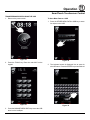
1. With the power on, remove the cover of the USB port
(20) and insert the USB drive.
These menus allow the manager to set up basic oven
functions
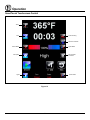
2. Press the MAINTENANCE KEY (15).
1. Turn the dial to highlight OVEN SETUP. Press the
center of the dial to select.
3. Turn the dial to highlight MANAGER PROGRAM.
Press the center of the dial to select.
2. Turn the dial to highlight MANAGER PROGRAM.
Press the center of the dial to select.
4. Turn the dial to highlight either COPY RECIPE FROM
USB or COPY RECIPE TO USB, then press the center of the dial to select.
3. Turn the dial to highlight the oven function you wish to
change. Press the center of the dial to select. Choose
from the following functions:
5. When the transfer is complete, press any key to return to the menu.
Recipe Password - Select YES or NO to enable
password protection on recipe programming. If YES
is selected the passcode 3124 must be entered to
change recipe programming.
6. Turn the dial to highlight EXIT. Press the center of
the dial to select. The display returns to the previous
menu.
Temp Unit - Select either degrees F or C.
7. Turn the dial to highlight EXIT. Press the center of the
dial to select.
Cool Down Temp - Select the set temperature for
the oven to achieve in Cool Down mode
MANAGER programming
Temp Disp Rate - Set the rate, in seconds, at which
the display switches between actual and setpoint
temperature
Entering the Manager Program Mode
Input Rsp Time - Set the length of time allowed to input each variable when programming recipes before
control automatically exits out
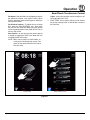
1. Press the MAINTENANCE KEY (15). If the control
is password protected, the display reads ENTER
CODE. Use the alpha/numeric keypad to enter the
manager passcode 6647, then press the center of the
dial to enter the program mode.
Setback Time - When not used for a period of time,
the oven temperature will automatically reduce to
conserve energy. This variable sets the length of time
the oven remains at the idle temperature before being lowered.
2. Turn the dial to highlight OVEN SETUP. Press the
center of the dial to select the product.
Programming Auto Start
Ready Beep - Select either ON or OFF. This is the audible alarm that sounds when the oven has reached
the set temperature.
NOTE: The Auto Start function enables the oven to turn
on at a programmed time of day and preheat to
a programmed temperature.
Cook Cool Fan - Select either YES or NO. This function allows the control to display OPEN OVEN DOOR
when you are attempting to lower the set temperature
of the oven.
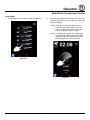
1. Turn the dial to highlight AUTO START. Press the
center of the dial to select.
2. Turn the dial to select either ON or OFF. Press the
center of the dial to select.
Restore Manual - Select either YES or NO. This variable enables the oven to remember the last settings
used for manual cooking.
If ON is selected, the display reads AUTO START 24
HOUR TIME 00:00. Turn the dial to enter the time you
would like the oven to begin preheating. Press the
center of the dial to select.
4. After editing a function, press the center of the dial
to save.
5. When all desired functions have been edited, turn the
dial to highlight EXIT. Press the center of the dial to
exit the manager programming mode.
The display reads AUTO START TEMP XXX. Turn
the dial to enter the desired preheat temperature.
Press the center of the dial to select.
21