1
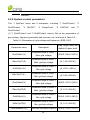
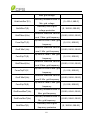
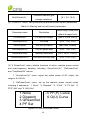
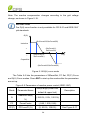
CPS SCA Series Grid-tied PV Inverter
CPS SCA23/28KTL-DO/US-480
Installation and Operation Manual
Ver 1.2
Table of Contents
Before You Start… ...................................................................................... 1
Chapter 1 IMPORTANT SAFETY INSTRUCTIONS .................................... 2
Chapter 2 Overview .................................................................................... 5
2.1 Inverter for grid-tied PV systems ................................................... 5
2.2 Product features ............................................................................ 5
2.3 Product protection functions .......................................................... 6
2.4 Circuit structure design .................................................................. 6
2.5 Appearance Description ................................................................ 7
Chapter 3 Installation ................................................................................. 9
3.1 Recommendations before installation .......................................... 11
3.2 Mechanical installation ................................................................ 12
3.3 Electrical installation .................................................................... 22
3.3.1 DC connection ..................................................................... 24
3.3.2 AC and ground connection .................................................. 28
3.3.3 Communication connection ................................................. 33
Chapter 4 Commissioning ....................................................................... 42
4.1 Commissioning Checklist ............................................................ 42
4.1.1 Mechanical installation ........................................................ 42
4.1.2 Cable connections ............................................................... 42
4.1.3 Electrical check.................................................................... 42
4.2 Commissioning steps .................................................................. 42
Chapter 5 User Interface .......................................................................... 45
5.1 Description of LCD panel ............................................................ 45
5.2 Operation state ............................................................................ 47
5.3 Interface types ............................................................................. 47
5.4 Menu functions ............................................................................ 49
5.4.1 Operation information .......................................................... 50
5.4.2 Alarm ................................................................................... 51
5.4.3 History .................................................................................. 51
5.4.4 System configuration ............................................................ 53
5.4.5 Power dispatch..................................................................... 55
5.4.6 AutoTest ............................................................................... 56
5.4.7 System protection parameters setup .................................... 58
5.4.8 System control parameters .................................................. 60
Chapter 6 Operation .................................................................................. 67
6.1 Start-up ........................................................................................ 67
6.2 Shut-down .................................................................................... 67
6.3 Operation mode ........................................................................... 67
6.4 Grid-tied power generation .......................................................... 69
Chapter 7 Maintenance and De-installation ............................................ 71
7.1 Fault shut down and troubleshooting ........................................... 71
7.1.1 LED fault and troubleshooting .............................................. 71
7.1.2 LCD fault and troubleshooting .............................................. 71
7.2 Product maintenance ................................................................... 79
7.2.1 Check the electrical connection............................................ 79
7.2.2 Clean the air vent filter ......................................................... 79
7.2.3 Replace cooling fans ............................................................ 79
7.2.4 Replace the inverter ............................................................. 82
7.3 De-installing the inverter .............................................................. 84
Chapter 8 Technical Data .......................................................................... 85
Chapter 9 Limited Warranty ...................................................................... 89
Appendix: Instruction of inverter selection ............................................ 90
Before You Start…
This manual contains important information regarding installation and safe
operation of this unit. Be sure to read this manual carefully before using.
Thank you for choosing this CPS Grid-tied PV Inverter. This PV Inverter is a
high performance and highly reliable product specifically designed for the
North American Solar market.
If you encounter any problems during installation or operation of this unit, first
check the user manual before contacting your local dealer or supplier. This
user
manual
is
applicable
for
the
following
2
models:
CPS
SCA23KTL-DO/US-480 and CPS SCA28KTL-DO/US-480.
Instructions inside this user manual will help you solve most installation and
operation difficulties. Contact your local supplier if the problem still exists.
Please keep this user manual on hand for quick reference.
1
Chapter 1 IMPORTANT SAFETY INSTRUCTIONS
(SAVE THESE INSTRUCTIONS)
Please read this user manual carefully before product installation. CPS
reserves the right to refuse warranty claims for equipment damage if the user
fails to install the equipment according to the instructions in this manual.
Warnings and symbols in this document
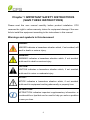
DANGER:
DANGER indicates a hazardous situation which, if not avoided, will
result in death or serious injury.
WARNING:
WARNING indicates a hazardous situation which, if not avoided,
could result in death or serious injury.
CAUTION:
CAUTION indicates a hazardous situation which, if not avoided,
could result in minor or moderate injury.
NOTICE:
NOTICE indicates a hazardous situation which, if not avoided,
could result in equipment working abnormally or property loss.
INSTRUCTION:
INSTRUCTION indicates important supplementary information or
provides skills or tips that can be used to help you solve a problem
or save you time.
2
Markings on the product
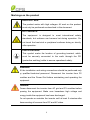
HIGH VOLTAGE:
The product works with high voltages. All work on the product
must only be performed as described in this document.
HOT SURFACE:
The equipment is designed to meet international safety
standards, but surfaces can become hot during operation. Do
not touch the heat sink or peripheral surfaces during or shortly
after operation.
EARTH GROUND:
This symbol marks the location of grounding terminal, which
must be securely connected to the earth through the PE
(protective earthing) cable to ensure operational safety.
WARNING:
All the installation and wiring connections should be performed only
by qualified technical personnel. Disconnect the inverter from PV
modules and the Power Grid before maintaining and operating the
equipment.
DANGER:
Please disconnect the inverter from AC grid and PV modules before
opening the equipment. Make sure hazardous high voltage and
energy inside the equipment has been discharged.
Do not operate or maintain the inverter until at least 5 minutes after
disconnecting all sources from DC and AC sides.
3
NOTICE:
This inverter is designed to connect AC power only to the public grid.
Do not connect the AC output of this equipment directly to any private
AC power equipment.
CAUTION:
CPS SCA23/28KTL-DO series inverter is approx 55kg (≈122
pounds).
Please ensure the mounting is properly installed before hanging the
the inverter on the bracket.
INSTRUCTION:
Please check with your local electricity supply company before
selecting the grid standard. If the inverter is operated with a wrong
grid standard, the electricity supply company may cancel the
operation license.
Putting the inverter into operation before the overall system complies
with the national rules and safety regulation of the application is not
permitted.
4
Chapter 2 Overview
2.1 Inverter for grid-tied PV systems
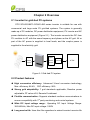
CPS SCA23/28KTL-DO/US-480 series inverter is suitable for use with
commercial and large scale PV grid-tied systems. The system is generally
made up of PV modules, DC power distribution equipment, PV inverter and AC
power distribution equipment (Figure 2-1). The inverter converts the DC from
PV modules to AC with the same frequency and phase as the AC grid. All or
part of the AC power is supplied to local loads, and the surplus power is
supplied to the electricity grid.
DC power
AC power
distribution
distribution
equipments
equipments
Bidirectional
electric meter
AC Grid
Figure 2-1 Grid-tied PV system
2.2 Product features
High conversion efficiency:Advanced 3-level conversion technology;
Max. efficiency: 98.4%;CEC efficiency: 98%
Strong grid adaptability: 7 grid standards applicable; Reactive power
adjustable; PF value:±0.8, Remote Curtailment
Flexible communication: Supports standard modbus communications to
rd
ensure compatibility with 3 party monitoring and control systems
Wide DC input voltage range:Operating DC Input Voltage Range:
300-900Vdc; Max DC input voltage: 1000V
Long service life: Uses thin-film capacitors to extend inverter’s service life
5
2 MPPTs: Dual and independent MPPT (Maximum Power Point Tracking)
enable maximum design flexibility and optimize energy harvest over the life
of the system
High protection degree: NEMA 4 protection degree meets the needs of
both indoor and outdoor use;
Intelligent Integration: Embedded DC/AC switches and up to 8 fused
string inputs eliminates the need for external combiner boxes and
simplifies installation.
2.3 Product protection functions
Polarity reverse protection of DC input
Short circuit protection
DC input insulation against ground monitoring
AC output voltage and frequency monitoring
Leakage current against ground monitoring
Monitoring of DC injection from AC output
Anti-islanding protection
Input and output over-voltage protection
Input over-current protection
Environmental temperature monitoring
Module temperature monitoring
2.4 Circuit structure design
The basic schematic diagram of CPS SCA23/28KTL-DO/US-480 series
inverter is shown in Figure 2-2.
The input of PV modules passes through surge protection circuitry, DC
EMI wave filter, and the front-end boost circuitry to achieve maximum power
tracking and boost up voltages. The output of the inverter converts the DC
voltage to 3-phase AC voltage. The high frequency AC components are
6
removed with a wave filter. Then the 3-phase AC voltage is passed through
two-stage relays and EMI wave filter to produce high quality AC power.
PV FUSE Clip
Input ( No FUSE)
PV1+
PV1+
PV1+
PV1+
DC
Switch
MPPT1
PV1+
PV1-
AC
Switch
PV1PV1PV1PV1-
AC
Output
N
L1
L2
MPPT2
PV2+
PV2+
PV2+
PV2+
L3
PV2+
PV2-
Three level
inverter
PV2PV2PV2PV2-
PE
AFD
Figure 2-2 Schematic diagram of CPS SCA23/28KTL-DO series inverter
2.5 Appearance Description
3
4
1
4
2
9
8
5 6 7
Figure 2-3 Appearance sketch of CPS SCA23/28KTL-DO series inverter
7
Main items of the inverter:
1) Main housing of the inverter
2) Wiring box of the inverter
3) Mounting bracket
4) External cooling fans
5) LED indication lights
6) LCD display
7) Key buttons
8) DC switch: DC power on/off
9) AC switch: AC power on/off
8
Chapter 3 Installation
Below is the installation procedure for the inverter. Please read carefully and
install the product step-by-step.
Before installation, please check that the following items are included in
the package:
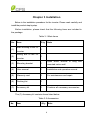
Table 3-1 Main items
No.
(1)
(2)
Item
Main housing of the PV
inverter
Wiring box of the PV
inverter
Q’ty
Note
1
1
Upon which inverter is hung and
(3)
Mounting bracket
1
(4)
User manual
1
Installation and operation manual
(5)
Warranty card
1
For maintenance and repair
(6)
Packing list
1
(7)
Accessory kit
1
mounted onto a wall
Contains all necessary accessories
The (7) Accessory kit contains items listed below:
Table 3-2 Accessories
No.
Item
Q’ty
Note
9
(1)
M8 Expansion tubes
8
For mounting bracket
(2)
M8×25 assembling bolts
8
For mounting bracket
(3)
M6X12 screw
6
(4)
M5X10 screw
8
(5)
M5 flange nut
2
(6)
Lifting eye nut M10
2
For lifting the main housing
(7)
OT type terminal
2
For ground connection
(8)
(9)
Pre-insulated
end
ferrule for AC side
Pre-insulated
ferrule for DC side
end
For wiring box and main housing; 2
spare parts
For mounting bracket and inverter,
external ground connection
For internal ground stud connection; 1
spare part
For AC output and ground cables, 2
8
spare parts
20
For DC input cables, 4 spare parts
For
RS485
or
Ethernet
(10)
RJ45 connecter
4
(11)
Jumper busbar
1
(12)
5 pin connector
1
For RS485 communication
(13)
3 pin connector
1
For dry contact communication
communication, 2 spare parts
For parallel mode cable connection
(positive pole)
INSTRUCTION:
The items in the accessory kit table above are for the standard
configuration. The accessories may vary if optional parts are
10
purchased.
3.1 Recommendations before installation
Check that the product environmental specifications (protection degree,
operating temperature range, humidity and altitude, etc) meet the
requirements of the specific project location;
Make sure that the power grid voltage is within normal range;
Ensure that the local electricity supply authority has granted permission
to connect to the grid;
Installation personnel must be qualified electricians or people who have
received professional training;
Sufficient space is provided to allow the inverter cooling system to
operate normally;
Install the inverter away from flammable and explosive substances;
Avoid installing the inverter in locations that exceed the temperature
limits specified in the inverter data sheet to limit undesirable power loss;
Do not install the inverter near the electromagnetic source which can
compromise the normal operation of electronic equipment;
11
3.2 Mechanical installation
1) Dimensions
Figure 3-1 Dimensions of CPS SCA23/28KTL-DO series inverter
12
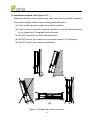
2) Installation method (see Figure 3-2):
Make sure that the mounting structure (wall, rack, etc) is suitable to support
the inverter weight. Follow the mounting guidelines below:
(a) If the location permits, install the inverter vertically.
(b) If the inverter cannot be mounted vertically, it may be tilted backward
by no lower than 15 degrees from horizontal.
(c) Do NOT mount the inverter leaning forward.
(d) Do NOT mount the inverter in a horizontal position (<15 degrees).
(e) Do NOT mount the inverter upside down.
(a)
(b)
(c)
(d)
Figure 3-2 Mount the inverter correctly
13
(e)
3) Installation space requirement (see Figure 3-3):
The distances between the inverters or the surrounding objects should
meet the following conditions:
NOTICE:
The spacing between two adjacently mounted inverters should be
≥1000mm (39.4 inches). Ensure that the air space around the
inverter is well ventilated.
≥300mm
(11.8in.)
≥500mm
(19.7in.)
≥1000mm
(39.4in.)
≥600mm
(23.6in.)
Figure 3-3 Inverter mounting dimensions
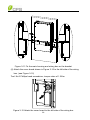
4) Mount the inverter onto the bracket
(1) Mark the 8 holes on the bearing surface for mounting the bracket as
shown in Figure 3-4;
14
Figure 3-4 Dimensions of holes on the bearing surface
(2) Drill holes at the marked positions with a 10mm (0.4in.) drill and put the
M8 expansion tubes① into the holes; Fasten the mounting bracket②
with the M8x25 assembling bolts③ in the accessory kit.
Tool: Electric drill (Ф10mm/0.4in. head), No. 13 wrench
15
1
2
3
Figure 3-5 Secure the mounting bracket
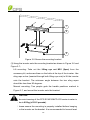
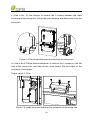
(3) Hang the inverter onto the mounting bracket as shown in Figure 3-6 and
Figure 3-7;
Lift mounting: Take out the lifting eye nut M10 (2pcs) from the
accessory kit, and screw them on the bolts at the top of the inverter. Use
sling rope or bar (inserted through both lifting eye nuts) to lift the inverter
onto the bracket. The minimum angle between the two sling ropes
should be less than 90 degrees.
Manual mounting: Two people grab the handle positions marked in
Figure 3-7, and mount the inverter onto the bracket.
CAUTION:
The main housing of the CPS SCA23/28KTL-DO series inverter is
about 46.5kg (≈102.5 pounds).
Please ensure the mounting is properly installed before hanging
the the inverter on the bracket. It is recommended to have at least
16
2 people to mount the inverter due to the weight of the equipment.
Figure 3-6 Mount the main housing on the bracket by lifting
Figure 3-7 Position of grab handle
17
(4) Install the wiring box
① Remove the cover plate at the bottom of the main housing. (see Figure
3-8)
Tool: No.2 Phillips head screwdriver
Figure 3-8 Cover plate of the main housing
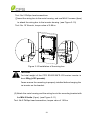
② Remove the cover board at the top of the wiring box (see Figure 3-9)
Figure 3-9 Cover board of the wiring box
Save the cover board and screws, and fix the board on the left side of the
wiring box after the wiring box is attached to the inverter housing (see
step 6, Figure 3-12)
18
Tool: No.2 Phillips head screwdriver
③Insert the wiring box to the main housing, and use M6x12 screws (4pcs)
to attach the wiring box to the inverter housing. (see Figure 3-10)
Tool: No. 10 Wrench, torque value of 2.8N.m
Figure 3-10 Installation of the wiring box
CAUTION:
The total weight of the CPS SCA23/28KTL-DO series inverter is
about 55kg (≈122 pounds).
Please ensure the mounting is properly installed before hanging the
the inverter on the bracket.
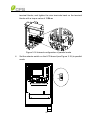
(5) Attach the main housing and the wiring box to the mounting bracket with
the M5x10 bolts (6 pcs). (see Figure 3-11)
Tool: No.2 Phillips head screwdriver, torque value of 1.6N.m
19
Figure 3-11 Fix the main housing and wiring box on the bracket
(6) Attach the cover board shown in Figure 3-10 to the left side of the wiring
box. (see Figure 3-12)
Tool: No.2 Phillips head screwdriver, torque value of 1.2N.m
Figure 3-12 Attach the cover board to the left side of the wiring box
20
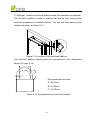
(7) Optional - Install an anti-theft padlock when the installation is complete.
The anti-theft padlock is used to prevent the inverter from being stolen
when the equipment is installed outdoors. You can lock the inverter on the
bracket, as shown in Figure 3-13:
Figure 3-13 Location of the anti-theft padlock
The anti-theft padlock should meet the requirement of the dimensions
shown in Figure 3-14:
B
C
A
Recommended lock size:
A: Ф3~6mm
B: 20~50mm
C: 20~50mm
Figure 3-14 The dimensions of anti-theft padlock
21
3.3 Electrical installation
The connection interface of CPS SCA23/28KTL-DO series inverter:
DC
INPUT 1
DC
INPUT 2
AC
OUTPUT
COMM.
PORT
ANT.
4
5
WARNING:
High touch current .
Earth connection essential
before connecting supply.
1
1
2
3
Figure 3-15 External connection ports
PV1 +
6
PV1
6
PV2 +
6
PV2
6
L1 L2 L3 N
7
8
Figure 3-16 Internal connection points
1. Knockout holes for DC input cable, 1-1/4” or 1”
2. Knockout hole for AC output cable, 1-1/4” or 1”
3. External ground connection point
4. Knockout hole for communication cable, 3/4”
5. Wireless communication antenna port (For optional Zigbee
communication)
6. DC input terminal block
7. AC output terminal block
8. Internal ground connection point & grounding studs
22
Choose the cables for inverters according to the following configuration table:
Table 3-3 Cables specifications
Position
DC input (﹢/﹣)
length (m)
#12~10AWG PV cable
Cable #10~6AWG
AC
Max. cable
Cable
61 (#10AWG)
#8AWG
output
cable
32 (#8AWG)
recommended
(L1/L2/L3/N/PE)
RS485
UTP
CAT-5e
communication
communication
or
cable
3106A)
23
3x#22~18AWG
(eg.
Belden
1200
3.3.1 DC connection
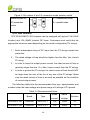
1) Working mode
CPS SCA23/28KTL-DO series inverter has two PV input sections: DC
Input-1 and DC Input-2. These two sections can work under “Parallel mode” or
“Independent mode”. (see Figure 3-17)
Under Parallel mode, the two PV input sections share one MPP Tracker;
Under Independent mode, each PV input section works with one MPP Tracker.
Inverter
Inverter
DC
Input-1
n1
DC
Input-1
DC
Input-2
n2
n3
n1=n2 =n3=n4
DC
Input-2
n1
n2
n1=n2
n4
Figure 3-17(a) Parallel mode
n3 n4
n3=n4
Figure 3-17(b) Independent mode
Table 3-4 DC input power specification
Inverter model
Max. DC input power
Rated DC input power
of each input section
SCA23KTL-DO
24kW
12kW
SCA28KTL-DO
29kW
14.5kW
Remarks: The standard configuration is “independent mode”. If it needs to
switch to the “Parallel mode”, please take the following steps to change the
internal configuration:
1.
Remove the cover of the wiring box. (see Figure 3-23)
2.
Use No.2 Phillips head screwdriver to remove the wire terminals from
the J9 & J10 terminal blocks on the fuse board.
3.
Put the jumper busbar attached in the accessory kit on the J9 & J10
24
terminal blocks, and tighten the wire terminals back on the terminal
blocks with a torque value of 1.2N.m.
Figure 3-18 Internal configuration of parallel mode
4.
Set the selector switch on the LCD board (see Figure 3-19) to parallel
mode.
PAR
IND
S401
Communication board
25
Figure 3-19 Location of the PV connection mode selector switch
Selector switch for
1-----independent mode
PV connection
2-----parallel mode
mode
2) DC fuse selection
CPS SCA23/28KTL-DO inverters can be equipped with typical 12A (23kW
Inverter) and 15A (28kW Inverter) DC fuses. Customers must verify that the
appropriate fuses are used depending on the actual configuration PV strings.
1) Each independent string of DC input from the PV strings needs fuse
protection.
2) The rated voltage of fuse should be higher than the Max. Voc of each
PV string.
3) In order to keep the output power normal, the rated current of fuse is
generally larger than the 1.5 × Max. output current from the PV strings.
4) In order to protect the PV strings, the rated current of fuse should NOT
be larger than the sum of the Isc of any two of the PV strings. Make
sure the rated current of fuse is as small as possible on the condition
of normal output power.
The following table lists the recommended fuse type, specifications and
number under the rated voltage and power range of 8 strings of PV panels.
Table 3-5 Recommended fuses
Rated
Rated
current
voltage
0SPF012.T
12A
1000V
16
0SPF015.T
15A
1000V
16
Brand
Type
SCA23KTL-DO
Littelfuse
SCA28KTL-DO
Littelfuse
26
Number
3) DC cable connection
To ensure the optimum performance of the inverter, please read the
following guidelines before DC connection:
(a) Confirm the DC configuration referring to Table 3-5 and ensure that the
maximum open circuit voltage of the PV modules is lower than 1000
Vdc under any conditions;
(b) Confirm that the PV strings for each MPPT of the inverter are of the
same type and specification before connection. The number,
orientation, and tilt of PV strings may differ for different applications.
(c) Check the polarity (Figure 3-20) before plugging the DC connectors
with the cables of PV strings according to the following steps:
i.
Use a multi-meter to measure the PV strings’ cable ends and check
the polarity.
ii. The positive (+) terminal of cable should match the positive (+)
terminal of inverter’s DC input.
iii. The negative (-) terminal of cable should match the negative (-)
terminal of inverter’s DC input.
NOTICE:
It is important to use a multi-meter to check the polarity of DC input
cables to avoid any risk of reverse polarity.
Figure 3-20 Polarity check
(d) Knock out the holes of the DC side and plug the suitable conduits of
27
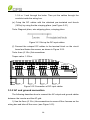
1-1/4 or 1 inch through the holes. Then put the cables through the
conduits inside the wiring box.
(e) Crimp the DC cables with the attached pre-insulated end ferrule
(16Pcs) by using the the crimping pliers. (see Figure 3-21)
Tools: Diagonal pliers, wire stripping pliers, crimping pliers
Figure 3-21 Set up the DC input cables
(f) Connect the crimped DC cables to the terminal block on the circuit
board and fasten the screws, as shown in Figure 3-22:
Tools: 4mm (0.16in.) flat screwdriver
Torque value: 1.2 N-m
PV1 +
PV1
PV2 +
PV2
L1 L2 L3 N
Figure 3-22 Connection of DC input cables
3.3.2 AC and ground connection
The following describes how to connect the AC output and ground cables
between the inverter and the AC grid:
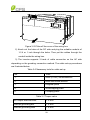
1) Use the 3mm (0.12in.) Hex screwdriver to screw off the 4 screws on the
wiring box and take off the cover. (see Figure 3-23)
28
Figure 3-23 Take off the cover of the wiring box
2) Knock out the holes of the DC side and plug the suitable conduits of
1-1/4 or 1 inch through the holes. Then put the cables through the
conduit inside the wiring box.
3) The inverter supports 3 kinds of cable connection on the AC side
depending on the grouding connection method. The cable set-up procedures
are illustrated below.
Table 3-6 Necessary tools for cable set up
No.
Tools
1.
4mm (0.16in.) flat screwdriver
2.
8mm hex socket wrench
3.
Diagonal pliers
4.
Wire stripping pliers
5.
Crimping pliers
Table 3-7 Torque value
AC output terminal block
1.2 N-m
Internal grounding bar
1.6 N-m
Internal grounding stud
1.6 N-m
29
External grounding point
1
2
L1 L2 L3 N
1.6 N-m
3
L1 L2 L3 N
L1 L2 L3 N
AC
OUTPUT
COMM.
PORT
WARNING:
High touch current .
Earth connection essential
before connecting supply.
Figure 3-24 AC output and ground cable connection
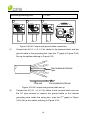
(1)
Connect the AC (L1, L2, L3, N) cables to the terminal block and the
st
ground cable to the grounding bar. (see the 1 graph in Figure 3-24)
Set up the cables referring to Figure 3-25.
Pre-insulated end ferrule
5pcs
Core wire
Pre-insulated end ferrule
Figure 3-25 AC output and ground cable set up
(2)
Connect the AC (L1, L2, L3, N) cables to the terminal block and use
the OT type terminal to connect the ground cable to the internal
grounding stud inside the wiring box. (see the 2
3-24) Set up the cables referring to Figure 3-26.
30
nd
graph in Figure
Pre-insulated end ferrule
4pcs
OT type terminal,1pcs
Core wire
Pre-insulated end ferrule
Core wire
OT type terminal
Figure 3-26 AC output and ground cable set up
(3)
Connect the AC (L1, L2, L3, N) cables to the terminal block and use
the OT type terminal to connect the ground cable to the external
rd
grounding point at the bottom of the wiring box. (see the 3 graph in
Figure 3-24) Set up the cables referring to Figure 3-27.
Pre-insulated end ferrule
4pcs
Core wire
Pre-insulated end ferrule
Ground wire
OT type terminal,2pcs
Figure 3-27 AC output and ground cable set up
INSTRUCTION:
The attached pre-insulated end ferrules match with the #8AWG
31
cables. If the cable of other gauge is selected, different pre-insulated
end ferrule is needed and provided by the installers.
4) When the output of the inverter is connected to the grid, an AC circuit
breaker is recommended to be installed to safely disconnect the inverter from
the grid when overcurrent happens.
Either 3 pole or 4 pole AC circuit breaker should be selected per the
following specifications:
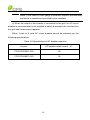
Table 3-8 Specification of AC breaker selection
Inverter
AC breaker rated current(A)
CPS SCA23KTL-DO
50
CPS SCA28KTL-DO
64
32
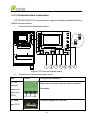
3.3.3 Communication connection
CPS SCA23/28KTL-DO series inverter supports industry standard Modbus
RS485 communication.
1.
Communication board description
PAR
IND
S401
ON
OFF
S402
Communication board
P203
P204
P207
P208
P205
3 4
Figure 3-29 Communication board
2.
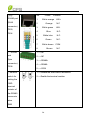
Connectors and communication cards
Item
Picture
① Dry
Configuration description
Please see the section after the table for detailed
contact
information.
communic
ation port
P205
② USB
N.O. N.C. COM
Firmware upgrade via USB disk
port P207
33
③/④
No.
RS485 port
1
(RJ45
2
connector)
3
Colour
Function
White orange
Orange
White green
485+
N.C
485-
P203,
P204
4
5
Blue
White blue
6
7
Green
White brown
8
Brown
⑤ RS485
1 -----NC
port
2 -----NC
(5pin
3 -----RS485+
connector)
N.C.
N.C.
N.C.
COM
N.C
4 -----RS485-
P208
5 -----COM
⑥Selector
1-----Disable the termination resistance
switch for
2-----Enable the terminal resistor
setting the
120Ω
terminal
resistor of
the RS485
communic
ation
S402
34
⑦Selector
1-----Independent mode
switch for
2-----Parallel mode
setting the
PV
connection
mode
S401
① Dry contact communication:
The inverter features an alarm function that opens or closes a dry contact on the
communication board. (available both as contact normally open – N.O. – and as
contact normally closed – N.C.), as shown below:
N.O. N.C. COM
Figure 3-30 Dry contact communication port
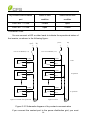
The voltage and current rating of the dry contact shown in the following
table must not be exceeded in any case.
Table 3-9 Rating of dry contact
Voltage
Current
AC
Maximum 277 V
Maximum 3 A
DC
Maximum 30 V
Maximum 1 A
Different modes of dry contact output can be accessed by connecting
different pins of the P205 connector, as shown in following table.
Table 3-10 Working modes of dry contact
35
Dry contact communication
Status in fault
Status without fault
port
condition
condition
P205: N.O. — COM
Closed
Open
P205: N.C. — COM
Open
Closed
Connection Plan:
You can connect a LED or other loads to indicate the operational status of
the inverter, as shown in the following figure:
(or L
+
Line circuit Breaker( 3 A)
(or L
N)
-
+
N)
-
Line circuit Breaker( 3 A)
COM
COM
N.C.
N.C.
N.O.
N.O.
COM
COM
N.C.
N.C.
N.O.
N.O.
COM
COM
N.C.
N.C.
N.O.
N.O.
Light on in trouble free operational
Fault
In operation
In operation
Light on in error
Figure 3-31 Schematic diagram of dry contact communication
If you connect the contact port to the power distribution grid, you must
36
install an individual miniature circuit-breaker between the dry contact and the
power distribution grid.
Dry contact communication cable connection:
a.) Knock out the holes for suitable cable conduits of 3/4 inch.
b.) Put the dry contact communication cable through the cable conduit and inside the
wiring box.
c.) Use double-layer insulated cables. Strip the cables according to the
following requirements.
Tool: Wire stripping pliers
D
A
L2
L1
Figure 3-32 Wire stripping
Table 3-11 Cable set-up
Position
Description
Value
Cable type
Double-layer insulated cable
D
Outer diameter
4.5 mm~ 6 mm
A
Cross-section area of conductor
0.2 mm²~ 0.75 mm²
L1
Length of stripped outer wire skin
Maximum 15mm
L2
Length of stripped inner wire skin
Maximum 7 mm
37
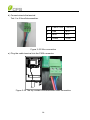
d.) Connect wires to the terminal.
Tool: 2 or 2.5mm flat screwdriver
No.
Cable Color
Function
1
Red
N.O.
2
Blue
N.C.
3
Green
COM
Figure 3-33 Wire connection
e.) Plug the cable terminal into the P205 connector.
Figure 3-34 The dry contact communication cable connection
38
② RS485 communication cable connection:
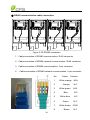
1
2
3
4
Figure 3-35 RS485 connection
1. Cable connection of RS485 communication: RJ45 connector
2. Cable connection of RS485 network communication: RJ45 connector
3. Cable connection of RS485 communication: 5 pin connector
4.
Cable connection of RS485 network communication: 5 pin connector
No.
1
2
3
4
5
6
7
8
39
Colour
Function
White orange
Orange
White green
Blue
White blue
Green
White brown
Brown
485+
N.C
485N.C.
N.C.
N.C.
COM
N.C
Figure 3-36 Crimp RJ45 connector on the RS485 and Ethernet cable
1 -----NC
2 -----NC
3 (Red)--------RS485+
4 (Blue) -------RS4855 (Green)----- COM
(1)
(2)
(1) RS485 communication of single inverter
(2) RS485 network communication
Figure 3-37 Fasten the cable terminal on the RS485 5 pin connector
a.) Put the communication cable through the conduits inside the wiring box, and
crimp the cable as shown in Figure 3-36 and Figure 3-37.
Tools: Wire stripping pliers, crimping pliers (for RJ45 connector)
Wire stripping pliers, 2 or 2.5mm (0.08in. or 0.1in.) flat screwdriver (for 5
pin connector)
b.) Plug the crimped connector into the corresponding port.
40
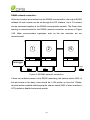
RS485 network connection:
When the inverters are monitored via the RS485 communication, the unique RS485
address for each inverter can be set through the LCD interface. Up to 31 inverters
can be connected together in the RS485 communication network. The Daisy-chain
topology is recommended for the RS485 network connection, as shown in Figure
3-38. Other communication topologies, such as the star networks, are not
recommended.
1
2
N
Datalogger
S402
OFF
S402
OFF
S402
ON
Figure 3-38 R485 network connection
If there are multiple inverters in the RS485 networking, the selector switch S402 of
the last inverter in the daisy chain should be in ON position to have the 120ohm
terminal resistor enabled while keeping the selector switch S402 of other inverters in
OFF position to disable the terminal resistor.
.
41
Chapter 4 Commissioning
WARNING:
Please follow the guidelines below before on-grid operation to
eliminate possible dangers to ensure safety.
4.1 Commissioning Checklist
4.1.1 Mechanical installation
Make sure that the mounting bracket is secure and all the screws have been
tightened to the specified torque values.
(Please refer to 3.2 Mechanical installation)
4.1.2 Cable connections
Make sure that all cables are connected to the right terminals.
The appropriate cable management is important to avoid physical damage.
The polarity of DC input cables should be correct and the DC Switch
should be on “OFF” position.
(Please refer to 3.3 Electrical installation)
4.1.3 Electrical check
Make sure that the AC circuit breaker is appropriately sized.
Test whether the AC voltage is within the normal operating range.
Make sure the DC open circuit voltage of input strings is less than 1000V.
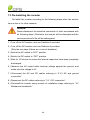
4.2 Commissioning steps
Complete the checklist above before commissioning the inverter as follows:
1.) Turn on the AC circuit breaker.
2.) Turn on the DC circuit breaker.
(Skip these two steps if there are no circuit breakers.)
3.) Switch the DC Switch to the “ON” position. When the energy supplied by
42
the PV array is sufficient, the LCD screen of inverter will light up. The inverter
will then start up with the message “sys checking”.
4.) Set up the grid standard:
INSTRUCTION:
Please check with your local electricity supply company before
selecting the grid standard. If the inverter is operated with a wrong grid
standard, the electricity supply company may cancel the operation
license.
Putting the inverter into operation before the overall system complies
with the national rules and safety regulation of the application is not
permitted.
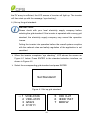
When the inverter completes “sys checking”, LCD shows the screen as
Figure 4-1 below. Press ENTER to the standard selection interface, as
shown in Figure 4-2.
Select the corresponding grid standard and press ENTER.
Set Standard!
Figure 4-1 Set up grid standard
→1
2
3
4
5 CEI 0-21
6 IEEE1547
7 BDEW
VDE-0126
VDE-4105
G59/2
C10/11
43
Figure 4-2 Select grid standard
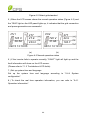
5.) When the LCD screen shows the normal operation status (Figure 4-3) and
the “RUN” light on the LED panel lights up, it indicates that the grid connection
and power generation are successful.
PV1
725 V
38.5A
PV2
720 V
31.9A
277
27.9
223.2
08/12 13:10:05
277
22.9
183.7
08/12 13:10:10
(a)
(b)
Figure 4-3 Normal operation status
6.) If the inverter fails to operate normally, “FAULT” light will light up and the
fault information will show on the LCD screen.
(Please refer to 7.1.2 Troubleshoot LCD faults)
7.) Set up system time and language
Set up the system time and language according to “5.4.4 System
configuration”.
8.) To check the real time operation information, you can refer to “5.4.1
Operation information”.
44
Chapter 5 User Interface
5.1 Description of LCD panel
The inverter’s LCD panel mainly consists of LCD screen, LED indicator
lights, buzzer and 4 keys, as shown in Figure 5-1.
POWER
RUN
GRID
FAULT
Figure 5-1 LCD panel
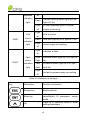
Interpretation for the indicator lights is shown in Table 5-1 and function of
the keys is shown in Table 5-2.
Table 5-1 LED Indication
LED light
Name
Status
Light
Working
POWER
on
Energized (control panel starts to
work)
power
light
Light
off
RUN
Indication
Grid-tied
Light
Power supply not working
In grid-tied power generation state
45
operation
on
indication
light
Flash
Light
off
Light
Grid
GRID
status
indication
light
on
Flash
Light
off
Light
on
FAULT
Derated running status (light up 0.5s,
light off 1.6s)
In other operation status or power
supply not working
Grid is normal
Grid fault (light up 0.5s, light off 1.6s)
Power supply not working
Indicates a Fault
Fault
Slow
Indicates Alarm (light up 0.5s, light off
status
flash
2s)
indication
Fast
Protective action (light up 0.5s, light
light
flash
off 0.5s)
Light
off
No fault or power supply not working
Table 5-2 Definition of the keys
Key
Description
Definition of function
Escape key
Back/end/mute
Enter key
Confirm entering the menu/confirm set
value/Switch to parameter setting
mode
Up
Page up in selection menu/+1 when
setting parameters
46
Down
Page down in selection menu/-1 when
setting parameters
5.2 Operation state
Table 5-1 indicates the definitions of LED, i.e. indicates the information of
the inverter’s operation state. It indicates that the system is energized and
under DSP control when “POWER” lights up.
“RUN” will light up when the inverter detects that the grid connection
conditions meet the requirements and power is fed into the grid. “RUN” will
blink if the grid is in de-rated running state during the period of feeding power
into the grid.
“GRID” will light up when the grid is normal during the operation of the
inverter. Otherwise, “GRID” will blink until the grid restores to normal.
“FAULT” will blink quickly as a fault (except grid fault) occurs. “FAULT” will
not light out until the fault is eliminated. The light will blink slowly when an
alarm occurs. “FAULT” remains illuminated when an internal fault occurs.
The buzzer will give an alarm if a fault (involving power grid fault) occurs.
5.3 Interface types
Users can perform the corresponding operations with the 4 function keys
according to the indications of the LCD display.
(1) The LCD interface starts with the company logo once the system is
energized, as shown in Figure 5-2.
47
Figure 5-2 LOGO interface
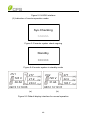
(2) Indication of inverter operation mode:
Sys.Checking
>>>>>>
Figure 5-3 Inverter system check ongoing
Standby
>>>>>>
Figure 5-4 Inverter system in standby mode
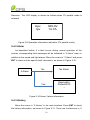
PV1
725 V
38.5A
PV2
720 V
31.9A
277
27.9
223.2
08/12 13:10:05
277
22.9
183.7
08/12 13:10:10
(a)
(b)
Figure 5-5 Default display interface for normal operation
48
GridV.OutLim
Figure 5-6 Fault indication interface
LCD screen will display different mode interfaces based on the operation
modes of the inverter. There are four operation modes: startup system check
mode (as shown in Figure 5-3), stand-by mode (as shown in Figure 5-4),
normal operation mode (as shown in Figure 5-5, the switching time between (a)
and (b) is 5 seconds), and fault mode (as shown in Figure 5-6).
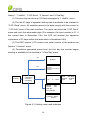
The default indication interface mainly indicates PV voltage, PV current,
grid voltage, instant power, daily generated power and time information under
normal operation.
The fault information of the most recent / current fault will be indicated on
the LCD screen when the inverter is in fault mode.
5.4 Menu functions
LCD screen displays “default indication interface” when the inverter is in
operation mode. Press ESC in this interface to escape the default interface
and enter the main operation interface. The main operation interface is shown
in Figure 5-7.
1
2
3
4
→5 Dispatch
OP.Info
Alarm
History
Setting
49
Figure 5-7 Main menus on the LCD screen
The main operation interface of LCD screen has 5 menus, i.e. “1 OP. Info”,
“2 Alarm”, “3 History”, “4 Setting” and “5 Dispatch”. The users may select
options with UP and DOWN, and then press ENT to confirm selection. The
users can return to the default indication interface by pressing ESC.
5.4.1 Operation information
When the cursor moves to “1 OP. Info” in the main screen, you should
press ENT to select the operation information as shown in Figure 5-8. Check
the information by pressing UP and DOWN. Return to the previous menu by
pressing ESC.
EDay
23.5kWh
PDayPk 19kW
DayT
12 .1 h
1 OP.Info
Uab
Ubc
Uca
Freq
400.2V
400.9V
399.7V
60.0Hz
Ia
Ib
Ic
13.9A
14.1A
13.1A
Tmod
Tamb
78.2C
50 C
Upv 1
Ipv1
Upv 2
Ipv2
360.0V
14.7A
360.4V
14.3A
Sac
Pac
17KVA
16.7kW
Figure 5-8 Operation information indication (PV independent mode)
50
Remarks:The LCD display is shown as follows when PV parallel mode is
selected.
Upv
Ipv
360.0V
14.7A
Figure 5-9 Operation information indication (PV parallel mode)
5.4.2 Alarm
As described before, if a fault occurs during normal operation of the
inverter, corresponding fault messages will be indicated in “2 Alarm” menu in
addition to the sound and light alarms. Move the cursor to “2 Alarm” and press
ENT to check out the specific fault information, as shown in Figure 5-10.
2 Alarm
No
No Alarm
Yes
EepromErr
Protect0010
…
Figure 5-10 Alarm / failure information
5.4.3 History
Move the cursor to “3 History” in the main interface. Press ENT to check
the history information, as shown in Figure 5-11. There are 4 submenus in “3
51
History”: “1 HistErr”, “2 OP. Recd”, “3 Version” and “4 TotalTag”.
(1) The error log can store up 100 fault messages in “1 HistErr” menu.
(2) The last 21 days of operation history data is available to be checked in
“2 OP. Recd” menu. All variable names in the data comply with the content in
“1 OP. Info” menu of the main interface. The users can select the “2 OP. Recd”
menu and input the retraceable days (For example, the input number is 21. If
the current date is December 15th, the LCD will indicate the operation
information of 21 days before that date which is November 24th).
(3) The DSP version, LCD version and serial number of the product are
listed in “3 Version” menu.
(4) Cumulative generated power from the first day the inverter began
working is available to be checked in “4 TotalTag” menu.
No
NoError
1.St2010.12.15 20:50
SPI Error
2.Ed2010.12.15 20:59
SPI Error
…
Yes
3 History
1 HistErr
2 OP.Recd
3 Version
→4 TotalTag
Pls input date
←2→
ß—12/15
DSPVer. 0.01
LCDVer.
0.01
Serial No.
10731220003
TotalTag(KWh)
2123.5
Figure 5-11 History menu and submenu
52
EDay 123.5KWh
PDayPk 20.0KW
DayT
7.0h
5.4.4 System configuration
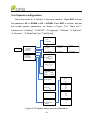
Move the cursor to “4 Setting” in the main interface. Press ENT to enter
the password: UP -> DOWN -> UP -> DOWN. Press ENT to confirm, and set
the current system parameters, as shown in Figure 5-12. There are 7
submenus in “4 Setting”: “1 ON/OFF”, “2 Language”, “3 Buzzer”, “4 SysTime”,
“5 Commun.”, “6 OtherCmd” and “7 NetConfig”.
→ ON
OFF
ON State
4 Setting
1 ON/OFF
2 Language
3 Buzzer
→4 SysTime
5 Commun
6 OtherCmd
7 NetConfig
→ 中文
English
EnglishVer.
→ Francaise
Deutsch
EnglishVer.
KeyBeep
Enabled
AlarmBeep
→ Disabled
↓
2009 / 12 / 15
21 :14
→ Address
2
BaudRate 3
1 2400
2 4800
3 9600
4 19200
ARCOption
-ARCFaultClear
IPAddr:10
122
1
123
MPPTOption
-MPPTCycle
-- Min
SubMask:255
255
255
0
MPPTScan
DHCP
<Enable/Disable>
StaticIP
GateWay:10
122
1
254
DNSSer.: 10
122
0
1
Figure 5-12 System setup menu and submenu
53
→ Italiano
EnglishVer.
(1) The inverter can be started and shut down with “1 ON/OFF” menu.
Move the cursor to “ON” and press ENT, “ON State” will then be indicated at
the bottom of LCD screen; move the cursor to “OFF” and press ENT, then
“OFF State” will be indicated as well. The inverter will stand by instead of
working normally if the startup conditions do not meet the set value even if “ON”
is selected. The inverter will be shut down immediately if “OFF” is selected in
any case.
(2) Five languages, i.e. Chinese, French, English, German, and Italian are
available in “2 Language” menu.
(3) Key beep and Alarm beep can be set mute/unmute in “3 Buzzer” menu.
“Key beep” and “Alarm beep” can be chosen by pressing UP and DOWN. Shift
between “Enable” and “Disable” by pressing UP and DOWN if the cursor is on
the “Key beep”. Complete the setup by pressing ENT. Similarly, the Alarm
beep can be set up in the same way.
(4) Set up the system date and time with “4 SysTime” menu (These
parameters are of critical importance and will be used in history information).
(5) Set the 485 communication parameters with “5 Commun.” menu.
(6) There are 5 submenus in the “6 MPPTScan” menu:
1. “ARCOption” is used to enable/disable the ARC function. Press ENT
and use UP and DOWN to enable/disable the ARC function, and press ENT to
confirm the setting.
2. “ARCFaultClear” is used to clear the ARC fault. Move the cursor to this
menu, and press ENT. The operation result will appear on the LCD, ie.
“Succeed” or “Failed”.
3. “MPPTOption” is used to enable the MPPT Scan. Move the cursor to
this menu, press ENT to set up the function. Use UP and DOWN to
enable/disable the “MPPTOption” function. Press ENT to confirm the setting.
54
4. “MPPTCycle” is used to set up the cycle time of MPPT Scan. Move the
cursor to this menu, press ENT to set up the cycle time. Use UP and DOWN to
adjust the MPPT cycle time. Press ENT to confirm the setting.
5. “MPPTScan” is to execute the MPPT scanning manually. Move the
cursor to this menu, and press ENT to initiate the scanning. The LCD screen
will skip to normal operation interface if the MPPT scanning succeeds, but
remain on the “MPPTScan menu” interface if the scanning fails.
(7) Configure the network address in the “7 NetConfig” menu.
Move the cursor to the menu, press ENT and set up the parameters by
UP and DOWN.
INSTRUCTION:
Move the cursor to the corresponding menu to set up the
parameters, and the number will flash after pressing ENT. Use UP
and DOWN to adjust the parameters.
5.4.5 Power dispatch
Move the cursor to “5 Dispatch” in the main interface and press ENT to go
to the following interface (Figure 5-13):
5 Dispatch
ActivePower(%)
100.0
PowerFactor
1.000
Figure 5-13 Active Power and PowerFactor
Remote power dispatch: The “ActivePower” and “PowerFactor” can be
adjusted remotely by software.
55
5.4.6 AutoTest
INSTRUCTION:
Autotest is only needed for CEI 0-21 grid standard.
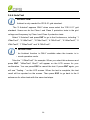
The “6 Autotest” appears ONLY when users select the “CEI 0-21” grid
standard. Users can do the Class I and Class II protection tests to the grid
voltage and frequency by Class I and Class II protection tests.
Select “6 Autotest” and press ENT to go to the 8 submenus, including “1
VMaxTest1”, “2 VMinTest1”, “3 FMaxTest1”, “4 FMinTest1”, “5 VMaxTest2”, “6
VMinTest2”, “7 FMaxTest2” and “8 FMinTest2”.
INSTRUCTION:
The Autotest function is ONLY available when the inverter is in
normal operation mode.
Take the “1 VMaxTest1” for example. When you select this submenu and
press ENT, “VMaxTest1 Start?” will appear on the LCD screen for your
confirmation. You can press ESC to cancel the test. If press ENT again, you
will see “Testing...” on the LCD screen. When the test is complete, the test
result will be reported on the screen. Then press ESC to go back to the 8
submenus for other tests with the same test steps.
56
Inverter is NOT Running
1 OP.infor
2 Alarm
3 History
4 Setting
5 Dispatch
6 Autotest
1 VMaxTest1
2 VMinTest1
3 FMaxTest1
→4 FMinTest1
Select VolMax1Test
Test Aborted!
RadiationTooLow
VMaxTest1
Start?
Testing...
UacMax1
Uac1
Uacoff1
Toff
5 VMaxTest2
6 VMinTest2
7 FMaxTest2
→8 FMinTest2
Select VolMin1Test
VMinTest1
Start?
Testing...
UacMin1
Uac1
Uacoff1
Toff
Select FreqMax1Test
FMaxTest1
Start?
FMinTest1
Start?
57
-- Hz
-- Hz
-- Hz
-- mS
Testing...
Fmin1
Freq1
Foff1
Toff
Figure 5-14 Autotest menu and submenus
-- V
-- V
-- V
-- mS
Testing...
Fmax1
Freq1
Foff1
Toff
Select FreqMin1Test
-- V
-- V
-- V
-- mS
-- Hz
-- Hz
-- Hz
-- mS
5.4.7 System protection parameters setup
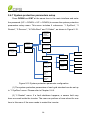
Press DOWN and ENT at the same time in the main interface and enter
the password (UP -> DOWN -> UP -> DOWN) to access the system protection
parameters setup menu. This menu includes 6 submenus: “1 SysPara”, “2
Restart”, “3 Recover”, “4 ClrErrRecd” and “5 Stdset”, as shown in Figure 5-15.
1 GridVProtect
2 GridFProtect
3 ON/OFF
4 PowerContr
5 LVRTSet
6 OtherProtect
→1 SysPara.
2 Restart
3 Recover
4 ClrErrRecd
Pls Input Pwd
****
Are You Sure?
5 StdSet
Pwd Error
Pls Input Again
****
Wrong Pwd
Initialization?
Restarting..
Recovering..
FaultOperated
Success !
Success !
ClearErrors?
Success
Failure!
Failure!
Success !
Failure
Failure
FaultOperated
1 VDE0126-1-1
2 VDE4105
3 G59
4 C10_11
5 CEI_021
6 IEEE1547
7 BDEW
Figure 5-15 System protection parameter configuration
(1) The system protection parameters of each grid standard can be set up
in “1 SysPara” menu. Please refer to Chapter 5.4.8.
(2) “2 Restart” menu: If a fault shutdown happens, a severe fault may
have occurred inside the inverter. The user can perform a force reboot for one
time in this menu if the user needs to restart the inverter.
58
INSTRUCTION:
This function is effective only when the fault “IntFault0010~0150” in
the troubleshooting table occurs. The inverter may restore to normal
operation automatically if alarm or protection faults occur. This
function will not respond when the inverter is in operation mode and a
“FaultOperated” alarm interface will be indicated.
(3) “3 Recover” menu: The manufacturer’s parameter default value can be
restored when the inverter is not in operation mode. Otherwise “Fault
Operated” will be reminded.
(4) “4 ClrErrRecd” menu: History information of the failures can be wiped
clear after confirmation
(5) “5 Stdset” menu: The grid standard can only be changed when the inverter
is turned off by LCD shut down. The change is ineffective under normal operation
mode. Please refer to “6.2 Shut down” after the inverter stops working, and choose
the grid standard as per the local requirement of the electricity supply company.
NOTICE:
Please don’t change the grid standard when the inverter is in normal
operation mode, or the change is invalid. Please refer to the “6.2
Manual shutdown” to turn off the inverter.
INSTRUCTION:
CPS SCA23/28KTL-DO series PV inverter supports 7 grid
standards. Please check with your local electricity supply company
before selecting the grid standard. If the inverter is operated with a
wrong grid standard, the electricity supply company may cancel the
operation license.
Putting the inverter into operation before the overall system complies
with the national rules and safety regulation of the application is not
59
permitted.
5.4.8 System control parameters
The “1 SysPara” menu has 6 submenus, including ”1 GridVProtect”, ”2
GridFProtect”,
”3
ON/OFF”,
”4
PowerContr”,
”5
LVRTSet”
and
”6
OtherProtect”.
(1) ”1 GridVProtect” and ”2 GridFProtect” menus: Set up the parameters of
grid voltage, frequency protection and recovery, etc, as shown in Table 5-3:
Table 5-3 Parameters of grid voltage and frequency (IEEE-1547)
Parameter name
GridV.Max1(V)
VMaxTripT1(S)
GridV.Min1(V)
VMinTripT1(S)
Description
Threshold value of Level 1
Max. grid voltage
Threshold value of Level 1
Max. grid trip voltage
Threshold value of Level 1
Min. grid voltage
Threshold value of Level 1
Min. grid trip voltage
GridV.Max2(V)
VMaxTripT2(S)
GridV.Min2(V)
VMinTripT2(S)
GridVmaxRecT(V)
Threshold value of Level 2
Max. grid voltage
Threshold value of Level 2
Max. grid trip voltage
Threshold value of Level 2
Min. grid voltage
Threshold value of Level 2
Min. grid trip voltage
Recovery threshold value of
60
Setup range (lower limit,
default & upper limit)
{200.0, 528.0, 552.0}
{0, 1.00, 600.00}
{0, 422.4, 480.0}
{0, 2.00, 600.00}
{480.0, 576.0, 624.0}
{0, 0.16, 600.00}
{240.0, 240.0, 480.0}
{0, 0.16, 600.00}
{200.0, 518.0, 533.0}
Max. grid voltage
GridVminRecT(V)
GridVRecT(S)
GridF.Max1(Hz)
FmaxTripT1(S)
GridF.Min1(Hz)
FminTripT1(S)
GridF.Max2(Hz)
FmaxTripT2(S)
Recovery threshold value of
Min. grid voltage
Recovery time of grid
voltage protection
Protection threshold value of
Level 1 Max. grid frequency
Trip time of Level 1 Max. grid
frequency
Protection threshold value of
Level 1 Min. grid frequency
Trip time of Level 1 Min. grid
frequency
Protection threshold value of
Level 2 Max. grid frequency
Trip time of Level 2 Max. grid
frequency
GridF.Min2(Hz)
FminTripT2(S)
GridFmaxRecT(Hz)
GridFminRecT(Hz)
GridFRecT(S)
Protection threshold value of
Level 2 Min. grid frequency
Trip time of Level 2 Min. grid
frequency
Recovery threshold value of
Max. grid frequency
Recovery threshold value of
Min. grid frequency
Recovery time of grid
frequency protection
61
{0, 432.4, 480.0}
{0, 300.00, 600.00}
{50.00, 60.50, 65.00}
{0, 0.16, 600.00}
{45.00, 59.30, 60.00}
{0, 0.16, 600.00}
{50.00, 61.00, 65.00}
{0, 0.05, 600.00}
{45.00, 59.00, 60.00}
{0, 0.05, 600.00}
{50.00, 60.40, 65.00}
{45.00, 59.40, 60.00}
{0, 300.00, 600.00}
Threshold value of grid
GridV.Unbal(%)
{0.1, 2.6, 10.0}
voltage unbalance
(2) ”3 ON/OFF” menu: Set up the start-up and shut-down control parameters.
Table 5-4 Start-up and turn-off control parameters
Setup range (lower limit,
Parameter name
Description
PVStartVol(V)
PV start-up voltage
{300.0, 330.0, 400.0}
SoftStep(KW/S)
Soft step
{0.01, 1.00, 2.00}
SoftOffOption
Soft turn off option
{Ban, Ban, Enable}
OffPStep(KW/S)
Turn off power step
{0.01, 1.50, 2.00}
IsoResis(KOhm)
Isolation resistance
{10.0, 200.0, 1000.0}
GridReStep(KW/S)
Grid fault recovery step
{0.01, 0.04, 2.00}
default & upper limit)
(3) ”4 PowerContr” menu: relative functions of active, reactive power control
and over-frequency derating, including “ActiveContr(%)”, “RePowerContr”
and ”FreqDeratCtrl” menus.
1. “ActiveContr(%)” menu: adjust the active power of AC output, the
range is 0~100.0%.
2. “RePowerContr” menu: set up the reactive power control mode,
including 6 submenus: “1. None”, “2. Dispatch”, “3. Q Set”, “4. PF Set”, “5.
PF(P) Set” and “6. Q(U) Set”.
1 None
2 Dispatch
3 QReactSet
4 PF Set
→5
PF(P) Curve
6 Q(U) Curve
Figure 5-16 Reactive power mode
62
1). None:
No mode/disable reactive power mode
2). Dispatch:
Remote power dispatch mode
Note: The ActivePower, PF and Q value can be adjusted by remote software if
the “Dispatch” is selected.
3). QReactSet: Set the Q value
Note: Change the reactive power by adjusting the Q value (reactive
compensation)
4). PF Set:
Set the PF value
Note: Change the reactive power by adjusting the PowerFactor
5). PF(P) Curve:PF curve mode
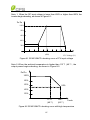
Note: The power factor changes according to the power change, as shown in
Figure 5-17:
INSTRUCTION:
The PF (P) Curve function is only available for VDE-4105, CEI 0-21
and IEEE-1547 grid standards.
PF
(PFCurveP1,PFCurvePF1)
Inductive
1
(P%)
-1
Capacitive
(PFCurveP2,PFCurvePF2)
Figure 5-17 PF(P) curve mode
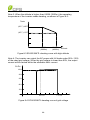
6). Q(U) Curve:Q(U) curve mode
63
Note: The reactive compensation changes according to the grid voltage
change, as shown in Figure 5-18.
INSTRUCTION:
The Q(U) curve function is only available for CEI 0-21 and IEEE-1547
grid standards.
Q(%)
(QuCurveU2i,QuCurveQ2i)
Inductive
+
(QuCurveU1,
QuCurveQ1)
(QuCurveU1i,
QuCurveQ1i)
_
U(V)
Capacitive
(QuCurveU2,QuCurveQ2)
Figure 5-18 Q(U) curve mode
The Table 5-5 lists the parameters of QReactSet, PF Set, PF(P) Curve
and Q(U) Curve modes. Press ENT to start up the modes after the parameters
are set up.
Figure 5-5 Parameters of reactive power control (IEEE-1547)
Mode
Q
Parameter Name
ReactiveComp(
%)
Setup range (lower limit,
default & upper limit)
Description
(-100.0%, 0.0%, 100.0%)
PF
PowerFactor
(-0.80, 1.000, 0.80)
PF(P)
PFCurveP1(%)
(0, 50.0%, 100.0%)
64
See Figure 5-17
PFCurvePF1
(-0.800, 1.000, 0.800)
See Figure 5-17
PFCurveP2(%)
(0, 100.0%, 100.0%)
See Figure 5-17
PFCurvePF2
(-0.800, -0.900, 0.800)
See Figure 5-17
PFCurvTripV(V)
(480.0, 480.0, 528.0)
PFCurveReV(V)
(422.4, 432.0, 480.0)
QuCurveU1(V)
(480.0, 518.4, 528.0)
See Figure 5-18
QuCurveQ1(%)
(-100.0%, 0.0%, 100.0%)
See Figure 5-18
QuCurveU2(V)
(480.0, 528.0, 528.0)
See Figure 5-18
QuCurveQ2(%)
Q(U)
(-100.0%, -50.0%,
100.0%)
PF curve trip
voltage
PF curve revocation
voltage
See Figure 5-18
QuCurveU1i(V)
(422.4, 441.6, 480.0)
See Figure 5-18
QuCurveQ1i(%)
(-100.0%, 0.0%, 100.0%)
See Figure 5-18
QuCurveU2i(V)
(422.4, 432.0, 480.0)
See Figure 5-18
QuCurveQ2i(%)
(-100.0%, 50.0%,
100.0%)
QuCurvTripP(%)
(5.0%, 20.0%, 100.0%)
QuCurveReP(%)
(5.0%, 5.0%, 100.0%)
See Figure 5-18
Qu curve trip power
Qu curve revocation
power
3. “FreqDeratCtrl” menu: Set up the parameters of over-frequency active
power deraring.
INSTRUCTION:
The “FreqDeratCtrl” function is not available for the IEEE-1547 grid
standard.
(4) ”5 LVRTSet” menu: set up the parameters of LVRT.
65
Table 5-6 Protection parameters of LVRT control
Parameter name
LVRTProtect
LVRTVoltLimit(%)
LVRTPosCurrK
LVRTNegCurrK
Description
LVRT protection
enable/disable
LVRT voltage limit
LVRT positive
current K
LVRT negative
current K
Setup range (lower limit, default
& upper limit)
{Ban, Enable1,Enable2}
{70.0,80.0,90.0}
{0,1.5,10.0}
{0,2.0,10.0}
(5) ”6 OtherProtect” menu: set up the threshold value of leakage current and
output DC component protection:
Table 5-7 Protection parameters of leakage current and output DC component
Parameter name
LeakCurMax(mA)
Description
Leakage current
Max. limit
Setup range (lower limit, default
& upper limit)
{0, 250, 300}
{0, 135, 1000}
IdcMax(mA)
DC component
(CPS SCA23KTL)
current Max. limit
{0, 165, 1000}
(CPS SCA28KTL)
66
Chapter 6 Operation
6.1 Start-up
Manual start-up: Manual start-up is required after regulation setting or
manual (fault) shut-down. Move the cursor from the main operation interface
to “4 Setting”. Press ENT and go to submenu “1 ON/OFF”. Then move the
cursor to “ON” and press ENT to start the inverter. Then the inverter will start
up and operate normally if the start-up condition is met. Otherwise, the inverter
will go to stand-by mode.
Automatic start-up: The inverter will start up automatically when the
output voltage and power of PV arrays meet the set value, AC power grid is
normal, and the ambient temperature is within allowable operating range.
6.2 Shut-down
Manual shutdown: Normally, it is not necessary to shutdown the inverter,
but it can be shut down manually if regulation setting or maintenance is
required.
Move the cursor from the main operation interface to “4 Setting”. Press
ENT and go to submenu “1 ON/OFF”. Move the cursor to “OFF” and press
ENT, and then the inverter will be shut down.
Automatic shutdown: The inverter will be shut down automatically when
the output voltage and power of PV modules are lower than the set value, or
AC power grid fails; or the ambient temperature exceeds the normal range.
6.3 Operation mode
There are 4 operation modes. The following are corresponding indications
for each mode.
(1) System check mode for start up, as shown in Figure 6-1:
67
Sys.Checking
>>>>>>
Figure 6-1 System self check ongoing
This mode indicates that the inverter is checking whether it is ready for
normal operation after the manual start-up of inverter.
(2) Normal operation mode: Default indication interface for normal
operation is shown in Figure 6-2 (a) and 6-2 (b). The switching time between
(a) and (b) is 5 seconds.
PV1
=
PV2
480
=
480
VAC
6.0 kW
~ 80.2 kwh
08/12 13:10:10
VAC
400 V
6.0 kW
15.1 A
~ 80.2 kwh
08/12 13:10:05
480 V
12.5 A
(a)
(b)
Figure 6-2 Default indication interface for normal operation
In this mode, the inverter converts the power generated by PV modules to
AC continuously and feeds into the power grid.
(3) Standby mode, as shown in Figure 6-3:
The inverter will enter standby mode when the output voltage and power
of PV modules do not meet the startup conditions or PV voltage and input
power are lower than the set value. The inverter will check automatically
whether it meets the startup conditions in this mode until it turns back to
normal mode. The inverter will switch from standby mode to fault mode if a
malfunction occurs.
68
Standby
>>>>>>
Figure 6-3 Inverter system in standby mode
(4) Fault mode, as shown in Figure 6-4:
The inverter will disconnect from the power grid and turn into fault mode
when the inverter or power grid fails. Check the specific cause in
“Troubleshooting table” (Table 7-2) according to the fault message displayed
on the LCD and eliminate the fault referring to the instructions.
SPICommErr
Figure 6-4 Fault indication interface
WARNING:
All the installation and wiring connections should be performed by
qualified technical personnel. Disconnect the inverter from PV
modules and the AC supply before undertaking maintenance.
Do not operate or maintain the inverter until at least 5 minutes after
disconnecting all sources of DC and AC.
6.4 Grid-tied power generation
CPS SCA23/28KTL-DO/US-480 series inverter has an automatic grid-tied
power generation process. It will check constantly whether AC power grid
meets the conditions for grid-tied power generation, and also test whether the
69
PV array has adequate energy. After all conditions are met, the inverter will
enter grid-tied power generation mode. While in grid-tied power generation,
the inverter can detect the power grid at all times, and also keep the
photovoltaic array output in maximum power point tracking (MPPT) mode. In
case of any abnormity, the inverter will enter the protection program
immediately. In low light conditions when power generation is not enough to
keep the inverter in operation, the inverter will enter standby mode. When the
voltage of PV array changes and becomes stable and higher than the required
set value, the inverter will attempt to start grid-tied power generation again.
70
Chapter 7 Maintenance and De-installation
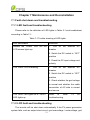
7.1 Fault shut down and troubleshooting
7.1.1 LED fault and troubleshooting
Please refer to the definition of LED lights in Table 5-1 and troubleshoot
according to Table 7-1:
Table 7-1 Trouble shooting of LED lights
LED fault status
Solutions
Neither the “Power” LED nor the
1. Turn off the external AC
LCD screen lights up.
breaker
2. Switch the DC switch to “OFF”
position
3. Check the PV input voltage and
polarity
The “GRID” LED is blinking.
1. Turn off the external AC
breaker
2. Switch the DC switch to “OFF”
position
3. Check whether the grid voltage
is normal and whether the cable
connection of AC side is correct
and secure
The “RUN” LED lights off or “FAULT”
Refer
LED lights up.
troubleshooting
to
Table
7-2
for
7.1.2 LCD fault and troubleshooting
The inverter will be shut down automatically if the PV power generation
system fails, such as output short circuit, grid overvoltage / undervoltage, grid
71
overfrequency / underfrequency, high environmental temperature or internal
malfunction of the machine. The fault information will be displayed on the LCD
screen. Please refer to “5.4.2 Present fault” for detailed operation.
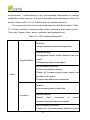
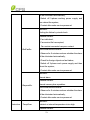
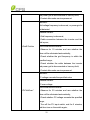
The causes of a fault can be identified based on the faults listed in Table
7-2. Proper analysis is recommended before contacting after-sales service.
There are 3 types of fault: alarm, protection and hardware fault.
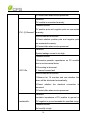
Table 7-2 LCD Troubleshooting table
Definition:
Prompt detection of abnormal temperature
Possible causes:
1.Temperature Sensor socket connecter has poor
1.TempSensorErr
contact;
2.Temperature Sensor is damaged;
Recommended solutions:
1.Observe temperature display;
2.Switch off 3-phase working power supply and
Alarm
then reboot the system;
3.Contact after-sales service personnel
Definition:
Communication inside inverter fails
2.CommErr
Possible causes:
Terminal
block
connecters
of
internal
communication wires have poor contact
Recommended solutions:
1.Observe for 5 minutes and see whether the alarm
72
will be eliminated automatically;
2.Switch off 3-phase working power supply and
then reboot the system;
3.Contact after-sales service personnel
Definition:
Cooling fan failure by visual check
Possible causes:
1.Fan is blocked;
2.Fan service life has expired;
3. Fan socket connecter has poor contact.
3.ExtFanErr
Recommended solutions:
1.Observe for 5 minutes and see whether the alarm
will be eliminated automatically;
2.Check for foreign objects on fan blades;
3.Switch off 3-phase work power supply and then
reboot the system;
4.Contact after-sales service personnel
Definition:
Internal alarm
Possible causes:
4.EepromErr
Internal memory has a problem
Recommended solutions:
1.Observe for 5 minutes and see whether the alarm
will be eliminated automatically;
2.Contact after-sales service personnel
Definition:
Protection 1.TempOver
Ambient or internal temperature is too high
Possible causes:
73
1.Ambient temperature outside the inverter is too
high;
2.Fan is blocked;
3. Convection airflow is insufficient due to improper
installation.
Recommended solutions:
1.Confirm that external ambient temperature is
within the specified range of operating temperature;
2.Check whether air inlet is blocked;
3.Check whether fan is blocked;
4.Check whether the location of installation is
appropriate or not;
5.Observe for 30 minutes and see whether the
alarm will be eliminated automatically;
6.Contact after-sales service personnel
Definition:
Grid voltage exceeds the specified range,
Possible causes:
1.Grid voltage is abnormal;
Power grid breaks down
2.Cable connection between the inverter and the
2.GridV.OutLim
grid is poor;
Recommended solutions:
1.Observe for 10 minutes and see whether the
alarm will be eliminated automatically;
2.Check whether the grid voltage is within the
specified range;
3.Check whether the cable between the inverter
74
and power grid is disconnected or has any fault;
4.Contact after-sales service personnel
Definition:
Grid voltage frequency is abnormal, or power grid is
not detected
Possible causes:
1.Grid frequency is abnormal;
2.Cable connection between the inverter and the
grid is poor;
3.GridF.OutLim
Recommended solutions:
1.Observe for 10 minutes and see whether the
alarm will be eliminated automatically;
2.Check whether the grid frequency is within the
specified range;
3.Check whether the cable between the inverter
and power grid is disconnected or has any fault;
4.Contact after-sales service personnel
Definition:
PV voltage exceeds the specified value
Possible causes:
PV over-voltage
Recommended solutions:
4.PVVoltOver*
1.Observe for 30 minutes and see whether the
alarm will be eliminated automatically;
2.Check whether PV voltage exceeds the specified
range;
3.Turn off the PV input switch, wait for 5 minutes,
and then turn on the switch again;
75
4.Contact after-sales service personnel
Definition:
PV module is connected inversely
Possible causes:
PV positive pole and negative pole are connected
5.PV1 (2) Reverse** inversely;
Recommended solutions:
1.Check whether positive pole and negative pole
are connected inversely;
2.Contact after-sales service personnel
Definition:
System leakage current is too high
Possible causes:
1.Excessive parasitic capacitance on PV module
due to environmental factor;
2.Grounding is abnormal;
6.GFCI.Err
3. Internal inverter fault
Recommended solutions:
1.Observe for 10 minutes and see whether the
alarm will be eliminated automatically;
2.Detect whether the electrical connection is
abnormal
3.Contact after-sales service personnel
Definition:
Insulation impedance of PV positive to ground or
7.IsolationErr
PV negative to ground exceeds the specified range
Possible causes:
Air humidity is high
76
Recommended solutions:
1.Observe for 10 minutes and see whether the
alarm will be eliminated automatically;
2.Check insulation of PV system;
3.Contact after-sales service personnel
Definition:
ARC fault
Possible causes:
Protection actions of ARC board
8.ARC Protect
Recommended solutions:
1. Use “ARCFaultClear” to clear the ARC fault.
(Refer to section 5.4.4)
2. Check if there is an arc in PV input or the
connection of PV cable is not good.
2. Contact after-sales service personnel
Definition:
Arcboard error
Possible causes:
Poor contact or damage of Arcboard
9.Arcboard Err
Recommended solutions:
1. Check whether the Arcboard is in good
condition
2. Use “ARCFaultClear” to clear the ARC fault.
(Refer to section 5.4.4)
3. Contact after-sales service personnel
Definition:
10.IntProtect0010~
Internal protection of the inverter
0620
Possible causes:
77
Protection procedure occurs inside the inverter
Recommended solutions:
1.Observe for 10 minutes and see whether the
alarm will be eliminated automatically;
2.Contact after-sales service personnel
Definition:
Internal fault of the inverter
Possible causes:
Fault occurs inside the inverter
Fault
IntFault0010~0150
Recommended solutions:
1.The inverter can be forced to restart once if it is
required by operation and if it is confirmed that
there is no other problem;
2.Contact after-sales service personnel
INSTRUCTION:
*The
actual
display
of
“PV.VoltOver”
is
“PV1VoltOver”
or
display
of
“PV.Reverse”
is
“PV1Reverse”
or
“PV2VoltOver”.
*The
actual
“PV2Reverse”.
DANGER:
Please disconnect the inverter from AC grid and PV modules before
opening the equipment. Make sure hazardous high voltage and
energy inside the equipment has been discharged.
Do not operate or maintain the inverter until at least 5 minutes after
disconnecting all sources of DC and AC.
78
7.2 Product maintenance
7.2.1 Check the electrical connection
Check all the cable connections as a regular maintenance inspection
every 6 months or once a year.
1.) Check the cable connections. If loose, please tighten all the cables
referring to “3.3 Electrical installation”.
2.) Check for cable damage, especially whether the cable surface is
scratched or smooth. Repair or replace the cables if necessary.
7.2.2 Clean the air vent filter
The inverter can become hot during normal operation. It uses built in
cooling fans to provide sufficient air flow to help in heat dissipation.
Check the air vent regularly to make sure it is not blocked and clean the
vent with soft brush or vacuum cleaner if necessary.
7.2.3 Replace cooling fans
If the internal temperature of the inverter is too high or abnormal noise is
heard assuming the air vent is not blocked and is clean, it may be necessary to
replace the external fans. Please refer to Figure 7-1 for replacing the cooling
fans.
1. Use a No.2 Phillips head screwdriver to take off the 10 screws on the fan
tray (6 screws on the upper fan tray, and 4 screws on the lower fan tray).
2. Disconnect the waterproof cable connector from the cooling fan.
3. Use a No.2 Phillips head screwdriver to take off the screws.
4. Fix the new cooling fan on the fan tray, and fasten the cable on the fan tray
with cable ties
Torque value: 0.8-1N.m
5. Install the assembled fans back to the inverter.
Torque value: 1.2N.m
79
1
2
3
4
5
80
6
50~60mm
mm
50~60mm
mm
Figure 7-1 Replace cooling fans
81
7.2.4 Replace the inverter
Please confirm the following things before replacing the inverter:
(1) The inverter is turned off.
(2) The DC switch of the inverter is turned to OFF position.
Then Replace the inverter according to the following steps:
a.) Unlock the padlock if it is installed on the inverter.
Figure 7-2 Unlock the padlock
b.) Use a No.2 Phillips head screwdriver to unscrew the 2 screws on both
sides of the inverter.
Figure 7-3 Remove the screws on both sides
82
c.) Use a No. 10 Hex wrench to remove the 4 screws between the main
housing and the wiring box. Lift up the main housing and disconnect from the
wiring box.
Figure 7-4 Disconnect the main housing from the wiring box
d.) Use a No.2 Phillips head screwdriver to remove the 2 screws on the left
side of the wiring box, and take off the cover board. Put the board on the
connector of wiring box.
Torque value: 1.2N.m
Figure 7-5 Install the cover board on the connector of the wiring box
83
7.3 De-installing the inverter
De-install the inverter according to the following steps when the service
time is due or for other reasons:
DANGER:
Please disconnect the electrical connection in strict accordance with
the following steps. Otherwise, the inverter will be damaged and the
service personnel’s life will be endangered.
1.) Turn off the AC breaker, and use Padlocks if provided.
2.) Turn off the DC breaker, and use Padlocks if provided.
(Skip the two steps if there are no circuit breakers.)
3.) Switch the AC switch to “OFF” position.
4.) Switch the DC switch to “OFF” position.
5.) Wait for 10 minutes to ensure the internal capacitors have been completely
discharged.
6.) Measure the AC output cable terminal voltage against the ground, and
make sure the voltage is 0V.
7.) Disconnect the AC and PE cables referring to “3.3.2 AC and ground
connection”.
8.) Disconnect the DC cables referring to “3.3.1 DC connection”.
9.) De-install the inverter using reverse of installation steps referring to “3.2
Mechanical installation”.
84
Chapter 8 Technical Data
Model Name
CPS
SCA23KTL-DO/US-480
CPS
SCA28KTL-DO/US-480
31kW
38kW
24kW
29kW
DC Input
Max. PV Power
Nominal DC Input
Power
1
Max. DC Input Voltage
Operating DC Input
Voltage Range
Start-up DC Input
Voltage / Power
Number of MPP
Trackers
2
MPPT Voltage Range
Max. Input Current
(Imp)
Max. Short Circuit
Current (Isc)
Number of DC Inputs
1000Vdc
300-900Vdc
330V/300W
2
480-800Vdc
500-800Vdc
54A (27A per MPPT)
64A (32A per MPPT)
82A (41A per MPPT)
96A (48A per MPPT)
8 inputs, 4 per MPPT
DC Disconnection Type
AC Output
Rated AC Output
Power
Max. AC Output Power
Load rated DC switch
23kW
23kW
Rated Output Voltage
Output Voltage Range
3
Max AC Output Current
Rated Output
Frequency
Output Frequency
4
Range
2
3
4
28kW
480Vac
422-528Vac
3Φ/ N / PE
Grid Connection Type
1
28kW
32A
39A
60Hz
55-66Hz
Exceeding the Max. DC Input Voltage may cause permanent damage to the equipment.
The MPPT Voltage Range is adjustable through LCD operations.
The Output Voltage Range may differ according to specific grid standard.
The Output Frequency Range may differ according to specific grid standard.
85
Power Factor
>0.99 (±0.8 adjustable)
Current THD
<3%
AC Disconnection Type
Load rated AC switch
System
Topology
Transformerless
Max. Efficiency
98.4%
CEC Efficiency
Stand-by / Night
Consumption
Environment
98.0%
<20W / <2W
Protection Degree
NEMA 4
Cooling
Operating Temperature
Range
Operating Humidity
Variable speed cooling fans
-13°F to +140°F / - 25°C to +60°C (derating from
+113°F / +45°C)
0-95%, non-condensing
13123.4ft / 4000m (derating from 6561.7ft /
Operating Altitude
2000m)
Display and Communication
Display
Communication
LCD + LED
Standard: RS485 (Modbus)
Mechanical Data
Dimensions (WxHxD)
23.6×39.4×9.1in / 600×1000×230mm
Weight
Orientation
Safety
Safety and EMC
Standard
Grid Standard
122lbs / 55kg
15 - 90 degrees from horizontal
UL1741:2010, CSA-C22.2 NO.107.1-01,
IEEE1547; FCC PART15
IEEE1547: 2003, IEEE1547.1: 2005
86
Note 1: When the DC input voltage is lower than 400V or higher than 800V, the
inverter begins derating, as shown in Figure 8-1:
Po/Pn
100%
80%
60%
40%
20%
300
500
(480)
800
900
1000
PV Voltage (V)
Figure 8-1 SCA23/28KTL derating curve of PV input voltage
Note 2: When the ambient temperature is higher than 113℉ (45℃), the
output power begins derating, as shown in Figure 8-2:
Po/Pn
100%
80%
60%
55%
40%
20%
113℉
(45℃)
140℉
(60℃)
Tamb
Figure 8-2 SCA23/28KTL derating curve with high temperature
87
Note 3: When the altitude is higher than 6562ft (2000m), the operating
temperature of the inverter needs derating, as shown in Figure 8-3:
Tamb
(60℃) 140℉
(45℃) 113℉
6562ft
(2000m)
13123ft
(4000m)
Altitude
Figure 8-3 SCA23/28KTL derating curve with high altitude
Note 4: The inverter can output the AC power with full loads under 90%~110%
of the rated grid voltage. When the grid voltage is lower than 90%, the output
current will be limited within the allowable Max. current.
Po/Pn
100%
80%
60%
40%
20%
0.9*Un
1.1*Un
Figure 8-4 SCA23/28KTL derating curve of grid voltage
88
Chapter 9 Limited Warranty
The warranty policy of this product is specified in the contract; otherwise,
the warranty period is 5 years.
For service, Chint Power Systems America will provide local support. For
Warranty terms, please refer to the CPS America standard warranty policy in
place at time of purchase.
89
Appendix: Instruction of inverter selection
Table A-1 Optional accessory
Item
Standard
Options
Number
■CPS SCA23/28KTL-DO/US-480
inverter
Note
1
□ DC SPD
1
□ DC and AC SPD
1
The following figure shows the wiring box equipped with the optional
components:
DC SPD
AC SPD
The position of the
optional communication card
Figure A-2 Internal structure of CPS SCA23/28KTL-DO inverter with optional
components
90
CHINT POWER SYSTEMS AMERICA CO., LTD.
Address: 700 International Parkway
Suite 102
Richardson TX 75081
Web: www.chintpower.com/na
Email: [email protected]
Service Hotline: 855-584-7168
SHANGHAI CHINT POWER SYSTEMS CO., LTD. All rights reserved.
Specifications and designs included in this manual are subject to change without notice.
CHINT POWER 2013/12-MKT PN: 9.0020.0119C0