1
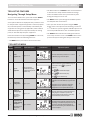
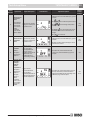
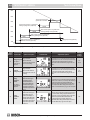
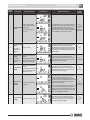
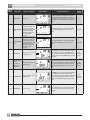
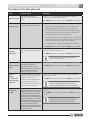
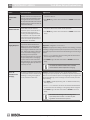
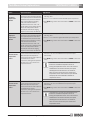
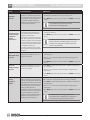
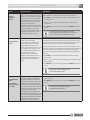
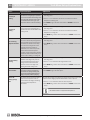
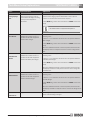
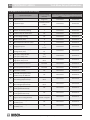
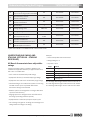
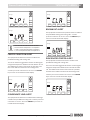
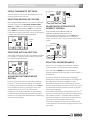
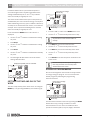
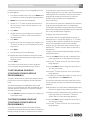
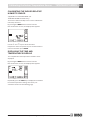
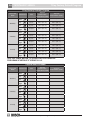
Remove the Battery Tab TSTBT4H2CP SERIES Tech Setup Features 11 • The blank button is a CANCEL button. Push this button to exit the menu setup and discard the last change made. The blank button can be pressed at any time during the setup process to exit. Navigating Through Setup Menu To access the installer menu, press and hold the ENTER button for 4 seconds until the first feature appears. Some options will not be displayed if they cannot be used for the particular equipment type that is selected (Option #2) or that the option is automatically controlled by the equipment or zoning panel (if applicable). Table 4 below shows which options are set by the installer, the zoning panel, or automatically set by the equipment. Enter the installer menu by holding ENTER for 4 seconds; the buttons perform the following functions: • The NEXT button cycles through the available options for that particular menu feature. • Once you have chosen the option using the NEXT button, if there are options for that setting, use the or button to cycle through the available options. See Tech Setup Table below for a list of available options. • The ENTER button will save the settings and exit the menu setup to home screen. The ENTER button can be pressed at any time during the setup process to exit. • The MENU button proceeds to the next menu item. Tech Setup Menu Option Number Option Title Option Description LCD will Show Adjustment Options Factory Default Settings Option 1 Select Degees C or F Use the Up and Down keys to select °F or °C. Press the MENU key to go to the next option. Range: °F or °C MENU NEXT °F ENTER Use the NEXT key to sequence through the equipment selections. Press the MENU key to go to 2 Type of Equipment Range: Gas/electric, conventional heat pump, dual fuel heat pump and air conditioner only the next option. Select equipment. Option MENU NEXT ENTER Select for conventional heat pump. Select for dual fuel heat pump. Select 3 Range: 1, 2 or 3 MENU Number of Heating Stages 4 5 This option is skipped for A/C equipment. Revised 06-13 ENTER MENU NEXT Outside NEXT 03 2 ENTER Option MENU Configuration 1 is one compressor, single stage. Configuration 2 is two compressors, 2 stages. Configuration 3 is one compressor with two stages. Use the Up and Down keys to select the number of heating stages in a Gas/Electric system or the number of auxiliary heating stages in a heat pump. Press the MENU key for the next option. Option Range: 0,1 or 2 Outdoor Temperature for Auxiliary Heating Changeover Range: 17 to 60F This option only for dual fuel heat pumps. NEXT CHP for air conditioner only. Use the Up and Down keys to select the compressor configuration. Press the MENU key to go to the next option. Option Compressor Configuration for gas/electric ENTER Subject to change without prior notice This option provides automatic changeover to fossil fuel heating in a dual fuel heat pump. Use the Up and Down keys to select the outdoor temperature to switch to fossil fuel heating. Press the MENU key to go to the next option. 6 720 220 387 OFF