1
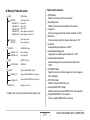
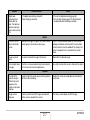
■ Memory Folder Structure
DCIM
100CASIO
CIMG0001.JPG
CIMG0002.AVI
CIMG0003.WAV
CIMG0004.JPG
CIMG0004.WAV
..
.
101CASIO
102CASIO
..
.
FAVORITE *
CIMG0001.JPG
CIMG0002.JPG
..
.
MISC
AUTPRINT.MRK
SCENE *
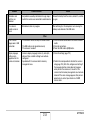
• DCIM Folder
Folder that contains all of the camera files
• Recording Folder
Folder that contains files recorded with the camera
• Image File
File of an image shot with the camera. Extension is “JPG”.
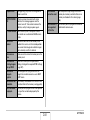
• Movie File
File of a movie shot with the camera. Extension is “AVI”.
• Audio File
Audio recording file. Extension is “WAV”.
• Audio Snapshot/Image File
Image file of an audio snapshot. Extension is “JPG”.
• Audio Snapshot/Audio File
Audio recording file of an audio snapshot. Extension is
“WAV”.
• FAVORITE Folder
Folder that contains Favorites image files. Size of images is
320 × 240 pixels.
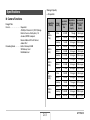
• DPOF File Folder
Folder that contains DPOF files, etc.
• Snapshot BEST SHOT Folder
Folder that contains snapshot BEST SHOT user setup files
• Snapshot BEST SHOT user setup file
File of a snapshot BEST SHOT user setup
(DCIM Folder)
(Recording Folder)
(Image File)
(Movie File)
(Audio File)
(Audio Snapshot Image File)
(Audio Snapshot Audio File)
(Recording Folder)
(Recording Folder)
(FAVORITE Folder)
(Recording File)
(Recording File)
(DPOF File Folder)
(DPOF File)
(Snapshot BEST SHOT Folder)
U1000001.JPE
..
.
(Snapshot BEST SHOT User Setup File)
U1000002.JPE
..
.
(Snapshot BEST SHOT User Setup File)
STARTING.JPG *
Folder and File Contents
(Startup Screen File)
* Indicates files that can be created in built-in memory only.
219
USING THE CAMERA WITH A COMPUTER