1
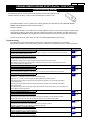
Diagnostics Guide
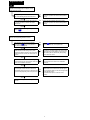
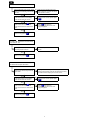
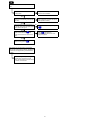
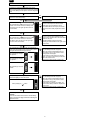
A1
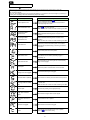
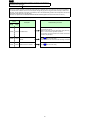
Remote control does not work
(Remote control display does not appear, or the
buzzer does not sound)
When operating the remote control, another switch
was not accidentally pressed at the same time.
NO
Refer to the basic operation items in the "User's
instructions" to perform the remote control operation
correctly.
NO
Refer to the basic operation items in the "User's
instructions" to perform the remote control operation
correctly.
NO
Refer to B1 , and perform the procedure for battery
replacement or remote control replacement.
YES
Did you press the remote control switch following
the correct procedure, as noted in the "User's
instructions?"
YES
The remote control is working correctly
(Refer to B1 ).
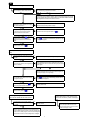
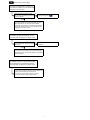
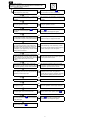
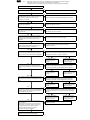
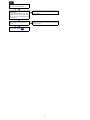
Remote control operating distance is short
After performing the remote control operation
check (Refer to B1 ), there is no problem or
error with the remote control.
YES
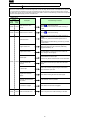
Even after trying to operate the remote control from
a better location, or after moving closer (within
approximately 300ft of vehicle) to the vehicle when
operating the remote control, the vehicle does not
respond.
NO
When there is something between the remote control
and the vehicle, such as a building, if you move to a
better location (with no obstructions), the operating
distance becomes shorter.
YES
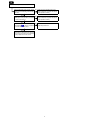
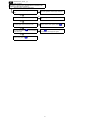
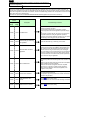
The harness and controller of the remote engine
start are attached to the correct location where are
shown in the installation instructions.
NO
Attach the harness and controller to the correct location
in the vehicle where are shown in the installation
instructions.
YES
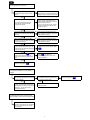
The metal parts or other electronic control units
except Mazda genuine parts are not attached close
to the controller (especially antenna component of
it).
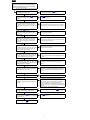
NO
If the metal parts or other electronic control units are
attached close to the controller of the remote engine
start, the operating distance of the remote engine start
may be affected by them.
Do not attach those parts or units close to the
controller.
YES
The controller is faulty or defective. Replace the
controller.
㪉