1
Data Ports
Parallel Data Port
Parallel Data Port
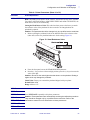
A standard 36-pin parallel connector is available at the rear of the printer for connection to the
data source. Under normal circumstances, data sent from the printer to the host computer in
response to a “Printer Status Request” command is sent through the RS-232 serial port.
However, if the host computer has a properly configured IEEE-1284 parallel port that is
recognized by the printer, status information is returned through the parallel port. Port
selection for status information is determined each time the printer is turned on.
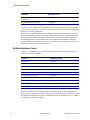
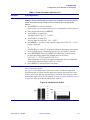
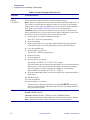
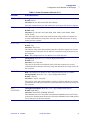
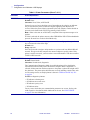
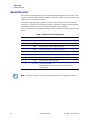
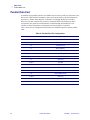
Table 9 shows the pin configuration and function of a standard computer-to-printer parallel
cable.
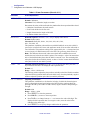
Table 9 • Parallel Port Pin Configuration
64
36-pin Connector
Description
1
nStrobe/HostClk
2–9
Data Bits 1–8
10
nACK/PtrClk
11
Busy/PtrBusy
12
PError/ACKDataReq
13
Select/Xflag
14
nAutoFd/HostBusy
15
Not used
16 & 17
Ground
18
+5 V @ 750 mA
19–30
Ground
31
ninit
32
nFault/NDataAvail
33 & 34
Not used
35
+5 V through a 1.8K Ω Resistor
36
NSelectin/1284 active
105SL User Guide
6/4/2004 11342L Rev. 8