1
Wireless-G Broadband Router with 2 Phone Ports
The Wireless Tab - Advanced Wireless Settings
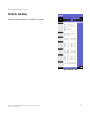
This tab is used to set up the Router’s advanced wireless functions. These settings should only be adjusted by an
expert administrator as incorrect settings can reduce wireless performance.
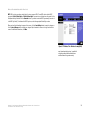
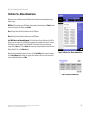
Basic Rate. The Basic Rate setting is not actually one rate of transmission but a series of rates at which the
Router can transmit. The Router will advertise its Basic Rate to the other wireless devices in your network, so
they know which rates will be used. The Router will also advertise that it will automatically select the best rate
for transmission. The default setting is Default, when the Router can transmit at all standard wireless rates
(1-2Mbps, 5.5Mbps, 11Mbps, 18Mbps, and 24Mbps). Other options are 1-2Mbps, for use with older wireless
technology, and All, when the Router can transmit at all wireless rates. The Basic Rate is not the actual rate of
data transmission. If you want to specify the Router’s rate of data transmission, configure the Transmission Rate
setting.
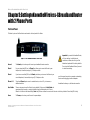
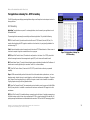
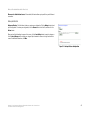
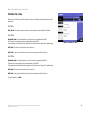
Figure 5-20: Wireless Tab - Advanced Wireless Settings
Control Tx Rate. The rate of data transmission should be set depending on the speed of your wireless network.
You can select from a range of transmission speeds, or you can select Auto to have the Router automatically use
the fastest possible data rate and enable the Auto-Fallback feature. Auto-Fallback will negotiate the best possible
connection speed between the Router and a wireless client. The default value is Auto.
Preamble Type. The preamble defines the length of the CRC block for communication between the Router and
the roaming Network Card. (High network traffic areas should use the shorter preamble type.) Select the
appropriate preamble type, Long Preamble (default) or Short Preamble.
Authentication Type. The default is set to Auto, which allows either Open System or Shared Key authentication
to be used. With Open System authentication, the sender and the recipient do NOT use a WEP key for
authentication. With Shared Key authentication, the sender and recipient use a WEP key for authentication.
CTS Protection Mode. CTS (Clear-To-Send) Protection Mode should remain disabled unless you are having
severe problems with your Wireless-G products. If these products are not able to transmit to the Router in an
environment with heavy 802.11b traffic, then enable CTS Protection Mode. This function boosts the Router’s
ability to catch all Wireless-G transmissions but will significantly decrease performance.
cts (clear to send): a signal sent by a wireless
device, signifying that it is ready to receive data
Beacon Interval. The default value is 100. Enter a value between 1 and 65,535 milliseconds. The Beacon Interval
value indicates the frequency interval of the beacon. A beacon is a packet broadcast by the Router to synchronize
the wireless network.
beacon interval: data transmitted on your wireless
network that keeps the network synchronized
DTIM Interval. This value, between 1 and 255, indicates the interval of the Delivery Traffic Indication Message
(DTIM). A DTIM field is a countdown field informing clients of the next window for listening to broadcast and
multicast messages. When the Router has buffered broadcast or multicast messages for associated clients, it
sends the next DTIM with a DTIM Interval value. Its clients hear the beacons and awaken to receive the broadcast
and multicast messages. The default value is 1.
dtim: a message included in data packets
that can increase wireless efficiency.
Chapter 5: Configuring the Wireless-G Broadband Router with 2 Phone Ports
The Wireless Tab - Advanced Wireless Settings
26