1
Supported Products
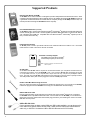
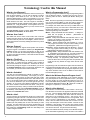
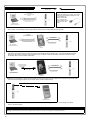
Data Transfer Module (AL-DTM)
An AL-DTM can be used to transfer Lock Programs (and other data) between DL-Windows and locks. When
computers cannot be transported or when electrical power is not available, the hand-held AL-DTM device acts as
a go-between--it allows the transfer of lock data from the computer (through the AL-DTM) and to the lock, or in
reverse (from the lock through the AL-DTM back to the computer).
Prox Card Reader/Enroller (AL-PRE)
An AL-PRE is used to quickly enroll multiple ProxCards® and ProxKey® keyfobs into DL-Windows without the
need to manually type User Codes. Use the supplied 9-pin DB9 to DB9 serial cable to connect the AL-PRE to
your computer’s serial COM port. Compatible with most HID ProxCards® and ProxKey® keyfobs (37 bits or
less). For PDL series locks only.
Infrared Printer (AL-IR1)
An AL-IR1 printer is used to print Audit Trails and User Code lists without the need for a PC. Its infrared
reader means no cable connection to the lock is needed.
HID
HID CORPORATION
ProxCard® / ProxKey® Keyfob
Compatible with most HID ProxCards®
and ProxKey® keyfobs (37 bits or less).
Note: ProxCard® and ProxKey® are trademarks of the
HID© Corporation.
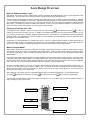
AL-PCI Cable
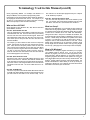
An ALARM LOCK AL-PCI cable is required to communicate between your computer’s RS-232 serial communications port (COM 1-4) and the AL-DTM or lock. One end of the AL-PCI cable is designed to be used
on a 9-pin serial Com Port. If your computer has a 25-pin Com Port only, a 25-pin to 9-pin adapter must be
used. The other end of the AL-PCI cable features a 2-pin banana plug connector which is polarity sensitive-the TAB (marked “GND”) side must be plugged into the lock’s black (left) terminal.
Double-ended Mini Banana Plug Connector
After you create the program in DL-Windows and transfer the program from your computer to an AL-DTM,
transfer the program from the AL-DTM to the lock(s) via a double-ended mini banana plug.
DB9 to DB9 Serial Cable
Enroll ProxCards quickly into DL-Windows, then transfer this new ProxCard® data from the computer to
the AL-PRE via this 9-pin DB9 to DB9 serial cable. Once the data is in the AL-PRE, you can transfer the
data to the lock via the double-ended mini banana plug (see above), thus avoiding the need to use an ALPCI cable for this process.
USB to RS-232 Cable
If your computer does not have a serial COM port (DB-9 male) available, you can plug your ALPCI2 cable into a special USB to RS-232 cable. Order part PCI-USB for the USB to RS-232
cable only, or ALPCI2-U for both the USB to RS-232 cable and an AL-PCI2 cable).
4