1
4. Operating Instructions
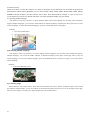
4-1 Basic Connections
* CONNECTED TO A TV
* CONNECTED TO AN ORDINARY AMPLIFIER
R
L
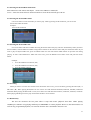
4-2 Selecting Video MODE
Press SETUP button and select GENERAL SETUP submenu on SETUP screen. After that, select TV TYPE by
pressing DOWN arrow button (▼ ) until desired TV mode is selected. For more information, refer to Page 34-36 on
the Instruction Manual.
22