1
Configuration Manual
Ascom i62 VoWiFi Handset
6.6.1
TD 92675EN
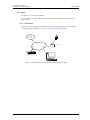
IP Address to the IMS3
The IMS3 handles all communication between the WLAN and its built-in Centralised Device
Manager. It is possible to send messages from a web browser to a VoWiFi Handset, handle
messages to groups, send simple messages from VoWiFi Handset to VoWiFi Handset (and to
groups), search for telephone numbers in a central database (on PC), have a central
telephone book on the IMS3 (not PC-based) and to have absence handling in the system.
6.7
1
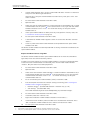
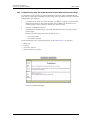
Select Device > Unite.
2
In the IP address field, enter the IP address of the IMS3. If left empty, no messaging or
alarm function will be available.
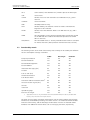
Messaging Settings
Note: Applicable to Messenger and Protector only.
It is possible to configure how incomming messages shall be indicated and displayed in
VoWiFi Handset.
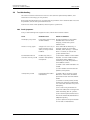
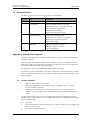
Profiles > Normal, Profile 1- 4
•
•
•
Vibrator
Determines if the VoWiFi Handset shall vibrate when receiving incoming calls and
messages.
Message alert
Determines the message sound for incoming messages.
Message volume
Determines the message volume for incoming messages. By default, the message
volume follows the ringer volume, but another message volume can be set with this
parameter.
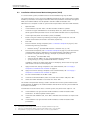
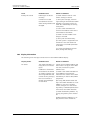
Device > Messaging
•
•
•
•
•
Message list representation
Can be set to text or number.
Time to read (TTR)
Determines if the user needs to close a message manually, or if the message
automatically shall be closed when TTR expires. Regardsless how a message is closed, it
is removed from the message queue and stored in the Messaging Inbox. TTR starts when
a message is displayed and keep running also when the message is placed in the
messaging queue. If a user presses any key when a message is displayed, the TTR is
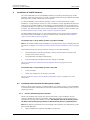
reset. See also 6.7.1 Examples of TTR/TTP settings on page 43.
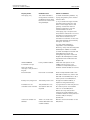
Time to prioritize (TTP)
Determines how long messages shall keep their priority status. The TTP starts when a
message is displayed. If a user presses any key when a message is displayed, the TTP is
reset. If receiving a message with higher priority than the displayed message, the
message with lower priority is placed in queue and its TTP is paused. When the TTP
elapsed for a message, it is put last in the queue. See also 6.7.1 Examples of TTR/TTP
settings on page 43.
Repeat message indication
This parameter enables/disables message indications. It sets whether a message
indication shall be repeated until confirmed by the user or not. The current repetition
rate is 7 seconds. If the message itself contains a repetition, it overrides this setting.
Vibrator for message during call
Determines if the handset shall vibrate when receiving messages during an ongoing call.
9 December 2011/ Ver. D
42