1
LX32 / LX34 LAMP REPLACEMENT: INSTRUCTIONS
TOP CONTROL
This indicator lights yellow
when the life of the projection
lamp draws to an end.
Replace the Projection Lamp
with a new one promptly.
ON-OFF
SELECT
CAUTION
Allow a projector to cool, for at least 45 minutes before
you open Lamp Cover. The inside of a projector can
become very hot.
For continued safety, replace with a lamp assembly of
the same type.
Do not drop a lamp assembly or touch a glass bulb! The
glass can shatter and may cause injury.
LAMP COVER
SCREW
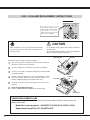
Follow these steps to replace the lamp assembly.
1
Turn off the projector and disconnect the AC plug. Allow the
projector to cool for at least 45 minutes.
2
3
To remove Lamp Cover, remove the screw with a screwdriver.
4
Replace Lamp Assembly with a new one and tighten 2 screws
back into position. Make sure that Lamp Assembly is set
properly. Replace Lamp Cover and tighten the screw.
5
Connect AC Power Cord to the projector and turn on the
projector.
6
Reset the Lamp Replace Counter.
Refer to “LAMP REPLACE COUNTER” on the next page .
Loosen 2 screws with a screwdriver and pull out Lamp Assembly
by grasping Handle.
HANDLE
SCREWS
LAMP
ASSEMBLY
ORDER REPLACEMENT LAMP
Replacement Lamps can be ordered through your dealer. When ordering, please provide the
following information:
Model No. of your projector : 38-VIV207-01 (LX32) &103-002001 (LX34)
Replacement Lamp/Filter Kit : 03-000712-01P
1
013-100237-02 Rev. 1 (02/07)