1
Set Up a VM-Series NSX Edition Firewall
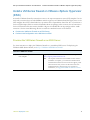
VM-Series NSX Edition Firewall Overview
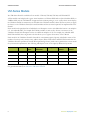
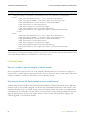
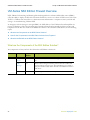
Provider
Component
Minimum
Version
Description
Palo Alto
Networks
PAN-OS
6.0
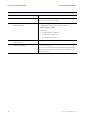
The VM-Series base image (PA-VM-NSX-6.0.0.zip) used for
deploying the VM-Series NSX edition firewall is PAN-OS version 6.0.
The minimum system requirement for deploying the VM-Series NSX
edition firewall on the ESXi server is as follows:
• Two vCPUs. One for the management plane and one for the
dataplane.
You can assign 2 or 6 additional vCPUs to allocate a total of 2, 4 or
8 vCPUs to the firewall; the management plane only uses one vCPU
and any additional vCPUs are assigned to the dataplane.
• 5GB of memory. Any additional memory will be used by the
management plane only.
• 40GB of virtual disk space.
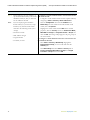
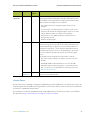
Panorama
6.0
Panorama is the centralized management tool for the Palo Alto
Networks next-generation firewalls. In this solution, Panorama works
with the NSX Manager to deploy, license, and centrally administer—
configuration and policies—on the VM-Series NSX edition firewall.
Panorama must be able to connect to the NSX Manager, the vCenter
server, the VM-Series firewalls and the Palo Alto Networks update
server.
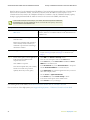
The minimum system requirement for Panorama is as follows:
• Two 8-Core vCPUs (2.2GHz); use 3GHz if you have 10 or more
firewalls.
• 4GB RAM; 16GB recommended if have 10 or more firewalls.
• 40GB disk space; To expand log capacity, you must add a virtual
disk or set up access to an NFS datastore. For details, refer to the
Panorama documentation.
VM-Series
6.0
NSX Edition
The only VM-Series license available in this solution is the VM-1000 in
hypervisor mode (VM-1000-HV).
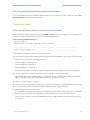
vCenter Server
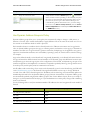
The vCenter server is required to manage the NSX Manager and the ESXi hosts in your datacenter. This joint
solution requires that the ESXi hosts be organized into one or more clusters on the vCenter server and must be
connected to a distributed virtual switch.
For information on clusters, distributed virtual switch, DRS, and the vCenter server, refer to your VMware
documentation: http://www.vmware.com/support/vcenter-server.html.
VM-Series Deployment Guide
47