1
Chapter 6: Operational Procedures
6.4 Verifying Messages
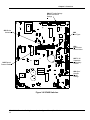
NOTE: Verify that DIP switch JP5 is in place. See Figure 3-5 for location.
Message 1
Message 2
Message 3
Message 4
Message 5
Message 6
Message 7
Message 8
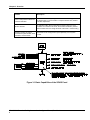
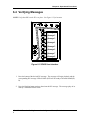
Figure 6-1 SP40S User Interface
1. Press the button of the desired DV message. The message will begin playback and the
corresponding DV message LED will blink (LED will be steady with model SP40S(E)D).
2. Press the blinking button again to deactivate the DV message. The message plays in its
entirety a minimum of three times.
SP40S Multi-Function Facility Communication System Manual, Revision L
3