1
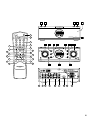
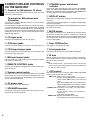
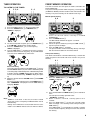
⁄5 PHONES jack
The JOG control can be used in the TUNER, AMP or TIMER
modes. Press to change the mode of JOG control to AMP mode.
5 seconds after the previous JOG operation is finished, the mode
of JOG control will return to AMP mode automatically. You can
also use this button to return to AMP mode immediately. The
function of JOG control in AMP mode is changed as follows (except
the volume adjust mode):
SOURCE select mode: To select input mode.
(Volume adjust mode: To adjust the volume level by turning
the volume control.)
Balance control mode: To adjust the speaker balance.
BASS control mode: Tone control (Low frequency)
TREBLE control mode: Tone control (High frequency)
The AMP mode is used for tone control (BASS/TREBLE) and to
change also source for JOG control.
For connecting a pair of stereo headphones. When the
headphones are connected to this jack, the speaker sound is
turned off.
ENGLISH
, AMP button
Note:
Door cannot be closed when headphones connected.
⁄6 Display panel
This panel shows information on the status of the unit.
⁄7 Infrared sensor
The infrared signal from the remote control enters the unit through
this sensor.
. TUNER button
Press to select FM or AM tuner when another source is selected
and select the JOG operation for TUNER selection. Use this button
to select the JOG operation for a scan of frequency or preset
memory mode. The TUNER button changes modes as below.
FREQUENCY mode: To scan tuning by frequency by JOG
control.
PRESET mode: To scan tunings in the preset memory by
JOG control.
TUNER mode: To change FM broadcasting to MONO or
STEREO.
The “MONO” indicator lights up on the
display in MONO position, the “AUTO”
indicator lights up when there is no signal
and “STEREO” lights up when a stereo
signal is received.
Please refer to page 9 for tuner operations.
⁄0 TIMER button
This button is used to program and check the timer program.
Please refer to page 11 for timer program operation.
⁄1 BAND button
This button is used to change the reception band to FM or AM.
⁄2 MEMO button
This button is used to set the preset memory of the tuner or clock
time.
Please refer to the tuner and timer operations.
⁄3 WOW button
This button is used to change the WOW function level.
Each press of this button change the WOW function level following
order.
OFF → LOW → HIGH → OFF
Note:
When this button is pressed, the sound of speakers is muted
momentary. This is not malfunction.
⁄4 VOLUME control
To increase or decrease sound level. To increase the sound level
turn clockwise, and to decrease turn counter-clockwise.
5