1
1.
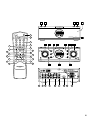
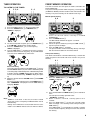
Press the power switch q/z to turn the power of the unit
ON.
TIMER
2.
3.
4.
ENGLISH
CANCEL TIMER SETTING
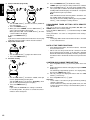
Press the TIMER button ⁄0 on the front panel until “Timer
ON/OFF” is displayed.
Turn the JOG control m to select “OFF”.
Press the JOG button m.
Important
- “TIMER” indicator is extinguished when TIMER button ⁄0
is pressed for 3 seconds or more in timer playing or
recording mode.
- Never set “Once” or “Everyday” in timer playing or
recording mode. If this is set, the off timer is concealed
and the power is not turned off. You should no operate
after you confirm the setting time, the display will return
original.
SLEEP TIMER SETTING (REMOTE CONTROL ONLY)
The sleep timer function allows the unit to be in standby mode
automatically after a specified period of time.
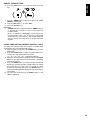
1. While the power is ON, press the SLEEP button !7 in the
AMP mode.
2. Press the SLEEP button !7 within 5 seconds. Each press
changes the sleep timer period in the order
10 → 20 → 30 → 60 → 90 → OFF(original display).
3. When the desired period is displayed, release the SLEEP
button !7. After that, setting of the sleep timer is completed
and the count starts.
4. Press the SLEEP button !7 during the sleep timer count to
display the remaining period in standby mode. To change
the setting after the sleep timer has started the count,
display the remaining time, press the SLEEP button !7
while the remaining period is displayed, and repeat steps 3
and 4 above.
5. To cancel the sleep timer, press SLEEP button !7 until
“OFF” is displayed.
13