1
COPY FUNCTIONS
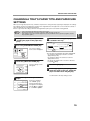
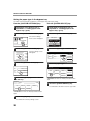
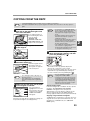
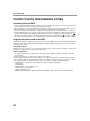
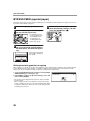
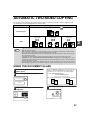
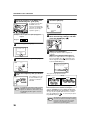
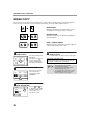
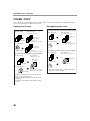
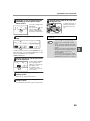
MANUAL RATIO SELECTION
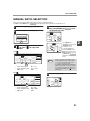
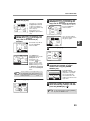
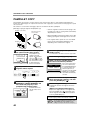
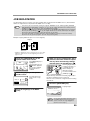
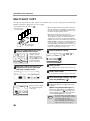
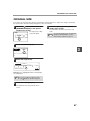
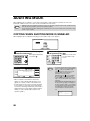
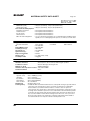
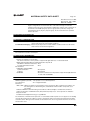
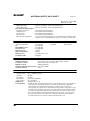
There are four preset reduction ratios and four preset enlargement ratios.
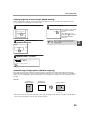
In addition, the [ZOOM] keys (
,
) can be pressed to select the ratio in increments of 1%.
1
Place the original(s). (p.22, p.23)
2
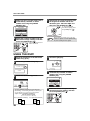
Touch the [COPY RATIO] key.
4
Use the enlargement key or reduction
key, or the [ZOOM] key (
/
) to set
the desired copy ratio.
100
1
PAPER SELECT
100%
COPY RATIO
3
%
ZOOM
8½x11
5½x8½
64%
11x17
121%
ZOOM
11x17
8½x14
8½x11
5½x8½
8½x14
8½x11
11x17
8½x11
MENU
2
1
77
Use the [MENU] key to select menu
[ ] or menu [ ] for copy ratio
selection.
77%
129%
%
ZOOM
1x17
½x11
8½x11
5½x8½
64%
½x14
11x17
121%
XY ZOOM
11x17
8½x14
8½x11
5½x8½
MENU
8½x14
8½x11
11x17
8½x11
1
77
129
2
Menu
READY TO COPY.
0
100
OK
AUTO
EXPOSURE
100%
AUTO
8½x11
PAPER SELECT
%
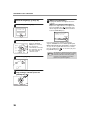
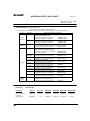
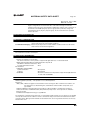
The [ZOOM] keys
(
/
) can be used to
change the ratio in
increments of 1%
Touch the
key to
increase the ratio or the
key to decrease the
ratio. Continuing to touch
a [ZOOM] key (
/
)
makes the ratio change
faster.
ZOOM
11x17
8½x11
8½x11
5½x8½
64%
8½x14
11x17
121%
XY ZOOM
11x17
8½x14
8½x11
5½x8½
8½x14
8½x11
11x17
8½x11
MENU
77%
129%
AUTO
IMAGE
Note
COPY RATIO
2
1
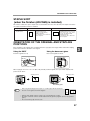
• Preset reduction keys :
64%, 77%
• Preset enlargement keys : 121%, 129%
• [100%] key
100%
Menu
READY TO COPY.
0
100
%
OK
AUTO
EXPOSURE
100%
AUTO
8½x11
PAPER SELECT
5
Touch the [OK] key.
ZOOM
25%
50%
200%
400%
AUTO
IMAGE
XY ZOOM
MENU
1
COPY RATIO
2
OK
%
x17
x14
x11
x8½
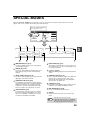
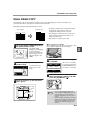
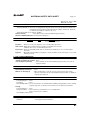
• Touch a reduction or enlargement key to
set the approximate ratio, then touch the
[
] key to decrease the ratio or the
[
] key to increase the ratio.
• If "IMAGE IS LARGER THAN THE COPY
PAPER." appears, the selected copy ratio
is too large for the paper size. However, if
you press the [START] key ( ), a copy
will be made.
EX
8½x14
8½x11
11x17
8½x11
1
77%
129%
100%
AUTO
IMAGE
AUTO
PAPE
COP
2
• Preset reduction keys :
25%, 50%
• Preset enlargement keys : 200%, 400%
• [100%] key
100%
31
2