1
Before You Start
No.
Item
Description
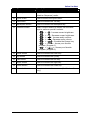
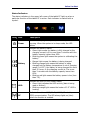
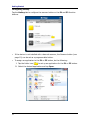
Security button
Press to exit Windows and enter SAS (Secure
Attention Sequence) mode.
10
Quick menu
Press to access the Quick menu.
11
Tab button
Press to emulate the Tab key.
12
Backspace button
Press to emulate the Backspace key.
13
Function button
When Function Button is locked, use the other
keys to perform special functions.
• <
> + < >: Increase screen brightness.
9
•
•
•
•
•
•
<
> + < >: Decrease screen brightness.
<
> + < >: Increase audio volume.
<
> + < >: Decrease audio volume.
<
>+<
>: Emulate the Escape key.
> + <TAB>: Access your favorite
<
program (Program1).
<
>+<
>: Access your favorite
program (Program2).
14
Enter button
Press to emulate the Enter key.
15
Up button
Press to emulate the Up key.
16
Left button
Press to emulate the Left key.
17
Right button
Press to emulate the Right key.
18
Down button
Press to emulate the Down key.
19
Home button
Press to return to Home screen (for Windows 8
only).
11