1
Getting Started
Starting Your Tablet PC
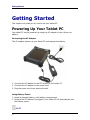
Turning On Your Tablet PC
Press the
button until the Power LED lights up.
Changing the Display Orientation
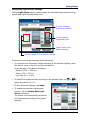
You can rotate the display orientation to suit your preference.
Press both <
> and <7> buttons to rotate the display 90° clockwise.
NOTE
•
•
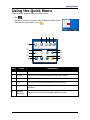
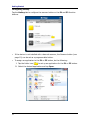
You need to disable the Auto Rotate option in the Quick menu before pressing
the shortcut buttons (< > + <7>) to rotate the display.
The screen can’t be turned 180 and 270 degree clockwise to operate.
Shutting Down Your Tablet PC
It is important to properly shut down your tablet PC to avoid the loss of unsaved
data. To shut down your tablet PC, do the following:
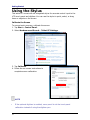
Tap Start > Shut down.
Wait for your tablet PC to turn off power completely
before removing the power source (if necessary).
21