1
Using the TMA
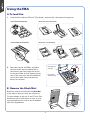
A. To load film:
1.
2.
Load the film inside the EZ-Lock™ Film Holder, with the film’s shiny base facing down.
• EZ-Lock 35mm Slide Holder
• EZ-Lock 6 x 22 cm Film Holder
• EZ-Lock 35mm Filmstrip Holder
• EZ-Lock 4" x 5" Film Holder
Raise the scanner lid (TMA), and place
the film holder with the loaded film on
the scanner glass bed. Align the arrows
so that the holder is flush against the top
ruler of the scan bed, with the calibration
strip of the holder facing towards the
back of the scanner.
Horizontal ruler
(top ruler)
Do not block
calibration strip
B. Remove the Black Mat:
Raise the scanner lid, and push the Black Mat
to the side to remove it from the scanner lid.
For more details on the use of the EZ-Lock Film
Holders as well as information on how to scan
non-standard-size film, refer to the ScanMaker
i800 Plus Supplement.
4