1
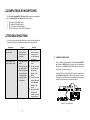
q q INSTALLATION q BIOS / CMOS SETTINGS The following BIOS setup changes are necessary for PC users and not necessary for Mac users: TROUBLESHOOTING – cont. Symptoms Newly installed USB device does not work. Causes (continued from page 8) (continued from page 8) 1. In STANDARD CMOS, set “HALT ON ERRORS” setting to “ALL BUT KEYBOARD”. q 2. In PNP AND PCI SETUP, set “PNP OS INSTALLED” setting to “YES” and set “USB IRQ” setting to “ENABLED”. NOTE: The UR-Series KVM USB switch is applicable for USB keyboard and mouse switching from one computer to the other. If you plan to share other peripherals such as a CCD camera, printer or scanner, it is required that you shut down the driver of the computer before switching to another computer. Because port switching is equivalent to unplugging the USB cable from one computer and plugging it in to another one, some USB drivers check attached USB peripherals all the time and will not accept this. q q Computer hangs up while switching a different computer. q Device initialization is taking too long. q CONSOLE CONNECTIONS q Before installation, make sure all devices and computers to be connected to the UR-Series KVM switch have been turned off. Plug a monitor into the Console's VGA port; plug a USB keyboard and a USB mouse into any two of the 4 Console's USB ports as shown in figure 2. As an option, the UR-Series USB KVM switch can be linked to an exisiting ConnectPRO PR-Series PS/2 type (non-USB) KVM switch with the mini-DIN8 male-to-male cable which is supplied with your UR-Series USB KVM switch. See figure 2. 4 Auto Scan does not switch PCs automatically and beeps are heard. q All PCs are off or only one PC is turned on. Scan mode works for powered-on computers only. 9 q Solutions Remove all power sources to the switch by unplugging all USB patch cables and the power adapter; then retry. Select the computer by pushbutton, then reboot. Wait at least 5 seconds before computer switching to ensure proper USB communication. Turn off device driver (not keyboard nor mouse) before switching. Turn computers on.