1
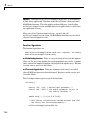
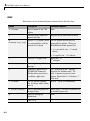
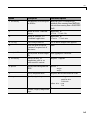
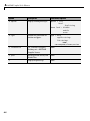
MATLAB® Compiler 4
User’s Guide
How to Contact The MathWorks
Web
Newsgroup
www.mathworks.com/contact_TS.html Technical Support
www.mathworks.com
comp.soft-sys.matlab
[email protected]
[email protected]
[email protected]
[email protected]
[email protected]
Product enhancement suggestions
Bug reports
Documentation error reports
Order status, license renewals, passcodes
Sales, pricing, and general information
508-647-7000 (Phone)
508-647-7001 (Fax)
The MathWorks, Inc.
3 Apple Hill Drive
Natick, MA 01760-2098
For contact information about worldwide offices, see the MathWorks Web site.
MATLAB Compiler User’s Guide
© COPYRIGHT 1995–2007 by The MathWorks, Inc.
The software described in this document is furnished under a license agreement. The software may be used
or copied only under the terms of the license agreement. No part of this manual may be photocopied or
reproduced in any form without prior written consent from The MathWorks, Inc.
FEDERAL ACQUISITION: This provision applies to all acquisitions of the Program and Documentation
by, for, or through the federal government of the United States. By accepting delivery of the Program or
Documentation, the government hereby agrees that this software or documentation qualifies as commercial
computer software or commercial computer software documentation as such terms are used or defined
in FAR 12.212, DFARS Part 227.72, and DFARS 252.227-7014. Accordingly, the terms and conditions of
this Agreement and only those rights specified in this Agreement, shall pertain to and govern the use,
modification, reproduction, release, performance, display, and disclosure of the Program and Documentation
by the federal government (or other entity acquiring for or through the federal government) and shall
supersede any conflicting contractual terms or conditions. If this License fails to meet the government’s
needs or is inconsistent in any respect with federal procurement law, the government agrees to return the
Program and Documentation, unused, to The MathWorks, Inc.
Trademarks
MATLAB, Simulink, Stateflow, Handle Graphics, Real-Time Workshop, SimBiology,
SimHydraulics, SimEvents, and xPC TargetBox are registered trademarks and The
MathWorks, the L-shaped membrane logo, Embedded MATLAB, and PolySpace are
trademarks of The MathWorks, Inc.
Other product or brand names are trademarks or registered trademarks of their respective
holders.
Patents
The MathWorks products are protected by one or more U.S. patents. Please see
www.mathworks.com/patents for more information.
Revision History
September 1995
March 1997
January 1998
January 1999
September 2000
October 2001
July 2002
June 2004
August 2004
October 2004
November 2004
March 2005
September 2005
March 2006
September 2006
March 2007
September 2007
First printing
Second printing
Third printing
Fourth printing
Fifth printing
Online only
Sixth printing
Online only
Online only
Online only
Online only
Online only
Online only
Online only
Online only
Online only
Seventh printing
Revised for Version 1.2
Revised for Version 2.0 (Release 11)
Revised for Version 2.1 (Release 12)
Revised for Version 2.3
Revised for Version 3.0 (Release 13)
Revised for Version 4.0 (Release 14)
Revised for Version 4.0.1 (Release 14+)
Revised for Version 4.1 (Release 14SP1)
Revised for Version 4.1.1 (Release 14SP1+)
Revised for Version 4.2 (Release 14SP2)
Revised for Version 4.3 (Release 14SP3)
Revised for Version 4.4 (Release 2006a)
Revised for Version 4.5 (Release 2006b)
Revised for Version 4.6 (Release 2007a)
Revised for Version 4.7 (Release 2007b)
Contents
Getting Started
1
What Is MATLAB Compiler? . . . . . . . . . . . . . . . . . . . . . . .
Overview of MATLAB Compiler . . . . . . . . . . . . . . . . . . . . . .
What Is the Deployment Tool? . . . . . . . . . . . . . . . . . . . . . .
1-2
1-2
1-2
How Does MATLAB Compiler Work? . . . . . . . . . . . . . . . . .
MATLAB Compiler Generated Application or Library . . . .
Wrapper Files . . . . . . . . . . . . . . . . . . . . . . . . . . . . . . . . . . . .
Component Technology File (CTF) . . . . . . . . . . . . . . . . . . . .
1-3
1-3
1-3
1-4
Before You Begin . . . . . . . . . . . . . . . . . . . . . . . . . . . . . . . . . .
1-5
Using the GUI to Create and Package a Deployable
Component . . . . . . . . . . . . . . . . . . . . . . . . . . . . . . . . . . . . .
1-6
Magic Square Example . . . . . . . . . . . . . . . . . . . . . . . . . . . . .
1-7
Using the mcc Command . . . . . . . . . . . . . . . . . . . . . . . . . . .
1-10
Developing and Testing Components on a Development
Machine . . . . . . . . . . . . . . . . . . . . . . . . . . . . . . . . . . . . . . . .
Packaging Your Software . . . . . . . . . . . . . . . . . . . . . . . . . . .
Replacement of MCRInstaller.zip and BUILDMCR
Functionality . . . . . . . . . . . . . . . . . . . . . . . . . . . . . . . . . . .
Creating a Package for Windows Users . . . . . . . . . . . . . . . .
Creating a Package for Users Who Do Not Use Windows . .
Configuring the Development Environment by Installing
the MCR . . . . . . . . . . . . . . . . . . . . . . . . . . . . . . . . . . . . . .
For More Information . . . . . . . . . . . . . . . . . . . . . . . . . . . . . .
1-12
1-12
1-12
1-13
1-13
1-14
1-15
v
Installation and Configuration
2
Requirements . . . . . . . . . . . . . . . . . . . . . . . . . . . . . . . . . . . . .
System Requirements . . . . . . . . . . . . . . . . . . . . . . . . . . . . . .
Supported Third-Party Compilers . . . . . . . . . . . . . . . . . . . .
2-2
2-2
2-2
Installation . . . . . . . . . . . . . . . . . . . . . . . . . . . . . . . . . . . . . . .
Installing MATLAB Compiler . . . . . . . . . . . . . . . . . . . . . . .
Installing an ANSI C or C++ Compiler . . . . . . . . . . . . . . . .
2-4
2-4
2-5
Configuration . . . . . . . . . . . . . . . . . . . . . . . . . . . . . . . . . . . . .
About the mbuild Utility . . . . . . . . . . . . . . . . . . . . . . . . . . . .
Configuring an ANSI C or C++ Compiler . . . . . . . . . . . . . .
2-7
2-7
2-7
Supported Compiler Restrictions . . . . . . . . . . . . . . . . . . .
2-11
Options Files . . . . . . . . . . . . . . . . . . . . . . . . . . . . . . . . . . . . . .
Locating the Options File . . . . . . . . . . . . . . . . . . . . . . . . . . .
Changing the Options File . . . . . . . . . . . . . . . . . . . . . . . . . .
2-12
2-12
2-13
Compilation Process
3
vi
Contents
Overview of MATLAB Compiler Technology . . . . . . . . .
MATLAB Component Runtime . . . . . . . . . . . . . . . . . . . . . .
Component Technology File . . . . . . . . . . . . . . . . . . . . . . . . .
Build Process . . . . . . . . . . . . . . . . . . . . . . . . . . . . . . . . . . . . .
3-2
3-2
3-2
3-3
Input and Output Files . . . . . . . . . . . . . . . . . . . . . . . . . . . . .
Standalone Executable . . . . . . . . . . . . . . . . . . . . . . . . . . . . .
C Shared Library . . . . . . . . . . . . . . . . . . . . . . . . . . . . . . . . . .
C++ Shared Library . . . . . . . . . . . . . . . . . . . . . . . . . . . . . . .
3-6
3-6
3-7
3-9
Deployment Process
4
Overview . . . . . . . . . . . . . . . . . . . . . . . . . . . . . . . . . . . . . . . . .
4-2
Deploying to Programmers . . . . . . . . . . . . . . . . . . . . . . . . .
Steps by the Programmer to Deploy to Programmers . . . .
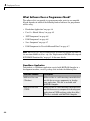
What Software Does a Programmer Need? . . . . . . . . . . . . .
4-3
4-3
4-4
Deploying to End Users . . . . . . . . . . . . . . . . . . . . . . . . . . . .
Steps by the Programmer to Deploy to End Users . . . . . . .
What Software Does the End User Need? . . . . . . . . . . . . . .
Using Relative Paths with Project Files . . . . . . . . . . . . . . .
Porting Generated Code to a Different Platform . . . . . . . . .
Extracting a CTF Archive Without Executing the
Component . . . . . . . . . . . . . . . . . . . . . . . . . . . . . . . . . . . .
Dependency Analysis Function (depfun) and User
Interaction with the Compilation Path . . . . . . . . . . . . . .
4-9
4-9
4-12
4-15
4-15
Working with the MCR . . . . . . . . . . . . . . . . . . . . . . . . . . . . .
Understanding the MCR . . . . . . . . . . . . . . . . . . . . . . . . . . . .
Installing the MCR and MATLAB on the Same Machine . .
Installing Multiple MCRs on the Same Machine . . . . . . . .
4-20
4-20
4-21
4-22
Deploying a Standalone Application on a Network
Drive . . . . . . . . . . . . . . . . . . . . . . . . . . . . . . . . . . . . . . . . . . .
4-24
MATLAB Compiler Deployment Messages . . . . . . . . . . . .
4-25
Using MATLAB Compiler Generated DLLs in Windows
Services . . . . . . . . . . . . . . . . . . . . . . . . . . . . . . . . . . . . . . . .
4-26
4-16
4-17
Compiler Commands
5
Command Overview . . . . . . . . . . . . . . . . . . . . . . . . . . . . . . .
Compiler Options . . . . . . . . . . . . . . . . . . . . . . . . . . . . . . . . .
5-2
5-2
vii
viii
Contents
Combining Options . . . . . . . . . . . . . . . . . . . . . . . . . . . . . . . .
Conflicting Options on the Command Line . . . . . . . . . . . . .
Using File Extensions . . . . . . . . . . . . . . . . . . . . . . . . . . . . . .
5-2
5-3
5-3
Using Macros to Simplify Compilation . . . . . . . . . . . . . . .
Macro Options . . . . . . . . . . . . . . . . . . . . . . . . . . . . . . . . . . . .
Understanding a Macro Option . . . . . . . . . . . . . . . . . . . . . .
5-5
5-5
5-5
Using Pathnames . . . . . . . . . . . . . . . . . . . . . . . . . . . . . . . . . .
5-7
Using Bundle Files . . . . . . . . . . . . . . . . . . . . . . . . . . . . . . . . .
5-8
Using Wrapper Files . . . . . . . . . . . . . . . . . . . . . . . . . . . . . . .
What Are Wrapper Files? . . . . . . . . . . . . . . . . . . . . . . . . . . .
Main File Wrapper . . . . . . . . . . . . . . . . . . . . . . . . . . . . . . . .
C Library Wrapper . . . . . . . . . . . . . . . . . . . . . . . . . . . . . . . .
C++ Library Wrapper . . . . . . . . . . . . . . . . . . . . . . . . . . . . . .
5-10
5-10
5-10
5-11
5-12
Interfacing M-Code to C/C++ Code . . . . . . . . . . . . . . . . . .
Overview . . . . . . . . . . . . . . . . . . . . . . . . . . . . . . . . . . . . . . . .
C Example . . . . . . . . . . . . . . . . . . . . . . . . . . . . . . . . . . . . . . .
5-13
5-13
5-13
Using Pragmas . . . . . . . . . . . . . . . . . . . . . . . . . . . . . . . . . . . .
Using feval . . . . . . . . . . . . . . . . . . . . . . . . . . . . . . . . . . . . . . .
Example: Using %#function . . . . . . . . . . . . . . . . . . . . . . . . .
5-17
5-17
5-17
Script Files . . . . . . . . . . . . . . . . . . . . . . . . . . . . . . . . . . . . . . .
Converting Script M-Files to Function M-Files . . . . . . . . . .
Including Script Files in Deployed Applications . . . . . . . . .
5-19
5-19
5-20
Compiler Tips . . . . . . . . . . . . . . . . . . . . . . . . . . . . . . . . . . . . .
Calling Built-In Functions from C or C++ . . . . . . . . . . . . . .
Calling a Function from the Command Line . . . . . . . . . . . .
Using MAT-Files in Deployed Applications . . . . . . . . . . . . .
Recommended Location of .CTF Files . . . . . . . . . . . . . . . . .
Compiling a GUI That Contains an ActiveX Control . . . . .
Debugging MATLAB Compiler Generated Executables . . .
Deploying Applications That Call the Java Native
Libraries . . . . . . . . . . . . . . . . . . . . . . . . . . . . . . . . . . . . . .
Locating .fig Files in Deployed Applications . . . . . . . . . . . .
5-22
5-22
5-23
5-23
5-23
5-24
5-24
5-25
5-25
Blocking Execution of a Console Application That Creates
Figures and Terminating Figures by Force . . . . . . . . . . .
Passing Arguments to and from a Standalone
Application . . . . . . . . . . . . . . . . . . . . . . . . . . . . . . . . . . . .
Using Graphical Applications in Shared Library Targets . .
Using the VER Function in a Compiled MATLAB
Application . . . . . . . . . . . . . . . . . . . . . . . . . . . . . . . . . . . .
5-25
5-27
5-28
5-28
Standalone Applications
6
Introduction . . . . . . . . . . . . . . . . . . . . . . . . . . . . . . . . . . . . . .
6-2
C Standalone Application Target . . . . . . . . . . . . . . . . . . . .
Compiling the Application . . . . . . . . . . . . . . . . . . . . . . . . . .
Testing the Application . . . . . . . . . . . . . . . . . . . . . . . . . . . . .
Deploying the Application . . . . . . . . . . . . . . . . . . . . . . . . . .
Running the Application . . . . . . . . . . . . . . . . . . . . . . . . . . . .
6-3
6-3
6-3
6-6
6-7
Coding with M-Files Only . . . . . . . . . . . . . . . . . . . . . . . . . .
M-File Advantages . . . . . . . . . . . . . . . . . . . . . . . . . . . . . . . .
Example . . . . . . . . . . . . . . . . . . . . . . . . . . . . . . . . . . . . . . . . .
6-11
6-11
6-11
Mixing M-Files and C or C++ . . . . . . . . . . . . . . . . . . . . . . . .
Examples Overview . . . . . . . . . . . . . . . . . . . . . . . . . . . . . . . .
Simple Example . . . . . . . . . . . . . . . . . . . . . . . . . . . . . . . . . .
Advanced C Example . . . . . . . . . . . . . . . . . . . . . . . . . . . . . .
6-13
6-13
6-13
6-18
Libraries
7
Introduction . . . . . . . . . . . . . . . . . . . . . . . . . . . . . . . . . . . . . .
7-2
Addressing mwArrays Above the 2 GB Limit . . . . . . . . .
7-3
ix
C Shared Library Target . . . . . . . . . . . . . . . . . . . . . . . . . . .
C Shared Library Wrapper . . . . . . . . . . . . . . . . . . . . . . . . . .
C Shared Library Example . . . . . . . . . . . . . . . . . . . . . . . . . .
Calling a Shared Library . . . . . . . . . . . . . . . . . . . . . . . . . . .
7-4
7-4
7-4
7-11
C++ Shared Library Target . . . . . . . . . . . . . . . . . . . . . . . . .
C++ Shared Library Wrapper . . . . . . . . . . . . . . . . . . . . . . . .
C++ Shared Library Example . . . . . . . . . . . . . . . . . . . . . . .
7-17
7-17
7-17
MATLAB Compiler Generated Interface Functions . . .
Functions in the Shared Library . . . . . . . . . . . . . . . . . . . . .
Type of Application . . . . . . . . . . . . . . . . . . . . . . . . . . . . . . . .
Structure of Programs That Call Shared Libraries . . . . . .
Library Initialization and Termination Functions . . . . . . .
Print and Error Handling Functions . . . . . . . . . . . . . . . . . .
Functions Generated from M-Files . . . . . . . . . . . . . . . . . . .
7-23
7-23
7-23
7-25
7-25
7-27
7-28
Using C/C++ Shared Libraries on Mac OS X . . . . . . . . . .
7-32
About Memory Management and Cleanup . . . . . . . . . . .
Overview . . . . . . . . . . . . . . . . . . . . . . . . . . . . . . . . . . . . . . . .
Passing mxArrays to Shared Libraries . . . . . . . . . . . . . . . .
7-38
7-38
7-38
Troubleshooting
8
x
Contents
mbuild . . . . . . . . . . . . . . . . . . . . . . . . . . . . . . . . . . . . . . . . . . . .
8-2
MATLAB Compiler . . . . . . . . . . . . . . . . . . . . . . . . . . . . . . . . .
8-4
Deployed Applications . . . . . . . . . . . . . . . . . . . . . . . . . . . . .
8-8
Reference Information
9
Directories Required for Development and Testing . . .
Overview . . . . . . . . . . . . . . . . . . . . . . . . . . . . . . . . . . . . . . . .
Path for Java Development on All Platforms . . . . . . . . . . .
Windows Settings for Development and Testing . . . . . . . . .
UNIX Settings for Development and Testing . . . . . . . . . . .
9-2
9-2
9-2
9-2
9-3
Directories Required for Run-Time Deployment . . . . . .
Path for Java Applications on All Platforms . . . . . . . . . . . .
Windows Path for Run-Time Deployment . . . . . . . . . . . . . .
UNIX Paths for Run-Time Deployment . . . . . . . . . . . . . . . .
9-5
9-5
9-5
9-6
Unsupported Functions . . . . . . . . . . . . . . . . . . . . . . . . . . . .
9-8
MATLAB Compiler Licensing . . . . . . . . . . . . . . . . . . . . . . .
Deployed Applications . . . . . . . . . . . . . . . . . . . . . . . . . . . . . .
Using MATLAB Compiler Licenses for Development . . . . .
9-11
9-11
9-11
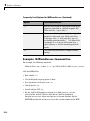
Using MCRInstaller.exe on the Command Line . . . . . . .
Running MCRInstaller.exe . . . . . . . . . . . . . . . . . . . . . . . . . .
Examples: MCRInstaller.exe Command Line . . . . . . . . . . .
9-13
9-13
9-14
Functions — By Category
10
Pragmas . . . . . . . . . . . . . . . . . . . . . . . . . . . . . . . . . . . . . . . . . .
10-2
Command-Line Tools . . . . . . . . . . . . . . . . . . . . . . . . . . . . . . .
10-2
xi
Functions — Alphabetical List
11
Limitations and Restrictions
12
Limitations About What May Be Compiled . . . . . . . . . . .
Compiling MATLAB and Toolboxes . . . . . . . . . . . . . . . . . . .
MATLAB Code . . . . . . . . . . . . . . . . . . . . . . . . . . . . . . . . . . . .
Fixing Callback Problems: Missing Functions . . . . . . . . . .
Finding Missing Functions in an M-File . . . . . . . . . . . . . . .
Suppressing Warnings on UNIX . . . . . . . . . . . . . . . . . . . . .
Cannot Use Graphics with the -nojvm Option . . . . . . . . . .
Cannot Create the Output File . . . . . . . . . . . . . . . . . . . . . .
No M-File Help for Compiled Functions . . . . . . . . . . . . . . .
No MCR Versioning on Mac OS X . . . . . . . . . . . . . . . . . . . .
Older Neural Networks Not Deployable with MATLAB
Compiler . . . . . . . . . . . . . . . . . . . . . . . . . . . . . . . . . . . . . .
12-2
12-2
12-3
12-3
12-5
12-5
12-5
12-6
12-6
12-6
12-7
MATLAB Compiler Quick Reference
A
Common Uses of MATLAB Compiler . . . . . . . . . . . . . . . .
Create a Standalone Application . . . . . . . . . . . . . . . . . . . . .
Create a Library . . . . . . . . . . . . . . . . . . . . . . . . . . . . . . . . . .
A-2
A-2
A-2
mcc . . . . . . . . . . . . . . . . . . . . . . . . . . . . . . . . . . . . . . . . . . . . . . .
A-4
Error and Warning Messages
B
About Error and Warning Messages . . . . . . . . . . . . . . . . .
xii
Contents
B-2
Compile-Time Errors . . . . . . . . . . . . . . . . . . . . . . . . . . . . . . .
B-3
Warning Messages . . . . . . . . . . . . . . . . . . . . . . . . . . . . . . . . .
B-7
depfun Errors . . . . . . . . . . . . . . . . . . . . . . . . . . . . . . . . . . . . .
About depfun Errors . . . . . . . . . . . . . . . . . . . . . . . . . . . . . . .
MCR/Dispatcher Errors . . . . . . . . . . . . . . . . . . . . . . . . . . . .
XML Parser Errors . . . . . . . . . . . . . . . . . . . . . . . . . . . . . . . .
depfun-Produced Errors . . . . . . . . . . . . . . . . . . . . . . . . . . . .
B-10
B-10
B-10
B-10
B-11
C++ Utility Library Reference
C
Primitive Types . . . . . . . . . . . . . . . . . . . . . . . . . . . . . . . . . . .
C-2
Utility Classes . . . . . . . . . . . . . . . . . . . . . . . . . . . . . . . . . . . . .
C-3
mwString Class . . . . . . . . . . . . . . . . . . . . . . . . . . . . . . . . . . . .
About mwString . . . . . . . . . . . . . . . . . . . . . . . . . . . . . . . . . .
Constructors . . . . . . . . . . . . . . . . . . . . . . . . . . . . . . . . . . . . .
Methods . . . . . . . . . . . . . . . . . . . . . . . . . . . . . . . . . . . . . . . . .
Operators . . . . . . . . . . . . . . . . . . . . . . . . . . . . . . . . . . . . . . . .
C-4
C-4
C-4
C-4
C-4
mwException Class . . . . . . . . . . . . . . . . . . . . . . . . . . . . . . . .
About mwException . . . . . . . . . . . . . . . . . . . . . . . . . . . . . . .
Constructors . . . . . . . . . . . . . . . . . . . . . . . . . . . . . . . . . . . . .
Methods . . . . . . . . . . . . . . . . . . . . . . . . . . . . . . . . . . . . . . . . .
Operators . . . . . . . . . . . . . . . . . . . . . . . . . . . . . . . . . . . . . . . .
C-20
C-20
C-20
C-20
C-20
mwException Class Functions . . . . . . . . . . . . . . . . . . . . . .
C-21
mwArray Class . . . . . . . . . . . . . . . . . . . . . . . . . . . . . . . . . . . .
About mwArray . . . . . . . . . . . . . . . . . . . . . . . . . . . . . . . . . . .
Constructors . . . . . . . . . . . . . . . . . . . . . . . . . . . . . . . . . . . . .
Methods . . . . . . . . . . . . . . . . . . . . . . . . . . . . . . . . . . . . . . . . .
Operators . . . . . . . . . . . . . . . . . . . . . . . . . . . . . . . . . . . . . . . .
Static Methods . . . . . . . . . . . . . . . . . . . . . . . . . . . . . . . . . . . .
C-29
C-29
C-29
C-30
C-31
C-31
xiii
mwArray Class Functions . . . . . . . . . . . . . . . . . . . . . . . . . .
C-33
Index
xiv
Contents
1
Getting Started
What Is MATLAB Compiler? (p. 1-2)
Brief summary of the product
How Does MATLAB Compiler Work?
(p. 1-3)
High-level description of what the
product does
Before You Begin (p. 1-5)
What you must do before you can
use the product
Using the GUI to Create and
Package a Deployable Component
(p. 1-6)
Overview of the steps to create a
simple application
Magic Square Example (p. 1-7)
Accessing examples that come
with the product and describes one
example in detail
Using the mcc Command (p. 1-10)
Sample mcc commands for creating
a standalone application or shared
library
Developing and Testing Components
on a Development Machine (p. 1-12)
Accessing components created with
MATLAB® Compiler
For More Information (p. 1-15)
Links to topics related to MATLAB
Compiler
1
Getting Started
What Is MATLAB Compiler?
In this section...
“Overview of MATLAB Compiler” on page 1-2
“What Is the Deployment Tool? ” on page 1-2
Overview of MATLAB Compiler
Use MATLAB® Compiler to convert MATLAB® programs to applications
and libraries that you can distribute to end users who do not have MATLAB
installed. You can compile M-files, MEX-files, or other MATLAB code.
MATLAB Compiler supports all the features of MATLAB, including objects,
private functions, and methods. Using MATLAB Compiler you can generate
the following:
• Standalone C and C++ applications on UNIX, Windows, and Macintosh
platforms
• C and C++ shared libraries (dynamically linked libraries, or DLLs, on
Microsoft Windows)
Use the mcc command to invoke MATLAB Compiler. Alternatively, you
can use the graphical user interface for MATLAB Compiler by issuing the
following command at the MATLAB prompt:
deploytool
What Is the Deployment Tool?
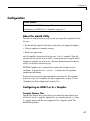
The Deployment Tool is the GUI to MATLAB Compiler. Use the Deployment
Tool to perform the tasks in the following illustration.
1-2
How Does MATLAB Compiler Work?
How Does MATLAB Compiler Work?
In this section...
“MATLAB Compiler Generated Application or Library” on page 1-3
“Wrapper Files” on page 1-3
“Component Technology File (CTF)” on page 1-4
MATLAB Compiler Generated Application or Library
When you package and distribute applications and libraries that are
generated by MATLAB Compiler, you must include the MATLAB Component
Runtime (MCR) as well as a set of supporting files generated by MATLAB
Compiler. You must also set the system paths on the target machine so that
the MCR and supporting files can be found.
An application or library generated by MATLAB Compiler has two parts: a
platform-specific binary file and an archive file containing MATLAB functions
and data. For an application, the binary file consists of a main function, and
for a library the binary file exports multiple functions that can be called by
users of the library.
Wrapper Files
To create the platform-specific binaries that you specify, MATLAB Compiler
generates one or more wrapper files. A wrapper file provides an interface
to the compiled M-code. Wrapper files differ depending on the execution
environment.
The wrapper file does the following:
• Performs initialization and termination as needed by a particular interface.
• Defines data arrays containing path information, encryption keys, and
other information needed by the MCR.
• Provides the necessary code to forward calls from the interface functions to
the MATLAB functions in the MCR.
• For an application, contains the main function
1-3
1
Getting Started
• For a library, contains the entry points for each public M-file function.
Users of libraries generated by MATLAB Compiler must call the library
initialization and termination routines in their client code.
Component Technology File (CTF)
MATLAB Compiler also generates a Component Technology File (CTF), which
is independent of the final target type — standalone application or library —
but is specific to each operating system platform. This file, which is named
with a .ctf suffix, contains the MATLAB functions and data that define the
application or library.
Caution Do not extract the files within the.ctf file and place them
individually under version control. Since the .ctf file contains interdependent
MATLAB functions and data, the files within it should be accessed only by
accessing the .ctf file. Therefore, the entire .ctf file should be placed under
version control. See also “Recommended Location of .CTF Files” on page 5-23.
1-4
Before You Begin
Before You Begin
Before you can use MATLAB Compiler, you must have it installed and
configured properly on your system. Refer to Chapter 2, “Installation and
Configuration” for more information. At a minimum, you must run the
following command once after installing a new version of MATLAB Compiler:
mbuild -setup
If you need information about writing the M-files that you plan to compile,
see MATLAB Programming, which is part of the MATLAB product
documentation.
1-5
1
Getting Started
Using the GUI to Create and Package a Deployable
Component
Open the Deployment Tool by issuing the following command at the MATLAB
prompt:
deploytool
Use the Deployment Tool as follows to create and package either a standalone
application or a shared library:
1 Create a new project.
2 Add files that you want to compile.
3 Set properties for building and packaging.
4 Save the project.
5 Build the component.
6 Edit and rebuild as necessary.
7 Package the component for distribution to programmers or end users.
1-6
Magic Square Example
Magic Square Example
This example shows you how to:
• Access the examples provided with MATLAB Compiler.
• Use MATLAB Compiler to create and package a simple standalone
application.
About the Examples The examples for MATLAB Compiler are in
matlabroot\extern\examples\compiler. For matlabroot, substitute
the MATLAB root directory on your system. Type matlabroot to see this
directory name.
The Magic Square example shows you how to create and package a simple
application that compiles an M-file, magicsquare.m.
magicsquare.m
function m = magicsquare(n)
%MAGICSQUARE generates a magic square matrix of the size specified
%
by the input parameter n.
% Copyright 2003-2007 The MathWorks, Inc.
if ischar(n)
n=str2num(n);
end
m = magic(n)
1 Create a subdirectory in your work directory and name it MagicExample.
This procedure assumes that your work directory is D:\Work.
2 Copy the following file to MagicExample:
matlabroot\extern\examples\compiler\magicsquare.m
3 At the MATLAB command prompt, change directory to
D:\Work\MagicExample.
1-7
1
Getting Started
4 While in MATLAB, type deploytool to open the Deployment Tool window.
The Deployment Tool opens as a dockable window in the MATLAB desktop,
and a menu labeled Project is added to the MATLAB menu bar.
5 Create a new project:
a. In the Deployment Tool toolbar, click the New Project
icon.
As an alternative, you can select File > New Deployment Project
in the MATLAB menu bar.
b. In the New Deployment Project dialog box, select Standalone
Applications, and enter the following settings:
• In the Name field, enter MagicExample.prj as the project name.
• In the Location field, enter the name of your work directory
followed by the project name.
In this example, that is D:\Work\MagicExample. You can browse to
a different directory if you choose.
c. Click OK.
MATLAB Compiler displays the project folder (MagicExample.prj)
in the Deployment Tool window. The folder contains three folders,
which are empty.
d. Drag the magicsquare.m file from the Current Directory browser in
MATLAB to the project folder in the Deployment Tool window.
MATLAB Compiler adds the M-file to the Main function folder.
6 Build the application as follows:
• In the Deployment Tool toolbar, click the Build Project
icon.
• As an alternative, you can select Tools > Build in the MATLAB menu
bar.
The build process begins, and a log of the build appears in the Deployment
Tool Output pane. The status of the process is displayed in the status bar
1-8
Magic Square Example
at the bottom of the output pane. The Deployment Tool Output pane is
dockable; by default it appears across the bottom of the MATLAB desktop.
MATLAB Compiler puts the files that are needed for the application in
two newly created subdirectories, src and distrib, in the MagicExample
directory. A copy of the build log is placed in the src directory.
Tip When your source code has been compiled successfully, a file named
readme.txt is written to the distrib directory. Use this file as a guide to
the system requirements and other prerequisites you must satisfy to deploy
your first component on a target computer.
7 Package the application so it can run on machines that do not have
MATLAB installed:
• In the Deployment Tool toolbar, click the Package Project
icon.
• As an alternative, you can select Tools > Package in the MATLAB
menu bar.
MATLAB Compiler creates a package in the distrib subdirectory. On
Windows, the package is a self-extracting executable, and on platforms
other than Windows, it is a .zip file.
8 Deploy the application to end users as described in “Deploying to End
Users” on page 4-9.
1-9
1
Getting Started
Using the mcc Command
Instead of the GUI, you can use the mcc command to run MATLAB Compiler.
The following table shows sample commands to create a standalone
application or a shared library using mcc at the operating system prompt.
Desired Result
Standalone application
from the M-file
Command
mcc -m mymfunction.m
mymfunction
Creates a standalone application named mymfunction.exe on
Windows platforms and mymfunction on platforms that are not
Windows.
Shared library from the
M-file mymfunction
mcc -l mymfunction.m
Creates a shared library named mymfunction.dll on Windows,
mymfunction.so on Linux and Solaris, and mymfunction.dylib on
Mac OS X.
C shared library from
the M-files file1.m,
file2.m, and file3.m
mcc -l file1.m file2.m file3.m
Creates a shared library named file1.dll on Windows, file1.so on
Linux and Solaris, and file1.dylib on Mac OS X.
C++ shared library from
the M-files file1.m,
file2.m, and file3.m
mcc -l file1.m file2.m file3.m -W cpplib -T link:lib
Creates a shared library named file1.dll on Windows, file1.so on
Linux and Solaris, and file1.dylib on Mac OS X.
1-10
Using the mcc Command
Note The -l option is a bundle option that expands into the following:
-W lib -T link:lib
A bundle is a collection of mcc input options. See
matlabroot/toolbox/compiler/bundles for the available bundles.
The -W lib option tells MATLAB Compiler to generate a function wrapper
for a shared library. The -T link:lib option specifies the target output as
a shared library.
See Chapter 5, “Compiler Commands”, for more information about using the
mcc command and its options.
1-11
1
Getting Started
Developing and Testing Components on a Development
Machine
In this section...
“Packaging Your Software” on page 1-12
“Replacement of MCRInstaller.zip and BUILDMCR Functionality” on page
1-12
“Creating a Package for Windows Users” on page 1-13
“Creating a Package for Users Who Do Not Use Windows” on page 1-13
“Configuring the Development Environment by Installing the MCR” on
page 1-14
Packaging Your Software
To deploy your software to another development machine that does not
have MATLAB installed (including a machine that has MATLAB but it
is a different version of MATLAB), you can use the GUI to package your
software automatically. (Open the project and click the Package icon
the Deployment Tool toolbar.)
in
Also, when you develop and test software created by MATLAB Compiler you
must set your path so that the system can support the compiled code at run
time. To run the application on your development machine, make sure you
have your path set properly. See “Directories Required for Development and
Testing” on page 9-2.
You cannot use the GUI to configure the development machine.
Replacement of MCRInstaller.zip and BUILDMCR
Functionality
In past releases, you needed to include MCRInstaller.zip in your packaged
application (created by running the buildmcr command). Now you must run
the following files, which trigger self-extracting archives, that replace the
functionality previously provided by MCRInstaller.zip. These files ship with
MATLAB Compiler:
1-12
Developing and Testing Components on a Development Machine
Platform
File Replacing
MCRInstaller.zip
File Location
Windows
32-bit
MCRInstaller.exe
matlabroot\toolbox\compiler\deploy\win32
Windows
64-bit
MCRInstaller.exe
matlabroot\toolbox\compiler\deploy\win64
Linux (glnx86)
MCRInstaller.bin
matlabroot/toolbox/compiler/deploy/glnx86
Linux
(glnxa64)
MCRInstaller.bin
matlabroot/toolbox/compiler/deploy/glnxa64
Mac
MATLAB_Component_
Runtime.dmg
matlabroot/toolbox/compiler/deploy/mac
Maci
MATLAB_Component_
Runtime.dmg
matlabroot/toolbox/compiler/deploy/maci
Solaris (sol64)
MCRInstaller.bin
matlabroot/toolbox/compiler/deploy/sol64
Note Since you no longer need to create MCRInstaller.zip, buildmcr is
no longer supported.
Creating a Package for Windows Users
The package should include the following:
• Your software (the standalone or shared library)
• The CTF archive that MATLAB Compiler created (component_name.ctf)
• MCRInstaller.exe, which is located in the following directory:
matlabroot\toolbox\compiler\deploy\win32
Creating a Package for Users Who Do Not Use
Windows
The package should include the following:
• The standalone or shared library that you created with MATLAB Compiler
1-13
1
Getting Started
• The CTF archive that MATLAB Compiler creates for your component
Configuring the Development Environment by
Installing the MCR
To test software created by MATLAB Compiler as it will be used by end users
without MATLAB, programmers must install the MCR, if it is not already
installed on the development machine, and set path environment variables
properly.
Configuring on Windows Platforms
1 Open the package created by you or the Deployment Tool.
2 Run MCRInstaller once on the machine where you want to develop the
application or library. MCRInstaller opens a command window and begins
preparation for the installation.
3 Add the required platform-specific directories to your dynamic library path.
See “Directories Required for Run-Time Deployment” on page 9-5.
Configuring on Platforms Other Than Windows
1 Install the MCR by unzipping MCRInstaller.zip in a directory, for
example, /home/username/MCR. You may choose any directory except
matlabroot or any subdirectory of matlabroot.
2 Copy the component and CTF archive to your application root directory, for
example, /home/username/approot.
3 Add the required platform-specific directories to your dynamic library path.
See “Directories Required for Run-Time Deployment” on page 9-5.
1-14
For More Information
For More Information
About This
Look Here
Detailed information on
standalone applications
Chapter 6, “Standalone Applications”
Creating libraries
Chapter 7, “Libraries”
Using the mcc command
Chapter 5, “Compiler Commands”
Troubleshooting
Chapter 8, “Troubleshooting”
1-15
1
1-16
Getting Started
2
Installation and
Configuration
This chapter describes the system requirements for MATLAB Compiler. It
also contains installation and configuration information for all supported
platforms.
When you install your ANSI C or C++ compiler, you may be required to
provide specific configuration details regarding your system. This chapter
contains information for each platform that can help you during this phase of
the installation process.
Requirements (p. 2-2)
Software requirements for MATLAB
Compiler and a supported C/C++
compiler
Installation (p. 2-4)
Steps to install MATLAB Compiler
and a supported C/C++ compiler
Configuration (p. 2-7)
Configuring a supported C/C++
compiler to work with MATLAB
Compiler
Supported Compiler Restrictions
(p. 2-11)
Known limitations of the supported
C/C++ compilers
Options Files (p. 2-12)
More detailed information on
MATLAB Compiler options files for
users who need to know more about
how they work
2
Installation and Configuration
Requirements
In this section...
“System Requirements” on page 2-2
“Supported Third-Party Compilers” on page 2-2
System Requirements
To install MATLAB Compiler, you must have the proper version of MATLAB
installed on your system. The MATLAB Compiler Platform & Requirements
page, which is accessible from our Web site, provides this information.
MATLAB Compiler imposes no operating system or memory requirements
beyond those that are necessary to run MATLAB. MATLAB Compiler
consumes a small amount of disk space.
MATLAB Compiler requires that a supported ANSI C or C++ compiler be
installed on your system. Certain output targets require particular compilers.
Note Before you use MATLAB Compiler for the first time, you must run
mbuild -setup to configure your C/C++ compiler to work with MATLAB
Compiler.
In general, MATLAB Compiler supports the current release of a third-party
compiler and its previous release. Since new versions of compilers are
released on a regular basis, it is important to check our Web site for the latest
supported compilers.
Supported Third-Party Compilers
For an up-to-date list of all the compilers supported by MATLAB and
MATLAB Compiler, see the MathWorks Technical Support Department’s
Technical Notes at
http://www.mathworks.com/support/tech-notes/1600/1601.shtml
2-2
Requirements
Supported ANSI C and C++ Windows Compilers
Use one of the following 32-bit C/C++ compilers that create 32-bit Windows
dynamically linked libraries (DLLs) or Windows applications:
• Lcc C version 2.4.1 (included with MATLAB). This is a C-only compiler;
it does not work with C++.
• Borland C++ versions 5.5, 5.6, and 5.5. (You may see references to
these compilers as Borland C++ Builder versions 5.0, 6.0, and Borland
C/C++ Free Command-Line Tools, respectively.) For more information
on the free Borland compiler and its associated command-line tools, see
http://community.borland.com.
• Microsoft Visual C/C++ (MSVC) Versions 6.0, 7.1, and 8.0.
Note The only compiler that supports the building of COM objects and
Excel plug-ins is Microsoft Visual C/C++ (Versions 6.0, 7.1, and 8.0). The
only compiler that supports the building of .NET objects is Microsoft Visual
C# Compiler for the .NET Framework (Versions 1.1 and 2.0).
Supported ANSI C and C++ UNIX Compilers
MATLAB Compiler supports the native system compilers on Solaris. On
Linux, Linux x86-64, and Mac OS X, MATLAB Compiler supports gcc and
g++.
2-3
2
Installation and Configuration
Installation
In this section...
“Installing MATLAB Compiler” on page 2-4
“Installing an ANSI C or C++ Compiler” on page 2-5
Installing MATLAB Compiler
MATLAB Compiler requires a supported ANSI C or C++ compiler installed on
your system as well. Refer to the “Installing an ANSI C or C++ Compiler” on
page 2-5 for more information.
Windows
To install MATLAB Compiler on Windows, follow the instructions in the
Installation Guide for Windows documentation. If you have a license to install
MATLAB Compiler, it will appear as one of the installation choices that you
can select as you proceed through the installation process.
If MATLAB Compiler does not appear in your list of choices, contact The
MathWorks to obtain an updated License File (license.dat) for multiuser
network installations, or an updated Personal License Password (PLP) for
single-user, standard installations.
You can contact The MathWorks:
• Via the Web at www.mathworks.com. On the MathWorks home page,
click My Account to access your MathWorks Account, and follow the
instructions.
• Via e-mail at [email protected].
UNIX
To install MATLAB Compiler on UNIX workstations, follow the instructions
in the Installation Guide for UNIX documentation. If you have a license to
install MATLAB Compiler, it appears as one of the installation choices that
you can select as you proceed through the installation process. If MATLAB
2-4
Installation
Compiler does not appear as one of the installation choices, contact The
MathWorks to get an updated license file (license.dat).
Installing an ANSI C or C++ Compiler
To install your ANSI C or C++ compiler, follow the vendor’s instructions that
accompany your C or C++ compiler. Be sure to test the C or C++ compiler to
make sure it is installed and configured properly. Typically, the compiler
vendor provides some test procedures.
Note If you encounter problems relating to the installation or use of your
ANSI C or C++ compiler, consult the documentation or customer support
organization of your C or C++ compiler vendor.
When you install your C or C++ compiler, you might encounter configuration
questions that require you to provide particular details. These tables provide
information on some of the more common issues.
Windows
Issue
Comment
Installation options
We recommend that you do a full
installation of your compiler. If you
do a partial installation, you may
omit a component that MATLAB
Compiler relies on.
Installing debugger files
For the purposes of MATLAB
Compiler, it is not necessary
to install debugger (DBG) files.
However, you may need them for
other purposes.
Microsoft Foundation Classes (MFC)
This is not required.
16-bit DLLs
This is not required.
ActiveX
This is not required.
2-5
2
Installation and Configuration
Windows (Continued)
Issue
Comment
Running from the command line
Make sure you select all relevant
options for running your compiler
from the command line.
Updating the registry
If your installer gives you the option
of updating the registry, you should
do it.
Installing Microsoft Visual C/C++
Version 6.0
If you need to change the location
where this compiler is installed,
you must change the location of the
Common directory. Do not change the
location of the VC98 directory from
its default setting.
UNIX
2-6
Issue
Comment
Determine which C or C++ compiler
is installed on your system.
See your system administrator.
Determine the path to your C or C++
compiler.
See your system administrator.
Configuration
Configuration
In this section...
“About the mbuild Utility” on page 2-7
“Configuring an ANSI C or C++ Compiler” on page 2-7
About the mbuild Utility
The mbuild script provides an easy way for you to specify an options file that
lets you:
• Set the default compiler and linker settings for each supported compiler.
• Change compilers or compiler settings.
• Build your application.
mbuild simplifies the process of setting up a C or C++ compiler. Typically,
you only need to use the mbuild utility’s setup option once to specify which
third-party compiler you want to use. For more information on the mbuild
utility, see the mbuild reference page.
MATLAB Compiler (mcc) automatically invokes mbuild under certain
conditions. In particular, mcc -m or mcc -l invokes mbuild to perform
compilation and linking.
See the reference page for more information about mbuild. For examples
of mbuild usage, see “Compiling the Driver Application” on page 7-6 and
“Compiling the Driver Application” on page 7-21.
Configuring an ANSI C or C++ Compiler
Compiler Options Files
Options files contain flags and settings that control the operation of your
installed C and C++ compiler. Options files are compiler-specific, i.e., there
is a unique options file for each supported C/C++ compiler, which The
MathWorks provides.
2-7
2
Installation and Configuration
When you select a compiler to use with MATLAB Compiler, the corresponding
options file is activated on your system. To select a default compiler, use
mbuild -setup
Additional information on the options files is provided in this chapter for
those users who may need to modify them to suit their own needs. Many users
never have to be concerned with the inner workings of the options files and
only need the setup option to initially designate a C or C++ compiler. If you
need more information on options files, see “Options Files” on page 2-12.
Note The following examples apply only to the 32-bit version of MATLAB.
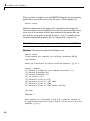
Windows. Executing the command on Windows gives
mbuild -setup
Please choose your compiler for building standalone MATLAB
applications:
Would you like mbuild to locate installed compilers [y]/n? n
Select a compiler:
[1] Borland C++ Compiler (free command line tools) 5.5
[2] Borland C++Builder 6.0
[3] Borland C++Builder 5.0
[4] Lcc-win32 C 2.4.1
[5] Microsoft Visual C++ 6.0
[6] Microsoft Visual C++ .NET 2003
[7] Microsoft Visual C++ 2005
[8] Microsoft Visual C++ 2005 Express Edition
[0] None
Compiler: 7
Your machine has a Microsoft Visual C/C++ compiler located at
D:\Applications\Microsoft Visual Studio. Do you want to use this
compiler [y]/n? y
2-8
Configuration
Please verify your choices:
Compiler: Microsoft Visual C/C++ 2005
Location: D:\Applications\Microsoft Visual Studio
Are these correct?([y]/n): y
Trying to update options file:
C:\WINNT\Profiles\username\Application
Data\MathWorks\MATLAB\current_release\compopts.bat
From template:
\\sys\MATLAB\BIN\WIN32\mbuildopts\msvc60compp.bat
Done ...
The preconfigured options files that are included with MATLAB for Windows
are shown below.
Note These options apply only to the 32-bit version of MATLAB.
Options File
Compiler
lcccompp.bat
Lcc C, Version 2.4.1 (included with
MATLAB)
msvc60compp.bat
msvc71compp.bat
msvc80compp.bat
msvc80freecompp.bat
Microsoft Visual
Microsoft Visual
Microsoft Visual
Microsoft Visual
Express Edition
bcc55freecompp.bat
Borland C/C++ (free
command-line tools) Version 5.5
Borland C++ Builder 5
Borland C++ Builder 6
bcc55compp.bat
bcc56compp.bat
C/C++, Version 6.0
C/C++, Version 7.1
C/C++, Version 8.0
C/C++, Version 8.0
UNIX. Executing the command on UNIX gives
2-9
2
Installation and Configuration
mbuild -setup
Using the 'mbuild -setup' command selects an options file that is
placed in ~/.matlab/current_release and
used by default for 'mbuild'. An options file in the current
working directory or specified on
the command line overrides the default options file
in ~/.matlab/current_release.
Options files control which compiler to use, the compiler
and link command options, and the run time libraries to link against.
To override the default options file, use the 'mbuild -f'
command (see 'mbuild -help' for more information).
The options files available for mbuild are:
1: matlabroot/bin/mbuildopts.sh :
Build and link with MATLAB C-API or MATLAB Compiler-generated
library via the system ANSI C/C++ compiler
matlabroot/bin/mbuildopts.sh is being copied to
/home/user/.matlab/current_release/mbuildopts.sh
The preconfigured options file that is included with MATLAB for UNIX is
mbuildopts.sh, which uses the system native ANSI compiler for Solaris
and gcc for Linux and Macintosh.
2-10
Supported Compiler Restrictions
Supported Compiler Restrictions
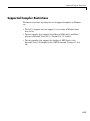
The known restrictions regarding the use of supported compilers on Windows
are:
• The LCC C compiler does not support C++ or versions of Windows other
than 32–bit.
• The only compiler that supports the building of COM objects and Excel
plug-ins is Microsoft Visual C/C++ (Versions 6.0, 7.1, and 8.0).
• The only compiler that supports the building of .NET objects is the
Microsoft Visual C# Compiler for the .NET Framework (Versions 1.1 and
2.0).
2-11
2
Installation and Configuration
Options Files
In this section...
“Locating the Options File” on page 2-12
“Changing the Options File” on page 2-13
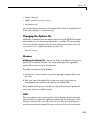
Locating the Options File
Windows
To locate your options file on Windows, the mbuild script searches the
following locations:
• Current directory
• The user profile directory (see “User Profile Directory Under Windows”
on page 2-12 for more information about this directory)
mbuild uses the first occurrence of the options file it finds. If no options file is
found, mbuild searches your machine for a supported C compiler and uses
the factory default options file for that compiler. If multiple compilers are
found, you are prompted to select one.
User Profile Directory Under Windows. The Windows user profile
directory is a directory that contains user-specific information such as
desktop appearance, recently used files, and Start menu items. The mbuild
utility stores its options files, compopts.bat, which is created during
the -setup process, in a subdirectory of your user profile directory,
named Application Data\MathWorks\MATLAB\current_release. Under
Windows with user profiles enabled, your user profile directory is
%windir%\Profiles\username. Under Windows with user profiles disabled,
your user profile directory is %windir%. You can determine whether or not
user profiles are enabled by using the Passwords control panel.
UNIX
To locate your options file on UNIX, the mbuild script searches the following
locations:
2-12
Options Files
• Current directory
• $HOME/.matlab/current_release
• matlabroot/bin
mbuild uses the first occurrence of the options file it finds. If no options file is
found, mbuild displays an error message.
Changing the Options File
Although it is common to use one options file for all of your MATLAB Compiler
related work, you can change your options file at anytime. The setup option
resets your default compiler so that the new compiler is used every time. To
reset your C or C++ compiler for future sessions, use
mbuild -setup
Windows
Modifying the Options File. You can use of the setup option to change your
options file settings on Windows. The setup option copies the appropriate
options file to your user profile directory.
To modify your options file on Windows:
1 Use mbuild -setup to make a copy of the appropriate options file in your
local area.
2 Edit your copy of the options file in your user profile directory to
correspond to your specific needs and save the modified file.
After completing this process, the mbuild script will use the new options file
every time with your modified settings.
UNIX
The setup option creates a user-specific, matlab directory in your individual
home directory and copies the appropriate options file to the directory. (If the
directory already exists, a new one is not created.) This matlab directory is
used for your individual options files only; each user can have his or her own
2-13
2
Installation and Configuration
default options files (other MATLAB products may place options files in this
directory). Do not confuse these user-specific matlab directories with the
system matlab directory, where MATLAB is installed.
Modifying the Options File. You can use the setup option to change your
options file settings on UNIX. For example, if you want to make a change to
the current linker settings, or you want to disable a particular set of warnings,
you should use the setup option.
To modify your options file on Linux:
1 Use mbuild -setup to make a copy of the appropriate options file in your
local area.
2 Edit your copy of the options file to correspond to your specific needs and
save the modified file.
This sets your default compiler’s options file to your specific version.
2-14
3
Compilation Process
This chapter provides an overview of how MATLAB Compiler works. In
addition, it lists the various sets of input and output files used by MATLAB
Compiler.
Overview of MATLAB Compiler
Technology (p. 3-2)
Describes the build process
Input and Output Files (p. 3-6)
Lists the files generated by MATLAB
Compiler
3
Compilation Process
Overview of MATLAB Compiler Technology
In this section...
“MATLAB Component Runtime” on page 3-2
“Component Technology File” on page 3-2
“Build Process” on page 3-3
MATLAB Component Runtime
MATLAB Compiler 4 uses the MATLAB Component Runtime (MCR), which is
a standalone set of shared libraries that enable the execution of M-files. The
MCR provides complete support for all features of the MATLAB language.
Note Since the MCR technology provides full support for the MATLAB
language, including Java, starting a compiled application takes approximately
the same amount of time as starting MATLAB.
The MCR makes use of thread locking so that only one thread is allowed to
access the MCR at a time. As a result, calls into the MCR are threadsafe for
MATLAB Compiler generated libraries, COM objects, and .NET objects.
Component Technology File
Compiler 4 also uses a Component Technology File (CTF) archive to house the
deployable package. All M-files are encrypted in the CTF archive using the
Advanced Encryption Standard (AES) cryptosystem where symmetric keys
are protected by 1024-bit RSA keys.
Each application or shared library produced by MATLAB Compiler has an
associated CTF archive. The archive contains all the MATLAB based content
(M-files, MEX-files, etc.) associated with the component. When the CTF
archive is extracted on a user’s system, the files remain encrypted.
3-2
Overview of MATLAB Compiler Technology
Additional Details
Multiple CTF archives, such as COM, .NET, or Excel components, can coexist
in the same user application, but you cannot mix and match the M-files they
contain. You cannot combine encrypted and compressed M-files from multiple
CTF archives into another CTF archive and distribute them.
All the M-files from a given CTF archive are locked together with a unique
cryptographic key. M-files with different keys will not execute if placed in
the same CTF archive. If you want to generate another application with a
different mix of M-files, you must recompile these M-files into a new CTF
archive.
The CTF archive and generated binary will be cleaned up following a failed
compilation, but only if these files did not exist before compilation was
initiated.
Build Process
The process of creating software components with MATLAB Compiler
is completely automatic. For example, to create a standalone MATLAB
application, you supply the list of M-files that make up the application.
MATLAB Compiler then performs the following operations:
• Dependency analysis
• Code generation
• Archive creation
• Compilation
• Linking
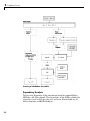
This figure illustrates how MATLAB Compiler takes user code and generates
a standalone executable.
3-3
3
Compilation Process
Creating a Standalone Executable
Dependency Analysis
The first step determines all the functions on which the supplied M-files,
MEX-files, and P-files depend. This list includes all the M-files called by the
given files as well as files that they call, and so on. Also included are all
built-in functions and MATLAB objects.
3-4
Overview of MATLAB Compiler Technology
Wrapper Code Generation
This step generates all the source code needed to create the target component,
including
• The C/C++ interface code to those M-functions supplied on the command
line (foo_main.c). For libraries and components, this file includes all of
the generated interface functions.
• A component data file that contains information needed to execute the
M-code at run-time. This data includes path information and encryption
keys needed to load the M-code stored in the component’s CTF archive.
Archive Creation
The list of MATLAB files (M-files and MEX-files) created during dependency
analysis is used to create a CTF archive that contains the files needed by
the component to properly execute at run-time. The files are encrypted and
compressed into a single file for deployment. Directory information is also
included so that the content is properly installed on the target machine.
C/C++ Compilation
This step compiles the generated C/C++ files from wrapper code generation
into object code. For targets that support the inclusion of user-supplied C/C++
code on the mcc command line, this code is also compiled at this stage.
Linking
The final step links the generated object files with the necessary MATLAB
libraries to create the finished component.
The C/C++ compilation and linking steps use the mbuild utility that is
included with MATLAB Compiler.
3-5
3
Compilation Process
Input and Output Files
In this section...
“Standalone Executable” on page 3-6
“C Shared Library” on page 3-7
“C++ Shared Library” on page 3-9
Standalone Executable
In this example, MATLAB Compiler takes the M-files foo.m and bar.m as
input and generates a standalone called foo.
mcc -m foo.m bar.m
3-6
File
Description
foo_main.c
The main-wrapper C source file containing the program’s
main function. The main function takes the input
arguments that are passed on the command line and
passes them as strings to the foo function.
foo_mcc_component_data.c
C source file containing data needed by the MCR to run
the application. This data includes path information,
encryption keys, and other initialization information for
the MCR.
foo.ctf
The CTF archive. This file contains a compressed and
encrypted archive of the M-files that make up the
application (foo.m and bar.m). It also contains other
files called by the two main M-files as well as any other
content and data files needed at run time.
foo
The main file of the application. This file reads and
executes the content stored in the CTF archive. On
Windows, this file is foo.exe.
Input and Output Files
C Shared Library
In this example, MATLAB Compiler takes the M-files foo.m and bar.m as
input and generates a C shared library called libfoo.
mcc -W lib:libfoo -T link:lib foo.m bar.m
File
Description
libfoo.c
The library wrapper C source file containing the
exported functions of the library representing
the C interface to the two M-functions (foo.m
and bar.m) as well as library initialization
code.
libfoo.h
The library wrapper header file. This file is
included by applications that call the exported
functions of libfoo.
libfoo_mcc_component_data.c
C source file containing data needed by the
MCR to initialize and use the library. This data
includes path information, encryption keys,
and other initialization for the MCR.
libfoo.exports
The exports file used by mbuild to link the
library.
libfoo.ctf
The CTF archive. This file contains a
compressed and encrypted archive of the
M-files that make up the library (foo.m and
bar.m). This file also contains other files called
by the two main M-files as well as any other
content and data files needed at run time.
3-7
3
Compilation Process
File
Description
libfoo
The shared library binary file. On Windows,
this file is libfoo.dll. On Solaris, this file is
libfoo.so.
Note UNIX extensions vary depending on
the platform. See the External Interfaces
documentation for additional information.
3-8
libname.exp
Exports file used by the linker. The linker uses
the export file to build a program that contains
exports, usually a dynamic-link library (.dll).
The import library is used to resolve references
to those exports in other programs.
libname.lib
Import library. An import library is used to
validate that a certain identifier is legal, and
will be present in the program when the .dll is
loaded. The linker uses the information from
the import library to build the lookup table for
using identifiers that are not included in the
.dll. When an application or .dll is linked, an
import library may be generated, which will
be used for all future .dlls that depend on the
symbols in the application or .dll.
Input and Output Files
C++ Shared Library
In this example, MATLAB Compiler takes the M-files foo.m and bar.m as
input and generates a C++ shared library called libfoo.
mcc -W cpplib:libfoo -T link:lib foo.m bar.m
File
Description
libfoo.cpp
The library wrapper C++ source file containing
the exported functions of the library representing
the C++ interface to the two M-functions (foo.m
and bar.m) as well as library initialization code.
libfoo.h
The library wrapper header file. This file is
included by applications that call the exported
functions of libfoo.
libfoo_mcc_component_data.c
C++ source file containing data needed by the
MCR to initialize and use the library. This data
includes path information, encryption keys, and
other initialization for the MCR.
libfoo.exports
The exports file used by mbuild to link the library.
libfoo.ctf
The CTF archive. This file contains a compressed
and encrypted archive of the M-files that make
up the library (foo.m and bar.m). This file also
contains other files called by the two main M-files
as well as any other content and data files needed
at run-time.
libfoo
The shared library binary file. On Windows,
this file is libfoo.dll. On Solaris, this file is
libfoo.so.
Note UNIX extensions vary depending on
the platform. See the External Interfaces
documentation for additional information.
3-9
3
3-10
Compilation Process
File
Description
libname.exp
Exports file used by the linker. The linker uses
the export file to build a program that contains
exports (usually a dynamic-link library (.dll).
The import library is used to resolve references to
those exports in other programs.
libname.lib
Import library. An import library is used to
validate that a certain identifier is legal, and
will be present in the program when the .dll is
loaded. The linker uses the information from the
import library to build the lookup table for using
identifiers that are not included in the .dll. When
an application or .dll is linked, an import library
may be generated, which will need to be used for
all future .dlls that depend on the symbols in the
application or .dll.
4
Deployment Process
This chapter tells you how to deploy compiled M-code to programmers and
to end users.
Overview (p. 4-2)
Describes the deployment process
Deploying to Programmers (p. 4-3)
Describes the steps used to deploy
compiled M-code to programmers
Deploying to End Users (p. 4-9)
Describes the steps used to deploy
compiled M-code to end users
Working with the MCR (p. 4-20)
Describes the steps end users
must follow to run MATLAB
Compiler generated applications and
components
Deploying a Standalone Application
on a Network Drive (p. 4-24)
Describes the steps you must follow
to run MATLAB Compiler generated
applications from a network drive
MATLAB Compiler Deployment
Messages (p. 4-25)
Describes how to display MATLAB
Compiler deployment messages
Using MATLAB Compiler Generated
DLLs in Windows Services (p. 4-26)
Important steps when deploying NT
services that use MATLAB Compiler
generated DLL files.
4
Deployment Process
Overview
After you create a library, a component, or an application, the next step
is typically to deploy it to others to use on their machines, independent of
MATLAB. These users could be programmers who want to use the library
or component to develop an application, or end users who want to run a
standalone application.
• “Deploying to Programmers” on page 4-3
• “Deploying to End Users” on page 4-9
Note When you deploy, you provide the wrappers for the compiled M-code
and the software needed to support the wrappers, including the MCR. The
MCR is version specific, so you must ensure that programmers as well as
users have the proper version of the MCR installed on their machines.
4-2
Deploying to Programmers
Deploying to Programmers
In this section...
“Steps by the Programmer to Deploy to Programmers” on page 4-3
“What Software Does a Programmer Need?” on page 4-4
Steps by the Programmer to Deploy to Programmers
Note If you are programming on the same machine where you created the
component, you can skip the steps described here.
1 Create a package that contains the software necessary to support the
compiled M-code. See “What Software Does a Programmer Need?” on
page 4-4
Note You can use the Deployment Tool to create a package for
programmers. For Windows platforms, the package created by the
Deployment Tool is a self-extracting executable. For UNIX platforms,
the package created by the Deployment Tool is a zip file that must be
decompressed and installed manually. See “Using the GUI to Create and
Package a Deployable Component” on page 1-6 to get started using the
Deployment Tool.
2 Write instructions for how to use the package.
a. If your package was created with the Deployment Tool, Windows
programmers can just run the self-extracting executable created by
the Deployment Tool. UNIX programmers must unzip and install
manually.
b. All programmers must set path environment variables properly. See
“Directories Required for Development and Testing” on page 9-2.
3 Distribute the package and instructions.
4-3
4
Deployment Process
What Software Does a Programmer Need?
The software that you provide to a programmer who wants to use compiled
M-code depends on which of the following kinds of software the programmer
will be using:
• “Standalone Application” on page 4-4
• “C or C++ Shared Library” on page 4-5
• “.NET Component” on page 4-6
• “COM Component” on page 4-6
• “Java Component” on page 4-7
• “COM Component to Use with Microsoft Excel” on page 4-7
Note MCRInstaller.exe has obsoleted the need for the function buildmcr or
the creation of MCRInstaller.zip. See “Replacement of MCRInstaller.zip and
BUILDMCR Functionality” on page 1-12 for more details.
Standalone Application
To distribute a standalone application created with MATLAB Compiler to a
development machine, create a package that includes the following files.
4-4
Software Module
Description
MCRInstaller.exe
MCRInstaller is a self-extracting executable that
(Windows)
installs the necessary components to develop
your application. This file is included with
MATLAB Compiler.
MCRInstaller.bin
MCRInstaller is a self-extracting executable that
(UNIX)
installs the necessary components to develop your
application on UNIX machines (other than Mac).
This file is included with MATLAB Compiler.
Deploying to Programmers
Software Module
Description
MATLAB_Component
_Runtime.dmg
MATLAB_Component_Runtime.dmg is a
(Mac)
self-extracting executable that installs
the necessary components to develop your
application on Mac machines. This file is
included with MATLAB Compiler.
application_name.ctf
Component Technology File archive;
platform-dependent file that must correspond to
the end user’s platform
application_name.exe
Application created by MATLAB Compiler
(Windows)
application_name
(UNIX)
C or C++ Shared Library
To distribute a shared library created with MATLAB Compiler to a
development machine, create a package that includes the following files.
Software Module
Description
MCRInstaller.bin
MATLAB Component Runtime library archive;
platform-dependent file that must correspond to
the end user’s platform
(UNIX)
MATLAB_Component
_Runtime.dmg
(Mac)
MCRInstaller.exe
(Windows)
unzip (UNIX)
MATLAB_Component_Runtime.dmg is a
self-extracting executable that installs the
necessary components to develop your application
on Mac machines. This file is included with
MATLAB Compiler.
Self-extracting MATLAB Component Runtime
library utility; platform-dependent file that must
correspond to the end user’s platform
Utility to unzip MCRInstaller.zip (optional).
The target machine must have an unzip utility
installed.
4-5
4
Deployment Process
Software Module
Description
libmatrix.ctf
Component Technology File archive;
platform-dependent file that must correspond to
the end user’s platform
libmatrix
Shared library; extension varies by platform, for
example, DLL on Windows
libmatrix.h
Library header file
.NET Component
To distribute a .NET component to a development machine, create a package
that includes the following files.
Software Module
Description
componentName.ctf
Component Technology File
componentName.xml
Documentation files
componentName.pdb (if Debug
option is selected)
Program Database File, which
contains debugging information
componentName.dll
Component assembly file
MCRInstaller.exe
MCR Installer (if not already
installed on the target machine)
COM Component
To distribute a COM component to a development machine, create a package
that includes the following files.
4-6
Software Module
Description
mwcomutil.dll
Utilities required for array processing.
Provides type definitions used in data
conversion.
componentname.ctf
Component Technology File (ctf) archive.
This is a platform-dependent file that must
correspond to the end user’s platform.
Deploying to Programmers
Software Module
Description
componentname_
version.dll
Component that contains compiled M-code.
MCRInstaller.exe
Self-extracting MATLAB Component
Runtime library utility; platform-dependent
file that must correspond to the end user’s
platform.
MCRInstaller.exe installs MATLAB
Component Runtime (MCR), which users of
your component need to install on the target
machine once per release.
Java Component
To distribute a Java component to a development machine, create a package
that includes the componentname.jar file, a Java package containing Java
interface to M-code in componentname.ctf.
Note For more information, see the MWArray Javadoc, which is searchable
from the Help or from the MathWorks Web site.
COM Component to Use with Microsoft Excel
To distribute a COM component for Excel to a development machine, create a
package that includes the following files.
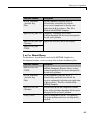
Software Module
Description
componentname.ctf
Component Technology File
archive; platform-dependent
file that must correspond to the
end user’s platform.
componentname_projectversion.dll
Compiled component.
4-7
4
Deployment Process
Software Module
Description
MCRInstaller.exe
Self-extracting MATLAB
Component Runtime library
utility; platform-dependent file
that must correspond to the end
user’s platform.
MCRInstaller.exe installs the
MATLAB Component Runtime
(MCR), which users of your
component need to install on
the target machine once per
release.
*.xla
Any user-created Excel
add-in files found in the
<projectdir>\distrib
directory
4-8
Deploying to End Users
Deploying to End Users
In this section...
“Steps by the Programmer to Deploy to End Users” on page 4-9
“What Software Does the End User Need?” on page 4-12
“Using Relative Paths with Project Files” on page 4-15
“Porting Generated Code to a Different Platform” on page 4-15
“Extracting a CTF Archive Without Executing the Component” on page 4-16
“Dependency Analysis Function (depfun) and User Interaction with the
Compilation Path” on page 4-17
Steps by the Programmer to Deploy to End Users
Note MCRInstaller.exe has obsoleted the need for the function buildmcr or
the creation of MCRInstaller.zip. See “Replacement of MCRInstaller.zip and
BUILDMCR Functionality” on page 1-12 for more details.
For an end user to run an application or use a library that contains compiled
M-code, there are two sets of tasks. Some tasks are for the programmer who
developed the application or library, and some tasks are for the end user.
1 Create a package that contains the software needed at run time. See “What
Software Does a Programmer Need?” on page 4-4 for more details.
4-9
4
Deployment Process
Note The package needed for end users must include the .ctf file, which
includes all the files in your preferences directory. Thus, you should make
sure that you do not have files in your preferences directory that you do
not want to expose to end users. MATLAB preferences set at compile time
are inherited by a compiled application. Preferences set by a compiled
application do not affect the MATLAB preferences, and preferences set
in MATLAB do not affect a compiled application until that application is
recompiled. The preferences directory is as follows:
$HOME/.matlab/current_release on UNIX
<system root>\profiles\<user>\application data\mathworks
\matlab\current_release on Windows
Caution MATLAB does not save your preferences directory until you exit
MATLAB. Therefore, if you make changes to your MATLAB preferences,
stop and restart MATLAB before attempting to recompile using your new
preferences.
2 Write instructions for the end user. See “Steps by the End User on
Windows” on page 4-10.
3 Distribute the package to your end user, along with the instructions.
Steps by the End User on Windows
1 Open the package containing the software needed at run time.
2 Run MCRInstaller once on the target machine, that is, the machine where
you want to run the application or library. The MCRInstaller opens a
command window and begins preparation for the installation. See “Using
the MCR Installer GUI” on page 4-11.
3 If you are deploying a Java application to end users, they must set the
class path on the target machine.
4-10
Deploying to End Users
Note for Windows Applications You must have administrative privileges
to install the MCR on a target machine since it modifies both the system
registry and the system path.
Running the MCRInstaller after the MCR has been set up on the target
machine requires only user-level privileges.
Steps by the End User on UNIX
1 Install the MCR.
Locate the MCRInstaller.zip file and copy it to a new directory on your
machine. This new directory will become the installation directory for your
library or application. To install the MCR, unzip MCRInstaller.zip.
2 Set the path environment variables properly. See “Directories Required for
Run-Time Deployment” on page 9-5.
3 When you deploy a Java application to end users, they must set the class
path on the target machine.
Using the MCR Installer GUI
1 When the MCR Installer wizard appears, click Next to begin the
installation. Click Next to continue.
2 In the Select Installation Folder dialog box, specify where you want to
install the MCR and whether you want to install the MCR for just yourself
or others. Click Next to continue.
Note The Install MATLAB Component Runtime for yourself, or for
anyone who uses this computer option is not implemented for this
release. The current default is Everyone.
3 Confirm your selections by clicking Next.
4-11
4
Deployment Process
The installation begins. The process takes some time due to the quantity of
files that are installed.
The MCRInstaller automatically:
• Copies the necessary files to the target directory you specified.
• Registers the components as needed.
• Updates the system path to point to the MCR binary directory, which is
<target_directory>/<version>/run time/bin/win32.
4 When the installation completes, click Close on the Installation Completed
dialog box to exit.
What Software Does the End User Need?
The software required by end users depends on which of the following kinds
of software is to be run by the user:
• “Standalone Compiled Application That Accesses Shared Library” on page
4-12
• “.NET Application” on page 4-13
• “COM Application” on page 4-14
• “Java Application” on page 4-14
• “Microsoft Excel Add-In” on page 4-15
Standalone Compiled Application That Accesses Shared Library
To distribute a shared library created with MATLAB Compiler to end users,
create a package that includes the following files.
Component
Description
MCRInstaller.zip
MATLAB Component Runtime library archive;
platform-dependent file that must correspond to
the end user’s platform.
(UNIX)
4-12
Deploying to End Users
Component
Description
MCRInstaller.exe
Self-extracting MATLAB Component Runtime
library utility; platform-dependent file that must
correspond to the end user’s platform.
(Windows)
(UNIX)
Utility to unzip MCRInstaller.zip (optional).
The target machine must have an unzip utility
installed.
matrixdriver.exe
Application
unzip
(Windows)
matrixdriver
(UNIX)
libmatrix.ctf
Component Technology File archive;
platform-dependent file that must correspond to
the end user’s platform.
libmatrix
Shared library; extension varies by platform.
Extensions are:
• Windows — .dll
• Solaris, Linux, Linux x86-64 — .so
• Mac OS X — .dylib
.NET Application
To distribute a .NET application that uses components created with MATLAB
Builder for .NET, create a package that includes the following files.
Software Module
Description
componentName.ctf
Component Technology File archive
componentName.xml
Documentation files
componentName.pdb
Program Database File, which contains debugging
information
(if Debug option is
selected)
4-13
4
Deployment Process
Software Module
Description
componentName.dll
Component assembly file
MCRInstaller.exe
MCR Installer (if not already installed on the
target machine)
application.exe
Application
COM Application
To distribute a COM application that uses components created with MATLAB
Builder for .NET or MATLAB Builder for Excel, create a package that
includes the following files.
Software Module
Description
componentname.ctf
Component Technology File (ctf) archive.
This is a platform-dependent file that must
correspond to the end user’s platform.
componentname
_version.dll
Component that contains compiled M-code
_install.bat
Script run by the self-extracting executable
MCRInstaller.exe
Self-extracting MATLAB Component Runtime
library utility; platform-dependent file that
must correspond to the end user’s platform.
MCRInstaller.exe installs MATLAB
Component Runtime (MCR), which users of
your component need to install on the target
machine once per release.
application.exe
Application
Java Application
To distribute a Java application created with MATLAB Builder for Java,
create a package that includes the following files.
4-14
Deploying to End Users
Software Module
Description
componentname.ctf
Component Technology File
componentname.jar
Java package containing Java interface to M-code
in componentname.ctf.
Microsoft Excel Add-In
To distribute an Excel add-in created with MATLAB Builder for Excel, create
a package that includes the following files.
Software Module
Description
componentname.ctf
Component Technology File archive;
platform-dependent file that must correspond
to the end user’s platform
componentname
_version.dll
Component that contains compiled M-code
_install.bat
Script run by the self-extracting executable
MCRInstaller.exe
Self-extracting MATLAB Component
Runtime library utility; platform-dependent
file that must correspond to the end user’s
platform
*.xla
Any Excel add-in files found in
projectdirectory\distrib
Using Relative Paths with Project Files
Project files now support the use of relative paths as of R2007b of MATLAB
Compiler, enabling you to share a single project file for convenient deployment
over the network. Simply share your project directory and use relative paths
to define your project location to your distributed computers.
Porting Generated Code to a Different Platform
You can distribute an application generated by MATLAB Compiler to any
target machine that has the same operating system as the machine on
which the application was compiled. For example, if you want to deploy an
4-15
4
Deployment Process
application to a Windows machine, you must use the Windows version of
MATLAB Compiler to build the application on a Windows machine.
Note Since binary formats are different on each platform, the components
generated by MATLAB Compiler cannot be moved from platform to platform
as is.
To deploy an application to a machine with an operating system different from
the machine used to develop the application, you must rebuild the application
on the desired targeted platform. For example, if you want to deploy a
previous application developed on a Windows machine to a Linux machine,
you must use MATLAB Compiler on a Linux machine and completely rebuild
the application. You must have a valid MATLAB Compiler license on both
platforms to do this.
Extracting a CTF Archive Without Executing the
Component
CTF archives contain content (M-files and MEX-files) that need to be extracted
from the archive before they can be executed. The CTF archive automatically
expands the first time you run the MATLAB Compiler-based component (a
MATLAB Compiler based standalone application or an application that calls
a MATLAB Compiler-based shared library, COM, or .NET component).
To expand an archive without running the application, you can use
the extractCTF (.exe on Windows) standalone utility provided in the
matlabroot/toolbox/compiler/deploy/arch directory, where arch is your
system architecture, Windows = win32, Linux = glnx86, Solaris = sol64,
x86-64 = glnxa64, and Mac OS X = mac. This utility takes the CTF archive as
input and expands it into the directory in which it resides. For example, this
command expands hello.ctf into the directory where it resides:
extractCTF hello.ctf
The archive expands into a directory called hello_mcr. In general, the name
of the directory containing the expanded archive is <componentname>_mcr,
where componentname is the name of the CTF archive without the extension.
4-16
Deploying to End Users
Note To run extractCTF from any directory, you must add
matlabroot/toolbox/compiler/deploy/arch to your PATH environment
variable. Run extractCTF.exe from a system prompt. If you run it from
MATLAB, be sure to utilize the bang (!) operator.
Dependency Analysis Function (depfun) and User
Interaction with the Compilation Path
MATLAB Compiler uses a dependency analysis function (depfun) to
determine the list of necessary files to include in the CTF package. In some
cases, this process includes an excessive number of files, for example, when
MATLAB OOPS classes are included in the compilation and it cannot resolve
overloaded methods at compile time. The dependency analysis is an iterative
process that also processes include/exclude information on each pass.
Consequently, this process can lead to very large CTF archives resulting in
long compilation times for relatively small applications.
depfun searches for "executable" content such as:
• M-files
• P-files
• Java classes and .jar files
• .fig files
• MEX-files and dependent binaries
depfun does not search for data files of any kind. You must manually include
data files.
M-files are encrypted by depfun, and depfun creates authorization files for
each MEX-file. This file guards against MEX-files of the same name (but of
different functionality) being placed into exploded CTF directories.
The most effective way to reduce the number of files is to constrain the
MATLAB path that depfun uses at compile time. MATLAB Compiler includes
features that enable you to manipulate the path. Currently, there are three
ways to interact with the compilation path:
4-17
4
Deployment Process
• addpath and rmpath in MATLAB
• Passing -I <directory> on the mcc command line
• Passing -N and -p directories on the mcc command line
addpath and rmpath in MATLAB
If you run MATLAB Compiler from the MATLAB prompt, you can use the
addpath and rmpath commands to modify the MATLAB path before doing a
compilation. There are two disadvantages:
• The path is modified for the current MATLAB session only.
• If MATLAB Compiler is run outside of MATLAB, this doesn’t work unless a
savepath is done in MATLAB.
Note The path is also modified for any interactive work you are doing
in MATLAB as well.
Passing -I <directory> on the Command Line
You can use the -I option to add a directory to the beginning of the list of
paths to use for the current compilation. This feature is useful when you are
compiling files that are in directories currently not on the MATLAB path.
Passing -N and -p <directory> on the Command Line
There are two MATLAB Compiler options that provide more detailed
manipulation of the path. This feature acts like a “filter” applied to the
MATLAB path for a given compilation. The first option is -N. Passing -N on
the mcc command line effectively clears the path of all directories except the
following core directories (this list is subject to change over time):
• matlabroot/toolbox/matlab
• matlabroot/toolbox/local
• matlabroot/toolbox/compiler/deploy
• matlabroot/toolbox/compiler
4-18
Deploying to End Users
It also retains all subdirectories of the above list that appear on the MATLAB
path at compile time. Including -N on the command line allows you to replace
directories from the original path, while retaining the relative ordering of
the included directories. All subdirectories of the included directories that
appear on the original path are also included. In addition, the -N option
retains all directories that the user has included on the path that are not
under matlabroot/toolbox.
Use the -p option to add a directory to the compilation path in an
order-sensitive context, i.e., the same order in which they are found on your
MATLAB path. The syntax is
p <directory>
where <directory> is the directory to be included. If <directory> is not an
absolute path, it is assumed to be under the current working directory. The
rules for how these directories are included are
• If a directory is included with -p that is on the original MATLAB path, the
directory and all its subdirectories that appear on the original path are
added to the compilation path in an order-sensitive context.
• If a directory is included with -p that is not on the original MATLAB path,
that directory is not included in the compilation. (You can use -I to add it.)
• If a path is added with the -I option while this feature is active (-N has
been passed) and it is already on the MATLAB path, it is added in the
order-sensitive context as if it were included with -p. Otherwise, the
directory is added to the head of the path, as it normally would be with -I.
Note The -p option requires the -N option on the mcc command line.
4-19
4
Deployment Process
Working with the MCR
In this section...
“Understanding the MCR” on page 4-20
“Installing the MCR and MATLAB on the Same Machine” on page 4-21
“Installing Multiple MCRs on the Same Machine” on page 4-22
Understanding the MCR
MATLAB Compiler was designed to work with a large range of applications
that use the MATLAB programming language. Because of this, run-time
libraries are large.
If you do not have MATLAB installed on the target machine and you want
to run components created by MATLAB Compiler, you still need to install
the MCR on the target machine, whether you are a developer or end user.
You have to install the MCR only once. There is no way to distribute your
application with any subset of the files that are installed by the MCRInstaller.
You can install the MCR by running MCRInstaller.exe.
On platforms other than Windows, you must also set paths and environment
variables. See “Directories Required for Run-Time Deployment” on page 9-5
for more information about these settings.
Note The MCR is version-specific, so make sure that you tell end users of
your components which version of the MCR is required.
If you are deploying .NET component applications to programmers or end
users, make sure to tell them to install .NET Framework before installing the
MCR. The MCRinstaller.exe must detect the presence of .NET framework on
a system for it to install MCR .NET support. Alternatively, you can package
.NET Framework with the component installer that you provide to them
as part of your deployment package.
4-20
Working with the MCR
Note MCRInstaller.exe has obsoleted the need for the function buildmcr or
the creation of MCRInstaller.zip. See “Replacement of MCRInstaller.zip and
BUILDMCR Functionality” on page 1-12 for more details.
See “Deploying to End Users” on page 4-9 for more information about the
general steps for installing the MCR as part of the deployment process.
See also “Using MCRInstaller.exe on the Command Line” on page 9-13 for
more information.
Installing the MCR and MATLAB on the Same Machine
You do not need to install the MCR on your machine if your machine has
both MATLAB and MATLAB Compiler installed. The version of MATLAB
should be the same as the version of MATLAB that was used to create the
deployed component.
Modifying the Path
If you install the MCR on a machine that already has MATLAB on it, you
must adjust the library path according to your needs.
Note To run the deployed component, the MCR run-time directory must
appear before the MATLAB run-time directory on the library path.
To run MATLAB, the MATLAB run-time directory must appear before the
MCR run-time directory.
Windows. To run deployed components, <mcr_root>\<ver>\run
time\win32 must appear on your system path before matlabroot\bin\win32.
To run MATLAB, matlabroot\bin\win32 must appear on your system path
before <mcr_root>\<ver>\run time\win32.
4-21
4
Deployment Process
UNIX. To run deployed components on Linux, Linux x86-64, or Solaris,
the <mcr_root>/run time/<arch> directory must appear on your
LD_LIBRARY_PATH before matlabroot/bin/<arch>, and XAPPLRESDIR should
point to <mcr_root>/X11/app-defaults. See “Directories Required for
Run-Time Deployment” on page 9-5 for the platform-specific commands.
To run MATLAB on Linux, Linux x86-64, or Solaris, matlabroot/bin/<arch>
must appear on your LD_LIBRARY_PATH before the <mcr_root>/run
time/<arch> directory, and the XAPPLRESDIR should point to
matlabroot/X11/app-defaults..
To run deployed components on Mac OS X, the <mcr_root>/run
time/mac directory must appear on your DYLD_LIBRARY_PATH
before matlabroot/bin/mac, and XAPPLRESDIR should point to
<mcr_root>/X11/app-defaults.
To run MATLAB on Mac OS X or Intel Mac, matlabroot/bin/mac must
appear on your DYLD_LIBRARY_PATH before the <mcr_root>/bin/mac
directory, and XAPPLRESDIR should point to matlabroot/X11/app-defaults.
Note For Intel Mac, substitute mac in pathnames for maci.
Installing Multiple MCRs on the Same Machine
The MCRInstaller supports the installation of multiple versions of the MCR
on a target machine. This allows applications compiled with different versions
of the MCR to execute side by side on the same machine.
If multiple versions of the MCR are not desired on the target machine, you
can remove the unwanted ones. On Windows, you can run Add or Remove
Programs from the Control Panel to remove any of the previous versions.
This can be done either before or after installation of a more recent version of
the MCR, as versions can be installed or removed in any order. On UNIX, you
can manually delete the unwanted MCR.
4-22
Working with the MCR
Note The feature that allows you to install multiple versions of the MCR on
the same machine is currently not supported on Mac OS X. When you receive
a new version of MATLAB, you must recompile and redeploy all of your
applications and components. Also, when you install a new MCR onto a target
machine, you must delete the old version of the MCR and install the new one.
You can only have one version of the MCR on the target machine.
Deploying a Recompiled Application
Users should always run their compiled applications with the corresponding
version of the MCR. If you upgrade your MATLAB Compiler on your
development machine and distribute the recompiled application to your users,
you should also distribute the corresponding version of the MCR. Users
should upgrade their MCR to the new version. If users need to maintain
multiple versions of the MCR on their systems, refer to “Installing Multiple
MCRs on the Same Machine” on page 4-22 for more information.
4-23
4
Deployment Process
Deploying a Standalone Application on a Network Drive
You can deploy a compiled standalone application to a network drive so that it
can be accessed by all network users without having them install the MCR
on their individual machines.
1 On any Windows machine, execute MCRInstaller.exe to install the
MATLAB Component Runtime (MCR).
2 Copy the entire MCR directory (the directory where MCR is installed) onto
a network drive.
3 Copy the compiled application into a separate directory in the network
drive and add the path <mcr_root>\<ver>\run time\<arch> to all client
machines. All network users can then execute the application.
If you are using MATLAB Builder for Excel, register mwcomutil.dll and
mwcommgr.dll on every client machine.
If you are using MATLAB Builder for .NET (to create COM objects), register
mwcomutil.dll on every client machine.
To register the DLLs, at the DOS prompt enter
regsvr32 <fully_qualified_pathname\dllname.dll>
These DLLs are located in <mcr_root>\<ver>\run time\<arch>.
Note These libraries are automatically registered on the machine on which
the installer was run.
4-24
MATLAB Compiler Deployment Messages
MATLAB Compiler Deployment Messages
To enable display of MATLAB Compiler deployment messages, see “Show
MATLAB Compiler Deployment messages” in MATLAB Desktop Tools and
Development Environment.
4-25
4
Deployment Process
Using MATLAB Compiler Generated DLLs in Windows
Services
If you have a Windows service that is built using DLL files generated by
MATLAB Compiler, do the following to ensure stable performance:
1 Create a file named java.opts.
2 Add the following line to the file:
-Xrs
3 Save the file to: MCRROOT/version/bin/win32, where MCRROOT is the
installation directory of the MATLAB Component Runtime and version is
the MCR version (for example, v74 for MATLAB Compiler 4.4 (R2006a)).
Caution Failure to create the java.opts file using these steps may result in
unpredictable results such as premature termination of Windows services.
4-26
5
Compiler Commands
This chapter describes mcc, which is the command that invokes MATLAB
Compiler.
Command Overview (p. 5-2)
Details on using the mcc command
Using Macros to Simplify
Compilation (p. 5-5)
Information on macros and how they
can simplify your work
Using Pathnames (p. 5-7)
Specifying pathnames
Using Bundle Files (p. 5-8)
How to use bundle files to replace
sequences of commands
Using Wrapper Files (p. 5-10)
Details on wrapper files
Interfacing M-Code to C/C++ Code
(p. 5-13)
Calling C/C++ functions from M-code
Using Pragmas (p. 5-17)
Using %#function
Script Files (p. 5-19)
Using scripts in applications
Compiler Tips (p. 5-22)
Useful information for creating
applications
5
Compiler Commands
Command Overview
In this section...
“Compiler Options” on page 5-2
“Combining Options” on page 5-2
“Conflicting Options on the Command Line” on page 5-3
“Using File Extensions” on page 5-3
Compiler Options
mcc is the MATLAB command that invokes MATLAB Compiler. You can issue
the mcc command either from the MATLAB command prompt (MATLAB
mode) or the DOS or UNIX command line (standalone mode).
You may specify one or more MATLAB Compiler option flags to mcc. Most
option flags have a one-letter name. You can list options separately on the
command line, for example,
mcc -m -g myfun
Macros are MathWorks supplied MATLAB Compiler options that simplify
the more common compilation tasks. Instead of manually grouping several
options together to perform a particular type of compilation, you can use a
simple macro option. You can always use individual options to customize the
compilation process to satisfy your particular needs. For more information on
macros, see “Using Macros to Simplify Compilation” on page 5-5.
Combining Options
You can group options that do not take arguments by preceding the list of
option flags with a single dash (-), for example:
mcc -mg myfun
Options that take arguments cannot be combined unless you place the option
with its arguments last in the list. For example, these formats are valid:
mcc -v -W main -T link:exe myfun
5-2
% Options listed separately
Command Overview
mcc -vW main -T link:exe myfun
% Options combined
This format is not valid:
mcc -Wv main -T link:exe myfun
In cases where you have more than one option that takes arguments, you can
only include one of those options in a combined list and that option must be
last. You can place multiple combined lists on the mcc command line.
If you include any C or C++ filenames on the mcc command line, the files are
passed directly to mbuild, along with any MATLAB Compiler generated C
or C++ files.
Conflicting Options on the Command Line
If you use conflicting options, MATLAB Compiler resolves them from left to
right, with the rightmost option taking precedence. For example, using the
equivalencies in “Macro Options” on page 5-5,
mcc -m -W none test.m
is equivalent to:
mcc -W main -T link:exe -W none test.m
In this example, there are two conflicting -W options. After working from
left to right, MATLAB Compiler determines that the rightmost option takes
precedence, namely, -W none, and MATLAB Compiler does not generate a
wrapper.
Caution Macros and regular options may both affect the same settings and
may therefore override each other depending on their order in the command
line.
Using File Extensions
The valid, recommended file extension for a file submitted to MATLAB
Compiler is.m. Always specify the complete filename, including the .m
5-3
5
Compiler Commands
extension, when compiling with mcc or you may encounter unpredictable
results.
Note P-files (.p) have precedence over M-files, therefore if both P-files and
M-files reside in a directory, and a filename is specified without an extension,
the P-file will be selected.
5-4
Using Macros to Simplify Compilation
Using Macros to Simplify Compilation
In this section...
“Macro Options” on page 5-5
“Understanding a Macro Option” on page 5-5
Macro Options
MATLAB Compiler, through its exhaustive set of options, gives you access
to the tools you need to do your job. If you want a simplified approach to
compilation, you can use one simple option, i.e., macro, that allows you to
quickly accomplish basic compilation tasks. Macros let you group several
options together to perform a particular type of compilation.
This table shows the relationship between the macro approach to accomplish
a standard compilation and the multioption alternative.
Option Equivalence
Macro
Option
Bundle File
Creates
Function Wrapper
|
Output Stage
|
|
-l
macro_option_l
Library
-W lib
-T link:lib
-m
macro_option_m
Standalone C application
-W main
-T link:exe
Understanding a Macro Option
The -m option tells MATLAB Compiler to produce a standalone C application.
The -m macro is equivalent to the series of options
-W main -T link:exe
This table shows the options that compose the -m macro and the information
that they provide to MATLAB Compiler.
5-5
5
Compiler Commands
-m Macro
Option
Function
-W main
Produce a wrapper file suitable for a standalone
application.
-T link:exe
Create an executable link as the output.
Changing Macro Options
You can change the meaning of a macro option by editing the corresponding
macro_option bundle file in matlabroot/toolbox/compiler/bundles. For
example, to change the -m macro, edit the file macro_option_m in the bundles
directory.
Note This changes the meaning of -m for all users of this MATLAB
installation.
5-6
Using Pathnames
Using Pathnames
If you specify a full pathname to an M-file on the mcc command line, MATLAB
Compiler
1 Breaks the full name into the corresponding pathname and filenames
(<path> and <file>).
2 Replaces the full pathname in the argument list with “-I <path> <file>”.
For example,
mcc -m /home/user/myfile.m
would be treated as
mcc -m -I /home/user myfile.m
In rare situations, this behavior can lead to a potential source of confusion.
For example, suppose you have two different M-files that are both named
myfile.m and they reside in /home/user/dir1 and /home/user/dir2. The
command
mcc -m -I /home/user/dir1 /home/user/dir2/myfile.m
would be equivalent to
mcc -m -I /home/user/dir1 -I /home/user/dir2 myfile.m
MATLAB Compiler finds the myfile.m in dir1 and compiles it instead of the
one in dir2 because of the behavior of the -I option. If you are concerned that
this might be happening, you can specify the -v option and then see which
M-file MATLAB Compiler parses. The -v option prints the full pathname to
the M-file during the dependency analysis phase.
Note MATLAB Compiler produces a warning (specified_file_mismatch) if
a file with a full pathname is included on the command line and MATLAB
Compiler finds it somewhere else.
5-7
5
Compiler Commands
Using Bundle Files
Bundle files provide a convenient way to group sets of MATLAB Compiler
options and recall them as needed. The syntax of the bundle file option is
-B <filename>[:<a1>,<a2>,...,<an>]
When used on the mcc command line, the bundle option -B replaces the entire
string with the contents of the specified file. The file should contain only mcc
command line options and corresponding arguments and/or other filenames.
The file may contain other -B options.
A bundle file can include replacement parameters for MATLAB Compiler
options that accept names and version numbers. For example, there is a
bundle file for C shared libraries, csharedlib, that consists of
-W lib:%1% -T link:lib
To invoke MATLAB Compiler to produce a C shared library using this bundle,
you could use
mcc -B csharedlib:mysharedlib myfile.m myfile2.m
In general, each %n% in the bundle file will be replaced with the corresponding
option specified to the bundle file. Use %% to include a % character. It is an
error to pass too many or too few options to the bundle file.
5-8
Using Bundle Files
Note You can use the -B option with a replacement expression as is at the
DOS or UNIX prompt. To use -B with a replacement expression at the
MATLAB prompt, you must enclose the expression that follows the -B in
single quotes when there is more than one parameter passed. For example,
>>mcc -B csharedlib:libtimefun weekday data tic calendar toc
can be used as is at the MATLAB prompt because libtimefun is the only
parameter being passed. If the example had two or more parameters, then
the quotes would be necessary as in
>>mcc -B 'cexcel:component,class,1.0' ...
weekday data tic calendar toc
See the following table for a list of bundle files available with MATLAB
Compiler.
Bundle File
Creates
Contents
cpplib
C++ Library
-W cpplib:<shared_library_name> -T link:lib
csharedlib
C Shared Library
-W lib:<shared_library_name> -T link:lib
Note Additional bundle files are available when you have a license for
products layered on MATLAB Compiler. For example, if you have a license for
MATLAB Builder for .NET, you can use the mcc command with bundle files
that create COM objects and .NET objects.
5-9
5
Compiler Commands
Using Wrapper Files
In this section...
“What Are Wrapper Files?” on page 5-10
“Main File Wrapper” on page 5-10
“C Library Wrapper” on page 5-11
“C++ Library Wrapper” on page 5-12
What Are Wrapper Files?
Wrapper files encapsulate, or wrap, the M-files in your application with an
interface that enables the M-files to operate in a given target environment.
To provide the required interface, the wrapper does the following:
• Performs wrapper-specific initialization and termination
• Provides the dispatching of function calls to the MCR
To specify the type of wrapper to generate, use the following syntax:
-W <type>
The following sections detail the available wrapper types.
Main File Wrapper
The -W main option generates wrappers that are suitable for building
standalone applications. These POSIX-compliant main wrappers accept
strings from the POSIX shell and return a status code. They pass these
command-line strings to the M-file function(s) as MATLAB strings. They are
meant to translate “command-like” M-files into POSIX main applications.
POSIX Main Wrapper
Consider this M-file, sample.m.
function y = sample(varargin)
varargin{:}
5-10
Using Wrapper Files
y = 0;
You can compile sample.m into a POSIX main application. If you call sample
from MATLAB, you get
sample hello world
ans =
hello
ans =
world
ans =
0
If you compile sample.m and call it from the DOS shell, you get
C:\> sample hello world
ans =
hello
ans =
world
C:\>
The difference between the MATLAB and DOS/UNIX environments is the
handling of the return value. In MATLAB, the return value is handled by
printing its value; in the DOS/UNIX shell, the return value is handled as
the return status code. When you compile a function into a POSIX main
application, the return status is set to 0 if the compiled M-file is executed
without errors and is nonzero if there are errors.
C Library Wrapper
The -l option, or its equivalent -W lib:libname, produces a C library
wrapper file. This option produces a shared library from an arbitrary set of
M-files. The generated header file contains a C function declaration for each
5-11
5
Compiler Commands
of the compiled M-functions. The export list contains the set of symbols that
are exported from a C shared library.
Note You must generate a library wrapper file when calling any MATLAB
Compiler generated code from a larger application.
C++ Library Wrapper
The -W cpplib:libname option produces the C++ library wrapper file. This
option allows the inclusion of an arbitrary set of M-files into a library. The
generated header file contains all of the entry points for all of the compiled
M-functions.
Note You must generate a library wrapper file when calling any MATLAB
Compiler generated code from a larger application.
5-12
Interfacing M-Code to C/C++ Code
Interfacing M-Code to C/C++ Code
In this section...
“Overview” on page 5-13
“C Example” on page 5-13
Overview
MATLAB Compiler supports calling arbitrary C/C++ functions from your
M-code. You simply provide an M-function stub that determines how the code
will behave in M, and then provide an implementation of the body of the
function in C or C++.
C Example
Suppose you have a C function that reads data from a measurement
device. In M-code, you want to simulate the device by providing a sine
wave output. In production, you want to provide a function that returns
the measurement obtained from the device. You have a C function called
measure_from_device() that returns a double, which is the current
measurement.
collect.m contains the M-code for the simulation of your application.
function collect
y = zeros(1, 100); %Preallocate the matrix
for i = 1:100
y(i) = collect_one;
end
disp (y)
function y = collect_one
persistent t;
if (isempty(t))
t = 0;
end
5-13
5
Compiler Commands
t = t + 0.05;
y = sin(t);
The next step is to replace the implementation of the collect_one function
with a C implementation that provides the correct value from the device each
time it is requested. This is accomplished by using the %#external pragma.
The %#external pragma informs MATLAB Compiler that the function will be
hand written and will not be generated from the M-code. This pragma affects
only the single function in which it appears. Any M-function may contain this
pragma (local, global, private, or method). When using this pragma, MATLAB
Compiler will generate an additional header file called fcn_external.h,
where fcn is the name of the initial M-function containing the %#external
pragma. This header file will contain the extern declaration of the function
that you must provide. This function must conform to the same interface as
code generated by MATLAB Compiler.
Note If you compile a program that contains the %#external pragma, you
must explicitly pass each file that contains this pragma on the mcc command
line.
MATLAB Compiler will generate the interface for any functions that contain
the %#external pragma into a separate file called fcn_external.h. The C
or C++ file generated by MATLAB Compiler will include this header file to
get the declaration of the function being provided.
In this example, place the pragma in the collect_one local function.
function collect
y = zeros(1, 100); % preallocate the matrix
for i = 1:100
y(i) = collect_one;
end
disp (y)
function y = collect_one
5-14
Interfacing M-Code to C/C++ Code
%#external
persistent t;
if (isempty(t))
t = 0;
end
t = t + 0.05;
y = sin(t);
When this file is compiled, MATLAB Compiler creates the additional
header file collect_one_external.h, which contains the interface between
MATLAB Compilergenerated code and your code. In this example, it would
contain:
extern bool collect_one(int nlhs, mxArray *plhs[],
int nrhs, mxArray *prhs[]);
Note The return type has changed from void to bool in MATLAB Compiler
post-R13.
It is recommended that you include this header file when defining the
function. This function could be implemented in this C file, measure.c, using
the measure_from_device() function.
#include "collect_one_external.h"
#include <math.h>
extern double measure_from_device(void);
bool collect_one(int nlhs, mxArray *plhs[],
int nrhs, mxArray *prhs[])
{
plhs[0] = mxCreateDoubleMatrix(1,1,mxREAL);
*(mxGetPr(plhs[0])) = measure_from_device();
}
double measure_from_device(void)
{
5-15
5
Compiler Commands
static double t = 0.0;
t = t + 0.05;
return sin(t);
}
To generate the application, use
mcc -m collect.m measure.c
Note For information on the mxArray, see the External Interfaces
documentation.
5-16
Using Pragmas
Using Pragmas
In this section...
“Using feval” on page 5-17
“Example: Using %#function” on page 5-17
Using feval
In standalone C and C++ modes, the pragma
%#function <function_name-list>
informs MATLAB Compiler that the specified function(s) should be included in
the compilation, whether or not the MATLAB Compiler dependency analysis
detects it. Without this pragma, the MATLAB Compiler dependency analysis
will not be able to locate and compile all M-files used in your application.
This pragma adds the top-level function as well as all the subfunctions in
the file to the compilation.
You cannot use the %#function pragma to refer to functions that are not
available in M-code.
Example: Using %#function
A good coding technique involves using %#function in your code wherever
you use feval statements. This example shows how to use this technique
to help MATLAB Compiler find the appropriate files during compile time,
eliminating the need to include all the files on the command line.
function ret = mywindow(data,filterName)
%MYWINDOW Applies the window specified on the data.
%
% Get the length of the data.
N= length(data);
% List all the possible windows.
% Note the list of functions in the following function pragma is
% on a single line of code.
5-17
5
Compiler Commands
%#function bartlett, barthannwin, blackman, blackmanharris,
bohmanwin, chebwin, flattopwin, gausswin, hamming, hann, kaiser,
nuttallwin, parzenwin, rectwin, tukeywin, triang
window = feval(filterName,N);
% Apply the window to the data.
ret = data.*window;
5-18
Script Files
Script Files
In this section...
“Converting Script M-Files to Function M-Files” on page 5-19
“Including Script Files in Deployed Applications” on page 5-20
Converting Script M-Files to Function M-Files
MATLAB provides two ways to package sequences of MATLAB commands:
• Function M-files
• Script M-files
These two categories of M-files differ in three important respects:
• You can pass arguments to function M-files, but not to script M-files.
• Variables used inside function M-files are local to that function; you cannot
access these variables from the MATLAB interpreter’s workspace unless
they are passed back by the function. By contrast, variables used inside
script M-files are shared with the caller’s workspace; you can access these
variables from the MATLAB interpreter command line.
• Variables that are declared as persistent in a MEX-file may not retain their
values through multiple calls from MATLAB.
MATLAB Compiler cannot compile script M-files, however, it can compile
function M-files that call scripts. You cannot specify a script M-file explicitly
on the mcc command line, but you can specify function M-files that include
scripts themselves.
Converting a script into a function is usually fairly simple. To convert a script
to a function, simply add a function line at the top of the M-file.
For example, consider the script M-file houdini.m:
m = magic(4); % Assign 4x4 magic square to m.
t = m .^ 3;
% Cube each element of m.
disp(t);
% Display the value of t.
5-19
5
Compiler Commands
Running this script M-file from a MATLAB session creates variables m and t
in your MATLAB workspace browser.
MATLAB Compiler cannot compile houdini.m because it is a script. Convert
this script M-file into a function M-file by simply adding a function header
line.
function houdini(sz)
m = magic(sz); % Assign magic square to m.
t = m .^ 3;
% Cube each element of m.
disp(t)
% Display the value of t.
MATLAB Compiler can now compile houdini.m. However, because this
makes houdini a function, running the function no longer creates variables
m and t in the MATLAB workspace browser. If it is important to have m
and t accessible from the MATLAB workspace browser, you can change the
beginning of the function to
function [m,t] = houdini(sz)
The function now returns the values of m and t to its caller.
Including Script Files in Deployed Applications
Compiled applications consist of two layers of M-files. The top layer is the
interface layer and consists of those functions that are directly accessible
from C or C++.
In standalone applications, the interface layer consists of only the main
M-file. In libraries, the interface layer consists of the M-files specified on
the mcc command line.
The second layer of M-files in compiled applications includes those M-files
that are called by the functions in the top layer. You can include scripts in the
second layer, but not in the top layer.
For example, you could produce an application from the houdini.m script
M-file by writing a new M-function that calls the script, rather than
converting the script into a function.
5-20
Script Files
function houdini_fcn
houdini;
To produce the houdini_fcn , which will call the houdini.m script M-file, use
mcc -m houdini_fcn
5-21
5
Compiler Commands
Compiler Tips
In this section...
“Calling Built-In Functions from C or C++” on page 5-22
“Calling a Function from the Command Line” on page 5-23
“Using MAT-Files in Deployed Applications” on page 5-23
“Recommended Location of .CTF Files” on page 5-23
“Compiling a GUI That Contains an ActiveX Control” on page 5-24
“Debugging MATLAB Compiler Generated Executables” on page 5-24
“Deploying Applications That Call the Java Native Libraries” on page 5-25
“Locating .fig Files in Deployed Applications” on page 5-25
“Blocking Execution of a Console Application That Creates Figures and
Terminating Figures by Force” on page 5-25
“Passing Arguments to and from a Standalone Application” on page 5-27
“Using Graphical Applications in Shared Library Targets” on page 5-28
“Using the VER Function in a Compiled MATLAB Application” on page 5-28
Calling Built-In Functions from C or C++
To enable a C or C++ program to call a built-in function directly, you must
write an M-file wrapper around each built-in function you want to access
outside of MATLAB. This is necessary because there are no C callable
interfaces to built-in functions. For example, to use the magic function in a
deployed application, you can use this M-file:
function m = magicsquare(n)
%MAGICSQUARE generates a magic square matrix of size specified
%
by the input parameter n.
% Copyright 2003 The MathWorks, Inc.
if (ischar(n))
n=str2num(n);
end
5-22
Compiler Tips
m = magic(n);
Calling a Function from the Command Line
You can make a MATLAB function into a standalone that is directly callable
from the system command line. All the arguments passed to the MATLAB
function from the system command line are strings. Two techniques to work
with these functions are:
• Modify the original MATLAB function to test each argument and convert
the strings to numbers.
• Write a wrapper MATLAB function that does this test and then calls the
original MATLAB function.
For example:
function x=foo(a, b)
if (isstr(a)), a = str2num(a), end;
if (isstr(b)), b = str2num(b), end;
% The rest of your M-code here...
You only do this if your function expects numeric input. If your function
expects strings, there is nothing to do because that’s the default from the
command line.
Using MAT-Files in Deployed Applications
To use a MAT-file in a deployed application, use the MATLAB Compiler -a
option to include the file in the CTF archive. For more information on the -a
option, see “-a Add to Archive” on page 11-17.
Recommended Location of .CTF Files
The .CTF file must reside in the same directory as the executable or shared
library.
It is not recommended to use a relative path to start a deployed application
from a directory that is not your working directory. For example, if you
execute your application using
5-23
5
Compiler Commands
..\myProgram.exe
you may see the error:
Cannot find the directory containing the 'myProgram' component,
which is required by this application. Make sure the directory
containing 'myProgram.ctf' is on your dynamic load library path
(PATH on Windows, or LD_LIBRARY_PATH on Linux, for example), or
your application search path (PATH on both Windows and Linux).
Error initializing CTF Archive.
Compiling a GUI That Contains an ActiveX Control
When you save a GUI that contains ActiveX components, GUIDE creates a
file in the current directory for each such component. The filename consists
of the name of the GUI followed by an underscore (_) and activexn, where
n is a sequence number. For example, if the GUI is named ActiveXcontrol
then the filename would be ActiveXcontrol_activex1. The filename does
not have an extension.
If you use MATLAB Compiler mcc command to compile a GUIDE-created GUI
that contains an ActiveX component, you must use the -a option to add the
ActiveX control files that GUIDE saved in the current directory to the CTF
archive. Your command should be similar to
mcc -m mygui -a mygui_activex1
where mygui_activex1 is the name of the file. If you have more than one such
file, use a separate -a option for each file.
Debugging MATLAB Compiler Generated Executables
As of MATLAB Compiler 4, it is no longer possible to debug your entire
program using a C/C++ debugger; most of the application is M-code, which can
only be debugged in MATLAB. Instead, run your code in MATLAB and verify
that it produces the desired results. Then you can compile it. The compiled
code will produce the same results.
5-24
Compiler Tips
Deploying Applications That Call the Java Native
Libraries
If your application interacts with Java, you need to specify the search path for
native method libraries by editing librarypath.txt and deploying it.
1 Copy librarypath.txt from
matlabroot/toolbox/local/librarypath.txt.
2 Place librarypath.txt in <mcr_root>/<ver>/toolbox/local.
<mcr_root> refers to the complete path where the MCR library archive
files are installed on your machine.
3 Edit librarypath.txt by adding the directory that contains the native
library that your application’s Java code needs to load.
Locating .fig Files in Deployed Applications
MATLAB Compiler locates .fig files automatically when there is an M-file
with the same name as the .fig file in the same directory. If the .fig file
does not follow this rule, it must be added with the -a option.
Blocking Execution of a Console Application That
Creates Figures and Terminating Figures by Force
• “Blocking Execution of a Console Application with the
mclWaitForFiguresToDie Method” on page 5-25
• “Terminating Figures by Force with the mclKillAllFigures Method” on
page 5-26
Blocking Execution of a Console Application with the
mclWaitForFiguresToDie Method
The purpose of mclWaitForFiguresToDie is to block execution of a calling
program as long as figures created in encapsulated M-code are displayed.
mclWaitForFiguresToDie takes no arguments. Your application can call
mclWaitForFiguresToDie any time during execution. Typically you use
mclWaitForFiguresToDie when:
5-25
5
Compiler Commands
• There are one or more figures you want to remain open.
• The function that displays the graphics requires user input before
continuing.
• The function that calls the figures was called from main() in a console
program.
When mclWaitForFiguresToDie is called, execution of the calling program is
blocked if any figures created by the calling object remain open.
mclWaitForFiguresToDie is utilized by both .NET Builder and Java Builder
through the use of wrapper methods. See “Blocking Execution of a Console
Application that Creates Figures” in the MATLAB Builder for .NET User’s
Guide and “Blocking Execution of a Console Application that Creates Figures”
in the MATLAB Builder for Java User’s Guide for more details and code
fragment examples.
Note Use caution when calling the mclWaitForFiguresToDie function.
Calling this function from an interactive program like Excel can hang the
application. This function should be called only from console-based programs.
Terminating Figures by Force with the mclKillAllFigures Method
mclKillAllFigures finds all open figures and deletes them. This
function uses the same internal algorithm to locate open figures as
mclWaitForFiguresToDie. The published signature is:
void mclKillAllFigures(HMCRINSTANCE inst)
Typically you use mclKillAllFigures when:
• You need to kill figures that are being displayed as the result of a
programming problem, such as an endless loop.
• You want to ensure all figures are closed before the execution of another
application.
5-26
Compiler Tips
Passing Arguments to and from a Standalone
Application
To pass input arguments to a MATLAB Compiler generated standalone
application, you pass them just as you would to any console-based application.
For example, to pass a file called helpfile to the compiled function called
filename, use
filename helpfile
To pass numbers or letters (e.g., 1, 2, and 3), use
filename 1 2 3
Do not separate the arguments with commas.
To pass matrices as input, use
filename "[1 2 3]" "[4 5 6]"
You have to use the double quotes around the input arguments if there is
a space in it. The calling syntax is similar to the dos command. For more
information, see the MATLAB dos command.
The things you should keep in mind for your M-file before you compile are:
• The input arguments you pass to your from a system prompt are considered
as string input. If, in your M-code before compilation, you are expecting
the data in different format, say double, you will need to convert the string
input to the required format. For example, you can use str2num to convert
the string input to numerical data. You can determine at run-time whether
or not to do this by using the isdeployed function. If your M-file expects
numeric inputs in MATLAB, the code can check whether it is being run as
a standalone application. For example:
function myfun (n1, n2)
if (isdeployed)
n1 = str2num(n1);
n2 = str2num(n2);
end
5-27
5
Compiler Commands
• You cannot return back values from your standalone application to the user.
The only way to return values from compiled code is to either display it on
the screen or store it in a file. To display your data on the screen, you either
need to unsuppress (do not use semicolons) the commands whose results
yield data you want to return to the screen or, use the disp command to
display the value. You can then redirect these outputs to other applications
using output redirection (> operator) or pipes (only on UNIX systems).
Passing Arguments to a Double-Clickable Application
On Windows, if you want to run the standalone application by double-clicking
it, you can create a batch file that calls this standalone application with the
specified input arguments. Here is an example of the batch file:
rem main.bat file that calls sub.exe with input parameters
sub "[1 2 3]" "[4 5 6]"
@echo off
pause
The last two lines of code keep your output on the screen until you press a
key. If you save this file as main.bat, you can run your code with the specified
arguments by double-clicking the main.bat icon.
Using Graphical Applications in Shared Library
Targets
When deploying a GUI as a shared library to a C/C++ application, use
mclWaitForFiguresToDie to display the GUI until it is explicitly terminated.
Using the VER Function in a Compiled MATLAB
Application
When you use the VER function in a compiled MATLAB application, it will
perform with the same functionality as if you had called it from MATLAB.
However, be aware that when using VER in a compiled MATLAB application,
only version information for toolboxes which the compiled application uses
will be displayed.
5-28
6
Standalone Applications
This chapter describes how to use MATLAB Compiler to code and build
standalone applications. You can distribute standalone applications to users
who do not have MATLAB on their systems.
Introduction (p. 6-2)
Overview of using MATLAB
Compiler to build standalone
applications
C Standalone Application Target
(p. 6-3)
Examples of using MATLAB
Compiler to generate and deploy
standalone C applications
Coding with M-Files Only (p. 6-11)
Creating standalone applications
from M-files
Mixing M-Files and C or C++
(p. 6-13)
Creating applications from M-files
and C or C++ code
6
Standalone Applications
Introduction
Suppose you want to create an application that calculates the rank of a
large magic square. One way to create this application is to code the whole
application in C or C++; however, this would require writing your own magic
square, rank, and singular value routines. An easier way to create this
application is to write it as one or more M-files, taking advantage of the power
of MATLAB and its tools.
You can create MATLAB applications that take advantage of the mathematical
functions of MATLAB, yet do not require that end users own MATLAB.
Standalone applications are a convenient way to package the power of
MATLAB and to distribute a customized application to your users.
The source code for standalone C applications consists either entirely of
M-files or some combination of M-files, MEX-files, and C or C++ source code
files.
MATLAB Compiler takes your M-files and generates C source code functions
that allow your M-files to be invoked from outside of interactive MATLAB.
After compiling this C source code, the resulting object file is linked with
the run-time libraries. A similar process is used to create C++ standalone
applications.
You can call MEX-files from MATLAB Compiler generated standalone
applications. The MEX-files will then be loaded and called by the standalone
code.
6-2
C Standalone Application Target
C Standalone Application Target
In this section...
“Compiling the Application” on page 6-3
“Testing the Application” on page 6-3
“Deploying the Application” on page 6-6
“Running the Application” on page 6-7
Compiling the Application
This example takes an M-file, magicsquare.m, and creates a standalone C
application, magicsquare.
1 Copy the file magicsquare.m from
matlabroot/extern/examples/compiler
to your work directory.
2 To compile the M-code, use
mcc -mv magicsquare.m
The -m option tells MATLAB Compiler (mcc) to generate a C standalone
application. The -v option (verbose) displays the compilation steps
throughout the process and helps identify other useful information such
as which third-party compiler is used and what environment variables
are referenced.
This command creates the standalone application called magicsquare and
additional files. The Windows platform appends the .exe extension to
the name. See the table in “Standalone Executable” on page 3-6 for the
complete list of files created.
Testing the Application
These steps test your standalone application on your development machine.
6-3
6
Standalone Applications
Note Testing your application on your development machine is an important
step to help ensure that your application is compilable. To verify that your
application compiled properly, you must test all functionality that is available
with the application. If you receive an error message similar to Undefined
function or Attempt to execute script script_name as a function, it
is likely that the application will not run properly on deployment machines.
Most likely, your CTF archive is missing some necessary functions. Use -a to
add the missing functions to the archive and recompile your code.
1 Update your path as follows:
Windows. Add the following directory to your path.
matlabroot\bin\win32
UNIX. Add the following platform-specific directories to your dynamic
library path.
Note For readability, the following commands appear on separate lines,
but you must enter each setenv command on one line.
Linux
setenv LD_LIBRARY_PATH
matlabroot/sys/os/glnx86:
matlabroot/bin/glnx86:
matlabroot/sys/java/jre/glnx86/jre1.6.0/lib/i386/native_threads:
matlabroot/sys/java/jre/glnx86/jre1.6.0/lib/i386/server:
matlabroot/sys/java/jre/glnx86/jre1.6.0/lib/i386:
setenv XAPPLRESDIR matlabroot/X11/app-defaults
Solaris 64
setenv LD_LIBRARY_PATH
/usr/lib/lwp:
matlabroot/sys/os/sol64:
matlabroot/bin/sol64:
6-4
C Standalone Application Target
matlabroot/sys/java/jre/sol64/jre1.6.0/lib/sparcv9/native_threads:
matlabroot/sys/java/jre/sol64/jre1.6.0/lib/sparcv9/server:
matlabroot/sys/java/jre/sol64/jre1.6.0/lib/sparcv9:
setenv XAPPLRESDIR matlabroot/X11/app-defaults
Linux x86-64
setenv LD_LIBRARY_PATH
matlabroot/sys/os/glnxa64:
matlabroot/bin/glnxa64:
matlabroot/extern/lib/glnxa64:
matlabroot/sys/java/jre/glnxa64/jre1.6.0/lib/amd64/native_threads:
matlabroot/sys/java/jre/glnxa64/jre1.6.0/lib/amd64/server:
matlabroot/sys/java/jre/glnxa64/jre1.6.0/lib/amd64:
setenv XAPPLRESDIR matlabroot/X11/app-defaults
Mac OS X
setenv DYLD_LIBRARY_PATH
matlabroot/bin/mac:
matlabroot/sys/os/mac:
/System/Library/Frameworks/JavaVM.framework/JavaVM:
/System/Library/Frameworks/JavaVM.framework/Libraries
setenv XAPPLRESDIR matlabroot/X11/app-defaults
Intel Mac (Maci)
setenv DYLD_LIBRARY_PATH
matlabroot/bin/maci:
matlabroot/sys/os/maci:
/System/Library/Frameworks/JavaVM.framework/JavaVM:
/System/Library/Frameworks/JavaVM.framework/Libraries
setenv XAPPLRESDIR matlabroot/X11/app-defaults
2 Run the standalone application from the system prompt (shell prompt on
UNIX or DOS prompt on Windows) by typing the application name.
magicsquare.exe 4
magicsquare 4
(On Windows)
(On UNIX)
6-5
6
Standalone Applications
The results are displayed as
ans =
16
5
9
4
2
11
7
14
3
10
6
15
13
8
12
1
Deploying the Application
You can distribute a MATLAB Compiler generated standalone to any target
machine that has the same operating system as the machine on which the
application was compiled.
For example, if you want to deploy an application to a Windows machine, you
must use MATLAB Compiler to build the application on a Windows machine.
If you want to deploy the same application to a UNIX machine, you must use
MATLAB Compiler on the same UNIX platform and completely rebuild the
application. To deploy an application to multiple platforms requires MATLAB
and MATLAB Compiler licenses on all the desired platforms.
Windows
Gather and package the following files and distribute them to the deployment
machine.
Component
Description
MCRInstaller.exe
Self-extracting MATLAB Component
Runtime library utility; platform-dependent
file that must correspond to the end
user’s platform. This file is located in the
matlabroot\toolbox\compiler\deploy\win32
directory.
6-6
magicsquare.ctf
Component Technology File archive;
platform-dependent file that must correspond to
the end user’s platform
magicsquare
Application; magicsquare.exe for Windows
C Standalone Application Target
UNIX
Distribute and package your standalone application on UNIX by packaging
the following files and distributing them to the deployment machine.
Component
Description
MCRInstaller.bin
MATLAB Component Runtime library archive;
platform-dependent file that must correspond to the
end user’s platform
unzip
Utility to unzip MCRInstaller.zip (optional). The
target machine must have an unzip utility installed.
magicsquare.ctf
Component Technology File archive;
platform-dependent file that must correspond to the
end user’s platform
magicsquare
Application
Running the Application
These steps describe the process that end users must follow to install and run
the application on their machines.
Preparing Windows Machines
1 Install the MCR by running the MCR Installer in a directory. For example,
run MCRInstaller.exe in C:\MCR. For more information on running the
MCR Installer utility, see “Working with the MCR” on page 4-20.
2 Copy the CTF archive and executable or library to your application root
directory, for example, C:\approot.
Note Use the CTF archive and executable or library that were generated
from the same compilation.
3 Add the following directory to your system path:
<mcr_root>\<ver>\run time\win32
6-7
6
Standalone Applications
Note On Windows XP, this directory is automatically added to your path.
Preparing UNIX Machines
1 Install the MCR by unzipping MCRInstaller.zip in a directory, for
example, /home/<user>/MCR. You may choose any directory except
matlabroot or any directory below matlabroot.
Note This documentation uses <mcr_root> to refer to the directory where
these MCR library archive files are installed on your machine.
2 Copy the CTF archive to your application root directory, for example,
/home/<user>/approot.
Note Use the CTF archive and executable or library that were generated
from the same compilation.
3 Add the following platform-specific directories to your dynamic library path.
Note For readability, the following commands appear on separate lines,
but you must enter each setenv command on one line.
Linux
setenv LD_LIBRARY_PATH
<mcr_root>/<ver>/run time/glnx86:
<mcr_root>/<ver>/sys/os/glnx86:
<mcr_root>/<ver>/sys/java/jre/glnx86/jre1.6.0/lib/i386/native_threads:
<mcr_root>/<ver>/sys/java/jre/glnx86/jre1.6.0/lib/i386/server:
<mcr_root>/<ver>/sys/java/jre/glnx86/jre1.6.0/lib/i386:
setenv XAPPLRESDIR <mcr_root>/<ver>/X11/app-defaults
Solaris 64
6-8
C Standalone Application Target
setenv LD_LIBRARY_PATH
/usr/lib/lwp:
<mcr_root>/<ver>/run time/sol64:
<mcr_root>/<ver>/sys/os/sol64:
<mcr_root>/<ver>/sys/java/jre/sol64/jre1.6.0/lib/sparcv9/native_threads:
<mcr_root>/<ver>/sys/java/jre/sol64/jre1.6.0/lib/sparcv9/server:
<mcr_root>/<ver>/sys/java/jre/sol64/jre1.6.0/lib/sparcv9:
setenv XAPPLRESDIR <mcr_root>/<ver>/X11/app-defaults
Linux x86-64
setenv LD_LIBRARY_PATH
<mcr_root>/<ver>/run time/glnxa64:
<mcr_root>/<ver>/sys/os/glnxa64:
<mcr_root>/<ver>/sys/java/jre/glnxa64/jre1.6.0/lib/amd64/native_threads:
<mcr_root>/<ver>/sys/java/jre/glnxa64/jre1.6.0/lib/amd64/server:
<mcr_root>/<ver>/sys/java/jre/glnxa64/jre1.6.0/lib/amd64:
setenv XAPPLRESDIR <mcr_root>/<ver>/X11/app-defaults
Mac OS X
setenv DYLD_LIBRARY_PATH
<mcr_root>/<ver>/run time/mac:
<mcr_root>/<ver>/sys/os/mac:
<mcr_root>/<ver>/bin/mac:
/System/Library/Frameworks/JavaVM.framework/JavaVM:
/System/Library/Frameworks/JavaVM.framework/Libraries
setenv XAPPLRESDIR <mcr_root>/<ver>/X11/app-defaults
Intel Mac (Maci)
setenv DYLD_LIBRARY_PATH
<mcr_root>/version/run time/maci:
<mcr_root>/version/sys/os/maci:
<mcr_root>/version/bin/maci:
/System/Library/Frameworks/JavaVM.framework/JavaVM:
/System/Library/Frameworks/JavaVM.framework/Libraries
setenv XAPPLRESDIR <mcr_root>/version/X11/app-defaults
6-9
6
Standalone Applications
Caution There is a limitation regarding directories on your path. If the
target machine has a MATLAB installation, the <mcr_root> directories must
be first on the path to run the deployed application. To run MATLAB, the
matlabroot directories must be first on the path. This restriction only applies
to configurations involving an installed MCR and an installed MATLAB on
the same machine.
Executing the Application
Run the magicsquare standalone application from the system prompt and
provide a number representing the size of the desired magic square, for
example, 4.
magicsquare 4
The results are displayed as:
ans =
16
5
9
4
2
11
7
14
3
10
6
15
13
8
12
1
Note Input arguments you pass to and from a system prompt are treated as
string input and you need to consider that in your application. For more
information, see “Passing Arguments to and from a Standalone Application”
on page 5-27.
Note Before executing your MATLAB Compiler generated executable, set
the LD_PRELOAD environment variable to /lib/libgcc_s.so.1.
6-10
Coding with M-Files Only
Coding with M-Files Only
In this section...
“M-File Advantages” on page 6-11
“Example” on page 6-11
M-File Advantages
One way to create a standalone application is to write all the source code in
one or more M-files or MEX-files as in the previous magic square example.
Coding an application with M allows you to take advantage of the MATLAB
interactive development environment. Once the M-file version of your
program works properly, compile the code and build it into a standalone
application.
Example
Consider a simple application whose source code consists of two M-files,
mrank.m and main.m. This example generates C code from your M-files.
mrank.m
mrank.m returns a vector of integers, r. Each element of r represents the rank
of a magic square. For example, after the function completes, r(3) contains
the rank of a 3-by-3 magic square.
function r = mrank(n)
r = zeros(n,1);
for k = 1:n
r(k) = rank(magic(k));
end
In this example, the line r = zeros(n,1) preallocates memory to help the
performance of MATLAB Compiler.
main.m
main.m contains a “main routine” that calls mrank and then prints the results.
6-11
6
Standalone Applications
function main
r = mrank(5)
Compiling the Example
To compile these functions into code that can be built into a standalone
application, invoke MATLAB Compiler.
mcc -m main mrank
The -m option causes MATLAB Compiler to generate C source code suitable for
standalone applications. For example, MATLAB Compiler generates C source
code files main_main.c and main_mcc_component_data.c. main_main.c
contains a C function named main; main_mcc_component_data.c contains
data needed by the MCR to run the application.
To build an application, you can use mbuild to compile and link these files.
Or, you can automate the entire build process (invoke MATLAB Compiler on
both M-files, use mbuild to compile the files with your ANSI C compiler, and
link the code) by using the command
mcc -m main mrank
If you need to combine other code with your application (Fortran, for example,
a language not supported by MATLAB Compiler), or if you want to build a
makefile that compiles your application, you can use the command
mcc -mc main mrank
The -c option inhibits invocation of mbuild. You will probably need to
examine the verbose output of mbuild to determine how to set the compiler
options in your makefile. Run
mcc -mv main mrank
to see the switches and options that mbuild uses on your platform.
6-12
Mixing M-Files and C or C++
Mixing M-Files and C or C++
In this section...
“Examples Overview” on page 6-13
“Simple Example” on page 6-13
“Advanced C Example” on page 6-18
Examples Overview
The examples in this section illustrate how to mix M-files and C or C++
source code files:
• The first example is a simple application that mixes M-files and C code.
• The second example illustrates how to write C code that calls a compiled
M-file.
One way to create a standalone application is to code some of it as one or
more function M-files and to code other parts directly in C or C++. To write a
standalone application this way, you must know how to do the following:
• Call the external C or C++ functions generated by MATLAB Compiler.
• Handle the results these C or C++ functions return.
Note If you include compiled M-code into a larger application, you
must produce a library wrapper file even if you do not actually create a
separate library. For more information on creating libraries, see Chapter 7,
“Libraries”.
Simple Example
This example involves mixing M-files and C code. Consider a
simple application whose source code consists of mrank.m, mrankp.c,
main_for_lib.c, and main_for_lib.h.
6-13
6
Standalone Applications
mrank.m
mrank.m contains a function that returns a vector of the ranks of the magic
squares from 1 to n.
function r = mrank(n)
r = zeros(n,1);
for k = 1:n
r(k) = rank(magic(k));
end
Copy mrank.m, printmatrix.m, mrankp.c, main_for_lib.c, and
main_for_lib.h into your current directory.
Build Process
The steps needed to build this standalone application are
1 Compile the M-code.
2 Generate the library wrapper file.
3 Create the binary .
To perform these steps, enter the following on a single line:
mcc -W lib:libPkg -T link:exe mrank printmatrix mrankp.c
main_for_lib.c
The following flow diagram shows the mixing of M-files and C-files that forms
this sample standalone application. The top part of the diagram shows the
mcc process and the lower part shows the mbuild process.
6-14
Mixing M-Files and C or C++
MATLAB Compiler generates the following C source code files:
• libPkg.c
• libPkg.h
• libPkg_mcc_component_data.c
6-15
6
Standalone Applications
This command invokes mbuild to compile the resulting MATLAB Compiler
generated source files with the existing C source files (mrankp.c and
main_for_lib.c) and link against the required libraries.
MATLAB Compiler provides two different versions of mrankp.c in the
matlabroot/extern/examples/compiler directory:
• mrankp.c contains a POSIX-compliant main function. mrankp.c sends
its output to the standard output stream and gathers its input from the
standard input stream.
• mrankwin.c contains a Windows version of mrankp.c.
mrankp.c
The code in mrankp.c calls mrank and outputs the values that mrank returns.
/*
* MRANKP.C
* "Posix" C main program
* Calls mlfMrank, obtained by using MCC to compile mrank.m.
*
* $Revision: 1.1.4.32.2.3 $
*
*/
#include <stdio.h>
#include <math.h>
#include "libPkg.h"
main( int argc, char **argv )
{
mxArray *N;
/* Matrix containing n. */
mxArray *R = NULL; /* Result matrix. */
int
n;
/* Integer parameter from command line.*/
/* Get any command line parameter. */
if (argc >= 2) {
n = atoi(argv[1]);
} else {
n = 12;
6-16
Mixing M-Files and C or C++
}
mclInitializeApplication(NULL,0);
libPkgInitialize();/* Initialize library of M-Functions */
/* Create a 1-by-1 matrix containing n. */
N = mxCreateDoubleScalar(n);
/* Call mlfMrank, the compiled version of mrank.m. */
mlfMrank(1, &R, N);
/* Print the results. */
mlfPrintmatrix(R);
/* Free the matrices allocated during this computation. */
mxDestroyArray(N);
mxDestroyArray(R);
libPkgTerminate(); /* Terminate library of M-functions */
mclTerminateApplication();
}
Explanation of mrankp.c
The heart of mrankp.c is a call to the mlfMrank function. Most of what comes
before this call is code that creates an input argument to mlfMrank. Most
of what comes after this call is code that displays the vector that mlfMrank
returns. First, the code must initialize the MCR and the generated libPkg
library.
mclInitializeApplication(NULL,0);
libPkgInitialize(); /* Initialize the library of M-Functions */
To understand how to call mlfMrank, examine its C function header, which is
void mlfMrank(int nargout, mxArray** r, mxArray* n);
According to the function header, mlfMrank expects one input parameter
and returns one value. All input and output parameters are pointers to the
mxArray data type. (See the External Interfaces documentation for details
on the mxArray data type.)
6-17
6
Standalone Applications
To create and manipulate mxArray * variables in your C code, you can call the
mx routines described in the External Interfaces documentation. For example,
to create a 1-by-1 mxArray * variable named N with real data, mrankp calls
mxCreateDoubleScalar.
N = mxCreateDoubleScalar(n);
mrankp can now call mlfMrank, passing the initialized N as the sole input
argument.
R = mlfMrank(1,&R,N);
mlfMrank returns its output in a newly allocated mxArray * variable named
R. The variable R is initialized to NULL. Output variables that have not been
assigned to a valid mxArray should be set to NULL. The easiest way to display
the contents of R is to call the mlfPrintmatrix function.
mlfPrintmatrix(R);
This function is defined in Printmatrix.m.
Finally, mrankp must free the heap memory allocated to hold matrices and
call the termination functions.
mxDestroyArray(N);
mxDestroyArray(R);
libPkgTerminate(); /* Terminate the library of M-functions */
mclTerminateApplication(); /* Terminate the MCR */
Advanced C Example
This section provides an advanced example that illustrates how to write C
code that calls a compiled M-file. Consider a standalone application whose
source code consists of the files:
• multarg.m, which contains a function named multarg
• multargp.c, which contains C wrapper code that calls the C interface
function for the M-code
• printmatrix.m, which contains the helper function to print a matrix to
the screen
6-18
Mixing M-Files and C or C++
• main_for_lib.c, which contains one main function
• main_for_lib.h, which is the header for structures used in
main_for_lib.c and multargp.c
multarg.m specifies two input parameters and returns two output parameters.
function [a,b] = multarg(x,y)
a = (x + y) * pi;
b = svd(svd(a));
The code in multargp.c calls mlfMultarg and then displays the two values
that mlfMultarg returns.
#include
#include
#include
#include
<stdio.h>
<string.h>
<math.h>
"libMultpkg.h"
/*
* Function prototype; MATLAB Compiler creates mlfMultarg
* from multarg.m
*/
void PrintHandler( const char *text )
{
printf(text);
}
int main( )
/* Programmer-written coded to
{
#define ROWS 3
#define COLS 3
mclOutputHandlerFcn PrintHandler;
mxArray *a = NULL, *b = NULL, *x, *y;
double x_pr[ROWS * COLS] = {1, 2, 3, 4,
double x_pi[ROWS * COLS] = {9, 2, 3, 4,
double y_pr[ROWS * COLS] = {1, 2, 3, 4,
double y_pi[ROWS * COLS] = {2, 9, 3, 4,
double *a_pr, *a_pi, value_of_scalar_b;
call mlfMultarg */
5,
5,
5,
5,
6,
6,
6,
6,
7,
7,
7,
7,
8,
8,
8,
1,
9};
1};
9};
8};
6-19
6
Standalone Applications
/* Initialize with a print handler to tell mlfPrintMatrix
* how to display its output.
*/
mclInitializeApplication(NULL,0);
libMultpkgInitializeWithHandlers(PrintHandler,PrintHandler);
/* Create input matrix "x" */
x = mxCreateDoubleMatrix(ROWS, COLS, mxCOMPLEX);
memcpy(mxGetPr(x), x_pr, ROWS * COLS * sizeof(double));
memcpy(mxGetPi(x), x_pi, ROWS * COLS * sizeof(double));
/* Create input matrix "y" */
y = mxCreateDoubleMatrix(ROWS, COLS, mxCOMPLEX);
memcpy(mxGetPr(y), y_pr, ROWS * COLS * sizeof(double));
memcpy(mxGetPi(y), y_pi, ROWS * COLS * sizeof(double));
/* Call the mlfMultarg function. */
mlfMultarg(2, &a, &b, x, y);
/* Display the entire contents of output matrix "a". */
mlfPrintmatrix(a);
/* Display the entire contents of output scalar "b" */
mlfPrintmatrix(b);
/* Deallocate temporary matrices. */
mxDestroyArray(a);
mxDestroyArray(b);
libMultpkgTerminate();
mclTerminateApplication();
return(0);
}
You can build this program into a standalone application by entering this
command on a single line:
mcc -W lib:libMultpkg -T link:exe multarg printmatrix
multargp.c main_for_lib.c
6-20
Mixing M-Files and C or C++
The program first displays the contents of a 3-by-3 matrix a, and then displays
the contents of scalar b.
6.2832 +34.5575i
12.5664 +34.5575i
18.8496 +18.8496i
25.1327 +25.1327i
31.4159 +31.4159i
37.6991 +37.6991i
43.9823 +43.9823i
50.2655 +28.2743i
56.5487 +28.2743i
143.4164
Explanation of This C Code
Invoking MATLAB Compiler on multarg.m generates the C function
prototype.
extern void mlfMultarg(int nargout, mxArray** a, mxArray** b,
mxArray* x, mxArray* y);
This C function header shows two input arguments (mxArray* x and
mxArray* y) and two output arguments (the return value and mxArray** b).
Use mxCreateDoubleMatrix to create the two input matrices (x and y). Both x
and y contain real and imaginary components. The memcpy function initializes
the components, for example:
x = mxCreateDoubleMatrix(,ROWS, COLS, mxCOMPLEX);
memcpy(mxGetPr(x), x_pr, ROWS * COLS * sizeof(double));
memcpy(mxGetPi(y), x_pi ROWS * COLS * sizeof(double));
The code in this example initializes variable x from two arrays (x_pr and
x_pi) of predefined constants. A more realistic example would read the array
values from a data file or a database.
After creating the input matrices, main calls mlfMultarg.
mlfMultarg(2, &a, &b, x, y);
The mlfMultarg function returns matrices a and b. a has both real and
imaginary components; b is a scalar having only a real component. The
program uses mlfPrintmatrix to output the matrices, for example:
mlfPrintmatrix(a);
6-21
6
6-22
Standalone Applications
7
Libraries
This chapter describes how to use MATLAB Compiler to create libraries.
Introduction (p. 7-2)
Overview of shared libraries
Addressing mwArrays Above the 2
GB Limit (p. 7-3)
How to enable extended addressing
for mwArrays larger than 2 GB
C Shared Library Target (p. 7-4)
Creating and distributing C shared
libraries
C++ Shared Library Target (p. 7-17)
Creating and distributing C++
shared libraries
MATLAB Compiler Generated
Interface Functions (p. 7-23)
Using MATLAB Compiler generated
interface functions
Using C/C++ Shared Libraries on
Mac OS X (p. 7-32)
Preparing a Mac OS X system to
use MATLAB Compiler generated
libraries
About Memory Management and
Cleanup (p. 7-38)
Recommendations on memory
management
7
Libraries
Introduction
You can use MATLAB Compiler to create C or C++ shared libraries (DLLs
on Windows) from your MATLAB algorithms. You can then write C or C++
programs that can call the MATLAB functions in the shared library, much
like calling the functions from the MATLAB command line.
7-2
Addressing mwArrays Above the 2 GB Limit
Addressing mwArrays Above the 2 GB Limit
As of R2007b, you can now address mwArrays above the 2 GB limit on 64-bit
machines. Enable this by defining MX_COMPAT_32_OFF in your mbuild step.
Defining MX_COMPAT_32_OFF causes both mwSize and mwIndex to be defined to
size_t (an unsigned type on both 32-bit and 64-bit machines). Not defining
MS_COMPAT_32_OFF (the default behavior) causes both mwSize and mwIndex to
be defined as signed ints. On 64-bit machines, size_t is a 64-bit quantity.
For example, to turn on extended addressing for program doublelarge.cpp,
your compile and build statements should look like this:
mcc -g -W cpplib:libutilp -T link:lib doubleup.m
mbuild -DMX_COMPAT_32_OFF -DLARGE doublelarge.cpp -L. -lutilp
-I. -v -g
The coding of MX_COMPAT_32_OFF may in some instances lead to compiler
errors or warnings due to conversions between signed and unsigned quantifies
and 64-bit and 32-bit quantities.
See Appendix C, “C++ Utility Library Reference” for detailed changes to
mwArray classes and method signatures.
7-3
7
Libraries
C Shared Library Target
In this section...
“C Shared Library Wrapper” on page 7-4
“C Shared Library Example” on page 7-4
“Calling a Shared Library” on page 7-11
C Shared Library Wrapper
The C library wrapper option allows you to create a shared library from an
arbitrary set of M-files on both Windows and UNIX. MATLAB Compiler
generates a wrapper file, a header file, and an export list. The header file
contains all of the entry points for all of the compiled M-functions. The export
list contains the set of symbols that are exported from a C shared library.
Note Even if you are not producing a shared library, you must use -W lib
or -W cpplib when including any MATLAB Compiler generated code into
a larger application.
Note mclmcrrt.lib is required for successful linking. For more information,
see the MathWorks Support database and search for information on the
MSVC shared library.
C Shared Library Example
This example takes several M-files and creates a C shared library. It also
includes a standalone driver application to call the shared library.
Building the Shared Library
1 Copy the following files from matlabroot/extern/examples/compiler to
your work directory:
matlabroot/extern/examples/compiler/addmatrix.m
7-4
C Shared Library Target
matlabroot/extern/examples/compiler/multiplymatrix.m
matlabroot/extern/examples/compiler/eigmatrix.m
matlabroot/extern/examples/compiler/matrixdriver.c
Note matrixdriver.c contains the standalone application’s main function.
2 To create the shared library, enter the following command on a single line:
mcc -B csharedlib:libmatrix addmatrix.m multiplymatrix.m
eigmatrix.m -v
The -B csharedlib option is a bundle option that expands into
-W lib:<libname> -T link:lib
The -W lib:<libname> option tells MATLAB Compiler to generate a
function wrapper for a shared library and call it libname. The -T link:lib
option specifies the target output as a shared library. Note the directory
where MATLAB Compiler puts the shared library because you will need it
later on.
Writing the Driver Application
All programs that call MATLAB Compiler generated shared libraries have
roughly the same structure:
1 Declare variables and process/validate input arguments.
2 Call mclInitializeApplication, and test for success. This function sets
up the global MCR state and enables the construction of MCR instances.
3 Call, once for each library, <libraryname>Initialize, to create the MCR
instance required by the library.
4 Invoke functions in the library, and process the results. (This is the main
body of the program.)
7-5
7
Libraries
Note If your driver application displays MATLAB figure windows, you
should include a call to mclWaitForFiguresToDie(NULL) before calling
the Terminate functions and mclTerminateApplication in the following
two steps.
5 Call, once for each library, <libraryname>Terminate, to destroy the
associated MCR.
6 Call mclTerminateApplication to free resources associated with the
global MCR state.
7 Clean up variables, close files, etc., and exit.
This example uses matrixdriver.c as the driver application.
Note You must call mclInitializeApplication once at the beginning of
your driver application. You must make this call before calling any other
MathWorks functions. See “Calling a Shared Library” on page 7-11 for
complete details on using a MATLAB Compiler generated library in your
application.
Compiling the Driver Application
To compile the driver code, matrixdriver.c, you use your C/C++ compiler.
Execute the following mbuild command that corresponds to your development
platform. This command uses your C/C++ compiler to compile the code.
mbuild matrixdriver.c libmatrix.lib
(Windows)
mbuild matrixdriver.c -L. -lmatrix -I. (UNIX)
7-6
C Shared Library Target
Note This command assumes that the shared library and the corresponding
header file created from step 2 are in the current working directory.
On UNIX, if this is not the case, replace the “.” (dot) following the -L and -I
options with the name of the directory that contains these files, respectively.
On Windows, if this is not the case, specify the full path to libmatrix.lib,
and use a -I option to specify the directory containing the header file.
This generates a standalone application, matrixdriver.exe, on Windows,
and matrixdriver, on UNIX.
Difference in the Exported Function Signature. The interface to the mlf
functions generated by MATLAB Compiler from your M-file routines has
changed from earlier versions of MATLAB Compiler. The generic signature of
the exported mlf functions is
• M-functions with no return values
void mlf<function-name>(<list_of_input_variables>);
• M-functions with at least one return value
void mlf<function-name>(int number_of_return_values,
<list_of_pointers_to_return_variables>,
<list_of_input_variables>);
Refer to the header file generated for your library for the exact signature of
the exported function. For example, in the library created in the previous
section, the signature of the exported addmatrix function is
void mlfAddmatrix(int nlhs,mxArray **a,mxArray *a1,mxArray *a2);
Testing the Driver Application
These steps test your standalone driver application and shared library on
your development machine.
7-7
7
Libraries
Note Testing your application on your development machine is an important
step to help ensure that your application is compilable. To verify that your
application compiled properly, you must test all functionality that is available
with the application. If you receive an error message similar to Undefined
function or Attempt to execute script script_name as a function, it
is likely that the application will not run properly on deployment machines.
Most likely, your CTF archive is missing some necessary functions. Use -a to
add the missing functions to the archive and recompile your code.
1 To run the standalone application, add the directory containing the shared
library that was created in step 2 in “Building the Shared Library” on page
7-4 to your dynamic library path.
2 Update the path for your platform by following the instructions in
“Developing and Testing Components on a Development Machine” on page
1-12.
3 Run the driver application from the prompt (DOS prompt on Windows,
shell prompt on UNIX) by typing the application name.
matrixdriver.exe
matrixdriver
(On Windows)
(On UNIX)
The results are displayed as
The value of added matrix is:
2.00 8.00 14.00
4.00 10.00 16.00
6.00 12.00 18.00
The value of the multiplied matrix is:
30.00 66.00 102.00
36.00 81.00 126.00
42.00 96.00 150.00
The eigenvalues of the first matrix are:
16.12 -1.12 -0.00
7-8
C Shared Library Target
Creating Shared Libraries from C with mbuild
mbuild can also create shared libraries from C source code. If a file with
the extension .exports is passed to mbuild, a shared library is built. The
.exports file must be a text file, with each line containing either an exported
symbol name, or starting with a # or * in the first column (in which case it
is treated as a comment line). If multiple .exports files are specified, all
symbol names in all specified .exports files are exported.
Deploying Standalone Applications That Call MATLAB Compiler
Based Shared Libraries
Gather and package the following files and distribute them to the deployment
machine.
Component
Description
MCRInstaller.zip
MATLAB Component Runtime library
archive; platform-dependent file that must
correspond to the end user’s platform.
(UNIX)
MCRInstaller.exe
(Windows)
Self-extracting MATLAB Component
Runtime library utility; platform-dependent
file that must correspond to the end user’s
platform.
unzip (UNIX)
Utility to unzip MCRInstaller.zip (optional).
The target machine must have an unzip
utility installed.
matrixdriver
Application; matrixdriver.exe for Windows.
7-9
7
Libraries
Component
Description
libmatrix.ctf
Component Technology File archive;
platform-dependent file that must correspond
to the end user’s platform.
libmatrix
Shared library; extension varies by platform.
Extensions are:
• Windows — .dll
• Solaris, Linux, Linux x86-64 — .so
• Mac OS X — .dylib
Note You can distribute a MATLAB Compiler generated standalone
application to any target machine that has the same operating system as the
machine on which the application was compiled. If you want to deploy the
same application to a different platform, you must use MATLAB Compiler on
the different platform and completely rebuild the application.
Deploying Shared Libraries to Be Used with Other Projects
To distribute the shared library for use with an external application, you need
to distribute the following.
7-10
Component
Description
MCRInstaller.zip
(UNIX) MATLAB Component Runtime library
archive; platform-dependent file that must
correspond to the end user’s platform
MCRInstaller.exe
(Windows) Self-extracting MATLAB Component
Runtime library utility; platform-dependent file
that must correspond to the end user’s platform
unzip
(UNIX) Utility to unzip MCRInstaller.zip
(optional). The target machine must have an
unzip utility installed.
C Shared Library Target
Component
Description
libmatrix.ctf
Component Technology File archive;
platform-dependent file that must correspond to
the end user’s platform
libmatrix
Shared library; extension varies by platform, for
example, DLL on Windows
libmatrix.h
Library header file
Calling a Shared Library
At run-time, there is an MCR instance associated with each individual
shared library. Consequently, if an application links against two MATLAB
Compiler generated shared libraries, there will be two MCR instances created
at run-time.
You can control the behavior of each MCR instance by using MCR options.
The two classes of MCR options are global and local. Global MCR options are
identical for each MCR instance in an application. Local MCR options may
differ for MCR instances.
To use a shared library, you must use these functions:
• mclInitializeApplication
• mclTerminateApplication
mclInitializeApplication allows you to set the global MCR options. They
apply equally to all MCR instances. You must set these options before creating
your first MCR instance.
These functions are necessary because some MCR options such as whether
or not to start Java, the location of the MCR itself, whether or not to use the
MATLAB JIT feature, and so on, are set when the first MCR instance starts
and cannot be changed by subsequent instances of the MCR.
7-11
7
Libraries
Caution You must call mclInitializeApplication once at the beginning
of your driver application. You must make this call before calling any other
MathWorks functions. This also applies to shared libraries. Avoid calling
mclInitializeApplication multiple times in an application as it will cause
the application to hang.
After you call mclTerminateApplication, you may not call
mclInitializeApplication again. No MathWorks functions may be called
after mclTerminateApplication.
Function Signatures
The function signatures are
bool mclInitializeApplication(const char **options, int count);
bool mclTerminateApplication(void);
mclInitializeApplication. Takes an array of strings of user-settable options
(these are the very same options that can be provided to mcc via the -R option)
and a count of the number of options (the length of the option array). Returns
true for success and false for failure.
mclTerminateApplication. Takes no arguments and can only be called
after all MCR instances have been destroyed. Returns true for success and
false for failure.
This C example shows typical usage of the functions:
int main(){
mxArray *in1, *in2; /* Define input parameters */
mxArray *out = NULL;/* and output parameters to pass to
the library functions */
double data[] = {1,2,3,4,5,6,7,8,9};
/* Call library initialization routine and make sure that
the library was initialized properly */
mclInitializeApplication(NULL,0);
7-12
C Shared Library Target
if (!libmatrixInitialize()){
fprintf(stderr,"could not initialize the library
properly\n");
return -1;
}
/* Create the input data */
in1 = mxCreateDoubleMatrix(3,3,mxREAL);
in2 = mxCreateDoubleMatrix(3,3,mxREAL);
memcpy(mxGetPr(in1), data, 9*sizeof(double));
memcpy(mxGetPr(in2), data, 9*sizeof(double));
/* Call the library function */
mlfAddmatrix(1, &out, in1, in2);
/* Display the return value of the library function */
printf("The value of added matrix is:\n");
display(out);
/* Destroy return value since this variable will be reused
in next function call. Since we are going to reuse the
variable, we have to set it to NULL. Refer to MATLAB
Compiler documentation for more information on this. */
mxDestroyArray(out); out=0;
mlfMultiplymatrix(1, &out, in1, in2);
printf("The value of the multiplied matrix is:\n");
display(out);
mxDestroyArray(out); out=0;
mlfEigmatrix(1, &out, in1);
printf("The Eigen value of the first matrix is:\n");
display(out);
mxDestroyArray(out); out=0;
/* Call the library termination routine */
libmatrixTerminate();
/* Free the memory created */
mxDestroyArray(in1); in1=0;
mxDestroyArray(in2); in2 = 0;
mclTerminateApplication();
return 0;
}
7-13
7
Libraries
Caution mclInitializeApplication can only be called once per
application. Calling it a second time generates an error, and will cause the
function to return false. This function must be called before calling any
C-Mex function or MAT-file API function.
Using a Shared Library
To use a MATLAB Compiler generated shared library in your application,
you must perform the following steps:
1 Include the generated header file for each library in your application. Each
MATLAB Compiler generated shared library has an associated header file
named libname.h, where libname is the library’s name that was passed in
on the command line when the library was compiled.
2 Initialize the MATLAB libraries by calling the mclInitializeApplication
API function. You must call this function once per application, and it must
be called before calling any other MATLAB API functions, such as C-Mex
functions or C MAT-file functions. mclInitializeApplication must be
called before calling any functions in a MATLAB Compiler generated
shared library. You may optionally pass in application-level options to this
function. mclInitializeApplication returns a Boolean status code. A
return value of true indicates successful initialization, and false indicates
failure.
3 For each MATLAB Compiler generated shared library that you include in
your application, call the library’s initialization function. This function
performs several library-local initializations, such as unpacking the CTF
archive, and starting an MCR instance with the necessary information to
execute the code in that archive. The library initialization function will be
named libnameInitialize(), where libname is the library’s name that
was passed in on the command line when the library was compiled. This
function returns a Boolean status code. A return value of true indicates
successful initialization, and false indicates failure.
7-14
C Shared Library Target
Note On Windows, if you want to have your shared library call a
MATLAB shared library (as generated by MATLAB Compiler), the
MATLAB library initialization function (e.g., <libname>Initialize,
<libname>Terminate, mclInitialize, mclTerminate) cannot be called
from your shared library during the DllMain(DLL_ATTACH_PROCESS) call.
This applies whether the intermediate shared library is implicitly or
explicitly loaded. You must place the call somewhere after DllMain().
4 Call the exported functions of each library as needed. Use the C-Mex API
to process input and output arguments for these functions.
5 When your application no longer needs a given library, call the library’s
termination function. This function frees the resources associated with
its MCR instance. The library termination function will be named
<libname>Terminate(), where <libname> is the library’s name that was
passed in on the command line when the library was compiled. Once a
library has been terminated, that library’s exported functions should not
be called again in the application.
6 When your application no longer needs to call any MATLAB Compiler
generated libraries, call the mclTerminateApplication API function. This
function frees application-level resources used by the MCR. Once you call
this function, no further calls can be made to MATLAB Compiler generated
libraries in the application.
Loading Libraries in a Compiled Function
With MATLAB Compiler 4.0 (R14) and later, you can use M-file prototypes
as described below to load your library in a compiled application. Note
that loading libraries using H-file headers is not supported in compiled
applications. This behavior occurs when loadlibrary is compiled with the
header argument as in the statement:
loadlibrary(library, header)
In order to work around this issue, execute the following command at the
MATLAB command prompt:
loadlibrary(library, header, 'mfilename', 'mylibrarymfile');
7-15
7
Libraries
where mylibrarymfile is the name of an M-file you would like to use when
loading this library. This step only needs to be performed once to generate an
M-file for the library.
In the code that is be compiled, you can now call loadlibrary with the
following syntax:
loadlibrary(library, @mylibrarymfile, 'alias', alias)
With MATLAB Compiler versions 4.0.1 (R14+) and later, generated M-files
will automatically be included in the CTF file as part of the compilation
process. For MATLAB Compiler versions 4.0 (R14) and later, include your
library M-file in the compilation with the -a option with mcc.
Caution With MATLAB Compiler Version 3.0 (R13SP1) and earlier, you
cannot compile calls to loadlibrary because of general restrictions and
limitations of MATLAB Compiler.
Note You can use your operating system’s loadlibrary function to call
a MATLAB Compiler shared library function as long as you first call the
initialization and termination functions mclInitializeApplication() and
mclTerminateApplication().
7-16
C++ Shared Library Target
C++ Shared Library Target
In this section...
“C++ Shared Library Wrapper” on page 7-17
“C++ Shared Library Example” on page 7-17
C++ Shared Library Wrapper
The C++ library wrapper option allows you to create a shared library from
an arbitrary set of M-files. MATLAB Compiler generates a wrapper file and
a header file. The header file contains all of the entry points for all of the
compiled M-functions.
Note Even if you are not producing a shared library, you must use -W lib
or -W cpplib when including any MATLAB Compiler generated code into a
larger application. For more information, refer to “Mixing M-Files and C
or C++” on page 6-13.
C++ Shared Library Example
This example rewrites the previous C shared library example using C++. The
procedure for creating a C++ shared library from M-files is identical to the
procedure for creating a C shared library, except you use the cpplib wrapper.
Enter the following command on a single line:
mcc -W cpplib:libmatrixp -T link:lib addmatrix.m
multiplymatrix.m eigmatrix.m -v
The -W cpplib:<libname> option tells MATLAB Compiler to generate a
function wrapper for a shared library and call it <libname>. The -T link:lib
option specifies the target output as a shared library. Note the directory where
MATLAB Compiler puts the shared library because you will need it later.
7-17
7
Libraries
Writing the Driver Application
Note Due to name mangling in C++, you must compile your driver application
with the same version of your third-party compiler that you use to compile
your C++ shared library.
This example uses a C++ version of the matrixdriver application,
matrixdriver.cpp. In the C++ version, arrays are represented by objects
of the class mwArray. Every mwArray class object contains a pointer to a
MATLAB array structure. For this reason, the attributes of an mwArray object
are a superset of the attributes of a MATLAB array. Every MATLAB array
contains information about the size and shape of the array (i.e., the number
of rows, columns, and pages) and either one or two arrays of data. The first
array stores the real part of the array data and the second array stores the
imaginary part. For arrays with no imaginary part, the second array is not
present. The data in the array is arranged in column-major, rather than
row-major, order.
/*==============================================================
*
* MATRIXDRIVER.CPP
* Sample driver code that calls a C++ shared library created
* using MATLAB Compiler. Refer to MATLAB Compiler
* documentation for more information on this
*
* This is the wrapper CPP code to call a shared library created
* using MATLAB Compiler.
*
* Copyright 1984-2005 The MathWorks, Inc.
*
*============================================================*/
#ifdef __APPLE_CC__
#include <CoreFoundation/CoreFoundation.h>
#endif
// Include the library specific header file as generated by the
// MATLAB Compiler
#include "libmatrixp.h"
7-18
C++ Shared Library Target
void *run_main(void *x)
{
int *err = (int *)x;
if (err == NULL) return 0;
//
//
//
if
{
Call application and library initialization. Perform this
initialization before calling any API functions or
Compiler-generated libraries.
(!mclInitializeApplication(NULL,0))
std::cerr << "could not initialize application properly"
<< std::endl;
*err = -1;
return x;
}
if( !libmatrixpInitialize() )
{
std::cerr << "could not initialize library properly"
<< std::endl;
*err = -1;
}
else
{
try
{
// Create input data
double data[] = {1,2,3,4,5,6,7,8,9};
mwArray in1(3, 3, mxDOUBLE_CLASS, mxREAL);
mwArray in2(3, 3, mxDOUBLE_CLASS, mxREAL);
in1.SetData(data, 9);
in2.SetData(data, 9);
// Create output array
mwArray out;
// Call the library function
addmatrix(1, out, in1, in2);
// Display the return value of the library function
7-19
7
Libraries
std::cout << "Value of added matrix is:" << std::endl;
std::cout << out << std::endl;
multiplymatrix(1, out, in1, in2);
std::cout << "The value of the multiplied matrix is:"
<< std::endl;
std::cout << out << std::endl;
eigmatrix(1,
std::cout <<
<<
std::cout <<
out, in1);
"The eigenvalues of the first matrix are:"
std::endl;
out << std::endl;
}
catch (const mwException& e)
{
std::cerr << e.what() << std::endl;
*err = -2;
}
catch (...)
{
std::cerr << "Unexpected error thrown" << std::endl;
*err = -3;
}
// Call the application and library termination routine
libmatrixpTerminate();
/*
*
*
*
}
On MAC, you need to call mclRunMain with the appropriate
exit status. Also, note that you should call mclmcrInitialize
application before you call mclRunMain.
mclTerminateApplication terminates the entire application. */
mclTerminateApplication()0;
return 0
}
int main()
{
mclmcrInitialize();
return mclRunMain((mclmainFcn)run_main,0,NULL);
7-20
C++ Shared Library Target
Compiling the Driver Application
To compile the matrixdriver.cpp driver code, you use your C++ compiler.
By executing the following mbuild command that corresponds to your
development platform, you will use your C++ compiler to compile the code.
mbuild matrixdriver.cpp libmatrixp.lib
mbuild matrixdriver.cpp -L. -lmatrixp -I.
(Windows)
(UNIX)
Note This command assumes that the shared library and the corresponding
header file are in the current working directory.
On Windows, if this is not the case, specify the full path to libmatrixp.lib,
and use a -I option to specify the directory containing the header file.
On UNIX, if this is not the case, replace the “.” (dot) following the -L and -I
options with the name of the directory that contains these files, respectively.
Incorporating a C++ Shared Library into an Application
To incorporate a C++ shared library into your application, you will, in general,
follow the steps in “Using a Shared Library” on page 7-14. There are two main
differences to note when using a C++ shared library:
• Interface functions use the mwArray type to pass arguments, rather than
the mxArray type used with C shared libraries.
• C++ exceptions are used to report errors to the caller. Therefore, all calls
must be wrapped in a try-catch block.
Exported Function Signature
The C++ shared library target generates two sets of interfaces for each
M-function. The first set of exported interfaces is identical to the mlx
signatures that are generated in C shared libraries. The second set of
interfaces is the C++ function interfaces. The generic signature of the
exported C++ functions is as follows:
7-21
7
Libraries
M-Functions with No Return Values.
void <function-name>(<list_of_input_variables>);
M-Functions with at Least One Return Value.
void <function-name>(int number_of_return_values,
<list_of_return_variables>, <list_of_input_variables>);
In this case, <list_of_input_variables> represents a comma-separated
list of type const mwArray& and <list_of_return_variables> represents
a comma-separated list of type mwArray&. For example, in the libmatrix
library, the C++ interfaces to the addmatrix M-function is generated as:
void addmatrix(int nargout, mwArray& a , const mwArray& a1,
const mwArray& a2);
Error Handling
C++ interface functions handle errors during execution by throwing a C++
exception. Use the mwException class for this purpose. Your application can
catch mwExceptions and query the what() method to get the error message.
To correctly handle errors when calling the C++ interface functions, wrap
each call inside a try-catch block.
try
{
...
(call function)
...
}
catch (const mwException& e)
{
...
(handle error)
...
}
The matrixdriver.cpp application illustrates the typical way to handle
errors when calling the C++ interface functions.
7-22
MATLAB Compiler Generated Interface Functions
MATLAB Compiler Generated Interface Functions
In this section...
“Functions in the Shared Library” on page 7-23
“Type of Application” on page 7-23
“Structure of Programs That Call Shared Libraries” on page 7-25
“Library Initialization and Termination Functions” on page 7-25
“Print and Error Handling Functions” on page 7-27
“Functions Generated from M-Files” on page 7-28
Functions in the Shared Library
A shared library generated by MATLAB Compiler contains at least seven
functions. There are three generated functions to manage library initialization
and termination, one each for printed output and error messages, and two
generated functions for each M-file compiled into the library.
To generate the functions described in this section, first copy
sierpinski.m, main_for_lib.c, main_for_lib.h, and triangle.c from
matlabroot/extern/examples/compiler into your directory, and then
execute the appropriate MATLAB Compiler command.
Type of Application
For a C Application on Windows
mcc -W lib:libtriangle -T link:lib sierpinski.m
mbuild triangle.c main_for_lib.c libtriangle.lib
For a C Application on UNIX
mcc -W lib:libtriangle -T link:lib sierpinski.m
mbuild triangle.c main_for_lib.c -L. -ltriangle -I.
7-23
7
Libraries
For a C++ Application on Windows
mcc -W cpplib:libtrianglep -T link:lib sierpinski.m
mbuild triangle.cpp main_for_lib.c libtrianglep.lib
For a C++ Application on UNIX
mcc -W cpplib:libtriangle -T link:lib sierpinski.m
mbuild triangle.cpp main_for_lib.c -L. -ltriangle -I.
These commands create a main program named triangle, and a shared
library named libtriangle. The library exports a single function that uses
a simple iterative algorithm (contained in sierpinski.m) to generate the
fractal known as Sierpinski’s Triangle. The main program in triangle.c
or triangle.cpp can optionally take a single numeric argument, which, if
present, specifies the number of points used to generate the fractal. For
example, triangle 8000 generates a diagram with 8,000 points.
7-24
MATLAB Compiler Generated Interface Functions
In this example, MATLAB Compiler places all of the generated functions into
the generated file libtriangle.c or libtriangle.cpp.
Structure of Programs That Call Shared Libraries
All programs that call MATLAB Compiler generated shared libraries have
roughly the same structure:
1 Declare variables and process/validate input arguments.
2 Call mclInitializeApplication, and test for success. This function sets
up the global MCR state and enables the construction of MCR instances.
3 Call, once for each library, <libraryname>Initialize, to create the MCR
instance required by the library.
4 Invoke functions in the library, and process the results. (This is the main
body of the program.)
5 Call, once for each library, <libraryname>Terminate, to destroy the
associated MCR.
6 Call mclTerminateApplication to free resources associated with the
global MCR state.
7 Clean up variables, close files, etc., and exit.
To see these steps in an actual example, review the main program in this
example, triangle.c.
Library Initialization and Termination Functions
The library initialization and termination functions create and destroy,
respectively, the MCR instance required by the shared library. You must call
the initialization function before you invoke any of the other functions in the
shared library, and you should call the termination function after you are
finished making calls into the shared library (or you risk leaking memory).
There are two forms of the initialization function and one type of termination
function. The simpler of the two initialization functions takes no arguments;
7-25
7
Libraries
most likely this is the version your application will call. In this example, this
form of the initialization function is called libtriangleInitialize.
bool libtriangleInitialize(void)
This function creates an MCR instance using the default print and error
handlers, and other information generated during the compilation process.
However, if you want more control over how printed output and error
messages are handled, you may call the second form of the function, which
takes two arguments.
bool libtriangleInitializeWithHandlers(
mclOutputHandlerFcn error_handler,
mclOutputHandlerFcn print_handler
)
By calling this function, you can provide your own versions of the print
and error handling routines called by the MCR. Each of these routines has
the same signature (for complete details, see “Print and Error Handling
Functions” on page 7-27). By overriding the defaults, you can control how
output is displayed and, for example, whether or not it goes into a log file.
Note Before calling either form of the library initialization routine, you must
first call mclInitializeApplication to set up the global MCR state. See
“Calling a Shared Library” on page 7-11 for more information.
On Microsoft Windows platforms, MATLAB Compiler generates an additional
initialization function, the standard Microsoft DLL initialization function
DllMain.
BOOL WINAPI DllMain(HINSTANCE hInstance, DWORD dwReason,
void *pv)
The generated DllMain performs a very important service; it locates the
directory in which the shared library is stored on disk. This information is
used to find the CTF archive, without which the application will not run. If
7-26
MATLAB Compiler Generated Interface Functions
you modify the generated DllMain (which we do not recommend you do),
make sure you preserve this part of its functionality.
Library termination is simple.
void libtriangleTerminate(void)
Call this function (once for each library) before calling
mclTerminateApplication.
Print and Error Handling Functions
By default, MATLAB Compiler generated applications and shared libraries
send printed output to standard output and error messages to standard error.
MATLAB Compiler generates a default print handler and a default error
handler that implement this policy. If you’d like to change this behavior,
you must write your own error and print handlers and pass them in to the
appropriate generated initialization function.
You may replace either, both, or neither of these two functions. Note that the
MCR sends all regular output through the print handler and all error output
through the error handler. Therefore, if you redefine either of these functions,
the MCR will use your version of the function for all the output that falls into
class for which it invokes that handler.
The default print handler takes the following form.
static int mclDefaultPrintHandler(const char *s)
The implementation is straightforward; it takes a string, prints it on standard
output, and returns the number of characters printed. If you override or
replace this function, your version must also take a string and return the
number of characters “handled.” The MCR calls the print handler when an
executing M-file makes a request for printed output, e.g., via the MATLAB
function disp. The print handler does not terminate the output with a
carriage return or line feed.
The default error handler has the same form as the print handler.
static int mclDefaultErrorHandler(const char *s)
7-27
7
Libraries
However, the default implementation of the print handler is slightly different.
It sends the output to the standard error output stream, but if the string does
not end with carriage return, the error handler adds one. If you replace the
default error handler with one of your own, you should perform this check as
well, or some of the error messages printed by the MCR will not be properly
formatted.
Caution The error handler, despite its name, does not handle the actual
errors, but rather the message produced after the errors have been caught
and handled inside the MCR. You cannot use this function to modify the error
handling behavior of the MCR -- use the try and catch statements in your
M-files if you want to control how a MATLAB Compiler generated application
responds to an error condition.
Note If you provide alternate C++ implementations of either
mclDefaultPrintHandler or mclDefaultErrorHandler, then functions must
be declared extern "C". For example:
extern "C" int myPrintHandler(const char *s);
Omitting extern "C" will generate warnings on the Solaris platform.
Functions Generated from M-Files
For each M-file specified on the MATLAB Compiler command line, MATLAB
Compiler generates two functions, the mlx function and the mlf function.
Each of these generated functions performs the same action (calls your M-file
function). The two functions have different names and present different
interfaces. The name of each function is based on the name of the first
function in the M-file (sierpinski, in this example); each function begins
with a different three-letter prefix.
7-28
MATLAB Compiler Generated Interface Functions
Note For C shared libraries, MATLAB Compiler generates the mlx and mlf
functions as described in this section. For C++ shared libraries, MATLAB
Compiler generates the mlx function the same way it does for the C shared
library. However, MATLAB Compiler generates a modified mlf function with
these differences:
• The mlf before the function name is dropped to keep compatibility with R13.
• The arguments to the function are mwArray instead of mxArray.
mlx Interface Function
The function that begins with the prefix mlx takes the same type and number
of arguments as a MATLAB MEX-function. (See the External Interfaces
documentation for more details on MEX-functions.) The first argument, nlhs,
is the number of output arguments, and the second argument, plhs, is a
pointer to an array that the function will fill with the requested number of
return values. (The “lhs” in these argument names is short for “left-hand
side” -- the output variables in a MATLAB expression are those on the
left-hand side of the assignment operator.) The third and fourth parameters
are the number of inputs and an array containing the input variables.
void mlxSierpinski(int nlhs, mxArray *plhs[], int nrhs,
mxArray *prhs[])
mlf Interface Function
The second of the generated functions begins with the prefix mlf. This
function expects its input and output arguments to be passed in as individual
variables rather than packed into arrays. If the function is capable of
producing one or more outputs, the first argument is the number of outputs
requested by the caller.
void mlfSierpinski(int nargout, mxArray** x, mxArray** y,
mxArray* iterations, mxArray* draw)
7-29
7
Libraries
Note that in both cases, the generated functions allocate memory for their
return values. If you do not delete this memory (via mxDestroyArray) when
you are done with the output variables, your program will leak memory.
Your program may call whichever of these functions is more convenient, as
they both invoke your M-file function in an identical fashion. Most programs
will likely call the mlf form of the function to avoid managing the extra
arrays required by the mlx form. The example program in triangle.c calls
mlfSierpinski.
mlfSierpinski(2, &x, &y, iterations, draw);
In this call, the caller requests two output arguments, x and y, and provides
two inputs, iterations and draw.
If the output variables you pass in to an mlf function are not NULL, the mlf
function will attempt to free them using mxDestroyArray. This means that
you can reuse output variables in consecutive calls to mlf functions without
worrying about memory leaks. It also implies that you must pass either NULL
or a valid MATLAB array for all output variables or your program will fail
because the memory manager cannot distinguish between a noninitialized
(invalid) array pointer and a valid array. It will try to free a pointer that is
not NULL -- freeing an invalid pointer usually causes a segmentation fault
or similar fatal error.
Using varargin and varargout in an M-Function Interface
If your M-function interface uses varargin or varargout, you must pass
them as cell arrays. For example, if you have N varargins, you need to create
one cell array of size 1-by-N. Similarly, varargouts are returned back as
one cell array. The length of the varargout is equal to the number of return
values specified in the function call minus the number of actual variables
passed. As in MATLAB, the cell array representing varagout has to be the
last return variable (the variable preceding the first input variable) and the
cell array representing varargins has to be the last formal parameter to
the function call.
For information on creating cell arrays, refer to the C-Mex function interface
in the External Interfaces documentation.
7-30
MATLAB Compiler Generated Interface Functions
For example, consider this M-file interface:
[a,b,varargout] = myfun(x,y,z,varargin)
The corresponding C interface for this is
void mlfMyfun(int numOfRetVars, mxArray **a, mxArray **b,
mxArray **varargout, mxArray *x, mxArray *y,
mxArray *z, mxArray *varargin)
In this example, the number of elements in varargout is (numOfRetVars 2), where 2 represents the two actual variables, a and b, being returned. Both
varargin and varargout are single row, multiple column cell arrays.
7-31
7
Libraries
Using C/C++ Shared Libraries on Mac OS X
To use a MATLAB Compiler generated library on Mac OS X, you must create
a separate thread that initializes the shared library and call that library’s
functions. The main thread of your application must create and execute a
CFRunLoop. The main thread of the application is the thread that calls your
driver program’s main() function. The body of your main() function must do
two things:
• Create a new thread, passing to it the address of a thread-function
containing the library initialization and necessary calls to the shared
library generated by MATLAB Compiler.
• Initialize and start a CFRunLoop by calling CFRunLoopRun().
The new thread does the main work of the application, including calling
MATLAB Compiler generated libraries, while the main thread is devoted
to the CFRunLoop.
Note You must be familiar with the Mac OS X CFRunLoop object. Consult the
Mac OS X Core Foundation Reference for a detailed discussion on run loops
and event-driven programming on Mac OS X.
The following example illustrates this procedure. This example rewrites the
C shared library example from this chapter for use on Mac OS X. Follow the
same procedure as in the earlier example to build and run this application.
/*==============================================================
*
* MATRIXDRIVER.C Sample driver code that calls the shared
*
library created using MATLAB Compiler. Refer to the
*
documentation of MATLAB Compiler for more information
*
on this
*
* This is the wrapper C code to call a shared library created
* using MATLAB Compiler.
*
* Copyright 1984-2005 The MathWorks, Inc.
7-32
Using C/C++ Shared Libraries on Mac OS X
*
*=============================================================*/
#include <stdio.h>
#ifdef __APPLE_CC__
#include <CoreFoundation/CoreFoundation.h>
#endif
/* Include the MCR header file and the library specific header
* file as generated by MATLAB Compiler */
#include "libmatrix.h"
/* This function displays double matrix stored in mxArray */
void display(const mxArray* in);
void *run_main(void *x)
{
int *err = x;
mxArray *in1, *in2; /* Define input parameters */
mxArray *out = NULL;/* and output parameters to be passed to
* the library functions */
double data[] = {1,2,3,4,5,6,7,8,9};
/* Call the mclInitializeApplication routine. Make sure that
* the application was initialized properly by checking the
* return status. This initialization has to be done before
* calling any MATLAB API's or MATLAB Compiler generated
* shared library functions. */
if( !mclInitializeApplication(NULL,0) )
{
fprintf(stderr, "Could not initialize application.\n");
*err = -1;
return(x);
}
/* Create the input data */
in1 = mxCreateDoubleMatrix(3,3,mxREAL);
in2 = mxCreateDoubleMatrix(3,3,mxREAL);
7-33
7
Libraries
memcpy(mxGetPr(in1), data, 9*sizeof(double));
memcpy(mxGetPr(in2), data, 9*sizeof(double));
/* Call the library intialization routine and make sure that
* the library was initialized properly. */
if (!libmatrixInitialize()){
fprintf(stderr,"Could not initialize the library.\n");
*err = -2;
}
else
{
/* Call the library function */
mlfAddmatrix(1, &out, in1, in2);
/* Display the return value of the library function */
printf("The value of added matrix is:\n");
display(out);
/* Destroy the return value since this varaible will be reused
* in the next function call. Since we are going to reuse the
* variable, we have to set it to NULL. Refer to MATLAB Compiler
* documentation for more information on this. */
mxDestroyArray(out); out=0;
mlfMultiplymatrix(1, &out, in1, in2);
printf("The value of the multiplied matrix is:\n");
display(out);
mxDestroyArray(out); out=0;
mlfEigmatrix(1, &out, in1);
printf("The eigenvalues of the first matrix are:\n");
display(out);
mxDestroyArray(out); out=0;
/* Call the library termination routine */
libmatrixTerminate();
/* Free the memory created */
mxDestroyArray(in1); in1=0;
mxDestroyArray(in2); in2 = 0;
}
/* On MAC, you need to call mclSetExitCode with the appropriate
* exit status. Also, note that you should call mclTerminate
* application in the end of your application.
7-34
Using C/C++ Shared Libraries on Mac OS X
* mclTerminateApplication terminates the entire
* application and exits with the exit code set using
* mclSetExitCode. Note that this behavior is only on MAC
* platform.
*/
#ifdef __APPLE_CC__
mclSetExitCode(*err);
#endif
mclTerminateApplication();
return 0;
}
/*DISPLAY This function will display the double matrix stored
* in an mxArray. This function assumes that the mxArray passed
* as input contains double array.
*/
void display(const mxArray* in)
{
int i=0, j=0; /* loop index variables */
int r=0, c=0; /* variables to store the row and column length
* of the matrix */
double *data; /* variable to point to the double data stored
* within the mxArray */
/* Get the size of the matrix */
r = mxGetM(in);
c = mxGetN(in);
/* Get a pointer to the double data in mxArray */
data = mxGetPr(in);
/* Loop through the data and display same in matrix format */
for( i = 0; i < c; i++ ){
for( j = 0; j < r; j++){
printf("%4.2f\t",data[j*c+i]);
}
printf("\n");
}
printf("\n");
}
7-35
7
Libraries
int main()
{
int err = 0;
#ifdef __APPLE_CC__
pthread_t id;
pthread_create(&id, NULL, run_main, &err);
CFRunLoopSourceContext sourceContext;
sourceContext.version
= 0;
sourceContext.info
= NULL;
sourceContext.retain
= NULL;
sourceContext.release
= NULL;
sourceContext.copyDescription = NULL;
sourceContext.equal
= NULL;
sourceContext.hash
= NULL;
sourceContext.schedule
= NULL;
sourceContext.cancel
= NULL;
sourceContext.perform
= NULL;
CFRunLoopSourceRef sourceRef = CFRunLoopSourceCreate(NULL, 0,
&sourceContext);
CFRunLoopAddSource(CFRunLoopGetCurrent(), sourceRef,
kCFRunLoopCommonModes);
CFRunLoopRun();
#else
run_main(&err);
#endif
return err;
}
The Mac version of the matrixdriver application differs from the version on
other platforms in these significant ways:
• We have created a run_main() function that performs the basic tasks of
initialization, calling the library’s functions, and termination. Compare
this function with the matrixdriver main() function on other platforms,
listed in the earlier example.
7-36
Using C/C++ Shared Libraries on Mac OS X
• You need to call mclSetExitCode with the appropriate exit status. Also,
note that you should call mclTerminateapplication in the end of your
application. mclTerminateApplication terminates the entire application
and exits with the exit code set using mclSetExitCode.
• In this example, the main() function creates a new thread using
pthread_create, and passes the address of the run_main() function to it.
• Initialize a CFRunLoop as follows:
a Create a CFRunLoopSourceRef that contains program-defined data and
callbacks with which you can configure the behavior of CFRunLoopSource.
b Add this CFRunLoopSourceRef to a run loop mode by calling
CFRunLoopAddSource.
c Run the main thread’s CFRunLoop by calling CFRunLoopRun.
7-37
7
Libraries
About Memory Management and Cleanup
In this section...
“Overview” on page 7-38
“Passing mxArrays to Shared Libraries” on page 7-38
Overview
Generated C++ code provides consistent garbage collection via the object
destructors and the MCR’s internal memory manager optimizes to avoid
heap fragmentation.
If memory constraints are still present on your system, try preallocating
arrays in M. This will reduce the number of calls to the memory manager, and
the degree to which the heap fragments.
Passing mxArrays to Shared Libraries
When an mxArray is created in an application which uses the MCR, it is
created in the managed memory space of the MCR.
Therefore, it is very important that you never create mxArrays (or call any
other MathWorks function) before calling mclInitializeApplication.
It is safe to call mxDestroyArray when you no longer need a particular
mxArray in your code, even when the input has been assigned to a persistent
or global variable in MATLAB. MATLAB utilizes reference counting to ensure
that when mxDestroyArray is called, if another reference to the underlying
data still exists, the memory will not be freed. Even if the underlying memory
is not freed, the mxArray passed to mxDestroyArray will no longer be valid.
For more information about mclInitializeApplication and
mclTerminateApplication, see “Calling a Shared Library” on page 7-11.
7-38
8
Troubleshooting
mbuild (p. 8-2)
Issues involving the mbuild utility
and creating standalone applications
MATLAB Compiler (p. 8-4)
Issues involving MATLAB Compiler
Deployed Applications (p. 8-8)
Issues that appear at run time
8
Troubleshooting
mbuild
This section identifies some of the more common problems that might occur
when configuring mbuild to create standalone applications.
Options File Not Writeable. When you run mbuild -setup, mbuild makes
a copy of the appropriate options file and writes some information to it. If
the options file is not writeable, you are asked if you want to overwrite the
existing options file. If you choose to do so, the existing options file is copied to
a new location and a new options file is created.
Directory or File Not Writeable. If a destination directory or file is not
writeable, ensure that the permissions are properly set. In certain cases,
make sure that the file is not in use.
mbuild Generates Errors. If you run mbuild filename and get errors, it
may be because you are not using the proper options file. Run mbuild -setup
to ensure proper compiler and linker settings.
Compiler and/or Linker Not Found. On Windows, if you get errors such
as unrecognized command or file not found, make sure the command-line
tools are installed and the path and other environment variables are set
correctly in the options file. For MS Visual Studio, for example, make sure to
run vcvars32.bat (MSVC 6.x and earlier) or vsvars32.bat (MSVC 7.x).
mbuild Not a Recognized Command. If mbuild is not recognized, verify
that matlabroot\bin is on your path. On UNIX, it may be necessary to
rehash.
mbuild Works from Shell But Not from MATLAB (UNIX). If the command
mcc -m hello
works from the UNIX command prompt but does not work from the MATLAB
prompt, you may have a problem with your .cshrc file. When MATLAB
launches a new C shell to perform compilations, it executes the .cshrc script.
If this script causes unexpected changes to the PATH environment variable, an
error may occur. You can test this by performing a
set SHELL=/bin/sh
8-2
mbuild
before starting MATLAB. If this works correctly, then you should check your
.cshrc file for problems setting the PATH environment variable.
Cannot Locate Your Compiler (Windows). If mbuild has difficulty
locating your installed compilers, it is useful to know how it finds compilers.
mbuild automatically detects your installed compilers by first searching for
locations specified in the following environment variables:
• BORLAND for Borland C/C++, Versions 5.5 and 5.6
• MSVCDIR for Microsoft Visual C/C++, Version 6.0, 7.1, or 8.0
Next, mbuild searches the Windows registry for compiler entries.
Internal Error when Using mbuild -setup (Windows). Some antivirus
software packages such as Cheyenne AntiVirus and Dr. Solomon may conflict
with the mbuild -setup process. If you get an error message during mbuild
-setup of the following form
mex.bat: internal error in sub get_compiler_info(): don't
recognize <string>
then you need to disable your antivirus software temporarily and rerun
mbuild -setup. After you have successfully run the setup option, you can
reenable your antivirus software.
Verification of mbuild Fails. If none of the previous solutions addresses
your difficulty with mbuild, contact Technical Support at The MathWorks at
http://www.mathworks.com/contact_TS.html.
8-3
8
Troubleshooting
MATLAB Compiler
Typically, problems that occur when building standalone C and C++
applications involve mbuild. However, it is possible that you may run
into some difficulty with MATLAB Compiler. A good source for additional
troubleshooting information for MATLAB Compiler is the MATLAB Compiler
Product Support page at the MathWorks Web site.
Borland Compiler Does Not Work with the Builder Products. The
only compiler that supports the building of COM objects is Microsoft Visual
C/C++ (Versions 6.0, 7.1, and 8.0). The Microsoft Visual C# Compiler for the
.NET Framework (Versions 1.1 and 2.0) is the only compiler that supports the
building of .NET components.
libmwlapack: load error: stgsy2_. This error occurs when a customer has
both R13 and R14 version of MATLAB or MCR/MGL specified in the directory
path and the R14 version fails to load because of a lapack incompatability.
Licensing Problem. If you do not have a valid license for MATLAB Compiler,
you will get an error message similar to the following when you try to access
MATLAB Compiler.
Error: Could not check out a Compiler License:
No such feature exists.
If you have a licensing problem, contact The MathWorks. A list of contacts at
The MathWorks is provided at the beginning of this manual.
MATLAB Compiler Does Not Generate Application. If you experience
other problems with MATLAB Compiler, contact Technical Support at The
MathWorks at http://www.mathworks.com/contact_TS.html.
"MATLAB file may be corrupt" Message Appears. If you receive the
message
This MATLAB file does not have proper version information and may
be corrupt. Please delete the extraction directory and rerun the
application.
8-4
MATLAB Compiler
when you run your standalone that was generated by MATLAB Compiler, you
should check the following:
• Do you have a startup.m file that calls addpath? If so, this will cause
run-time errors. As a workaround, use isdeployed to have the addpath
command execute only from MATLAB. For example, use a construct such
as:
if ~isdeployed
addpath(path);
end
• Verify that the .ctf archive file self extracted and that you have write
permission to the directory.
• Verify that none of the files in the <application name>_mcr directory
have been modified or removed. Modifying this directory is not supported,
and if you have modified it, you should delete it and redeploy or restart
the application.
• If none of the above possible causes apply, then the error is likely caused
by a corruption. Delete the <application name>_mcr directory and run
the application.
Missing Functions in Callbacks. If your application includes a call to a
function in a callback string or in a string passed as an argument to the
feval function or an ODE solver, and this is the only place in your M-file this
function is called, MATLAB Compiler will not compile the function. MATLAB
Compiler does not look in these text strings for the names of functions to
compile. See“Fixing Callback Problems: Missing Functions” on page 12-3
for more information.
"MCRInstance not available" Message Appears. If you
receive the message MCRInstance not available when you
try to run a standalone application that was generated with
MATLAB Compiler, it could be that the MCR is not located
properly on your path or the CTF file is not in the proper directory.
The UNIX verification process is the same, except you use the appropriate
UNIX path information.
8-5
8
Troubleshooting
To verify that the MCR is properly located on your path, from a development
Windows machine, confirm that matlabroot\bin\win32, where matlabroot
is your root MATLAB directory, appears on your system path ahead of any
other MATLAB installations.
From a Windows target machine, verify that <mcr_root>\<ver>\run
time\win32, where <mcr_root> is your root MCR directory, appears on your
system path. To verify that the CTF file that MATLAB Compiler generated in
the build process resides in the same directory as your program’s file, look at
the directory containing the program’s file and make sure the corresponding
.ctf file is also there.
Unable to Run MCRInstaller.exe on a Target Windows Machine. If
you receive the message
This advertised application would not be installed because it
might be Unsafe. Contact your administrator to change the
installation user interface option of the package to basic.
when you try to install the MATLAB Component Runtime (MCR) using
MCRInstaller.exe on a Windows machine, you need to log in as an
administrator. If this is not possible and you have no objection to installing the
MCR in the default location, try the following command from a DOS window:
msiexec /qb /I MCRInstaller.msi
MCRInstaller.msi should have been placed in the installation directory after
your first attempt to install the MCR. This command will start the installer
using the basic UI configuration, which will execute at a lower security level.
warning LNK4248: unresolved typeref token (01000028) for
’mxArray_tag’; image may not run test3.obj. If you receive this
message while compiling an MSVC application that calls a MATLAB
Compiler generated shared library, you can safely ignore it. The message is
due to changes in Visual C/C++ 2005 compiler and will not interfere with
successful running of your application. If you desire, you can suppress the
message by including an empty definition for mxArray_tag inside your .cpp
file (test3.cpp, in this case). For example, if you add the line:
struct mxArray_tag {};
8-6
MATLAB Compiler
at the beginning of your code and after the include statements, the warning
will not recur.
8-7
8
Troubleshooting
Deployed Applications
Failed to decrypt file. The M-file
"<ctf_root>\toolbox\compiler\deploy\matlabrc.m" cannot be
executed. The application is trying to use a CTF archive that does not
belong to it. Applications and CTF archives are tied together at
compilation time by a unique cryptographic key, which is
recorded in both the application and the CTF archive. The keys
must match at run time. If they don’t match, you will get this error.
To work around this, delete the *_mcr directory corresponding to the CTF
archive and then rerun the application. If the same failure occurs, you will
likely need to recompile the application using MATLAB Compiler and copy
both the application binary and the CTF archive into the installation directory.
This application has requested the run time to terminate in an
unusual way. This indicates a segmentation fault or other fatal error.
There are too many possible causes for this message to list them all.
To try to resolve this problem, run the application in the debugger and try to
get a stack trace or locate the line on which the error occurs. Fix the offending
code, or, if the error occurs in a MathWorks library or generated code,
contact MathWorks technical support.
Checking access to X display <IP-address>:0.0 . . .
If no response hit ^C and fix host or access control to host.
Otherwise, checkout any error messages that follow and fix . . .
Successful. . . . . This message can be ignored.
8-8
Deployed Applications
??? Error: File: /home/username/<M-file_name>
Line: 1651 Column: 8
Arguments to IMPORT must either end with ".*"
or else specify a fully qualified class name:
"<class_name>" fails this test. The import statement is referencing a
Java class (<class_name>) that MATLAB Compiler (if the error occurs at
compile time) or the MCR (if the error occurs at run time) cannot find.
To work around this, ensure that the JAR file that contains the
Java class is stored in a directory that is on the Java class path.
(See matlabroot/toolbox/local/classpath.txt for the
class path.) If the error occurs at run time, the classpath
is stored in matlabroot/toolbox/local/classpath.txt
when running on the development machine. It is stored in
<mcr_root>/toolbox/local/classpath.txt when running
on a target machine.
Warning: Unable to find Java library:
matlabroot\sys\java\jre\win32\jre<version>\bin\client\jvm.dll
Warning: Disabling Java support. This warning indicates
that a compiled application could not find the Java virtual
machine, and therefore, the compiled application cannot run any
Java code. This will affect your ability to display graphics.
To resolve this, ensure that jvm.dll is in the
matlabroot\sys\java\jre\win32\jre<version>\bin\client directory and
that this directory is on your system path.
Warning: matlabroot\toolbox\local\pathdef.m not found.
Toolbox Path Cache is not being used. Type ’help toolbox_path_cache’
for more info. The pathdef.m file defines the MATLAB startup path.
MATLAB Compiler does not include this file in the generated CTF
archive because the MCR path is a subset of the full MATLAB path.
This message can be ignored.
Undefined function or variable ’matlabrc’. When MATLAB
or the MCR starts, they attempt to execute the M-file
matlabrc.m. This message means that this file cannot be found.
To work around this, try each of these suggestions in this order:
8-9
8
Troubleshooting
• Ensure that your application runs in MATLAB (uncompiled) without this
error.
• Ensure that MATLAB starts up without this error.
• Verify that the generated CTF archive contains a file called matlabrc.m.
• Verify that the generated code (in the *_mcc_component_data.c* file) adds
the CTF archive directory containing matlabrc.m to the MCR path.
• Delete the *_mcr directory and rerun the application.
• Recompile the application.
This MATLAB file does not have proper version information and may
be corrupt. Please delete the extraction directory and rerun
the application. The M-file <M-file> cannot be executed.
MATLAB:err_parse_cannot_run_m_file. This message is an indication that
the MCR has found nonencrypted M-files on its path and has attempted to
execute them. This error is often caused by the use of addpath, either
explicitly in your application, or implicitly in a startup.m file. If you use
addpath in a compiled application, you must ensure that the added directories
contain only data files. (They cannot contain M-files, or you’ll get this error.)
To work around this, protect your calls to addpath with the
isdeployed function.
This application has failed to start because mclmcrrt7x.dll
was not found. Re-installing the application may fix this
problem. mclmcrrt7x.dll contains the public interface to the
MCR. This library must be present on all machines that run
applications generated by MATLAB Compiler. Typically, this means
that either the MCR is not installed on this machine, or that the
PATH does not contain the directory where this DLL is located.
To work around this, install the MCR or modify the path appropriately. The
path must contain <mcr_root>/<version>/run time/<arch>, for
example: c:\mcr\v73\run time\win32.
8-10
Deployed Applications
Linker cannot find library and fails to create standalone application
(win32 and win64). If you try building your standalone application without
mbuild, you must link to the following dynamic library:
mclmcrrt.lib
This library is found in one of the following locations, depending on your
architecture:
matlabroot\extern\lib\win32\arch
matlabroot\extern\lib\win64\arch
where arch is microsoft, watcom, lcc, or borland.
Version ’GCC_4.2.0’ not found. When running on Linux platforms, users
may report that a run time error occurs that states that the GCC_4.2.0 library
is not found by applications built with MATLAB Compiler.
To resolve this error, do the following:
1 Navigate to matlabroot/sys/os/glnx86.
2 Rename the following files with a prefix of old_:
• libgcc_s.so.1
• libstdc++.so.6.0.8
• libgfortran.so.1.0.0
For example, rename libgcc_s.so.1 to old_libgcc_s.so.1. Note that
you must rename all three of the above files. Alternately, you can create a
subdirectory named old and move the files there.
8-11
8
8-12
Troubleshooting
9
Reference Information
Directories Required for
Development and Testing (p. 9-2)
Path settings for machines where
you want to develop and test
applications that contain compiled
M-code
Directories Required for Run-Time
Deployment (p. 9-5)
Path settings for machines where
you want to run applications that
were generated with MATLAB
Compiler
Unsupported Functions (p. 9-8)
Functions not supported in
standalone mode
MATLAB Compiler Licensing
(p. 9-11)
How the MATLAB Compiler license
model works
Using MCRInstaller.exe on the
Command Line (p. 9-13)
Options to use for more powerful
installation of your applications
9
Reference Information
Directories Required for Development and Testing
In this section...
“Overview” on page 9-2
“Path for Java Development on All Platforms ” on page 9-2
“Windows Settings for Development and Testing” on page 9-2
“UNIX Settings for Development and Testing” on page 9-3
Overview
The following information is for programmers developing applications that
use libraries or components that contain compiled M-code. These settings
are required on the machine where you are developing your application.
Other settings required by end users at run time are described in “Directories
Required for Run-Time Deployment” on page 9-5.
Note For matlabroot, substitute the MATLAB root directory on your
system. Type matlabroot to see this directory name.
Path for Java Development on All Platforms
Note There are additional requirements when programming in Java. See
“Deploying Applications That Call the Java Native Libraries” on page 5-25.
Windows Settings for Development and Testing
When programming with components that are generated with MATLAB
Compiler, add the following directory to your system PATH environment
variable:
matlabroot\bin\win32
9-2
Directories Required for Development and Testing
UNIX Settings for Development and Testing
When programming with components that are generated with MATLAB
Compiler, use the following commands to add the required platform-specific
directories to your dynamic library path.
Note For readability, the following commands appear on separate lines, but
you must enter each setenv command on one line.
Linux
setenv LD_LIBRARY_PATH
matlabroot/sys/os/glnx86:
matlabroot/bin/glnx86:
matlabroot/sys/java/jre/glnx86/jre1.6.0/lib/i386/native_threads:
matlabroot/sys/java/jre/glnx86/jre1.6.0/lib/i386/server:
matlabroot/sys/java/jre/glnx86/jre1.6.0/lib/i386:
setenv XAPPLRESDIR matlabroot/X11/app-defaults
Solaris64
setenv LD_LIBRARY_PATH
/usr/lib/lwp:
matlabroot/sys/os/sol64:
matlabroot/bin/sol64:
matlabroot/sys/java/jre/sol64/jre1.6.0/lib/sparcv9/native_threads:
matlabroot/sys/java/jre/sol64/jre1.6.0/lib/sparcv9/server:
matlabroot/sys/java/jre/sol64/jre1.6.0/lib/sparcv9:
setenv XAPPLRESDIR matlabroot/X11/app-defaults
Linux x86-64
setenv LD_LIBRARY_PATH
matlabroot/sys/os/glnxa64:
matlabroot/bin/glnxa64:
matlabroot/sys/java/jre/glnxa64/jre1.6.0/lib/amd64/native_threads:
matlabroot/sys/java/jre/glnxa64/jre1.6.0/lib/amd64/server:
9-3
9
Reference Information
matlabroot/sys/java/jre/glnxa64/jre1.6.0/lib/amd64:
setenv XAPPLRESDIR matlabroot/X11/app-defaults
Mac OS X
setenv DYLD_LIBRARY_PATH
matlabroot/bin/mac:
matlabroot/sys/os/mac:
/System/Library/Frameworks/JavaVM.framework/JavaVM:
/System/Library/Frameworks/JavaVM.framework/Libraries
setenv XAPPLRESDIR matlabroot>/X11/app-defaults
You can then run the compiled applications on your development machine
to test them.
Intel Mac (Maci)
setenv DYLD_LIBRARY_PATH
matlabroot/bin/maci:
matlabroot/sys/os/maci:
/System/Library/Frameworks/JavaVM.framework/JavaVM:
/System/Library/Frameworks/JavaVM.framework/Libraries
setenv XAPPLRESDIR matlabroot/X11/app-defaults
9-4
Directories Required for Run-Time Deployment
Directories Required for Run-Time Deployment
In this section...
“Path for Java Applications on All Platforms” on page 9-5
“Windows Path for Run-Time Deployment” on page 9-5
“UNIX Paths for Run-Time Deployment” on page 9-6
Path for Java Applications on All Platforms
When your users run applications that contain compiled M-code, you must
instruct them to set the path so that the system can find the MCR.
Note When you deploy a Java application to end users, they must set the
class path on the target machine.
The system needs to find .jar files containing the MATLAB libraries. To tell
the system how to locate the .jar files it needs, specify a classpath either in
the javac command or in your system environment variables.
Windows Path for Run-Time Deployment
The following directory should be added to the system path:
mcr_root\version\run time\win32
where mcr_root refers to the complete path where the MCR library archive
files are installed on the machine where the application is to be run.
Note that mcr_root is version specific; you must determine the path after
you install the MCR.
9-5
9
Reference Information
UNIX Paths for Run-Time Deployment
Note For readability, the following commands appear on separate lines, but
you must enter each setenv command on one line.
Linux
setenv LD_LIBRARY_PATH
mcr_root/version/run time/glnx86:
mcr_root/version/sys/os/glnx86:
mcr_root/version/sys/java/jre/glnx86/jre1.6.0/lib/i386/native_threads:
mcr_root/version/sys/java/jre/glnx86/jre1.6.0/lib/i386/server:
mcr_root/version/sys/java/jre/glnx86/jre1.6.0/lib/i386:
setenv XAPPLRESDIR mcr_root/version/X11/app-defaults
Solaris 64
setenv LD_LIBRARY_PATH
/usr/lib/lwp:
mcr_root/version/run time/sol64:
mcr_root/version/sys/os/sol64:
mcr_root/version/sys/java/jre/sol64/jre1.6.0/lib/sparcv9/native_threads:
mcr_root/version/sys/java/jre/sol64/jre1.6.0/lib/sparcv9/server:
mcr_root/version/sys/java/jre/sol64/jre1.6.0/lib/sparcv9/client:
mcr_root/version/sys/java/jre/sol64/jre1.6.0/lib/sparcv9:
setenv XAPPLRESDIR mcr_root/version/X11/app-defaults
Linux x86-64
setenv LD_LIBRARY_PATH
mcr_root/version/run time/glnxa64:
mcr_root/version/sys/os/glnxa64:
mcr_root/version/sys/java/jre/glnxa64/jre1.6.0/lib/amd64/native_threads:
mcr_root/version/sys/java/jre/glnxa64/jre1.6.0/lib/amd64/server:
mcr_root/version/sys/java/jre/glnxa64/jre1.6.0/lib/amd64:
9-6
Directories Required for Run-Time Deployment
setenv XAPPLRESDIR mcr_root/version/X11/app-defaults
Mac OS X
setenv DYLD_LIBRARY_PATH
mcr_root/version/run time/mac:
mcr_root/version/sys/os/mac:
mcr_root/version/bin/mac:
/System/Library/Frameworks/JavaVM.framework/JavaVM:
/System/Library/Frameworks/JavaVM.framework/Libraries
setenv XAPPLRESDIR mcr_root/version/X11/app-defaults
Intel Mac (Maci)
setenv DYLD_LIBRARY_PATH
mcr_root/version/run time/maci:
mcr_root/version/sys/os/maci:
mcr_root/version/bin/maci:
/System/Library/Frameworks/JavaVM.framework/JavaVM:
/System/Library/Frameworks/JavaVM.framework/Libraries
setenv XAPPLRESDIR mcr_root/version/X11/app-defaults
9-7
9
Reference Information
Unsupported Functions
Some functions are not supported in standalone mode; that is, you cannot
compile them with MATLAB Compiler. These functions are in the following
categories:
• Functions that print or report MATLAB code from a function, for example,
the MATLAB help function or debug functions, will not work.
• Simulink® functions, in general, will not work.
• Functions that require a command line, for example, the MATLAB lookfor
function, will not work.
• clc, home, and savepath will not do anything in deployed mode.
• Tools that allow run-time manipulation of figures
Returned values from standalone applications will be 0 for successful
completion or a nonzero value otherwise.
In addition, there are functions that have been identified as nondeployable
due to licensing restrictions.
List of Unsupported Functions
add_block
add_line
applescript
close_system
colormapeditor
createClassFromWsdl
dbclear
dbcont
dbdown
dbquit
dbstack
9-8
Unsupported Functions
List of Unsupported Functions (Continued)
dbstatus
dbstep
dbstop
dbtype
dbup
delete_block
delete_line
depfun
doc
echo
edit
fields
figure_palette
get_param
help
home
inmem
keyboard
linmod
mislocked
mlock
more
munlock
new_system
open_system
pack
9-9
9
Reference Information
List of Unsupported Functions (Continued)
plotbrowser
plottools
propedit
propertyeditor
publish
rehash
set_param
sim
simget
simset
sldebug
type
9-10
MATLAB Compiler Licensing
MATLAB Compiler Licensing
In this section...
“Deployed Applications” on page 9-11
“Using MATLAB Compiler Licenses for Development” on page 9-11
Deployed Applications
Before you deploy applications or components to your users, you should be
aware of the license conditions. Consult the Deployment Addendum in the
MathWorks License Agreement at www.mathworks.com/license for terms
and conditions of deployment.
Using MATLAB Compiler Licenses for Development
You can run MATLAB Compiler from the MATLAB command prompt
(MATLAB mode) or the DOS/UNIX prompt (standalone mode).
Running MATLAB Compiler in MATLAB Mode
When you run MATLAB Compiler from “inside” of MATLAB, that is, you run
mcc from the MATLAB command prompt, you hold the MATLAB Compiler
license as long as MATLAB remains open. To give up the MATLAB Compiler
license, exit MATLAB.
Running MATLAB Compiler in Standalone Mode
If you run MATLAB Compiler from a DOS or UNIX prompt, you are running
from “outside” of MATLAB. In this case, MATLAB Compiler
• Does not require MATLAB to be running on the system where MATLAB
Compiler is running
• Gives the user a dedicated 30-minute time allotment during which the user
has complete ownership over a license to MATLAB Compiler
Each time a user requests MATLAB Compiler, the user begins a 30-minute
time period as the sole owner of the MATLAB Compiler license. Anytime
during the 30-minute segment, if the same user requests MATLAB Compiler,
9-11
9
Reference Information
the user gets a new 30-minute allotment. When the 30-minute interval has
elapsed, if a different user requests MATLAB Compiler, the new user gets
the next 30-minute interval.
When a user requests MATLAB Compiler and a license is not available, the
user receives the message
Error: Could not check out a Compiler License.
This message is given when no licenses are available. As long as licenses are
available, the user gets the license and no message is displayed. The best
way to guarantee that all MATLAB Compiler users have constant access to
MATLAB Compiler is to have an adequate supply of licenses for your users.
9-12
Using MCRInstaller.exe on the Command Line
Using MCRInstaller.exe on the Command Line
In this section...
“Running MCRInstaller.exe” on page 9-13
“Examples: MCRInstaller.exe Command Line” on page 9-14
Running MCRInstaller.exe
When you want to run MCRInstaller.exe without any options or arguments
you can use a GUI to install the MCR. This is the best technique for most
applications.
For more powerful installation options, you can use the command line with
the options described in the next table.
Note MCRInstaller.exe runs two installers: InstallShield and Msiexec.exe.
For more information about these tools, see the appropriate documentation
from their vendors: InstallShield (the Basic MSI project options only) and
Msiexec.exe.
Frequently Used Options for MCRInstaller.exe
Option
Tells InstallShield to...
/a
Perform installation as an administrator. This
option is useful if you want to uncompress the
installation so you can extract the MSI install
and repackage it with your options. The /a
option requires Windows Administrator access.
/Ldecimal_language_ID
Specify the language (decimal_language_ID)
to be used by a multi-language installation
program.
/n
Run without a GUI.
/q
Run in quiet mode.
9-13
9
Reference Information
Frequently Used Options for MCRInstaller.exe (Continued)
Option
Tells InstallShield to...
/s
Run the installation in silent mode based on the
responses contained in a default response file.
There must be a space after /s.
/v
Pass command-line options and values of public
properties to Msiexec.exe. Make sure there
is no space after /v. Also, note that you can
use double quotation marks (" ") to delimit the
arguments to /v, but you still cannot have a
space between /v and the enclosing quotation
marks.
/w
Wait until the installation is complete before
exiting.
Examples: MCRInstaller.exe Command Line
For example, the following command:
MCRInstaller.exe /L1033 /s /v"/qn INSTALLDIR=D:\MCR\current_release"
tells InstallShield to:
• Run silently (/s).
• Use the English language option (L1033).
• Pass arguments to Msiexec.exe (/v).
• Install quietly (/q).
• Install with no GUI (/n).
• Set the INSTALLDIR property to point to D:\MCR\current_release
instead of the default, which is matlabroot\MATLAB Component
Runtime\mcrversion, where matlabroot is the root directory for the
MATLAB installation and mcrversion is the version number of the MCR.
9-14
Using MCRInstaller.exe on the Command Line
The following command:
MCRInstaller.exe /v"/L*v \"C:\log.txt\""
causes the installer to create a verbose log of the install process in log.txt
in C:.
9-15
9
9-16
Reference Information
10
Functions — By Category
Pragmas (p. 10-2)
Directives to MATLAB Compiler
Command-Line Tools (p. 10-2)
Deployment-related commands
10
Functions — By Category
Pragmas
%#external
Pragma to call arbitrary C/C++
functions from M-code
%#function
Pragma to help MATLAB Compiler
locate functions called through
feval, eval, or Handle Graphics®
callback
Command-Line Tools
10-2
builder2prj
Convert project files with suffixes
.cbl, .nbl, and .mxl to .prj
(deploytool) format
ctfroot
Root directory of application in
deployed mode
deployprint
Use to print (as substitute for
MATLAB print function) when
working with deployed Windows
applications
deploytool
Open GUI for MATLAB Compiler
isdeployed
Determine whether code is running
in deployed or MATLAB mode
mbuild
Compile and link source files into
standalone application or shared
library
mcc
Invoke MATLAB Compiler
11
Functions — Alphabetical
List
%#external
%#function
builder2prj
ctfroot
deployprint
deploytool
isdeployed
mbuild
mcc
%#external
Purpose
Pragma to call arbitrary C/C++ functions from M-code
Syntax
%#external
Description
The %#external pragma informs MATLAB Compiler that the
implementation version of the function (Mlxf) will be hand written and
not generated from the M-code. This pragma affects only the single
function in which it appears, and any M-function may contain this
pragma (local, global, private, or method).
Note If you compile a program that contains the %#external pragma,
you must explicitly pass each file that contains this pragma on the mcc
command line.
When using this pragma, MATLAB Compiler will generate an
additional header file called fcn_external.h, where fcn is the name
of the initial M-function containing the %#external pragma. This
header file will contain the extern declaration of the function that the
user must provide. This function must conform to the same interface
as code generated by MATLAB Compiler. For more information on the
%#external pragma, see “Interfacing M-Code to C/C++ Code” on page
5-13.
11-2
%#function
Purpose
Pragma to help MATLAB Compiler locate functions called through
feval, eval, or Handle Graphics® callback
Syntax
%#function function1 [function2 ...
functionN]
%#function object_constructor
Description
The %#function pragma informs MATLAB Compiler that the specified
function(s) will be called through an feval, eval, or Handle Graphics
callback.
Use the %#function pragma in standalone C and C++ applications
to inform MATLAB Compiler that the specified function(s) should
be included in the compilation, whether or not MATLAB Compiler’s
dependency analysis detects the function(s). It is also possible to include
objects by specifying the object constructor.
Without this pragma, MATLAB Compiler’s dependency analysis will
not be able to locate and compile all M-files used in your application.
This pragma adds the top-level function as well as all the subfunctions
in the file to the compilation.
Examples
Example 1
function foo
%#function bar
feval('bar');
end %function foo
By implementing this example, MATLAB Compiler is notified that
function bar will be included in the compilation and is called through
feval.
Example 2
function foo
%#function bar foobar
11-3
%#function
feval('bar');
feval('foobar');
end %function foo
In this example, multiple functions (bar and foobar) are included in
the compilation and are called through feval.
11-4
builder2prj
Purpose
Convert project files with suffixes .cbl, .nbl, and .mxl to .prj
(deploytool) format
Syntax
builder2prj
builder2prj([project.cbl,project.nbl,project.mxl])
builder2prj([project.cbl,project.nbl,project.mxl],
new_project.prj)
Description
This function converts project files in older formats such as.cbl, .nbl,
and .mxl, to a format usable by deploytool (.prj).
Examples
Example 1
builder2prj;
Entering this command opens the Builder Project File dialog box, which
enables you to browse for the project you wish to convert. Navigate to
the .cbl, .nbl, or .mxl project file, select the file name, and click Open
to start the conversion process.
Example 2
builder2prj(my_project.cbl);
In this example, builder2prj locates my_project.cbl in your present
working directory and converts the file to deploytool-compatible
format (.prj format). In this example, after builder2prj runs, only the
file suffix (.cbl) has changed. The new project name is the same as the
old project name, but with a new suffix (my_project.prj).
Example 3
builder2prj(my_project.mxl,renamed_project.prj);
By specifying a second file name argument, you can choose a specific
name for your deploytool-compatible project. In this example,
my_project.mxl is located in your present working directory and
11-5
builder2prj
builder2prj is run, converting the .mxl project to a .prj project. The
new project is named renamed_project.prj.
11-6
ctfroot
Purpose
Root directory of application in deployed mode
Syntax
ctfroot
Description
root = ctfroot returns a string that is the name of the directory
where the CTF file for the deployed application is expanded.
To determine the location of various toolbox directories in deployed
mode, use the toolboxdir function.
11-7
deployprint
Purpose
Use to print (as substitute for MATLAB print function) when working
with deployed Windows applications
Syntax
deployprint
Description
In cases where the print command would normally be issued when
running MATLAB, use deployprint when working with deployed
applications.
deployprint is available on all platforms, however it is only required
on Windows.
deployprint supports all of the input arguments supported by print
except for the following:
Argument
Description
-d
Used to specify the type of the output (for
example. .JPG, .BMP, etc.). deployprint only
produces .BMP files.
Note To print to a file, use the print function.
-noui
Used to suppress printing of user interface
controls. Similar to use in MATLAB print
function.
-setup
The -setup option is not supported.
-s windowtitle
MATLAB Compiler does not support Simulink.
deployprint supports a subset of the figure properties supported by
print. The following are supported:
• PaperPosition
• PaperSize
• PaperUnits
11-8
deployprint
• Orientation
• PrintHeader
Note deployprint requires write access to the file system in order to
write temporary files.
Examples
The following is a simple example of how to print a figure in your
application, regardless of whether the application has been deployed
or not:
figure;
plot(1:10);
if isdeployed
deployprint;
else
print(gcf);
end
See Also
isdeployed, print
11-9
deploytool
Purpose
Open GUI for MATLAB Compiler
Syntax
deploytool
Description
The deploytool command displays the Deployment Tool window, which
is the graphical user interface (GUI) for MATLAB Compiler.
See “Using the GUI to Create and Package a Deployable Component” on
page 1-6 to get started using the Deployment Tool to create standalone
applications and libraries.
11-10
isdeployed
Purpose
Determine whether code is running in deployed or MATLAB mode
Syntax
x = isdeployed
Description
x = isdeployed returns true (1) when the function is running in
deployed mode and false (0) if it is running in a MATLAB session.
If you include this function in an application and compile the
application with MATLAB Compiler, the function will return true when
the application is run in deployed mode. If you run the application
containing this function in a MATLAB session, the function will return
false.
11-11
mbuild
Purpose
Compile and link source files into standalone application or shared
library
Syntax
mbuild [option1 ... optionN] sourcefile1 [... sourcefileN]
[objectfile1 ... objectfileN] [libraryfile1 ... libraryfileN]
[exportfile1 ... exportfileN]
Note Supported types of source files are .c, .cpp, .idl, .rc. To
specify IDL source files to be compiled with the Microsoft Interface
Definition Language (MIDL) Compiler, add <filename>.idl to the
mbuild command line. To specify a DEF file, add <filename>.def to
the command line. To specify an RC file, add <filename>.rc to the
command line. Source files that are not one of the supported types are
passed to the linker.
Description
mbuild is a script that supports various options that allow you to
customize the building and linking of your code. This table lists the set
of mbuild options. If no platform is listed, the option is available on
both UNIX and Windows.
11-12
Option
Description
@<rspfile>
(Windows only) Include the contents of the text
file <rspfile> as command line arguments to
mbuild.
-<arch>
Build an output file for architecture -<arch>.
To determine the value for -<arch>, type
computer('arch') at the MATLAB Command
Prompt on the target machine. Note: Valid
values for -<arch> depend on the architecture
of the build platform.
-c
Compile only. Creates an object file only.
mbuild
Option
Description
-D<name>
Define a symbol name to the C preprocessor.
Equivalent to a #define <name> directive in
the source.
-D<name>=<value>
Define a symbol name and value to the C
preprocessor. Equivalent to a #define <name>
<value> directive in the source.
-f <optionsfile>
Specify location and name of options file to
use. Overrides the mbuild default options file
search mechanism.
-g
Create an executable containing additional
symbolic information for use in debugging.
This option disables the mbuild default
behavior of optimizing built object code (see
the -O option).
-h[elp]
Print help for mbuild.
-I<pathname>
Add <pathname> to the list of directories to
search for #include files.
-inline
Inline matrix accessor functions (mx*). The
executable generated may not be compatible
with future versions of MATLAB.
-l<name>
Link with object library. On Windows,
<name> will be expanded to <name>.lib or
lib<name>.lib and on UNIX to lib<name>.
-L<directory>
Add <directory> to the list of directories
to search for libraries specified with the -l
option.
-lang <language>
Specify compiler language. <language> can be
c or cpp. By default, mbuild determines which
compiler (C or C++) to use by inspection of the
source file’s extension. This option overrides
that default.
11-13
mbuild
11-14
Option
Description
-n
No execute mode. Print out any commands
that mbuild would otherwise have executed,
but do not actually execute any of them.
-O
Optimize the object code. Optimization is
enabled by default and by including this option
on the command line. If the -g option appears
without the -O option, optimization is disabled.
-outdir <dirname>
Place all output files in directory <dirname>.
-output
<resultname>
Create an executable named <resultname>.
An appropriate executable extension is
automatically appended. Overrides the mbuild
default executable naming mechanism.
-regsvr
(Windows only) Use the regsvr32 program to
register the resulting shared library at the end
of compilation. MATLAB Compiler uses this
option whenever it produces a COM or .NET
wrapper file.
-setup
Interactively specify the compiler options file
to use as the default for future invocations
of mbuild by placing it in the user profile
directory (returned by the prefdir command).
When this option is specified, no other
command line input is accepted.
-U<name>
Remove any initial definition of the C
preprocessor symbol <name>. (Inverse of the
-D option.)
mbuild
Option
Description
-v
Verbose mode. Print the values for important
internal variables after the options file is
processed and all command line arguments
are considered. Prints each compile step and
final link step fully evaluated.
<name>=<value>
Supplement or override an options file variable
for variable <name>. This option is processed
after the options file is processed and all
command line arguments are considered. You
may need to use the shell’s quoting syntax to
protect characters such as spaces that have
a meaning in the shell syntax. On Windows
double quotes are used (e.g., COMPFLAGS="opt1
opt2"), and on UNIX single quotes are used
(e.g., CFLAGS='opt1 opt2').
It is common to use this option to supplement
a variable already defined. To do this, refer
to the variable by prepending a $ (e.g.,
COMPFLAGS="$COMPFLAGS opt2" on Windows
or CFLAGS='$CFLAGS opt2' on UNIX).
Note Some of these options (-f, -g, and -v) are available on the mcc
command line and are passed along to mbuild. Others can be passed
along using the -M option to mcc. For details on the -M option, see the
mcc reference page.
11-15
mbuild
Note MBUILD can also create shared libraries from C source code.
If a file with the extension .exports is passed to MBUILD, a shared
library is built. The .exports file must be a text file, with each line
containing either an exported symbol name, or starting with a # or *
in the first column (in which case it is treated as a comment line). If
multiple .exports files are specified, all symbol names in all specified
.exports files are exported.
Examples
To set up or change the default C/C++ compiler for use with MATLAB
Compiler, use
mbuild -setup
To create a shared library named libfoo, use
mcc -W lib:libfoo -T link:lib foo.m
To compile and link an external C program foo.c against libfoo, use
mbuild foo.c -L. -lfoo (on UNIX)
mbuild foo.c libfoo.lib (on Windows)
This assumes both foo.c and the library generated above are in the
current working directory.
11-16
mcc
Purpose
Invoke MATLAB Compiler
Syntax
mcc [-options] mfile1
Description
mcc is the MATLAB command that invokes MATLAB Compiler. You
can issue the mcc command either from the MATLAB command prompt
(MATLAB mode) or the DOS or UNIX command line (standalone mode).
[mfile2 ... mfileN]
[C/C++file1 ... C/C++fileN]
mcc prepares M-file(s) for deployment outside of the MATLAB
environment, generates wrapper files in C or C++, optionally builds
standalone binary files, and writes any resulting files into the current
directory, by default.
If more than one M-file is specified on the command line, MATLAB
Compiler generates a C or C++ function for each M-file. If C or object
files are specified, they are passed to mbuild along with any generated
C files.
Options
-a Add to Archive
Add a file to the CTF archive. Use
-a filename
to specify a file to be directly added to the CTF archive. Multiple -a
options are permitted. MATLAB Compiler looks for these files on the
MATLAB path, so specifying the full pathname is optional. These files
are not passed to mbuild, so you can include files such as data files.
If only a directory name is included with the -a option, the entire
contents of that directory are added recursively to the CTF archive.
For example:
mcc -m hello.m -a ./testdir
In this example, testdir is a directory in the current working directory.
All files in testdir, as well as all files in subdirectories of testdir,
11-17
mcc
are added to the CTF archive, and the directory subtree in testdir
is preserved in the CTF archive.
If a wildcard pattern is included in the filename, only the files in the
directory that match the pattern are added to the CTF archive and
subdirectories of the given path are not processed recursively. For
example:
mcc -m hello.m -a ./testdir/*
In this example, all files in ./testdir are added to the CTF archive and
subdirectories under ./testdir are not processed recursively.
mcc -m hello.m -a ./testdir/*.m
In this example, all files with the extension .m under ./testdir are
added to the CTF archive and subdirectories of ./testdir are not
processed recursively.
Note Currently, * is the only supported wildcard.
All files added to the CTF archive using -a (including those that match
a wildcard pattern or appear under a directory specified using -a) that
do not appear on the MATLAB path at the time of compilation will
cause a path entry to be added to the deployed application’s run-time
path so that they will appear on the path when the deployed application
or component is executed.
When files are included, the absolute path for the DLL and header files
is changed. The files are placed in the .\exe_mcr\ folder when the CTF
file is expanded. The file is not placed in the local directory. This folder
gets created from the CTF file the first time the EXE file is executed.
The isdeployed function is provided to help you accommodate this
difference in deployed mode.
11-18
mcc
The -a switch also creates a .auth file for authorization purposes.
It ensures that the executable looks for the DLL- and H-files in the
exe_mcr\exe folder.
-b Generate Excel-Compatible Formula Function
Generate a Visual Basic file (.bas) containing the Microsoft Excel
Formula Function interface to the COM object generated by MATLAB
Compiler. When imported into the workbook Visual Basic code, this
code allows the MATLAB function to be seen as a cell formula function.
This option requires MATLAB Builder for Excel.
-B Specify Bundle File
Replace the file on the mcc command line with the contents of the
specified file. Use
-B filename[:<a1>,<a2>,...,<an>]
The bundle file filename should contain only mcc command line
options and corresponding arguments and/or other filenames. The file
may contain other -B options. A bundle file can include replacement
parameters for Compiler options that accept names and version
numbers. See “Using Bundle Files” on page 5-8 for a list of the bundle
files included with MATLAB Compiler.
-c Generate C Code Only
When used with a macro option, generate C wrapper code but do not
invoke mbuild, i.e., do not produce a standalone application. This option
is equivalent to -T codegen placed at the end of the mcc command line.
-d Specified Directory for Output
Place output in a specified directory. Use
-d directory
to direct the output files from the compilation to the directory specified
by the -d option.
11-19
mcc
Note Do not terminate the output directory with a
slash or backslash, e.g., use mcc -md C:\TEMP test.m.
Do not use mcc -md C:\TEMP\ test.m.
-e Suppress MS-DOS Command Window
Suppress appearance of the MS-DOS command window when
generating a standalone application. Use -e in place of the -m option.
This option is available for Windows only. Use with -R option to
generate error logging as such:
mcc -e -R -logfile,"bar.txt" -v foo.m
This macro is equivalent to:
-W WinMain -T link:exe
-f Specified Options File
Override the default options file with the specified options file. Use
-f filename
to specify filename as the options file when calling mbuild. This option
allows you to use different ANSI compilers for different invocations of
MATLAB Compiler. This option is a direct pass-through to the mbuild
script.
Note The MathWorks recommends that you use mbuild -setup.
-F Specified Project File
Specify that mcc use settings contained in the specified project file. Use
-F project_name.prj
11-20
mcc
to specify project_name as the project file name when calling mcc. This
option enables the .prj file, along with all of its associated settings, to
be fed back to mcc. Project files created using either mcc or deploytool
are eligible to use this option. When using -F, no other arguments may
be invoked against mcc.
-g Generate Debugging Information
Include debugging symbol information for the C/C++ code generated
by MATLAB Compiler. It also causes mbuild to pass appropriate
debugging flags to the system C/C++ compiler. The debug option
enables you to backtrace up to the point where you can identify if the
failure occurred in the initialization of MCR, the function call, or the
termination routine. This option does not allow you to debug your
M-files with a C/C++ debugger.
-G Debug Only
Same as -g.
-I Add Directory to Include Path
Add a new directory path to the list of included directories. Each -I
option adds a directory to the beginning of the list of paths to search.
For example,
-I <directory1> -I <directory2>
would set up the search path so that directory1 is searched first
for M-files, followed by directory2. This option is important for
standalone compilation where the MATLAB path is not available.
-l Generate a Function Library
Macro to create a function library. This option generates a library
wrapper function for each M-file on the command line and calls your C
compiler to build a shared library, which exports these functions. The
library name is the component name, which is derived from the name of
the first M-file on the command line. This macro is equivalent to
-W lib:string link:lib
11-21
mcc
-m Generate a Standalone Application
Macro to produce a standalone application. This macro is equivalent to
-W main -T link:exe
Use the -e option instead of the -m option to generate a standalone
application while suppressing the appearance of the MS-DOS Command
Window.
-M Direct Pass Through
Define compile-time options. Use
-M string
to pass string directly to the mbuild script. This provides
a useful mechanism for defining compile-time options, e.g.,
-M "-Dmacro=value".
Note Multiple -M options do not accumulate; only the rightmost -M
option is used.
-N Clear Path
Passing -N effectively clears the path of all directories except the
following core directories (this list is subject to change over time):
• matlabroot/toolbox/matlab
• matlabroot/toolbox/local
• matlabroot/toolbox/compiler/deploy
It also retains all subdirectories of the above list that appear on the
MATLAB path at compile time. Including -N on the command line
allows you to replace directories from the original path, while retaining
11-22
mcc
the relative ordering of the included directories. All subdirectories
of the included directories that appear on the original path are also
included. In addition, the -N option retains all directories that the user
has included on the path that are not under matlabroot/toolbox.
-o Specify Output Name
Specify the name of the final executable (standalone applications only).
Use
-o outputfile
to name the final executable output of MATLAB Compiler. A suitable,
possibly platform-dependent, extension is added to the specified name
(e.g., .exe for Windows standalone applications).
-p Add Directory to Path
Used in conjunction with required option -N to add specific directories
(and subdirectories) under matlabroot/toolbox to the compilation
MATLAB path in an order sensitive way. Use the syntax:
-N -p directory
where directory is the directory to be included. If directory is not an
absolute path, it is assumed to be under the current working directory.
The rules for how these directories are included are
• If a directory is included with -p that is on the original MATLAB
path, the directory and all its subdirectories that appear on the
original path are added to the compilation path in an order-sensitive
context.
• If a directory is included with -p that is not on the original MATLAB
path, that directory is not included in the compilation. (You can use
-I to add it.)
If a path is added with the -I option while this feature is active (-N
has been passed) and it is already on the MATLAB path, it is added in
the order-sensitive context as if it were included with -p. Otherwise,
11-23
mcc
the directory is added to the head of the path, as it normally would
be with -I.
-R Run-Time
Provide MCR run-time options. Use the syntax
-R option
to provide either of these run-time options.
Option
Description
-nojvm
Do not use the Java Virtual Machine (JVM).
-nojit
Do not use the MATLAB JIT (binary code generation
used to accelerate M-file execution).
Note The -R option is available only for standalone applications. To
override MCR options in the other MATLAB Compiler targets, use the
mclInitializeApplication and mclTerminateApplication functions.
For more information on these functions, see “Calling a Shared Library”
on page 7-11.
-S Create Singleton MCR
Create a singleton MCR when compiling a COM object. Each instance
of the component uses the same MCR. Requires MATLAB Builder for
.NET.
-T Specify Target Stage
Specify the output target phase and type. Use the syntax
-T target
to define the output type. Valid target values are as follows:
11-24
mcc
Target
Description
codegen
Generates a C/C++ wrapper file. The default is
codegen.
compile:exe
Same as codegen plus compiles C/C++ files to
object form suitable for linking into a standalone
application.
compile:lib
Same as codegen plus compiles C/C++ files to object
form suitable for linking into a shared library/DLL.
link:exe
Same as compile:exe plus links object files into a
standalone application.
link:lib
Same as compile:lib plus links object files into a
shared library/DLL.
-v Verbose
Display the compilation steps, including:
• MATLAB Compiler version number
• The source filenames as they are processed
• The names of the generated output files as they are created
• The invocation of mbuild
The -v option passes the -v option to mbuild and displays information
about mbuild.
-w Warning Messages
Displays warning messages. Use the syntax
-w option[:<msg>]
to control the display of warnings. This table lists the valid syntaxes.
11-25
mcc
Syntax
Description
-w list
Generates a table that maps <string>
to warning message for use with enable,
disable, and error. Appendix B, “Error
and Warning Messages” lists the same
information.
-w enable
Enables complete warnings.
-w
disable[:<string>]
Disables specific warning associated
with <string>. Appendix B, “Error
and Warning Messages”, lists the valid
<string> values. Leave off the optional
<string> to apply the disable action to
all warnings.
-w enable[:<string>]
Enables specific warning associated
with <string>. Appendix B, “Error
and Warning Messages”, lists the valid
<string> values. Leave off the optional
<string> to apply the enable action to all
warnings.
-w error[:<string>]
Treats specific warning associated with
<string> as error. Leave off the optional
<string> to apply the error action to all
warnings.
-W Wrapper Function
Controls the generation of function wrappers. Use the syntax
-W type
to control the generation of function wrappers for a collection of
MATLAB Compiler generated M-files. You provide a list of functions
and MATLAB Compiler generates the wrapper functions and any
11-26
mcc
appropriate global variable definitions. This table shows the valid
options.
Type
Description
main
Produces a POSIX shell main() function.
lib:<string>
Creates a C interface and produces an initialization
and termination function for use when compiling this
compiler generated code into a larger application.
This option also produces a header file containing
prototypes for all public functions in all M-files
specified. <string> becomes the base (file) name
for the generated C/C++ and header file. Creates a
.exports file that contains all nonstatic function
names.
cpplib:<string>
Creates a C++ interface and produces an initialization
and termination function for use when compiling this
compiler generated code into a larger application.
This option also produces a header file containing
prototypes for all public functions in all M-files
specified. <string> becomes the base (file) name
for the generated C/C++ and header file. Creates a
.exports file that contains all nonstatic function
names.
none
Does not produce a wrapper file. The default is none.
-Y License File
Use
-Y license.dat_file
to override the default license.dat file with the specified argument.
-z Specify Path
Specify the path for library and include files. Use
11-27
mcc
-z path
to specify path to use for the compiler libraries and include files instead
of the path returned by matlabroot.
-? Help Message
Display MATLAB Compiler help at the command prompt.
Linux mcc
Cache
Management
Command
Options
Examples
The Bourne shell front-end interface to the MATLAB Compiler uses
a cache file to speed execution. The cache file contains precomputed
values of critical environment variables. The cache is automatically
built whenever the back-end interface is called, providing that the cache
file doesn’t already exist and the -nocache option is not used. Later
executions of mcc will use it unless overridden by -nocache. Special
command-line options are available to manage this cache, but they
can only be executed on Linux in standalone command-line mode (not
through MATLAB). The table summarizes these options.
Linux Command Option
Description
-cache
Prints the cache if used as the
only argument. Can be used to
rebuild the cache when used with
other arguments in this table.
-arch architecture
Assumes local host has
architecture specified by this
command. Rebuilds the cache
unless -nocache is specified.
-rmcache
Removes the cache.
-nocache
Ignores the cache.
Make a standalone executable for myfun.m.
mcc -m myfun
11-28
mcc
Make a standalone executable for myfun.m, but look for myfun.m in
the /files/source directory and put the resulting C files and in the
/files/target directory.
mcc -m -I /files/source -d /files/target myfun
Make the standalone myfun1 from myfun1.m and myfun2.m (using one
mcc call).
mcc -m myfun1 myfun2
Make a shared/dynamically linked library called liba from a0.m and
a1.m.
mcc -W lib:liba -T link:lib a0 a1
11-29
mcc
11-30
12
Limitations and
Restrictions
Limitations About What May Be
Compiled (p. 12-2)
Restrictions regarding what can be
compiled
12
Limitations and Restrictions
Limitations About What May Be Compiled
In this section...
“Compiling MATLAB and Toolboxes” on page 12-2
“MATLAB Code” on page 12-3
“Fixing Callback Problems: Missing Functions” on page 12-3
“Finding Missing Functions in an M-File” on page 12-5
“Suppressing Warnings on UNIX” on page 12-5
“Cannot Use Graphics with the -nojvm Option” on page 12-5
“Cannot Create the Output File” on page 12-6
“No M-File Help for Compiled Functions” on page 12-6
“No MCR Versioning on Mac OS X” on page 12-6
“Older Neural Networks Not Deployable with MATLAB Compiler” on page
12-7
Compiling MATLAB and Toolboxes
MATLAB Compiler supports the full MATLAB language and almost all
MATLAB based toolboxes. However, some limited MATLAB and toolbox
functionality is not licensed for compilation.
• Most of the prebuilt graphical user interfaces included in MATLAB and its
companion toolboxes will not compile.
• Functionality that cannot be called directly from the command line will
not compile.
• Some toolboxes, such as Symbolic Math Toolbox, will not compile.
The code generated by MATLAB Compiler is not suitable for embedded
applications unless the system is running a version of Windows, UNIX/Linux,
or Mac OS X that supports MATLAB.
To see a full list of MATLAB Compiler limitations, visit
http://www.mathworks.com/products/compiler/compiler_support.html.
12-2
Limitations About What May Be Compiled
Note See “Unsupported Functions” on page 9-8 for a complete list of
functions that cannot be compiled.
MATLAB Code
MATLAB Compiler 4 supports much of the functionality of MATLAB.
However, there are some limitations and restrictions that you should be
aware of. This version of MATLAB Compiler cannot create interfaces for
script M-files (See “Converting Script M-Files to Function M-Files” on page
5-19 for further details.)
Fixing Callback Problems: Missing Functions
When MATLAB Compiler creates a standalone application, it compiles the
M-file(s) you specify on the command line and, in addition, it compiles any
other M-files that your M-file(s) calls. MATLAB Compiler uses a dependency
analysis, which determines all the functions on which the supplied M-files,
MEX-files, and P-files depend. The dependency analysis may not locate a
function if the only place the function is called in your M-file is a call to the
function either
• In a callback string
• In a string passed as an argument to the feval function or an ODE solver.
MATLAB Compiler does not look in these text strings for the names of
functions to compile.
Symptom
Your application runs, but an interactive user interface element, such as
a push button, does not work. The compiled application issues this error
message:
An error occurred in the callback: change_colormap
The error message caught was
: Reference to unknown function
change_colormap from FEVAL in stand-alone mode.
12-3
12
Limitations and Restrictions
Workaround
There are several ways to eliminate this error.
• Using the %#function pragma and specifying callbacks as strings
• Specifying callbacks with function handles
• Using the -a option
Specifying Callbacks as Strings. Create a list of all the functions that are
specified only in callback strings and pass these functions using separate
%#function pragma statements. This overrides MATLAB Compiler’s
dependency analysis and instructs it to explicitly include the functions listed
in the %#function pragmas.
For example, the call to the change_colormap function in the sample
application, my_test, illustrates this problem. To make sure MATLAB
Compiler processes the change_colormap M-file, list the function name in the
%#function pragma.
function my_test()
% Graphics library callback test application
%#function change_colormap
peaks;
p_btn = uicontrol(gcf,...
'Style', 'pushbutton',...
'Position',[10 10 133 25 ],...
'String', 'Make Black & White',...
'CallBack','change_colormap');
Specifying Callbacks with Function Handles. To specify the callbacks
with function handles, use the same code as in the example above and replace
the last line with
'CallBack',@change_colormap);
12-4
Limitations About What May Be Compiled
For more information on specifying the value of a callback, see Specifying
the Value of Callback Function Properties in the MATLAB Programming
documentation.
Using the -a Option. Instead of using the %#function pragma, you can
specify the name of the missing M-file on MATLAB Compiler command line
using the -a option.
Finding Missing Functions in an M-File
To find functions in your application that may need to be listed in a
%#function pragma, search your M-file source code for text strings specified
as callback strings or as arguments to the feval, fminbnd, fminsearch, funm,
and fzero functions or any ODE solvers.
To find text strings used as callback strings, search for the characters
“Callback” or “fcn” in your M-file. This will find all the Callback properties
defined by Handle Graphics® objects, such as uicontrol and uimenu. In
addition, this will find the properties of figures and axes that end in Fcn, such
as CloseRequestFcn, that also support callbacks.
Suppressing Warnings on UNIX
Several warnings may appear when you run a standalone application on
UNIX. This section describes how to suppress these warnings.
• To suppress the app-defaults warnings, set XAPPLRESDIR to point to
<mcr_root>/<ver>/X11/app-defaults.
• To suppress the libjvm.so warning, make sure you set the dynamic library
path properly for your platform. See “Directories Required for Run-Time
Deployment” on page 9-5.
You can also use MATLAB Compiler option -R -nojvm to set your
application’s nojvm run-time option, if the application is capable of running
without Java.
Cannot Use Graphics with the -nojvm Option
If your program uses graphics and you compile with the -nojvm option, you
will get a run-time error.
12-5
12
Limitations and Restrictions
Cannot Create the Output File
If you receive the error
Can't create the output file filename
there are several possible causes to consider:
• Lack of write permission for the directory where MATLAB Compiler is
attempting to write the file (most likely the current working directory).
• Lack of free disk space in the directory where MATLAB Compiler is
attempting to write the file (most likely the current working directory).
• If you are creating a standalone application and have been testing it, it is
possible that a process is running and is blocking MATLAB Compiler from
overwriting it with a new version.
No M-File Help for Compiled Functions
If you create an M-file with self-documenting online help by entering text on
one or more contiguous comment lines beginning with the second line of the
file and then compile it, the results of the command
help filename
will be unintelligible.
Note Due to performance reasons, M-file comments are stripped out prior to
MCR encryption.
No MCR Versioning on Mac OS X
The feature that allows you to install multiple versions of the MCR on the
same machine is currently not supported on Mac OS X. When you receive
a new version of MATLAB, you must recompile and redeploy all of your
applications and components. Also, when you install a new MCR onto a target
machine, you must delete the old version of the MCR and install the new one.
You can only have one version of the MCR on the target machine.
12-6
Limitations About What May Be Compiled
Older Neural Networks Not Deployable with
MATLAB Compiler
Loading networks saved from older Neural Network Toolbox versions requires
some initialization routines that are not deployable. Therefore, these
networks cannot be deployed without first being updated.
For example, deploying with Neural Network Toolbox 5.0.1 (2006b) and
MATLAB Compiler 4.5 (R2006b) yields the following errors at run-time:
??? Error using ==> network.subsasgn
"layers{1}.initFcn" cannot be set to non-existing
function "initwb".
Error in ==> updatenet at 40
Error in ==> network.loadobj at 10
??? Undefined function or method 'sim' for input
arguments of type 'struct'.
Error in ==> mynetworkapp at 30
12-7
12
12-8
Limitations and Restrictions
A
MATLAB Compiler Quick
Reference
Common Uses of MATLAB Compiler
(p. A-2)
Summary of how to use MATLAB
Compiler
mcc (p. A-4)
Quick reference table of MATLAB
Compiler options
A
MATLAB Compiler Quick Reference
Common Uses of MATLAB Compiler
In this section...
“Create a Standalone Application” on page A-2
“Create a Library” on page A-2
Create a Standalone Application
Example 1
To create a standalone application from mymfile.m, use
mcc -m mymfile
Example 2
To create a standalone application from mymfile.m, look for mymfile.m in the
directory /files/source, and put the resulting C files and in /files/target,
use
mcc -m -I /files/source -d /files/target mymfile
Example 3
To create a standalone application mymfile1 from mymfile1.m and
mymfile2.m using a single mcc call, use
mcc -m mymfile1 mymfile2
Create a Library
Example 1
To create a C shared library from foo.m, use
mcc -l foo.m
A-2
Common Uses of MATLAB Compiler
Example 2
To create a C shared library called library_one from foo1.m and foo2.m, use
mcc -W lib:library_one -T link:lib foo1 foo2
Note You can add the -g option to any of these for debugging purposes.
A-3
A
MATLAB Compiler Quick Reference
mcc
Bold entries in the Comment/Options column indicate default values.
Option
Description
Comment/Options
-a filename
Add filename to the CTF
archive.
None
-b
Generate Excel compatible
formula function.
Requires MATLAB Builder for Excel
-B
Replace -B filename on the
filename[:arg[,arg]] mcc command line with the
contents of filename.
The file should contain only mcc
command-line options. These are
MathWorks included options files:
• -B csharedlib:foo — C shared
library
• -B cpplib:foo — C++ library
-c
Generate C wrapper code.
Equivalent to
-T codegen
-d directory
Place output in specified
directory.
None
-e
Suppresses appearance of
the MS-DOS Command
Window when generating a
standalone application.
Use -e in place of the -m option.
Available for Windows only. Use
with -R option to generate error
logging. Equivalent to -W WinMain -T
link:exe
A-4
-f filename
Use the specified options
file, filename, when calling
mbuild.
mbuild -setup is recommended.
-F project_name.prj
Use the specified project file
as input to mcc.
When using -F, no other arguments can
be invoked against mcc.
-g
Generate debugging
information.
None
-G
Same as -g
None
mcc
Option
Description
Comment/Options
-I directory
Add directory to search path
for M-files.
MATLAB path is automatically
included when running from MATLAB,
but not when running from a DOS/UNIX
shell.
-l
Macro to create a function
library.
-W lib -T link:lib
Macro to generate a C
standalone application.
-W main -T link:exe
-M string
Pass string to mbuild.
Use to define compile-time options.
-N
Clear the path of all but
a minimal, required set of
directories.
None
-o outputfile
Specify name of final output
file.
Adds appropriate extension
-p directory
Add directory to
compilation path in an
order-sensitive context.
Requires -N option
-R option
Specify run-time options for
MCR.
option =
-nojvm
-nojit
-S
Create Singleton MCR.
Requires MATLAB Builder for .NET
-T target
Specify output stage.
target =
-v
Verbose; Display compilation
steps
None
-m
Equivalent to
Equivalent to
codegen
compile:bin
link:bin
where bin = exe
lib
A-5
A
MATLAB Compiler Quick Reference
Option
Description
Comment/Options
-w option
Display warning messages.
option = list
level
level:string
where level = disable
enable
error
A-6
-W type
Control the generation of
function wrappers.
type = main
cpplib:<string>
lib:<string>
none
com:compname,clname,version
-Y licensefile
Use licensefile when
checking out a MATLAB
Compiler license.
None
-z path
Specify path for library and
include files.
None
-?
Display help message.
None
B
Error and Warning
Messages
About Error and Warning Messages
(p. B-2)
How to use the error and warning
messages guide
Compile-Time Errors (p. B-3)
Error messages generated at compile
time
Warning Messages (p. B-7)
User-controlled warnings generated
by MATLAB Compiler
depfun Errors (p. B-10)
Errors generated by depfun
B
Error and Warning Messages
About Error and Warning Messages
This appendix lists and describes error messages and warnings generated
by MATLAB Compiler. Compile-time messages are generated during the
compile or link phase. It is useful to note that most of these compile-time
error messages should not occur if MATLAB can successfully execute the
corresponding M-file.
Use this reference to:
• Confirm that an error has been reported
• Determine possible causes for an error
• Determine possible ways to correct an error
When using MATLAB Compiler, if you receive an internal error message,
record the specific message and report it to Technical Support at
http://www.mathworks.com/contact_TS.html.
B-2
Compile-Time Errors
Compile-Time Errors
Error: An error occurred while shelling out to mex/mbuild (error
code = errorno). Unable to build (specify the -v option for more
information). MATLAB Compiler reports this error if mbuild or mex
generates an error.
Error: An error occurred writing to file "filename": reason. The file
could not be written. The reason is provided by the operating system. For
example, you may not have sufficient disk space available to write the file.
Error: Cannot write file "filename" because MCC has already created
a file with that name, or a file with that name was specified as a
command line argument. MATLAB Compiler has been instructed to
generate two files with the same name. For example:
mcc -W lib:liba liba -t
% Incorrect
Error: Could not check out a Compiler license. No additional MATLAB
Compiler licenses are available for your workgroup.
Error: Could not find license file "filename". (Windows only) The
license.dat file could not be found in matlabroot\bin.
Error: Initializing preferences required to run the application. The
.ctf file and the corresponding target (standalone application or shared
library) created using MATLAB Compiler do not match. Ensure that the .ctf
file and the target file are created as output from the same mcc command.
Verify the time stamp of these files to ensure they were created at the same
time. Never combine the .ctf file and the target application created during
execution of different mcc commands.
Error: File: "filename" not found. A specified file could not be found
on the path. Verify that the file exists and that the path includes the file’s
location. You can use the -I option to add a directory to the search path.
Error: File: "filename" is a script M-file and cannot be compiled with
the current Compiler. MATLAB Compiler cannot compile script M-files. To
learn how to convert script M-files to function M-files, see “Converting Script
M-Files to Function M-Files” on page 5-19.
B-3
B
Error and Warning Messages
Error: File: filename Line: # Column: # A variable cannot be made
storageclass1 after being used as a storageclass2. You cannot change
a variable’s storage class (global/local/persistent). Even though MATLAB
allows this type of change in scope, MATLAB Compiler does not.
Error: Found illegal whitespace character in command line option:
"string". The strings on the left and right side of the space should
be separate arguments to MCC. For example:
mcc('-m', '-v', 'hello')% Correct
mcc('-m -v', 'hello')
% Incorrect
Error: Improper usage of option -optionname. Type "mcc -?" for
usage information. You have incorrectly used a MATLAB Compiler option.
For more information about MATLAB Compiler options, see Chapter 10,
“Functions — By Category”, or type mcc -? at the command prompt.
Error: libraryname library not found. MATLAB has been installed
incorrectly.
Error: No source files were specified (-? for help). You must provide
MATLAB Compiler with the name of the source file(s) to compile.
Error: "optionname" is not a valid -option option argument. You must
use an argument that corresponds to the option. For example:
mcc -W main ... % Correct
mcc -W mex ... % Incorrect
Error: Out of memory. Typically, this message occurs because MATLAB
Compiler requests a larger segment of memory from the operating system
than is currently available. Adding additional memory to your system could
alleviate this problem.
Error: Previous warning treated as error. When you use the -w error
option, this error appears immediately after a warning message.
B-4
Compile-Time Errors
Error: The argument after the -option option must contain a colon.
The format for this argument requires a colon. For more information, see
Chapter 10, “Functions — By Category”, or type mcc -? at the command
prompt.
Error: The environment variable MATLAB must be set to the MATLAB
root directory. On UNIX, the MATLAB and LM_LICENSE_FILE variables must
be set. The mcc shell script does this automatically when it is called the first
time.
Error: The license manager failed to initialize (error code is
errornumber). You do not have a valid MATLAB Compiler license or no
additional MATLAB Compiler licenses are available.
Error: The option -option is invalid in modename mode (specify -?
for help). The specified option is not available.
Error: The specified file "filename" cannot be read. There is a problem
with your specified file. For example, the file is not readable because there
is no read permission.
Error: The -optionname option requires an argument (e.g.
"proper_example_usage"). You have incorrectly used a MATLAB
Compiler option. For more information about MATLAB Compiler options, see
Chapter 10, “Functions — By Category”, or type mcc -? at the command
prompt.
Error: -x is no longer supported. MATLAB Compiler no longer generates
MEX-files because there is no longer any performance advantage to doing so.
The MATLAB JIT Accelerator makes compilation for speed obsolete.
Error: Unable to open file "filename":<string>. There is a problem with
your specified file. For example, there is no write permission to the output
directory, or the disk is full.
Error: Unable to set license linger interval (error code is
errornumber). A license manager failure has occurred. Contact Technical
Support with the full text of the error message.
B-5
B
Error and Warning Messages
Error: Unknown warning enable/disable string: warningstring. -w
enable:, -w disable:, and -w error: require you to use one of the warning
string identifiers listed in “Warning Messages” on page B-7.
Error: Unrecognized option: -option. The option is not a valid option. See
Chapter 10, “Functions — By Category” for a complete list of valid options for
MATLAB Compiler, or type mcc -? at the command prompt.
B-6
Warning Messages
Warning Messages
This section lists the warning messages that MATLAB Compiler can generate.
Using the -w option for mcc, you can control which messages are displayed.
Each warning message contains a description and the warning message
identifier string (in parentheses) that you can enable or disable with the -w
option. For example, to produce an error message if you are using a demo
MATLAB Compiler license to create your standalone application, you can use
mcc -w error:demo_license -mvg hello
To enable all warnings except those generated by the save command, use
mcc -w enable -w disable:demo_license ...
To display a list of all the warning message identifier strings, use
mcc -w list -m mfilename
For additional information about the -w option, see Chapter 10, “Functions
— By Category”.
Warning: File: filename Line: # Column: # The #function pragma
expects a list of function names. (pragma_function_missing_names) This
pragma informs MATLAB Compiler that the specified function(s) provided
in the list of function names will be called through an feval call. This will
automatically compile the selected functions.
Warning: M-file "filename" was specified on the command line
with full path of "pathname", but was found on the search path
in directory "directoryname" first. (specified_file_mismatch) MATLAB
Compiler detected an inconsistency between the location of the M-file as
given on the command line and in the search path. MATLAB Compiler uses
the location in the search path. This warning occurs when you specify a full
pathname on the mcc command line and a file with the same base name
(filename) is found earlier on the search path. This warning is issued in the
following example if the file afile.m exists in both dir1 and dir2:
mcc -m -I /dir1 /dir2/afile.m
B-7
B
Error and Warning Messages
Warning: The file filename was repeated on MATLAB Compiler
command line. (repeated_file) This warning occurs when the same filename
appears more than once on the compiler command line. For example:
mcc -m sample.m sample.m % Will generate the warning
Warning: The name of a shared library should begin with the letters
"lib". "libraryname" doesn’t. (missing_lib_sentinel) This warning is
generated if the name of the specified library does not begin with the letters
“lib”. This warning is specific to UNIX and does not occur on Windows. For
example:
mcc -t -W lib:liba -T link:lib a0 a1 % No warning
mcc -t -W lib:a -T link:lib a0 a1
% Will generate a warning
Warning: All warnings are disabled. (all_warnings) This warning
displays all warnings generated by MATLAB Compiler. This warning is
disabled.
Warning: A line has num1 characters, violating the maximum page
width (num2). (max_page_width_violation) This warning is generated if
there are lines that exceed the maximum page width, num2. This warning
is disabled.
Warning: The option -optionname is ignored in modename mode
(specify -? for help). (switch_ignored) This warning is generated if an
option is specified on the mcc command line that is not meaningful in the
specified mode. This warning is enabled.
Warning: Unrecognized Compiler pragma "pragmaname".
(unrecognized_pragma) This warning is generated if you use an unrecognized
pragma. This warning is enabled.
Warning: "functionname1" is a MEX- or P-file being referenced
from "functionname2". (mex_or_p_file) This warning is generated if
functionname2 calls functionname1, which is a MEX- or P-file. This warning
is enabled.
B-8
Warning Messages
Note A link error is produced if a call to this function is made from standalone
code.
DEMO Compiler license. The generated application will expire 30
days from today, on date. (demo_license) This warning displays the date
that the deployed application will expire. This warning is enabled.
B-9
B
Error and Warning Messages
depfun Errors
In this section...
“About depfun Errors” on page B-10
“MCR/Dispatcher Errors” on page B-10
“XML Parser Errors” on page B-10
“depfun-Produced Errors” on page B-11
About depfun Errors
MATLAB Compiler uses a dependency analysis (depfun) to determine the list
of necessary files to include in the CTF package. If this analysis encounters a
problem, depfun displays an error.
These error messages take the form
depfun Error: <message>
There are three causes of these messages:
• MCR/Dispatcher errors
• XML parser errors
• depfun-produced errors
MCR/Dispatcher Errors
These errors originate directly from the MCR/Dispatcher. If one of
these error occurs, report it to Technical Support at The MathWorks at
http://www.mathworks.com/contact_TS.html.
XML Parser Errors
These errors appear as
depfun Error: XML error: <message>
B-10
depfun Errors
Where <message> is a message returned by the XML parser. If this
error occurs, report it to Technical Support at The MathWorks at
http://www.mathworks.com/contact_TS.html.
depfun-Produced Errors
These errors originate directly from depfun.
depfun Error: Internal error. This error occurs if an internal error is
encountered that is unexpected, for example, a memory allocation error
or a system error of some kind. This error is never user generated. If
this error occurs, report it to Technical Support at The MathWorks at
http://www.mathworks.com/contact_TS.html.
depfun Error: Unexpected error thrown. This error is similar to the
previous one. If this error occurs, report it to Technical Support at The
MathWorks at http://www.mathworks.com/contact_TS.html.
depfun Error: Invalid file name: <filename>. An invalid file name was
passed to depfun.
depfun Error: Invalid directory: <dirname>. An invalid directory was
passed to depfun.
B-11
B
Error and Warning Messages
B-12
C
C++ Utility Library
Reference
Primitive Types (p. C-2)
Primitive types that can be stored in
a MATLAB array
Utility Classes (p. C-3)
Utility classes used by the mwArray
API
mwString Class (p. C-4)
String class used by the API to pass
string data as output
mwException Class (p. C-20)
Exception type used by the mwArray
API and the C++ interface functions
mwException Class Functions
(p. C-21)
Exception handling functions that
report errors that occur during array
processing
mwArray Class (p. C-29)
Used to pass input/output arguments
to MATLAB Compiler generated
C++ interface functions
mwArray Class Functions (p. C-33)
mwArray construction functions to
create mwArrays
C
C++ Utility Library Reference
Primitive Types
The mwArray API supports all primitive types that can be stored in a MATLAB
array. This table lists all the types.
C-2
Type
Description
mxClassID
mxChar
Character type
mxCHAR_CLASS
mxLogical
Logical or Boolean type
mxLOGICAL_CLASS
mxDouble
Double-precision
floating-point type
mxDOUBLE_CLASS
mxSingle
Single-precision
floating-point type
mxSINGLE_CLASS
mxInt8
1-byte signed integer
mxINT8_CLASS
mxUint8
1-byte unsigned integer
mxUINT8_CLASS
mxInt16
2-byte singed integer
mxINT16_CLASS
mxUint16
2-byte unsigned integer
mxUINT16_CLASS
mxInt32
4-byte signed integer
mxINT32_CLASS
mxUint32
4-byte unsigned integer
mxUINT32_CLASS
mxInt64
8-byte signed integer
mxINT64_CLASS
mxUint64
8-byte unsigned integer
mxUINT64_CLASS
Utility Classes
Utility Classes
The following are C++ utility classes:
• “mwString Class” on page C-4
• “mwException Class” on page C-20
• “mwArray Class” on page C-29
C-3
C
C++ Utility Library Reference
mwString Class
In this section...
“About mwString” on page C-4
“Constructors” on page C-4
“Methods” on page C-4
“Operators” on page C-4
About mwString
The mwString class is a simple string class used by the mwArray API to pass
string data as output from certain methods.
Constructors
• mwString()
• mwString(const char* str)
• mwString(const mwString& str)
Methods
• int Length() const
Operators
• operator const char* () const
• mwString& operator=(const mwString& str)
• mwString& operator=(const char* str)
• bool operator==(const mwString& str) const
• bool operator!=(const mwString& str) const
• bool operator<(const mwString& str) const
• bool operator<=(const mwString& str) const
C-4
mwString Class
• bool operator>(const mwString& str) const
• bool operator>=(const mwString& str) const
• friend std::ostream& operator<<(std::ostream& os, const
mwString& str)
C-5
mwString()
Purpose
C++
Syntax
C-6
Construct empty string
#include "mclcppclass.h"
mwString str;
Arguments
None
Return
Value
None
Description
Use this constructor to create an empty string.
mwString(const char* str)
Purpose
C++
Syntax
Arguments
Construct new string and initialize strings data with supplied char
buffer
#include "mclcppclass.h"
mwString str("This is a string");
str
NULL-terminated char buffer to initialize the string.
Return
Value
None
Description
Use this constructor to create a string from a NULL-terminated char
buffer.
C-7
mwString(const mwString& str)
Purpose
C++
Syntax
Arguments
Copy constructor for mwString
#include "mclcppclass.h"
mwString str("This is a string");
mwString new_str(str);
// new_str contains a copy of the
// characters in str.
str
mwString to be copied.
C-8
Return
Value
None
Description
Use this constructor to create an mwString that is a copy of an existing
one. Constructs a new string and initializes its data with the supplied
mwString.
int Length() const
Purpose
C++
Syntax
Return number of characters in string
#include "mclcppclass.h"
mwString str("This is a string");
int len = str.Length();
// len should be 16.
Arguments
None
Return
Value
The number of characters in the string.
Description
Use this method to get the length of an mwString. The value returned
does not include the terminating NULL character.
C-9
operator const char* () const
Purpose
C++
Syntax
C-10
Return pointer to internal buffer of string
#include "mclcppclass.h"
mwString str("This is a string");
const char* pstr = (const char*)str;
Arguments
None
Return
Value
A pointer to the internal buffer of the string.
Description
Use this operator to get direct read-only access to the string’s data
buffer.
mwString& operator=(const mwString& str)
Purpose
C++
Syntax
Arguments
mwString assignment operator
#include "mclcppclass.h"
mwString str("This is a string");
mwString new_str = str;
// new_str contains a copy of
// the data in str.
str
String to make a copy of.
Return
Value
A reference to the invoking mwString object.
Description
Use this operator to copy the contents of one string into another.
C-11
mwString& operator=(const char* str)
Purpose
C++
Syntax
Arguments
mwString assignment operator
#include "mclcppclass.h"
const char* pstr = "This is a string";
mwString str = pstr; // str contains copy of data in pstr.
str
char buffer to make copy of.
C-12
Return
Value
A reference to the invoking mwString object.
Description
Use this operator to copy the contents of a NULL-terminated buffer
into an mwString.
bool operator==(const mwString& str) const
Purpose
C++
Syntax
Arguments
Test two mwStrings for equality
#include
mwString
mwString
bool ret
"mclcppclass.h"
str("This is a string");
str2("This is another string");
= (str == str2);// ret should have value of false.
str
String to compare.
Return
Value
The result of the comparison.
Description
Use this operator to test two strings for equality.
C-13
bool operator!=(const mwString& str) const
Purpose
C++
Syntax
Arguments
Test two mwStrings for inequality
#include
mwString
mwString
bool ret
"mclcppclass.h"
str("This is a string");
str2("This is another string");
= (str != str2); // ret should have value of
// true.
str
String to compare.
C-14
Return
Value
The result of the comparison.
Description
Use this operator to test two strings for inequality.
bool operator<(const mwString& str) const
Purpose
C++
Syntax
Arguments
Compare input string with this string and return true if this string is
lexicographically less than input string
#include
mwString
mwString
bool ret
"mclcppclass.h"
str("This is a string");
str2("This is another string");
= (str < str2);
// ret should have a value
// of true.
str
String to compare.
Return
Value
The result of the comparison.
Description
Use this operator to test two strings for order.
C-15
bool operator<=(const mwString& str) const
Purpose
C++
Syntax
Arguments
Compare input string with this string and return true if this string is
lexicographically less than or equal to input string
#include
mwString
mwString
bool ret
"mclcppclass.h"
str("This is a string");
str2("This is another string");
= (str <= str2);
// ret should have value
// of true.
str
String to compare.
C-16
Return
Value
The result of the comparison.
Description
Use this operator to test two strings for order.
bool operator>(const mwString& str) const
Purpose
C++
Syntax
Arguments
Compare input string with this string and return true if this string is
lexicographically greater than input string
#include
mwString
mwString
bool ret
"mclcppclass.h"
str("This is a string");
str2("This is another string");
= (str > str2);
// ret should have value
// of false.
str
String to compare.
Return
Value
The result of the comparison.
Description
Use this operator to test two strings for order.
C-17
bool operator>=(const mwString& str) const
Purpose
C++
Syntax
Arguments
Compare input string with this string and return true if this string is
lexicographically greater than or equal to input string
#include
mwString
mwString
bool ret
"mclcppclass.h"
str("This is a string");
str2("This is another string");
= (str >= str2);//ret should have value of false.
str
String to compare.
C-18
Return
Value
The result of the comparison.
Description
Use this operator to test two strings for order.
friend std::ostream& operator<<(std::ostream& os,
const mwString& str)
Purpose
Copy contents of input string to specified ostream
C++
Syntax
Arguments
#include "mclcppclass.h"
#include <ostream>
mwString str("This is a string");
std::cout << str << std::endl; //should print "This is a
//string" to standard out.
os
ostream to copy string to.
str
String to copy.
Return
Value
The input ostream.
Description
Use this operator to print the contents of an mwString to an ostream.
C-19
C
C++ Utility Library Reference
mwException Class
In this section...
“About mwException” on page C-20
“Constructors” on page C-20
“Methods” on page C-20
“Operators” on page C-20
About mwException
The mwException class is the basic exception type used by the mwArray
API and the C++ interface functions. All errors created during calls to the
mwArray API and to MATLAB Compiler generated C++ interface functions
are thrown as mwExceptions.
Constructors
• mwException()
• mwException(const char* msg)
• mwException(const mwException& e)
• mwException(const std::exception& e)
Methods
• const char *what() const throw()
Operators
• mwException& operator=(const mwException& e)
• mwException& operator=(const std::exception& e)
C-20
mwException Class Functions
mwException Class Functions
The following function is in the mwExceptionClass.
C-21
mwException()
Purpose
C++
Syntax
C-22
Construct new mwException with default error message
#include "mclcppclass.h"
throw mwException();
Arguments
None
Return
Value
None
Description
Use this constructor to create an mwException without specifying an
error message.
mwException(const char* msg)
Purpose
C++
Syntax
Arguments
Construct new mwException with specified error message
#include "mclcppclass.h"
try
{
throw mwException("This is an error");
}
catch (const mwException& e)
{
std::cout << e.what() << std::endl // Displays "This
// is an error" to
// standard out.
}
msg
Error message.
Return
Value
None
Description
Use this constructor to create an mwException with a specified error
message.
C-23
mwException(const mwException& e)
Purpose
Copy constructor for mwException class
C++
Syntax
Arguments
#include "mclcppclass.h"
try
{
throw mwException("This is an error");
}
catch (const mwException& e)
{
throw mwException(e);
// Rethrows same error.
}
e
mwException to create copy of.
C-24
Return
Value
None
Description
Use this constructor to create a copy of an mwException. The copy will
have the same error message as the original.
mwException(const std::exception& e)
Purpose
Create new mwException from existing std::exception
C++
Syntax
Arguments
#include "mclcppclass.h"
try
{
...
}
catch (const std::exception& e)
{
throw mwException(e);
}
// Rethrows same error.
e
std::exception to create copy of.
Return
Value
None
Description
Use this constructor to create a new mwException and initialize the
error message with the error message from the given std::exception.
C-25
const char *what() const throw()
Purpose
C++
Syntax
C-26
Return error message contained in this exception
#include "mclcppclass.h"
try
{
...
}
catch (const std::exception& e)
{
std::cout << e.what() << std::endl; // Displays error
// message to
// standard out.
}
Arguments
None
Return
Value
A pointer to a NULL-terminated character buffer containing the error
message.
Description
Use this method to retrieve the error message from an mwException.
mwException& operator=(const mwException& e)
Purpose
Assignment operator for mwException class
C++
Syntax
Arguments
#include "mclcppclass.h"
try
{
...
}
catch (const mwException& e)
{
mwException e2 = e;
throw e2;
}
e
mwException to create copy of.
Return
Value
A reference to the invoking mwException.
Description
Use this operator to create a copy of an mwException. The copy will
have the same error message as the original.
C-27
mwException& operator=(const std::exception& e)
Purpose
Assignment operator for mwException class
C++
Syntax
Arguments
#include "mclcppclass.h"
try
{
...
}
catch (const std::exception& e)
{
mwException e2 = e;
throw e2;
}
e
std::exception to initialize copy with.
C-28
Return
Value
A reference to the invoking mwException.
Description
Use this operator to create a copy of an std::exception. The copy will
have the same error message as the original.
mwArray Class
mwArray Class
In this section...
“About mwArray” on page C-29
“Constructors” on page C-29
“Methods” on page C-30
“Operators” on page C-31
“Static Methods” on page C-31
About mwArray
Use the mwArray class to pass input/output arguments to MATLAB Compiler
generated C++ interface functions. This class consists of a thin wrapper
around a MATLAB array. The mwArray class provides the necessary
constructors, methods, and operators for array creation and initialization,
as well as simple indexing.
Note Arithmetic operators, such as addition and subtraction, are no longer
supported as of Release 14.
Constructors
• mwArray()
• mwArray(mxClassID mxID)
• mwArray(mwSize num_rows, mwSize num_cols, mxClassID mxID,
mxComplexity cmplx = mxREAL)
• mwArray(mwSize num_dims, const mwSize* dims, mxClassID mxID,
mxComplexity cmplx = mxREAL)
• mwArray(const char* str)
• mwArray(mwSize num_strings, const char** str)
• mwArray(mwSize num_rows, mwSize num_cols, int num_fields,
const char** fieldnames)
C-29
C
C++ Utility Library Reference
• mwArray(mwSize num_dims, const mwSize* dims, int num_fields,
const char** fieldnames)
• mwArray(const mwArray& arr)
• mwArray(<type> re)
• mwArray(<type> re, <type> im)
Methods
• mwArray Clone() const
• mwArray SharedCopy() const
• mwArray Serialize() const
• mxClassID ClassID() const
• int ElementSize() const
• size_t ElementSize() const
• mwSize NumberOfElements() const
• mwSize NumberOfNonZeros() const
• mwSize MaximumNonZeros() const
• mwSize NumberOfDimensions() const
• int NumberOfFields() const
• mwString GetFieldName(int index)
• mwArray GetDimensions() const
• bool IsEmpty() const
• bool IsSparse() const
• bool IsNumeric() const
• bool IsComplex() const
• bool Equals(const mwArray& arr) const
• int CompareTo(const mwArray& arr) const
• int HashCode() const
C-30
mwArray Class
• mwString ToString() const
• mwArray RowIndex() const
• mwArray ColumnIndex() const
• void MakeComplex()
• mwArray Get(mwSize num_indices, ...)
• mwArray Get(const char* name, mwSize num_indices, ...)
• mwArray GetA(mwSize num_indices, const mwIndex* index)
• mwArray GetA(const char* name, mwSize num_indices, const
mwIndex* index)
• mwArray Real()
• mwArray Imag()
• void Set(const mwArray& arr)
• void GetData(<numeric-type>* buffer, mwSize len) const
• void GetLogicalData(mxLogical* buffer, mwSize len) const
• void GetCharData(mxChar* buffer, mwSize len) const
• void SetData(<numeric-type>* buffer, mwSize len)
• void SetLogicalData(mxLogical* buffer, mwSize len)
• void SetCharData(mxChar* buffer, mwSize len)
Operators
• mwArray operator()(mwIndex i1, mwIndex i2, mwIndex i3, ..., )
• mwArray operator()(const char* name, mwIndex i1, mwIndex i2,
mwIndex i3, ..., )
• mwArray& operator=(const <type>& x)
• operator <type>() const
Static Methods
• static mwArray Deserialize(const mwArray& arr)
C-31
C
C++ Utility Library Reference
• static double GetNaN()
• static double GetEps()
• static double GetInf()
• static bool IsFinite(double x)
• static bool IsInf(double x)
• static bool IsNaN(double x)
C-32
mwArray Class Functions
mwArray Class Functions
The following function is in the mwarray Class.
C-33
mwArray()
Purpose
C++
Syntax
C-34
Construct empty array of type mxDOUBLE_CLASS
#include "mclcppclass.h"
mwArray a;
Return
Value
None
Description
Use this constructor to create an empty array of type mxDOUBLE_CLASS.
mwArray(mxClassID mxID)
Purpose
C++
Syntax
Construct empty array of specified type
#include "mclcppclass.h"
mwArray a(mxDOUBLE_CLASS);
Return
Value
None
Description
Use this constructor to create an empty array of the specified type.
You can use any valid mxClassID. See the External Interfaces
documentation for more information on mxClassID.
C-35
mwArray(mwSize num_rows, mwSize num_cols,
mxClassID mxID, mxComplexity cmplx = mxREAL)
Purpose
C++
Syntax
Arguments
Construct 2-D matrix of specified type and dimensions
#include "mclcppclass.h"
mwArray a(2, 2, mxDOUBLE_CLASS);
mwArray b(3, 3, mxSINGLE_CLASS, mxCOMPLEX);
mwArray c(2, 3, mxCELL_CLASS);
num_rows
The number of rows.
num_cols
The number of columns.
mxID
The data type type of the matrix.
cmplx
The complexity of the matrix (numeric types only).
C-36
Return
Value
None
Description
Use this constructor to create a matrix of the specified type and
complexity. For numeric types, the matrix can be either real or complex.
You can use any valid mxClassID. Consult the External Interfaces
documentation for more information on mxClassID. For numeric types,
pass mxCOMPLEX for the last argument to create a complex matrix. All
elements are initialized to zero. For cell matrices, all elements are
initialized to empty cells.
mwArray(mwSize num_dims, const mwSize* dims,
mxClassID mxID, mxComplexity cmplx = mxREAL)
Purpose
C++
Syntax
Arguments
Construct n-dimensional array of specified type and dimensions
#include "mclcppclass.h"
int dims[3] = {2,3,4};
mwArray a(3, dims, mxDOUBLE_CLASS);
mwArray b(3, dims, mxSINGLE_CLASS, mxCOMPLEX);
mwArray c(3, dims, mxCELL_CLASS);
num_dims
Size of the dims array.
dims
Dimensions of the array.
mxID
The data type type of the matrix.
cmplx
The complexity of the matrix (numeric types only).
Return
Value
None
Description
Use this constructor to create an n-dimensional array of the specified
type and complexity. For numeric types, the array can be either real
or complex. You can use any valid mxClassID. Consult the External
Interfaces documentation for more information on mxClassID. For
numeric types, pass mxCOMPLEX for the last argument to create a
complex matrix. All elements are initialized to zero. For cell arrays, all
elements are initialized to empty cells.
C-37
mwArray(const char* str)
Purpose
C++
Syntax
Arguments
Construct character array from supplied string
#include "mclcppclass.h"
mwArray a("This is a string");
str
NULL-terminated string
C-38
Return
Value
None
Description
Use this constructor to create a 1-by-n array of type mxCHAR_CLASS, with
n = strlen(str), and initialize the array’s data with the characters in
the supplied string.
mwArray(mwSize num_strings, const char** str)
Purpose
Construct character matrix from list of strings
C++
Syntax
Arguments
#include "mclcppclass.h"
const char* str[] = {"String1", "String2", "String3"};
mwArray a(3, str);
num_strings
Number of strings in the input array
str
Array of NULL-terminated strings
Return
Value
None
Description
Use this constructor to create a matrix of type mxCHAR_CLASS, and
initialize the array’s data with the characters in the supplied strings.
The created array has dimensions m-by-max, where max is the length of
the longest string in str.
C-39
mwArray(mwSize num_rows, mwSize num_cols, int
num_fields, const char** fieldnames)
Purpose
C++
Syntax
Arguments
Construct 2-D MATLAB structure matrix of specified dimensions and
field names
#include "mclcppclass.h"
const char* fields[] = {"a", "b", "c"};
mwArray a(2, 2, 3, fields);
num_rows
Number of rows in the struct matrix.
num_cols
Number of columns in the struct matrix.
num_fields
Number of fields in the struct matrix.
fieldnames
Array of NULL-terminated strings representing the field names.
C-40
Return
Value
None
Description
Use this constructor to create a matrix of type mxSTRUCT_CLASS, with
the specified field names. All elements are initialized with empty cells.
mwArray(mwSize num_dims, const mwSize* dims, int
num_fields, const char** fieldnames)
Purpose
C++
Syntax
Arguments
Construct n-dimensional MATLAB structure array of specified
dimensions and field names
#include "mclcppclass.h"
const char* fields[] = {"a", "b", "c"};
int dims[3] = {2, 3, 4}
mwArray a(3, dims, 3, fields);
num_dims
Size of the dims array
dims
Dimensions of the struct array
num_fields
Number of fields in the struct array
fieldnames
Array of NULL-terminated strings representing the field names
Return
Value
None
Description
Use this constructor to create an n-dimensional array of type
mxSTRUCT_CLASS, with the specified field names. All elements are
initialized with empty cells.
C-41
mwArray(const mwArray& arr)
Purpose
C++
Syntax
Arguments
mwArray copy constructor. Constructs new array from existing one
#include "mclcppclass.h"
mwArray a(2, 2, mxDOUBLE_CLASS);
mwArray b(a);
arr
mwArray to copy
C-42
Return
Value
None
Description
Use this constructor to create a copy of an existing array. The new array
contains a deep copy of the input array.
mwArray(<type> re)
Purpose
Construct real scalar array of type of the input argument and initialize
data with input argument’s value
C++
Syntax
Arguments
#include "mclcppclass.h"
double x = 5.0;
mwArray a(x);
// Creates 1X1 double array with value 5.0
re
Scalar value to initialize array with
Return
Value
None
Description
Use this constructor to create a real scalar array. <type> can be any
of the following: mxDouble, mxSingle, mxInt8, mxUint8, mxInt16,
mxUint16, mxInt32, mxUint32, mxInt64, mxUint64, or mxLogical. The
scalar array is created with the type of the input argument.
C-43
mwArray(<type> re, <type> im)
Purpose
Construct complex scalar array of type of input arguments and initialize
real and imaginary parts of data with input argument’s values
C++
Syntax
Arguments
#include "mclcppclass.h"
double re = 5.0;
double im = 10.0;
mwArray a(re, im); // Creates 1X1 complex array with
// value 5+10i
re
Scalar value to initialize real part with
im
Scalar value to initialize imaginary part with
C-44
Return
Value
None
Description
Use this constructor to create a complex scalar array. The first input
argument initializes the real part and the second argument initializes
the imaginary part. <type> can be any of the following: mxDouble,
mxSingle, mxInt8, mxUint8, mxInt16, mxUint16, mxInt32, mxUint32,
mxInt64, or mxUint64. The scalar array is created with the type of the
input arguments.
mwArray Clone() const
Purpose
C++
Syntax
Return new array representing deep copy of array
#include "mclcppclass.h"
mwArray a(2, 2, mxDOUBLE_CLASS);
mwArray b = a.Clone();
Arguments
None
Return
Value
New mwArray representing a deep copy of the original.
Description
Use this method to create a copy of an existing array. The new array
contains a deep copy of the input array.
C-45
mwArray SharedCopy() const
Purpose
C++
Syntax
C-46
Return new array representing shared copy of array
#include "mclcppclass.h"
mwArray a(2, 2, mxDOUBLE_CLASS);
mwArray b = a.SharedCopy();
Arguments
None
Return
Value
New mwArray representing a reference counted version of the original.
Description
Use this method to create a shared copy of an existing array. The new
array and the original array both point to the same data.
mwArray Serialize() const
Purpose
C++
Syntax
Serialize underlying array into byte array, and return this data in new
array of type mxUINT8_CLASS
#include "mclcppclass.h"
mwArray a(2, 2, mxDOUBLE_CLASS);
mwArray s = a.Serialize();
Arguments
None
Return
Value
New mwArray of type mxUINT8_CLASS containing the serialized data.
Description
Use this method to serialize an array into bytes. A 1-by-n numeric
matrix of type mxUINT8_CLASS is returned containing the serialized
data. The data can be deserialized back into the original representation
by calling mwArray::Deserialize().
C-47
mxClassID ClassID() const
Purpose
C++
Syntax
C-48
Return type of array
#include "mclcppclass.h"
mwArray a(2, 2, mxDOUBLE_CLASS);
mxClassID id = a.ClassID();// Should return mxDOUBLE_CLASS
Arguments
None
Return
Value
The mxClassID of the array.
Description
Use this method to determine the type of the array. Consult the
External Interfaces documentation for more information on mxClassID.
int ElementSize() const
Purpose
C++
Syntax
Return size in bytes of element of array
#include "mclcppclass.h"
mwArray a(2, 2, mxDOUBLE_CLASS);
int size = a.ElementSize();// Should return sizeof(double)
Arguments
None
Return
Value
The size in bytes of an element of this type of array.
Description
Use this method to determine the size in bytes of an element of array
type.
Note If you define MX_COMPAT_32_OFF, this method is defined as
size_t ElementSize() const.
C-49
size_t ElementSize() const
Purpose
C++
Syntax
Return size in bytes of an element of array
#include "mclcppclass.h"
mwArray a(2, 2, mxDOUBLE_CLASS);
int size = a.ElementSize();// Should return sizeof(double)
Arguments
None
Return
Value
The size in bytes of an element of this type of array.
Description
Use this method to determine the size in bytes of an element of array
type.
Note If you do not define MX_COMPAT_32_OFF, this method is defined
as size-t ElementSize() const.
C-50
mwSize NumberOfElements() const
Purpose
C++
Syntax
Return number of elements in array
#include "mclcppclass.h"
mwArray a(2, 2, mxDOUBLE_CLASS);
int n = a.NumberOfElements();// Should return 4
Arguments
None
Return
Value
Number of elements in array.
Description
Use this method to determine the total size of the array.
C-51
mwSize NumberOfNonZeros() const
Purpose
C++
Syntax
Return number of nonzero elements for sparse array
#include "mclcppclass.h"
mwArray a(2, 2, mxDOUBLE_CLASS);
int n = a.NumberOfNonZeros();// Should return 4
Arguments
None
Return
Value
Actual number of nonzero elements in array.
Description
Use this method to determine the size of the of the array’s data. If
the underlying array is not sparse, this returns the same value as
NumberOfElements().
Note This method does not analyze the actual values of the array
elements. Instead, it returns the number of elements that could
potentially be nonzero. This is exactly the number of elements for which
the sparse matrix has allocated storage.
C-52
mwSize MaximumNonZeros() const
Purpose
C++
Syntax
Return maximum number of nonzero elements for sparse array
#include "mclcppclass.h"
mwArray a(2, 2, mxDOUBLE_CLASS);
int n = a.MaximumNonZeros();// Should return 4
Arguments
None
Return
Value
Number of allocated nonzero elements in array.
Description
Use this method to determine the allocated size of the of the array’s
data. If the underlying array is not sparse, this returns the same value
as NumberOfElements().
Note This method does not analyze the actual values of the array
elements.
C-53
mwSize NumberOfDimensions() const
Purpose
C++
Syntax
C-54
Return number of dimensions in array
#include "mclcppclass.h"
mwArray a(2, 2, mxDOUBLE_CLASS);
int n = a.NumberOfDimensions();// Should return 2
Arguments
None
Return
Value
Number of dimensions in array.
Description
Use this method to determine the dimensionality of the array.
int NumberOfFields() const
Purpose
C++
Syntax
Return number of fields in struct array
#include "mclcppclass.h"
const char* fields[] = {"a", "b", "c"};
mwArray a(2, 2, 3, fields);
int n = a.NumberOfFields(); // Should return 3
Arguments
None
Return
Value
Number of fields in the array.
Description
Use this method to determine the number of fields in a struct array. If
the underlying array is not of type struct, zero is returned.
C-55
mwString GetFieldName(int index)
Purpose
C++
Syntax
Arguments
Return string representing name of (zero-based) field in struct array
#include "mclcppclass.h"
const char* fields[] = {"a", "b", "c"};
mwArray a(2, 2, 3, fields);
mwString tempname = a.GetFieldName(1);
const char* name = (const char*)tempname; // Should
// return "b"
Index
Zero-based field number
C-56
Return
Value
mwString containing the field name.
Description
Use this method to determine the name of a given field in a struct
array. If the underlying array is not of type struct, an exception is
thrown.
mwArray GetDimensions() const
Purpose
C++
Syntax
Return array of type mxINT32_CLASS representing dimensions of array
#include "mclcppclass.h"
mwArray a(2, 2, mxDOUBLE_CLASS);
mwArray dims = a.GetDimensions();
Arguments
None
Return
Value
mwArray type mxINT32_CLASS containing the dimensions of the array.
Description
Use this method to determine the size of each dimension in the array.
The size of the returned array is 1-by-NumberOfDimensions().
C-57
bool IsEmpty() const
Purpose
C++
Syntax
C-58
Return true if underlying array is empty
#include "mclcppclass.h"
mwArray a;
bool b = a.IsEmpty(); // Should return true
Arguments
None
Return
Value
Boolean indicating if the array is empty.
Description
Use this method to determine if an array is empty.
bool IsSparse() const
Purpose
C++
Syntax
Return true if underlying array is sparse
#include "mclcppclass.h"
mwArray a(2, 2, mxDOUBLE_CLASS);
bool b = a.IsSparse(); // Should return false
Arguments
None
Return
Value
Boolean indicating if the array is sparse.
Description
Use this method to determine if an array is sparse.
C-59
bool IsNumeric() const
Purpose
C++
Syntax
C-60
Return true if underlying array is numeric
#include "mclcppclass.h"
mwArray a(2, 2, mxDOUBLE_CLASS);
bool b = a.IsNumeric(); // Should return true.
Arguments
None
Return
Value
Boolean indicating if the array is numeric.
Description
Use this method to determine if an array is numeric.
bool IsComplex() const
Purpose
C++
Syntax
Return true if underlying array is complex
#include "mclcppclass.h"
mwArray a(2, 2, mxDOUBLE_CLASS, mxCOMPLEX);
bool b = a.IsComplex(); // Should return true.
Arguments
None
Return
Value
Boolean indicating if the array is complex.
Description
Use this method to determine if an array is complex.
C-61
bool Equals(const mwArray& arr) const
Purpose
C++
Syntax
Arguments
Test two arrays for equality
#include "mclcppclass.h"
mwArray a(1, 1, mxDOUBLE_CLASS);
mwArray b(1, 1, mxDOUBLE_CLASS);
a = 1.0;
b = 1.0;
bool c = a.Equals(b); // Should return true.
arr
Array to compare to array
C-62
Return
Value
Boolean value indicating the equality of the two arrays.
Description
Returns true if the input array is byte-wise equal to this array. This
method makes a byte-wise comparison of the underlying arrays.
Therefore, arrays of the same type should be compared. Arrays of
different types will not in general be equal, even if they are initialized
with the same data.
int CompareTo(const mwArray& arr) const
Purpose
C++
Syntax
Arguments
Compare two arrays for order
#include "mclcppclass.h"
mwArray a(1, 1, mxDOUBLE_CLASS);
mwArray b(1, 1, mxDOUBLE_CLASS);
a = 1.0;
b = 1.0;
int n = a.CompareTo(b); // Should return 0
arr
Array to compare to this array
Return
Value
Returns a negative integer, zero, or a positive integer if this array is less
than, equal to, or greater than the specified array.
Description
Compares this array with the specified array for order. This method
makes a byte-wise comparison of the underlying arrays. Therefore,
arrays of the same type should be compared. Arrays of different types
will, in general, not be ordered equivalently, even if they are initialized
with the same data.
C-63
int HashCode() const
Purpose
C++
Syntax
C-64
Return hash code for array
#include "mclcppclass.h"
mwArray a(1, 1, mxDOUBLE_CLASS);
int n = a.HashCode();
Arguments
None
Return
Value
An integer value representing a unique hash code for the array.
Description
This method constructs a unique hash value form the underlying bytes
in the array. Therefore, arrays of different types will have different
hash codes, even if they are initialized with the same data.
mwString ToString() const
Purpose
C++
Syntax
Return string representation of underlying array
#include <stdio.h>
#include "mclcppclass.h"
mwArray a(1, 1, mxDOUBLE_CLASS, mxCOMPLEX);
a.Real() = 1.0;
a.Imag() = 2.0;
printf("%s\n", (const char*)(a.ToString()));// Should print
// "1 + 2i" on
// screen.
Arguments
None
Return
Value
An mwString containing the string representation of the array.
Description
This method returns a string representation of the underlying array.
The string returned is the same string that is returned by typing a
variable’s name at the MATLAB command prompt.
C-65
mwArray RowIndex() const
Purpose
C++
Syntax
C-66
Return array containing row indices of each element in array
#include <stdio.h>
#include "mclcppclass.h"
mwArray a(1, 1, mxDOUBLE_CLASS);
mwArray rows = a.RowIndex();
Arguments
None
Return
Value
An mwArray containing the row indices.
Description
Returns an array of type mxINT32_CLASS representing the row indices
(first dimension) of this array. For sparse arrays, the indices are
returned for just the non-zero elements and the size of the array
returned is 1-by-NumberOfNonZeros(). For nonsparse arrays, the size
of the array returned is 1-by-NumberOfElements(), and the row indices
of all of the elements are returned.
mwArray ColumnIndex() const
Purpose
C++
Syntax
Return array containing column indices of each element in array
#include "mclcppclass.h"
mwArray a(1, 1, mxDOUBLE_CLASS);
mwArray rows = a.ColumnIndex();
Arguments
None
Return
Value
An mwArray containing the column indices.
Description
Returns an array of type mxINT32_CLASS representing the column
indices (second dimension) of this array. For sparse arrays, the indices
are returned for just the non-zero elements and the size of the array
returned is 1-by-NumberOfNonZeros(). For nonsparse arrays, the size
of the array returned is 1-by-NumberOfElements(), and the column
indices of all of the elements are returned.
C-67
void MakeComplex()
Purpose
C++
Syntax
C-68
Convert real numeric array to complex
#include "mclcppclass.h"
double rdata[4] = {1.0, 2.0, 3.0, 4.0};
double idata[4] = {10.0, 20.0, 30.0, 40.0};
mwArray a(2, 2, mxDOUBLE_CLASS);
a.SetData(rdata, 4);
a.MakeComplex();
a.Imag().SetData(idata, 4);
Arguments
None
Return
Value
None
Description
Use this method to convert a numeric array that has been previously
allocated as real to complex. If the underlying array is of a nonnumeric
type, an mwException is thrown.
mwArray Get(mwSize num_indices, ...)
Purpose
C++
Syntax
Arguments
Return single element at specified 1-based index
#include "mclcppclass.h"
double data[4] = {1.0, 2.0, 3.0, 4.0};
double x;
mwArray a(2, 2, mxDOUBLE_CLASS);
a.SetData(data, 4);
x = a.Get(1,1);
// x = 1.0
x = a.Get(2, 1, 2);
// x = 3.0
x = a.Get(2, 2, 2);
// x = 4.0
num_indices
Number of indices passed in
...
Comma-separated list of input indices. Number of items must
equal num_indices.
Return
Value
An mwArray containing the value at the specified index.
Description
Use this method to fetch a single element at a specified index. The
index is passed by first passing the number of indices followed by
a comma-separated list of 1-based indices. The valid number of
indices that can be passed in is either 1 (single subscript indexing),
in which case the element at the specified 1-based offset is returned,
accessing data in column-wise order, or NumberOfDimensions()
(multiple subscript indexing), in which case, the index list is used
to access the specified element. The valid range for indices is
1 <= index <= NumberOfElements(), for single subscript indexing.
For multiple subscript indexing, the ith index has the valid range:
1 <= index[i] <= GetDimensions().Get(1, i). An mwException is
thrown if an invalid number of indices is passed in or if any index is
out of bounds.
C-69
mwArray Get(const char* name, mwSize num_indices,
...)
Purpose
C++
Syntax
Return single element at specified field name and 1-based index in
struct array
#include "mclcppclass.h"
const char* fields[] = {"a", "b", "c"};
mwArray a(1, 1, 3, fields);
mwArray b = a.Get("a", 1, 1);
mwArray b = a.Get("b", 2, 1, 1);
Arguments
// b=a.a(1)
// b=a.b(1,1)
name
NULL-terminated string containing the field name to get.
num_indices
Number of indices passed in.
...
Comma-separated list of input indices. Number of items must
equal num_indices.
C-70
Return
Value
An mwArray containing the value at the specified field name and index.
Description
Use this method to fetch a single element at a specified field name
and index. This method may only be called on an array that is of
type mxSTRUCT_CLASS. An mwException is thrown if the underlying
array is not a struct array. The field name passed must be a valid
field name in the struct array. The index is passed by first passing
the number of indices followed by a comma-separated list of 1-based
indices. The valid number of indices that can be passed in is either 1
(single subscript indexing), in which case the element at the specified
1-based offset is returned, accessing data in column-wise order, or
NumberOfDimensions() (multiple subscript indexing), in which case,
the index list is used to access the specified element. The valid range
for indices is 1 <= index <= NumberOfElements(), for single subscript
indexing. For multiple subscript indexing, the ith index has the
valid range: 1 <= index[i] <= GetDimensions().Get(1, i). An
mwArray Get(const char* name, mwSize num_indices,
...)
mwException is thrown if an invalid number of indices is passed in
or if any index is out of bounds.
C-71
mwArray GetA(mwSize num_indices, const mwIndex*
index)
Purpose
C++
Syntax
Arguments
Return single element at specified 1-based index
#include "mclcppclass.h"
double data[4] = {1.0, 2.0, 3.0, 4.0};
int index[2] = {1, 1};
double x;
mwArray a(2, 2, mxDOUBLE_CLASS);
a.SetData(data, 4);
x = a.GetA(1, index);
x = a.GetA(2, index);
index[0] = 2;
index[1] = 2;
x = a.Get(2, index);
// x = 1.0
// x = 1.0
// x = 4.0
num_indices
Size of index array
index
Array of at least size num_indices containing the indices
C-72
Return
Value
An mwArray containing the value at the specified index.
Description
Use this method to fetch a single element at a specified index. The
index is passed by first passing the number of indices, followed by an
array of 1-based indices. The valid number of indices that can be passed
in is either 1 (single subscript indexing), in which case the element at
the specified 1-based offset is returned, accessing data in column-wise
order, or NumberOfDimensions() (multiple sub-script indexing), in
which case, the index list is used to access the specified element. The
valid range for indices is 1 <= index <= NumberOfElements(), for
single subscript indexing. For multiple subscript indexing, the ith index
has the valid range: 1 <= index[i] <= GetDimensions().Get(1, i).
An mwException is thrown if an invalid number of indices is passed in
or if any index is out of bounds.
mwArray GetA(const char* name, mwSize
num_indices, const mwIndex* index)
Purpose
C++
Syntax
Arguments
Return single element at specified field name and 1-based index in
struct array
#include "mclcppclass.h"
const char* fields[] = {"a", "b", "c"};
int index[2] = {1, 1};
mwArray a(1, 1, 3, fields);
mwArray b = a.Get("a", 1, index);
mwArray b = a.Get("b", 2, index);
// b=a.a(1)
// b=a.b(1,1)
name
NULL-terminated string containing the field name to get
num_indices
Number of indices passed in
index
Array of at least size num_indices containing the indices
Return
Value
An mwArray containing the value at the specified field name and index.
Description
Use this method to fetch a single element at a specified field name
and index. This method may only be called on an array that is of type
mxSTRUCT_CLASS. An mwException is thrown if the underlying array is
not a struct array. The field name passed must be a valid field name
in the struct array. The index is passed by first passing the number
of indices followed by an array of 1-based indices. The valid number of
indices that can be passed in is either 1 (single subscript indexing),
in which case the element at the specified 1-based offset is returned,
accessing data in column-wise order, or NumberOfDimensions()
(multiple subscript indexing), in which case, the index list is used
to access the specified element. The valid range for indices is
1 <= index <= NumberOfElements(), for single subscript indexing.
For multiple subscript indexing, the ith index has the valid range:
1 <= index[i] <= GetDimensions().Get(1, i). An mwException is
C-73
mwArray GetA(const char* name, mwSize num_indices,
const mwIndex* index)
thrown if an invalid number of indices is passed in or if any index is
out of bounds.
C-74
mwArray Real()
Purpose
C++
Syntax
Return mwArray that references real part of complex array
#include "mclcppclass.h"
double rdata[4] = {1.0, 2.0, 3.0, 4.0};
double idata[4] = {10.0, 20.0, 30.0, 40.0};
mwArray a(2, 2, mxDOUBLE_CLASS, mxCOMPLEX);
a.Real().SetData(rdata, 4);
a.Imag().SetData(idata, 4);
Arguments
None
Return
Value
An mwArray referencing the real part of the array.
Description
Use this method to access the real part of a complex array. The returned
mwArray is considered real and has the same dimensionality and type
as the original.
Complex arrays consist of Complex numbers, which are 1 X 2 vectors
(pairs). For example, if the number is 3+5i, then the pair is (3,5i). An
array of Complex numbers is therefore two dimensional (N X 2), where
N is the number of complex numbers in the array. 2+4i, 7-3i, 8+6i
would be represented as (2,4i) (7,3i) (8,6i). Complex numbers
have two components, real and imaginary.
The MATLAB functions Real and Imag can be applied to an array of
Complex numbers. These functions extract the corresponding part of
the Complex number. For example, REAL(3,5i) == 3 and IMAG(3+5i)
== 5. Note that Imag returns 5 in this case and not 5i. Imag returns
the magnitude of the imaginary part of the number as a real number.
C-75
mwArray Imag()
Purpose
C++
Syntax
Return mwArray that references imaginary part of complex array
#include "mclcppclass.h"
double rdata[4] = {1.0, 2.0, 3.0, 4.0};
double idata[4] = {10.0, 20.0, 30.0, 40.0};
mwArray a(2, 2, mxDOUBLE_CLASS, mxCOMPLEX);
a.Real().SetData(rdata, 4);
a.Imag().SetData(idata, 4);
Arguments
None
Return
Value
An mwArray referencing the imaginary part of the array.
Description
Use this method to access the imaginary part of a complex array. The
returned mwArray is considered real and has the same dimensionality
and type as the original.
Complex arrays consist of Complex numbers, which are 1 X 2 vectors
(pairs). For example, if the number is 3+5i, then the pair is (3,5i). An
array of Complex numbers is therefore two dimensional (N X 2), where
N is the number of complex numbers in the array. 2+4i, 7-3i, 8+6i
would be represented as (2,4i) (7,3i) (8,6i). Complex numbers
have two components, real and imaginary.
The MATLAB functions Real and Imag can be applied to an array of
Complex numbers. These functions extract the corresponding part of
the Complex number. For example, REAL(3,5i) == 3 and IMAG(3+5i)
== 5. Note that Imag returns 5 in this case and not 5i. Imag returns
the magnitude of the imaginary part of the number as a real number.
C-76
void Set(const mwArray& arr)
Purpose
C++
Syntax
Arguments
Assign shared copy of input array to currently referenced cell for arrays
of type mxCELL_CLASS and mxSTRUCT_CLASS
#include "mclcppclass.h"
mwArray a(2, 2, mxDOUBLE_CLASS);
mwArray b(2, 2, mxINT16_CLASS);
mwArray c(1, 2, mxCELL_CLASS);
c.Get(1,1).Set(a);
c.Get(1,2).Set(b);
// Sets c(1) = a
// Sets c(2) = b
arr
mwArray to assign to currently referenced cell
Return
Value
None
Description
Use this method to construct cell and struct arrays.
C-77
void GetData(<numeric-type>* buffer, mwSize len) const
Purpose
C++
Syntax
Arguments
Copy array’s data into supplied numeric buffer
#include "mclcppclass.h"
double rdata[4] = {1.0, 2.0, 3.0, 4.0};
double data_copy[4] ;
mwArray a(2, 2, mxDOUBLE_CLASS);
a.SetData(rdata, 4);
a.GetData(data_copy, 4);
buffer
Buffer to receive copy
len
Maximum length of buffer. A maximum of len elements will be
copied.
C-78
Return
Value
None
Description
Valid types for <numeric-type> are mxDOUBLE_CLASS, mxSINGLE_CLASS,
mxINT8_CLASS, mxUINT8_CLASS, mxINT16_CLASS, mxUINT16_CLASS,
mxINT32_CLASS, mxUINT32_CLASS, mxINT64_CLASS, and
mxUINT64_CLASS. The data is copied in column-major order. If the
underlying array is not of the same type as the input buffer, the data is
converted to this type as it is copied. If a conversion cannot be made,
an mwException is thrown.
void GetLogicalData(mxLogical* buffer, mwSize len)
const
Purpose
C++
Syntax
Arguments
Copy array’s data into supplied mxLogical buffer
#include "mclcppclass.h"
mxLogical data[4] = {true, false, true, false};
mxLogical data_copy[4] ;
mwArray a(2, 2, mxLOGICAL_CLASS);
a.SetData(data, 4);
a.GetData(data_copy, 4);
buffer
Buffer to receive copy
len
Maximum length of buffer. A maximum of len elements will be
copied.
Return
Value
None
Description
The data is copied in column-major order. If the underlying array is not
of type mxLOGICAL_CLASS, the data is converted to this type as it is
copied. If a conversion cannot be made, an mwException is thrown.
C-79
void GetCharData(mxChar* buffer, mwSize len) const
Purpose
C++
Syntax
Arguments
Copy array’s data into supplied mxChar buffer
#include "mclcppclass.h"
mxChar data[6] = {'H', 'e' , `l' , 'l' , 'o' , '\0'};
mxChar data_copy[6] ;
mwArray a(1, 6, mxCHAR_CLASS);
a.SetData(data, 6);
a.GetData(data_copy, 6);
buffer
Buffer to receive copy
len
Maximum length of buffer. A maximum of len elements will be
copied.
C-80
Return
Value
None
Description
The data is copied in column-major order. If the underlying array is not
of type mxCHAR_CLASS, the data is converted to this type as it is copied.
If a conversion cannot be made, an mwException is thrown.
void SetData(<numeric-type>* buffer, mwSize len)
Purpose
C++
Syntax
Arguments
Copy data from supplied numeric buffer into array
#include "mclcppclass.h"
double rdata[4] = {1.0, 2.0, 3.0, 4.0};
double data_copy[4] ;
mwArray a(2, 2, mxDOUBLE_CLASS);
a.SetData(rdata, 4);
a.GetData(data_copy, 4);
buffer
Buffer containing data to copy
len
Maximum length of buffer. A maximum of len elements will be
copied.
Return
Value
None
Description
Valid types for <numeric-type> are mxDOUBLE_CLASS, mxSINGLE_CLASS,
mxINT8_CLASS, mxUINT8_CLASS, mxINT16_CLASS, mxUINT16_CLASS,
mxINT32_CLASS, mxUINT32_CLASS, mxINT64_CLASS, and
mxUINT64_CLASS. The data is copied in column-major order. If the
underlying array is not of the same type as the input buffer, the data is
converted to this type as it is copied. If a conversion cannot be made,
an mwException is thrown.
C-81
void SetLogicalData(mxLogical* buffer, mwSize len)
Purpose
C++
Syntax
Arguments
Copy data from supplied mxLogical buffer into array
#include "mclcppclass.h"
mxLogical data[4] = {true, false, true, false};
mxLogical data_copy[4] ;
mwArray a(2, 2, mxLOGICAL_CLASS);
a.SetData(data, 4);
a.GetData(data_copy, 4);
buffer
Buffer containing data to copy
len
Maximum length of buffer. A maximum of len elements will be
copied.
C-82
Return
Value
None
Description
The data is copied in column-major order. If the underlying array is not
of type mxLOGICAL_CLASS, the data is converted to this type as it is
copied. If a conversion cannot be made, an mwException is thrown.
void SetCharData(mxChar* buffer, mwSize len)
Purpose
C++
Syntax
Arguments
Copy data from supplied mxChar buffer into array
#include "mclcppclass.h"
mxChar data[6] = {'H', 'e' , 'l' , 'l' , 'o' , '\0'};
mxChar data_copy[6] ;
mwArray a(1, 6, mxCHAR_CLASS);
a.SetData(data, 6);
a.GetData(data_copy, 6);
buffer
Buffer containing data to copy
len
Maximum length of buffer. A maximum of len elements will be
copied.
Return
Value
None
Description
The data is copied in column-major order. If the underlying array is not
of type mxCHAR_CLASS, the data is converted to this type as it is copied.
If a conversion cannot be made, an mwException is thrown.
C-83
mwArray operator()(mwIndex i1, mwIndex i2,
mwIndex i3, ..., )
Purpose
C++
Syntax
Arguments
Return single element at specified 1-based index
#include "mclcppclass.h"
double data[4] = {1.0, 2.0, 3.0, 4.0};
double x;
mwArray a(2, 2, mxDOUBLE_CLASS);
a.SetData(data, 4);
x = a(1,1);
// x = 1.0
x = a(1,2);
// x = 3.0
x = a(2,2);
// x = 4.0
i1, i2, i3, ...,
Comma-separated list of input indices
C-84
Return
Value
An mwArray containing the value at the specified index.
Description
Use this operator to fetch a single element at a specified index.
The index is passed as a comma-separated list of 1-based indices.
This operator is overloaded to support 1 through 32 indices. The
valid number of indices that can be passed in is either 1 (single
subscript indexing), in which case the element at the specified
1-based offset is returned, accessing data in column-wise order, or
NumberOfDimensions() (multiple subscript indexing), in which case,
the index list is used to access the specified element. The valid range
for indices is 1 <= index <= NumberOfElements(), for single subscript
indexing. For multiple subscript indexing, the ith index has the
valid range: 1 <= index[i] <= GetDimensions().Get(1, i). An
mwException is thrown if an invalid number of indices is passed in
or if any index is out of bounds.
mwArray operator()(const char* name, mwIndex i1,
mwIndex i2, mwIndex i3, ..., )
Purpose
C++
Syntax
Arguments
Return single element at specified field name and 1-based index in
struct array
#include "mclcppclass.h"
const char* fields[] = {"a", "b", "c"};
int index[2] = {1, 1};
mwArray a(1, 1, 3, fields);
mwArray b = a("a", 1, 1);
mwArray b = a("b", 1, 1);
// b=a.a(1,1)
// b=a.b(1,1)
name
NULL-terminated string containing the field name to get
i1, i2, i3, ...,
Comma-separated list of input indices
Return
Value
An mwArray containing the value at the specified field name and index
Description
Use this method to fetch a single element at a specified field name
and index. This method may only be called on an array that is of type
mxSTRUCT_CLASS. An mwException is thrown if the underlying array is
not a struct array. The field name passed must be a valid field name
in the struct array. The index is passed by first passing the number
of indices, followed by an array of 1-based indices. This operator is
overloaded to support 1 through 32 indices. The valid number of
indices that can be passed in is either 1 (single subscript indexing),
in which case the element at the specified 1-based offset is returned,
accessing data in column-wise order, or NumberOfDimensions()
(multiple subscript indexing), in which case, the index list is used
to access the specified element. The valid range for indices is
1 <= index <= NumberOfElements(), for single subscript indexing.
For multiple subscript indexing, the ith index has the valid range:
1 <= index[i] <= GetDimensions().Get(1, i). An mwException is
thrown if an invalid number of indices is passed in or if any index is
out of bounds.
C-85
mwArray& operator=(const <type>& x)
Purpose
Assign single scalar value to array
C++
Syntax
Arguments
#include "mclcppclass.h"
mwArray a(2, 2, mxDOUBLE_CLASS);
a(1,1) = 1.0;
// assigns
a(1,2) = 2.0;
// assigns
a(2,1) = 3.0;
// assigns
a(2,2) = 4.0;
// assigns
1.0
2.0
3.0
4.0
to
to
to
to
element
element
element
element
x
Value to assign
C-86
Return
Value
A reference to the invoking mwArray.
Description
Use this operator to set a single scalar value. This operator is
overloaded for all numeric and logical types.
(1,1)
(1,2)
(2,1)
(2,2)
operator <type>() const
Purpose
C++
Syntax
Fetch single scalar value from array
#include "mclcppclass.h"
double data[4] = {1.0, 2.0, 3.0, 4.0};
double x;
mwArray a(2, 2, mxDOUBLE_CLASS);
a.SetData(data, 4);
x = (double)a(1,1);
x = (double)a(1,2);
x = (double)a(2,1);
x = (double)a(2,2);
//
//
//
//
x
x
x
x
=
=
=
=
1.0
3.0
2.0
4.0
Arguments
None
Return
Value
A single scalar value from the array.
Description
Use this operator to fetch a single scalar value. This operator is
overloaded for all numeric and logical types.
C-87
static mwArray Deserialize(const mwArray& arr)
Purpose
C++
Syntax
Arguments
Deserialize array that was serialized with mwArray::Serialize
#include "mclcppclass.h"
double rdata[4] = {1.0, 2.0, 3.0, 4.0};
mwArray a(1,4,mxDOUBLE_CLASS);
a.SetData(rdata, 4);
mwArray b = a.Serialize();
a = mwArray::Deserialize(b);// a should contain same
// data as original
arr
mwArray that has been obtained by calling mwArray::Serialize
C-88
Return
Value
A new mwArray containing the deserialized array.
Description
Use this method to deserialize an array that has been serialized
with mwArray::Serialize(). The input array must be of type
mxUINT8_CLASS and contain the data from a serialized array. If the
input data does not represent a serialized mwArray, the behavior of
this method is undefined.
static double GetNaN()
Purpose
C++
Syntax
Get value of NaN (Not-a-Number)
#include "mclcppclass.h"
double x = mwArray::GetNaN();
Arguments
None
Return
Value
The value of NaN (Not-a-Number) on your system.
Description
Call mwArray::GetNaN to return the value of NaN for your system. NaN
is the IEEE arithmetic representation for Not-a-Number. Certain
mathematical operations return NaN as a result, for example:
• 0.0/0.0
• Inf-Inf
The value of NaN is built in to the system; you cannot modify it.
C-89
static double GetEps()
Purpose
C++
Syntax
C-90
Get value of eps
#include "mclcppclass.h"
double x = mwArray::GetEps();
Arguments
None
Return
Value
The value of the MATLAB eps variable.
Description
Call mwArray::GetEps to return the value of the MATLAB eps variable.
This variable is the distance from 1.0 to the next largest floating-point
number. Consequently, it is a measure of floating-point accuracy. The
MATLAB pinv and rank functions use eps as a default tolerance.
static double GetInf()
Purpose
C++
Syntax
Get value of Inf (infinity)
#include "mclcppclass.h"
double x = mwArray::GetInf();
Arguments
None
Return
Value
The value of Inf (infinity) on your system.
Description
Call mwArray::GetInf to return the value of the MATLAB internal Inf
variable. Inf is a permanent variable representing IEEE arithmetic
positive infinity. The value of Inf is built into the system; you cannot
modify it.
Operations that return Inf include
• Division by 0. For example, 5/0 returns Inf.
• Operations resulting in overflow. For example, exp(10000) returns
Inf because the result is too large to be represented on your machine.
C-91
static bool IsFinite(double x)
Purpose
C++
Syntax
C-92
Test if value is finite and return true if value is finite
#include "mclcppclass.h"
bool x = mwArray::IsFinite(1.0);
// Returns true
Arguments
Value to test for finiteness
Return
Value
Result of test.
Description
Call mwArray::IsFinite to determine whether or not a value is finite.
A number is finite if it is greater than -Inf and less than Inf.
static bool IsInf(double x)
Purpose
C++
Syntax
Test if value is infinite and return true if value is infinite
#include "mclcppclass.h"
bool x = mwArray::IsInf(1.0);
// Returns false
Arguments
Value to test for infinity
Return
Value
Result of test.
Description
Call mwArray::IsInf to determine whether or not a value is equal to
infinity or minus infinity. MATLAB stores the value of infinity in a
permanent variable named Inf, which represents IEEE arithmetic
positive infinity. The value of the variable, Inf, is built into the system;
you cannot modify it.
Operations that return infinity include
• Division by 0. For example, 5/0 returns infinity.
• Operations resulting in overflow. For example, exp(10000) returns
infinity because the result is too large to be represented on your
machine. If the value equals NaN (Not-a-Number), then mxIsInf
returns false. In other words, NaN is not equal to infinity.
C-93
static bool IsNaN(double x)
Purpose
C++
Syntax
Test if value is NaN (Not-a-Number) and return true if value is NaN
#include "mclcppclass.h"
bool x = mwArray::IsNaN(1.0);
// Returns false
Arguments
Value to test for NaN
Return
Value
Result of test.
Description
Call mwArray::IsNaN to determine whether or not the value is NaN.
NaN is the IEEE arithmetic representation for Not-a-Number. NaN is
obtained as a result of mathematically undefined operations such as
• 0.0/0.0
• Inf-Inf
The system understands a family of bit patterns as representing NaN. In
other words, NaN is not a single value, rather it is a family of numbers
that MATLAB (and other IEEE-compliant applications) use to represent
an error condition or missing data.
C-94
Index
A
Index
addpath command 4-18
Addressing
Extended
2 GB Limit 7-3
Advanced Encryption Standard (AES)
cryptosystem 3-2
ANSI compiler
installing 2-5
application
POSIX main 5-10
application coding with
M-files and C/C++ files 6-13
M-files only 6-11
axes objects 12-5
B
bcc55compp.bat file 2-9
bcc55freecompp.bat file 2-9
bcc56compp.bat file 2-9
Borland compiler 2-3
build process 3-3
built-in function
calling from C/C++ 5-22
bundle file 5-8
C
C
interfacing to M-code 5-13
shared library wrapper 5-11
C++
interfacing to M-code 5-13
library wrapper 5-12
primitive types C-2
utility classes C-3
C/C++
compilers
supported on UNIX 2-3
supported on Windows 2-3
C/C++ compilation 3-5
cache 11-28
linux
mcc 11-28
callback problems
fixing 12-3
callback strings
searching M-files for 12-5
CFRunLoop 7-32
code
porting 4-15
compilation path 4-17
Compiler
license 9-11
security 3-2
compilers
supported on UNIX 2-3
supported on Windows 2-3
compiling
complete syntactic details 10-2 11-17
shared library quick start 1-10
Component Technology File (CTF) 3-2
compopts.bat 2-12
configuring
C/C++ compiler 2-7
using mbuild 2-7
conflicting options
resolving 5-3
.ctf
Component Technology File 1-4
CTF (Component Technology File) archive 3-2
determining files to include 4-17
extracting without executing 4-16
Recommended location of 5-23
CTF file 3-2
Index-1
Index
D
debugging 5-24
-G option flag 11-21
dependency analysis 3-4
depfun 4-17
deployed applications
licensing 9-11
troubleshooting 8-8
using relative path 5-23
deploying applications that call Java native
libraries 5-25
deploying components
from a network drive 4-24
deploying GUIs with ActiveX controls 5-24
deploying recompiled applications 4-23
deploying to different platforms 4-15
deployment 4-2
deployprint function 11-8
deploytool
quick start 1-7
deploytool function 11-10
directory
user profile 2-12
DLL. See shared library 7-2
double-clickable application
passing arguments 5-28
.dylib
Mac OS shared library 1-10
E
encryption and compression 3-5
error messages
compile-time B-2
Compiler B-2
depfun B-10
internal error B-2
warnings B-7
export list 5-11
Index-2
%#external 5-14 11-2
using 5-13
extractCTF utility 4-16
extracting
CTF archive without executing 4-16
F
feval 11-3
using 5-17
feval pragma 10-2 11-3
.fig file
locating in deployed applications 5-25
figure objects 12-5
Figures
Keeping open by blocking execution of
console application 5-25
Terminating by force 5-25
file
license.dat 2-4
wrapper 1-3
file extensions 5-3
files
bundle 5-8
license.dat 2-4
wrapper 1-3
full pathnames
handling 5-7
function
calling from command line 5-23
calling from M-code 5-13
comparison to scripts 5-19
unsupported in standalone mode 9-8
wrapper 5-10
%#function 11-3
using 5-17
function M-file 5-19
functions
unsupported 9-8
Index
G
-G option flag 11-21
GUI
compiling with ActiveX controls 5-24
deploying
as shared library 5-28
displaying 5-28
H
Handle Graphics 12-5
I
input/output files 3-6
C shared library 3-7
C++ shared library 3-9
standalone 3-6
interfacing
M-code to C/C++ code 5-13
internal error B-2
isdeployed 8-4
J
Java native libraries
deploying applications that call 5-25
L
lcccompp.bat file 2-9
libraries
overview 1-10
library
shared C/C++ 7-2
wrapper 5-12
license problem 2-4 8-4 9-12
license.dat file 2-4
licensing 9-11
limitations
Windows compilers 2-11
limitations of MATLAB Compiler 12-3
script M-file 12-3
linking
stage of compilation 3-5
loadlibrary 7-15
locating
.fig files in deployed applications 5-25
log
installation process 9-15
M
-m option flag 6-12
-M option flag 11-22
M-file
encrypting 3-2
example
houdini.m 5-20
main.m 6-11
mrank.m 6-11
function 5-19
script 5-19
searching for callback strings 12-5
Mac OS shared library
.dylib 1-10
Mac OS X
using shared library 7-32
macros 5-5
main program 5-10
main wrapper 5-10
main.m 6-11
MAT-files in deployed applications 5-23
MATLAB Compiler
error messages B-2
flags 5-2
installing
on Microsoft Windows 2-4
on UNIX 2-4
limitations 12-3
macro 5-5
Index-3
Index
options 5-2
summarized A-4
syntax 10-2 11-17
system requirements
UNIX 2-2
troubleshooting 8-4
warning messages B-2
MATLAB Compiler license 9-11
MATLAB Component Runtime (MCR) 3-2
matrixdriver
on Mac OS X 7-36
msvc80compp.bat file 2-9
msvc80freecompp.bat file 2-9
MX_COMPAT_32_OFF 7-3
mxArrays
Passing to shared libraries 7-38
N
network drive
deploying from 4-24
-nocache 11-28
mbuild 2-7
options 11-12
troubleshooting 8-2
mcc 11-17
Compiler 2.3 options A-4
Overview 5-2
syntax 5-2
mclKillAllFigures 5-25
mclWaitForFiguresToDie 5-25
MCR
installing
options 9-13
MCR (MATLAB Component Runtime) 3-2
installing
multiple MCRs on same machine 4-22
on deployment machine 4-10
with MATLAB on same machine 4-21
instance 7-11
options 7-11
MCRInstaller.exe
options 9-13
Memory Cleanup 7-38
Memory Management 7-38
Microsoft Visual C++ 2-3
mlx interface function 7-29
mrank.m 6-11
MSVC. See Microsoft Visual C++ 2-3
msvc60compp.bat file 2-9
msvc71compp.bat file 2-9
Index-4
O
objects (Handle Graphics) 12-5
options 5-2
combining 5-2
Compiler 2.3 A-4
grouping 5-2
macros 5-5
resolving conflicting 5-3
specifying 5-2
options file 2-12
changing 2-13
locating 2-12
modifying on
UNIX 2-14
Windows 2-13
UNIX 2-10
Windows 2-9
P
pass through
-M option flag 11-22
passing
arguments to standalone applications 5-27
path
user interaction 4-17
-I option 4-18
-N and -p 4-18
Index
pathnames
handling full 5-7
PLP (personal license password) 2-4
porting code 4-15
POSIX main application 5-10
POSIX main wrapper 5-10
pragma
%#external 10-2 11-2
feval 10-2 11-3
%#function 10-2 11-3
prerequisites 1-5
primitive types C-2
problem with license 2-4
Q
quick start
compiling a shared library 1-10
quotation marks
with mcc options 5-9
quotes
with mcc options 5-9
R
relative path
running deployed applications 5-23
resolving
conflicting options 5-3
rmpath 4-18
S
script file 5-19
including in deployed applications 5-20
script M-file 5-19
converting to function M-files 5-19
security 3-2
shared library 7-4
calling structure 7-25
header file 5-11
using on Mac OS X 7-32
wrapper 5-11
silent installation 9-14
standalone application. See wrapper file 1-3
standalone applications 6-1
passing arguments 5-27
restrictions on 9-8
restrictions on Compiler 2.3 9-8
system requirements 2-2
T
troubleshooting
Compiler problems 8-4
deployed applications 8-8
mbuild problems 8-2
missing functions 12-3
U
uicontrol objects 12-5
uimenu objects 12-5
UNIX
options file 2-10
locating 2-12
supported compilers 2-3
system requirements 2-2
unsupported functions 9-8
user profile directory 2-12
V
varargin 7-30
varargout 7-30
W
WaitForFiguresToDie 5-28
warning message
Compiler B-2
Windows
Index-5
Index
options file 2-9
locating 2-12
Windows compiler
limitations 2-11
wrapper code generation 3-5
wrapper file 1-3
wrapper function 5-10
wrappers
Index-6
C shared library 5-11
C++ library 5-12
main 5-10
Z
-z option flag 11-27