1
Audio Connections
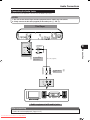
Connecting to the Digital Audio Terminal or Jack
You can connect audio equipment to the DIGITAL AUDIO OUT terminal or jack.
STEPS
1: Be sure to turn off this Player and the equipment before making any connections.
2: Firmly connect an optical digital cable (commercially available) to the optical digital audio terminals
or a coaxial digital cable (commercially available) to the coaxial digital audio jacks (1 and 2, or 3
and 4).
This Player
• When using COAXIAL/OPTICAL output,
5.1 ch Digital Output is available.
7.1 ch Digital Output is not available.
3
To COAXIAL
jack
Coaxial digital cable
(commercially available)
4
To OPTICAL
terminal
or
To coaxial input
jack
1
Optical digital cable
(commercially available)
To optical input
terminal
2
Amplifier
Audio equipment with a digital audio input terminal or jack
After connecting
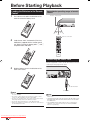
• Load a disc and start playback. (Pages 24–27)
Downloaded From Disc-Player.com Sharp Manuals
18