1
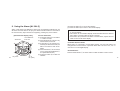
10. Using the Chronograph [CHR]
This chronograph allows you to measure and display to maximum "23 hours 59
minutes 59 seconds 99" in units of 1/100 of a second. After the completion of 24hour measurement, it returns to the reset display and stops. It is also possible to
measure split time (elapsing time).
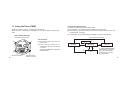
<Split Time Measurement>
Every time the button B is pressed during chronograph measuring, the newest
split time is displayed for about 10 seconds. (During the split display, "SPL" blinks
in the mode mark display portion.)
[Chronograph Reset Display]
Time difference from UTC
A
M
A
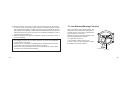
Chronograph
Measuring
B
A
Stop
A
B
*1
A
Split Time
B
18
Hour, minute, second,
1/100 seconds
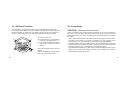
<Elapsed Time Measurement>
(1) Press the button M to set the chronograph mode.
(2) When the button A is pressed, it starts, and if the button A is pressed while
measuring, it stops. Each time you press button A, start/stop is repeated.
(3) If the button B is pressed while stopped, it returns to the reset display.
* The mode can be changed by pressing the button M even during the chronograph measuring. If the mode is returned to the chronograph mode again,
the continued measuring can be displayed. If the measuring exceeds 24
hours, however, return is made to the reset display.
B
*1: Auto-Return after 10 seconds.
19