1
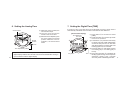
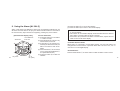
6. Setting the Analog Time
Second hand
Normal
position
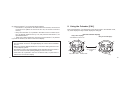
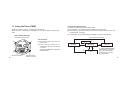
7. Setting the Digital Time [TME]
(1) When the crown is pulled, the
second hand stops.
(2) Turn the crown and set the
hands to the correct time.
(3) After the time is adjusted, push
the crown neatly to its normal
position. When the crown is
pushed in, the second hand
starts.
If the time of any of 30 cities and UTC is adjusted, the time of other cities is
automatically calculated and corrected on the basis of time difference.
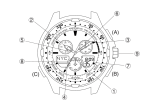
[Normal Time Display]
Time difference
from UTC
M
Crown
Time adjustment position
B
* Stop the second hand at the 0 position and then press the crown when the
digital display reaches zero seconds. The second hand will start moving in
synchronization with the digital display.
10
City name
(1) Press button M to set the Time mode
[TME].
(2) Press the button B to show a city whose
time is to be corrected.
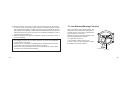
A (3) If the button B is pressed continuously
for about 2 seconds, "SMT (abbreviation
of summer time)" and "On" or "OF" blink
and watch enter the correction state. The
blinking figures can be corrected.
(4) Press the button A and switch summer
time setting (On) or non-setting (OF) of
the city.
Time (5) Every time the button B is pressed, the
blinking figures change in the sequence
of [second → minute → hour → 12 hours/
11
24 hours]. Have a desired figures blink.