1
4
①
Software Installation
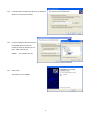
Copy the folder “AR-IQ software v.X” (“X” being the version number) from the supplied CD to any location in your hard
drive
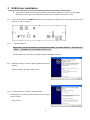
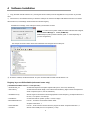
② When first run, the software will ask you about the COM port to which the AR-Alpha USB Remote Control is connected.
After the first run, local settings will be saved in the windows registry.
Possible error message, if the COM port number you entered is incorrect
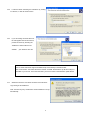
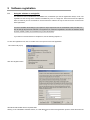
Solution: In order to find out which COM port number Windows has assigned,
check the Device Manager’s “Ports (COM&LPT)”.
USB Serial port (COM x) will be indicated. (Note: “x” varies depending on
your PC configuration.)
The example screenshot below shows that COM8 has been assigned for the COM port.
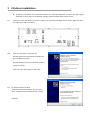
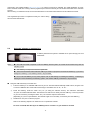
③ To start the software, double click the file “ar-iq.exe” located inside the folder “AR-IQ software v.X”
Registry keys not GUI editable (advanced users only)
( HKCU¥Software¥Microtelecom s.r.l.¥ar-iq¥v1.0¥ )
- AGCRiseTime_ms
Controls the response of the spike rejection filter (min=5, max=100, default=25).
- AudioLatency
Controls the audio buffer length; lower values minimize latency, higher values are required for
slower computers (min=4, max=20, default=9).
- AutoModeCountry
Sets the region for automatic mode change (based on tuned frequency). Accepted values are 0
for USA, 1 for Japan or 2 for Europe.
- LevelBarPos
Controls the level bar position (0=left, 1=center, 2=right).
- MouseWheelReverse
If set to 1, inverts the mouse wheel rotation effect.
Accepted values are 0, 1.
- PowerOffOnExit
If set to 1, shuts down the receiver when the program is exited. Accepted values are 0, 1.
- VcomPort
Sets the virtual COM port for CI-V operation (1..255).
9