1
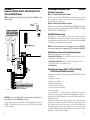
DIAGRAM 2-1
Hook-up For PC5010, PC5015, PC1555/1565, PC1575/
1580 or PC580/585 Panels
NOTE: Programming section [01], Option 2 must be OFF for LINKS2450 to work
with these panels.
PROGRAMMING DESCRIPTIONS
Section 4
[01] Module Configuration
Option 1: Communications Enabled / Disabled
Enable this option to have the LINKS2450 initiate communications for all events that
have reporting codes and call direction options (section [30]) programmed.
Disable this option to test the system.
Option 2: Serial Connection / Keybus Connection
Enable this option if you will use the LINKS2450 with a PC4010/4020 panel. Disable
this option if you will use the LINKS2450 with a PC5015, PC5010, PC1575/1580,
PC1555/1565/1565 or PC580/585 panel.
[10] LINKS2450 Account Code
This 4-digit code is used to identify the system and is transmitted when the
LINKS2450 initiates communications. Program a 4-digit code in this section using
2 two-digit hexadecimal numbers. Refer to your control panel Installation Manual
for instructions on programming hexadecimal digits.
NOTE: An account number must be entered in this section before the LINKS2450
can send aeny communications. Programming [FFFF] will disable the LINKS2450.
[20] Maintenance Alarms and Restoral Reporting Codes
Program 2 digit reporting codes for the following:
• Keybus/Serial Fault Alarm: This code will be sent when connection is lost to
the panel for more than 30 seconds.
• Keybus/Serial Fault Restoral: This code will be sent when connection is
restored to the panel for more than 30 seconds.
• For Future Use.
[30] Call Direction Options (PC5015, PC5010, PC1575/1580,
PC1555/1565 and PC580/585 panels only)
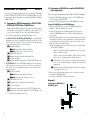
CAUTION: Due to the sensitivity of the RF circuitry, avoid any contact with the coils
and potentiometers on the LINKS2450 circuit board.
*If power supply supervision is required for the LINKS2450 VTX terminals, use the
PC5204. If no supervision is needed, you can use the PS1520 or the control panel
Bell+/Aux- terminals.
6
Program which of the following reporting code types the LINKS2450 will send to the
central station:
• Alarm/restore reporting
• Tamper/restore reporting
• Opening/closing reporting
• System maintenance reporting
• System test transmission reporting
• Future event support
In most installations, you should program the tranmission of alarm/restore
reporting codes only. Your radio network has limited bandwidth and capacity. The
more signals each LINKS2450 transmits, the fewer LINKS2450s you will be able to
install on your network.
The Future Event Support option refers to reporting codes (events) that may be
added to future software versions of DSC control panels. If you turn on the Future
Event Support option, when the new events occur, the LINKS2450 will send
reporting codes for the events to the central station. If you do not turn this option
on, the LINKS2450 will not send reporting codes for events that are not currently
included in one of the call direction groups.
11