1
ENGLISH
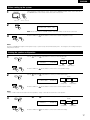
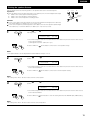
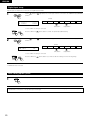
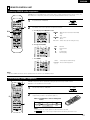
Connecting the video equipments
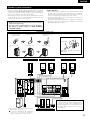
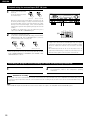
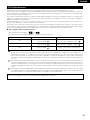
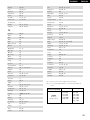
To connect the video signal, connect using a 75 Ω/ohms video signal cable cord. Using an improper cable can result in a drop in sound quality.
TV or DBS tuner
AUDIO
R
R
OUT
L
Connecting a TV/DBS tuner
TV/DBS
• Connect the TV’s or DBS tuner’s video output jack (VIDEO
OUTPUT) to the VIDEO (yellow) TV/DBS IN jack using a
75
Ω/ohms video coaxial pin plug cord.
• Connect the TV’s or DBS tuner’s audio output jacks (AUDIO
OUTPUT) to the AUDIO TV/DBS IN jacks using pin plug cords.
VIDEO DIGITAL
OUT
OUT OPTICAL
L
MONITOR OUT
• Connect the TV’s video input jack (VIDEO
INPUT) to the VIDEO MONITOR OUT
jack using a 75 Ω/ohms video coaxial pin
plug cord.
VIDEO DIGITAL
OUT
OUT COAXIAL
AUDIO
R
OUT
R
L
DVD player or VDP
Monitor TV
L
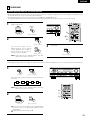
• Connect the DVD player’s (video disc player’s) video output jack (VIDEO OUTPUT) to
the VIDEO (yellow) DVD/VDP IN jack using a 75 Ω/ohms video coaxial pin plug cord.
• Connect the DVD player’s (video disc player’s) analog audio output jacks (ANALOG
AUDIO OUTPUT) to the AUDIO DVD/VDP IN jacks using pin plug cords.
• For better sound quality, we recommend using the DVD player with digital rather than
analog connections.
DVD and VDP players can also be connected to the VCR terminals.
VIDEO OUT
AUDIO OUT
Connecting a DVD player or a video disc player (VDP)
R
VIDEO IN
VIDEO OUT
AUDIO OUT
VIDEO
IN
L
R
L
R
L
R
AUDIO IN
AUDIO OUT
L
R
R
OUT
NOTE:
Connection of the video disc Player Equipped with Dolby Digital RF
(AC-3RF) Output Jack.
• Please use a commercially available adaptor when connecting the
Dolby Digital RF (AC-3RF) output jack of the video disc player to
the digital input jack.
Please refer to the instruction manual of the adapter when making
connections.
VIDEO IN
L
R
L
R
AUDIO
Video deck
L
IN
L
VIDEO OUT
OUT IN
VIDEO
Connecting a video decks
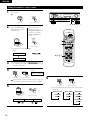
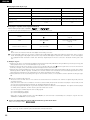
Video input/output connections:
• Connect the video deck’s video output jack (VIDEO OUT) to the VIDEO (yellow) VCR IN jack, and the video deck’s video input jack (VIDEO IN) to the VIDEO
(yellow) VCR OUT jack using 75 Ω/ohms video coaxial pin plug cords.
Connecting the audio output jacks:
• Connect the video deck’s audio output jacks (AUDIO OUT) to the AUDIO VCR IN jacks, and the video deck’s audio input jacks (AUDIO IN) to the AUDIO VCR OUT
jacks using pin plug cords.
10