1
Chapter 1: Features Overview
This guide and other SSR 2100 documentation refers to the SSR 2100’s Layer-2, Layer-3,
and Layer-4 switching and routing. These layers are based on the International Standards
Organization (ISO) 7-layer reference model. Here is an example of that model. The
SSR 2100 operates within the layers that are not shaded. Notice that Layer-2 is divided
into an LLC layer and a MAC layer. The SSR 2100 operates at the MAC layer but not the
LLC layer.
Layer 7
Application
Layer 6
Presentation
Layer 5
Session
Layer 4
TCP/UDP - application
Layer 3
IP/IPX - routing
Layer 2
LLC
Layer 2
MAC -bridging
Layer 1
Physical Interfaces
TCP/UDP Services
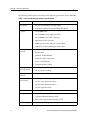
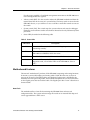
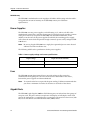
The following table lists some well known TCP/UDP services provided by the SSR 2100.
Table 2. TCP/UDP services
TCP Port
UDP Port
Description
23
Telnet
161
SNMP
67
BOOTP/DHCP Relay Agent
520
Routed
Features
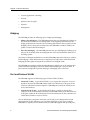
This section describes the following SSR 2100 features:
•
Address-based and flow-based bridging
•
Port-based VLANs and protocol-based VLANs
•
IP and IPX routing
SmartSwitch Router 2100 Getting Started Guide
5