1
SlimSCSI 1450 Adapter User’s Guide
Using the SlimSCSI 1450
Hot Plugging
After you install the SlimSCSI 1450 driver in your Windows 95 PC,
you can insert or remove the SlimSCSI 1450 at any time except when
data is being transferred on the SCSI bus. This is called hot plugging.
(You can tell that data is being transferred if the SCSI device activity
light is on.) Follow these steps to remove the SlimSCSI 1450 while
Windows 95 is running
1
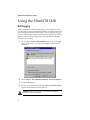
Click on the small PC Card (PCMCIA) icon in the lower right
corner of the screen. You will see a dialog box similar to the
following:
2
Select Adaptec APA-1425/50/60 PCMCIA SCSI Host Adapter.
3
Click the Stop button.
4
When you see the message You may safely remove this device,
remove the SlimSCSI 1450 from the slot.
Caution: Your PC may hang if you remove the adapter
before the message appears.
6