1
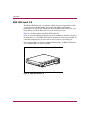
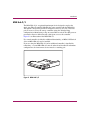
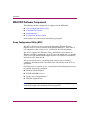
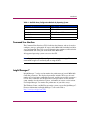
Reference
Guide
hp StorageWorks
Modular Smart Array 1000
(MSA1000)
First Edition (September 2003)
Part Number: 347280-001
The HP StorageWorks Modular Smart Array 1000 is a 2-Gb Fibre Channel storage system
designed for the entry-level to mid-range Storage Area Network (SAN). Designed to reduce the
complexity, expense, and risk of SAN deployments in heterogeneous configurations, the
MSA1000 provides a scalable, high-performance system.
Note: Documentation titled HP StorageWorks Modular SAN Array 1000 or HP StorageWorks Modular
Smart Array 1000 both refer to the HP StorageWorks MSA1000.
© Copyright 2002-2003 Hewlett-Packard Development Company, L.P.
Hewlett-Packard Company makes no warranty of any kind with regard to this material, including, but not limited to,
the implied warranties of merchantability and fitness for a particular purpose. Hewlett-Packard shall not be liable for
errors contained herein or for incidental or consequential damages in connection with the furnishing, performance,
or use of this material.
This document contains proprietary information, which is protected by copyright. No part of this document may be
photocopied, reproduced, or translated into another language without the prior written consent of Hewlett-Packard.
The information contained in this document is subject to change without notice.
Microsoft®, MS-DOS®, MS Windows®, Windows®, and Windows NT® are U.S. registered trademarks of
Microsoft Corporation.
UNIX® is a registered trademark of The Open Group.
Hewlett-Packard Company shall not be liable for technical or editorial errors or omissions contained herein. The
information is provided “as is” without warranty of any kind and is subject to change without notice. The warranties
for Hewlett-Packard Company products are set forth in the express limited warranty statements for such products.
Nothing herein should be construed as constituting an additional warranty.
Printed in the U.S.A.
MSA1000 Reference Guide
First Edition (September 2003)
Part Number: 347280-001
Contents
Contents
About this Guide. . . . . . . . . . . . . . . . . . . . . . . . . . . . . . . . . . . . . . . . . . . . . . . . . . . .7
Overview. . . . . . . . . . . . . . . . . . . . . . . . . . . . . . . . . . . . . . . . . . . . . . . . . . . . . . . . . . . . . . . . . . 8
Intended Audience . . . . . . . . . . . . . . . . . . . . . . . . . . . . . . . . . . . . . . . . . . . . . . . . . . . . . . . 8
Related Documentation . . . . . . . . . . . . . . . . . . . . . . . . . . . . . . . . . . . . . . . . . . . . . . . . . . . 8
Conventions . . . . . . . . . . . . . . . . . . . . . . . . . . . . . . . . . . . . . . . . . . . . . . . . . . . . . . . . . . . . . . . 9
Document Conventions . . . . . . . . . . . . . . . . . . . . . . . . . . . . . . . . . . . . . . . . . . . . . . . . . . . 9
Text Symbols . . . . . . . . . . . . . . . . . . . . . . . . . . . . . . . . . . . . . . . . . . . . . . . . . . . . . . . . . . 10
Equipment Symbols . . . . . . . . . . . . . . . . . . . . . . . . . . . . . . . . . . . . . . . . . . . . . . . . . . . . . 10
Rack Stability . . . . . . . . . . . . . . . . . . . . . . . . . . . . . . . . . . . . . . . . . . . . . . . . . . . . . . . . . . . . . 12
Getting Help . . . . . . . . . . . . . . . . . . . . . . . . . . . . . . . . . . . . . . . . . . . . . . . . . . . . . . . . . . . . . . 12
HP Technical Support . . . . . . . . . . . . . . . . . . . . . . . . . . . . . . . . . . . . . . . . . . . . . . . . . . . 12
HP Website. . . . . . . . . . . . . . . . . . . . . . . . . . . . . . . . . . . . . . . . . . . . . . . . . . . . . . . . . . . . 13
HP Authorized Reseller . . . . . . . . . . . . . . . . . . . . . . . . . . . . . . . . . . . . . . . . . . . . . . . . . . 13
1
Introduction . . . . . . . . . . . . . . . . . . . . . . . . . . . . . . . . . . . . . . . . . . . . . . . . . . . . . .15
About the MSA1000. . . . . . . . . . . . . . . . . . . . . . . . . . . . . . . . . . . . . . . . . . . . . . . . . . . . . . . . 16
Features of the MSA1000 . . . . . . . . . . . . . . . . . . . . . . . . . . . . . . . . . . . . . . . . . . . . . . . . 17
Supported Software Components. . . . . . . . . . . . . . . . . . . . . . . . . . . . . . . . . . . . . . . . . . . 18
Front View of the MSA1000 . . . . . . . . . . . . . . . . . . . . . . . . . . . . . . . . . . . . . . . . . . . . . . 19
Rear View of the MSA1000. . . . . . . . . . . . . . . . . . . . . . . . . . . . . . . . . . . . . . . . . . . . . . . 20
Hot-Pluggability. . . . . . . . . . . . . . . . . . . . . . . . . . . . . . . . . . . . . . . . . . . . . . . . . . . . . . . . 21
System Power. . . . . . . . . . . . . . . . . . . . . . . . . . . . . . . . . . . . . . . . . . . . . . . . . . . . . . . . . . 22
Maximum Storage . . . . . . . . . . . . . . . . . . . . . . . . . . . . . . . . . . . . . . . . . . . . . . . . . . . . . . 22
SCSI ID Assignments . . . . . . . . . . . . . . . . . . . . . . . . . . . . . . . . . . . . . . . . . . . . . . . . . . . 22
MSA1000 Hardware Components . . . . . . . . . . . . . . . . . . . . . . . . . . . . . . . . . . . . . . . . . . . . . 23
MSA1000 Controller . . . . . . . . . . . . . . . . . . . . . . . . . . . . . . . . . . . . . . . . . . . . . . . . . . . . 23
MSA1000 Controller Display . . . . . . . . . . . . . . . . . . . . . . . . . . . . . . . . . . . . . . . . . . 24
Array Accelerator (Battery-backed Cache) . . . . . . . . . . . . . . . . . . . . . . . . . . . . . . . . 25
Array Accelerator Features: . . . . . . . . . . . . . . . . . . . . . . . . . . . . . . . . . . . . . . . . 25
Array Accelerator Batteries . . . . . . . . . . . . . . . . . . . . . . . . . . . . . . . . . . . . . . . . 26
MSA1000 Reference Guide
3
Contents
Array Configuration . . . . . . . . . . . . . . . . . . . . . . . . . . . . . . . . . . . . . . . . . . . . . . . . .
Array Fault Tolerance Levels . . . . . . . . . . . . . . . . . . . . . . . . . . . . . . . . . . . . . . .
Selective Storage Presentation (SSP) . . . . . . . . . . . . . . . . . . . . . . . . . . . . . . . . .
SCSI I/O Module with an Integrated Environmental Monitoring Unit (EMU) . . . . . . .
Redundant Power Supply/Blower Assembly . . . . . . . . . . . . . . . . . . . . . . . . . . . . . . . . . .
Fibre Channel I/O Module . . . . . . . . . . . . . . . . . . . . . . . . . . . . . . . . . . . . . . . . . . . . . . . .
MSA SAN Switch 2/8 . . . . . . . . . . . . . . . . . . . . . . . . . . . . . . . . . . . . . . . . . . . . . . . . . . .
MSA Hub 2/3 . . . . . . . . . . . . . . . . . . . . . . . . . . . . . . . . . . . . . . . . . . . . . . . . . . . . . . . . . .
MSA1000 Software Components . . . . . . . . . . . . . . . . . . . . . . . . . . . . . . . . . . . . . . . . . . . . . .
Array Configuration Utility (ACU) . . . . . . . . . . . . . . . . . . . . . . . . . . . . . . . . . . . . . . . . .
Command Line Interface . . . . . . . . . . . . . . . . . . . . . . . . . . . . . . . . . . . . . . . . . . . . . . . . .
Insight Manager 7 . . . . . . . . . . . . . . . . . . . . . . . . . . . . . . . . . . . . . . . . . . . . . . . . . . . . . .
System Event Analyzer (SEA). . . . . . . . . . . . . . . . . . . . . . . . . . . . . . . . . . . . . . . . . . . . .
2
27
27
28
29
30
31
32
33
34
34
35
35
36
Operation and Management . . . . . . . . . . . . . . . . . . . . . . . . . . . . . . . . . . . . . . . . . .37
Connecting the Power. . . . . . . . . . . . . . . . . . . . . . . . . . . . . . . . . . . . . . . . . . . . . . . . . . . . . . . 38
Applying Power . . . . . . . . . . . . . . . . . . . . . . . . . . . . . . . . . . . . . . . . . . . . . . . . . . . . . . . . . . . 39
Interpreting Component Indicators. . . . . . . . . . . . . . . . . . . . . . . . . . . . . . . . . . . . . . . . . . . . . 40
MSA1000 Controller Indicators . . . . . . . . . . . . . . . . . . . . . . . . . . . . . . . . . . . . . . . . . . . 40
Enclosure Status Indicators . . . . . . . . . . . . . . . . . . . . . . . . . . . . . . . . . . . . . . . . . . . . . . . 42
Power Supply/Blower Assembly Indicators . . . . . . . . . . . . . . . . . . . . . . . . . . . . . . . . . . 43
SCSI I/O Module with Integrated EMU Indicators . . . . . . . . . . . . . . . . . . . . . . . . . . . . . 44
Hard Drive Indicators. . . . . . . . . . . . . . . . . . . . . . . . . . . . . . . . . . . . . . . . . . . . . . . . . . . . 45
Fibre Channel I/O Module Indicators . . . . . . . . . . . . . . . . . . . . . . . . . . . . . . . . . . . . . . . 47
Replacing Components. . . . . . . . . . . . . . . . . . . . . . . . . . . . . . . . . . . . . . . . . . . . . . . . . . . . . . 49
Replacing a Variable Speed Blower . . . . . . . . . . . . . . . . . . . . . . . . . . . . . . . . . . . . . . . . 49
Replacing a Power Supply . . . . . . . . . . . . . . . . . . . . . . . . . . . . . . . . . . . . . . . . . . . . . . . . 52
Replacing a SCSI I/O Module . . . . . . . . . . . . . . . . . . . . . . . . . . . . . . . . . . . . . . . . . . . . . 54
Replacing Hard Drives. . . . . . . . . . . . . . . . . . . . . . . . . . . . . . . . . . . . . . . . . . . . . . . . . . . 56
Replacing the Fibre Channel I/O Module . . . . . . . . . . . . . . . . . . . . . . . . . . . . . . . . . . . . 60
Replacing the MSA SAN Switch 2/8. . . . . . . . . . . . . . . . . . . . . . . . . . . . . . . . . . . . . . . . 62
Replacing the MSA Hub 2/3 . . . . . . . . . . . . . . . . . . . . . . . . . . . . . . . . . . . . . . . . . . . . . . 64
Replacing the 2-Gb Small Form Factor Pluggable (SFP) Transceiver . . . . . . . . . . . . . . 66
Adding Additional Storage Enclosures . . . . . . . . . . . . . . . . . . . . . . . . . . . . . . . . . . . . . . . . . 67
Migrating Existing Storage Enclosures . . . . . . . . . . . . . . . . . . . . . . . . . . . . . . . . . . . . . . 67
Adding a New Storage Enclosure . . . . . . . . . . . . . . . . . . . . . . . . . . . . . . . . . . . . . . . . . . 69
A Regulatory Compliance Notices . . . . . . . . . . . . . . . . . . . . . . . . . . . . . . . . . . . . . . . .71
Regulatory Compliance Identification Numbers . . . . . . . . . . . . . . . . . . . . . . . . . . . . . . . 71
4
MSA1000 Reference Guide
Contents
Federal Communications Commission Notice. . . . . . . . . . . . . . . . . . . . . . . . . . . . . . . . .
Modifications. . . . . . . . . . . . . . . . . . . . . . . . . . . . . . . . . . . . . . . . . . . . . . . . . . . . . . .
Cables . . . . . . . . . . . . . . . . . . . . . . . . . . . . . . . . . . . . . . . . . . . . . . . . . . . . . . . . . . . .
Canadian Notice (Avis Canadien) . . . . . . . . . . . . . . . . . . . . . . . . . . . . . . . . . . . . . . . . . .
European Union Notice . . . . . . . . . . . . . . . . . . . . . . . . . . . . . . . . . . . . . . . . . . . . . . . . . .
Japanese Notice . . . . . . . . . . . . . . . . . . . . . . . . . . . . . . . . . . . . . . . . . . . . . . . . . . . . . . . .
BSMI Notice . . . . . . . . . . . . . . . . . . . . . . . . . . . . . . . . . . . . . . . . . . . . . . . . . . . . . . . . . .
Laser Compliance. . . . . . . . . . . . . . . . . . . . . . . . . . . . . . . . . . . . . . . . . . . . . . . . . . . . . . .
Battery Replacement Notice . . . . . . . . . . . . . . . . . . . . . . . . . . . . . . . . . . . . . . . . . . . . . .
71
71
71
72
72
72
73
73
74
B
Electrostatic Discharge. . . . . . . . . . . . . . . . . . . . . . . . . . . . . . . . . . . . . . . . . . . . . . .75
Grounding Methods . . . . . . . . . . . . . . . . . . . . . . . . . . . . . . . . . . . . . . . . . . . . . . . . . . . . . . . . 76
C
Specifications . . . . . . . . . . . . . . . . . . . . . . . . . . . . . . . . . . . . . . . . . . . . . . . . . . . . .77
D Recovering from Hard Drive Failure . . . . . . . . . . . . . . . . . . . . . . . . . . . . . . . . . . . . .79
Hard Drive Failure . . . . . . . . . . . . . . . . . . . . . . . . . . . . . . . . . . . . . . . . . . . . . . . . . . . . . . . . . 80
Recognizing Drive Failure . . . . . . . . . . . . . . . . . . . . . . . . . . . . . . . . . . . . . . . . . . . . . . . . 81
Compromised Fault Tolerance. . . . . . . . . . . . . . . . . . . . . . . . . . . . . . . . . . . . . . . . . . . . . 82
Procedure to Attempt Recovery . . . . . . . . . . . . . . . . . . . . . . . . . . . . . . . . . . . . . . . . . . . . 83
Automatic Data Recovery . . . . . . . . . . . . . . . . . . . . . . . . . . . . . . . . . . . . . . . . . . . . . . . . 84
Failure of Automatic Data Recovery. . . . . . . . . . . . . . . . . . . . . . . . . . . . . . . . . . . . . 84
Replacing a Drive . . . . . . . . . . . . . . . . . . . . . . . . . . . . . . . . . . . . . . . . . . . . . . . . . . . . . . . . . 85
Moving Array Controller Drives and Arrays . . . . . . . . . . . . . . . . . . . . . . . . . . . . . . . . . . . . . 87
Expanding and Extending Capacity . . . . . . . . . . . . . . . . . . . . . . . . . . . . . . . . . . . . . . . . . . . . 88
E
Recovery ROM and ROM Cloning . . . . . . . . . . . . . . . . . . . . . . . . . . . . . . . . . . . . . .91
Recovery ROM. . . . . . . . . . . . . . . . . . . . . . . . . . . . . . . . . . . . . . . . . . . . . . . . . . . . . . . . . . . . 91
ROM Cloning . . . . . . . . . . . . . . . . . . . . . . . . . . . . . . . . . . . . . . . . . . . . . . . . . . . . . . . . . . . . . 92
F
SCSI ID Assignments . . . . . . . . . . . . . . . . . . . . . . . . . . . . . . . . . . . . . . . . . . . . . . . .93
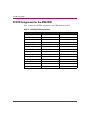
SCSI ID Assignments for the MSA1000 . . . . . . . . . . . . . . . . . . . . . . . . . . . . . . . . . . . . . . . . 94
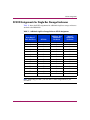
SCSI ID Assignments for Single Bus Storage Enclosures . . . . . . . . . . . . . . . . . . . . . . . . . . . 95
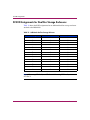
SCSI ID Assignments for Dual Bus Storage Enclosures . . . . . . . . . . . . . . . . . . . . . . . . . . . . 96
Index . . . . . . . . . . . . . . . . . . . . . . . . . . . . . . . . . . . . . . . . . . . . . . . . . . . . . . . . . . .97
MSA1000 Reference Guide
5
Contents
6
MSA1000 Reference Guide
About This
Guide
About this Guide
This reference guide provides information to help you:
■
Operate the MSA1000About this Guide
■
Configure the MSA1000
“About this Guide” topics include:
■
Overview, page 8
■
Conventions, page 9
■
Rack Stability, page 12
■
Getting Help, page 12
MSA1000 Reference Guide
7
About this Guide
Overview
This section covers the following topics:
■
Intended Audience
■
Related Documentation
Intended Audience
This book is intended for use by administrators with a moderate amount of
SAN-management experience.
Related Documentation
In addition to this guide, refer to the HP StorageWorks MSA1000 Installation
Overview poster that ships with this system.
8
MSA1000 Reference Guide
About this Guide
Conventions
Conventions consist of the following:
■
Document Conventions
■
Text Symbols
■
Equipment Symbols
Document Conventions
The document conventions included in Table 1 apply in most cases.
Table 1: Document Conventions
Element
Convention
Cross-reference links
Figure 1
Key and field names, menu items,
buttons, and dialog box titles
Bold
File names, application names, and text
emphasis
Italics
User input, command and directory
names, and system responses (output
and messages)
Monospace font
COMMAND NAMES are uppercase
monospace font unless they are case
sensitive
Variables
<monospace, italic font>
Website addresses
Underlined sans serif font text:
http://www.hp.com
MSA1000 Reference Guide
9
About this Guide
Text Symbols
The following symbols may be found in the text of this guide. They have the
following meanings.
WARNING: Text set off in this manner indicates that failure to follow
directions in the warning could result in bodily harm or loss of life.
Caution: Text set off in this manner indicates that failure to follow directions
could result in damage to equipment or data.
Note: Text set off in this manner presents commentary, sidelights, or interesting points
of information.
Equipment Symbols
The following equipment symbols may be found on hardware for which this guide
pertains. They have the following meanings.
Any enclosed surface or area of the equipment marked with these
symbols indicates the presence of electrical shock hazards. Enclosed
area contains no operator serviceable parts.
WARNING: To reduce the risk of injury from electrical shock hazards,
do not open this enclosure.
Any RJ-45 receptacle marked with these symbols indicates a network
interface connection.
WARNING: To reduce the risk of electrical shock, fire, or damage to the
equipment, do not plug telephone or telecommunications connectors
into this receptacle.
10
MSA1000 Reference Guide
About this Guide
Any surface or area of the equipment marked with these symbols
indicates the presence of a hot surface or hot component. Contact with
this surface could result in injury.
WARNING: To reduce the risk of injury from a hot component, allow
the surface to cool before touching.
Power supplies or systems marked with these symbols indicate the
presence of multiple sources of power.
WARNING: To reduce the risk of injury from electrical shock,
remove all power cords to completely disconnect power from the
power supplies and systems.
Any product or assembly marked with these symbols indicates that the
component exceeds the recommended weight for one individual to
handle safely.
WARNING: To reduce the risk of personal injury or damage to the
equipment, observe local occupational health and safety requirements
and guidelines for manually handling material.
MSA1000 Reference Guide
11
About this Guide
Rack Stability
Rack stability protects personnel and equipment.
WARNING: To reduce the risk of personal injury or damage to the
equipment, be sure that:
■ The leveling jacks are extended to the floor.
■ The full weight of the rack rests on the leveling jacks.
■ In single rack installations, the stabilizing feet are attached to the rack.
■ In multiple rack installations, the racks are coupled.
■ Only one rack component is extended at any time. A rack may become
unstable if more than one rack component is extended for any reason.
Getting Help
If you still have a question after reading this guide, contact an HP authorized
service provider or access our website: http://www.hp.com.
HP Technical Support
In North America, call technical support at 1-800-652-6672, available 24 hours a
day, 7 days a week.
Note: For continuous quality improvement, calls may be recorded or monitored.
12
MSA1000 Reference Guide
About this Guide
Outside North America, call technical support at the nearest location. Telephone
numbers for worldwide technical support are listed on the HP website under
support: http://www.hp.com.
Be sure to have the following information available before calling:
■
Technical support registration number (if applicable)
■
Product serial numbers
■
Product model names and numbers
■
Applicable error messages
■
Operating system type and revision level
■
Detailed, specific questions
HP Website
The HP website has the latest information on this product, as well as the latest
drivers. Access storage at: www.hp.com/go/msa1000. From this website, select the
appropriate product or solution.
HP Authorized Reseller
For the name of your nearest HP Authorized Reseller:
■
In the United States, call 1-800-345-1518
■
In Canada, call 1-800-263-5868
■
Elsewhere, see the HP website for locations and telephone numbers:
http://www.hp.com.
MSA1000 Reference Guide
13
About this Guide
14
MSA1000 Reference Guide
Introduction
1
The MSA1000 is a next generation, 2-Gb storage system designed for the entry
level to mid-range Storage Area Network (SAN). Designed to reduce the
complexity, expense, and risk of SAN deployment, the MSA1000 provides a
scalable, high-performance storage system with investment protection in mind.
The modular design of the MSA1000 allows storage capacity to be added as
needed.
This introductory chapter includes the following overviews:
■
About the MSA1000, page 16
■
MSA1000 Hardware Components, page 23
■
MSA1000 Software Components, page 34
MSA1000 Reference Guide
15
Introduction
About the MSA1000
The MSA1000 provides a high performance array controller in a 14-drive storage
cabinet, capable of 2 Gb/s speeds over Fibre Channel. It may be expanded by
adding two more storage cabinets for a total capacity of 42 drives. The MSA1000
is compatible with 1 Gb/s and 2 Gb/s hub and fabric switch interconnects and
includes options for embedded switches and hubs.
Complete operating redundancy is supported, including redundancy while
expanding disk and unit volumes.
Refer to the MSA1000 website: www.hp.com/go/msa1000, for the most up-to-date
information on supported components and operating system versions.
This section discusses:
16
■
Features of the MSA1000
■
Supported Software Components
■
Front View of the MSA1000
■
Rear View of the MSA1000
■
Hot-Pluggability
■
System Power
■
Maximum Storage
■
SCSI ID Assignments
MSA1000 Reference Guide
Introduction
Features of the MSA1000
Key features of the MSA1000 are summarized in Table 2.
Table 2: MSA1000 Features, summarized
Feature
Description
Form factors
HP Series rack, 4U design combining
both the controller and disk shelf
Model
Rack-mountable
Hard drive types
HP Ultra2, Ultra3, and Ultra320
1" SCSI hard disk drives
Maximum number of drives
14 (1-inch); scalable to 42 drives with
two optional storage expansion
enclosures
Connection to host
2-Gb Fibre Channel connections, with
support for 1-Gb and 2-Gb Fibre
Channel infrastructures.
Operating systems
Windows
Novell NetWare
Linux
OpenVMS
Tru64 UNIX
Controller
Embedded MSA1000 Controller with
battery-backed cache
(256 MB; can be upgraded to 512 MB)
RAID configuration levels
RAID 0, RAID 1, RAID 1+0, RAID 5,
and Advanced Data Guarding (ADG)
Option
Embedded 2 Gb/s
MSA SAN Switch 2/8
Option
Embedded 2 Gb/s
MSA Hub 2/3
MSA1000 Reference Guide
17
Introduction
Supported Software Components
Supported software is summarized in Table 3.
Table 3: MSA1000 Supported Software
Software
Operating System
Array Configuration Utility (ACU)
Windows: online
Linux: online
NetWare: offline
Command Line Interface (CLI)
Windows
Linux
NetWare
OpenVMS
Tru64 UNIX
Microsoft Clustering Services (MSCS)
Windows
OpenView Virtual Replicator
Windows
SmartStart
Windows
Linux
NetWare
HP System Event Analyzer (SEA)
OpenVMS
Tru64 UNIX
Insight Manager 7
Windows
Linux
NetWare
HP StorageWorks Secure Path
Windows
Linux
NetWare
Note: Refer to the MSA1000 website: www.hp.com/go/msa1000, for the most
up-to-date information on supported software components
.
18
MSA1000 Reference Guide
Introduction
Front View of the MSA1000
The following figure and supporting table illustrate and define the front view
features of the MSA1000.
1
2
3
4
7
6
5
Figure 1: Front view of the MSA1000
Item
MSA1000 Reference Guide
Description
1
Blank panel
Included in the standard shipping configuration and
removed when a redundant MSA1000 Controller is
installed.
In redundant configurations, this is the secondary
controller and may be referred to as controller2.
2
RJ-45Z customized serial port for accessing the CLI
One customized cable is included in the shipping carton.
3
Hot-Pluggable MSA1000 Controller
In redundant configurations, this is the primary controller
and may be referred to as controller1.
4
Controller LCD display
5
Power switch
6
Enclosure status indicators
7
Hot-pluggable hard drives
19
Introduction
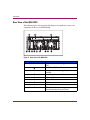
Rear View of the MSA1000
The following figure and supporting table illustrate and define the features and
components on the rear of the MSA1000.
1
9
8
2
7
6
3
5
4
6
5
4
Figure 2: Rear view of the MSA1000
Item
20
Description
1
2-Gb Small Form Factor Pluggable Transceivers
(SFP)
2
Fibre Channel I/O Module
3
Blank panel (when hot-pluggable options are not
installed)
4
Power supply/blower assemblies
5
Power supply/blower assembly indicators
6
AC power cord connectors
7
SCSI Port A connector
8
SCSI Port B connector
9
SCSI I/O Module with an integrated
Environmental Monitoring Unit (EMU)
MSA1000 Reference Guide
Introduction
Hot-Pluggability
Hot-pluggability allows components to be removed and replaced without
powering down the MSA1000.
The following MSA1000 hardware components are hot-pluggable:
Hard Drives—Failed drives in fault-tolerant configurations can be replaced
without interrupting system operation. Data on the failed drive is restored
automatically to the replacement drive online.
Power Supply/Blower Assembly—Redundant power supplies allow you to
remove one power supply and replace it without interrupting system operation.
The assembly includes one variable speed blower for each power supply. If one of
the blowers in the assembly fails, the other blower automatically operates at a
higher speed. A blower can be removed and replaced without removing the
assembly.
MSA1000 Controller—If your system has two controllers and one controller
fails, you can remove and replace the failed controller. See the “Operation and
Management” chapter for specific limitations.
Fibre Channel I/O Module—The Fibre Channel I/O Module is a single-port,
hot-pluggable 1-Gb/2-Gb Fibre Channel device that includes a 2-Gb Small Form
Factor Pluggable Transceiver (SFP) port. This module can be removed and
replaced with other interconnect options, such as the MSA SAN Switch 2/8 or the
MSA Hub 2/3.
MSA SAN Switch 2/8—The MSA SAN Switch 2/8 is an optional, hot-pluggable
I/O device designed to replace the single port Fibre Channel I/O Module that
comes standard with the MSA1000. This switch includes 8-ports, featuring 2 Gb/s
full duplex non-blocking performance on all ports. One port is internal to the
switch, leaving 7 available external ports.
MSA Hub 2/3—The MSA Hub 2/3 is an optional, hot-pluggable I/O device
designed to replace the single port Fibre Channel I/O Module that comes standard
with the MSA1000. This hub provides an inexpensive and easy way for a
clustered pair of servers to access the storage controller (using an arbitrated-loop
configuration), without having to buy an external hub or switch. Two SFP ports
are presented to the user, while a third, internal port accesses the controller.
MSA1000 Reference Guide
21
Introduction
System Power
Power to the MSA1000 does not shut off completely with the power switch. The
two positions of the front panel power switch should be considered as on and
standby, instead of on and off. The standby position removes power from most of
the electronics and the drives, but portions of the power supply and some internal
circuitry remain active.
Consequently, to remove all power from the MSA1000 storage system, you must
disconnect the power cord from the storage system. In environments with multiple
power supplies, you must disconnect all power cords to remove power completely
from the MSA1000 storage system.
WARNING: To reduce the risk of electric shock or damage to the equipment,
disconnect power from the storage system by unplugging all power cords from
either the electrical outlet or the storage system.
Maximum Storage
A maximum of 14 1-inch Universal drives can be installed in the MSA1000. Up to
two additional external storage enclosures can be cascaded from the MSA1000,
expanding the capacity to 42 drives. Refer to the MSA1000 website:
www.hp.com/go/msa1000, for the most up-to-date information on supported drives
and enclosures.
Note: The maximum size of a logical unit is 2 TB. If you have more than 2 TB of
storage attached to your MSA1000, you must create multiple logical units.
SCSI ID Assignments
SCSI IDs are assigned automatically in the storage system according to the drive
bay used for each drive. It is not necessary to assign SCSI IDs manually. Drive
bay numbers are indicated on the front panel. See the “SCSI ID Assignments”
appendix for a complete table of SCSI ID assignments.
22
MSA1000 Reference Guide
Introduction
MSA1000 Hardware Components
The standard configuration of the MSA1000 includes one MSA1000 Controller,
one MSA Fibre Channel I/O Module, one SCSI I/O with an integrated EMU, and
redundant power supply/blower assemblies.
Option kits are available for redundant MSA1000 Controllers and Fibre
Channel I/O Modules as well as for embedded switches and hubs.
Components of the MSA1000 include:
■
MSA1000 Controller
■
SCSI I/O with integrated Environmental Monitoring Unit
■
Redundant power supply/blower assemblies
■
Fibre Channel I/O Module
■
MSA SAN Switch 2/8 (option only)
■
MSA Hub 2/3 (option only)
MSA1000 Controller
The MSA1000 Controller is a drive array controller specifically designed for
installation in the MSA1000. The MSA1000 comes equipped with one MSA1000
Controller installed. An additional controller for redundancy can be purchased
separately.
To ensure uninterrupted service, two copies of the controller firmware are stored
in Read Only Memory (ROM) on the controller. See the “Recovery ROM and
ROM Cloning” appendix for more information.
Additional information about the following topics is included in this section:
■
MSA1000 Controller Display
■
Array Accelerator (Battery-backed Cache)
■
Array Configuration
MSA1000 Reference Guide
23
Introduction
MSA1000 Controller Display
Each array controller in an MSA1000 contains an integrated Liquid Crystal
Display (LCD). This module is used for displaying informational and error
messages, showing the status of the module, and for providing user input when
required. Traditional Power-On Self-Test (POST) messages issued by PCI-based
array controllers have been combined with runtime event notification messages to
create a new set of controller display messages.
1
2
3
7
4
5
6
Figure 3: Controller display
\
Controller Display
Description
1
Fault indicator (amber)
2
Display
3
Left push button
4
Up push button
5
Right push button
6
Down push button
7
Redundancy Link indicator (green)
For more information about the MSA1000 Controller display, see the “Controller
Display Messages” appendix.
24
MSA1000 Reference Guide
Introduction
Array Accelerator (Battery-backed Cache)
The Array Accelerator is a high-performance, upgradeable 256-MB SDRAM
DIMM read/write battery-backed cache that can increase performance in database
and fault-tolerant configurations. It performs both protected posted-write caching
and read-ahead caching, allowing data to be accessed much faster than from disk
storage.
In protected posted-write caching, data is written to the cache memory on the
Array Accelerator rather than directly to the drives. Later, when the MSA1000
storage system is idle, the controller writes the cached data to the drive array.
The read-ahead cache detects sequential accesses to the array, reads ahead data,
and stores the data in the cache until the next read access arrives. If the data is of a
sequential nature, the data can be loaded immediately into memory, avoiding the
latency of a disk access.
If the MSA1000 Controller fails before cached data is stored on the disk, the
Array Accelerator and its integrated batteries may be removed from one
MSA1000 Controller and installed on a replacement controller. Any data in the
Array Accelerator that has not been written to the hard drive will be transferred to
the replacement MSA1000 Controller.
Array Accelerator Features:
Other features of the Array Accelerator:
■
Mounted on a removable daughterboard (allows stored data to be moved to
another controller if the original controller fails)
■
Backed up with replaceable batteries
■
Upgradable to 512 MB (256 MB per controller)
■
Adjustable read/write ratio - usually set during array configuration but can be
changed at any time
■
16-bit Error Checking and Correcting (ECC) SDRAM memory
ECC detects and corrects all single-bit memory errors. It also detects all
two-bit memory errors in any position, and most three- and four-bit memory
errors in a single SDRAM. With ECC, an entire memory chip can also fail
without data loss. This provides a high level of data integrity by ensuring the
correction of common memory errors without affecting performance.
MSA1000 Reference Guide
25
Introduction
Array Accelerator Batteries
The Array Accelerator has two rechargeable and replaceable Nickel Metal
Hydride (NiMH) battery packs. Under normal operating conditions, these should
last for three years before replacement is necessary. They are continuously
recharged via a “trickle” charging process whenever the MSA1000 storage system
is powered on.
The battery packs protect data on the Array Accelerator against equipment failure
or power outage for up to four continuous days.
Note: Temperature, age, and cache size may affect battery life.
This also applies if the Array Accelerator is removed from the MSA1000
Controller. When power is restored to the MSA1000 storage system, an
initialization process writes the preserved data to the disk drives. This is
particularly important for data that has been cached by a posted-write operation,
but has not yet been written to the hard drives.
Note: The batteries on a new MSA1000 Controller may be discharged when the
board is first installed. In this case, a Power-On Self-Test (POST) message will be
displayed on the controller display panel when the controller is powered on, indicating
that the Array Accelerator is temporarily disabled. No action is required on your part,
since the internal circuitry will automatically recharge the batteries. Recharging the
batteries can take up to 4 hours. The MSA1000 Controller will function properly during
this time, although without the performance advantage of the Array Accelerator. When
the batteries are charged to 90 percent of their capacity, the Array Accelerator is
automatically enabled.
Depending on the status of the array accelerator, including a low battery charge,
informational or error messages may be displayed on the controller’s LCD panel.
For a listing of cache module LCD messages, see the definitions for LCD
messages 60 through 79 in the HP StorageWorks MSA1000 Controller User
Guide.
For detailed array accelerator or battery replacement instructions, see the
“Operation and Management” chapter.
26
MSA1000 Reference Guide
Introduction
Array Configuration
Drive array technology distributes data across a series of individual hard drives to
unite these physical drives into one or more higher-performance logical arrays and
volumes. Distributing the data allows for concurrent access from multiple drives
in the array, yielding faster I/O rates than non-arrayed drives. Each logical drive in
the array can be set to a different level of fault tolerance.
Depending on your server’s operating system and your preference of user
interfaces, use one of the following provided user interfaces to configure the
storage on the MSA1000:
■
Array Configuration Utility (ACU)
■
Command Line Interface (CLI)
For information about these user interfaces, see the “MSA1000 Software
Components” section also in this chapter.
Array Fault Tolerance Levels
Fault tolerance refers to several possible methods used to protect your MSA1000
storage system from data loss in the event of a hardware failure somewhere in the
storage system. Each method has its advantages; choosing one requires careful
planning for your particular requirements.
The RAID configuration methods supported by the MSA1000 Controller include:
■
No fault tolerance (RAID 0)
■
Drive mirroring (RAID 1)
■
Drive mirroring and striping (RAID 1+0)
■
Distributed data guarding (RAID 5)
■
Advanced Data Guarding (RAID ADG)
Further data protection can be achieved by assigning one or more online spares to
any fault-tolerant array.
For detailed information on fault tolerance options, see the “Hard Drive Arrays”
appendix.
MSA1000 Reference Guide
27
Introduction
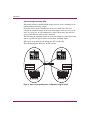
Selective Storage Presentation (SSP)
SSP permits sharing of the MSA1000 storage between servers, including servers
running different operating systems.
Each logical drive on the controller has an Access Control List (ACL) that
contains the worldwide names of the server host adapters that have access to the
drive. If a server tries to send commands to a logical drive that it does not have
access to, the firmware will reject the command.
The SSP maps the worldwide names of server host adapters to connection names
and sets up ACLs for logical drives based on these worldwide names.
SSP can be set up and managed through the ACU and the CLI.
The following diagram illustrates an SSP scenario.
Host A
Host B
Switch
ACCESS
Host A - LD3, LD4
ACCESS
Host A - LD1, LD2
Host B - LD3, LD4
Host B - LD1, LD2
Storage A
1
2
Storage B
3
4
1
2
3
4
Figure 4: Basic non-cooperating server configuration using the switch
28
MSA1000 Reference Guide
Introduction
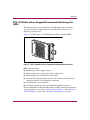
SCSI I/O Module with an Integrated Environmental Monitoring Unit
(EMU)
This element performs several functions, including monitoring the enclosure
operation, detecting and indicating errors, providing I/O connectors, and
displaying enclosure status.
Figure 5 is an illustration of a SCSI I/O Module with the integrated EMU.
Figure 5: SCSI I/O Module with an integrated Environmental Monitoring Unit
EMU functions include:
■
Monitoring the power supply voltages
■
Monitoring the power supply and enclosure temperatures
■
Monitoring the presence and status of hard drives
■
Detecting and reporting element changes in the enclosure and showing the
addition or removal of a hot-pluggable component
■
Controlling drive status indicators
■
Providing expansion ports for external HP StorageWorks enclosures
For more information on the SCSI I/O module, including installation and removal
and status indicators, refer to the “Enclosure Status Indicators” and “Replacing a
SCSI I/O Module” sections of the “Operation and Management” chapter.
MSA1000 Reference Guide
29
Introduction
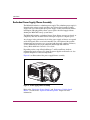
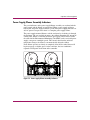
Redundant Power Supply/Blower Assembly
The MSA1000 includes a redundant power supply. The redundant power supply is
identical to the primary supply and shares the electrical load equally. If either
supply fails or is removed, the other power supply assumes the full load without
interruption. Hot-pluggability allows you to replace the failed supply without
shutting the MSA1000 storage system down.
The MSA1000 includes a redundant blower. If one blower operates too slowly, or
completely shuts off, the other blower will begin to operate at a higher speed.
Any changes in the performance level of the power supply or blower are reported
on the LCD panel of the associated controller. For a description of the possible
informational and error messages associated with the power supplies or blowers,
see the definitions for messages numbered 400 through 499 in the HP
StorageWorks MSA1000 Controller User Guide.
Depending on the setup of Insight Manager 7 and System Event Analyzer,
informational and error messages about the power supplies and blowers are also
reported though these software components.
Figure 6 is an illustration of the power supply/blower assembly.
Figure 6: Power supply/blower assembly
Refer to the “Replacing a Power Supply” and “Replacing a Variable Speed
Blower” sections in the “Operation and Management” chapter for more
information.
30
MSA1000 Reference Guide
Introduction
Fibre Channel I/O Module
The Fibre Channel I/O Module is a single-port, 1-Gb/2-Gb Fibre Channel device
that includes a 2 Gb/s Small Form Factor Pluggable Transceiver (SFP) port.
Figure 7 is an illustration of the Fibre Channel I/O Module.
This module can be removed and replaced with other interconnect options, such as
the MSA SAN Switch 2/8 or the MSA Hub 2/3. In redundant configurations, the
interconnect devices must be a matching pair.
If a second controller is added for additional functionality, an MSA SAN Switch
2/8 or an MSA Hub 2/3 may be installed.
If you are using the Fibre Channel I/O Module and an additional controller is
installed for redundancy, a second I/O Module must be ordered and installed.
Figure 7: Fibre Channel I/O module
MSA1000 Reference Guide
31
Introduction
MSA SAN Switch 2/8
The MSA SAN Switch 2/8 is an optional 2-Gb/s, integrated 8-port fabric switch
(1 port internal to the MSA1000), that enables full duplex non-blocking
performance on all ports. For information about the MSA SAN Switch 2/8, refer
to the HP StorageWorks MSA SAN Switch 2/8 Installation Guide.
Figure 8 is an illustration of the MSA SAN Switch 2/8.
If you are using the MSA SAN Switch 2/8 and an additional controller is installed
for redundancy, a second MSA SAN Switch 2/8 must be ordered and installed. In
redundant configurations, the interconnect devices must be a matching pair.
If a second controller is added for additional functionality, an MSA SAN Switch
2/8 or an MSA Hub 2/3 may be installed.
Figure 8: MSA SAN Switch 2/8
32
MSA1000 Reference Guide
Introduction
MSA Hub 2/3
The MSA Hub 2/3 is an optional input/output device designed to replace the
single port Fibre Channel I/O Module that comes standard with the MSA1000.
This option is designed to provide an inexpensive and easy way for a clustered
pair of servers to access the storage controller (using the arbitrated loop
configuration) without having to buy an external hub or switch. Two SFP ports are
presented to the user while internally a third port accesses the controller.
Figure 9 is an illustration of the MSA Hub 2/3.
If a second controller is added for additional functionality, an MSA SAN Switch
2/8 or an MSA Hub 2/3 may be installed.
If you are using the MSA Hub 2/3 and an additional controller is installed for
redundancy, a second MSA Hub 2/3 must be ordered and installed. In redundant
configurations, the interconnect devices must be a matching pair.
Figure 9: MSA Hub 2/3
MSA1000 Reference Guide
33
Introduction
MSA1000 Software Components
The following software components are supported on the MSA1000:
■
Array Configuration Utility (ACU)
■
Command Line Interface
■
Insight Manager 7
■
System Event Analyzer (SEA)
Each software tool is discussed in the following paragraphs.
Array Configuration Utility (ACU)
The ACU is Web based and can run locally through the Windows Internet
Explorer browser screen or remotely through Insight Manager 7. If the utility is
not configured to allow remote access, it will run in the local environment.
The ACU is supported for Windows, Linux, and NetWare environments. In
Windows and Linux environments, the ACU can be run online after it is installed
on the server from the MSA1000 Support Software CD. NetWare environments
must run the ACU from the CD.
All agent, network services, and management software must be installed,
configured, and running before all of the features and functions of the ACU are
operational.
For Web-browser or network access, a combination of the following may need to
be installed and properly configured:
■
Windows Internet Explorer
■
TCP/IP and SNMP services
■
Agents such as Insight Manger 7
■
Host Bus Adapter drivers
Note: If you plan to use the ACU to configure and manage your storage, HP
recommends using the ACU exclusively and not using the CLI.
34
MSA1000 Reference Guide
Introduction
Table 4: Available Array Configuration Methods by Operating System
Operating System
Array Configuration Method
Windows
ACU and CLI
Linux
ACU and CLI
NetWare
ACU (offline) and CLI
OpenVMS
CLI
Tru64 UNIX
CLI
Command Line Interface
The Command Line Interface (CLI) is built into the firmware and can be used to
configure, manage, and monitor all aspects of the MSA1000, including hard drive
array configuration. The CLI is accessed through a host computer connected to the
customized RJ-45Z serial port on the front of the MSA1000.
All supported operating systems can access the CLI.
Note: If you plan to use the CLI to configure and manage your storage, HP
recommends using the CLI exclusively and not using the ACU.
Insight Manager 7
Insight Manager 7 can be used to monitor the performance of several MSA1000
Controller parameters. The displayed parameters include CPU usage, the total
number of read and write commands processed, and the average time to process a
read or write command. Also displayed for each logical drive are the total I/O
count, number of read and write requests, and number of sectors read or written.
Use Insight Manager 7 to monitor the performance of your drive arrays.
The Windows, Linux, and NetWare operating systems can use Insight Manager 7.
For more information on Insight Manager 7, refer to the Web at
http://www.hp.com/go/msa1000.
MSA1000 Reference Guide
35
Introduction
System Event Analyzer (SEA)
System Event Analyzer is a host-based fault analysis utility included with the
Web-Based Service Enterprise (WEBES) service tools. Each WEBES service tool
adds functionality to the Directory, a process (or set of processes) that executes
continuously. SEA provides the Director with the capability to capture and
interpret hardware events. The analysis of events can be performed automatically
or when requested by an outside process.
SEA provides background automatic analysis by monitoring the active binary
event log (also called the system event log or error log) and processing events as
they occur. The events in the binary event log file are checked against the analysis
rules. If one or more of the events in the binary event log file meets the conditions
specified in the rules, the analysis engine collects the error data and creates a
problem report containing a description of the problem and any corrective actions
required. After the problem report is created, it is distributed in accordance with
the customer’s notification preferences.
SEA features:
■
Error event analysis and translation
■
Multi-event correlation (view events, traps, and so on)
■
Manual and automatic (real-time) analysis capabilities on local or remote
machines
■
Filtering capabilities on error logs
■
Automatic notification (customer or HP Support Center)
■
Rule-based (allowing more frequent updates)
■
Proactive indictment with the operating system
■
Web and command line interfaces
For more information, go to the HP website at http://www.hp.com/go/msa1000
and search on the keyword WEBES.
36
MSA1000 Reference Guide
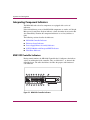
Operation and Management
2
This chapter describes the operational tasks of managing the MSA1000.
Included sections:
■
Connecting the Power, page 38
■
Applying Power, page 39
■
Interpreting Component Indicators, page 40
■
Replacing Components, page 49
■
Adding Additional Storage Enclosures, page 67
MSA1000 Reference Guide
37
Operation and Management
Connecting the Power
The power cord should be approved for use in your country. It must be rated for
the product and for the voltage and current marked on the product's electrical
ratings label. The voltage and current rating of the cord should be greater than the
voltage and current rating marked on the product. In addition, the diameter of the
wire must be a minimum of 1.02 mm² or 18 AWG. If you are using 18 AWG, your
maximum length may be up to 12 feet.
A power cord should be routed so that it is not likely to be walked on or pinched
by items placed upon it or against it. Particular attention should be paid to the
plug, electrical outlet, and the point where the cord exits from the product.
After all hardware components are installed and the unit is in place, the power can
be connected.
WARNING: To reduce the risk of electric shock or damage to the equipment:
■ Do not disable the power cord’s grounding plug. The grounding plug is an
important safety feature.
■ Plug the power cord into a grounded (earthed) electrical outlet that is easily
accessible at all times.
■ Disconnect power from the storage system by unplugging all power cords
from either the electrical outlet or storage system.
1. Plug the AC power cord into a grounded outlet.
2. Plug the AC power cord into the MSA1000.
The power supply automatically senses the input voltage. It is not necessary to
select the correct main voltage.
3. Plug the second AC power cord into the redundant power supply.
4. Plug the second AC power cord into a grounded outlet nearby.
38
MSA1000 Reference Guide
Operation and Management
Applying Power
Before applying power to the MSA1000, all components of the storage system
must be installed and connected to the supported interconnect options. Hard
drives should be installed in the MSA1000 so that they can be identified and
configured at power up.
The MSA1000 components should be powered up in the following sequence:
1. Storage Expansion Enclosures
2. MSA1000
Power on the MSA1000 using the switch located in the far-right lower area of
the front panel of the MSA1000. After powering on, wait until the message
“MSA1000 Startup Complete” appears on your display. This process may
take up to two minutes.
3. Interconnect Devices
4. Server(s)
MSA1000 Reference Guide
39
Operation and Management
Interpreting Component Indicators
The MSA1000 and each of its components are equipped with a series of
indicators.
If the fault indicators on any of the MSA1000 components are amber, or if Insight
Manager or System Even Analyzer indicates a fault, determine the reason for this
alert immediately. Examine the component indicators to see if any indicates a
fault.
The following sections describe the indicators:
■
MSA1000 Controller Indicators
■
Enclosure Status Indicators
■
Power Supply/Blower Assembly Indicators
■
SCSI I/O Module with Integrated EMU Indicators
■
Hard Drive Indicators
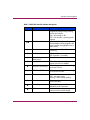
MSA1000 Controller Indicators
During normal runtime, the MSA1000 Controller has 18 indicators that indicate
activity or malfunction of the controller. They are labeled 0-17, as shown in the
following figure. The table that follows describes the purpose and function of
each indicator.
15
14
13
12
11
10
9
8
17
7
6
5
4
3
2
1
0
16
Figure 10: MSA1000 Controller indicators
40
MSA1000 Reference Guide
Operation and Management
Table 5: MSA1000 Controller Indicator Descriptions
Indicator
Function
Description
0-2
Busy status
These three LEDs are used to
progressively represent the processing
load on the controller.
ON = the controller is idle.
OFF = the controller is operating at full
capacity.
3-7
Fibre Channel ID
Indicates the 5-bit Arbitrated Loop
Physical Address (ALPA) assigned to this
array controller (not applicable when in
fabric mode).
8
Idle Heartbeat
Indicates the controller is idle and
functioning.
9
Active/Standby
ON=Controller is active.
OFF=Controller is in standby.
-
Direct Memory Access
(DMA) active
ON = DMA transfers are active.
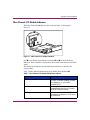
q
Logical I/O active
ON = Currently processing logical
requests from the Host Adapter.
w
SCSI Port A (SCSI Bus 0)
ON = Indicates requests are outstanding
on the first SCSI bus.
e
SCSI Port B (SCSI Bus 1)
ON = Indicates requests are outstanding
on the second SCSI bus.
r
Cache Activity
ON = Cache active.
OFF = No cache activity.
Blinking = Cache transfer pending.
t
Drive failure
ON = A configured hard drive has
failed in the array.
@
Redundancy Active
Green indicates two controllers are in a
redundant mode of operation.
A
Fault
Amber indicates an error message has
been sent to the controller display.
MSA1000 Reference Guide
41
Operation and Management
Enclosure Status Indicators
The front panel indicators are found on the MSA1000, as illustrated in Figure 11.
1
2
3
Figure 11: Enclosure status indicators
WARNING: The system power in the MSA1000 does not shut off completely
with the power switch. STANDBY removes power from most of the electronics
and the drives, but portions of the power supply and some internal circuitry
remain active. To remove the power completely, disconnect all power cords
from the equipment.
Number
1
2
3
42
Indicator
EMU
Power
Fault
Condition
Meaning
Blinking Green
EMU is operating normally.
Off or On without
blinking
EMU is not operating
normally.
Green
System power ON.
Off
System in STANDBY or
system power has been
removed.
Amber
Fault detected in one or
more subsystems.
Off
No faults detected.
MSA1000 Reference Guide
Operation and Management
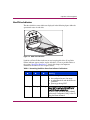
Power Supply/Blower Assembly Indicators
The green indicators on the power supply/blower assembly are on when both the
power supply and the blower are operational. When a power supply or blower
fault occurs, the power supply indicators go off. If the power supply indicators are
off, AC power is not present or there is a complete power supply failure.
The power supply-mounted blowers cool the enclosure by circulating air through
the enclosure. The rate at which air moves (the airflow) determines the amount of
cooling. This airflow is a function of blower speed (rpm). These blowers, under
the control of the Environmental Monitoring Unit (EMU) or the associated power
supply, can operate at multiple speeds. This ensures that when the enclosure
temperature changes, the blowers can automatically adjust the airflow.
If one blower operates too slowly or completely shuts off, the other blower will
begin to operate at a higher speed. At the same time, the error condition is
reported to LCD panel on the front of the controller.
Figure 12: Power supply/blower assembly indicators
MSA1000 Reference Guide
43
Operation and Management
SCSI I/O Module with Integrated EMU Indicators
The SCSI I/O Module has three indicators. The following figure and table
describe their locations and meanings.
1
2
3
Figure 13: SCSI I/O Module with Integrated EMU
Number
1
2
3
44
Indicator
Condition
Meaning
SCSI I/O Module
Power
Solid green
Power on
Off
Power off/Fault
SCSI Host Port A
Green/Flashing
On/Activity
Off
Off
Green/Flashing
On/Activity
Off
Off
SCSI Host Port B
MSA1000 Reference Guide
Operation and Management
Hard Drive Indicators
The three disk drive status indicators displayed in the following figure define the
operational status of each drive.
1
2
3
Figure 14: Hard drive indicators
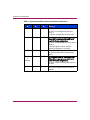
Look for red Drive Failure indicators on any hot-pluggable drive. If any Drive
Failure indicator appears amber, replace that drive as soon as possible. Refer to
the section “Replacing Hard Drives,” later in this chapter, for important
information on when it is safe to replace drives.
Table 6: Determining Hard Drive Status from Indicator Combinations
Activity
1
Online
2
Fault
3
On
Off
Off
Meaning
The drive is being accessed, but it is:
■
■
■
Flashing
MSA1000 Reference Guide
Flashing
Flashing
Not configured as part of an array.
A replacement drive and rebuild has not
yet started.
Spinning up during POST.
Do not remove the drive. Removing a drive
during this process can cause data loss in
non-fault-tolerant configurations.
The drive is part of an array being selected
by the Array Configuration Utility, or the CLI
using the locate command.
45
Operation and Management
Table 6: Determining Hard Drive Status from Indicator Combinations
46
Activity
1
Online
2
Fault
3
Off
Off
Off
OK to replace the drive online if:
The drive is not configured as part of an
array, or
The drive is configured as an online spare.
On
Flashing
Off
Do not remove the drive. Removing a drive
during this process can cause data loss in
non-fault-tolerant configurations
The drive is a replacement drive and is being
rebuilt or
If all online lights in a drive array are
blinking, an expansion is occurring.
Off
Off
On
OK to replace the drive online.
The drive has failed and has been placed
offline.
Off, On,
or
flashing
On
Off
Do not remove the drive. Removing a drive
during this process can cause data loss in
non-fault-tolerant configurations.
The drive is online and configured as part of
an array.
On or Off
On or Off
Flashing
Meaning
A predictive failure alert has been received
for this drive. Replace the drive as soon as
possible.
MSA1000 Reference Guide
Operation and Management
Fibre Channel I/O Module Indicators
The Fibre Channel I/O Module has three indicator lights, as illustrated in
Figure 15.
2
1
3
Figure 15: Fibre Channel I/O module indicators
Item 1 is the Global Status indicator and items 2 and 3 are the Link Status
Indicators. If the controller is not installed, the two link status indicators will flash
amber.
The Global Status indicator and the Link Status indicators are described in
separate tables.
Table 7 defines different illuminations of the Global Status Indicator 1.
Table 7: Fibre Channel I/O Module Global Status Indicator
Condition
Description
Off
Power not applied to Fibre I/O module,
no Fibre I/O module installed, controller
not plugged in, or unsuccessful
controller POST.
Solid Green
Power applied and connection
established between Fibre I/O module
and Fibre Channel controller.
Flashing Amber
Power is applied but the MSA1000
Controller is not present or a link cannot
be established.
MSA1000 Reference Guide
47
Operation and Management
Table 8 defines the illuminations of the Link Status Indicators 2 and 3.
Table 8: Fibre Channel I/O Module Link Status Indicators
1-Gb Indicator
1
48
2-Gb Indicator
2
Description
Off
Off
A link has not been established since the
application of power, initiation of reset,
hot-plug of Fibre I/O module, the
removal of transceiver or the hot-plug of
the transceiver.
Green
Off
A 1-Gb link is active and the status is
good.
Flashing Amber
Off
A 1-Gb link was established but is now
inactive.
Off
Green
A 2-Gb link is active and the status is
good.
Off
Flashing Amber
A 2-Gb link was established but is now
inactive.
Flashing Amber
Flashing Amber
The controller was removed or a link
cannot be established.
MSA1000 Reference Guide
Operation and Management
Replacing Components
Caution: It is important to follow these instructions when replacing
components in the MSA1000. If the procedure is done improperly, it is
possible to lose data or damage equipment. Refer to Appendix B,
“Electrostatic Discharge,” for important information on using the proper
procedures.
This section includes:
■
Replacing a Variable Speed Blower
■
Replacing a Power Supply
■
Replacing Hard Drives
■
Replacing the 2-Gb Small Form Factor Pluggable (SFP) Transceiver
Note: To take advantage of all features, check the MSA1000 website at
www.hp.com/go/msa1000, to make sure you have the latest firmware.
Replacing a Variable Speed Blower
WARNING: The blower blades rotate at a high speed and do not stop
immediately when power is removed. Allow time for the blades to stop
rotating. Avoid touching the rotating blades when removing the blower.
Caution: Removing a power supply significantly changes the airflow within
the MSA1000. After removal of a power supply, the remaining supply starts a
timer that will shut the system down in five minutes, if the removed power
supply is not replaced.
Note: The power supply design ensures that removing a blower does not change the
airflow within the enclosure. However, do not remove a blower until the replacement
blower is available.
MSA1000 Reference Guide
49
Operation and Management
To remove the blower from the power supply:
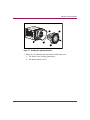
1. Push in on the two port wine-colored blower tabs 1 while pulling on the
blower element 2. See Figure 16 for an illustration.
2
1
1
Figure 16: Replacing the blower
Caution: Pressing on the center section of the blower can damage the blades.
To prevent this, press only on the outer edge of the blower.
2. Align the new blower’s guidepost 2 with the power supply connector 1.
Slide the replacement blower into the blower base 4 until the tabs 3 snap into
place.
See Figure 17 for an illustration.
50
MSA1000 Reference Guide
Operation and Management
4
1
3
2
3
Figure 17: Installing the replacement blower
3. Make sure the following operational blower indications occur:
a. The blower starts operating immediately.
b. The blower indicator is On.
MSA1000 Reference Guide
51
Operation and Management
Replacing a Power Supply
Caution: Removing a power supply significantly changes the airflow within
the enclosure. The system could shut down because of overheating unless the
power supply is replaced within five minutes.
Note: Replacement power supply assemblies do not include a variable speed blower.
You must remove the operational blower from the defective power supply and install the
blower on the new supply.
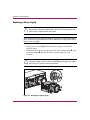
1. Disengage the cord lock 1 and disconnect the AC power cord from the
defective supply.
2. While lifting up on the power supply port wine-colored module latch 2, grasp
the blower element 3 and pull the defective power supply out of the
enclosure.
Caution: When removing the left power supply, move the cord lock on the
right power supply out of the way to avoid dislodging the right power supply
and causing your system to become overheated.
2
1
3
2
Figure 18: Removing the power supply
52
MSA1000 Reference Guide
Operation and Management
3. Install the replacement power supply by lifting up on the power supply
module latch 1 and pushing in on the blower base 2 until the assembly is
fully seated in the enclosure.
1
2
Figure 19: Installing the replacement power supply
4. Re-connect the AC power cord to the replacement power supply and engage
the cord lock.
MSA1000 Reference Guide
53
Operation and Management
Replacing a SCSI I/O Module
Note: The SCSI I/O Module with an integrated EMU is not hot-pluggable. Before
replacing the module all I/O from the servers must be stopped and the MSA1000 must
be powered off.
1. Disconnect the SCSI cables from the SCSI I/O module.
1
2
Figure 20: Revoving the SCSI I/O module
2. Press down the port wine-colored release latch 1.
3. Slide the SCSI I/O module 2 straight out.
54
MSA1000 Reference Guide
Operation and Management
2
1
Figure 21: Installing the SCSI I/O module
4. Slide the new SCSI I/O module 1 straight in and make sure it is fully seated.
5. Secure the release latch 2.
6. Reconnect the SCSI cables.
7. Power up the MSA1000 and verify connectivity.
MSA1000 Reference Guide
55
Operation and Management
Replacing Hard Drives
Caution: To replace a hot-pluggable drive, it is important to follow the
guidelines in this section. Failure to do so could result in data loss and could
void your warranty.
Drive failure is indicated by an amber Drive Failure indicator.
RAID 0 is not a fault-tolerant configuration. Never remove a drive from a RAID 0
array unless it has failed. If you are using a RAID 0 configuration, removing an
operating drive is not allowed and will result in loss of data.
To remove a working drive without losing data, the entire array must be backed
up, the drive must be replaced, and the entire array must be restored. Backing up a
single drive and replacing it will not restore the array.
There are some instances in which you may replace a drive in RAID 1, RAID 5,
and Advanced Data Guarding configurations. Table 6, located in the earlier
section “Hard Drive Indicators,” illustrates the conditions when you may or may
not remove a drive in a fault-tolerant system.
Follow these guidelines when replacing drives:
■
Never remove more than one drive at a time (two drives if you are using
Advanced Data Guarding).
When you replace a drive, the controller uses data from the other drives in the
array to reconstruct data on the replacement drive. If you remove more than
one drive, a complete data set is not available to reconstruct data on the
replacement drive(s) and permanent data loss could occur.
■
Never remove a working drive.
The amber Drive Failure indicator on the drive carrier indicates a drive that
has been failed by the controller. Permanent data loss will occur if a working
drive is removed while replacing a failed drive.
■
Never remove one drive in an array while another drive in the array is
being rebuilt.
A drive’s Online indicators flash green (once per second) while it is being
rebuilt. A replaced drive is rebuilt from data stored on the other drives.
■
56
If the system has an online spare drive, wait for it to complete rebuilding
before replacing the failed drive.
MSA1000 Reference Guide
Operation and Management
When a drive fails, the online spare becomes active and begins rebuilding as a
replacement drive. After the online spare has completed Automatic Data
Recovery (the Online indicators will be continuously lit), replace the failed
drive with a new replacement drive. Do not replace the failed drive with the
online spare. The system will automatically rebuild the replacement drive and
reset the spare drive to an available state.
■
If you replace a drive while the system is off, it may be necessary to rebuild
the replaced drive.
■
Up to one half of the drives in a RAID 1+0 array can be replaced at the same
time.
MSA1000 Reference Guide
57
Operation and Management
To replace a drive:
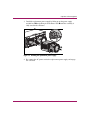
1. Verify the Activity LED indicator is OFF.
Hard Drive LEDs are illustrated in Figure 14.
2. Press the ejector 1 and pivot the lever 2 to full open position.
3. Pull the drive partially out of the bay and allow time for the disk to stop
rotating.
4. Pull the drive completely out of the storage system drive bay 3.
3
2
1
Figure 22: Opening the drive tray latches
5. On the new hard drive, press the ejector and pivot the lever to a full open
position.
58
MSA1000 Reference Guide
Operation and Management
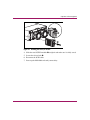
6. Insert the new drive into the same bay as the drive just removed, sliding it in
as far as it will go 1.
Make sure the ejector lever 2 is in the full open position to ensure a correct
latch.
1
2
Figure 23: Inserting the new drive
7. Close the ejector lever against the front of the drive. The locking hinge must
be engaged behind the front panel of the unit.
8. Insert the drive completely to ensure that the drive is firmly engaged and that
the ejector lever is latched.
Caution: Data can be lost if the drive is not firmly seated.
The drive tray indicators light one at a time and then turn off together to indicate
that the system has recognized the new drive. In fault-tolerant configurations,
allow the replacement drive to be reconstructed automatically with data from the
other drives. While reconstruction is in progress, the online indicators flash.
MSA1000 Reference Guide
59
Operation and Management
Replacing the Fibre Channel I/O Module
To remove the Fibre Channel I/O Module:
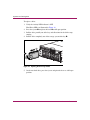
1. Slide the wine-colored release latch 1 to the right.
2. Slide the Fibre Channel I/O module 2 straight out.
1
2
Figure 24: Removing the Fibre Channel I/O module
60
MSA1000 Reference Guide
Operation and Management
To install the Fibre Channel I/O Module:
1. Slide the Fibre Channel I/O module straight in.
Note: When the Fibre Channel I/O module slides into place the release latch should
automatically close.
2. Make sure the port wine-colored release latch is secure.
Figure 25: Installing the Fibre Channel I/O module
MSA1000 Reference Guide
61
Operation and Management
Replacing the MSA SAN Switch 2/8
To remove the MSA SAN Switch 2/8e:
1. Slide the wine-colored release latch 1 to the right.
2. Slide the MSA SAN Switch 2/8 2 straight out.
1
2
Figure 26: Removing the MSA SAN Switch 2/8
62
MSA1000 Reference Guide
Operation and Management
To install the MSA SAN Switch 2/8:
1. Slide the MSA SAN Switch 2/8 straight in.
Note: When the MSA SAN Switch 2/8 slides into place the release latch should
automatically close.
2. Make sure the port wine-colored release latch is secure.
Figure 27: Installing the MSA SAN Switch 2/8
MSA1000 Reference Guide
63
Operation and Management
Replacing the MSA Hub 2/3
To remove the MSA Hub 2/3:
1. Slide the wine-colored release latch 1 to the right.
2. Slide the MSA Hub 2/3 2 straight out.
1
2
Figure 28: Removing the MSA Hub 2/3
64
MSA1000 Reference Guide
Operation and Management
To install the MSA Hub 2/3:
1. Slide the MSA Hub 2/3 straight in.
Note: When the MSA Hub 2/3 slides into place the release latch should automatically
close.
2. Make sure the port wine-colored release latch is secure.
Figure 29: Installing the MSA Hub 2/3
MSA1000 Reference Guide
65
Operation and Management
Replacing the 2-Gb Small Form Factor Pluggable (SFP) Transceiver
If a transceiver fails, follow this procedure to replace it. It is not necessary to
power down the system.
WARNING: To reduce the risk of injury from laser radiation or damage to the
equipment, observe the following precautions:
■ Do not open any panels, operate controls, make adjustments, or perform
procedures to a laser device other than those specified herein.
■ Do not stare into laser beam when panels are open.
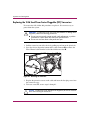
1. Pull the transceiver out of the device by pulling up and out on the plastic tab.
2. Press the release clip on the bottom of the cable connector 2 to remove the
Fibre Channel cable from the back of the failed transceiver 3.
1
3
2
Figure 30: Removing the failed SFP
3. Replace the protective covers on the cable and insert the dust plug covers into
the transceiver cage.
4. To insert a new SFP, reverse steps 1 through 3.
Caution: To reduce the risk of damage to the equipment, do not use excessive
force when inserting the transceiver.
66
MSA1000 Reference Guide
Operation and Management
Adding Additional Storage Enclosures
This section describes how to add single bus enclosures or dual bus enclosures to
the MSA1000 storage subsystem. It does not cover adding disk drives to the
MSA1000 or to disk enclosures already attached.
Older storage systems with high voltage SCSI connections cannot be attached to
the MSA1000.
Methods of expanding:
■
Migrating existing storage enclosures from an HP Smart Array to the
MSA1000
■
Adding a new storage enclosure
Note: Refer to the MSA1000 website: www.hp.com/go/msa1000, for the most
up-to-date information on supported enclosures.
.
Migrating Existing Storage Enclosures
Even though extensive design and testing has been performed, when migrating
enclosures it is recommended to perform a back up of your data before you
migrate the enclosure to the MSA1000. Perform disk administration steps to
defragment your file systems or volumes prior to performing the backup, which
allows more efficient use of your backup media and reduces the time for backup.
The following steps provide an overview of migrating a new enclosure to an
existing MSA1000:
1. After backing up the storage systems, schedule a convenient time to shut
down the servers/applications so the storage subsystem can be turned off.
2. Shut down both the system(s) from which you are removing the disk
enclosure(s) and the target system to which you are planning to
migrate/consolidate your storage.
3. Disconnect the SCSI cables from your host bus adapter and storage enclosure.
If necessary, move the disk enclosure(s) to the new server rack using the
existing rack mount hardware.
4. Attach SCSI cables to the MSA1000 expansion SCSI connectors.
See Figure 31 for an illustration of the SCSI connectors.
MSA1000 Reference Guide
67
Operation and Management
1
2
Figure 31: MSA1000 expansion SCSI connectors
Item
Description
1
SCSI Port A (SCSI Bus 2)
2
SCSI Port B (SCSI Bus 3)
5. Attach the SCSI cables to the expansion disk enclosures. Attach the power
cords to the power supplies at the rear of the enclosures. Power on each
external disk enclosure.
6. Power on the MSA1000 system using the power switch in front of the system.
Turn on the host server(s) and allow it to boot.
7. Use the ACU or the CLI to verify current configuration is maintained and new
volumes are identified. If the migrated volumes are not identified, shut down
the system and verify connections.
8. Run the operating-system-specific disk administration utility to add logical
drive volumes. Some systems may require rebooting to use the new volumes.
For detailed information on drive migrations, go to the storage page on the
following website: www.hp.com/go/msa1000.
68
MSA1000 Reference Guide
Operation and Management
Adding a New Storage Enclosure
New storage enclosures with unconfigured drives are hot-pluggable. The
following steps for attaching and installing a new enclosure to an existing
MSA1000:
1. Install the new storage enclosure in the rack.
Refer to the documentation shipped with the rack for instructions.
2. Attach SCSI cables to the MSA1000 expansion SCSI connectors and the
storage enclosure.
See Figure 31 for an illustration of the SCSI connectors.
3. Attach the power cords to the power supplies at the rear of the enclosure.
4. Configure new storage with the ACU or the CLI.
Verify that additional storage is identified through the utility.
Refer to the ACU or CLI chapters in this manual for further information.
5. Run the operating-system-specific disk administration utility to add logical
drive volumes.
6. If necessary for your operating system, reboot server to use the new storage.
MSA1000 Reference Guide
69
Operation and Management
70
MSA1000 Reference Guide
Regulatory Compliance
Notices
A
Regulatory Compliance Identification Numbers
For the purpose of regulatory compliance certifications and identification, your
HP StorageWorks MSA1000 is assigned an HP Series number. The Storage
System Series number can be found on the product label, along with the required
approval markings and information. The product label is located on the right side
of the chassis. When requesting certification information for this product, always
refer to this Series number. This Series number should not be confused with the
marketing name or model number for your Storage System.
Federal Communications Commission Notice
This equipment has been tested and found to comply with the limits for a Class A
digital device, pursuant to Part 15 of the FCC Rules. These limits are designed to
provide reasonable protection against harmful interference when the equipment is
operated in a commercial environment. This equipment generates, uses, and can
radiate radio frequency energy and, if not installed and used in accordance with
the instructions, may cause harmful interference to radio communications.
Operation of this equipment in a residential area is likely to cause harmful
interference, in which case the user will be required to correct the interference at
personal expense.
Modifications
The FCC requires the user to be notified that any changes or modifications made
to this device that are not expressly approved by Hewlett-Packard Company may
void the user's authority to operate the equipment.
Cables
Connections to this device must be made with shielded cables with metallic
RFI/EMI connector hoods in order to comply with FCC Rules and Regulations.
MSA1000 Reference Guide
71
Regulatory Compliance Notices
Canadian Notice (Avis Canadien)
This Class A digital apparatus meets all requirements of the Canadian
Interference-Causing Equipment Regulations.
Cet appareil numérique de la classe A respecte toutes les exigences du Règlement
sur le matériel brouilleur du Canada.
European Union Notice
Products with the CE Marking comply with both the EMC Directive
(89/336/EEC) and the Low Voltage Directive (73/23/EEC) issued by the
Commission of the European Community.
Compliance with these directives implies conformity to the following European
Norms (in brackets are the equivalent international standards):
■
EN55022 (CISPR 22) - Electromagnetic Interference
■
EN50082-1 (IEC801-2, IEC801-3, IEC801-4) - Electromagnetic Immunity
■
EN60950 (IEC950) - Product Safety
Japanese Notice
72
MSA1000 Reference Guide
Regulatory Compliance Notices
BSMI Notice
Laser Compliance
The SFP Module contains a laser diode of either gallium aluminum arsenide
(GaALAs) emitting in the wavelength range of 770-860 nm, or indium gallium
arsenide phosphide (InGaAsP) emitting in the wavelength range of 1270-1355
nm. All HP systems equipped with a laser device comply with safety standards,
including International Electrotechnical Commission (IEC) 825. With specific
regard to the laser, the equipment complies with laser product performance
standards set by government agencies as a Class 1 laser product. The product does
not emit hazardous laser radiation.
WARNING: Use of controls or adjustments or performance of procedures
other than those specified herein or in the laser product’s installation guide
may result in hazardous radiation exposure. To reduce the risk of exposure to
hazardous radiation:
■ Do not try to open the unit enclosure. There are no user-serviceable
components inside.
■ Do not operate controls, make adjustments, or perform procedures to the
laser device other than those specified herein.
■ Allow only HP Authorized Service technicians to repair the unit.
The Center for Devices and Radiological Health (CDRH) of the U.S. Food and
Drug Administration implemented regulations for laser products on August 2,
1976. These regulations apply to laser products manufactured from August 1,
1976. Compliance is mandatory for products marketed in the United States. This
device is classified as a Class 1 laser product as defined by IEC 825.
MSA1000 Reference Guide
73
Regulatory Compliance Notices
This indicates that the product is classified as a
CLASS 1 LASER PRODUCT.
Battery Replacement Notice
Your MSA1000 is provided with Nickel Metal Hydride batteries. There is a
danger of explosion and risk of personal injury if the array is incorrectly replaced
or mistreated. Replace only with the HP spare designated for this product. For
more information about battery replacement or proper disposal, contact your HP
Authorized Reseller or your Authorized Service Provider.
WARNING: Your Accelerator Array contains Nickel Metal Hydride batteries.
There is risk of fire and burns if the battery pack is not handled properly. To
reduce the risk of personal injury:
■ Do not attempt to recharge the battery.
■ Do not expose to temperatures higher than 60 C.
■ Do not disassemble, crush, puncture, short external contacts, or dispose of
in fire or water.
■ Replace only with HP spare designated for this product.
Caution: Batteries, battery packs, and accumulators should not be disposed of
together with the general household waste. In order to forward them to
recycling or proper disposal, please use the public collection system or return
them to HP, your authorized HP Partners, or their agents.
74
MSA1000 Reference Guide
Electrostatic Discharge
B
To prevent damage to the system, be aware of the precautions you need to follow
when setting up the system or handling parts. A discharge of static electricity from
a finger or other conductor may damage system boards or other static-sensitive
devices. This type of damage may reduce the life expectancy of the device.
To prevent electrostatic damage, observe the following precautions:
■
Avoid hand contact by transporting and storing products in static-safe
containers.
■
Keep electrostatic-sensitive parts in their containers until they arrive at
static-free workstations.
■
Place parts on a grounded surface before removing them from their
containers.
■
Avoid touching pins, leads, or circuitry.
■
Always make sure you are properly grounded when touching a static-sensitive
component or assembly.
MSA1000 Reference Guide
75
Electrostatic Discharge
Grounding Methods
There are several methods for grounding. Use one or more of the following
methods when handling or installing electrostatic-sensitive parts:
■
Use a wrist strap connected by a ground cord to a grounded workstation or
computer chassis. Wrist straps are flexible straps with a minimum of 1
megohm ± 10 percent resistance in the ground cords. To provide proper
ground, wear the strap snug against the skin.
■
Use heel straps, toe straps, or boot straps at standing workstations. Wear the
straps on both feet when standing on conductive floors or dissipating floor
mats.
■
Use conductive field service tools.
■
Use a portable field service kit with a folding static-dissipating work mat.
If you do not have any of the suggested equipment for proper grounding, have an
Authorized HP Reseller install the part.
Note: For more information on static electricity, or assistance with product installation,
contact your HP Authorized Reseller.
76
MSA1000 Reference Guide
C
Specifications
This appendix provides operating and physical specifications for the MSA1000.
Table 9: MSA1000 Specifications
Parameter
English
Metric
Dimensions
Height
Depth
Width
6.9 in
20.5 in
19.0 in
17.5 cm
52.1 cm
48.3 cm
68.8 lb
31.27 kg
Input Power Requirements
Rated Input Voltage
Rated Input Frequency
Rated Input Current
Input Power (max)
100 to 240 VAC
50 - 60 Hz
7.35 A Max
641 W*
100 to 240 VAC
50 - 60 Hz
7.35 A Max
641 W*
Heat Dissipation (max)
2187 Btu/hr*
2187 Btu/hr*
Temperature Range
Operating
50° to 95° F
10° to 35° C (derated
1°C per 1000 feet of
elevation to 10000
ft.)
Weight
No drives installed,
single power supply
Shipping
Relative Humidity
(non-condensing)
Operating
Non-operating
MSA1000 Reference Guide
-22° to 122° F
10% to 90%
up to 95%
-30° to 50° C
10% to 90%
up to 95%
77
Specifications
Table 9: MSA1000 Specifications
Parameter
English
Metric
Maximum Wet Bulb
Temperature
Long term storage
Short term storage
84.2°F
86°F
29°C
30°C
*Input Power and Heat Dissipation specifications are maximum values and apply to
worst-case conditions at full rated power supply load. The power/heat dissipation
for your installation will vary depending on the equipment configuration.
78
MSA1000 Reference Guide
Recovering from Hard Drive
Failure
D
Caution: Back up all data before removing drives or changing configurations.
Failure to do so could result in permanent loss of data. Before moving drives
and arrays, run the Array Configuration Utility.
The purpose of fault-tolerant configurations on the MSA1000 Controller is to
protect against data loss due to drive failure. Although the MSA1000 Controller
firmware is designed to protect against normal drive failure, it is imperative that
you perform the correct actions to recover from a drive failure without
inadvertently inducing any additional drive failures. Multiple drive failures in the
same array generally result in data loss (exceptions include failures following
activation of a spare drive, and failure of drives in a mirroring configuration that
are not mirrored to one another or Advanced Data Guarding configuration).
Drives may be either Ultra2, Ultra3, or Ultra320 Pluggable Universal Hard Disk
Drives. Drives that are to be grouped in the same array should be of the same
capacity. The excess capacity of a larger drive cannot be used by the array and will
be wasted.
A list of supported hard drives is available at www.hp.com/go/msa1000.
MSA1000 Reference Guide
79
Recovering from Hard Drive Failure
Hard Drive Failure
When a hard drive fails, all logical drives that are in the same array will be
affected. Each logical drive in an array may be using a different fault tolerance
method, so each logical drive can be affected differently.
■
RAID 0 configurations cannot tolerate drive failure. If any physical drive in
the array fails, all non-fault-tolerant (RAID 0) logical drives in the same array
will also be failed.
■
RAID 1 and RAID 1+0 configurations can tolerate multiple drive failures, as
long as none of the failed drives are mirrored to one another.
■
RAID 5 configurations can tolerate one drive failure.
■
RAID ADG configurations can tolerate simultaneous failure of two drives in
the array.
■
Spare hard drive configuration guidelines include:
— A spare must be assigned to each individual array separately.
— A spare must be greater than or equal to any drive that it is intended to
replace.
— The same spare can be assigned to multiple Controllers as long as its
capacity is greater than or equal to any drives in that array.
Note: Only remove hard drives that have been failed or marked as degraded by the
controller.
If more hard drives are failed than the fault-tolerance method allows, fault
tolerance is “compromised” and the logical drive is failed. In this case, all requests
from the operating system will be rejected with “unrecoverable” errors. The
section on Compromised Fault Tolerance later in this chapter discusses possible
ways to recover from this situation.
80
MSA1000 Reference Guide
Recovering from Hard Drive Failure
Recognizing Drive Failure
The indicators on the front of each hard drive are visible through the front of the
external storage unit. When a drive is configured as a part of an array and attached
to a powered-on controller, the status of the drive can be determined from the
illumination pattern of these indicators.
Figure 32 and its associated table define the three indicators on the hard drive.
For detailed descriptions of the various indicator combinations, refer to the “Hard
Drives” section in the “Operation and Management” chapter.
1
2
3
Figure 32: Hard drive indicators
Item
MSA1000 Reference Guide
Description
1
Environmental Monitoring Unit (EMU)
2
Power
3
Fault
81
Recovering from Hard Drive Failure
There are several other ways to recognize that a hard drive has failed:
■
The amber status indicator will light up on the front of an HP storage system
if failed drives are inside. (Other problems such as fan failure, redundant
power supply or over-temperature conditions will also cause this indicator to
light up.)
■
A front panel display message will list failed drives whenever the system is
restarted, as long as the controller detects one or more good drives.
■
Insight Manager can detect failed drives locally or remotely across a network.
Additional information on troubleshooting hard drive problems can be found in
the Server Troubleshooting Guide.
Compromised Fault Tolerance
Compromised fault tolerance commonly occurs when more physical drives have
failed than the fault tolerance method can endure. In this case, the logical volume
will be failed and error messages will be returned to the host. Data loss is likely to
occur.
An example of this situation would be a RAID 5 logical drive, where one drive on
an array fails while another drive in the same array is still being rebuilt.
Fault tolerance may also be compromised due to non-drive problems, such as a
faulty cable, faulty storage system power supply, or a user accidentally turning off
an external storage system while the host system power was on. In such cases, the
physical drives do not need to be replaced. However, data loss may still have
occurred, especially if the system was busy at the time the problem happened.
82
MSA1000 Reference Guide
Recovering from Hard Drive Failure
Procedure to Attempt Recovery
Inserting replacement drives when fault tolerance has been compromised will not
improve the condition of the logical volume. Instead, if unrecoverable error
messages display on your screen, try the following procedure to recover data.
1. Check for loose, dirty, broken, or bent cabling and connectors on all devices.
2. Turn the entire system off. Remove and then reinsert all hard drives and
controllers.
Caution: Data can be lost if the drives are not firmly reseated.
3. Turn the system on. In some cases, a marginal drive might work again for
long enough to allow you to make copies of important files.
4. If a #02 or #04 is displayed on the front panel, press the right push button to
re-enable the logical volumes. Remember that data loss has probably occurred
and any data on the logical volume is suspect.
5. Make copies of important data, if possible.
6. Replace any failed drives.
7. After the failed drives have been replaced, the fault tolerance may again be
compromised. If so, cycle the power again, and if the #02 or #04 front-panel
display message is displayed, press the right push button. This will re-enable
the logical drive(s).
To minimize the risk of data loss from compromised fault tolerance, make
frequent backups of all logical volumes.
MSA1000 Reference Guide
83
Recovering from Hard Drive Failure
Automatic Data Recovery
Automatic Data Recovery is an automatic background process that rebuilds data
onto a spare or replacement drive when another drive in the array fails. The hard
drive that is being rebuilt blinks once per second.
If a drive in a fault-tolerant configuration is replaced while the system power is
off, a front-panel display message will be displayed during the next system
startup. Automatic Data Recovery will be started.
When Automatic Data Recovery is completed, the online indicator of the
replacement drive will stop blinking and begin to glow steadily.
In general, approximately 15 minutes is required to rebuild each gigabyte. The
actual rebuild time depends upon:
■
The rebuild priority level (high or low) of the logical drive
■
The amount of I/O activity occurring during the rebuild operation
■
The disk drive speed
■
The number of drives in the array (for RAID 5 and RAID ADG)
Failure of Automatic Data Recovery
If the online indicator of the replacement drive stops blinking during Automatic
Data Recovery, there are two possible causes:
■
The replacement drive is failed (amber failure indicator illuminated or other
indicators go out) and is producing unrecoverable disk errors. Remove and
replace the failed replacement drive.
■
The Automatic Data Recovery process may have abnormally terminated, due
to a non-correctable read error (such as a SCSI bus signal integrity problem)
from another physical drive during the recovery process.
Reboot the system and retry Automatic Data Recovery. If this does not work,
backup all data on the system, do a surface analysis (using User Diagnostics), and
restore the data from backup.
84
MSA1000 Reference Guide
Recovering from Hard Drive Failure
Replacing a Drive
Replacement drives must have a capacity no less than that of the smallest drive in
the array. Drives of insufficient capacity will be failed immediately by the
controller before Automatic Data Recovery can begin.
Caution: Sometimes, a drive that has previously been failed by the controller
may seem to be operational after the system is power-cycled, or (for a
hot-pluggable drive) after the drive has been removed and reinserted.
However, continued use of such marginal drives may eventually result in data
loss. Replace the marginal drive as soon as possible.
A hot-pluggable drive can be removed and replaced at any time, whether the host
or storage system power is on or off. System performance and fault tolerance will
both be affected until the rebuild operation is completed. This can take several
hours, even if the system is not busy while the rebuild is in progress.
When a hot-pluggable drive is inserted, all disk activity on the array is paused
while the new drive is spinning up (usually 10 seconds or so). If the drive is
inserted while power is on, in a fault-tolerant configuration, data recovery onto the
replacement drive will begin automatically (indicated by the blinking online
LED).
Disk drive replacement should be performed as soon as possible. In addition, all
logical volumes on the same array as the drive being replaced should have a
current valid backup.
MSA1000 Reference Guide
85
Recovering from Hard Drive Failure
If another drive in the array should fail while you are rebuilding a previously
failed drive, then fault tolerance has been compromised and all data on the array
will be lost, with the following exceptions:
■
In a mirrored (RAID 1) configuration, failure of a drive that is not mirrored to
any other failed drives.
■
A second drive failure in a RAID ADG configuration.
Take these precautions when removing failed drives to minimize the likelihood of
compromising your logical drive data:
■
Do not remove a degraded drive if any other member of the array is off-line
(the online indicator is off).
■
Do not remove a failed second drive from an array until the first failed or
missing drive has been replaced and the rebuild process is complete. (When
the rebuild is complete, the online indicator on the front of the drive will stop
blinking.) Exceptions include RAID ADG configurations, as any two drives
in the array can be replaced simultaneously.
When a hard drive is replaced, the controller uses fault tolerance data on the
remaining drives in the array to rebuild data (previously on the failed drive) onto
the replacement drive. If more than one drive is removed at a time, the fault
tolerance data is incomplete. The missing data cannot then be reconstructed and is
likely to be permanently lost.
86
MSA1000 Reference Guide
Recovering from Hard Drive Failure
Moving Array Controller Drives and Arrays
Caution: Back up all data before removing drives or changing configurations.
Failure to do so could result in permanent loss of data. Before moving drives
and arrays, run the Array Configuration Utility.
Drives can be moved to other ID positions on the same array controller. You may
also move a complete array from one controller to another, even if the Controllers
are on different servers. Arrays on different Controllers can also be moved to
another controller.
Before moving drives, these conditions must be met:
■
No drives are failed, missing, or degraded.
■
The move will not result in more than 14 physical drives in the MSA1000 or
42 in a single enclosure.
■
No more than 32 logical volumes will be configured for a controller.
■
The array should be in its original configuration with no active spare drives.
■
Capacity expansion is not running.
■
Controller firmware is the latest version (recommended).
Before moving an array from one controller to another, these additional conditions
must be met:
■
All drives in the array must be moved at the same time.
■
Positions of drives on the destination controller should not be changed during
relocation of the array.
When the appropriate conditions are met, follow this procedure:
1. Power OFF the system.
2. Move the drives.
3. Power the system ON.
A #86 front-panel display message should be displayed, indicating that drive
positions were changed and the configuration was updated. If a #121 front-panel
display (no volumes) message is displayed, turn the system OFF immediately to
avoid data loss, and return the drives to their original locations.
You can now check the new drive configuration by running the Array
Configuration Utility.
MSA1000 Reference Guide
87
Recovering from Hard Drive Failure
Expanding and Extending Capacity
Caution: Back up all data before removing drives or changing configurations.
Failure to do so could result in permanent loss of data. Before moving drives
and arrays, run the Array Configuration Utility.
Array Capacity Expansion is the addition of physical drives to an array that has
already been configured. The capacity of these added physical drives may then be
added to an existing logical drive on the array (capacity extension; see the next
paragraph), or it may be configured into a new logical drive.
Logical Drive Capacity Extension is the enlargement of an existing logical drive
after the corresponding array has undergone capacity expansion.
Capacity expansion and extension are carried out using ACU. A data backup and
restoration cycle is not required, even in non-fault-tolerant configurations.
If you are using hot-pluggable drives, expansion can be performed online (that is,
without shutting down the operating system). Online extension can only be
performed if supported by the operating system.
Note: When extending a logical drive under Windows 2000, upgrade the disk to
DYNAMIC before creating a partition on that disk. If the disk already has a partition
when it is upgraded to DYNAMIC, Windows 2000 may not allow logical drive
extension. Refer to the Windows 2000 documentation for details about DYNAMIC and
BASIC disks.
Note: Windows NT 4.0 will only allow four partitions on each logical drive. Additional
drive space created may not be accessible if the four partitions per logical drive limit is
exceeded.
88
MSA1000 Reference Guide
Recovering from Hard Drive Failure
Note: If you are running Windows 2000 with Microsoft Cluster Services (MSCS),
logical drive extensions are not recommended. MSCS requires that disks be configured
as BASIC in logical disk manager. In order to take advantage of logical drive extension,
your drives would have to be configured as DYNAMIC when the volume is initially
created. Because of the differences in requirements for the MSCS and the Logical drive
extension feature, we recommend you do not perform a logical drive extension on a
storage enclosure that is part of a Microsoft Cluster.
The expansion process is illustrated in the figure below where the original array
(containing data) is shown with a dashed border, and the newly added drives are
shown unshaded (they contain no data). The array controller redistributes the
original logical drive over the enlarged array, using the same fault-tolerance
method. The unused capacity on the new (enlarged) array can then be used to
create an additional logical drive, with a different fault tolerance setting if
necessary. Alternatively, the extra capacity can be used to increase the size of the
original logical drive (capacity extension).
+
Figure 33: Array capacity expansion
If you are expanding an array that has several logical drives, data will be
redistributed one logical drive at a time. Newly created logical drives will not
become available until capacity expansion has finished.
MSA1000 Reference Guide
89
Recovering from Hard Drive Failure
90
MSA1000 Reference Guide
Recovery ROM and ROM
Cloning
E
Recovery ROM
Each MSA1000 Controller contains ROM (Read-Only Memory), which holds the
firmware that operates the controller. The Recovery ROM feature stores two
complete firmware images in the ROM: one active image and one backup image.
When the controller is powering up, it checks both firmware images to ensure
they are valid. If either one is not, the valid image will be copied on top of the
invalid image to correct it. This is referred to as auto-flashing. All of this
functionality is done automatically by the controller and does not require any user
intervention.
MSA1000 Reference Guide
91
Recovery ROM and ROM Cloning
ROM Cloning
Note: In order for a MSA1000 to operate in a redundant controller configuration, it
must contain two controllers that are executing the same version of firmware. During
power up (or if an optional controller is hot-plugged while the MSA1000 is already
operating) the firmware versions on both controllers are compared. If they are not the
same, then the ROM Cloning feature will attempt to copy one version of firmware onto
the other controller. After the copy has been completed, the controller that was modified
will be automatically reset. Once the reset controller has powered up the two controllers
should then start redundant operation. All of this functionality is done automatically by
the controllers and does not require any user intervention.
The determination as to which firmware version will be used is based on the
following criteria:
■
If the MSA1000 is being powered up with both controllers inserted, then the
most recent version of firmware will be used regardless of which controller it
resides.
■
If the MSA1000 is already operating and an optional controller is
hot-plugged, then the version of firmware that is on the original
(non-hot-plugged) controller will be used regardless of its version. This
ensures that any host initiated I/O to the controller is not interrupted.
There is the possibility that a specific version of firmware may not be compatible
with certain hardware revisions of a controller. In this scenario, the most recent
firmware version that is compatible with both controllers will be copied to the
controller with the incompatible firmware version. However, if the controller that
is updated is already operating and processing I/O, then it will not be reset. The
MSA1000 will not enter redundant operation and an appropriate message will be
shown on the display. After the MSA1000 has been shutdown and powered back
on, the controllers will then be able to enter redundant operation. On a subsequent
power cycle, both controllers will enter redundant mode.
92
MSA1000 Reference Guide
SCSI ID Assignments
F
SCSI IDs are assigned automatically in the MSA1000 drive shelf and any
additional attached storage enclosures according to the drive bay used for each
drive.
The tables in this appendix show the assigned SCSI assignments and the SCSI
buses used for each of the drive bays in the MSA1000 and any additional attached
storage enclosures. A separate table is present on each page of this appendix.
MSA1000 Reference Guide
93
SCSI ID Assignments
SCSI ID Assignments for the MSA1000
Table 10 shows the SCSI ID Assignments for the MSA1000 drive shelf.
Table 10: MSA1000 SCSI ID Assignments
94
Drive Bay
SCSI ID
SCSI Bus
1
0
0
2
1
0
3
2
0
4
3
0
5
4
0
6
5
0
7
8
0
8
0
1
9
1
1
10
2
1
11
3
1
12
4
1
13
5
1
14
8
1
MSA1000 Reference Guide
SCSI ID Assignments
SCSI ID Assignments for Single Bus Storage Enclosures
Table 11 shows the SCSI assignments for additional single bus storage enclosures
attached to the MSA1000.
Table 11: Additional single bus Storage Enclosure SCSI ID Assignments
SCSI Bus,
Second
Additional
Enclosure
Drive Bay of
Each Enclosure
SCSI IDs
SCSI Bus, first
Additional
Enclosure
1
0
2
3
2
1
2
3
3
2
2
3
4
3
2
3
5
4
2
3
6
5
2
3
7
8
2
3
8
9
2
3
9
10
2
3
10
11
2
3
11
12
2
3
12
13
2
3
13
14
2
3
14
15
2
3
Note: When using SCSI Bus 2, use SCSI Port A. When using SCSI Bus 3, use
SCSI Port B.
.
MSA1000 Reference Guide
95
SCSI ID Assignments
SCSI ID Assignments for Dual Bus Storage Enclosures
Table 12 shows the SCSI assignments for an additional dual bus storage enclosure
attached to the MSA1000.
Table 12: Additional dual bus Storage Enclosure
Drive Bay
SCSI ID
SCSI Bus
1
0
2
2
1
2
3
2
2
4
3
2
5
4
2
6
5
2
7
8
2
8
0
3
9
1
3
10
2
3
11
3
3
12
4
3
13
5
3
14
8
3
Note: When using SCSI Bus 2, use SCSI Port A. When using SCSI Bus 3, use
SCSI Port B.
.
96
MSA1000 Reference Guide
Index
B
batteries
replacement notice 74
C
cables
troubleshooting 83
capacity expansion 88
capacity extension 88
Compaq Insight Manager
drive failure detection 82
indicating faults 40
MSA1000 Reference Guide
Index
access control list 28
ACU
configuration
of hardware 27
adding hard drive to array 88
amber LED 81
array
adding hard drives 88
capacity expansion 88
moving 87
array accelerator
described 25
features of 25
array configuration methods 27
audience 8
automatic data recovery
failure of 84
resources 84
Index
A
components
hardware, of the MSA1000 23
hot-pluggable 21
replacing 21
software, of the MSA1000 34
compromised fault tolerance 82
configuration
fault-tolerant 27
of drives 27
Controller display
defined 24
error messages 24
illustrated 24
conventions
document 9
equipment symbols 10
text symbols 10
D
DAS See Direct Attached Storage 67
data
distributing 27
loss of 79
rebuild time 84
recovery,automatic 84
restoring
automatically 21
direct attached storage, capacity expansion 67
document conventions 9
documentation, related 8
drive
arrays, performance 35
bays, IDs 22
97
Index
failure, notification 82
failure, replacing drive 85
logical 35
performance 27
physical 27
E
electrostatic discharge 75
EMU
illustrated 29
indicators 44
enclosure expansion
ACU 68
adding enclosures to existing MSA1000 69
attaching SCSI cables 67, 69
direct attached storage 67
installation overview 69
methods of 67
migration overview 67, 95, 96
rack considerations 67
recommended procedures 67
running disk administration utility 68
SCSI connectors, illustrated 68
Ultra3 drives 67
enclosure status indicators 42
enclosure status indicators, illustrated 42
enlarging logical drive 88
equipment symbols 10
expanding
array capacity 88
extending
logical drive capacity 88
F
failed
hard drive 80
logical drive 80, 82
fault management
automatic data recovery 84
fault tolerance
compromised 82
98
definition 27
online spare 27
removing hard drives 56
FCC notice 71
features
front view 19
rear view 20
Fibre Channel Arrays, applying power 39
Fibre Channel I/O Module
hot-pluggability 21, 32
illustrated 31
indicators 47
redundant 31
replacement 21, 31, 32, 33, 60
Fibre Channel I/O module
replacement 32
Fibre Channel I/O module indicators,
illustrated 47
front view features 19
front view, MSA1000, illustrated 19
G
getting help 12
grounding methods 76
H
hard drives
adding to array 88
configuring 39
defining arrays 27
ejector levers 58, 59
failure 80
detection 82
multiple 79
recognizing 81
replacing drive 85
hot-pluggable 21
identifying 39
indicators 47
amber 47
illustrated 45
MSA1000 Reference Guide
Index
latches 58, 59
moving 87
online spare 27
recognizing 59
reconstructing 59
removing 58
removing in fault-tolerant systems 56
replacement 21
replacing 85
conditions 21
procedure 58
securing 59
status lights 81
hardware
failure 27
help, obtaining 12
hot-plug drive, replacing 85
hot-pluggability
definition 21
hp
authorized reseller 13
technical support 12
website 13
I
I/O
rates 27
indicators 19
amber 40
drive access 58
drive tray 47, 59
EMU 44
enclosure status 42
Fibre Channel I/O module 47
interpreting 81
online 58
power supply/blower assembly 43
using 40
Insight Manager
monitoring performance 35
MSA1000 Reference Guide
L
latches, hard drive 58, 59
limitations
moving arrays 87
moving drives 87
logical drive
capacity extension 88
failure 80, 82
M
maximum storage 22
moving
array 87
drives 87
MSA Hub 2/3
defined 33
hot-pluggability 21
illustrated 33
redundant 33
replacement 21, 64
MSA SAN Switch
defined 32
full duplex non-blocking performance 32
hot-pluggability 21
illustrated 32
redundant 32
replacement 21, 62
MSA1000 Controller
array accelerator 25
array accelerator features 25
hot-pluggability 21
indicators 40
managing hard drive array 27
replacement 21
MSA1000 startup sequence 39
O
overview
of the MSA1000 16
99
Index
P
panels
front 39
performance
logical drives 27
power
applying 39
connecting 38
cord 38
switch 39
system 22
power cords
disconnecting 22
MSA1000 38
power supplies
adding 30
hot-pluggability 21
illustrated 30
redundant 21, 30
removing power from 22
replacement 21
power supply/blower assembly indicators 43
power switch
definition of positions 22
location of 19
prerequisites
moving arrays 87
moving hard drives 87
R
rack stability, warning 12
rear view features 20
rear view, MSA1000, illustrated 20
rebuild
automatic data recovery 84
time 84
recognizing hard drive failure 81
recovery ROM 91
regulatory compliance identification numbers
71
100
regulatory compliance notices 72
related documentation 8
removing
hard drive 85
replacing
failed drive 85
hard drive 85
resources, automatic data recovery 84
restrictions
moving arrays 87
moving drives 87
ROM
cloning 23
recovery 23
S
SCSI I/O Module with an Integrated
Environmental Monitoring Unit (EMU)
described 29
functions of 29
illustrated 29
indicators, illustrated 44
replacement 54
SCSI ID assignments
dual bus storage enclosure 96
MSA1000 drive shelf 94
single bus storage enclosure 95
SFP
inserting the replacement transceiver 66
specifications 77
SSP
defined 28
diagram 28
standby power 22
status indicators 81
switches
power 22, 39
symbols
in text 10
on equipment 10
MSA1000 Reference Guide
Index
T
V
technical support, hp 12
text symbols 10
transceiver
inserting the replacement SFP 66
troubleshooting
cabling 83
hard drive problems 81
troubleshooting See also Controller display
messages
view
front of the MSA1000 19
rear of the MSA1000 20
W
warning
rack stability 12
websites
hp storage 13
U
unrecoverable disk error message 82
MSA1000 Reference Guide
101
Index
102
MSA1000 Reference Guide