1
appendix b
Configuring MIDI Studio Setup (Windows Only)
MIDI Studio Setup
MIDI Studio Setup (MSS) lets you configure the MIDI controllers and sound modules that are
connected to your system, and control the routing of MIDI data between your MIDI equipment and Pro Tools.
MSS automatically finds MIDI interfaces, and lets you specify a custom name for each of the
MIDI ports within the MIDI Studio Setup document.
MSS also supports XML-based patch file names for storing and importing patch names for
your external MIDI devices.
Entire MIDI Studio Setup configurations created within MSS can be imported and exported.
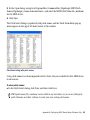
MIDI Studio Setup Window
The MIDI Studio Setup window is organized into three sections. Interface controls are at the
top of the window. All the currently defined instruments are displayed in the Instrument
Name list on the left side of the window. A detailed view of MIDI parameters is shown in the
Properties section on the right.
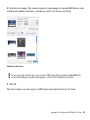
MIDI Studio Setup window
Appendix B: Configuring MIDI Studio Setup (Windows Only) 59